
So the news is that Cinema 4D (Maxon) has purchased ZBrush outright and is getting the main dev team along with it. Makes sense, as ZBrush has now been dangerously flanked. On one side by the one-time purchase 3DCoat 2021, offering quality sculpting to newcomers and studio bosses who want to avoid the mind-bending ‘thrown together by mad monkeys’ interface of ZBrush. And flanked on the other side by the free Blender 3.0 (and eventually a Blender 4.0 in a few years, possibly with a focus on sculpting). Of course Blender also has its own UI difficulties, but is far better than it was a few years back.
Category Archives: Companion software
Release: MeshLab update
A new version of the free MeshLab was released, just before Halloween.
Mostly used for poly-reduction of 3D meshes, for many. “Quadric Edge Decimation” is what you want there.

Bear in mind that the two new versions in 2021 have bjorked every Meshlab tutorial ever written on smoothing, as all the relevant filters are either removed or differently-named or put somewhere else. The solution is to go get Meshlab 2016 which is still available and is what the old tutorials were written for.
Cleaning Firefly’s speckles with vectorisation
I did an experiment with speckle-removal in a Poser Firefly “toon lines only” render. One of the problems of that special kind of render is, the closer you go in with the camera, the more speckles. Until a character can look like they have the measles. Using a Poser script to auto-remove all bump-maps often solves most of the problem, but not always and not entirely.
Anyway: I rendered and took the render into a leading vectorizer, Vextractor 7.x. I had found that this has a useful and very easy ‘remove isolated spots’ filter, of the sort needed after scanning hand-drawn line-art. If a spot has x number of empty/white pixels around it, it’s removed.
This works on the above very subtle example. But the problem is that the lineart produced is then inferior to what you would get from the other non-vectorising method, which involves the free Paint.NET and two free plugins.
But it occurs to me now that, back in the day, Poser’s Firefly lineart speckles were not considered a problem — because it was thought that people would vectorise the lineart and thus be able to easily clean off the specks. If you’re doing animation, this may well still be viable. In a 30 FPS cartoon seen across a living-room, that vector line ugly-fication is going to be far less noticable. But it’s not much good for comics.
So the best method for comics is Paint.NET and it’s wholly free and should run on Windows back to XP. But… it’s Paint.NET and not Photoshop. So I took another look for such a ‘remove stray pixels’ filter in Photoshop, something that would be very useful for automation of the whole process. But nothing in that line has appeared since my last such search. There are zillions of photographer plugins for correcting grain and ‘hot pixels’ on the camera sensor, but nothing for this ‘scan artwork and clean’ task. The native ‘Median’ and ‘Dust and Scratches’ are useless because they nibble into or erode the fine lineart from Poser, and lack sensitivity.
What’s needed is a computational plugin solution that says… “that dot can be deleted, because it has only white all around it and its diameter is 2 pixels or less”. The free G’MIC might have the capability to build that, but I don’t see anything there at present.
DAP dipped
Better late than never, the worthy Dynamic Auto-Painter (DAP) is currently 20% off. So basically, your local sales tax is likely being covered. It’s very rare that the main DAP ever has a discount, though the older Photoshop plugin version (which works a bit differently) is always on a perpetual discount.
Update: Ah, I think I see why they’ve done a discount at last. They are touting several positive reviews.
Note also their new budget-priced software, both rather interesting and unique, Style Animator and CQuill Writer for writing stories and novels. Both are currently at the 1.0 stage, but look very promising.
Blender 3.0 lands
Blender 3.0 stable is out, and there’s also a 3.1 alpha. Mostly 3.0 seems to be about speed/performance, UI changes, and the new Asset Browser. The multipage changelog for 3.0 is big and techie enough to stun a charging rhino, but here are some highlights I spotted…
* Faster rendering on Cycles, “rendering between 2x and 8x faster in real-world scenes.” If… you have a hefty RTX graphics card. (That sounds like very good news for Poser 12, if it can be plugged in any time soon. Poser uses Cycles, but there it’s re-branded as SuperFly).
* Auto tile-tweaking. This is about the tile-size that gets rendered when rendering. e.g. 128 pixels. “Previously tweaking tile size was important for maximizing CPU and GPU performance. Now this is mostly automated.”
* Faster hair curves (not ribbons), but again only if… you have a fast NVIDIA OptiX card.
* A less laggy viewport, and again… I suspect that having a fast shiny new graphics card will help there.
* For the overall UI “the default theme got a refresh” and various changes.
* It’s now faster to work with the UI, which is good because Blender needs a lot of clicky-clicky work. The speed is due to things like faster text rendering, as panels spring into existence.
* Not much this time around for Eevee, but… “Performance when editing a huge mesh is improved.”
* New GreasePencil abilities with some new line modifiers (dashes, wiggles etc), and thus expanded lineart possibilities.
* A major rework of the UI layout for Freestyle. I hear elsewhere that it’s a bit quicker now to load a previous set of lines.
* .USD files can now be imported into Blender. This is the Pixar Universal Scene Description format.
* AMD GPUs are now supported.
* OpenCL rendering is removed. So is Branched Path Tracing. And the Rigify Legacy Mode is gone.
* A new Asset Browser for: Objects; Materials; Poses and Expressions; Worlds. I assume it’s drag-and-drop.
Blender 2.93 portable could run on Windows 7 with a small workaround. I assume there will also be enough demand to fix 3.0 for Windows 7. But until then, 3.0 is officially Windows 8 or higher. It will also refuse to install unless you have a sufficiently powerful graphics card.
Update: Blender 3.51 for Windows 7 (early May 2023). Needing no installer, it will now launch! Hurrah.
PzDB no longer sold
I see that the third-party Poser Library software PzDB is currently in the ‘no longer sold’ category. The Payloadz payment system refuses. The software’s ‘ping’ server is still working though, the ‘ping’ being required on loading the software. My installed 1.3 version is thus still working. So there’s hope that the problem may just be with the payment processor.
The problem may be…
1) the Payloadz payment system is kaput for PzDB and other items too, for some reason;
2) that the hefty monthly PayLoadz seller’s account payment of $29 (!) has somehow ceased, and the maker of PzDb hasn’t yet noticed;
3) the maker has turned off purchases because his MS Access reseller licence (PzDB is build on MS Access) doesn’t support the latest Windows 11. However, that is unlikely, since I read that…
“MS Access database can be sold as a standalone [custom] application with a runtime edition of Access which is licence free, if you have Developers edition of the Access/Office”.
Which was what was happening with the back-end of PzDB. However it’s said that Microsoft does not love Access and that it becomes more and more difficult to run Access on newer versions of Windows. One user of the 60-day trial (still available) reports crashes with PzDB on Windows 10, but he also has the full MS Access installed, so there might be conflicts.
Anyway, just my guesses. Let’s hope it’s just a payment system problem and that sales processing can be easily switched to Gumroad instead.
On the other hand, if it is to become abandonware then I’d suggest that perhaps what’s needed first is a small crowdfunder to raise enough to unlock the ‘ping’ and make it free + charity-ware. Even as freeware for Windows 7 and 8, it might help raise some money for charity — perhaps especially if it ran a discreet banner ad and a link inside the UI.
What are the alternatives?
1) There’s the affordable P3DO Explorer, but I find that’s impossibly slow on searches (eight minutes for a simple search for the Pitterbill keyword). Results are then mediocre. I can’t see any way, in the utterly confusing and labyrinthine interface, to speed it up.
2) There’s the native Poser 11 Library interface, which is far better than it was. It’s now reasonably fast, but still very far from ideal in terms of the UI or triggering of indexing. The Search over in DAZ is not much better or faster on a large runtime. Poser 2012 users may be able to bypass the loss of Flash and use Air instead. There was apparently a Service Release for 2012 Pro that added the ability to set “Library Launch Behaviour to External”, and then if Adobe Air was installed that would be used for the Library.
The main drawback for Poser 11 (and now Poser 12) is that the Library feature “Show Folder Thumbnails: When checked, a thumbnail of the first item in the selected folder will appear on the folder” has never worked. This often leaves you looking at a wall of grey identical folders in the search results.
In contrast PzDB just finds so much more stuff, and shows everything individually. For instance try a search for Aiko 3 in Poses. PzDB just finds more, presumably because of the character-based cross-referencing and clustering it does on initial indexing of the runtime. It can also show you just what you just installed. The difference is not because Poser’s indexing is set to Shallow or Full.
3) Everything is free and useful for quick searches, when set to Large Thumbnails / View By Path / Search for Picture. It’s lightning fast because it builds an index first, and as such it’s probably the best sort-of substitute for PzDB for casual Poser users, in combination with RSR to PNG and the native Poser Library. It can sort by Date Created in the latest 1.4 but this needs to be manually turned on. Yet Everything is still not ideal, because you then still need to open the likely folder in Windows Explorer, and find the non-picture Poser file that can be dragged and dropped to Poser. You thus need to know what you’re looking at and the difference between your .MT5s and your .PZ2s etc. Ideally the makers of Everything would add a half-dozen features geared for Poser and DAZ content discovery.
4) If you have it, then Semideu’s Shaderworks Library Manager 2.6 still works in Poser 11, including drag-and-drop from the search results. It’s abandonware from circa 2016 and Semideu (often mis-spelled as Semidue) has long departed the scene following the closure of the RDNA store. But it searches quickly and elegantly on a large runtime. A few seconds longer than PzDB perhaps, but quite bearable. Or, it does when it doesn’t crash. It’s very unstable on Poser 2014, and iffy on Poser 11. Good results though, once you puzzle it out in the very cryptic interface. It may need the free AVfix on some iterations of Poser 11.x. Library Manager itself doesn’t like to be run at startup of Poser 11, so you need to manually start it each session. It’s ‘all Python’, so can dock with the Poser 11 UI (also Python) and replace the Library. If docked you may also need to close it before closing Poser, and return to the normal Library. There’s no Python Tkinter being used in it, so I guess it should theoretically run on a Mac. The PDF manual is here, but the software is currently unavailable unless you can dig it out of an old backup drive or DVD-r. Useful to have as a backup for when (if) PzDB dies, and you find it’s stable for you.
5) There’s also the old Advanced Library for Poser standalone freeware, in version 1.9.2.x. Nice but it totally lacks drag-and-drop to the Poser stage (it used the old defunct PRPC method involving scripts and server .exes). It is however a quick finder tool, with full image thumbnails and easy filtering.
6) The best and most stable solution in the event of a PzDB failure might actually be the Adobe AIR Library that officially shipped with Poser Pro 2014. It can drag and drop to Poser 11 and 12, and can run as an external Library on a second monitor (though Poser 2014 does need to be running). It also knows about DAZ folders and can filter for just the Poser-friendly content there. Presentation is simple but effective. Search is fast, perhaps slightly faster than PzDB. Give it a try if you have 2014.
7) From Poser 13 you can also drag-and-drop Library content to older versions of Poser, if running at the same time. For instance, click and drag from Poser 13 and drop onto the Poser Pro 2014 stage.
‘Black Friday’ keeps on rolling: Serif, EyeCandy, Nik Collection
New since yesterday…
* Serif currently has 30% off everything in its budget Affinity range.
* Modest but worth-having discounts on Eye Candy 7 for Photoshop. Should run even on older versions of Photoshop.
* DxO’s Nik Collection 4 for Photoshop is heavily discounted.
Vue Solutions
A free Vue Solutions community webinar, 28th November 2021. Booking now.

Monkeying with Moho
Posted on
by
 Posted in Companion software, Poser, Spotted in the News, The Animation Industry
Leave a comment
Posted in Companion software, Poser, Spotted in the News, The Animation Industry
Leave a comment
Posted in Companion software, Poser, Spotted in the News, The Animation Industry
Leave a comment
The venerable indie animation software Moho, now back with its original developers, has released a YouTube preview of a new CrazyTalk-like ‘Live Mesh’ feature. Apparently this is…
coming with the free Moho 13.5.2 update for Moho 13.5 owners
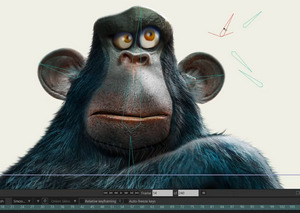
Looks like you can relatively easily add face-rigging to a 2D image, for a 2.5D animatable look, something other software can also do. Though here it looks nicely professional, is integrated into the all-in $400 software (i.e. no $1,000+ of extra plugins to buy), and it obviously gives good results.
Sadly it’s probably not an alternative way to rig a Poser face, and thus perhaps have an older Poser figure fake the look of having ‘real stretchy muscles’ under the skin. Other than as a 2D rendered from Poser. That’s because Moho (formerly Anime Studio) had licencing problems with the Smith Micro / Renderosity switchover, and that caused the drop of the Poser import feature with Moho 13. My guess would be that there was a big script doing the work and that was by Smith Micro and had not been labelled as public domain (as DAZ tends to do with key scripts, presumably to prevent such future problems). So far as I know 12.5.x was the last Moho to officially support Poser import, and there have as yet been no experiments to see if the following is possible:
Poser 11 -> Moho 12.5 -> save file -> open in Moho 13.5.
Poly Haven
From South Africa, the new Poly Haven. A library website of free CC-Zero Blender assets with, at present, what appears to be some quality-control. A test of a small oil-can gave me an open public download (no sign-up needed). The polished and roomy new site seems to be from a small group of young Blender enthusiasts, who plan to run on a mix of crowdfunding and ads. It’s crowdfunding now.
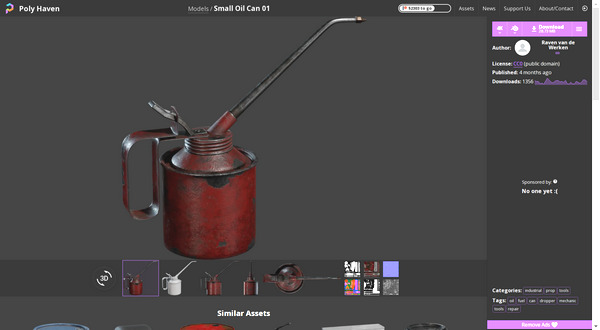
Opening my test file failed in Blender 2.76, but succeeded in 2.83. Automatic Blender to Poser conversion then succeeded nicely, and the can was inside Poser in seconds and looking good.
Technical Search expands again
My Technical Search is now covering 95 sites or pages. It’s now exponentially more useful than when first launched.
Also, added to the sidebar on this blog, PD Howler and Vue Galleries (Facebook). I recently got around to trying the free Howler 2020 (given away in the summer) and it’s excellent for landscape painting. Also for creating simple 3D from greyscale heightmaps, which then auto-magically extrude into lit landscapes — and which you can use as a base for paintovers. The UI takes an hour of getting used to, but it soon makes sense. It’s now one of the four I’d recommend trying on a Windows 7 PC (Photoshop 2018, SAI2, PaintStorm Studio, PD Howler 2021 build 86). For Windows 10 users there’s a 2022 version. If you last tried it decades ago, take another look.
Black Friday 2021: first moves
The software side of Black Friday is starting to move slightly forward. Here’s a round-up of the current discounts I could find:
* The innovative and now greatly refined PD Howler 2021 and 2022 (aka Project Dogwaffle), both strongly improved and speeded up since any version you may have tried years or even decades ago. It’s a digital painting tool that’s especially good for landscape artists, but can also do Bryce-like 3D landscape creation/rendering, some superb particles (inc. particle brushes), animation, spline-based fast inking for comics (‘Penny Paint’ module), and much more. Bear in mind you may already have a copy of 2020 stashed away but not yet installed, as it was temporarily given away free in August 2021. However, that was build 37, a relatively early build, and later builds of 2020 have many further improvements including brushes working faster on larger canvases (build 50).
Windows 7 users should target the most recent version of 2020 (discounted to $29) or buy 2021 (at $30) and then ask for PD Howler 2021.3 (build 85) — which the changelog suggests was the ‘last good’ version before it went all ‘Windows 10’. Other purchasers should just go for the latest 2022 version, and they will also get a free Howler 2021 licence along with 2022 “and you are allowed and encouraged to give 2021 as a gift”. Nice, though bear in mind the recipient ideally needs to have lots of RAM and CPU threads available. If all they have is a dusty old laptop then they probably need the lightweight SAI2.
Actually it gets better. This sales page currently has 2022 for just $20, and presumably you also get the 2021 freebie with that(?).
* Humble Bundle: the Campaign Cartographer software, plus a lot of fantasy and some sci-fi map making packs that work with it. Two weeks left. Bear in mind there’s now a wide range of fantasy map-making software available, and the venerable Campaign Cartographer is by no means the only choice.
* 15% off Silo & Milo. Basically, you get a discount that covers your local sales tax.
* 10% off U-Render, which is kind of ‘Blender’s real-time Eevee, but for Cinema 4D’. Again, doing little more than covering some of your local sales tax, but any discount is welcome in these difficult times. Depending on how you can juggle the versions to align with each other, there may be a ‘Poser 11 – Poserfusion – Cinema 4D – U-render’ route in there somewhere.
* DxO ViewPoint for $50, down from $80. Automatically straightens the ‘fish eye’ camera-curvature lines in your architectural photos or renders, and does a fine job of it. Highly recommended if you want ‘architect magazine perfect’ verticals on pictures, and want it done in seconds.
iClone 8 – new features reveal
Just in today, iClone 8 New Features Introduction. Some of the highlights…
* extended animated .FBX support (“Drag and drop! Any FBX motion data format is compatible, which largely removes platform barriers for motion data and makes it all compatible”);
* many improvements to animation editing and figure controls;
* a new look for the figure Control Rig;
* Hotkey Manager and Collection Manager (“freely categorize objects in the Scene Manager”);
* simulated volumetric lighting in real-time (by adding “visible volume to directional, spot and point lights”);
* mirrors (“simulate realistic mirror reflection, with various control settings like opacity and blur”);
* NVIDIA Omniverse connection (requires RTX graphics card);
* performance optimization (such as “hidden objects will not be processed in the background” for large scenes).
iClone 8 is not out yet. The official take from the Forum is… ”
“iClone 8 … not scheduled for release until at least Spring 2022”
Since the downloads of purchased versions are limited to the last three versions, now might be a good time to go get and archive the installers for iClone 5 — just in case you ever need it for backwards compatability.
VRoid Studio 1.0
Japanese avatar creation software VRoid Studio is out of beta (launched August 2018), and has released its stable 1.0 version. They write… “we rebuilt it from scratch”. Commercial use of the results, summed up as “Your models are yours to use freely”.
Easy to use, and while limited to a generic manga/anime look it does have pointy-ears and suchlike.

Designed characters are low-poly (designed for VR, chat) and export to .VRM format. There are ways to get .VRM to .FBX files and into other 3D software. There is also software such as VSeeFace for facial motion-capture for .VRM figures.
For DAZ and Poser users it would probably be better to get the right shapes/eyes/morphs and build the character natively. You would then have a high-poly model that could also take accessories, motions, face mo-cap and lip-sync etc. Though admittedly the toon texturing and getting the lines looking right would present problems for many. But Poser users have the Comic Book mode and now my discovery of blur + overlay.
Going Live…
Well, my eBay bargain Asus Xtion Pro depth-sensing 3D camera has turned out to be better than expected. After trudging through an Autumn/Fall storm to pick it up, on opening the box it turns out to be… an Asus Xtion Pro Live. And thus, a later improved model and even more of an absolute bargain. Super.

The first Asus Xtion Pro was out for about a year before it was replaced by the later Live. This added a RGB camera and two microphones either side. It’s the model widely named by 2012-2018 software makers as their supported camera, alongside various early incarnations of the Kinect. It appears to support OpenNI 2.0 without needing to be flashed with new firmware.
Sadly though, this happy discovery means I shall never be able to tell readers if the first generation Xtion works with software X, Y or Z. As I now have no way of testing that.
Pitterbill, re-mapping blendshapes to morphs, in Faceshift…
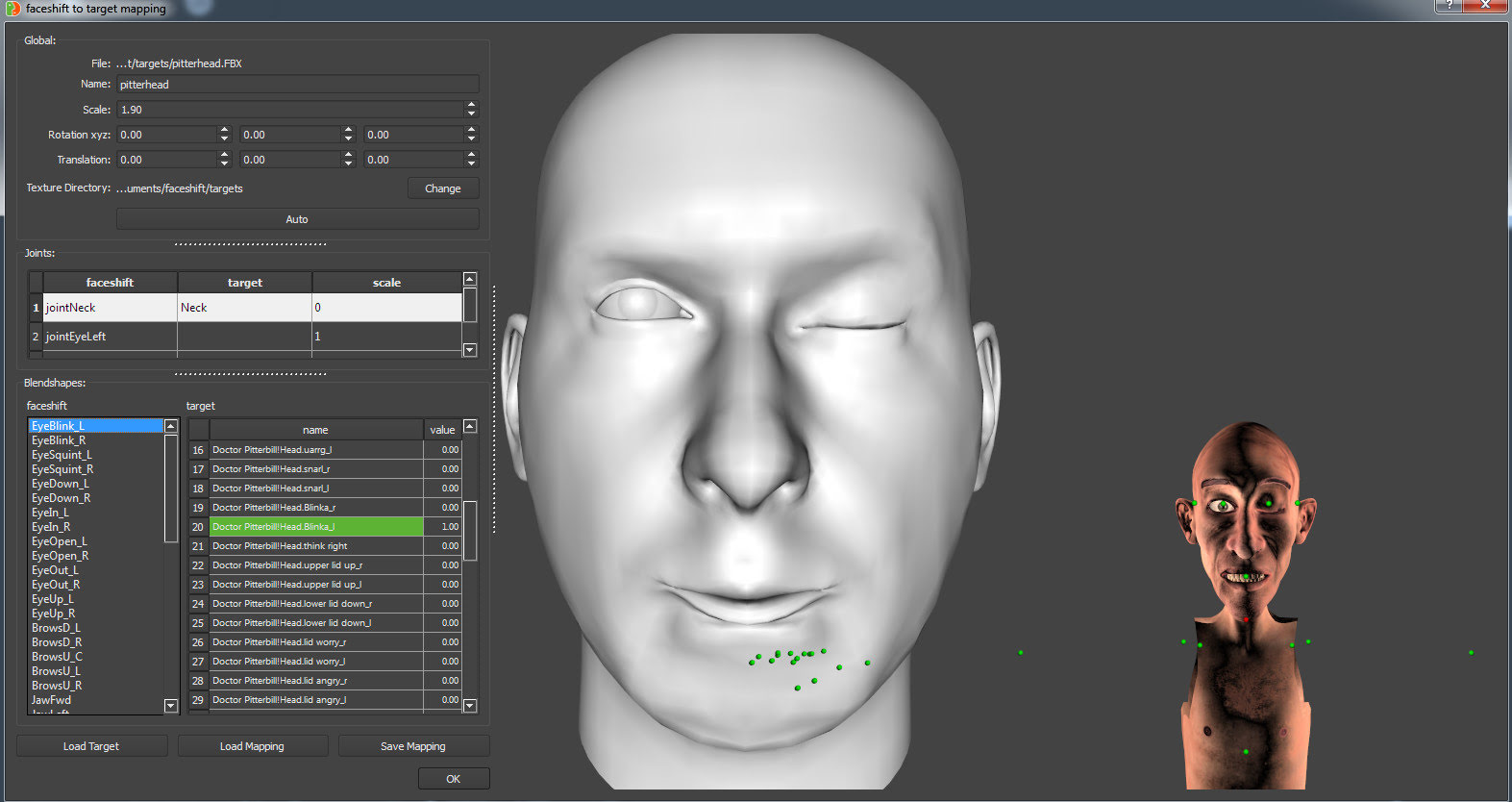
Export .FBX from Poser, Binary, 2012 spec. Place in the \faceshift\targets working folder, along with any texture .fbm folder.
Open Faceshift. Tracking | Display | Target | Import. Import the .FBX. Pair jointNeck with Neck, and then the other morphs will appear. Align the head (better than seen here). Then match the targets, with the Pitterbill targets on sliders similar to Poser dials. Turn to 1.0 to activate the Pitterbill target.
Above we see the left blink being matched.