How to install Stable Audio 3.0 Small SFX safetensors, and run it in ComfyUI.
Why the Small SFX version of the new Stable Audio 3.0? Because it’s amazingly quick, commercial-use, and also because the larger 3.0 main or base version requires Flash Attention 2. As the official readme states…
“Stable Audio 3 Medium requires Flash Attention 2.”
Good luck with that, then. The rest of us will use the Small models. What follows should theoretically also work for the Small Music model, but I’m mainly interested in the audio ‘foley’ sound-effects generator model.
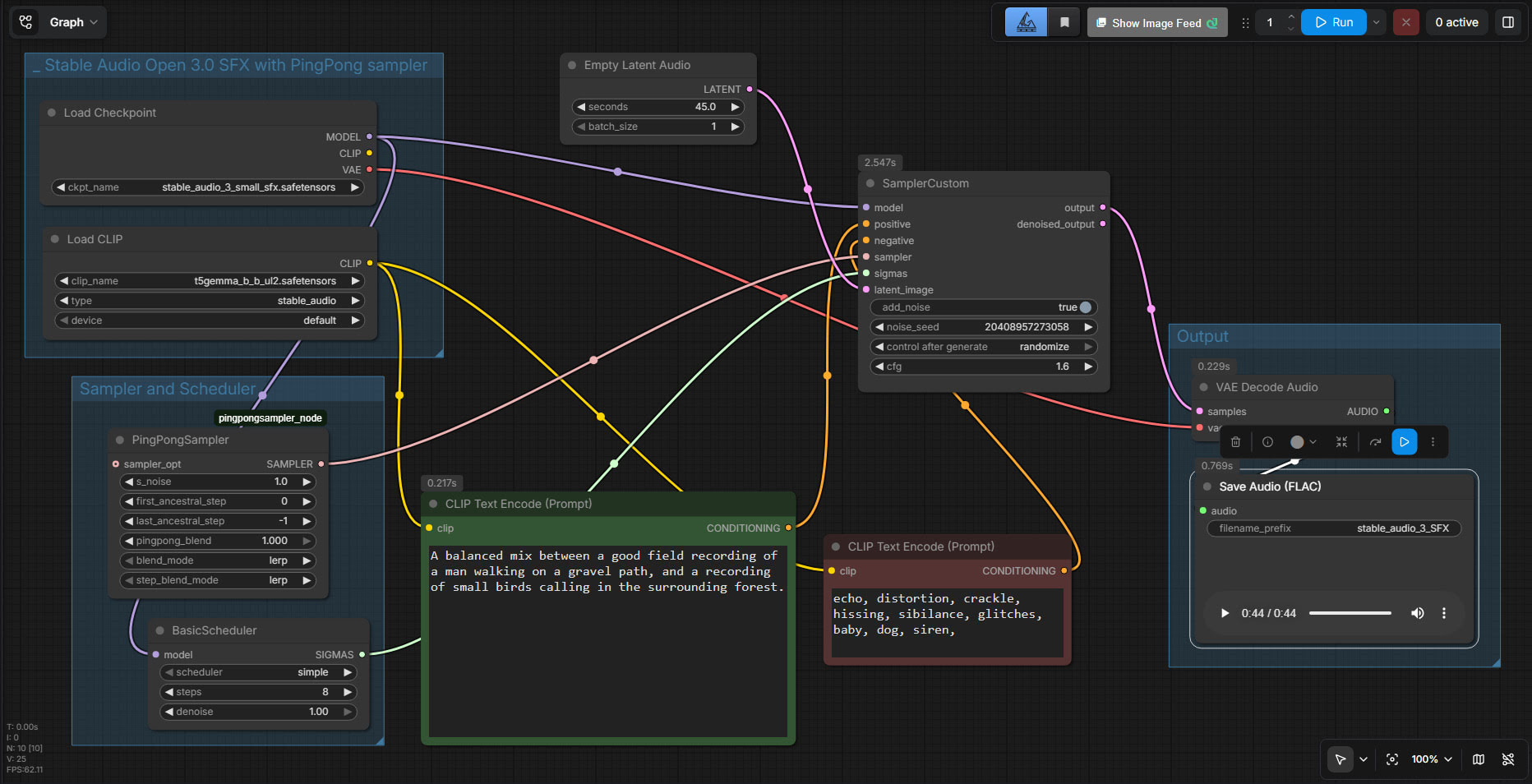
Here’s the install guide for ComfyUI:
1. Upgrade your ComfyUI portable to the latest 0.22 version or higher (required, not optional) which had zero-day support for SA3 a few days ago. Then also run PIP to install the new requirements.txt as well.
2. From the official ComfyUI HuggingFace, download the stable_audio_3_small_sfx.safetensors (2.3Gb) and put it your local ComfyUI’s ..\models\checkpoints folder and also the t5gemma_b_b_ul2.safetensors (1.2Gb) and put that in ..\models\text_encoders No config file is needed.
3. The official readme for SA3 Small SFX says it needs:
Steps = 8.
CFG = 1.0.
Sampler = Pingpong
Hmm… what, Pingpong?? Never heard of it. Turns it’s a custom node and sampler by Blepping, all in one. It’s here as pingpongsampler_node.py. Drop this file in the root of your ComfyUI Custom Nodes folder, and re-start Comfy. It has no requirements.txt.
Once ComfyUI is loaded with PingPong, the new sampler won’t show up on the list of samplers in your regular nodes. Instead you just double-click on a workflow and type pingpong, and then load it via its own node.
4. Now assemble the following ComfyUI workflow thus. This works for me and gives reasonable results with blistering speed. I say “reasonable” because I still think that Stable Audio 1.0 gives a better quality of output and also seems to handle the instruction to ‘mix’ sounds better, but then… 1.0 also takes about 50 times as long to generate an audio clip. If you have a super-ninja graphics card, that may not matter much. But for the GPU-poor it may matter.
You may want to also hook an audio output to Denoised output and compare the two.
Possibly there are going to be better ways to do it. Possibly I’m doing it wrong. But for now, in the first day or so after release, this works for me.