Black Friday deal-of-the-eon, Poser 12 for $29. This is the full ‘Pro’ version, as there’s no longer any division between Pro and Standard.


Black Friday deal-of-the-eon, Poser 12 for $29. This is the full ‘Pro’ version, as there’s no longer any division between Pro and Standard.
 Posted in Poser, Poser 12, Special Offers and Discounts, Spotted in the News
Leave a comment
Posted in Poser, Poser 12, Special Offers and Discounts, Spotted in the News
Leave a comment
A Humble Bundle Poser 12 $25 (£20) licence key. If you’re rendering then you really want Poser 13 for the improved Blender Cycles rendering and improved OIDN de-noiser. But for those who use Poser for real-time comic-book renders, reference images for manual over-inking and over-painting, or for AI export, then Poser 12 will be fine. P12 is also good for export to the now-free E-on Vue.
However Poser 14 is coming soon, and if they have the sense to add a free integration of Stable Diffusion as a render option… then many will feel like they wasted $25 on Poser 12 over what will then be the must-have Poser 14.
Ken K has released OpenPose for Poser 12, which provides the first ‘Poser to Stable Diffusion’ pipeline.

The Video Demo suggests it’s useful for speeding up the feeding of SD with exact poses, and it looks especially useful for hands. While a Controlnet can provide native openpose estimation, the hands are often not well detected. Ken’s method lets you get excellent hands.

The free alternative might be something like a .BVH to OpenPose converter. But no-one seems to have made one, which seems rather amazing. Everyone wants to do it from analysed video pixels rather than the skeletons of 3D figures. So Ken’s new product seems unique.
Poser 13.1.469 has been released. Hurrah, some improvement of non-photoreal rendering. Unspecified…
– Improvements to Comic Book Preview Draw Last feature.
Sounds good. Also, for photoreal…
– Major changes to subsurface scatter on the PhysicalSurface root node, ‘Burley’ set as Subsurface Method default.
– More improvements to subsurface scatter.
And some 2D picture export fixes…
– Added pref[erence] in General Preferences Render tab, to not export original render.
– ‘Copy Picture’ correctly pastes to 3rd-party paint programs.
– PSD Image export no longer shifts to a darker color space. SRGB successfully converting on export.
Plus some changes that may make Mac users happy…
– On the Mac: Enhanced backward compatibility on Mac OS 10.15 (Catalina) or better.
– On the Mac: The PostFX window scene preview properly fits and is better centered.
The version was 13.1.449, before this new update.
Poser could be the ‘killer app’ in creative AI, in terms of usable graphics production for storytelling.
Imagine an AI that takes what you see in the Poser viewport, and works on that, giving you 98% consistent character renders which would allow the creation of graphic novels etc.
The aim would be to keep all character details consistent and stable, while also ‘AI rendering’ the viewport into a consistent professional ‘art style’. Auto-analysis of a quick real-time render from the Viewport might be needed (already here, elsewhere) and auto-prompt construction (already here). Perhaps there might be some on-the-fly LoRA training going on too, behind the scenes. Then, the AI image generation would be done.
You can kind of do all this now, outside of Poser, using Poser renders. But what if it was all neatly integrated into Poser, and ran on SDXL? All those royalty-free runtime assets then become super-valuable, since with their aid you can easily get the AI to do exactly what you want. Face, expression, pose, clothes, camera-angle. Hands. All output by the AI to the usual masked .PNG file, ready to drop over a 2D backplate in Photoshop. In three clicks. And all consistent between images, enough to satisfy even the most fersnickety regular comics reader.
The aim would not be to go wild, but to get something very close to the arrangement and content seen in the real-time viewport. It doesn’t necessarily have to be done by Bondware/Reallusion either, since Poser is Python 3 friendly and very extensible. All that would be needed, perhaps, would be to open up PostFX to be able to run a Python plugin that applies its own FX on real-time renders.
So imagine Poser’s Comic Book Preview or Sketch rendering, but done by an AI on a purpose-built ‘AI-native’ PC (coming in 2025 in retail, if not before). With No Drawing Required™ and Character Consistency.™ Let’s call it SuperFlying Dreamland.™ 😉
You can now go from Poser 11 to Poser 13 for $95.70…
Upgrades to Poser 13 are available for $95.70 until 11:59pm Monday, 31st July with coupon code POSERUPG13 at the checkout.” Valid Poser 11 serial numbers are now also being accepted for the upgrade… “… will accept Poser 11 or Poser 12 serial numbers for upgrade validation”. This wasn’t the case before.
Apparently the Poser 13 serial will be valid for the Mac Poser 13 Early Access, due for release very soon.
Poser 12 for $49, apparently. Via Graphixly. The “Windows 10” claim is questionable. It runs fine on Windows 7, though I guess it’s possible you won’t get support-desk help if you’re on older Windows versions. And some store-bought P12 third-party scripts won’t work on Windows 7 (which lacks the required Microsoft encryption modules).

Over at NeoWin, Poser Pro 11.3 is now $79. It was a huge $150 on Renderosity, last week. Ideally a non-photoreal user would want to have both 11 and 12 (they can co-exist happily), and the current discounter prices seem the best way to do that at present.
Poser 13 has been released for Windows. Available now at Renderosity. There’s also a 21-day free trial.
Upgrade from Poser 12 is $99, full-price for 13 is $250. Poser 12 is still on sale at $150. There doesn’t seem to be an upgrade offer from Poser 11 to 13, curiously. But I imagine that anyone who wants to has already done the Poser 11 to 12 upgrade.
Poser 11 is still on sale thankfully… but is now hiked up to $150 at Renderosity (was $52 for a long time). However, note that Neowin still has it for $80, an ongoing roll-over offer officially approved by Poser’s parent company Bondware.
The “Windows 10” system spec probably doesn’t mean much, since Poser 12 and now 13 run fine on Windows 7. But note that Windows 7 users can’t install Ken’s store-purchased Python utilities due to lacking the encryption needed. Note also that ZBrush 2022.7 or higher is now required for GoZ round-tripping to Poser 13.
A Mac version of 13 is also set for release, soon-ish… “We expect the Mac version to follow the Windows release in a few weeks as a free update for Poser 13 license holders.”
Also due is “an exciting new figure” but this is still “in the works for Poser 13”. The existing free 25Gb content bundle is the same, but it seems it’s now split into more manageable download bundles.
Installers for 11 / 12 / 13 are now all available at the posersoftware.com site.
As usual, expect any new version to break a few Python scripts, because Python “knows nurthing” about any ‘Poser 13’ version. There is one forum report that EZSkin 3 won’t run on Poser 13, for instance. But there’s already a fix for the script. However, the dev team also quickly posted a “new installer” that may fix this without the need for the new fixed script.
Also as usual, new users of a vanilla Poser 13 may have to tweak their rendering settings to get the optimum configuration for their particular hardware setup. There’s a lot to digest there, several things have changed with the new Cycles/SuperFly, and it will pay to study the new settings for a few hours.
Ok, so… new items for Poser 13 which caught my eye in the list were:
* The “latest open source Cycles engine” from Blender, which in Poser is branded as SuperFly. Not all Blender Cycles nodes are present. It’s a slightly cut-down version, plus some Poser-specific nodes. The new version in Poser 13 gives much faster rendering, especially on animations and complex scenes… “GPU renders of complex scenes benchmark at under half the time required for the same scene on Poser 12.” Also works on CPUs, I hear. Also has “Improved adaptive sampling for faster renders” and an “Updated animation rendering system for better productivity [when] rendering movie sequences.” The new “GPU rendering on remote nodes” can speed things up even more, if you have the kit and ability to pay the electricity bills and can wire up a local render farm.
* “Updated Walk Designer and Talk Designer, for better compatibility with all figure types and support of imported libraries.” Again, animators will likely be happy at that.
* New ‘Post FX’ post-render options… “denoise, exposure, saturation, gamma, brightness, contrast, bloom, blur and pixelate.” Nothing you can’t do in Photoshop, but nice to have. Bloom may be interesting. If it looks good, is consistently controllable, and has enough light spillover to become ‘glow’.
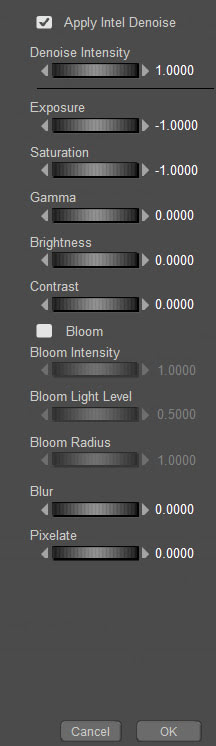
* Improved Intel Open Image Denoise (OIDN) module. One of the best features of Poser 12, and now also in Poser 13. Good to see they’ve integrated a more recent version, though no version number is given. It works wonders on either CPUs or the GPU, which suggests it is indeed the latest version (previous versions were GPU-only).
* “Improved morph and weight-map copying system makes creating clothing easier.” Clothing makers will no doubt welcome that. (Update: Two bug-fix releases to 13.0.287 focused largely on these features). PoserPython scripting now “includes Match Centers to Morph, Joint Order, and Copy Morphs From”.
* Downloadable full PDF manual. Useful for those who locally index and search an archive of PDFs and forum-captures, using full-text desktop search software such as dtSearch or Docfetcher. The manual is not quite up-to-date. For instance, the new Enhanced Shadow Catcher in P13 does work with SuperFly, though the manual says it won’t.
There are unconfirmed forum reports that the Preview viewport / rendering “has improved”, but no comparison screenshots. For this reason, it may be unwise for those in mid-project on a Comic Book Preview rendered animation or comic-book to switch to Poser 13 because they assume that the Viewport / Preview rendering will look exactly the same. It may not.
So, overall it looks like a big must-have upgrade for 3D photoreal animators. It’s also a must-have for those who have a new fast RTX NVIDIA graphics card and want the latest greatest fast software to pair with it. Costly, true, but if the user has the cash for a big shiny new card then they also have the cash to get Poser 13.
I imagine clothing makers may well stick with the workflow they know for now, unless the improvements in 13 are dramatic (I’m not qualified to judge such things).
Overall, the team is to be congratulated. They’ve done enough to justify the version upgrade, and have given 13 a clear focus on animation and a big boost in render speed. There are genuine and useful improvements here.
Of course, it would have been great to see a version that focused on non-photoreal and some Python tweaks to help it (e.g. having Python able to address the Post FX box and plug in any .8BF Photoshop filter at that point in the render process). But that’s a much smaller market than photoreal/animation.
In the meanwhile, don’t worry… the world-leading non-photoreal stuff is still in there: Firefly (with Photoshop auxiliary render layers if required) inc. outlines, real-time Comic Book, Sketch.
Onward to Poser 14!
Install test:
* As expected, Poser 13 installs without overwriting previous Poser versions or runtimes.
* Content directory created at C:\Users\Public\Documents\Poser 13 Content
* No .PDF manual in the install, as that’s now a download.
* Poser 11.x and 12.x still launch after install of the 13 Trial version. Import of a Poser 13 scene to Vue 2016 and the latest Vue both work, is Poser 11 is told where the 12 and 13 runtimes are.
* As usual, the new Poser user will need to fix the ever-accumulating light presets problem by tweaking a setting in Preferences.

* Yes, Blender’s Cycles X (here branded as ‘SuperFly’) happily renders on CPUs. There’s no nonsense at install time about “your graphics card is not worthy, so I’m not even installing”, as there is with Blender.
* The new version of the Intel OIDN Denoiser is packaged as a .DLL, so I can’t find what version number it’s now at in Poser 13.
* Checks how many threads Poser is using on a multi-core PC. Poser 13 defaults to 12 threads for me, but in Edit / Preferences I tell Poser 13 I have 24 threads available for its use (12 Xeon cores = 24 threads) in CPU rendering. And if you have that much power, don’t accept Firefly and Sketch render presets that use the old minimum 32 buckets. Tweak this setting up to 128, for a vastly improved rendering speed. Superfly renders are a whole different ballgame, and you’ll need to study and test to get the best for your PC.
* You add your previous runtime to the Library by targeting ../content/ not the ../content/runtime/ folder. When you’ve done this, your old saved scene files should load fine — because Poser 13 will know where to load the content from.
More official details about Poser 13, due for release soon.
* The Poser 13’s SuperFly rendering will use “Cycles X” from Blender.
* New “robust light bloom” option in the PostFX module.
* New “tools for morph and weight mapping transfer between figures”, for content creators.
* Unspecified “improvements to Talk Designer and Walk Designer”.
* Newly “added support for HDRI domes”.
Last I heard, in April 2021, Blender’s Cycles X was “NVIDIA-only”. On looking into this again, I see that AMD (HIP) support was added November 2021.
On YouTube, an hour-long My Poser 13 wishlist. Well-informed and worth a listen. However, the presenter seems to be missing a trick on some existing P12 Poser scripts and the easy Vue integration…
* Depth-of-field: He seems unaware that there’s a free Poser 12 script for calculating DOF.
* Scatter: Again, there’s a free Poser 12 script for that too, if you don’t wan’t to pay for the paid scatter/array solution in Poser 12.
* Atmospherics: Easy Universal Glow for Poser 11 and Poser 12, with light ‘spillover’. With Photoshop Action and full PDF manual. Again, free.
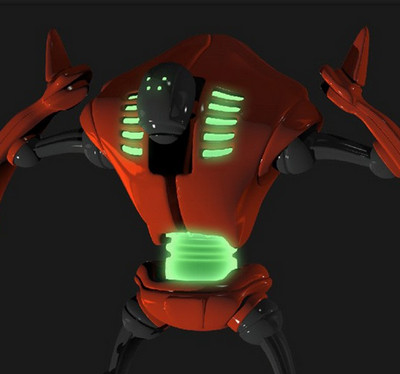
Otherwise, it’s trivial to take a Poser scene to Vue… and then you have all the luscious foggy/misty atmospherics you can imagine.
* Easy Billboarding: Easy setup with always-faces-the-camera functionality. Not free in this case, but see the Python script billboarding-plane-always-faces-camera.py in the sets of pre-made sample scripts that come with PhilC’s Python for Poser Tutorials on Renderosity. Still working in Poser 12, no conversion needed for Python 3. Admittedly, it’s in an expensive $30 bundle that hardly every gets a discount. I was lucky enough to get it when it was down at around $12, a couple of years back. Very useful, especially if you need to hack or bodge or tweak Python scripts.
* Vue: Some of the rendering-quality needs expressed in the video, re: Firefly to SuperFly automation, might be solved by a step sideways. Simply import the Poser 12 scene to Vue and render there, for a very quick and easy way to get a more photoreal quality while still using older Firefly textures.
To his list I’d add a few of my own long-wanted features:
1) A better way to build and load a library of custom Sketch presets. Although admittedly, since Sketch is render-size dependent (what looks pleasing at 1800px may not at 3600px), it would probably be better done from having a set of presets located in the Library. How about a feature that optionally saves a custom preset from the Sketch Designer to the Library, nicely bundled up as an iconized script that sets the preset’s required render-size and then loads the preset and runs the render?
2) A built-in Scene Toy replacement.
3) Renderosity buys PzDB outright, and gives it away free. Having a discreet banner-ad in that would alone make it worth the cost, surely?
3rd Annual Pinup Contest at Renderosity. Win licences for Poser 12 and more. Live now, with a deadline of 28th February 2023.

The script Hampelmann 1.7 for Poser 12 has been released, free. It allows you to easily control figure-parts, with the mouse and/or keyboard. Here’s the basics of how to install and then use it for the first time in Poser 12.
1. Download the new Hampelmann 1.7 for Poser 12, extract the folder and and install by copy-paste of the folder to…
C:\Program Files\Poser Software\Poser 12\Runtime\Python\poserScripts\ScriptsMenu
Rename the new sub-folder there to something a bit more descriptive, such as P12-Hampelmann-v17-figure-controller or similar.
2. Download the old Hampelmann 1.6, extract. With this you want everything except the scripts. Copy only the config and img folders and the help files (not the scripts) to your new…
C:\Program Files\Poser Software\Poser 12\Runtime\Python\poserScripts\ScriptsMenu\P12-Hampelmann-v17-figure-controller
This .ZIP also gets you the help / instruction pages, not included with with the 1.7 .ZIP file. You might want to make a shortcut link to these pages, on your desktop.
3. Run Poser 12, place a test figure such as the standard Andy on the stage (Library: Character | Additional Figures | Mannequins | Andy).
4. Run Hampelmann 1.7 (Top Menu | Scripts | P12-Hampelmann-v17-figure-controller | Scripts | Hampelmann_17).
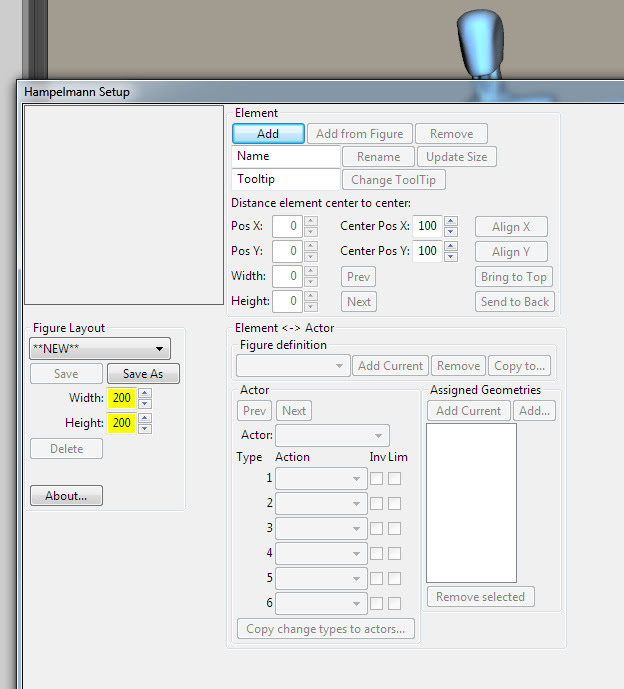
You should see this…
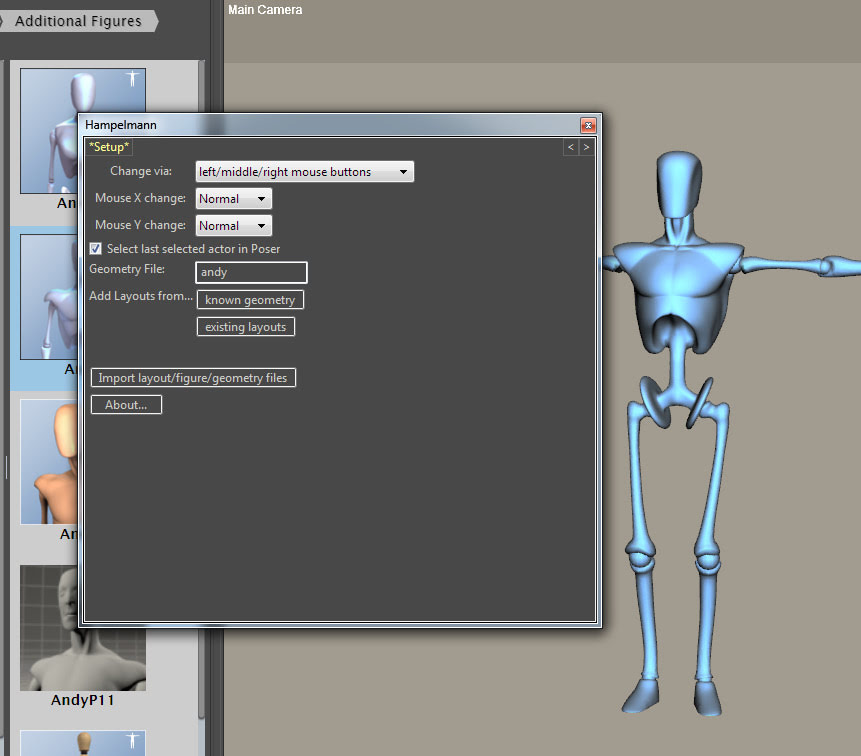
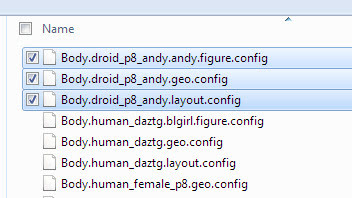
Click on “Import layout/figure/geometry files”. Then locate the folder you extracted from 1.6, the one with the layouts and config files in it called config_files. There are a confusing range of files in there. I had success with Andy by importing all three at once, and was then instantly taken to the figure posing screen. It worked, so… success.

Now click on a body part on the Hampelmann panel (not on the figure on the stage), and a click-hold of the mouse will gently move that part of the figure. Right button for back/forwards, left button for up-down. You get the idea. Sensitivity of movement can be easily adjusted with a single slider.
That’s the basics. There are detailed and rather daunting instructions in the 1.6 help files, if you need more guidance. And yes, it can work with more than one figure on the stage, and can switch between them.
It looks like can also create your own setup files for any Poser figure, via working with the companion Hampelmann_Setup.pyc script.
Poser 13 Update and Survey. I tried to fill it in, and did so. But every time I pressed “submit” it blanked a button I’d already pressed, and failed. Oh well, you may have better luck. I’m not sure if there’s more than the first page of questions that I saw, mostly seeming to be about the Queue Manager.
So, based on the blurb on the intro page…
1. Support for a new figure type that maintains true unimesh geometry inside Poser to simplify content creation and cross-tool content development. New female figure based on the new unimesh figure type
Only 0.00001% of users know why unimesh is such a big thing. Please explain that to the community first. What is the actual benefit to users?
2. Upgrading to latest Cycles render engine, with Poser code changes to streamline future updates
Seems sensible and obvious. Faster is always better, and so far as I know it’s both faster and better. Eevee would be nice too, but it’s probably not going to happen.
3. Addition of light bloom and more PostFX using the bgfx library
Yes, and make that panel Python scriptable. Such that anyone can build a “module” for PostFX, and call it in a script.
4. App launcher feature to offer more useful scene selection on startup
I have no idea what this means.
5. Other smaller features and bug fixes
Naturally.
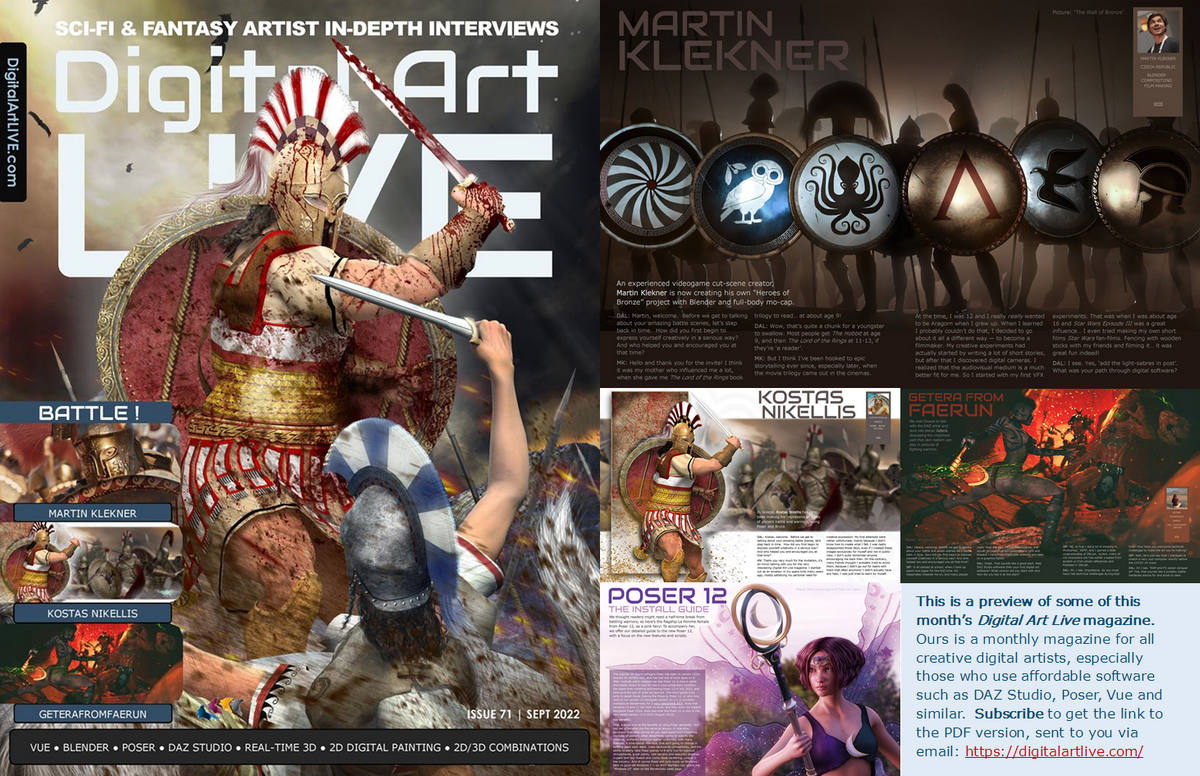
Now available, free on Gumroad, the “Battle” issue of Digital Art Live magazine. Also has a 12-page centre section on the Poser 12 software, to give some light relief in the middle. And a two-page technical primer on Poser-to-Vue.
One-click to improve your scene render in Poser! Poser Python scripts to instantly switch your scene lights to use softer ray-traced shadows, or to switch back again to the default Depth-map shadows. Working in Poser 11 and 12. In just one click, they save you having to fiddle around with each of the lights to turn on softer shadows across a scene.
Note that you can also soften shadow intensity manually, with the dial found on Light / Parameters / Shadow.
In both scripts the shadows are softened from the defaults (defaults = 0.0 for Ray-traced, 2.0 for Depth-map). Here the softening is increased to 6, but you may want to go to 12 or so. The free PASS Poser watercolor shaders on ArtStation Marketplace work best with even higher shadow blurring.
Change the script’s “(6)” to the shadows softness setting you want. If you want a full reset script, just set the “(6)” on the second script to the default (2) setting.
Set Ray-traced Shadows:
|
1 2 3 4 5 6 7 8 9 10 11 12 13 14 15 16 17 18 19 20 21 22 23 24 25 26 27 28 |
# SWITCH TO SOFT RAY-TRACED SHADOWS FOR YOUR POSER SCENE # A small script to have all lights in a Poser scene move from using Depth Map Shadows # over to Ray-traced Shadows (with SOFT shadows set at 6.0). All scene lights are # assumed to be on and casting a shadow of some sort. Script is tested and working in # Poser 11 and Poser 12. # # Also boost sample size when rendering, for less grainy shadows. # You can also soften shadow _intensity_ with the dial on Light / Parameters / Shadow. import poser # Tell Poser we expect a scene to be loaded. scene = poser.Scene() # Get a list of lights in the Poser scene. lights = scene.Lights() #Run the script on all lights in the scene. for light in lights: # For some reason this old line needs to be above SetRayTraceShadows - or the switch over won't work. light.ParameterByCode(poser.kParmCodeDEPTHMAPSTRENGTH).SetValue(1.0) # Ok, now we can set the Light to cast Ray-traced shadows. light.SetRayTraceShadows(1) # Now we can set the amount of softness for the Ray-traced Light's shadows. # Note that here we do not use SetShadowBlurRadius() but rather SetShadowRaytraceSoftness() light.SetShadowRaytraceSoftness(6) scene.DrawAll() |
Set Depth-map Shadows:
|
1 2 3 4 5 6 7 8 9 10 11 12 13 14 15 16 17 18 19 20 21 22 23 24 25 26 27 28 |
# SWITCH TO SOFT DEPTH-MAP SHADOWS FOR YOUR POSER SCENE # A small script to have all lights in a Poser scene move from using Ray-traced Shadows # to using Depth Map Shadows (with shadow softness at 6.0, from normal 2.0). All scene lights # are assumed to be on and casting a shadow of some sort. Script is tested and working in # Poser 11 and Poser 12. Also boost sample size when rendering, for less grainy shadows. # # Also boost sample size when rendering, for less grainy shadows. # You can also soften shadow _intensity_ with the dial on Light / Parameters / Shadow. import poser # Tell Poser we expect a scene to be loaded. scene = poser.Scene() # Get a list of lights in the Poser scene. lights = scene.Lights() #Run the script on all lights in the scene. for light in lights: # For some reason this old line needs to be above SetRayTraceShadows - or the switch over won't work. light.ParameterByCode(poser.kParmCodeDEPTHMAPSTRENGTH).SetValue(1.0) # Ok, now we can turn off Ray-traced shadows, if they are on. light.SetRayTraceShadows(0) # Now we can set the amount of softness for the depth-map shadows. # Note that here we use SetShadowBlurRadius() rather than the ray-traced SetShadowRaytraceSoftness() light.SetShadowBlurRadius(6) scene.DrawAll() |
Especially useful for soft indoor “old masters” type portraits, not so useful for hard-edged sun-baked beach scenes.