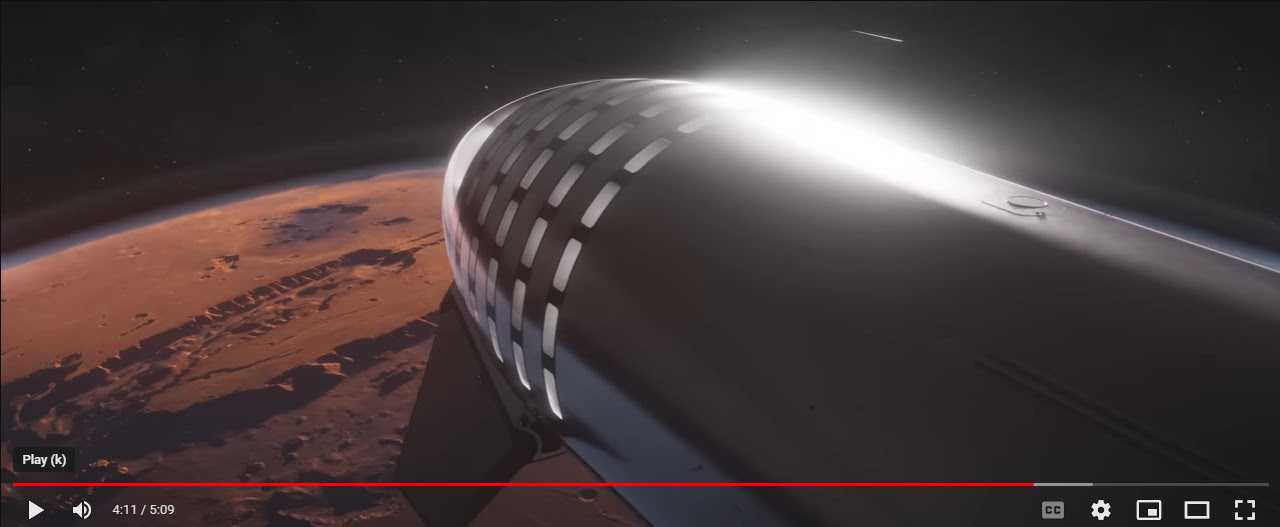
SpaceX has released its 4k “Starship: Mission to Mars” video. The Starship, which should launch to orbit later in the spring, is seen making possible a mission to Mars.
Category Archives: Spotted in the News
New store: 3D Shards
Sickleyield has kindly made his formerly-paid ShareCG items free. I’m not sure what was formerly paid there, but going through the items I noted…
SY Big Wave iRay. A big ocean wave with spray. And posing bones.
SY 200 Morphs for Genesis 8 Head & Body.
His conversion of DieTrying’s 182 Morphs for Genesis 2 Male and Genesis 2 Female. Also available for Genesis 1.
His paid G8 items are now over at the new 3D Shards store (slow to load, give it time). A very slick store, with 78 items there at present. Has his new G8 Pinocchio wooden puppet-boy and the older Marshmallow Man / Snowman, among others.
Gift Certificates for Renderosity
New Gift Certificates for Renderosity, from $150 to $500. When purchasing, you need the email address of the recipient…
“the recipient will receive an e-mail informing them that they have received a Gift from someone at Renderosity”
Your recipient can spend ‘a bit at a time’. For instance if someone only spends $50 on an order, they’d still have a remaining $100 on a $150 Gift.
Also useful for collaborative projects with freelancers, where you need to buy a creative partner some assets. But you don’t particularly want to get into just sending them the cash via PayPal, or buying it yourself and then sending the files.
Release: Poser 13
Poser 13 has been released for Windows. Available now at Renderosity. There’s also a 21-day free trial.
Upgrade from Poser 12 is $99, full-price for 13 is $250. Poser 12 is still on sale at $150. There doesn’t seem to be an upgrade offer from Poser 11 to 13, curiously. But I imagine that anyone who wants to has already done the Poser 11 to 12 upgrade.
Poser 11 is still on sale thankfully… but is now hiked up to $150 at Renderosity (was $52 for a long time). However, note that Neowin still has it for $80, an ongoing roll-over offer officially approved by Poser’s parent company Bondware.
The “Windows 10” system spec probably doesn’t mean much, since Poser 12 and now 13 run fine on Windows 7. But note that Windows 7 users can’t install Ken’s store-purchased Python utilities due to lacking the encryption needed. Note also that ZBrush 2022.7 or higher is now required for GoZ round-tripping to Poser 13.
A Mac version of 13 is also set for release, soon-ish… “We expect the Mac version to follow the Windows release in a few weeks as a free update for Poser 13 license holders.”
Also due is “an exciting new figure” but this is still “in the works for Poser 13”. The existing free 25Gb content bundle is the same, but it seems it’s now split into more manageable download bundles.
Installers for 11 / 12 / 13 are now all available at the posersoftware.com site.
As usual, expect any new version to break a few Python scripts, because Python “knows nurthing” about any ‘Poser 13’ version. There is one forum report that EZSkin 3 won’t run on Poser 13, for instance. But there’s already a fix for the script. However, the dev team also quickly posted a “new installer” that may fix this without the need for the new fixed script.
Also as usual, new users of a vanilla Poser 13 may have to tweak their rendering settings to get the optimum configuration for their particular hardware setup. There’s a lot to digest there, several things have changed with the new Cycles/SuperFly, and it will pay to study the new settings for a few hours.
Ok, so… new items for Poser 13 which caught my eye in the list were:
* The “latest open source Cycles engine” from Blender, which in Poser is branded as SuperFly. Not all Blender Cycles nodes are present. It’s a slightly cut-down version, plus some Poser-specific nodes. The new version in Poser 13 gives much faster rendering, especially on animations and complex scenes… “GPU renders of complex scenes benchmark at under half the time required for the same scene on Poser 12.” Also works on CPUs, I hear. Also has “Improved adaptive sampling for faster renders” and an “Updated animation rendering system for better productivity [when] rendering movie sequences.” The new “GPU rendering on remote nodes” can speed things up even more, if you have the kit and ability to pay the electricity bills and can wire up a local render farm.
* “Updated Walk Designer and Talk Designer, for better compatibility with all figure types and support of imported libraries.” Again, animators will likely be happy at that.
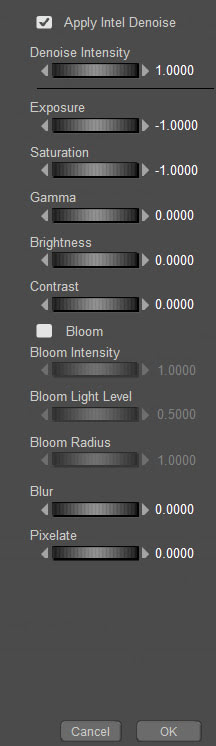
* New ‘Post FX’ post-render options… “denoise, exposure, saturation, gamma, brightness, contrast, bloom, blur and pixelate.” Nothing you can’t do in Photoshop, but nice to have. Bloom may be interesting. If it looks good, is consistently controllable, and has enough light spillover to become ‘glow’.
* Improved Intel Open Image Denoise (OIDN) module. One of the best features of Poser 12, and now also in Poser 13. Good to see they’ve integrated a more recent version, though no version number is given. It works wonders on either CPUs or the GPU, which suggests it is indeed the latest version (previous versions were GPU-only).
* “Improved morph and weight-map copying system makes creating clothing easier.” Clothing makers will no doubt welcome that. (Update: Two bug-fix releases to 13.0.287 focused largely on these features). PoserPython scripting now “includes Match Centers to Morph, Joint Order, and Copy Morphs From”.
* Downloadable full PDF manual. Useful for those who locally index and search an archive of PDFs and forum-captures, using full-text desktop search software such as dtSearch or Docfetcher. The manual is not quite up-to-date. For instance, the new Enhanced Shadow Catcher in P13 does work with SuperFly, though the manual says it won’t.
There are unconfirmed forum reports that the Preview viewport / rendering “has improved”, but no comparison screenshots. For this reason, it may be unwise for those in mid-project on a Comic Book Preview rendered animation or comic-book to switch to Poser 13 because they assume that the Viewport / Preview rendering will look exactly the same. It may not.
So, overall it looks like a big must-have upgrade for 3D photoreal animators. It’s also a must-have for those who have a new fast RTX NVIDIA graphics card and want the latest greatest fast software to pair with it. Costly, true, but if the user has the cash for a big shiny new card then they also have the cash to get Poser 13.
I imagine clothing makers may well stick with the workflow they know for now, unless the improvements in 13 are dramatic (I’m not qualified to judge such things).
Overall, the team is to be congratulated. They’ve done enough to justify the version upgrade, and have given 13 a clear focus on animation and a big boost in render speed. There are genuine and useful improvements here.
Of course, it would have been great to see a version that focused on non-photoreal and some Python tweaks to help it (e.g. having Python able to address the Post FX box and plug in any .8BF Photoshop filter at that point in the render process). But that’s a much smaller market than photoreal/animation.
In the meanwhile, don’t worry… the world-leading non-photoreal stuff is still in there: Firefly (with Photoshop auxiliary render layers if required) inc. outlines, real-time Comic Book, Sketch.
Onward to Poser 14!
Install test:
* As expected, Poser 13 installs without overwriting previous Poser versions or runtimes.
* Content directory created at C:\Users\Public\Documents\Poser 13 Content
* No .PDF manual in the install, as that’s now a download.
* Poser 11.x and 12.x still launch after install of the 13 Trial version. Import of a Poser 13 scene to Vue 2016 and the latest Vue both work, is Poser 11 is told where the 12 and 13 runtimes are.
* As usual, the new Poser user will need to fix the ever-accumulating light presets problem by tweaking a setting in Preferences.
* Yes, Blender’s Cycles X (here branded as ‘SuperFly’) happily renders on CPUs. There’s no nonsense at install time about “your graphics card is not worthy, so I’m not even installing”, as there is with Blender.
* The new version of the Intel OIDN Denoiser is packaged as a .DLL, so I can’t find what version number it’s now at in Poser 13.
* Checks how many threads Poser is using on a multi-core PC. Poser 13 defaults to 12 threads for me, but in Edit / Preferences I tell Poser 13 I have 24 threads available for its use (12 Xeon cores = 24 threads) in CPU rendering. And if you have that much power, don’t accept Firefly and Sketch render presets that use the old minimum 32 buckets. Tweak this setting up to 128, for a vastly improved rendering speed. Superfly renders are a whole different ballgame, and you’ll need to study and test to get the best for your PC.
* You add your previous runtime to the Library by targeting ../content/ not the ../content/runtime/ folder. When you’ve done this, your old saved scene files should load fine — because Poser 13 will know where to load the content from.
R.I.P. Phil Cooke
It’s sad to hear that Phil Cooke (‘Phil C’), the PoserPython expert and Python teacher among his many other talents, has passed away. Renderosity has a memorial page, and HiveWire has a forum thread.
Release: Clip Studio 2.0
Clip Studio 2.0 has been released. New features include…
* A new “3D head model” on which the user can adjust “eyes, nose, and mouth” to get a stylised look. Meant for reference, for hand-drawn over-sketching/painting… not iRay-like production rendering.
* A “hand pose scanner”. Scan a live hand pose, via a webcam and some reasonable softbox lighting. The hand pose is (more or less) applied ‘live’ to the 3D dummy’s hand in Clip Studio. I assume only those with specialist hand requirements need this, as there must surely be packs of 100s of organised hand-poses already available for Clip Studio’s generic 3D dummies?
* “Automatic shading” for flats, applying shadows based on your lineart and use of colours. A somewhat uninformative video demo is available, but it looks like it does work and has quick presets. If it can stay completely consistent from panel to panel is another matter.
* The flexible ruler now works with scenes that have a fisheye camera perspective.
* Depth-fogging cameras. “Enable Fog, to add a fog-like effect that expresses depth in 3D space”.
* “Spin blur” effect (e.g. semi-blur a speeding spinning missile, or a bouncing ball). I’m amazed they didn’t have this before.
* Import… “It is now faster to import posable 3D files with a large number of bones and meshes.”
Release: Clavicula 0.9.9.5
Clavicula 0.9.9.5, a new release for the free and innovative modelling software.
And in the comments, “export renders with a given screen resolution” may be coming by the end of 2023.
Release: Curvy 3D 5.0
The Windows desktop sculpting software Aartform Curvy 3D 5.0 final is now available, having been in beta since November 2020. Cost is $99 (around £92 in the UK), and there are further discounts available if you purchased an earlier version (check your email).
An important new feature in 5.0 is adaptive subdivision on the meshes. There’s no video trailer yet for 5.0, but the YouTube channel will likely have one soon.
More news about Poser 13
More official details about Poser 13, due for release soon.
* The Poser 13’s SuperFly rendering will use “Cycles X” from Blender.
* New “robust light bloom” option in the PostFX module.
* New “tools for morph and weight mapping transfer between figures”, for content creators.
* Unspecified “improvements to Talk Designer and Walk Designer”.
* Newly “added support for HDRI domes”.
Last I heard, in April 2021, Blender’s Cycles X was “NVIDIA-only”. On looking into this again, I see that AMD (HIP) support was added November 2021.
Release: Dust3D 1.0 rc7
The open source Dust3D is alive again, after a long hiatus during the Covid years. The 1.0.0 release candidate 7 is now available. Dust3D is a…
“cross-platform 3D modeling software that makes it easy to create low poly 3D models for videogames, 3D printing, and more.”
Relatively easy, free, and under a full MIT open licence. Training Playlist on YouTube.
Release: GMic v3.2.1
A new release for GMic, aka G’Mic as GMic v3.2.1. Changelog. Highlights I noted are…
1) A new 3D handling feature, though possibly command-line only?
Command | extract_textures3d
“This will help you extracting textures from 3D objects directly as 2D images, that you can save or process and remap on the object.”
Probably not a replacement for dedicated tools used to get a texture atlas and/or seam templates, but it may be of interest to some.
In Poser Pro, a FBX or Collada export can also get you a single texture map (a ‘texture atlas’), output alongside the FBX output. The problem with a ‘texture atlas’ is that it then prevents drag-and-drop re-texturing of parts. It’s all or nothing. DAZ Studio also has a ‘texture atlas’ output command somewhere or other, with the location depending on which UI layout you use.
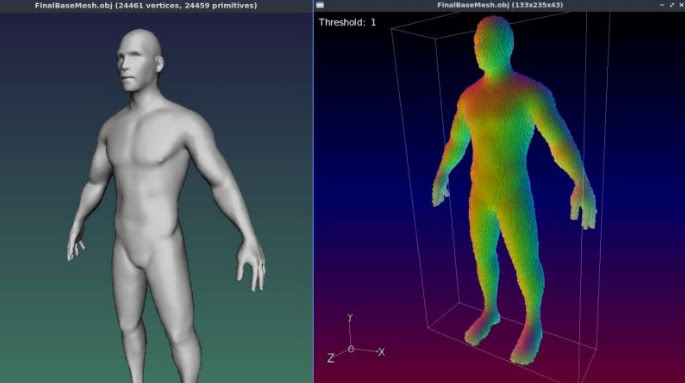
2) Better voxelisation of 3D…
“Improved the triangle voxelization algorithm even more. G’MIC is now really a quite nice tool to voxelize 3D meshes!”
Could be useful if you want to have your OBJ export from DAZ/Poser look like a hologram and, once it’s back on Poser or DAZ, put on transparency and glow? But don’t expect to animate afterwards.
3) Basic subdivision of 3D object meshes. Again, you can do this natively in Poser and DAZ.
4) A new filter, to be found in ‘Testing’…
Garagecoder | Upscale [Recursive2x]
Appears to be a sort of ‘intelligent sharpening’ that preserves details better on low-res images? Again, you’d probably do this with AI Gigapixel or online with Base Ten or SWIN, though perhaps this (I’m guessing) is optimised for low-res images?
As always, beware of updating. Because if someone changed the name of their filter, then that breaks your custom preset. For instance, last summer GMic’s long-standing Artistic | Comic Book filter had its functionality updated and the name changed to Comicbook. All my custom presets based on this filter were gone in a flash, and some of the filter’s needed switches and sliders had also been removed. Filter makers really need to be told: “If you’re going to tinker to that extent, then keep the old filter the same and call your new one Comicbook_2″.
Release: 3DCoat 2023
3DCoat 2023 has been released. Not a mega whopper-topper-wow! release, it seems. More of a ‘lots of smaller improvements and bug fixes’ release…
* Much quicker when doing booleans and manipulating really big meshes.
* Various topology, UI and viewing improvements and bugfixes.
* Much easier drag-drop linking into Blender, with the Blender AppLink…
“just install 3DCoat and Blender, follow what 3DCoat tells you… and then you may easily drop assets to Blender”
Their front page is still on 3DCoat 2022.x, so I don’t yet know if the system specs have changed.
Marketplace changes are rolling out at Renderosity
The Marketplace changes are rolling out at Renderosity. Quite subtle so far, but some nice ones. For instance it’s now easier to tell if a coupon won’t apply to an item. There’s a little red block indicating “no coupons”. If it’s green, coupons are good. Very useful.
The WishList feels nicer and less cramped, but I already created a UserScript to remove the dangerous “Clear List” button (I never want to clear the entire 760-item list), and to make the ‘% discount’ font much larger. It’s a pity you have to scroll back to the top of the WishList page, to move to the next page. Logically, the ‘advance to next page’ option should be at both the bottom and top. There still no way to save a single-file backup of the list.
Gone is the WishList’s eye-boggling total of what it would cost to buy the entire list at one go. Which is a pity. It might have been kept when I filter by Vendor, so I could see what it would cost me to buy all of my missing stuff for that one vendor.
My Wishlist – lowest price has a different URL now. It would be nice to filter the WishList by: On Sale / Coupon Accepted / Lowest Price first. But that can’t be done. Instead you do Lowest Price and then scan by eye for the ‘Coupon Accepted’ icon. Yes, I know… I’m cheap, and I like it cheap when I buy.
Various Marketplace URLs have changed at Renderosity, along with the new store improvements. Some will redirect, some only redirect to the home page. The Marketplace item and Vendor store URLs have all changed, but have re-directs. Vendors are now at ../marketplace/vendors/NAME. The address for the general Lowest price page has also changed. Always worth a look to see what’s slipped under $3, even if it’s not on your WishList.
The URL to buy Poser 11 is still the same. Still $52, a bargain for the power and unique/quick Comic Book and Sketch non-photoreal rendering. And you’re getting what was Poser 11 Pro.
Vital Python add-ons for Poser 11 such as XA – Toolbar are still there and for sale, but the seller Dimension3D seems to have lost the store images on many of his utilities.
Freestuff and Forums URLs appear unaffected by the URL changes.
Daz to Blender Bridge updated and fixed
Butaixianran has kindly created a free DazToBlender: Daz to Blender Bridge updated fork…
“I updated the official Daz To Blender Bridge, now Daz model can be exported from Blender with morphs and textures, so you can use Blender as a Daz Bridge to other 3D tools.”
It’s already had a number of bug-fixes, and animation import has been added. Normal maps can be saved to .JPG to reduce bloat. Also supports Genesis 8.1 and 9.
No texture or base mesh resolution changes are involved with the conversion, and the user is left to do that in Blender. Or just use Blender as a pass-through to other software. As always, geografts and complex geoshell and similar overlay things many not convert well.
Regrettably Blender 3.1 or higher is required, so you need a powerful enough PC to pass Blender 3.x’s “install or not?” test and get Blender to install. Update: Blender 3.51 for Windows 7 (early May 2023). Needing no installer, it will now launch on Windows 7! Hurrah.
Made with Blender – the new movie showcase website
Blend.Stream, a new showcase and aggregator site for all movies made with Blender. This means more than just the official open movies sponsored by the Blender Foundation, and the site is open to all quality films made with the software. Also keep in mind that they’re not all under Creative Commons, though they are all free to view.