A new 2021 version of PoseRay, a simple freeware Windows utility for converting Bryce .DFX to .OBJ files.
You may want to uncheck “Reorient” for best results, in some cases, before importing your .DFX mesh.
A new 2021 version of PoseRay, a simple freeware Windows utility for converting Bryce .DFX to .OBJ files.
You may want to uncheck “Reorient” for best results, in some cases, before importing your .DFX mesh.
Copy-paste, save as a .py Python script. Make sure the ” ” are not fancy curly quotes. They need to be straight quotes… " "
|
1 2 3 4 5 6 7 8 9 10 11 12 13 14 15 16 17 18 19 20 21 22 23 24 |
# A Python script to load and render a Sketch Preset in Poser 11. # Do the usual setup stuff. import poser scene = poser.Scene() # Tell Poser we are going to want to load a Firefly options preset. option = scene.CurrentFireFlyOptions() # Set Firefly as the render engine. scene.SetCurrentRenderEngine(poser.kRenderEngineCodeFIREFLY) # Load the Sketch render preset, and Firefly will # accept it even though it's not a .prp Firefly preset. # Note that the backslash is required on the file path. option.LoadPreset("C:\sketch_preset.pzs") # Now the important bit, we have the script switch # Poser's render mode to Sketch. scene.SetCurrentRenderEngine(poser.kRenderEngineCodeSKETCH) # Do the render with the current Sketch preset and Sketch # engine, and adopt the other current render settings. scene.Render() |
Yous custom Sketch presets are found at:
C:\Users\YOUR_USERNAME\AppData\Roaming\Poser Pro\11\SketchPresets
or
C:\Users\YOUR_USERNAME\AppData\Roaming\Poser\12\SketchPresets
Here’s how to get the free DAZ Bridge running with Photoshop, and streamline a chunk of the workflow with my additional automated script.
1. Download the Bridge.
BRIDGE: Most people will want the 64-bit installer current at DS4_3DBridge_1.13.0.17_Win64.exe and this is working with the latest DAZ Studio 4.20.x. DAZ Studio lacks Poser’s ability to render to a multi-layered Photoshop .PSD, so this is the only official way to get renders over to a layered Photoshop file.
PHOTOSHOP: In this 64-bit case you need a 64-bit Photoshop that also supports 3D. Adobe recently pulled all 3D support from Photoshop, for rather murky reasons. Technically that should not matter, as all we’re doing here is bringing in a 2D render via a Bridge. But you may still want to revert to an older 3D version of Photoshop. The following tutorial assumes Photoshop 2018 on Windows.
2. Install the DAZ bridge. In the installer, you specify the plugins directory for the version of Photoshop you want to target. In this case…
C:\Program Files\Adobe\Adobe Photoshop CC 2018\Plug-ins
3. Once installed, go look in your regular Photoshop’s ..\Plug-ins directory and you should see a new ..\DAZ 3D folder there, and inside that a psdzbridge.8li file. Success.
4. Now load Photoshop. Open the backdrop image (aka ‘background’, aka ‘backplate’) you want as the base layer for your picture, above which your 3D DAZ renders will appear as adjustable layers. Ideally this backdrop is not at some huge size, but rather more like 1800-2400px wide. Then you run the Bridge script thus…
6. The Bridge’s mini UI panel will then appear in Photoshop. DAZ Studio will also be auto-launched at the same time, if it wasn’t already running. Give it time to load. In DAZ you will see you now have a special camera which is being used to get and pass the renders, and you will automatically be looking through that camera.
7. In DAZ, the Backdrop now needs to match the same one you have open in Photoshop. I wrote a script that automatically takes care of all the fiddly steps involved in this: it first invites the user to select and load the same backdrop they’ve already loaded in Photoshop. Ignore other manual switches, as the script will take care of them. This is how you load a backdrop image…
Then, once you’ve done that, the script continues. It auto-sets the Viewport ratio to the new backdrop, then also matches the current render size to it in pixels, and finally it turns off visibility of the backdrop in renders. The script also sets the iRay Max Time (i.e. maximum render time) to 30 seconds.
* Script (save as Photoshop_Bridge_helper_script_for DAZ_Studio.txt and then rename to .dsa).
(I have a tutorial here on how to pin a script to your DAZ UI’s ‘Scripts’ menu).
8. Both DAZ and Photoshop should now have the same auto-magically matched backdrops. Set up your prop or figure in DAZ, via the special Bridge camera, so as to match the backdrop in terms of position and lighting.
For 64-bit users to get a cutout render on transparency, you need to first click “Preview Image”. This doesn’t Preview in 64-bit (see below for details) but does set up “Render to New Layer” to render onto transparency. 32-bit users with CS6 need no such workaround.
In Photoshop and via the Bridge’s mini UI, you then “Render to New Layer”. The resulting render will perfectly match the backdrop in Photoshop, and will also be a cutout on transparency.
And the DAZ render time is now reasonable, taking 30 seconds to get into Photoshop. The seconds can be adjusted at the foot of my script. Adjust the time to as long as you can bear…
// Max Time in seconds
oProperty.setValue(30)
oProperty.getValue()
Yes, sadly 64-bit users have to do a proper full render in DAZ before it’s brought into Photoshop. Because the Bridge’s “Preview” button no longer works in 64-bit. What “Preview” was supposed to do was… “create an image or layer in Photoshop using the current DAZ Studio viewport image.” But for most this no longer works. Bridge now only works fully if you can use this method which involves having CS6 32-bit on a 64-bit system.
Thus for most people the best way to get an iRay render into Photoshop with any speed is to manually cap the render time to just 30 seconds, which my script does for you. At my default of 30 seconds the iRay render’s result is grainy, yes… but that doesn’t matter for me. The aim in Photoshop is “painterly via a filter”. The grain thus gets smushed away by the filter, and the painterly effect is perhaps even helped along a bit by the grain….
Alternatively you could try setting your DAZ engine to use a superfast custom iRay preset you have working with a ninja $1,000 graphics-card, or manually set the near real-time render-engine of OpenGL, after my script has run.
The advantages of rendering to layers over a matched background are various. Layers can be filtered differently or faded out for a ‘depth fog’ effect. Cutout edges can be stroked. Layers can be moved or deleted without having to go back into a big 3D scene. Very large complex pictures can be built, potentially with many elements, without burning out your PC trying to render some DAZ mega-scene all in one go.
That’s it. Enjoy, as the DAZ Photoshop Bridge could have cost you $200 back-in-the-day!
A new wholly-free and seemingly perpetual version of the 3DCoat software, in the form of 3DCoatPrint 2022. This is the latest version and is even partly licensed for commercial use. Ah, but how is it crippled? Well it’s…
* capped at “40,000 triangles on export” as a .STL mesh for 3D printing.
* has no “paint and retopology toolsets”.
* apart from 3D printing, “other uses may only be for personal non-profit activity.”
That appears to be it. So 3DCoatPrint looks reasonably good, even if you have no interest in inflicting yet more plastic junk on the world. Possible use-cases:
* you want a more rational sculpting replacement for Zbrush / Blender, and yet don’t need a Zbrush round-trip interface working with Poser / DAZ Studio.
* you “sculpt for greyscale render + partial auto-colour + paint-over”, making elements for assembly as 2D concept paintings.
* you specifically target the ‘low-poly look’ aesthetically, and might even find the 40,000 triangle limit a creative spur.
The software works on Windows 7 and up. Regrettably it’s not just “download an .EXE and install”, through. You do have to ‘sign up’ / ‘sign in’ to get it. Which suggests there’s some sort of online leash which could eventually pull your access, years down the line.
The latest Digital Art Live magazine is now available as issue 69. Free, but small donations are now encouraged via Gumroad to help keep it going. This month’s theme for the midsummer issue is “The Misty Isles”, loosely based around mythic and mystical ideas of our own British Isles.
In related ‘British landscape’ news, which sadly came just too late for inclusion in Digital Art Live #69, Vue’s grand English oak forest official pack is now available…
“This PlantCatalog update adds everything you need to create a full English oak forest, including trees, mushrooms, ferns, dead undergrowth and more.”
Brilliant, just add Robin Hood. Also in the pack are native lichen, moss, and even ‘pollarded’ willows (they grow alongside English rivers and large streams, and are harvested for their withies)…
Accessed for Vue via E-on’s standalone sister-software PlantCatalog. The PlantCatalog plants… “can be used both within [the subscription] VUE as procedural files and within any other 3D application as baked polygon meshes, with or without wind animation.”
Also interesting is that with this update to the software, all… “existing PlantCatalog species files are now up to 60% smaller than before.” Thus saving hard-drive space.
Time for another survey-pick of what’s new for Poser and DAZ Studio, in June 2022.
Science-fiction:
Modular Sci-fi Chamber. Simply but stylish and believable. For added visual effect, have the ceiling be transparent revealing stars, swirling nebulae etc.

A free Astronaut sculptured bust. Useful clutter for your starship conference room (although by that time all decisions will of course be made by bio-AIs in nano-seconds across quantum-space).
Free today, only. DAZ Platinum Club Anniversary 2021 Mega Pack 4 with lots of sci-fi goodness. Get it while it’s hot.

Steampunk:
A free simple Compact Mirror for the hand.

A free toony steampunk Cannon.

M3D Victorian Hair, Facial Hair, Hats, and Aging for G8M.
Fantasy:
Moonboat for Poser by 1971s. Appears to be new, as I don’t have it in my runtime under that name. Though it is similar to early 1971s boats.

Free Antlers for G8 Female.
Storybook:
Ponytail Hair Accessories – Set 1 and Set 2. For the 3-in-1 Low Ponytails Hair.

An unusual free Candy Hat.

The above led me to a freebie I missed in 2021, Lea Hair. For some reason this is a huge half-gigabyte download!

Toon:
Flossie for La Femme for Poser.

Fancy Cats – Tuxedo and EveryDay Dogs – Beagle for Melody and Micah, and Furries for Melody and Micah. I have a guide to setting these up, re: their base dependencies, finding and loading order.

Masataka for Walther 2.0 for DAZ Studio. A manga style character for G8M.

Patrick base mesh, affordable and with a permissive licence. It wouldn’t take too much work in ZBrush or Blender to turn this into H.P. Lovecraft.

Carnivora for DAZ Studio iRay. Plants go wild!

Landscape:
A modular Deep Rainforest by ShaaraMuse3D, for Poser and DAZ. Looks great. Could be paired with the new Tanglewood – Tormented Trees for a more Avatar-ish look.

Medieval Ruin – Modular for DAZ Studio. Medieval, but has a nice fresh feel about it.
Photo Props: Chiselled Blocks by ShaaraMuse3D.
Animals:
Savannah Cat for Cat Mars for DAZ Studio.

Songbird ReMix: Birds of Legend for Poser and DAZ.
Historical:
The Domus of Victory Training Arena. A nice small gladiatorial training area from antiquity. Though no spectator poses. Could be paired with the new Majestic Plaza.

Shakespeare’s Puck for G8M.

A free Flintlock Pistol for DAZ Studio. And from the same maker, a free classic Wild West Colt Peacemaker pistol for DAZ Studio.

A free 1910s European Street Lamp Type 1.
The free Erte inspired dForce dress #3 for G8F. Looks great. Remove the 1920s hat, add rusty textures and it could work well as a steampunk outfit.

A free Vintage late-1950s dForce swing coat for G8F.

Free Low Poly Hair, 1970s cheerleader style and colour materials.
Characters, poses, hair:
Free, Five Soft Fashion Poses for G8. The listing page is confused, so ignore the ‘for Poser and Windows 10 only’. It’s for DAZ. This appears to be a free sampler for the larger paid pack RAV Fredda Soft Fashion Poses 25.

A new “Hr” from Ali is always welcome, the latest is Hr-252.

D9S Brianna for La Femme for Poser. Excellently done, in that I can’t tell it’s based on La Femme. Has a sort of ‘1930s Berlin’ feel.

Kneeling Poses 001 for G3F and G8F. Could be useful for those who need a lot of such poses, e.g. a children’s garden bug-hunt or a tunnel-based thriller. See also the new HF Creeping Poses for G8F.
HID Lucy for G8F, another high-quality Emma Whatsername clone.
Software, utilities and scripts:
Node Navigation Tools for DAZ Studio. Here “node” means in the figure hierarchy (i.e. body, hand, feet etc). This script set can be linked with keyboard shortcuts to let you move up/down the hierarchy without having to squint at or open a long list.
Select the BODY script for Poser.
Bone Minion for Generation 4 Poses. Appears to be a reliable on-the-fly conversion utility for old poses. Looks very useful.
It looks like Renderosity is keeping Poser 11 Pro at $52, at least for now. What a superb bargain, especially if you want to make non-photoreal renders from 3D.
Tutorials and more:
The Geometry Editor: An In-Depth Tutorial Guide. In three hours, “14 case studies to demonstrate how effective the geometry editor is” and what you can do with it in DAZ Studio. Indexed and searchable video. Looks good.
The latest Digital Art Live magazine #69 (June 2022).
That’s all for June. More next month!
A small script to select the BODY in Poser 11. Should work in nearly all cases, re: figure types. Buttonize it on the XA Toolbar, for a one-click BODY select.

Save as a .py script.
|
1 2 3 4 5 6 7 |
# A simple Poser script to select BODY on the figure in the scene. import poser scene = poser.Scene() figure = scene.CurrentFigure() actor = scene.CurrentActor() # Setup done, now set current figure to its Figure | BODY root scene.SelectActor(figure.ParentActor()) |
You can also tweak the script, to select any body part you regularly need to select on a figure over and over again.
Actually Poser already has the BODY select built in, though. Press 2 on your keyboard to instantly move the figure selection from the currently selected body-part up to the main BODY. So the script is only for those who don’t want to be constantly peering down at their keyboard to find the “2” button, and prefer to have everything in front of them in the UI.
Alternatively you could use a mouse-gesture software, and assign a ‘B’ gesture to Press 2 on the keyboard.
3D .OBJ import and lit manipulation in the free G’MIC, developing nicely and coming soon in version 3.1.3. And since G’MIC for Photoshop also works as a standard .8BF plugin in other graphics software, then they’ll also get the same 3D import capabilities.

Of course, older versions of Photoshop have 3D, but G’MIC will be able to provide simple 3D import for all current versions. From which, for some rather murky reasons, Adobe has ripped out all the 3D features.
Update: now released. Rather clunky at present, and .OBJ only (i.e. missing textures are likely). Experienced 3D users will be best to render in DAZ, Poser, KeyShot etc and export as a masked .PNG file.
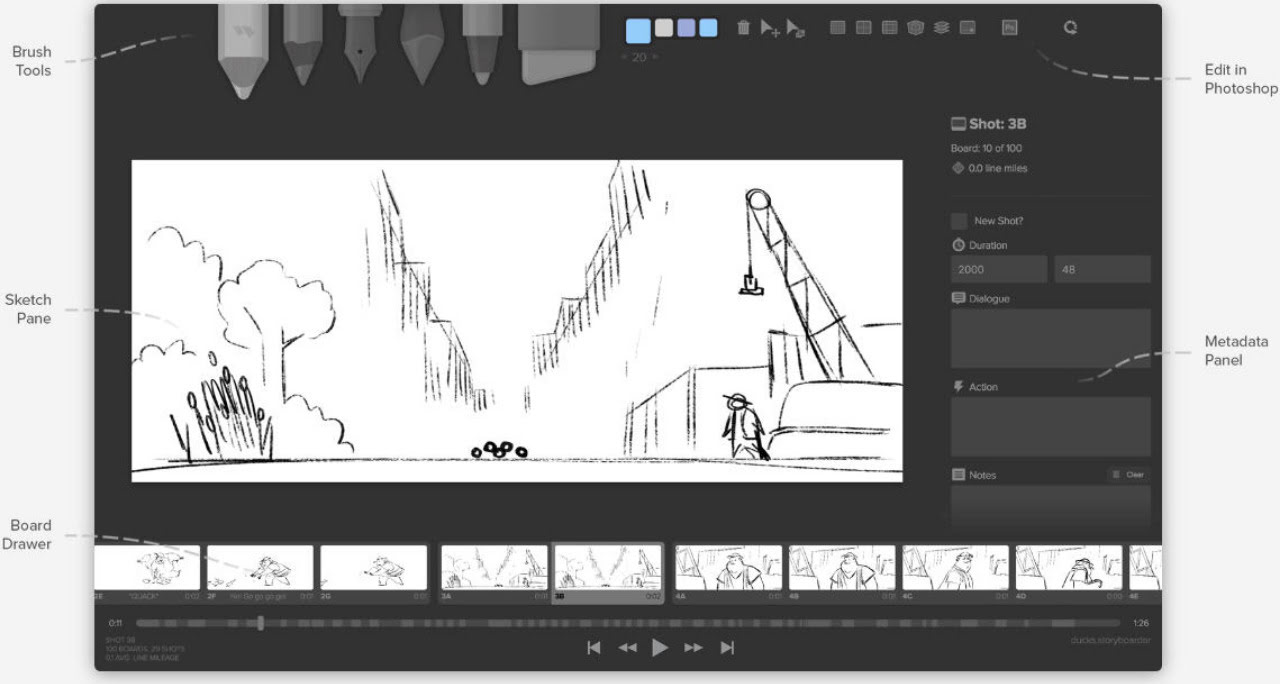
Release: Storyboarder 3.0 slipped out at the end of March 2022, with almost no-one noticing. It’s a bit sad that those with the biggest and slickest marketing hog all the attention, when there’s so much fine software around these days.
Free and open-source, for movie storyboarding but also possibly useful for figuring out the flow of comics. Especially a comic that is likely to be viewed in reader apps that offer ‘Panel View’ (one panel at a time, filling the screen) or scrolling formats.
Among other changes…
* Shot Generator: Insert Image via Drag/Drop or Paste.
* Storyboarder: Video Export fixed.
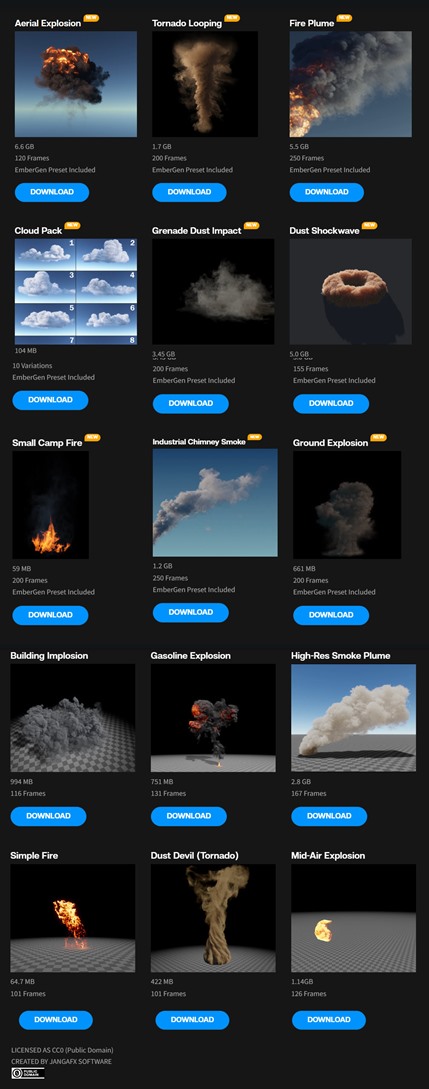
Download Free VDB Animations: Explosions, Fire, Tornado and more. Now that DAZ Studio support .VBD volumetrics files, these should theoretically be loadable and playable there. Licences are CC0, so you’re free to use these VFX your next mega-movie. The front-page takes an age to download, so here’s a screenshot of the effects…
JangaFX is also readying its Embergen 1.0 tool for final release is about a year.
I’ve finally found and hacked a working way to have a script apply a single shader across multiple surfaces in DAZ. Many hours of searching and testing finally surfaced Mcasual’s free mcjSelectTheseMats. This will do the job in DAZ 4.12.x, with a few custom adjustments. I’m amazed no-one has made such a script for this basic task, until now. Here is my working tweak to extend the ‘mcjSelectTheseMats’ script.
SelectTheseMats_ApplyShader.txt (download, rename to be a .DSA script)
This selects the named base figure in the scene, then makes sure he is really selected, then selects and highlights all the non-eye surfaces of the ‘Genesis 2 Male’. Adjust as desired for your likely target figure (e.g ‘Genesis 8 Female’. There is also a naming convention which handles having two or more Genesis figures of the same base type in a scene).
The resulting script auto-selects all the required surfaces. This part works even if something else entirely is selected in the scene, when the script is run, e.g. a light. It also doesn’t matter if the target figure is named ‘Fluffy Bunny’ etc in your runtime, the DAZ scene only sees and knows him as a ‘Genesis 2 Male’.
Then at the end of the script, I added two lines to apply the chosen shader to the selected surfaces. Obviously you will need to adjust the path to your desired shader and file and then save the script.
With this script in hand you can then theoretically build it into a larger multi-pass ‘render, load and repeat’ script. By having the script make an automatic render after each new shader is applied. It would be ‘shader-based’ multi-pass, rather than ‘render-engine based’ multi-pass.
Obviously the script as it stands is not the ‘apply to all surfaces in a scene, except those identified as eyes’ I initially wanted, but it works and goes a long way toward it.
Also, this was the short non-working version that I wrestled with for a long time. Theoretically it should work, but it doesn’t select the surfaces, only applies the shader to any already-selected surfaces…
var figure = Scene.findNodeByLabel( “Genesis 2 Male” );
figure.select( true );
var sPathToFile = “C://my_folder/my_shader.duf”;
App.getContentMgr().openFile( sPathToFile, true );
It may save someone else the trouble in the future.
mCasual has released the free script mcjDropToTerrain 2 for DAZ Studio 4. Drop 3D objects onto the surface of a 3D mesh/terrain, even if the mesh is bumpy/curvy.
A new version of the free MeshLab was released, just before Halloween.
Mostly used for poly-reduction of 3D meshes, for many. “Quadric Edge Decimation” is what you want there.
Bear in mind that the two new versions in 2021 have bjorked every Meshlab tutorial ever written on smoothing, as all the relevant filters are either removed or differently-named or put somewhere else. The solution is to go get Meshlab 2016 which is still available and is what the old tutorials were written for.
The DAZ Store Freebies page has updated. Michael 6 / The Girl 6 / Gia 6 Starter Bundles, all for Genesis 2, including some hairs; a 1970s-style sci-fi ‘Wicked Date Night Genesis’ dress; and a retro early-1960s outfit ‘Ordinarily One for Genesis 2’.
If you go to the Store and sort by price you’ll also currently find the freebies ‘Gingerbread Set’; ‘Ivy Plants’ and a ‘Holiday Lucky Bag’. Which is a bag, not a surprise freebie.
Renderosity now has an official Christmas Advent Calendar. Each day, with download links active for ‘one day only’, leading vendors give away Poser / DAZ content as an open download. A new cumulative post each day, and the list is currently on the third day.