Here’s an unusual one. A free UserScript for your Web browser’s Tampermonkey or similar, and which interacts with the DAZ site. All it appears to do is filter your purchased Interactive licences. So that you can just see those. Kind of useful, I guess, if you’re a developer who just needs to see your available assets… and not the 569 other things you’ve purchased over the years. It’s open-source and the code looks clean.. it’s not doing anything untoward.
Category Archives: Freebies
Terragen 4.6 – a big update
According to the Newsletter, Terragen 4.6 is about to be released. This being the first big update for the advanced 3D landscape desktop software in two years.
* Windows now has .VBD export (was previously Linux only).
* Export clouds in .VBD for use in Blender etc.
* Better sRGB support.
* Better .FBX import, better .FBX export compatibility with Unreal Engine.
* Now with import and export of population caches as XML, as well as binary.
* Rendering speed improvements, faster Preview renders.
* Pro users get an experimental pipeline for RPC integration with other third-party tools.
* An open-source RPC Python module, so you can write Python scripts enabling other software to ‘talk’ to Terragen.
* Geolocation (aka “Georeferencing”) is said to become free in the Terragen 4.6 Free (aka Learning Edition, Non-Commercial). So far as I can tell, this is about aligning tiles side by side, rather than grabbing a DEM landscape tile from a user-friendly Google Earth style world-browser.
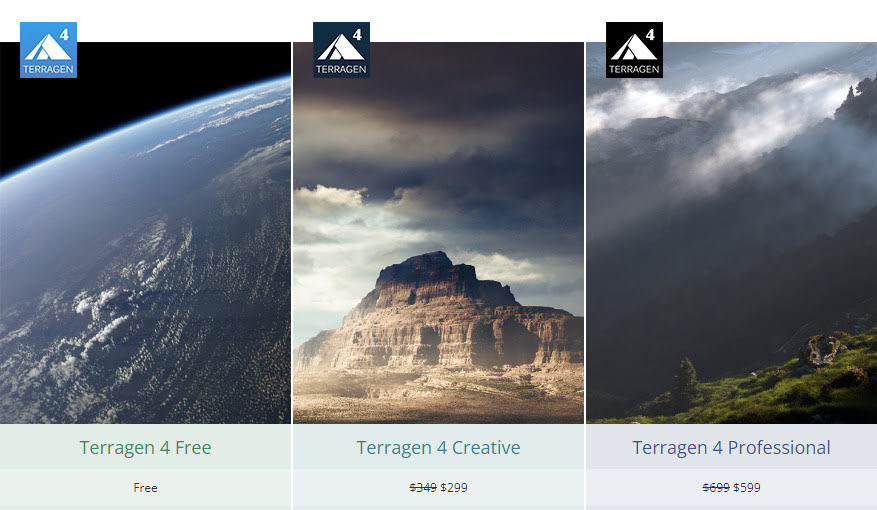
Still supports Windows 7+, and the update is free. Terragen 4 Free is free, and then currently Terragen 5 Creative is $299, the Pro is $599. A Mac version is coming soon, and a fun nodes-free ‘sky making’ Terragen Sky tool is also coming in December 2022.
Planetside Software (website has yet to update to 4.6 details/downloads. but should soon) and see also the YouTube channel.
What’s new for Poser and DAZ in October 2022
Here’s my survey of DAZ and Poser content and other items, picked from the October 2022 releases. As usual, freebies are only listed if ‘commercial use’ for renders.
NOTE: One person has said links don’t work, but they do. If you can’t click through on Web links, then you probably have an over-zealous anti-virus software that also tries to police your links. Please try whitelisting www.renderosity.com and sharecg.com and www.daz3d.com.
Science fiction:
The stylish Mecha One Male for DAZ Studio. Also at CGbytes.
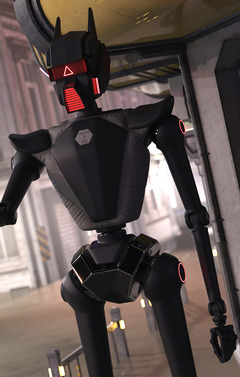
He probably drives the new Sci-fi Space Rover.
Protective Gear 011 for Poser and DAZ. Whacky retro sci-fi helmets plus G8 fits.
You may need one of those helmets if you go up against the mighty Toad cliff for DAZ and Poser.
Landing Leg, Morphing, V1 for DAZ Studio. Add bio-morphic landing legs to any craft.
ShaaraMuse3D Planetarium 2 for Poser and DAZ. A high-quality “planet seen from orbit” set. 8k texture maps and halo variations.
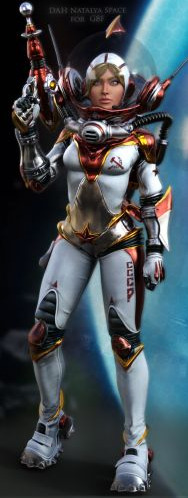
A DAH Natalya Space for G8F, a retro Russian space-girl. Appears to be a character from the old Destroy All Humans! videogame, so for fan-art only.
Retro Bicycle a stylised low-poly-ish Blender file, but nicely done.
Need something sleeker? Try the new Manga Anime Bike.
Colony Wellness Center, not something you see in colony sets every day. But such things will be vitally important, off-world.
Steampunk:
DryJack’s Steam Tank. Good to see him branching out from his superb model railway items.
An Old West Western Train for the presumably forthcoming “Railroad Construction Kit” mentioned in the blurb. With dial animations.
Another Street for The Streets of SteamPunk, A texture makeover for the recent big Stonemason scene.
Beach:
Still dreaming of summer and the beach? Try some free Cocktails for Poser.
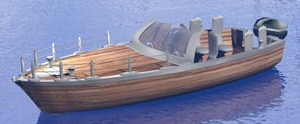
A free Fast Boat 03a, with a nice look to it.
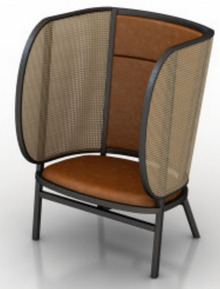
An unusual Hideout Armchair with wings adding privacy and also protecting from wind and sand-kicks on the beach.
Storybook:
Four Simple Boats for Poser, stylized and suitable for storybook / stop-motion type scenes.
A Snow White Gown for Fay Gown for G8F.
Fashion Kid Poses for Parah for G8. Requires CNB Parah which is a HD figure.
Toon:
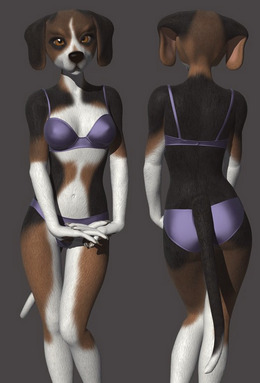
Beagle for Melody & Micah for Poser. I have a “Furries Melody/Micah characters – how to load the head shapes” tutorial that may help with getting this up and running.
NIK Female Morphs for G8F has one that’s semi-toon.
Clothing:
Retro Biker for G8M sees Cybertenko moving into clothing.
A free D-Force Gothic Headpiece for G8F.
Halloween:
DAZ Crow and Poses and Gothic Crow Accessories.
Illustratur Ad Mortem by MortemVetus. Olde books, skulls and candles for Poser.
Dracula Hair Long for G8. For the new Dracula.
A creepy-elegant Feast Of Bones table.
Figures and figure add-ons:
Antonia Polygon 1.3 Standalone base figure, and Free Nightie. Antonia was one of the base figures developed in the Apollo Maximus era, as a female companion for Apollo. Version 1.3 appears to have been fully updated for Poser 11/12 and is now under a generous permissive Creative Commons Attribution licence.
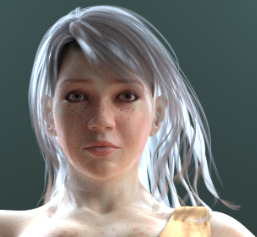
The free Sara for La Femme for Poser. A full-body makeover for the flagship female who ships with Poser 11/12.
Clarinet and Poses for Genesis 8.
WkD3D G8M Face Pack, great and non-generic male faces/heads. But note that “This product contains only the head morphs – no textures are included. The skin textures used in the promos are noted on each image.”
The DAZ Genesis 9 base figure is out, and also various packs of base shapes, expressions, essentials etc. It was said in the webinar that if you can run existing HD figures then you should be able to run G9. Also apparently requires the very latest DAZ Studio.
Landscapes:
Some basic Grass for Poser, as a small square prop. Flink’s Grass would usually be my go-to, but this may be useful for tiling in the distance or for a large low-poly soccer pitch.
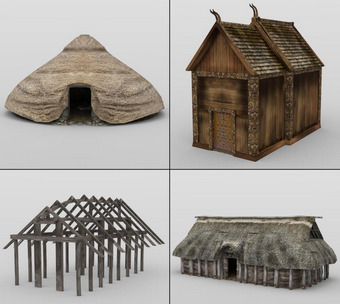
Viking Town: Set 3. Old VanishPoint content, but still able to look OK at a distance. Also useful for Anglo-Saxon scenes, as the hut buildings were often much the same.
Underwater:
ShaaraMuse3D’s new Photo Plants: Plants of the Sea. Sea-grass for your underwater scenes.
Underwater reefs by RaffyRaffy, sadly only for Blender and not Vue.
Animals:
Songbird ReMix Parrots Vol 6 – Amazons of the World 2 for Poser and DAZ.
Love A Cat for the HiveWire Housecat and Hivewire’s Dawn base female figure.
Mutton, a stylised ram (sheep), perhaps especially suitable for a scene that looks like a stylised stop-motion scene.
Historical:
Viking Warrior’s Horn Helmets for Genesis 8.
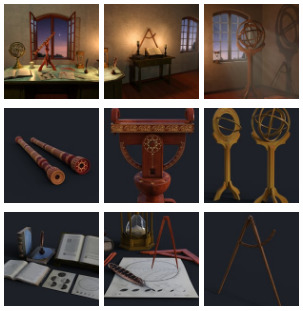
Renaissance Astronomy Room, complete with the relevant papers, tools and so on.
Jolly Roger Pirate Ship for Poser and DAZ. Updated for 2022.
A free 1777 Musket, French Napoleonic type.
1970s glam-rock boots, Wedge Platform Boots for G8F.
Utilities:
AutoLoad Creator for DAZ Studio. Use a simple UI to generate scripts that will autoload items onto a figure. Looks useful for content vendors, who can thus supply standalone scripts that can reproduce their promo images for users. Would be great to see this also extended to lights and cameras and render-settings.
AutoSave for DAZ. A simple “save every…” tool.
A free DAZ Studio UI layout Industrial Layout.
A free DAZ script to List Products Used in a scene.
Camera Tracking Importer for DAZ Studio – HitFilm Composite Shot.
Regroup for Sketchup. UnGroup models, fix their axis, re-group. Might be useful for fixing badly-made models with good geometry, before getting them out to an .OBJ file.
A Photoshop Action to cleanly cut out Dream by WOMBO AI images and auto-heal the curved corners.
Tutorials and more:
Digital Comics Creative – volumes three and four. 100 pages packed with information and examples. This double-issue combo volume is aimed at those who want to use Poser to make line-art for comics and also make more storybook type pictures that emulate hand-drawn and watercolor. Also covers filters, and has a well-researched section at the end surveying the possibilities for mo-cap for comics production.
Making an Autofit Clone and Shape for Genesis 9. A basic starter tutorial.
Using Poser Constraint Groups for animation, a short tutorial by Nerd3D.
Scene Power Building: How to Quickly Build Content-Rich DAZ Studio Scenes.
Digital Art Live’s YouTube Channel is changing. Old videos are gone, and many new videos are coming. Be sure to subscribe.
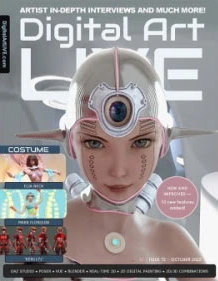
Digital Art Live magazine #72. Newly expanded, with freebies, ten new additional features and 108 pages. The theme this month is “Costume”, with a focus on fun and futuristic clothes and an Elia Neck interview.
That’s it for the October survey.
Changes at ShareCG
Changes at ShareCG. Mostly a home for freebies, but some also try to sell there. For content sellers…
“Due to the high cost of sales processing, the minimum price of a new (or updated) upload[ed product] will be set to $5.00. In addition the maximum discount was reduced to 50%.”
“The above change will set the minimum selling price, at the highest discount, to $2.50”
Seems fair enough. But they go on to say that even $2.50 “is too low to our opinion”. So presumably they would like to see a discounted minimum-price being set higher, in order to cover their processing costs.
Mission to Minerva
KitBash3D’s new art challenge is “Mission to Minerva”. Entrants get a… “free, 3D asset-kit filled with everything a spacefaring explorer needs” with the aim of creating a space colony in “concept art or animation”. Prizes include “NVIDIA RTX 4080 graphics cards, Wacom Cintiq 16” and more. Deadline: 2nd December 2022.
MMD to DAZ
By accident I found the freeware MMD to DAZ, v2 (2019) plugin. May require Microsoft Visual C++ 2015 Redistributable installed in Windows, which all but ancient dinosaur PCs should already have. Lets you import .PMD (older MMD) and .PMX (newer MMD) Miku Miku Dance figure files, apparently with the proper textures and bones, shaders, and toon outlines. You can also apparently drag and drop .PMX files onto the DAZ viewport.
Basic tutorial video: MMD Importer for DAZ Studio.
The other MMD option is said to be: Blender importer > FBX export (optionally also with dance motions) > Poser 11 import > save as .CR2 from which you can also take it to DAZ Studio. There may be other, perhaps better Blender importers by now, I haven’t made a huge search for them.
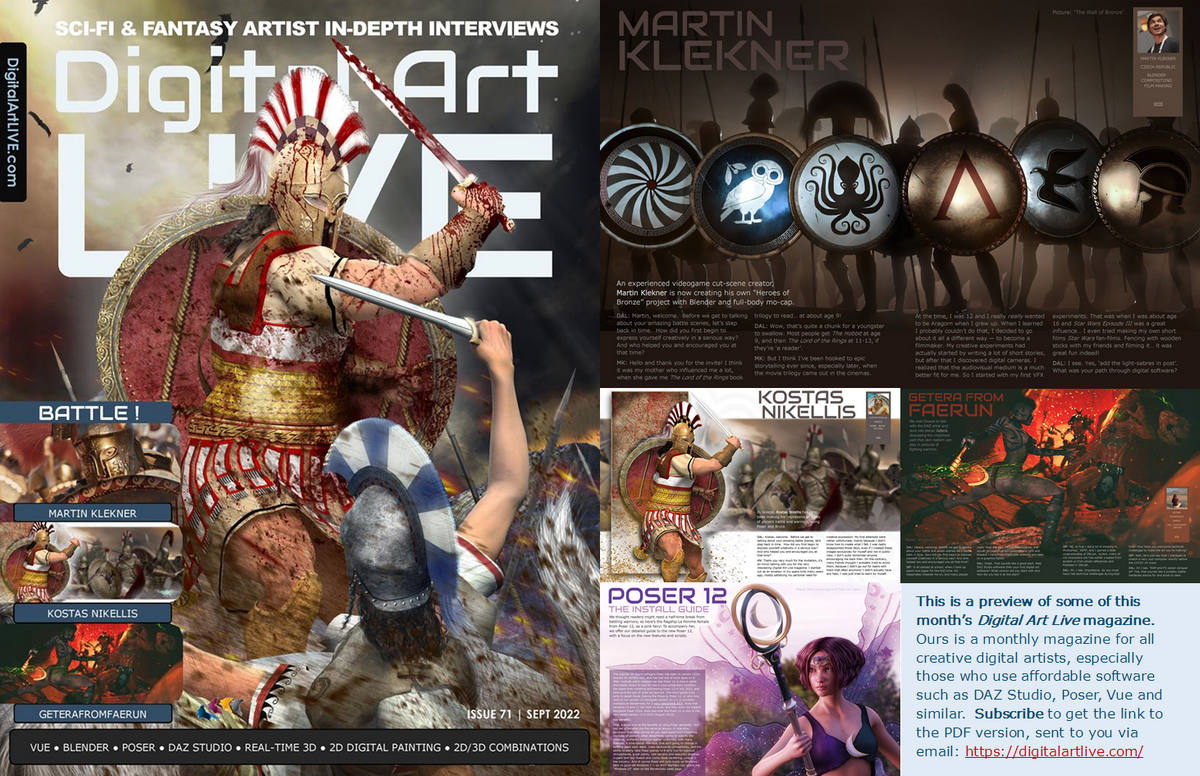
Out now, Digital Art Live #71 – “Battle”
Now available, free on Gumroad, the “Battle” issue of Digital Art Live magazine. Also has a 12-page centre section on the Poser 12 software, to give some light relief in the middle. And a two-page technical primer on Poser-to-Vue.
DAZ Freebies page updates
The DAZ Freebies pages has updated.
Ninive 6 Starter Bundle has Beach Wave Hair for Genesis 2, and a set of Capsces poses (always quality).

Keiko 6 Basic Poses, suited to thin toony Genesis 2 figures.
Tale Hero Textures are nice, but require the Sarsa/Val3dart “Tale Hero” (not free) for Genesis 1. The shirt has potential, for hobbits.

ClipDrop
An interesting new re-lighting service, ClipDrop – Relight. Requires a 2D picture-upload, and you then get “as-if 3D” real-time relighting.
Animated demo:
I’m not sure how well it would work with a picture that doesn’t look like a head-and-shoulders passport photo.
I’m guessing it may also be flummoxed by wild Poser/DAZ stuff, such as an all-action hero cyber-elephant wearing goggles, posed against a complex cyber-city background.
Doubtless this sort of capability is coming to desktop software in a month or two, if it isn’t here already in something I haven’t heard about yet. But this is a nice online demo of the capabilities.
By the way, here is the “Click to replay” code, for the above demo. A few lines of simple HTML for Web pages. I’m surprised people go overboard with massive javascripts just to add a simple animated .PNG control…
Working in Opera (Chrome), Brave (Chrome) and Pale Moon (Firefox). You’re welcome.
Digital Art Live STUDIO
Most readers of this blog will already also be members of the free Digital Art Live STUDIO forum. But if not, there’s the ‘joining’ link. It’s a more Facebook-like forum, not the old type.
Release: AccuRIG 1.0, free
Reallusion have a new free “automatic rigging tool” for 3D characters. Equivalent to Miximo, AccuRIG 1.0 users load a T-pose or A-pose figure and apparently get back a 19-joint .FBX with…
“full-body and finger rigs for biped characters”
Seems to be genuinely free, and independent of the rest of the costly suite of Reallusion software (although it can interface with Reallusion’s ActorCore system).
No mention of face or toes rigging though. So I guess mostly aimed at quick auto-rigging of “low-poly NPCs”, of the sort needed for games. I’m uncertain how many auto-riggers gamer developers already have, but I’d guess it’s not zero. Also, I don’t see any mention that the rig can take standard .BVH mo-cap motions, or your existing iClone motions. But I guess Reallusion will hope to sell new motion packs for the figures.
It’s Windows desktop software that you download, and then ActorCore “free registration” is needed for any sort of export from it. Might be worth trying, to see how well it can do, say… the free Big Buck Bunny rabbit figure from Blender. And then how well that moves in DAZ / Poser, and if .BVH motions work.
But otherwise Poser and DAZ people probably have enough in their runtimes to provide the standard extras needed for a large scene, without having to go all around-about via the .FBX format.
Soon, a free ‘temporally stable’ AI denoiser
Pixar’s RenderMan 25 will for the first time feature its in-house AI denoiser, and this is “temporally stable”. Translation: when run on animation frames, this de-noiser is stable from frame to frame. When the frames are run as an animation, there’s no strange wavyness, jitter, or edges popping from sharp to blurred and back.
The devs and artist at Pixar report this feature reduces render times “two to four” times, and it also “has CPU and GPU implementations”.
But ‘what use is this to hobbyists’, you might ask. Ah, well… there will be a free non-commercial edition of RenderMan 25 by the end of 2022. The free version is reported to lack only RenderMan’s “XPU” feature — which is Pixar’s “new hybrid CPU + GPU rendering engine” that many are calling the future of high-end rendering.
Thus it sounds to me like hobbyists could have a pro-level ‘temporally stable’ AI denoiser, free and highly trained on 3D CG frames, by the end of the year. And presumably it will be able to process a folder of animation frames produced with other software. Poser 12, for instance, which has a superb Intel denoiser for stills — but this is apparently not “temporally stable” for animation.
Google is also reported to be working on an AI image denoiser, but it’s still in the Labs. Presumably this will be free and open source when it appears. Part of the larger NeRF from Google, a one-click quick image enhancer.
Kindle Fire HD – fresh OS, fresh apps
I cleaned my Kindle Fire HD (2017) tablet. In fact, a new fresh OS install and start over again. The Home tab’s Carousel is gone now, removed by Amazon. But it was jammed anyway, which was part of the reason for the fresh OS install.
New discoveries…
* DroidEdit. A Python code-writing tool for Android, with coloured text theme etc. On the Kindle Fire tablet version of the app store there’s only a paid version. The free version is only to be found on the Web Amazon app store, and once ‘purchased’ there it appears to be sent to your Kindle. But it never is. Oh well. No worries, as Archive.org has a Droid Edit Pro as a free .apk file to manually install. Not that I want to write code on a tablet, but if I gaze long enough at a script I can start to understand how it works. And in such a situation, I need the script to have pretty and consistent colour-coding. I’m a Brummie tinkerer who learns by looking at something that’s actually working, not from abstract ‘first principles’ and theory.
* The free Autodesk Sketchbook appears to be gone from the Kindle app store. But I had it in my Cloud library at Amazon in its £2.50 form and got it again from there. It’s also on Archive.org’s .apk stash as Autodesk Sketch Book Pro v4. Untested from Archive.org, but my old version works.
* No Clip Studio on the Kindle app store, but Archive.org has a 447Mb(!) archived copy of the app from November 2021. I assume this is the free .apk version, and you may well need to sign-in on loading it. Untested as yet. Can it perhaps be less annoying and fiddly than the desktop version? Let’s hope so.
* MediBang’s comics layout-maker MangaName is gone from the store, but can be had here. Although it may make a difference that I had it in my Amazon app library from years ago.
* No Krita on the Kindle app store. I vaguely heard they now have an Android version? But I’m not sure that would run on a Kindle Fire.
* No ToonArt on the Kindle store. I’ve only just discovered it. Such a pity it appears to require ‘face/head and shoulders’, and can’t toon-filter other things. Why is there no Photoshop desktop equivalent, I wonder? Perhaps there are software patents on the AI.
* No AIMP on the store, for playing audio and easy playlist assemblage, but that can be had free from the website.
* In Web search, I found that eTools has a dedicated app on the Kindle store. It’s getting to be better than Google for some types of search, especially hobbyist and professional technical information.
* Microsoft Teams was briefly available for the Kindle HD 10″ toward the end of 2021, but it’s now gone. At least, gone from the my model (2017). The page listing for it can no longer be found when you search the app store from the Fire, only Skype. Microsoft Skype installs, logs in and works fine. Of course, many workplaces now fetishize Teams, but you’ll just have to firmly tell them that you’re ‘Microsoft Skype only’.
Also of interest and found over at the Archive.org .apk stash…
* Pose Tool 3D. Definitely not Poser, and has ugly icons. But it works.
* LongShot, a long-scrolling screenshot maker + stitching app. Works, has a discreet narrow ad at the bottom of the main screen which is easily dismissed. Nothing more worrying than that from it, so far.
* Both Pose Tool and LongShot may benefit from the Open Source Media Merger app which automatically… “moves ../sdcard/DCIM/* and ../sdcard/Pictures/Screenshots to user specified folder”. Works fine. Takes a moment before the file is transferred to your chosen folder. Can be turned on and off.
* Four ‘vintage camera effects’ apps were tried, but all failed. The Open Source VectorCamera also failed, even the latest from the maker’s site. Wrong type of camera?
* The old Samsung Paper Artist app also failed. But it’s from a decade ago, now.
* I couldn’t find a free pixel-art / voxel-art app that also offered an isometric view/grid. Just ‘icon-maker’ type apps.
* Surprisingly, nor are there any fractal creation apps on the Archive.org .apk archive. Possibly they’re too computationally demanding for Android? Or maybe they just have the sort of obscurantist names that the desktop software has, so I can’t find them?
* No Carousel replacement, that simply does “Newly-arrived documents + cover thumbnails + sliding carousel” and then launches the selected item. Such a thing does not seem to exist.
What’s New in July/August 2022
Time for another survey-pick of what’s new in content for Poser and DAZ, since it’s been a month now since the last one. I’m looking here at the tail end of July and most of August. As usual, freebies are listed only if “commercial use”, and there’s no “HD” stuff. Fan-art is listed only if obvious, such that you would not think to try to use it in a paid comic etc.
Science-fiction:
Colony Motorbike with both Firefly and Superfly materials.
A usefully generic Worksuit for G8F. Could probably be made silvery for a more futuristic feel, and could then serve as a rider suit for the Colony Motorbike.
Moonbase Wig for G8F. Jerry Anderson’s UFO TV-series fan-art, but obviously so. Also a MoonBase Uniform DS Texturing guide.
A cute little free retro Spaceship Landing Craft.
The inhabitant is probably Shooting Star. I assume this isn’t direct-copy J-pop / idol fan-art, but I guess it might be close.
Photo Props: Asteroid World. Hi-res, quality texture and modelling.
Wastewater Area. A nicely done ‘vignette’ area. Looks useful, in combination with similar DAZ settings.
Jail Talks. A grim high-security prison visitor centre. Could probably be given a more clinical white makeover, for a sort of ‘future madhouse’. See also the generic new XI Modular Futuristic Prison.
Taisha for Genesis 8, possibly of interest to classic Spock/Kirk-era Star Trek fans, as a base for re-creating the character of Communications Officer Uhura, for fan-art purposes.
Fantasy:
Blood Omen for Genesis 8. Note that this is “a small creature-feature material pack” with four materials, not the impressive figure on the main promo. Still, these kind of unusual MATs are always useful.
Medieval Wagon Train, with implausibly large mega-wagon which puts it in the fantasy category. Probably hauled by dragons or trolls.
Amun-Raw Mummy for Genesis 8. An Ancient Egyptian ‘Living Mummy’.
Storybook:
Schip, looks very suitable as a storybook boat for a group of children and/or animals.
Simple dForce Summer Pajamas set.
A free G8 piggy-back paired pose set, which might be adapted for adult/child.
A cute Star Armchair for DAZ Studio.
Songbird Remix Finches of the Caribbean Add-on. A little free pirate hat for the new Finches of the Caribbean Songbird pack.
Toon:
Toon aircraft in .OBJ.
Cute flying Robot and Friends for DAZ.
Characters, poses, hair, expressions:
25 Expressions for Nursoda’s Eepo.
20 Expressions for Nursoda’s Doctor Pitterbill. Both Eepo and Pitterbill have custom face-rigs, so they can’t just take standard V4 type expressions.
Stylish Hair Mega Bundle. An appealing if expensive set, though what we really need are “looks nice + renders really fast” sets. But is it even possible to make nice hair that renders really quickly, unless it’s a displacement-mapped skullcap or has heavily been run through Scene Optimizer?
More free RAV Fredda Soft Fashion Poses Fredda. May require the paid Fredda, newly released in a new version.
Another catwalk animation set for G8F, this time with bobble… “add an animation of a female chest and change its intensity”.
A usefully generic newsreader-type dForce male suit.
Full urban hipster beard and hair. Possibly also useful for steampunk airship captains, ancient gods etc.
Animals:
Kitten For Cat Zeus. Cat Zeus is now only at Render Hub, along with the kitties.
More DAZ Dog 8 Animated Motions.
Landscapes, scenes:
dForce Dutch Milkmaid Outfit for G8F. This seems to belong more in “scenes”, as it’s a vital part of this sort of ‘old master’ painting of interiors. Purchasers of this may also want the new Studio Portrait Lighting Essentials for iRay tutorial set.
PW Mandrakia Island, a complete Greek Islands tourist resort. Really, it looks like everything’s here.
Vegetable Plot and Garden Flowers – Canterbury Bells for Daz Studio.
The Mount Olympus for DAZ Studio.
Sand and Beach Pebble iRay Shaders. Fine sea-grit and ocean-washed pebbles.
History:
Ancient battles MDBD Blood ‘n Dirt Bundle for DAZ. As geoshells, though.
Ancient Roman Simple Plebeian Domus. Generic Roman house, which might build out into a small district.
Ancient type dForce Angel Outfits. Possibly not all that authentic, but this looks like a good starting point for runtime-bashing. Great wings.
On ShareCG, a new flotilla of excellent sailing boats as .OBJ freebies. Boat06 is especially nice.
dForce U.S. Cavalry Outfit. See also Stonemason’s new Outlaw Alley Wild West town.
Agent civil 1940. Low-poly, accepts Poser M3 presets including face morphs. Good for Lovecraftian ‘Cthulhu Mythos’ type scenes.
Classic Second World War American Tank and Texture Pack.
1940/50s British Leyland Hippo Flatbed Truck and military version. For Poser.
1940s and 50s Vintage Vending Machines.
1950s American Diner Waitress outfit for G8F. A more modest and ‘home on the range’ top is in the new dForce MK Strapless Tight Dress pack.
Free, retro early 1960s Strand hair 2 and 3 for Genesis Females. Which may suit the waitress outfit.
Free 1930s-70s Hooded Nib Fountain Pens.
Later in time, and also free from the same maker are Disposable Ballpoint Pens.
1960s dForce Hippy Ponchos for G8F. Also new Hippie Dance Poses.
A free 1970s style Tufted Lip Sofa.
1970s Table Football.
Shaders, materials:
Universal Glow for Poser 11 and Poser 12, with light ‘spillover’. With Photoshop Action and full PDF manual.
A set of iRay Frosted Glass shaders.
Sand and Beach Pebble iRay Shaders.
Scripts and Add-ons:
Python script to disconnect all bump maps, for Poser 12. Also comes with matching render preset. The idea is to quickly get clean grunge-free line-art (only) from a Firefly render. May also be useful for Poser-to-Vue, since bump-mapping may not even be visible in a very big scene.
Bone Minion for Genesis 3 Poses Bundle. Apparently an on-the-fly pose converter. Try to load a non-G3 pose to a G3, and the script steps in and auto-converts it. Untested, but I assume it works.
SimDataSaver for Poser 12, specifically for Dynamic Cloth. “Always wanted to be able to save the Dynamic Controls Data as a Simulation pre-set? Now you can.” Sounds handy, if you use that Room in Poser.
Light shadow-blurring script for Poser. One-click to add soft ray-traced shadows to all your scene lights.
mcjHelpMeAssembleThisMachine, now in version 2, released 2021. Helps you “precisely position an object onto another object” in DAZ. Also updated, the related mcjLinks.
MCJ’s Neural Nets. Apparently with this you can train DAZ figures to auto-animate, using an AI. Now with a new Mac version. Updated a while ago, but I’ve only just noticed it.
fSpy Project Importer. Seems to be a way to import a Blender scene and also have your cameras match up in DAZ? Nice to see people wanting to go from Blender to DAZ, rather than the reverse.
A script to automatically create a DAZ ToolBar from a directory/folder of scripts.
Tutorials and magazines:
Free, Digital Art Live magazine #70 (August 2022).
Brian Haberlin’s Hellcop comic, made with Poser. About to conclude its second story-arc.
Studio Portrait Lighting Essentials for iRay as a tutorial webinar.
Poser to Vue, a quickstart guide. A more detailed guide will be in the next Digital Art Live magazine, along with a look at Poser 12.
Add an overlay on any existing texture in Poser.
Add tattoos and overlays on characters in Poser (may be out-of-date in parts).
Some practical tutorials for Poser figure rigging (may be very out-of-date in parts).
That’s it for now. More toward the end of September. As usual, if you like what I do here, please consider becoming my Patron on Patreon.
Scene shadow blurring scripts for Poser
One-click to improve your scene render in Poser! Poser Python scripts to instantly switch your scene lights to use softer ray-traced shadows, or to switch back again to the default Depth-map shadows. Working in Poser 11 and 12. In just one click, they save you having to fiddle around with each of the lights to turn on softer shadows across a scene.
Note that you can also soften shadow intensity manually, with the dial found on Light / Parameters / Shadow.
In both scripts the shadows are softened from the defaults (defaults = 0.0 for Ray-traced, 2.0 for Depth-map). Here the softening is increased to 6, but you may want to go to 12 or so. The free PASS Poser watercolor shaders on ArtStation Marketplace work best with even higher shadow blurring.
Change the script’s “(6)” to the shadows softness setting you want. If you want a full reset script, just set the “(6)” on the second script to the default (2) setting.
Set Ray-traced Shadows:
|
1 2 3 4 5 6 7 8 9 10 11 12 13 14 15 16 17 18 19 20 21 22 23 24 25 26 27 28 |
# SWITCH TO SOFT RAY-TRACED SHADOWS FOR YOUR POSER SCENE # A small script to have all lights in a Poser scene move from using Depth Map Shadows # over to Ray-traced Shadows (with SOFT shadows set at 6.0). All scene lights are # assumed to be on and casting a shadow of some sort. Script is tested and working in # Poser 11 and Poser 12. # # Also boost sample size when rendering, for less grainy shadows. # You can also soften shadow _intensity_ with the dial on Light / Parameters / Shadow. import poser # Tell Poser we expect a scene to be loaded. scene = poser.Scene() # Get a list of lights in the Poser scene. lights = scene.Lights() #Run the script on all lights in the scene. for light in lights: # For some reason this old line needs to be above SetRayTraceShadows - or the switch over won't work. light.ParameterByCode(poser.kParmCodeDEPTHMAPSTRENGTH).SetValue(1.0) # Ok, now we can set the Light to cast Ray-traced shadows. light.SetRayTraceShadows(1) # Now we can set the amount of softness for the Ray-traced Light's shadows. # Note that here we do not use SetShadowBlurRadius() but rather SetShadowRaytraceSoftness() light.SetShadowRaytraceSoftness(6) scene.DrawAll() |
Set Depth-map Shadows:
|
1 2 3 4 5 6 7 8 9 10 11 12 13 14 15 16 17 18 19 20 21 22 23 24 25 26 27 28 |
# SWITCH TO SOFT DEPTH-MAP SHADOWS FOR YOUR POSER SCENE # A small script to have all lights in a Poser scene move from using Ray-traced Shadows # to using Depth Map Shadows (with shadow softness at 6.0, from normal 2.0). All scene lights # are assumed to be on and casting a shadow of some sort. Script is tested and working in # Poser 11 and Poser 12. Also boost sample size when rendering, for less grainy shadows. # # Also boost sample size when rendering, for less grainy shadows. # You can also soften shadow _intensity_ with the dial on Light / Parameters / Shadow. import poser # Tell Poser we expect a scene to be loaded. scene = poser.Scene() # Get a list of lights in the Poser scene. lights = scene.Lights() #Run the script on all lights in the scene. for light in lights: # For some reason this old line needs to be above SetRayTraceShadows - or the switch over won't work. light.ParameterByCode(poser.kParmCodeDEPTHMAPSTRENGTH).SetValue(1.0) # Ok, now we can turn off Ray-traced shadows, if they are on. light.SetRayTraceShadows(0) # Now we can set the amount of softness for the depth-map shadows. # Note that here we use SetShadowBlurRadius() rather than the ray-traced SetShadowRaytraceSoftness() light.SetShadowBlurRadius(6) scene.DrawAll() |
Especially useful for soft indoor “old masters” type portraits, not so useful for hard-edged sun-baked beach scenes.