Clavicula 0.9.9.5, a new release for the free and innovative modelling software.
And in the comments, “export renders with a given screen resolution” may be coming by the end of 2023.
Clavicula 0.9.9.5, a new release for the free and innovative modelling software.
And in the comments, “export renders with a given screen resolution” may be coming by the end of 2023.
A brief note on Raffael for Poser, for the benefit of future searchers. I didn’t know this existed. Raffael is a flexible ‘base figure’ with several unique character morphs, and his Renderosity store page says he now ships free with Poser 11. He’s quite low-poly, but looks pleasing and ships with a great many sub-morphs.
To load after install, he’s not under !Raffael or Raffael or 3D Dream (the maker), in the Library listing. Actually buried deep, under…
Library | Figures tab || Figures folder | Raffael | 3Dream | Raffael
Also loads in DAZ Studio…
Poser | Figures | 3DDream.
To make the most of this freebie you should install his vital Raffael – Freebies collection 1, which among others includes neanderthals (male and female), a stylised doll, and two unique youth presets (unique for Poser).
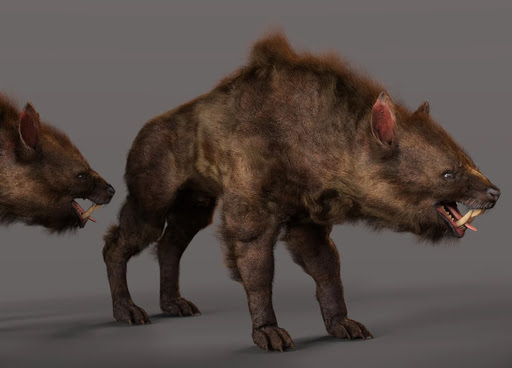
Here we see my quick render of the Neanderthal with Creepy Kid hair. Backdrop photo by Toby Speight.
After install, the freebies are then all found under Poses | ! Raffael with a good range of figure types as one-click morphs. There are also MATs and more, all nicely organised. Renders in SuperFly with no problems. Has a paid but rather fabulous male skin pack along with others.
Takes Hiro 3 action poses, I found, more or less. But make sure you first save a T-Pose to get back to. There’s no T-pose in the freebie pack. Elbow crease-bending is definitely not great on some poses, like many older figures. Otherwise anatomically correct, though.
Commercial renders OK on all content.
Raffeal appears to have a completely unique face rig, since none of my existing expression presets will move it at all. There are many face part control dials, but no dials for expressions (happy, sad etc).
What this (now free) figure totally lacks is clothing, other than a basic one-click photo-mapped body suit (to remove this, reload the skin MAT in Poses | ! Raffael). And there’s no CrossDresser licence for Raffael either, so clothing can’t be had that way. Only by wrestling with the Fitting Room. Ugh. Such a pity… what a waste of a nice friendly figure. There is one basic clothing maker’s ‘merchant resource’ for sale on Renderosity, though, for making basic clothing.
In the last month the PD Howler software (aka Dogwaffle) has been accompanied by ten new YouTube videos showing the new 3D capabilities in the latest version. The latest one is on working with DAZ Studio exports.
There are a couple of worth-having male freebies on the DAZ Store freebies page, at present. The boots are especially useful generic ‘superhero’ type boots, if you want to get away from ‘fat clomper’ type of boots and toward something more stylish.
After install, the Boots for Genesis are found under: Genesis | Clothing | GnBoots.
Tested with Genesis 3 Male and Genesis 8 Male. Just choose Autofit | None and the boots fit nicely.
Obviously you’re going to ‘kitbash’ (or for 3D, ‘runtime bash’) with this, to make something unique. As I’ve done here. I don’t know of anything that’s specifically designed to work with the boots, and Ravenheart didn’t then make Genesis trousers/pants of a matching length. I can’t find any freebies that were made for the boots, and you only get one MAT with the boots themselves.
The base parts of ‘Sci-fi Guard Outfit’ for G8M seems to kind-of-work with the boots. But as you can see on a G3M there’s poke-through and you’d need to make an opacity MAT. I’ve quickly combined the boots/suit with other random stuff by grabbing some extra pauldrons and gloves from other content packs, and added the Armarni hair. Not great, but could work as a starting base for more character development.
The Windows desktop sculpting software Aartform Curvy 3D 5.0 final is now available, having been in beta since November 2020. Cost is $99 (around £92 in the UK), and there are further discounts available if you purchased an earlier version (check your email).
An important new feature in 5.0 is adaptive subdivision on the meshes. There’s no video trailer yet for 5.0, but the YouTube channel will likely have one soon.
More official details about Poser 13, due for release soon.
* The Poser 13’s SuperFly rendering will use “Cycles X” from Blender.
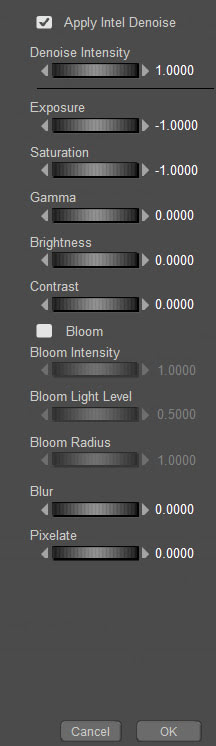
* New “robust light bloom” option in the PostFX module.
* New “tools for morph and weight mapping transfer between figures”, for content creators.
* Unspecified “improvements to Talk Designer and Walk Designer”.
* Newly “added support for HDRI domes”.
Last I heard, in April 2021, Blender’s Cycles X was “NVIDIA-only”. On looking into this again, I see that AMD (HIP) support was added November 2021.
The open source Dust3D is alive again, after a long hiatus during the Covid years. The 1.0.0 release candidate 7 is now available. Dust3D is a…
“cross-platform 3D modeling software that makes it easy to create low poly 3D models for videogames, 3D printing, and more.”
Relatively easy, free, and under a full MIT open licence. Training Playlist on YouTube.
A new release for GMic, aka G’Mic as GMic v3.2.1. Changelog. Highlights I noted are…
1) A new 3D handling feature, though possibly command-line only?
Command | extract_textures3d
“This will help you extracting textures from 3D objects directly as 2D images, that you can save or process and remap on the object.”
Probably not a replacement for dedicated tools used to get a texture atlas and/or seam templates, but it may be of interest to some.
In Poser Pro, a FBX or Collada export can also get you a single texture map (a ‘texture atlas’), output alongside the FBX output. The problem with a ‘texture atlas’ is that it then prevents drag-and-drop re-texturing of parts. It’s all or nothing. DAZ Studio also has a ‘texture atlas’ output command somewhere or other, with the location depending on which UI layout you use.
2) Better voxelisation of 3D…
“Improved the triangle voxelization algorithm even more. G’MIC is now really a quite nice tool to voxelize 3D meshes!”
Could be useful if you want to have your OBJ export from DAZ/Poser look like a hologram and, once it’s back on Poser or DAZ, put on transparency and glow? But don’t expect to animate afterwards.
3) Basic subdivision of 3D object meshes. Again, you can do this natively in Poser and DAZ.
4) A new filter, to be found in ‘Testing’…
Garagecoder | Upscale [Recursive2x]
Appears to be a sort of ‘intelligent sharpening’ that preserves details better on low-res images? Again, you’d probably do this with AI Gigapixel or online with Base Ten or SWIN, though perhaps this (I’m guessing) is optimised for low-res images?
As always, beware of updating. Because if someone changed the name of their filter, then that breaks your custom preset. For instance, last summer GMic’s long-standing Artistic | Comic Book filter had its functionality updated and the name changed to Comicbook. All my custom presets based on this filter were gone in a flash, and some of the filter’s needed switches and sliders had also been removed. Filter makers really need to be told: “If you’re going to tinker to that extent, then keep the old filter the same and call your new one Comicbook_2″.
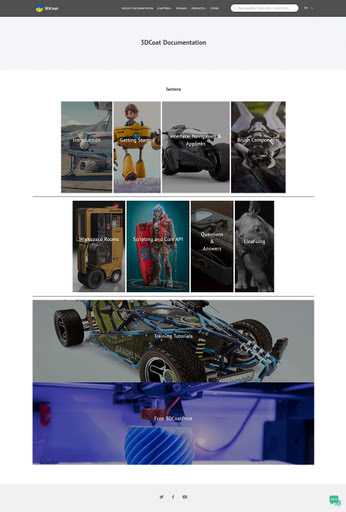
3DCoat 2023 has been released. Not a mega whopper-topper-wow! release, it seems. More of a ‘lots of smaller improvements and bug fixes’ release…
* Much quicker when doing booleans and manipulating really big meshes.
* Various topology, UI and viewing improvements and bugfixes.
* Much easier drag-drop linking into Blender, with the Blender AppLink…
“just install 3DCoat and Blender, follow what 3DCoat tells you… and then you may easily drop assets to Blender”
Their front page is still on 3DCoat 2022.x, so I don’t yet know if the system specs have changed.
The Marketplace changes are rolling out at Renderosity. Quite subtle so far, but some nice ones. For instance it’s now easier to tell if a coupon won’t apply to an item. There’s a little red block indicating “no coupons”. If it’s green, coupons are good. Very useful.
The WishList feels nicer and less cramped, but I already created a UserScript to remove the dangerous “Clear List” button (I never want to clear the entire 760-item list), and to make the ‘% discount’ font much larger. It’s a pity you have to scroll back to the top of the WishList page, to move to the next page. Logically, the ‘advance to next page’ option should be at both the bottom and top. There still no way to save a single-file backup of the list.
Gone is the WishList’s eye-boggling total of what it would cost to buy the entire list at one go. Which is a pity. It might have been kept when I filter by Vendor, so I could see what it would cost me to buy all of my missing stuff for that one vendor.
My Wishlist – lowest price has a different URL now. It would be nice to filter the WishList by: On Sale / Coupon Accepted / Lowest Price first. But that can’t be done. Instead you do Lowest Price and then scan by eye for the ‘Coupon Accepted’ icon. Yes, I know… I’m cheap, and I like it cheap when I buy.
Various Marketplace URLs have changed at Renderosity, along with the new store improvements. Some will redirect, some only redirect to the home page. The Marketplace item and Vendor store URLs have all changed, but have re-directs. Vendors are now at ../marketplace/vendors/NAME. The address for the general Lowest price page has also changed. Always worth a look to see what’s slipped under $3, even if it’s not on your WishList.
The URL to buy Poser 11 is still the same. Still $52, a bargain for the power and unique/quick Comic Book and Sketch non-photoreal rendering. And you’re getting what was Poser 11 Pro.
Vital Python add-ons for Poser 11 such as XA – Toolbar are still there and for sale, but the seller Dimension3D seems to have lost the store images on many of his utilities.
Freestuff and Forums URLs appear unaffected by the URL changes.
Time for another round-up of the last month’s new goodies and releases for Poser and DAZ Studio users. As usual, only commercial-use freebies are noted, unless they’re fan-art so obvious that no-one would think of trying to use them commercially.
This post covers releases and items which caught my eye in mid January to mid February 2023.
Science-fiction:
A fabulous Hollywood-level dForce Space Jumpsuit for G8F. I’m assuming it’s not fan-art.
Astro Car, flying car models for Poser.
1971’s new Place of Screams for Poser, and also seperately for DAZ Studio. Looks good, and his modelling always renders nicely in Poser’s Comic-Book line-art.
A stylised Dragon Limousine for Poser. With a bit of a texture makeover it would be suitable for a dieselpunk world. And if you need Presidential outriders, there’s the new Thirties Streamline Motorcycle.
AutoBar with robot bar-tender. For Poser and DAZ. See below, for a link to a good new robot/cyborg TTS voice.
Fantasy:
Poizen’s new HelmZ for Poser. As .OBJ files, so can also easily go to Vue and DAZ Studio. Not to be confused with the older Helmet-Z series.
Poisen’s new HeartZ 3D Models for Poser. Again, these are different from his older CharmZ 3D hearts.
He also has a new BoneGarden set.
Storybook:
Scaffolding for 1971’s Roller House, a nice and unusual freebie. Could be paired with AnnieMation’s Fairytale Road Trip model.
Chull Clothes One set, for Nursoda’s new Chull figure.
BlenCon – Cozy Room for Poser Superfly. Nice to see Poser conversions of Blender models. In this case, a free ‘cozy room’ interior suitable for the start of a ‘once upon a time’ tale. There’s also a Part Two.
Just add a few of the free Bambi Chairs about the room.
Animals:
Nothing in toon or animals this month, but there are some free Thicker Sabers for HiveWire Big Cat, for making a sabre-tooth.
Characters, clothing, hair:
Gear Up from Coflek-Gnorg, generic army packs.
Free Scuba Diver Suit and Scuba Diver Fins and Hood, Mask and Snorkel, all for Poser’s La Femme.
Hr-253 from Ali, a new hair with many fits including V4 and La Femme. Also a texture set with shading.
Dynamic pants and top for Antonia, the free Poser figure.
MP Realistic Feet for Genesis 8.
Office Aniblocks for Genesis 8. Sitting and typing, opens drawer and so on.
Landscape:
Tanglewood Stumpery – Fairy Tale Tree Stumps, Dead and Fallen Trees for DAZ Studio.
Photo Props: Aurora Effect from ShaaraMuse3D. Seems to be a “simple plane set” rather than each prop being an array of planes.
EV Ocean FX. 3D ocean models for Poser, including a water-spout or sink-hole.
Historical:
Ken has his Royal Hawaiian for Genesis 3 and higher on Renderosity. Was at Hivewire. His Hawaiian Voyager, Weapons of Lua, and Royal Hawaiian for Dusk are also now on Renderosity.
Leudo, a coastal Mediterranean trader, 15th-17th century. Could be framed rather nicely in the bay, by the new Wild Dog Rose.
Marta, a free boat model in .OBJ.
A Ford Model T car from Cybertenko, complete with ‘comedy crash’ morph presets. The first affordable mass-market car, much used in the old silent comedy movies of the 1910s and 20s.
1910s-30s Deep Sea Diver for G8M.
That Yellow Seaplane, a classic 1930s/40s sea-plane. With interior.
Utilities:
The free DAZ to Blender Bridge updated and fixed.
A free G8F Pose Transfer to G1 Script for DAZ Studio.
Batch Tonemapper. Free… “Batch Tonemapper is a simple program allowing you to generate thumbnails for .EXR or .HDR files.”
And in 2D, another free Krita free brush bundle from David Revoy.
Tutorials:
50 Shades of iRay: Create Your Own Unique Fabrics.
Mesh Grabber Expert Guide: Powerful Manipulation of Meshes and Morphs in DAZ Studio.
The new free video tutorial How to set up dynamic clothing in Poser.
Automatic TTS speaking – the secret control codes! Useful for those who use text-to-speech voices. And for robot voices, CereProc has a rather good paid movie-quality one. For more basic but free ‘comedy bot’ voices, see here and here.
Ok, that’s it for now. More next month.
I made a 65,000 word Dictionary of British Pronunciation for the TTS freeware Balabolka, with pre-made IPA pronunciation tags alongside each word. It’s in Balabolka’s .BXT file format, which it can load and which can handle the IPA phoneme symbols.
Possibly useful for those using TTS for making clearly-voiced English tutorials or animations, using the British IVONA 2 voices, and who’re stuck on the pronunciation of a word that they can’t easily substitute. With this you can write freely, knowing that it’s unlikely you’ll have to substitute a dozen or more words with simpler or different forms that don’t quite express what you want to convey.
You can load it in Balabolka and then keep it on a tab in the background, for easy consultation. A good test is getting Ivona 2 Brian to say “mature” in a sentence. It’s very difficult unless you use the IPA coded tag.
For use with the abandonware British voices Ivona 2 Amy, Ivona 2 Ivy, Ivona 2 Emma & Brian. Neospeech Voiceware Bridget is also a very good ‘posh’ British voice, though after install will wrongly show up as ‘United States’ in the list of voice names. Most of the time these do a good job on their own, but sometimes you may need more precision — especially for short comedy animation — and the IPA tags give you that.
It seems rather odd to consider old-school text-to-speech software and SAPI5 voices, at a time when Poland’s ElevenLabs is doing such great things with AI-generated voices. But I’m always one to cherish old Windows freeware, and at present all the new AI voices are online and require a monthly/yearly subscription. So I was pleased to find an alternative freeware to Balbolka for desktop PC text-to-speech using SAPI5 voices. Many such voices are also now abandonware on Archive.org, the key companies having since been sold on several times.
Made in Italy, the DSpeech TTS freeware used to be fairly basic, but it’s improved enormously since about 2016. Though this is not a fact reflected in its rather basic 1990s-style download page, which you’ll have to overlook. This freeware is now in version 1.74 (spring 2022), It’s genuine one-man freeware, made in Italy, and is feature-comparable with Balbolka though a bit rougher in UI and Help translation to English.
The DSpeech download link uses only a .GIF button, so if you have a .GIF blocker in your Web browser, then you instead right-click the page and ‘View Source’. You should then see a live working link to the download in the HTML…
The English manual is included in the software. There’s no Windows installer, just unzip where you want and run it.
SCRIPTING: Beyond the usual control tags, DSpeech supports basic scripting including voice-recognition and script loops. Which is unusual. Apparently it can even read out VLCplayer movie sub-titles in real-time, in a chosen SAPI5 TTS voice and speed.
TAGS: The tagging menus make switching voices easy. There’s better right-click support than in the latest Balabolka for adding tags, though that’s not saying much. When you highlight a word in DSpeech, and add a tag, the word is not wrapped with a closing and opening tag, it’s deleted. Urgh! Having right-click is great, but… the rest of the tag insertion system is not good.
LOQUENDO: DSpeech is supposed to support Loquendo ‘voice expressions’ (laugh, sigh etc) via the Italian Loquendo 6 Italian ‘Paola’ and ‘Luca’ TTS voices, combining words with special expressive tags such as \_Laugh and suchlike. Later the tag syntax was changed to \item=Laugh in Loquendo version 7 voices. But while these v6 voices work fine in any DSpeech, and v7 voices work fine in DSpeech v.1.72.29 (December 2018, not the latest 1.74.x), their expressive cues no longer vocalise in DSpeech. You just hear silence.
Spanish Loquendo 7 voices (not 6) can however ‘express’ when used in Loquendo’s own Java-based TTS Director, which came with the Loquendo SDK. See YouTube for examples and useful links.
Regrettably neither the Loquendo 6 or 7 voices can even be played in the other TTS freeware Balabolka, though they do show up on its voice menu. It thus seems that properly-working Loquendo voices are limited to…
* Loquendo 6 (any voice) on DSpeech 1.74.x or earlier. Loquendo 7 not supported on the latest DSpeech.
* Loquendo 7 (Spanish) on DSpeech 1.72.29 (or earlier?), or Loquendo 7 (Spanish) on Loquendo TTS Director with SDK and Spanish pack.
The Spanish version 7 voices do however have ‘expressives’ that work fine with Loquendo TTS Director 7, which was Windows freeware which shipped with the developer/API/SDK kit. This success at least showed me that the problem was not with my PC or a 32-bit / 64-bit Windows clash, at least for version 7 voices.
Yet it’s strange. Obviously DSpeech could, at one time, play the ‘expressives’ in the Loquendo 6 voices. But, no longer, it seems. Switching back to an older DSpeech 1.72.29 didn’t cure the problem, but it did usefully fix the playing of the Loquendo 7 voices. I suspect that Loquendo 6 voices now have a 32-bit / 64-bit problem on 64-bit Windows, despite the player and voices both being 32-bit.
Loquendo TTS Director voices have a complete list of expressives in the C:\Program Files (x86)\Loquendo\LTTS7\data\voices\Soledad\SoledadGildedParalinguistics.sde file (change name for each voice). Open it in Notepad++ to see the list in plain-text. For instance, Soledad has the following, and obviously you can also mix and match and tone-shift…
\item=Ah
\item=Ah_01
\item=Ah_02
\item=Ay
\item=Ay_01
\item=Breath
\item=Breath_01
\item=Buh
\item=Buh_01
\item=Buuu
\item=Buuu_01
\item=Cataplum
\item=Cataplum_01
\item=Click
\item=Click_01
\item=Click_02
\item=Cough
\item=Cough_01
\item=Cough_02
\item=Cry
\item=Cry_01
\item=Cry_02
\item=Cry_03
\item=Ehm
\item=Ehm_01
\item=Epa
\item=Epa_01
\item=Hey
\item=Hey_01
\item=Hiccup
\item=Hiccup_01
\item=Hiccup_02
\item=Laugh
\item=Laugh_01
\item=Laugh_02
\item=Mhmm
\item=Mhmm_01
\item=Mhmm_02
\item=Mhmm_03
\item=Oh
\item=Oh_01
\item=Ohoh
\item=Ohoh_01
\item=Ops
\item=Ops_01
\item=Prrr
\item=Prrr_01
\item=Shhh
\item=Shhh_01
\item=Sigh
\item=Sigh_01
\item=Sigh_02
\item=Singing
\item=Singing_01
\item=Smack
\item=Smack_01
\item=Smack_02
\item=Sniff
\item=Sniff_01
\item=Sniff_02
\item=Sniff_03
\item=Snore
\item=Snore_01
\item=Swallow
\item=Swallow_01
\item=Throat
\item=Throat_01
\item=Throat_02
\item=Throat_03
\item=Uff
\item=Uff_01
\item=Ups
\item=Ups_01
\item=Whistle
\item=Whistle_01
\item=Whistle_02
\item=Whistle_03
\item=Whistle_04
\item=Whistle_05
\item=Yawn
\item=Yawn_01
\item=Yawn_02
\item=Yeee
\item=Yeee_01
\item=Yuhu
\item=Yuhu_01
\item=Yuhu_02
\item=Zas
\item=Zas_01
Easier to just paste these all in and cut out what you don’t want. Rather than wrestling with menu-based insertion.
VOICEWARE: DSpeech has support for reading with a VoiceWare TTS, but not for a vital aspect of the voice. The first version of the TTS VoiceWare voices (e.g. VW Bridget, British) had different inflections on words if you added ! ?! or !? (again, see YouTube for demo and useful links). But this feature of the voice is not supported in DSpeech. It is supported in Balabolka. So this is another deal-breaker for DSpeech.
CONCLUSIONS: Despite what at first glance seems to be DSpeech’s more intuitive right-click tag adding, Balabolka is on several counts the superior tool for longer-form editing. It properly wraps highlighted words in starting/closing tags, which is vital if you’re TTS-coding something longer than a paragraph. It also supports VoiceWare’s ! ?! and !?, useful for one of the best British voices.
I thus suggest using the latest Balabolka for freeware TTS scripting and recording, and the old Loquendo TTS Director + its Spanish voices for creation of vocal FX, pitch and speed-shifted to match the voice being used in Balabolka. Then embed these vocal FX as audio clips in Balabolka. This is not as ideal as having Balabolka support Loquendo (it refuses to even read their voices), but it’s a viable workaround.
The ideal would be to have a standard SAPI5 voice that was ‘expressives only’, for use in Balabolka. A sort of audio FX bank, that could be reliably called with a simple tag (such as \_sneeze etc). But so far as I can see, that doesn’t exist, other than by chopping bits from my Dictionary of British Pronunciation for TTS.
Finally, note that TTS Director only ‘sees’ its own Loquendo voices, and is therefore no good as a general SAPI5 TTS script editor. TTS can be done in Adode Captivate (used for super-Powerpoint ‘e-learning’ creation) and in CrazyTalk / Cartoon Animator, but the editing is not at all comparable to Balaboka.
Excellent clear British SAPI5 TTS voices for short animations and tutorials are Ivona Voice 1.6 Amy 22kHz (aka Ivona 2 Amy). The other is the less common Neospeech Voiceware Bridget (demo). Yes, they’re still robo voices, but I’d say they’re the most pleasing and human of the female British voices released in the 2010s for SAPI5. And you can’t argue with free and offline. No subscriptions or data-gouging needed (though Eleven Labs are the best, if you want that). Both voices are now free on Archive.org, and work with the free Balabolka. Here’s how to control them with some simple markup.
1. Amy can be controlled using the normal SAPI markup (SSML) in the Balabolka editor. She also supports phenomes (visimes) symbols, a prosidy markup tag, and others.
|
1 |
<phoneme alphabet="ipa" ph="ɺʡʜʑʢ"/> |
|
1 |
<prosody rate="-20%" volume="40">prosidy</prosody> |
|
1 2 |
You say, <sub alias="tu-mah-toe">tomato</sub>. I say, <sub alias="to-may-toe">tomato</sub>. |
2. Neospeech Voiceware Bridget however does not support phenomes, prosidy etc and requires the following XML tags to add pauses and emphasis…
|
1 2 3 |
Here we insert a very slight pause. Here <silence msec="01"/> we insert <silence msec="01"/> a <silence msec="03"/> <emph>very<emph> slight <silence msec="03"/> pause?! |
Add ! or ?! to inflect and emote a word at the end of a sentence…
|
1 |
gosh! |
|
1 |
gosh?! |
Also working as XML tags with Bridget…
|
1 |
<emph>emphasis</emph> |
|
1 |
<volume level="50">quieter voice</volume> |
|
1 |
<rate absspeed="-6">slower speed</rate> |
|
1 |
<pitch absmiddle="6">higher pitch</pitch> |
No closing tag is needed for the following milliseconds pause tag…
|
1 |
<silence msec="300"/> |
Incidentally, Neospeech Voiceware Bridget shows up in Balbolka as “VW Bridget English (United States)”, when she should be “VW Bridget English (British, upper class)”.
Old-school ‘robot voice’ Microsoft Sam on 64-bit Windows. Tested and working with the text to speech freeware Balabolka. Archive.org only has the 32-bit installers, which is no good for 64-bit Windows. This one has been extracted from the original voice resources and a new installer created (WinXP_TTS_Voices_v1.3.exe). Still useful for robot/computer voices in a 3D animation. I read that meme creators (presumably animated?) also find a use for it.
Also installs Microsoft Mike, again good for an old-school robot voice.