DAZ Carrara 8 and 8.5 now have free patches that translate the interface into German.
Tutorial: How to make a simple sphere glow in Carrara 8
How to make a simple sphere glow in DAZ Carrara 8:
1. File | New | Empty Scene
2. Drop a simple sphere primitive onto the stage. Keep it selected.
3. First we apply a basic texture to the sphere. To do this we go over to the General tab, over there on the right of the screen. There we click on “Preset”, in order to choose a texture for the sphere that will match the desired type of glow. I chose the “Blue Chrome” texture.
4. On the right hand panel, switch to the Shading tab, and click “Edit”. This will switch into Carrara’s Texture Room. Here we can see the sphere texture’s “Glow” channel, and we need to switch this channel from “Nothing” to “Texture Map”.
(Ignore that the screenshot shows “Normal Map” instead of “Texture Map”: I messed up the screenshot).
5. Switch back to Carrara’s main Assemble Room. On the right hand panel, switch to the Effects tab, and then tick “Enable” in the “Aura” panel. Then click on the “Edit” button next to Aura. This will bring up the Aura settings window.
6. Your sphere should be glowing in the Aura setting window’s handy little real-time preview box (see screenshot, below). Click “Auto Update” in Rendering Mode, then slide the sliders to change the glow effect. Here I have the glow Radius at 70 (too high) and have ticked Distance Attenuation (meaning: adding the effect of light spillover, into the air around the sphere). I also have Intensity effect reduced, so that we can still see something of the original sphere texture. And I also changed the colour of the aura to match the sphere’s texture. When you have the glow looking how you want it to, then click OK.
7. Now switch to Carrara’s Render Room. Here I set an 800 x 800px render with Fast anti-aliasing. The initial render of the sphere will be almost instant. But then a little bar will appear at the top of the screen, preparing to overlay the glow effect. This may take a long time to run, even for a simple sphere. If it’s impossibly long for you, pressing Esc on your keyboard will stop almost instantly.
You can try to switch to a fast render preset…
But it hardly speeds up the slow application of the 3D Aura effect. The main render-speed killer here is having ticked that Distance Attenuation box in the Aura settings. A setting of 50 in Distance Attenuation is a good deal faster than 70, and yet still gives you something to add to with a glow layer effect later (when working on your final render in Photoshop). For a complex scene you might have to have minimal Distance Attenuation, and then add more glow later in Photoshop or (for animation) HitFilm.
Here’s my final render with an Aura | Radius | Distance Attenuation of 50…
And here is the same render with a bit of Photoshop enhancement, applying Alien Skin EyeCandy “Gradient Glow” filter to a circular selection (made just inside the rim of the sphere). The edges of the sphere are blended in a little by this Photoshop tweak, and there’s a more believable falloff of light.
(The Google Chrome browser can’t handle the subtleties of the glow banding, and will make it look rather ugly. Save the PNG and view it from your hard drive).
All in all, it’s way too complicated (iClone can make a sphere or any other object glow in about one second of work, and render it in real-time too). But it’s good to know spillover glow can at least be done in Carrara. For a more complex example see the Neon sample scene that ships with Carrara (Browser | Special FX | Luminescent Logo).
The other problem is that if the maker of the figure or model did not name things correctly, you have no way of finding the shader/material you need to glow. Sadly Carrara is not like Poser, where you can just ‘eye-dropper’ on something to find out what its material name is. Thus, though Carrara can do nice glows, the setup can be nearly impossible.
Carrara plugin: move prop to camera
DAZ Carrara has a new “Move to Camera” plugin, bringing to Carrara a wonderful feature that I used constantly in iClone. The $5 “Move to Camera” moves the currently selected prop or character to the centre of the current render camera. This means that, wherever your prop gets mysteriously placed on import to your scene, you don’t have to spend 10 minutes hunting it in order to grab it and bring it in front of the main camera. A few simple keystokes will re-position it front-and-centre.
Modern Times
The sci-fi corridors I surveyed here last week feature heavily in the superb sci-fi short Modern Times, from Ben Craig in the UK. The FX and sci-fi sets were done with Carrara, DAZ Studio’s ‘big sister’ software.
MODERN TIMES from BC2010 on Vimeo.
Hat-tip: Carrara Cafe.
Moonbeam 33
The Moonbeam 33, a gorgeous new retro-future flying car, over at Renderosity. Sadly it’s not in Poser or DAZ 3D form, but it seems there’s an .OBJ in the package.
Free webinar with a Poser expert
A free one-hour recorded-video webinar from Stefan Werner, Senior Software Engineer for Poser: “Getting the Most Out of Your Poser 3D Renders”…
“He demonstrates how to leverage the new and improved rendering features, including Subsurface Scattering, available in Poser 9 and Poser Pro 2012. Stefan also discusses how to optimize your render settings to master features such as depth-of-field, indirect light, and ambient occlusion. Learn why more isn’t necessarily better when it comes to rendering, and find the perfect balance between quality and performance.”
3D content survey: spaceship interiors
Here’s my survey of human spaceship interiors for DAZ Studio or Poser. There are a great many available, so here are what I think are the best.
I’ve avoided those that could too-easily double as a 20th century factory or a submarine interior, and the starship bridges and freighter/fighter cockpits. Mostly this is starship corridors…
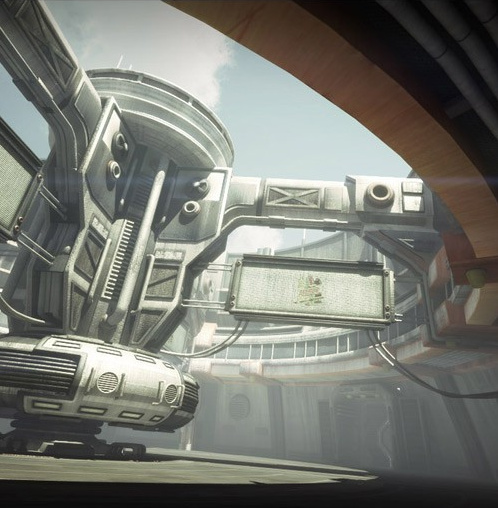
The famous Stonemason has a nice selection. His The Tin Can has a retro pulp-era feel to it, and Nightshift’s Argos Hangar can serve as a matching third-party addition for the Tin Can…
Stonemason also has his excellent new range of CryoTube and Sci-Fi Consoles, plus his new Sci-Fi CryoEnviroment and Sci-Fi Corridor 2013 to put them in…
Stonemason’s new sci-fi content could match nicely with this…
Stonemason also has earlier spaceship / space-station corridors: the 20th century industrial style The Arc; the wide vehicle-friendly Skyline Hall; the flexible (though overused by now) Dark Star; and the smooth Mass Effect -style Utopia Deck C (seen here)…
Saros 7 has a nice 1970s retro look to his corridor…
Applejack’s AJ Research Center is similar to Saros 7 and might complement it…
Starcarrier and Powerstar Final offer a good shiny hangar deck with depth. They match well with the well-known Vanguard and Stinger smaller spaceships.
LuxuryStar can ship your elite passengers to the stars…
With its cathederal-like windows the GIS Nova, part of the GIS series, could make a good observation deck for that Thruxian alien you have on board as your mystical star-navigator…
The GIS series also has a good flight deck called GIS Terminal, which has an add-on Future Flight texture set…
Andromeda Station is very affordable, but you may need to swop out the system-intensive lights and fix a few materials…
Hull Breach is an unusual space-ship interior from Coflek-Gnorg…
And finally, Dreamland’s Movie Sets Hypersleep Chamber has nicely designed sleep-chambers, though it has the odd addition of a 20th century lavatory. Don’t 22nd century deep space-o-nauts have bio-engineering in them that removes that need?
That’s it. Happy voyages!
Learn DAZ Carrara 8.5 – new training video
Infinite Skills have a new Carrara 8.5 Tutorial Video. 11.5 hours of training to help you get started with the latest version of Carrara, DAZ Studio’s ‘big sister’ software.
UK users may find it cheaper or as-cheap on Amazon.
The Lost World
Alessandro_AM has just released his new The Lost World for DAZ Studio or Poser…
“The Lost World is a complex environment specifically designed for DAZ Studio 4.6+”
…but note that he kindly also includes a Poser installer.
Stickman for DAZ
Stickman is a new addition to the DAZ character range, just released. Comes with a variety of accessories. Useful for custom stock pictures for business promos and in-house / specialist trade magazines.
Maybe it’s just the render but he looks a bit plastic, and not quite as cute/attractive as the similar iClone Mr. Pose character…
Tutorial: export an FBX from DAZ Studio
Part one of the tutorial is more generally useful for those who need to export FBX files for non-standard toon characters from DAZ…
Part two shows you the steps needed in 3DXchange Pro 5 and iClone…
More quality from London224
London224 continues to produce quality 3d sci-fi and steampunk content for DAZ and Poser. His latest at the Renderosity store is hard sci-fi. It’s a nicely Kirby-esque MS13 Cyron Chamber that would also suit superhero scenes very well (it reminds me of Jack Kirby’s vision of the interior of the Baxter Building in Fantastic Four)…
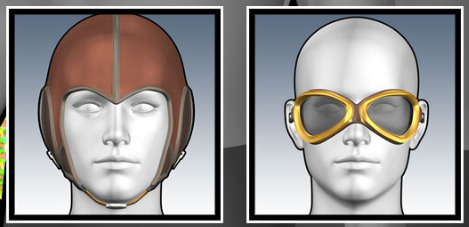
There’s also his matching MS13 Search Helmet and MS12 Prometheus Two spaceship.
Plant Factory Producer
There’s now a free Personal Learning Edition of the new Plant Factory Producer, from the makers of 3D landscape software Vue. It’s a…
“3D vegetation modeling, animation and rendering software [to create] fully custom intricate 3D plant models.”
Users of free never-expires version can apparently…
* Create complete projects and save their work
* Export their plants to other applications as standard geometry [standard .OBJ, .FBX]
Like most Eon/Vue freebies it’s also heavily crippled. Model exports are crippled in the free version because…
“Exported geometry removes 1 polygon out of 5”.
Although I’m guesing that those willing to experiment with smoothing (3DXchange), repairing (PolyTrans), remeshing by adding polys (I think the latest Poser can do that) or decimating (DAZ Decimator) the .OBJ models might make the plants acceptable for middle-distance use in DAZ or Poser?
Frisk-a-tron
Just what every Christmas party needs, a cool Frisk-a-tron machine instead of some ugly bouncers on the door. Free, for Poser and Daz Studio…
Poser to Anime Studio / Manga Studio
Did you know there’s now a free script to export OBJ 3D models from Poser and import the OBJ into the 2D animation software Anime Studio Pro? It’s been possible for some years now, but Smith Micro now offer the free Poser Python export script — along with two tutorial movies, one of which shows how to adjust the toon line weight on the object.
See also this 10 minute tutorial video, in which DutchWorkingMan shows how he uses Poser and Anime Studio Pro to get a believable cartoon cel-shaded look on an exported character.
The Smith Micro comic-book software Manga Studio can also apparently import OBJs — but in that case you simply drag the OBJ onto your Manga Studio canvas.
Update: script still available via Archive.org. Works for Poser 11 to Clip Studio.