Renderosity’s Free Christmas Gifts page. Get them while they’re hot! Here are previews of just a few…
Includes a fabulous .OBJ fantasy helmet by Poisen, which works very nicely with the aid of Poser’s Comic Book mode.
Renderosity’s Free Christmas Gifts page. Get them while they’re hot! Here are previews of just a few…
Includes a fabulous .OBJ fantasy helmet by Poisen, which works very nicely with the aid of Poser’s Comic Book mode.
The script Hampelmann 1.7 for Poser 12 has been released, free. It allows you to easily control figure-parts, with the mouse and/or keyboard. Here’s the basics of how to install and then use it for the first time in Poser 12.
1. Download the new Hampelmann 1.7 for Poser 12, extract the folder and and install by copy-paste of the folder to…
C:\Program Files\Poser Software\Poser 12\Runtime\Python\poserScripts\ScriptsMenu
Rename the new sub-folder there to something a bit more descriptive, such as P12-Hampelmann-v17-figure-controller or similar.
2. Download the old Hampelmann 1.6, extract. With this you want everything except the scripts. Copy only the config and img folders and the help files (not the scripts) to your new…
C:\Program Files\Poser Software\Poser 12\Runtime\Python\poserScripts\ScriptsMenu\P12-Hampelmann-v17-figure-controller
This .ZIP also gets you the help / instruction pages, not included with with the 1.7 .ZIP file. You might want to make a shortcut link to these pages, on your desktop.
3. Run Poser 12, place a test figure such as the standard Andy on the stage (Library: Character | Additional Figures | Mannequins | Andy).
4. Run Hampelmann 1.7 (Top Menu | Scripts | P12-Hampelmann-v17-figure-controller | Scripts | Hampelmann_17).
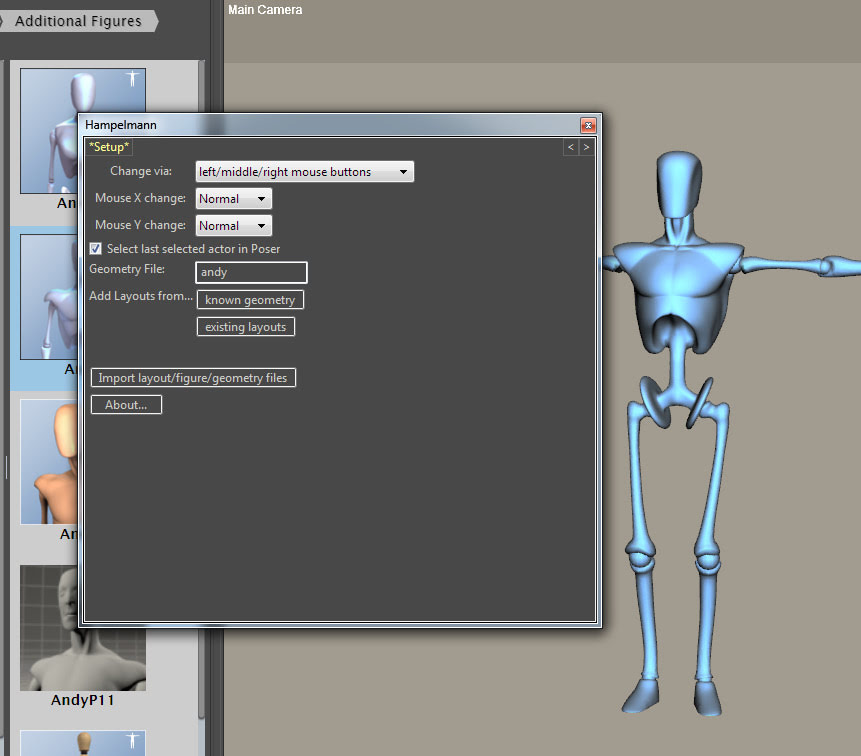
You should see this…
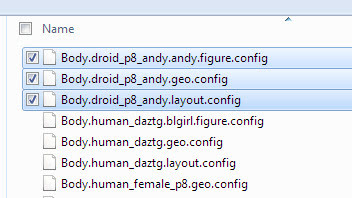
Click on “Import layout/figure/geometry files”. Then locate the folder you extracted from 1.6, the one with the layouts and config files in it called config_files. There are a confusing range of files in there. I had success with Andy by importing all three at once, and was then instantly taken to the figure posing screen. It worked, so… success.
Now click on a body part on the Hampelmann panel (not on the figure on the stage), and a click-hold of the mouse will gently move that part of the figure. Right button for back/forwards, left button for up-down. You get the idea. Sensitivity of movement can be easily adjusted with a single slider.
That’s the basics. There are detailed and rather daunting instructions in the 1.6 help files, if you need more guidance. And yes, it can work with more than one figure on the stage, and can switch between them.
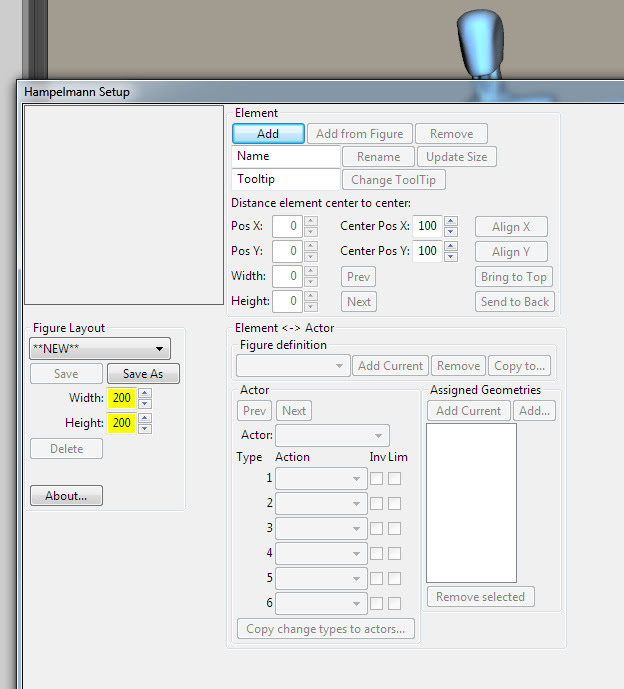
It looks like can also create your own setup files for any Poser figure, via working with the companion Hampelmann_Setup.pyc script.
Marmoset Toolbag 4.05 is now available in a public beta. Despite being a .05 release for this games-focused desktop software, it’s being touted as a big update which greatly improves texture painting and the available range of materials and lights. There’s also a new stabiliser for your hand-painted brush strokes. Apparently also a “10x” speed boost, on big complex multi-layered object-painting projects.
Interestingly there is also a mention of the NVIDIA “DLSS viewport upscaling”, the first I’ve heard of such a thing in 3D production software. Intended for (retro/older?) videogames, it can up-scale “by 4x”. In Marmoset Toolbag it’s said to enable real-time up-scaling of your viewport. (Adobe also has something called “neural rendering”, which seems to evolve an AI render from a 3D point-cloud, but that’s still at the research-paper stage).
Sadly Marmoset Toolbag is now “Windows 10 only”, but it’s good to see there is still a one-time purchase at $320 for hobbyists. I admit I’m not very familiar with this side of the 3D software world, but I know that Substance Painter (or the free Material Maker) and 3DCoat are some of the ‘adjacent’ software packages for desktop. I’m uncertain how Marmoset and 3DCoat line up these days, feature-wise, and if they can perhaps be classed as broadly having feature-parity. Maybe a reader of this blog could advise on that?
Terragen’s easy sky generator is now available in Early Access, for Windows desktop PCs. Make “photorealistic CG skies” with “a simplified UI and workflow” using sliders. Also 360-degree HDRIs.
In Early Access it’s apparently not yet a standalone software, but will be. Currently it exports the sky into the main Terragen desktop software, and thus is only available to those who have a Terragen licence or subscription. If Terragen Sky will be free or low-cost and/or public, when it reaches its final release, is as yet unknown.
On Renderosity -renapd- is retiring some items, with heavy discounts for those who want them while still available. The most unusual are the RTproductions Napoleonic-era military uniforms for M4, including British and French packs. I also see a Russian Cossack and a Cossack Peasants pack for M3. Very niche, but no doubt they have a certain appeal in Europe.
Blender 3.4 has some interesting new features, including storyboarding and PBR.
* A new storyboarding tool called Storypencil, said to be tested and production-ready. It works in tandem with the Video Sequence Editor, and is intended for making rough animatic sequences or saving out storyboard images. Multiple SVG files can also be imported.
Update: It was in the beta but appears to have been pulled from the final. To get it: i) Get the 3.4 beta and 3.4 final; ii) install both; iii) copy Storypencil folder from Scripts | Addons_contrib to the same folder in Blender 3.4 final.
* Yet more Grease Pencil improvements. It now has some improved maths ‘under the hood’, working to auto-close gaps in line-art when using the Fill tool to colour.
* PBR support. Apparently this wholly new, which if true is kind of amazing? Anyway, the .MTL material files that accompany .OBJs can now call the full range of PBR material sets, including Principled BSDF materials. Poser 11 and 12 now support Cycles BSDF, so there may be potential here for making PBR’d .OBJs in Blender for use in Poser.
A new official YouTube video from DAZ, “The History of DAZ 3D – Where We Have Been and Where We Are Going”.
Forgotten about Adobe Substance? ArtStation has a handy one-page 2022 Updates Recap. Who knew there was now an official voxel-based “Substance 3D Modeler”, released in October 2022? Also noted is that coming soon is Adobe Substance 3D Sampler, for real-world scanning of objects. All very nice, but still subscription.
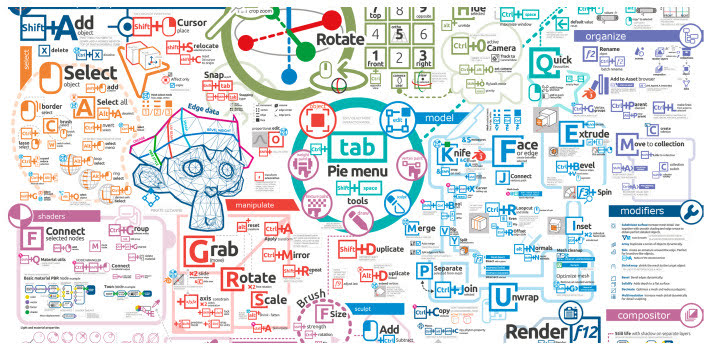
Everything you need to memorise for Blender operation, in one crazy-monkey visual map for keyboard bashers. Now updated for the latest Blender.
Amazon has open-sourced its Krakatoa VFX particle renderer and the associated shader system. Appears to be Maya focused, so I guess they were/are using this for the Amazon TV VFX. The VFX world has many particle-generators / particle-renderers by now, but this one is said to be especially “fast”. That’s the only claim made for it, at least on the GitHub. Still, if you were looking to plug a fast particle system into Poser 13, I see lots of .PY scripts in the Krakatoa GitHub and it might be something to consider.
The ‘text prompt to image generating’ AI Stable Diffusion 2.0 has released. 1.4 was the first public release back in summer 2022, and 1.5 was the previous version.
Along other new features, a shape-sensing and shape-preserving model…
It also has a few other nice features such as better in-painting and built in up-scaling. But note that the new 2.0 version is now censored, so some may consider it as effectively no longer open-source. They’ve “removed ability to copy artist styles”. This means 2.0 now ignores popular user prompts such as “in the style of [name]…”. It also refuses to create what is described as “NSFW” images, though how widely that’s defined is unknown.
The free Clavicula has released 0.9.9.1, with new features such as “custom shader layers” among other changes. It’s the successor to Neobarok and an innovative way of 3D modelling, completely free for desktops. The YouTube channel is here, and there was a Digital Art Live magazine interview with the maker in Digital Art Live Issue 64 (Christmas 2021).
Fantasy Attic’s Christmas Advent Calendar, now live. Accepting donations of giveaway Poser or DAZ gifts for the Calendar until 30th November 2022. Renderosity mail (see link) seems the best way to contact with a donation, although the organiser is also somewhat active on Twitter and DeviantArt.
Empty at the moment, but filling in due course for ‘one per day’ opening during December.
Goo Blender, also known as the “Goo Engine”, is a new non-photoreal toon Blender version for Windows (only)…
“our custom build of Blender that was made specifically to our team’s needs. Our team specializes in making 3D anime in Blender”
Goo Engine still seems to involve the usual head-banging wrangling of big node chains in order to get simple tooning done in the viewport.
I haven’t had time to look at the 30 minute intro tutorial and am currently uncertain if it’s real-time Eevee or Cycles rendered? Anyway, it’s available via a Patreon subscription if you want to download and try. I assume it’s a build for the latest Blender, which now has certain graphics-card requirements before it will even let you install. Note also the Goo Engine GitHub, which presumably means you can get it free if you know how to ‘build’ Blender from a code repository.
This new release reminded me to take a look at the progress of the competitor BEER, the free NPR system plugin for regular Blender. The 1.0 engine was all done, and a user-friendly UI was then being made. A magnificent effort by all concerned, and they’re to be congratulated for getting so far with it. However I see there’s been no public progress with the user UI implementation in the last year and it’s stalled at UI Milestone #2 (November 2021). Possibly they could use a volunteer UI expert, to get it finished and polished?
Material Maker 1.1 has been released. Though only a .1 update there are lots of new changes and improvements to this great free replacement for Adobe’s Substance.