An update on the recent G’MIC filters release in .8BF format. If some of your saved “Favorites” presets no longer work after this, the solution is to tick the “Internet” check-box and run the “Update filters” inside G’MIC. This then gives you the extra super-secret “Testing” folder of filters that you didn’t have before. Also some extras in the “Artistic” folder. Your G’MIC install is now complete, and all your old custom “Favorite” presets should now work.
Category Archives: Companion software
Release: NVIDIA Omniverse
NVIDIA Omniverse has been released in open beta. In its current form it appears to be an extensible virtual production studio, giving teams the ability to… “simultaneously work together on projects with real-time photorealistic rendering” but also to “work concurrently between different software applications” via Omniverse Connectors which bridge into “leading” content creation software. Most interestingly, there is a promised Connector bridge to the free Blender in the near future. Naturally, your studio’s creatives all need to be brewing their wizardry on fast n’ shiny NVIDIA graphics cards and Windows.
The Omniverse platform is only in open beta at present, but already has several working modules within it. Including ‘Omniverse View’ for architects, and ‘Omniverse Create’ for designers and creators. It seems to use the Pixar USD format for universal ‘in-out porting’ of the 3D scenes and moving them around the various applications?
“Early next year” this virtual studio platform will see the release of…
“‘Omniverse Audio2Face’, AI-powered facial animation; and ‘Omniverse Machinima’ for GeForce RTX gamers”.
Machinima being the term for real-time WYSIWYG animation using a game-engine, and from the sound of it ‘Omniverse Machinima’ seems to be tilted toward Unreal Engine users and TV studios — rather than the hobbyist crowd that is currently using iClone.
The ‘Audio2Face’ module is more interesting and will aim to have an AI… “generate expressive facial animation from just an audio source” without any need for expensive and fiddly camera-based mo-cap. That makes a lot of sense. Train an AI to match millions of audio vocalisations with visual expressions, then have it generate expressions purely from audio. In fact I’m a bit surprised such a thing doesn’t already exist in software — beyond the existing ‘vocal audio to mouth phonemes’ lip-sync automation. But perhaps animating a full face and escaping from ‘the uncanny valley’ in real-time may need a Cloud connection and a zillion back-end NVIDIA GPUs to work? My guess is that you would need a second AI to weed out the “ugh, no… uncanny valley” results.
Anyway NVIDIA Omniverse looks good and may even be free(?), albeit after the entry-ticket price of a 30-series NVIDIA graphics card and (ugh) Windows 10. When it’s all polished up and hooked to a Blender bridge, that could make it very interesting for small indie animation studios. But what are the prospects for non-techie hobbyists? Well, DAZ is also an NVIDIA partner, so I guess if DAZ Studio implements a Pixar USD-format bridge then they could also enter the Omniverse?
MojoWorld on Windows 10: the install guide
MojoWorld on Windows 10, a new step-by-step install guide.
Santa drops a .8BF
Would you like the free G’MIC filters running in Photoshop, for Christmas? And in PhotoLine, Serif Affinity Photo and IrfanView too? Santa has visited early, on that one!
Yes, the latest G’MIC has been successfully ported to the old Photoshop .8bf plugin format. It’s been a year of work, in an official project, and is stable in 64-bit.
Be aware that if you have saved custom “Favorite” presets, some may no longer work after installing this. This is because this G’MIC is incomplete, and this incompleteness will affect presets on all your other G’MIC installs (Krita, Paint.NET etc). The solution is to tick the “Internet” check-box and run the “Update filters” inside G’MIC. This will give you the extra super-secret “Testing” folder of filters (and perhaps others in other folders) that you didn’t have before. G’MIC is now complete and all your custom “Favorite” presets will now work.
Release: Cartoon Animator 4.4
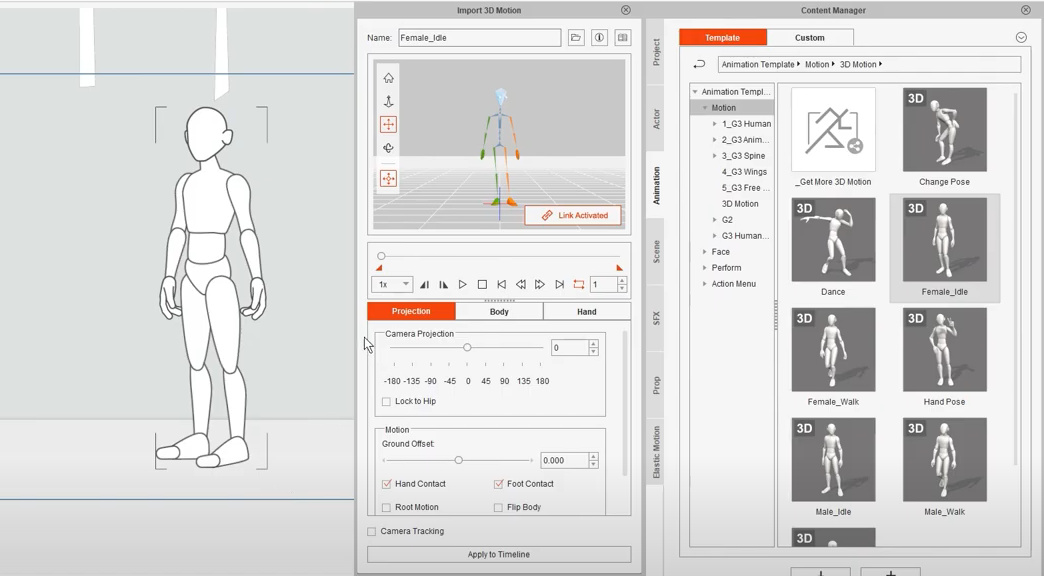
Reallusion has released a cool new Cartoon Animator 4.4, with the ability to tweak and adjust imported 3D motions. This feature is apparently not just a Pipeline edition thing, but is also in the cheaper version.
Don’t want to tweak? This is Reallusion, so you can of course also buy very expensive packs of pre-made 3D motions, well-suited and tested for the latest sophisticated G3 generation of Cartoon Animator figures.
What about importing freebies? At the end of the video, Reallusion’s 3DXchange utility is shown and third-party motions are being converted. Sadly 3DXchange (a sort of universal converter) is no long available as a standalone, and to get it in a useful version I’m pretty sure you need the expensive iClone Pipeline bundle. So don’t go rushing to pay for an upgrade to Cartoon Animator 4.4 in the hope of importing oodles of free .BVH motions, unless you also have the matching install of 3DXchange.
However, note that applying 3D human motions in Cartoon Animator (formerly CrazyTalk Animator) is not new. You can already do free BVH to Cartoon Animator conversion with an older copy of 3DXchange by saving them to iClone ‘non-standard figure’ motions. Many will have picked up a free copy of iClone 5 at some point and may well have the 3DXchange that came along with it.
Indeed, old-school iClone users may not even need to do that, as they likely already have a large library of 3D-figure iClone motion files on their PC. These are now (mostly) drag-and-drop onto Cartoon Animator figures. However they may not “take” on the latest shiniest G3 figures. So if you need to upgrade will partly depend on what figures you’re going to be using, G2 or G3.
Have a BEER
A new video on “Getting Started with BEER/Malt”, this being the new free NPR plugin for Blender. The video shows how to download, install and active the newly public Release v1-beta. Also how to apply a basic shader and line to a sphere.
The development work is done, but according to their YouTube channel they still need to hire a developer to add a nice UI and a layering system. You can donate here to help make that happen.
CTA4 at NeoWin Deals
The discounts keep rolling, as people try to find ways to wiggle those last few dollars out of your precious PayPal balance. I see that Reallusion has followed Renderosity’s lead and are offering their software at a heavy discount via NeoWin Deals. They now have Cartoon Animator 4 Pro of offer there, bundling this starter version (ignore the “Pro” label, the real Pro version is called “Pipeline”) with their 12 Principles of Animation Course, for $49.
CTA 4 is the latest version of their 2D animator software and it’s a fine animation tool in terms of both its ease-of-use and general friendliness. It’s less friendly in terms of the cost of content and add-on packs, so ideally the impoverished hobbyist needs to make or find their own 2D assets and backplates. I have a big bundles of freebies in that regard, to start you off. Also, while their training is always top quality you do need to always check if a paid ‘training DVD’ of theirs is actually also available free online — sometimes it is.
You should also know that iClone motions, if you have any, can be used on the G2 CTA characters via simple drag-and-drop.
Black Friday: Teknology3d Poser/DAZ store / World Creator / itch.io / Blambot / Comic Life
* The DAZ/Poser store Teknology3d has 60% off the entire store. They mostly specialise in supporting quality toon figures such as Mavka, some of the Nursoda figures, Sam and Sadie etc.
* 30% off all versions of Stefan Kraus’s real-time World Creator 2 landscape software. There’s 12 months of “Free updates to major new editions” which should theoretically also get you the imminent version 3. Which will have a radically new UI, so if you do plunk down your $150, wait a few weeks until you can learn it on 3.0.
* Black Friday 2020 at itch.io, on now. No discount on the real-time landscape software FlowScape, which lives there. While you’re in there, you may want to add the “name your price” Call of the Sentinel graphic novel to your basket and pass it on to young readers with shiny new 10″ tablets.
* Blambot Comic Fonts usually have a Cyber Monday only sale. No word on that for 2020 though.
* Nothing yet at Comic Life but they also usually discount on Cyber Monday only. I may not be able to post here on Monday, so here’s the link now.
Still no movement at Flaming Pear (Flood 2), Redfield (maker of the best non-pencil Photoshop sketch plugin, Sketch Master), Expressi (inky Chinese brush painting software), Wonderdraft (a leading fantasy map maker software), or JitBit Macro Recorder (automate any software).
Release: Blender 2.91
Another release for the fast-moving Blender, now Blender 2.91. What are the main new items?
* Most interesting for NPR renders and comics makers is more development of Grease Pencil. Antonio Vazquez’s automated “Trace Images into Grease Pencil” feature is now in there and you can apparently drag in a 2D image and convert it “with one click”. B&W only. The next release of Blender is likely to expand this to cope with importing image sequences and have PDF export (important for studios where designs need ‘sign-off’ from studio managers). You can now also re-order in the modifier stack for Grease Pencil, but I thought you could already do that. You also now open holes (“hold outs”) in filled areas.
* For modellers, you can now trim a 3D mesh “just by drawing lines in the viewport”. Super. I was astounded recently to see a demo which included fiddly multi-step / multi-panel / multi-button operations just to do something as simple as cutting the top off a 3D mesh. But it sounds like that particular fiddle has now been squashed.
* Better search, now with new “fuzzy matching” and abbreviation-awareness, for finding stuff in Blender’s labyrinthine interface. Although that assumes you can remember what the desired tool is being called this week, and how its naming differs from the 50,000 others. However, the placement of the search does look excellent, static and right at the top of the most used panel.
* For modellers and sculptors, lots of new sculpting brush improvements in things like edge brushes, cloth sculpting. More refined bevelling of mesh edges, and better Boolean intersections of meshes when modelling.
* ‘Volume to mesh’, so for example you can turn a volumetric cloud into a 3D mesh, then apply procedural textures. You can also go the other way, making a mesh into a volumetric cloud.
* New simulations for things like making a linked metal chain, and then being able to animate the chain swinging around.
* Simultaneously released, Radeon ProRender 3.0 for Blender, offering “hardware-accelerated ray tracing on AMD’s new Radeon RX 6000 series GPUs”, matching NVIDIA’s RTX ray-tracing and opening up some welcome competition there which should help to trim graphics-card prices in due course. Also (most interestingly) ProRender 3 has “a new contour rendering option for non-photorealistic renders”. Poser 12 uses the latest Blender Cycles, but apparently ProRender is a plugin for that and also has its own materials system. It is thus not likely to be supported in Poser just to aid the Poser Comic Book makers. Adding it would apparently require content makers to make and test yet another new set of materials for their store content.
Old AMD GPUs based on TeraScale 2 and 3 are totally kaput in terms of use with Blender 2.91, and Blender will refuse to load. Some integrated AMD GPUs that have numbers that should be fine (if big cards) were actually built on TeraScale 3. Graphics card upgrades will thus be needed.
Take the five-minute YouTube tour here.
Release: Marvelous Designer 10
Digital clothes maker Marvelous Designer 10 has swished down the catwalk today. Sadly this leading software is now subscription only, but still somewhat accessible for semi-pro hobbyist content-makers at $39 a month, though I guess there may be an annual deal on that come Cyber Monday. I’m not keen on covering subscription software here, but in this case it’s still worth a very quick look at what’s new…
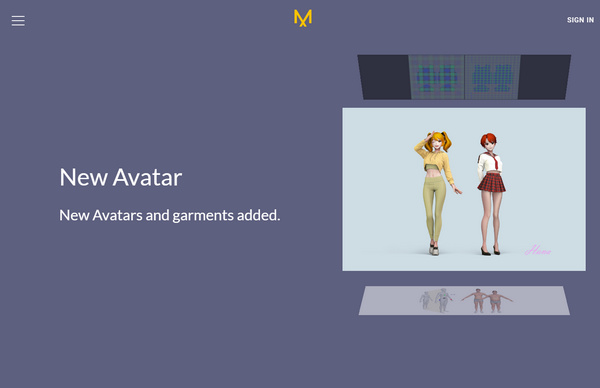
* New manga-babe 3D avatars, with erm… customisable chests and other body parts. Big in Japan, I’d imagine.
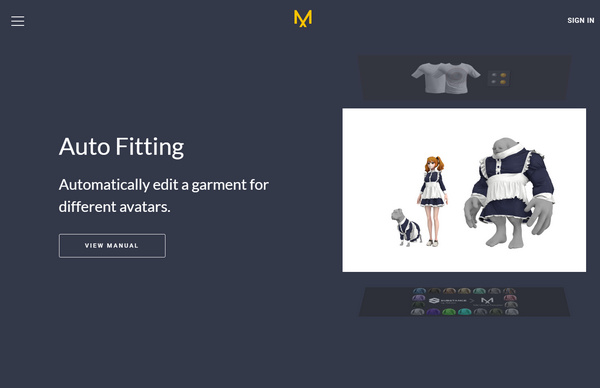
* Autofit clothes made for one figure to another. Especially useful for fitting frilly maid outfits to dogs, it seems.
* Better UV mapping and now supports the Substance Designer .sbsar format.
* “Sculpt realistic folds and wrinkles” with a new Wrinkle and Release bush.
* Pen-pressure support, when using a pen monitor.
Black Friday: Clip Studio, ArtStation prints, KeyShot advance notice
* Fiddly comics production software Clip Studio has gone to its usual 50% off Black Friday deal, a little early this year. The front-page blurb rather misleadingly pitches clueless newbies with the idea that the expensive EX version is the one needed to make comics. Not really, unless you want multi-page. The expensive version basically offers, as wrote here back in June…
batch import; multipage comics with Kindle and ePub output; and rather basic-looking vector lineart can be made from imported 3D architectural and similar models.
Kind of useful if you aim to be a comics pro and do lots of hand-inking and printed comics, but it’s still a steep $84 cost to move up to EX. The upgrade page for that is here. Note that the very latest version adds .SVG import/export.
Poser users thinking of getting the $25 version should know that in June I found a Poser to Clip Studio solution in the form of a lost Smith Micro import script long-ago harvested by Archive.org. This freebie was meant for Anime Studio but I figured, and found out, that it worked just the same in importing posed Poser figures to their sister-software Clip Studio. You’re welcome.
But for 90% of people, asking about Clip Studio’s features and scripts is simply asking the wrong questions. To make comics they should just be using Comic Life 3 instead.
* Artstation currently has 30% off the prints sold there. Might be useful if you want to give a few as Christmas presents this year, or get some mini-prints to be glued to quality Xmas cards.
* There’s also advance news that Luxion will be having discounts on various KeyShot licences, though only on Cyber Monday it seems.
Release: Diffeomorphic DAZ-to-Blender 1.5.1
There was an important release that I overlooked, back in the summer. The free DAZ-Blender bridge plugin by Diffeomorphic, Thomas Larsson,was released as v1.5. This is in active development and at November 2020 is now at version 1.5.1. Apparently it does a good job, and is quicker and in some ways better than the free official DAZ 2.0 script. Since it doesn’t need to convert via an .FBX or Collada conversion and instead reads the DAZ files directly. Said to support polyline hair, but not strand hair. Worth a look, if you’re getting into Blender and its real-time Eevee engine.
Interestingly, I recently noticed that Eevee is actually OpenGL + PBR materials. I hadn’t known that before. It explains why my OpenGL upgrade fixed Blender. It just shows how far OpenGL can be pushed.
Update December 2020: diffeomorphic.blogspot.com totally dead. Fixed links by sending to WayBack and I’ve directly linked the repository.
3DCoat 2021
Good news, I’ve just heard that a “new 3DCoat will ship within Q4 this year as 3DCoat 2021 … including the new user interface”. Most people think of 3D-Coat (now “3DCoat”) as model texturing software. But its relatively easy 3D sculpting also makes it one of the few viable alternatives to ZBrush. The drawback there is that it suffers from a poor sculpting UI. Not “thrown together by mad imps” like ZBrush or Blender, but rather too off-puttingly stolid and a bit too fiddly and cluttered for the new user.
So a new UI sounds enticing. However, a little research discovers it’s actually going to be a tweaked and slightly tidied-up UI according to the official preview video. Not a “new” UI in terms of being a radical replacement. What a pity.
However knowing about this relative lack-of-makeover means that if 4.9.x Amateur comes up in the Black Friday sales at 50% off (i.e. $50) it should probably be grabbed, because it’ll be no use hanging around in the hope of a shiny new wholesale UI makeover. The current Amateur licence limits you to 2048px textures and 7 layers, which will be fine for most users. Non-commercial use too, but apparently that means ‘earning more than $10k a year from it’. Again, fine for most people.
Also, so far as I can tell from the 2021 announcement, prices will go up and not down for the new 2021 version. The new version will stay as a perpetual licence. It may even be possible to get a free upgrade via a Black Friday offer on 4.9.x Amateur, but it may not…
It can also do PBR materials, which also makes it interesting re: the new SuperFly in Poser 12, and how easy it is to plug a PBR material in there.
Release: MakeHuman 1.2 final
The open source figure-creation software MakeHuman 1.2.0 final has been released. It’s now Windows 64-bit only, and it appears that it still integrates closely with Blender, and indeed now has… “completely new Blender integration, MPFB, with support for socket transfers, IK and Kinect.” Lots of other improvements and changes, and a move to the new Python version.
Another pre-Black Friday roundup
So we’re still a week away from Black Friday, but many stores are going a week early. Several offers have even been and gone, including a modest discount on the latest GigaPixel AI and some nice offers on key Flaming Pear plugins such as Flood 2.
What’s tasty in non-subscription software?
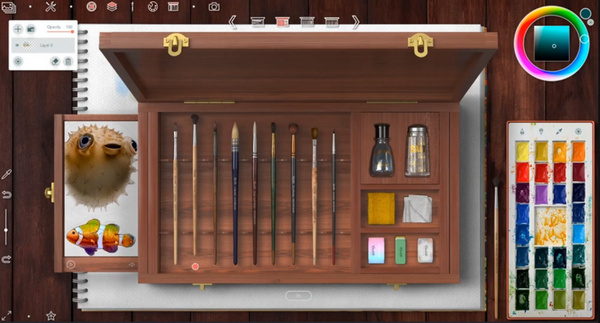
* 30% off Rebelle 3.2 is a good one, as I’ve never seen it at a discount before. The software is near-perfect, not least in its simplicity, if you’re an illustrator in a traditional style who want to remove white from lineart and then add very realistic watercolour layers underneath. Watercolor painting is the main strength, as well as the best-of-breed UI. It can kind of do speed-painting, but is not really the best choice for that. It also lacks the extensibility of software like Krita.
* “Top Corel Products” are now discounted, with Painter Essentials 7 at a quite reasonable £30, with is pretty good though keep in mind that Krita 4.x is free. Corel also has PaintShop Pro 2021, less desirable at £50, especially when compared to the recent Humble Bundle offer.
* The Reallusion 20th Anniversary sale until 22nd November, including the fine Cartoon Animator 2D software.
* There are big discounts in Unity plugins at the Unity Asset Store including 50% off the three major rival toon plugins RealToon, Flat Kit, and Toony Colors Pro 2. Also the “visual novels” engine Naninovel.
* “Up to 50% off the entire store” on the 3D model packs at KitBash3D, albeit coming down from a high starting price.
* DxO ViewPoint is discounted. Automatically fixes the weird angles on your ‘big architecture’ photography, so you have straight verticals.