mCasual has released the free script mcjDropToTerrain 2 for DAZ Studio 4. Drop 3D objects onto the surface of a 3D mesh/terrain, even if the mesh is bumpy/curvy.
Author Archives: jonahjameson
Release: Blender 3.1
Blender is now officially at Blender 3.1. For those who only use it as a tool by which to get at lots of free 3D content for DAZ/Poser, note the…
new C++ .OBJ exporter speeding up export of .OBJ files by up to 13x.
But also note the move to the Python 3.10 scripting language, which may not please some.
New for DAZ and Poser in February 2022

Post lost in the move, but there’s a PDF backup of it with links…
Release: DAZ Studio Studio 4.20
The new DAZ Studio Studio 4.20 is out of beta and it updates to “the latest version of iRay (2021.1.0)”. Meaning we get the volumetric depth-effects (i.e. lights shining through fogs, hazes, mists etc) that the iRay devs have been working on.
The iRay devs also noted on their tech blog… “dramatically decreased host/CPU texture memory usage” for this iRay version. Which many people doing CPU-only rendering and/or more-or-less real-time viewports on CPUs will welcome. Yes it is possible to run iRay on CPUs alone, if you have enough of them and a streamlined workstation. It’s a myth that it only runs on expensive NVIDIA graphics cards (GPUs).
4.20 is also said to have lots of bug and stability fixes. As with all shiny new software releases, it’s probably best to wait a few weeks before install, to see what problems the early adopters encounter.
Update: No, I can’t recommend it… as it can badly screw up the Viewport. There’s a major bug with the SHIFT + F11 fullscreen, with this current installer version.
OcenAudio
In the sidebar links I’ve replaced the Audacity audio editor with the fine freeware Ocenaudio. About the only one worth having, and thankfully it’s a very nice bit of desktop Windows freeware. Easy to use, too, and there’s no ‘you must now install some FFmpeg codecs, etc’ (which was always a hassle, with Audacity) after install. The only drawbacks I’ve found so far is it takes about 30 seconds to load. And, though it’s supposed to be “multitrack”, I’m still utterly baffled about to how to get two tracks side-by-side. That is not at all obvious, though the UI is very easy otherwise.
Update: After a good deal of searching, I don’t think it’s actually possible to multitrack edit with Ocenaudio. If it is, no-one can show me how to do it.
Update: Yes, here’s audio expert Steven Jay Cohen… “Both OcenAudio and TwistedWave were not designed to be multi-track editors.” Stupid reviewers said it was multi-track! Grrr. Turns out, it’s not!!
I’ve also discovered the wonderful automatic transcription feature of Nuance Dragon Professional 15. I hadn’t been following the fortunes of the old Dragon Dictate, having tried it on and off since 2005 and always uninstalled it due to lack of use. But in recent years I see it has got AI and has lost the ‘Dictate’ bit of the name. It now has an auto-transcriber built in, which works surprisingly well from a clear .MP3 with a speaker who has good diction and English. Maybe only 85% as good as a YouTube transcript, but quite usable with a bit of manual editing after hearing the original. The software does not need online or cloud access, making it the only viable offline desktop solution I know of. The drawbacks for some will be the cost, and that Mac development has apparently been abandoned (because… Apple).
Also note iZotope RX 7 Audio_Editor Advanced, which uses AI to remove background hum, clicks, and other problems with spoken audio.
Release: QuarkXpress 2022
I’m pleased to see that the DTP software QuarkXPress 2022 has been released. Now “compatible with macOS Monterey and Windows 11” and still available as a perpetual one-off licence. Some readers will have vague memories of ancient and crumbly software from the early 2000s. But this QuarkXPress is very different, having been steadily and solidly improved every year since 2015. It is now a perfectly capable and slick non-subscription choice for magazine and book production software, and one that natively supports absolute reproduction of a DTP print layout in Web browser-friendly HTML5. No expensive HTML5 subscription-only plugin required, as is the case with InDesign. Affordable too, so watch for discounts in the next month or so.
Windows 7 users, though, should target QuarkXPress 2018.
What was new for Poser and DAZ in January 2022?

Post lost in the move, but there’s a PDF backup of it with Web links…
Poser’s 25th Anniversary
Just a ‘heads up’ for a 25th Anniversary, for those inclined to plan a year ahead (museum curators, magazine editors, software developers, etc). Poser 3.0 appears to have shipped May 1998, which makes summer 2023 the 25th Anniversary of the Poser software that we know and use today. By the end of the year the street price was around $120, and the mass-market 3D figure revolution was underway.
What’s New for Poser and DAZ in December 2021
It’s getting toward the end of the month, so… it’s survey time for new Poser and DAZ content. As usual freebies are only noted if they are also commercial use, or are such obvious fan-art that no-one would think of using them commercially.
Also, no ‘HD’ items are covered here since they adjust your render settings without asking (and in ways that are difficult for newbies to reverse), and are only useful for a few people with incredibly powerful PCs.
At risk of sounding like a moaner, I have to say that the DAZ Store is still very slow to browse for me, despite the new smaller thumbnail previews. Even scrolling down the Wishlist too far now stalls loading for 20 seconds or so. This is the only such site that has these problems for me. I try to bypass this problem by bookmarking into my Wish List, but may still have missed a few at the DAZ Store.
Science-fiction:
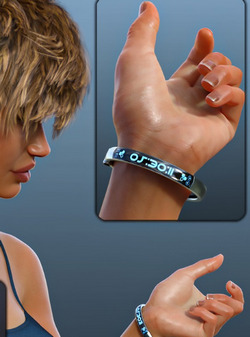
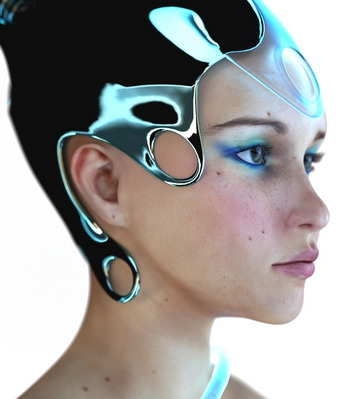
A useful free tech Display Band for DAZ and with wearable presets for G8. It also seems fairly easy to add your own wording.
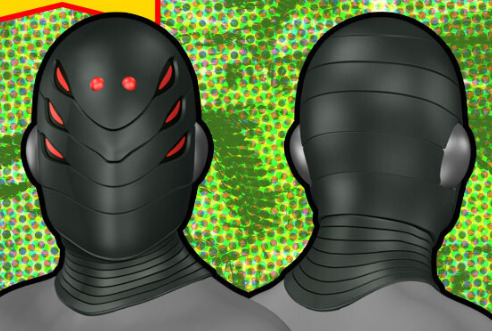
A cool super-villain Helmet 048 for G3. Not fan-art, so far as I know.
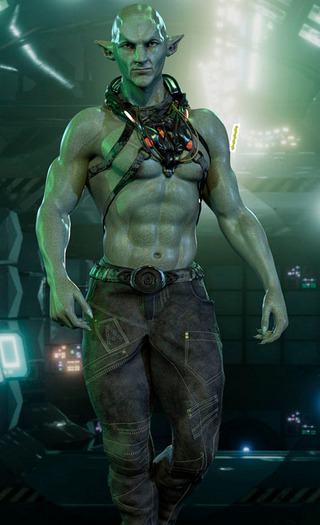
Dubrock for G8M. Not fan-art, so far as I know. Though it looks a bit Guardians of the Galaxy.
The free Dystopia Props and Dystopia Props 2, good for cluttering the middle-distance of wide and city scenes.
Steampunk:
A free Steampunk Mask for G8.
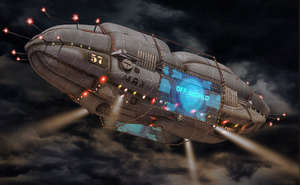
Add Blimp, a middle-distance cyber-city blimp that could be fairly easily adapted for steampunk. Just replace the advert-hoarding with hydrogen-tanks.
FPE Tentacle Arms for G8M, good for a Captain Nemo-type submarine or airship crew. The crew probably hail from the Pirate Shipping Village.
Toon:
Little Mummy for G8F and poses and expressions. Somewhat similar to the old RDNA toon Ancient Egyptian mummy-boy, but not the same.
A free set of toony String Lights (Christmas Lights) for DAZ.
Storybook:
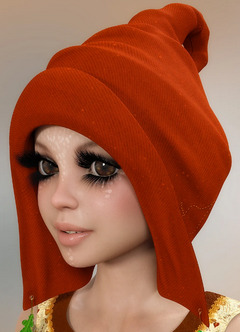
Christmas Pixie for La Femme for Poser.
Disco Stomp Trainers for G8F. Requires the base Stomp Trainers.
Animals:
3DU Toon Mouse Fur Long, a Look At My Hair preset.
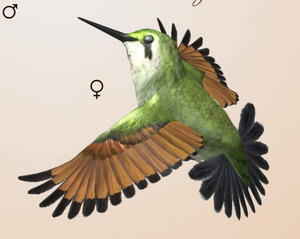
Songbird ReMix Hummingbirds v3 for Poser and DAZ.
Love Kitty, 28 3D cat props of various types (bowl, toy mice, dangler, etc).
Landscape elements:
A free Wooden Cross for DAZ and also in .OBJ, ‘Boot Hill’ style and with Wild West style bootlaces.
A free Hang-Glider for DAZ and G8.
Let’s hope your hang-glider pilot doesn’t land in the Stinging Nettles for DAZ. Definitely not a British stinging-nettle, and so perhaps an American variety? Quality and also in .OBJ, so likely to interest Vue users.
Historical:
Primitive Norse Structures 2 including two ramshackle windmills.
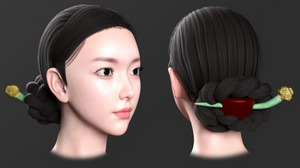
Joseon Era Hair for G8F. What a girl might wear in the 1400s-1900s in Korea. Also a paid dForce Hanbok dress from that era.
The useful and adaptable free medieval Headscarf Outfit for G8F. Not dForce but has some control morphs. Previews suggest it’s capable of turning into a sort of short cape, so may also be of interest to makers of super-heroine comics.
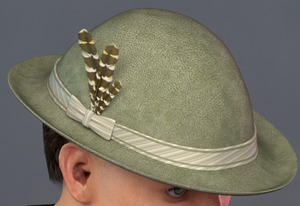
L’HommeHat 2, a sort of German / Austrian / Swiss / Italian hat of the type that might be seen on an Alpine summer guide in the 1920s and 30s. Also L’HommeHat 1 which is more of a classic British workman’s flat-cap.
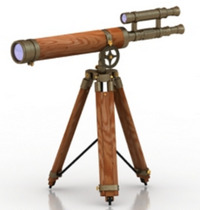
A free Antique Harbour Telescope in .OBJ format.
A Royal Opera Stage from the early/mid 19th century, with side boxes.
A Fountain Pen Ink Bottle, Pen Accessories, and 1916 Fountain Pen Prop. See also the new Cardboard And Paper Shaders pack.
British vintage 3D railway expert Dryjack has a new Sopwith Pup biplane, a classic British plane.
dForce Aran Sweater Outfit for G8M, of the sort a Scottish crofter or early pilot might have worn.
A somewhat 1960s K-Roller petrol-scooter, free. Also note the helmet which could be used in other types of retro scenes. I guess it may actually be a modern electric scooter, with a retro design?
Figures:
The Corinna La Femme character/skin makeover. Appears to need La Femme Pro, rather than the free La Femme which ships with Poser?
A more basic but free alternative look for Poser’s flagship La Femme, to nudge her away from the Princess Di look, is the new Helena for La Femme.
Still prefer V4? A free SuperFly Skin shader for V4, so V4 can render in SuperFly, and with a bit of automatic ‘sweat gloss’ too.
Genesis Clones (aka ‘Genesis Clones for Genesis 8 and 8.1 and Vice Versa’). Genesis 8 Male and Female Clones for Genesis 1, so you can fit G8 clothes and items to the original Genesis figure. Shows in the fitting list for G1 as ‘Vyusur…’.
Straightforward Catwalk Animations for Clothes Presentation for G8F. It seems this is not the same as last month’s “Runway Animation” pack from the same maker.
Hair:
Free 1950s ‘The Fonz’ style strand based hair for G8M. With front cow-lick.
Free SBHBeards for G8M. Strand-based hair and eyebrows and moustaches. Looks useful.
A simple free Genesis 1 skull cap. Shows up in the Library under My Library | People | Genesis | Hair | Willq, not under People | Genesis as you might expect.
Scripts:
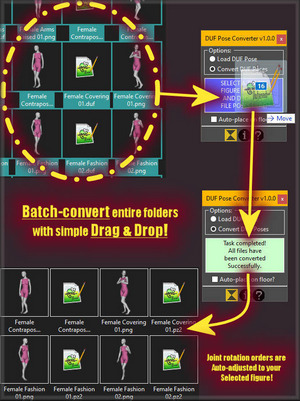
DUF Pose Converter for Poser 12. Convert your DAZ .DUF poses to Poser 12 and apply them “to any figure you may have on stage”, apparently. Not tested by me.
FlockIt for DAZ Studio. Looks similar to ‘Send in the Clones’ and the various Scatter scripts for Poser.
ArchangelFirewolf’s free Pose Control Converter for G3 and G8. Seems to add a set of sliders that allow tweaking for fine adjustment of poses.
Installing PIP in Poser 11. PIP is a package manager for installing further Python packages that have components needed for scripts to run. So… if you had a need for some specialist Python module that doesn’t already ship with Poser, this might get it installed.
Tutorials:
A three-part in-depth Comic Book Creation Kit Bundle of tutorials and guidance, which seems to be aimed at photoreal comics makers using DAZ.
Noted elsewhere:
For Blender, Grease Pencil From Mesh, with an edge-sharpener.
3D maker Sixus1, also a fine digital painter, has a new Platinum Brush Pack for Photoshop and PaintStorm. It appears to be his current working brushes set, honed and weeded over many years.
Ok, that’s it for December 2021 and for 2021. Onward to 2022!
Some highlights from 2021
Some highlights from 2021.
The good:
Poser 12 Early Access ended the year with its new Manual completed. Now available not only in HTML, but also in a free PDF. Ghostship shipped his Poser 12 Materials, which those who used them on Poser 11 will know are a key enhancement for Poser SuperFly users. Various useful scripts, including those by Snarlygribbly continued to be updated for Poser 12. Also, Poser 12 can now be snail-mailed to you if you live out in the wilds.
NeoWin Deals continued with their great offer of Poser Pro 11 for $80, and this can co-exist alongside Poser 12. Mac Poser users now have an equivalent of the must-have ‘Snap To’ mover script, working on both Poser 11 and 12. There were many other new Poser 11 scripts, including an automated Blender to Poser conversion script for free Blender assets.
DAZ ended the year by announcing a new integrated iRay render-farm service in the Cloud, Infinite-Compute’s “Boost for DAZ”.
Of course the year saw lots of great new Poser/DAZ content and freebies released, with the picks being covered here in my monthly round-ups. 300 game-ready DAZ figure conversions were officially added by Tafi to the Unity Store.
Redeye Cat retired in May and kindly gave away her stuff for free — now safely archived as a 500Mb mega-bundle archive on Archive.org. Cage’s Loop and Chain-making Poser scripts were likewise saved. Wootha also retired and kindly gave away his brushes, concept art etc as public domain (he’s not to be confused with the Wolthera who works on Krita).
Another year of free magazines from Digital Art Live, and the Digital Art Live STUDIO forum is also working well.
Renderosity finally made it possible to paste nicely formatted and coloured code in the Python Scripting forums, though only from proper editors such as the free Microsoft Visual Studio Code and PyCharm.
The ArtStation Marketplace grew and thrived, and though very crowded becomes a useful place once you start to build a judicious wishlist.
The new G’MIC 3.0 for Photoshop version added AI-powered de-noising. This does not need NVIDIA, and can even be done on CPUs.
XP-Pen produced and shipped even better budget ‘draw on the screen’ pen-monitors.
The bad:
On the DAZ Store all the old Poser .ZIPs have been re-labelled as “DAZ Studio”. But it’s pretty easy to tell the difference, once you know how. Just download all the .ZIPs, and if there’s a ‘data’ folder inside then it’s for DAZ.
The Poser-friendly Hivewire store closed down. But on the bright side, they eventually moved most items to Renderosity. The lively and friendly Hivewire forums remain.
We lost the excellent third-party Poser library PzDB (still working, but can no longer be purchased); Topaz Clean (but I showed how to use G’MIC as a very close if slower replacement); and the tooning plugin pwToon for DAZ Studio (no longer for sale).
The enforced removal of the Flash Player from PCs caused a bit of confusion, as ancient Poser Library systems stopped working for a few. But people found workarounds.
Several big VR painting tools were killed off.
The venerable free audio-editor Audacity was bjorked. Audacity 2.4 became ‘the last good version’, but there is now a safer fork called Audacium 1.0.
Adobe completely killed 3D in Photoshop, for rather murky reasons.
The graphics-card drought / price-gouging continued. There were also other tech shortages.
The latest OS upgrades and patches became a very dangerous game of Russian Roulette for both Mac and Windows, likely to cause the sudden death of much-loved and mission-critical software. Some people sensibly told the OS makers to stuff it, and went back to good old Windows 7.
NFTs. Evil incarnate.
The soft:
PD Howler 2020 was given away free in the summer then heavily-discounted at the end of the year, and as a consequence was positively reviewed in Digital Art Live. I worked out how to remove white (white to transparency) in PD Howler. Since that’s not a thing it can do ‘one click’, like you can in Rebelle or Clip Studio or Photoshop (with an Action).
In other painting software, someone invented a great free Lasso colour-autofill script for Photoshop (like Clip Studio has) but sadly no-one noticed. The free Krita 5 went through five betas and is due for final release in a few days. The excellent $20 Realistic Paint Studio had a new version 2.0, and the free Paint.NET also had a substantial release. Escape Motions released Rebelle 5, but effectively put the price up. Corel Painter 2022 was apparently (according to Boro) an outstanding move forward for the venerable software.
The free G’MIC for Photoshop plugin added useful support for recording G’MIC in Photoshop Actions, among other new features.
In 3D painting software we had the excellent 3DCoat 2021, and the budget 3DCoatTextura. The budget-priced ArmorPaint 0.8 appeared, and has made good progress as a Substance Designer competitor.
Blender 3.0 stable landed in December, with many Freestyle and Grease Pencil improvements. BEER for Blender is due in final in early 2022, offering even better NPR and lineart. Blender also now has a basic Assets Browser, at long last. Blender’s main Cycles renderer had big speed boosts, which should filter through to Poser 12 in due course (Poser’s SuperFly renderer is a slightly tweaked Cycles).
Software we nearly lost included DAZ on a Mac, totally bjorked by the OS Big Sur update for many months… until it was fixed by a huge effort in September. Vue was also fixed for Big Sur. Scatter for Poser 11 was lost for a while in the Hivewire-Renderosity transfer. But it’s also back now. The free abandonware Microsoft ICE 2.0 seemed to vanish, but popped up again on Archive.org.
Software we ‘might have lost, but kept’ included Moho (aka Smith Micro’s Anime Studio), now back with its original developers and with new features in a new release (20% off for Xmas and New Year, with code: HOLIDAYS). The subscription VUE R6 (not to be confused with the old Vue 2016 R6) has so far kept easy import of Poser scenes, thus offering a way to port Poser to big-beast 3D software like Maya, Lightwave etc. Effectively Vue now replaces the PoserFusion plugins for studio pipeline work, although of course it is not free like the plugins were.
Various bits of software updated as usual, including KeyShot 10.2 which apparently fixed the ‘butterfly-wing eyelashes’ problem on DAZ figure imports. In unusual or niche software VRoid Studio 1.0 came out of beta; Clavicula superseded Neobarok; and Movmi pointed the way to AI-powered mo-cap from video clips.
The bleeding edge:
A slick Metahuman demo caused a moment’s “DAZ is doooommed!” panic in April, then everyone forgot about it.
Worthy AI designers Deep AI are training their new Zendo AI to locate and mask the edges of multiple objects in images. Auto-masking that works perfectly and precisely every time would certainly be something worth having. I mean here the accurate object-aware segmentation of an entire complex picture with lost-edges, not just ‘mask that easy-to-isolate shape there’.
Several interesting technical papers appeared on auto-inking, promising much for the future. Autocomplete for inking artists, i.e. ‘making several short curves to form a longer one’. And an AI that can autotrace your rough sketch in inks.
Here:
I discovered a basic de-grunging Matcap-like method for Poser 11 materials, useful for making comics flats. Also a new way to remove the speckles from Poser’s Firefly lineart renders (Vextractor 7.x). I realised in tests that the 25 year-old default bucket sizes, used when rendering, may now be out-of-date on many fast PCs. I discovered an interesting way to consistently get a partial silhouette in Poser. My on-off work on several Poser scripts continued, and I learned a good deal more about Python and automation on a PC.
My blog’s Poser/DAZ Technical Search engine is now exponentially more useful than when first launched. It now also covers Vue, motion capture, and a few other useful topics. I undertook the annual overhaul of the blog in the summer, doing things like checking and fixing all the sidebar links by hand.
Elsewhere, there was further taming of my YouTube and DeviantArt experiences by use of UserScripts and other addons. Both are now somewhat bearable. Likewise fixed are the Google Doodle and many other small annoyances scattered around the Web.
Top of the pops in 2021
So, what are the top items on Renderosity? Rendo provides a page where you can find such things out. The top four are pretty much as you might expect.
Followed by a superstore’s-worth of skimpies and silkies, page after page, and just a couple of other quality G8 female characters. You have to scroll a long way down to get to something like “STZ Cleaning accessories”. It takes a while to puzzle that one out, but then the penny drops: hardware accessories for the maid costumes.
Way way down after many pages you start to see occasional other things, like “Photo Props: Fire Effect Maker” and the “Poser 12 – Upgrade”. Eventually, after a very long time of scrolling the first male item appears. G8M realistic body-hair strips, and then after another few pages another in “Karl for Genesis 8 Male”. Hurrah for Karl, but… he has no other mates down there.
Eventually we start to get a couple of animals, with the HiveWire Horse, Songbird ReMix Corvus (crows). Also a few very scattered sci-fi sets. Even further down up pops La Femme Pro V.2, along with more Hivewive Big Cats, Hivewire Housecat. Also Poser 11 at the Renderosity price.
So basically it seems that if you want to sell to the masses, G3F and G8F is where it’s at. Specifically clothing and the slinkier and more enticing the better. However, it’s obviously a very crowded market. I’m guessing the ‘work to hit product’ ratio might be high, and you could have to produce and shout about twenty or more items of new clothing to get one breakthrough product that sells well. The rest are likely to be lost in the tidal waves of similar items, because back of these best-sellers must be thousands of others that didn’t get the traction.
Hair obviously has to be really really good to make it up the charts. I guess many people already have their favourite go-to hairs. Also, hair is a risky buy, so buyers may be averse.
There’s a surprisingly lack of scripts and add-ons, but I guess such things are beyond the ability of the mass market and so don’t sell a lot.
Of course, all this does not necessarily mean that the kind of stuff that sold twenty years ago is no longer selling. It probably is. It’s just that such things are being drowned out in the charts by the new mass market.
What of the DAZ Store? So far as I can tell the DAZ Store’s “sort by most popular” is not an all-time or yearly tally, and only seems to give you the most popular this week.
Boost for DAZ
DAZ Studio users are set to get a new integrated iRay render-farm service in the Cloud. Infinite-Compute’s “Boost for DAZ” will presumably become available as a free plugin soon. Nothing there yet, I just looked. According to the press-release on the partnership the new service will offer the ability to first configure… “a custom NVIDIA iRay Server within minutes” by budget / time / complexity. Then once that has spun up, users quickly render the project on it and “only pay for what they use.” No need for expensive graphics cards, then, just a fast Internet uplink to get the file and any relevant folders uploaded.
Looks good, and it may be especially welcomed by those who are shut out of the NVIDIA ecosystem, either because of Apple or the simple lack of fast cards to buy at their supposed ‘budget’ prices.
Presumably you can also still run things like Scene Optimizer in DAZ first, and thus make the upload / cloud rendering faster and thus save cash? But that’s just my guess.
Said to be “affordable”, and judging by the current prices on the Infinite Compute site it is and is pay-as-you-go.
Top of the range is a professional studio NVIDIA Quadro RTX4000 aided by 8 CPUs. But you can also render iRay on 12 x CPUs alone if you want. Yes, iRay can run on CPUs alone, as it’s a myth that it needs an NVIDIA card. That’s what I’ve actually got under the desk: 12 CPUs / 24 render threads, and with a little help from Scene Optimizer and a couple of tweaks it can push the Viewport into something approaching real-time. A bit grainy for a few seconds when the camera moves, but perfectly acceptable in giving a ‘what you see is what you get’ view of the scene.
I assume that what you won’t get from Infinite-Compute is some kind of hook into powering your DAZ Viewport, whereby their server also helps render your Viewport in iRay while you set up the scene and test angles, lighting etc. As such I expect Infinite-Compute will mostly be used for big 6k final ‘beauty’ renders and by animators. You’ll still need some kind of hefty local computing power to help with the scene setup.
Staying on point
Vital advice from Warlord at Renderosity, “Making Video Tutorials – Staying on Point”. I suspect I know the recent two-hour slog-a-thon which may have triggered his article, as I saw that one too.
“Practice”, yes, as he stresses. And I’d add that also from practice comes your timing. Don’t spend ages on introductions and ‘Computer Graphics classroom’ theory about isometroptical flange-widgets and how vertex pixel-wiggling happens (that no-one will remember or ever use). Only to run out of time to present the actual useful knowledge for the software in question (i.e. ‘find X here, set Y here, then press this, not that’) that people are waiting for. In such situations you then have to cram it all into four garbled minutes while skipping lots of the juicy stuff. Practice and timing helps you bypass such problems, because you know in advance if it will all fit in the time available.
Also vital advice from Warlord…
Show a clip at the beginning of the tutorial demonstrating the final result.
Good microphones and levels are also a ‘must have’.
I’d add that “can we keep questions to the end please” is also useful to prevent interruptions and sidetracking during a ‘live room’ presentation. A variant for webinars is “questions at the end of each segment, please” although such things can also be done in other ways.
C4D acquires ZBrush
So the news is that Cinema 4D (Maxon) has purchased ZBrush outright and is getting the main dev team along with it. Makes sense, as ZBrush has now been dangerously flanked. On one side by the one-time purchase 3DCoat 2021, offering quality sculpting to newcomers and studio bosses who want to avoid the mind-bending ‘thrown together by mad monkeys’ interface of ZBrush. And flanked on the other side by the free Blender 3.0 (and eventually a Blender 4.0 in a few years, possibly with a focus on sculpting). Of course Blender also has its own UI difficulties, but is far better than it was a few years back.
Auto inking
At SIGGRAPH 2021, a demo of an automated AI to ink vector lines over a loose lineart sketch. PDF examples.