Have you ever found yourself looking at a tangled mess of Materials panels in Poser’s Materials Room, some of which are closed, while having the suspicion that there are still others to be found if you scroll sideways? align_Nodes.py runs from: File | Run Python Script and gets them straightened up. Works fine in Poser 11.
Rust-Icator for Poser, working in Poser 11
I’m pleased to say that Rust-Icator for Poser and Grime-Inizer for Poser (the latter no longer sold) work in Poser 11. They seem a simpler script/texture-based alternative to the new materials layer-blending possibilities in Poser 11 and SuperFly. For instance, they offer a very simple way to apply a blended cross-hatching texture, without fading the underlying material or changing its appearance.
They’re billed as…
“… one-click age and decay effects you can use on everything in your scene … can be applied to ANY surface – human skin, clothes, props, hair – like any other shader. Existing texture maps will not be replaced. The shaders incorporate math nodes so the original texture is still visible beneath them.”
These scripts (aka Rusticator etc) were updated at the DAZ Store fairly recently. I can confirm that the latest Rust-Icator for Poser runs fine in the latest Poser 11 Pro version (SR6) under Windows…
There is however a forum report suggesting that modern Mac users have the ‘wrong type of Python’ for this to run. Could be that it’s now effectively Windows-only, but that’s just my guess.
They also seem a bit temperamental about launching from the Poser Library. Firstly they are found under “Pose” and not “Materials”. Figures they like, Props they don’t. If there’s no response from clicking on a Library icon, then use the alternative route of File | Run Python Script… which seems to always work fine even on props. ..\Runtime\Python\poserScripts\DraagonStorm\Grunge\RustShader\MHGSrustcracked.py is your target.
There are three duplicate sets of the scripts, one for Poser 8, Poser 9, and other named MHGS. The MHGSrustcracked.py and other MHGS versions ran fine in Poser 11, from File | Run Python Script… Do not delete the older P8 / P9 versions, thinking you won’t need them. Because it seems that the working MHGS versions require or call them in some way.
The scripts call up 4,000px textures from the runtime, which can be swopped out easily in the Materials Room…
For less memory-muching, a smaller file can be loaded and scaling then dialed down from 1.0 to 0.1. Here I’ve switched to a piffling little 130px cross-hatching tile, which isn’t even optimised for seamless tiling…
Works in Preview, Firefly, SuperFly and Sketch.
Poser 11’s Sketch Designer and the Comic Book mode
When I first loaded up Poser 11 Pro I fairly quickly discovered that the old Sketch Designer is happy to noodle its sketch-render magic along the new Comic Book mode’s toon lines, and thus create a simple soft-charcoal line, for later Photoshop blending into the hard-ink Comic Book toon lines.
I more or less stopped there, happy to have a sort of ‘grease pencil’ line. But after some more experiments today I’ve discovered it’s possible to use Poser’s Sketch Designer to create a different type of ‘rough sketch’ Comic Book line, and at the same time to render Sketch Designer’s lines into the base materials too.
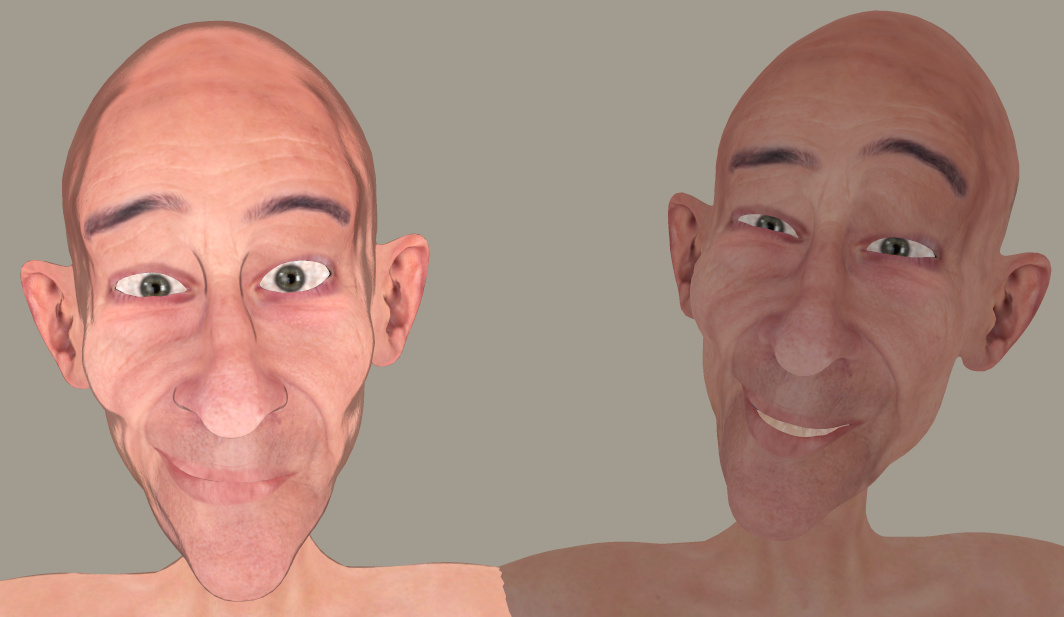
Here’s the stock Andy 3D character in a flat light, with a simple slightly-shaded plain texture and with the normal Comic Book mode inking lines applied. Next to him is the Andy with some of my home-brew Sketch presets applied into the Comic Book lines, plus another preset where I was trying to get big chunky ink lines.
I’ve also discovered (or perhaps re-discovered, after many years?) that you can preview and design a new Sketch render preset in 4000px. First turn off all the Sketch Designer’s also-sketch-lines-into-the-background panel sliders (which speeds it up enormously) and do any old Sketch render to that size, then leave the finished render ‘live’ while going back to: Render | Render Settings | Sketch Designer. This time the Sketch Designer will take some seconds longer to load. That’s because it’s now picking up the settings from the finished render and offering you a live preview at a huge 4000px. As such you’ll have to pan wildly across the preview, to get your object back into view again. But you can then design Sketch presets which work for a 4000px render…
Sadly it seems to be no way that convincing traditional cross-hatch ink shading can be done this way, except perhaps as a very lucky accident for one-off character portraits. By ‘convincing’ I mean I need it to work like a human inker would — follow and hug into the shadows, follow curved surfaces with a suitable angle-of-attack, and not start whorling and swirling about. Update: it can be done, but needs tight control of other variables.
Still, while the Sketch Designer has its limitations in terms of realistic cross-hatching , it’s also fairly easy to take it far away from its usual ‘teeny-weeny hairlines’ default presets…
For reference, if you want to share any Sketch Designer presets you’ve made, your personal ones get stored as .pzs files in one of Poser 11’s many obscure hidey-holes, at:
C:\Users\USERNAME\AppData\Roaming\Poser Pro\11\SketchPresets
CrazyTalk Animator 3.1
The excellent 2D animation software CrazyTalk Animator is now shipping the promised .PSD Photoshop templates with the $299 CrazyTalk Animator Pipeline version 3.1 (not to be confused with 3.01). This is from Reallusion, and so the new templates are very clearly documented.
This relatively-simple software also looks increasingly useful for re-posing 2D characters of the sort used in webcomics production, to save a whole lot of hand-drawing. So it might be considered by artists, even if you don’t want to plunge into all the pain and fiddly slogging that comes with making a full-blown animation with its backgrounds / video-editing / voice-acting / music / titles etc.
Also, I see Reallusion has iClone 7 on a pre-order with special discounts, for delivery in “June 2017”. Upgrading from iClone 5 Pro would cost $199, and that would include the vital companion software 3DXchange 6 Pro (required for working with the current incarnation of 3D Warehouse, older 3DXchange versions being no use now in that regard, because 3D Warehouse have junked all their old file versions).
I’ve looked at the new features but am not really tempted to get back into iClone, unless perhaps… if iClone 7 reveals a Comic Book inking mode that can do better than Poser 11 can. iClone 7 development looks to be pitched heavily toward meeting a slate of industry pre-vis feature requests, and competing with videogame engines such as Unreal and Unity (both free, but for now they’re stuck with nightmare interfaces intended for game developers).
Wanted: a Poser 11 script for quickly applying a colour-adaptive toon material to all selected surfaces
There appears to be a need for a Poser script to quickly apply a colour-adaptive toon material to all surfaces.
There are of course several automated material-replacer Poser scripts, which can work en-masse. For instance, you pick one material .mt5 and then apply it to all your selected materials on a character or prop. Simple script panels such as Transfer Material will do single textures, and XS Shader Manager (looks old, but it still works fine in Poser 11.2) will do much more. MATWriter Panel lets you save a MAT file preset once you have everything applied.
But with Poser 11’s new Comic Book mode, what we now need is a script which does such a replacement, but… which first reads the base colour in the material to be replaced, and then automatically adjusts the colour of the newly applied material accordingly.
For instance: I want to replace all materials on a prop with a neutral two-tone toon material. Where the new material replaces a red material, its colour will be automatically switched to more-or-less the same red colour as it replaces.
I’m not sure if this is possible. The script would presumably need to…
1. Look at the material’s base bitmap, and any colour shading that was being applied on top of that.
2. Then output a ‘best guess’ at a suitable replacement output colour.
3. Then adjust the duo-tone toon material’s colour ramp accordingly.
Having such a script would speed up the process of toon material replacement across a large scene, for use with the Comic Book mode in Poser 11.
One can of course ‘burn off’ much of the prop’s 3D material colour, when using the Comic Book mode (see below). But even when at optimal burn-off, it’s still sometimes not ideal…
Which is why such a script would be useful. It would be like the old llanimeall.py script, but intended to quickly optimise all materials to work with Poser 11’s Comic Book preview mode.
Update: in the animation industry such things are apparently called Matcap (MAT capture) shaders.
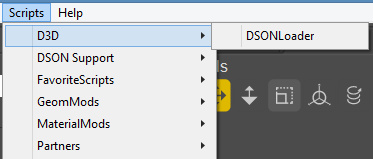
Incidentally, I found that the old llanimeall.py Anime script is still available via the WayBack Machine. It’s been overtaken by the Poser 11 Comic Book mode, but some users may still want it for something. For Poser 11 the script goes into C:\Program Files\Smith Micro\Poser 11\Runtime\Python\poserScripts\ScriptsMenu where I have a FavoriteScripts\Toon Shaders folder.
I sort-of got the script working again, at least on some test shoes, by pasting the whole /runtime/ folder (found in the .zip) underneath that…
But it gives multiple error-messages, and is obviously unable to do the vital mat-cap bit. The script only ever worked on Poser 10 (not 2014, which was the Pro version of 10), and I’ve never heard of anyone but the maker Digitani who was able to actually make his script work.
But even if you don’t want the script, the LLToon.mt5 and LLAnime.mt5 materials may be useful to study, and can presumably be applied en-masse using one of the scripts linked at the top of this blog post.
Blending materials in Poser 11
A quick-start on the absolute basics of how to add a new blended materials layer, using Poser 11.
Layers work somewhat like they do in Photoshop, in terms of the basic ability to blend them into one another.
1. Go to the Materials Room. Click on a scene material you want to overlay. Click on the Plus icon…
2. You’ve now made a new Materials Surface. The old one is still there underneath, it’s just that you now have two layers and the new one is on top.
3. Make the new layer semi-transparent, by dialing its Transparency down to 0.6, so we can see the old layer coming through the new. Then, for fun, load a ‘Spots’ preset into the Alternate Diffuse.
4. There’s now a ‘spotted cow-hide’ like effect, because the new spots material layer is blending in top of the original layer. There are lots of presets like Spots. They’re explained in the PDF Manual in Chapter 15, 16 and 17.
2D textures can also be loaded into the blending layer. There’s obviously a lot more to this layer blending feature, which I haven’t yet investigated, but that’s a basic four-step starter to get someone started.

Update: multi-layers appear to be for SuperFly rendering only.
Technavioforecast
There’s a new predictive industry report on 3D software, from Indian analysts Technavioforecast. They suggest that the “global animation design software market” to grow by 16%, to be at $4.288 billion by 2021. Keep in mind that this market report is focused on animation production and thus includes and will be skewed by the huge videogames industry. As such it presumably doesn’t consider the uses in comics and artwork production, event and theatre pre-production, and industrial uses such as architectural and store design rendering.
The report suggests some main drivers:
* increased use of animation design in movies and video games.
* use of animation design software for TV commercials [and presumably also for Web].
* a rise in demand from the Asia-Pacific region inc. Russia. With… “China, India, and Japan leading this growth”.
Fairly obvious stuff. Off the top of my head, I’d suggest that a few other factors will be:
* increasing automation and optimised workflows within the software.
* a large and growing number of able older people, retired and still adept with their hands and their PCs, with the time and money to learn the software as a hobby.
* faster rendering via the move to 8-core PCs and faster video cards. Also on the horizon are “render farms in a box” (44 cores in a cool quiet desktop BOXX, currently £3,800 but that sort of thing will fall in price in five years if the market sees competition).
* excellent tutorials, webinars and support, making the ‘on-ramp’ for the software vastly easier than the way things were 10 to 15 years ago.
* this ‘on-ramp’ is aided by the increasing use-ability of mature software (think Poser 11, Vue 2016 R2, CrazyTalk Animator 3 etc). The same can be said for the wider 2D ecosystem of support software (Photoshop, Clip Studio, SketchBook Pro etc) and their digitising methods. Judging by 3D World magazine, the same thing is happening over in the university-students-and-professionals market (3DS Max, Maya, Zbrush etc).
* there are new commercial content niches for paid content made with this type of software, in markets often uncontrolled by establishment media gatekeepers. Production and sales distribution are both aided by the ease of getting affordable no-hassle assistance from the likes of Fivver.
Three-panel widescreen grid for comics
This is a fascinating video breakdown of Darwyn Cooke’s approach to superhero comics layout. At first glance it seems to be a format aimed at a less-able juvenile reader who was raised on movies and TV, and who thus who needs a more ‘widescreen movie experience’ without having to weave their eye across a complex series of panels.
Yet the comic, “The New Frontier” (collected in one volume in 2015) is hailed as a classic moment in DC’s post-2000 output, and a powerful homage to the golden age of DC. I’ve never been a DC fan, but I’ll have to take look at that one. Update: comic is excellent, the animated movie adaptation is mediocre.
It occurs to me that it would be much easier for a Poser comics-maker to make a 28-page commercial comic this way. There are only three widescreen panels on each page, which means Poser scene setups would be reduced in number. Wrestling with the framing would be reduced. And when one had the finished panel pictures, all the complex layout and fiddly design considerations of the page are then radically simplified. There’s also fewer boxes and less text to add to the page, and less fiddly colouring via the Toon ID layer. The downside is it’s going to take a whole lot more pre-production story-boarding to get it right, and a restrained story script which ‘shows-not-tells’.
DAZ Hexagon on sale
The DAZ Hexagon 3d modelling software is currently on sale at $7.98. Somewhat old now, not having been developed for a few years, but fairly easy to learn and still perfectly capable of producing props and getting them to DAZ Studio and Poser in a quick way. I grabbed mine years ago, back when it was free, but it’s been full price for a while now. For your first step in learning it, Fugazi1968’s “Make your own Starfighter Tutorials” are well worth your $10, taking you through the basics in a very practical “let’s make something” way.
Digital Art Live magazine – winter issues catch-up
As we head into the really-leafy bit of the springtime, here’s a catch-up on last winter’s free monthly Digital Art Live magazine. The list below features the issues which have appeared since I last featured the magazine on this blog.
DAL is a Poser and DAZ -friendly magazine, devoted to science-fiction art and artists. It is currently regularly nudging 90-100 pages per issue, and is able to get in-depth interviews with the likes of Syd Mead. Next up is the Vue-themed issue, set for release any day now. Contact Paul to be put on the mailing-list and get your free copies. DAL will also soon be inviting advertising at very reasonable rates, so Poser / DAZ content vendors may also want to ask Paul about that.
Issue 12 : Second Skin, a Skin Art issue with a heavy Poser / DAZ contingent.
Issue 14 : Cybertronics. A Tron tribute issue for the mid-wintertime, with lots of glowing neon.
Issue 15 : Mystworlds, a tribute to the videogame Myst, with a lead interview with original Myst artist and animator Chuck Carter.
Issue 16 : Future Vehicles, with exclusive in-depth interview with Syd Mead.
Issue 17 : Movie Magic, on makers of VFX for movies and TV and more.
Poser and DAZ content: what’s new in April 2017
What’s new in the DAZ and Poser content in April 2017? Here’s my personal selection from the month’s new releases.
Sci-fi:
Morphing SciFi Glasses for G3F look like they could made flexible use of across a range of sci-fi and superhero characters, even if everyone is going to say “oh, that X-Men guy!” when they see it.
For something similar but more retro, the Project Zero Goggles for Poser.
Slime Attack for G3F is very unusual, and the slime models would also appear to have possibilities as standalone exports for ‘alien garden’ scenes.
Swamp Mushrooms by 1971s for Poser. Simple, but effective.
AJ Hibernation Hall for Poser.
Liquid Lab for DAZ Studio.
Missing those good ol’ Bryce 3D primitives? DAZ now has a pack of Impossible Objects.
A freebie, an iRay pack of Shimmery Sheer Fabrics suitable for sci-fi.
Aeon Soul’s new Proxy Outfit for Genesis 3 Female is an everyday cyberpunk style. No texture add-on packs yet, but Aeon Soul’s quality sci-fi clothes usually get one or more texture packs fairly swiftly.
Nostalgia:
The free Milkshake Props for DAZ iRay look like they’re worth a shake.
The Realigh Hopper 1970s Chopper bike, plus G3F and G3M preset poses. And if you want a ‘newspaper delivery-girl’-style duffel coat for the rider, there’s one in the new GaoDan Uniforms pack for G3F.
Historical:
Classic James Bond-style 1960s Mountain Cable Car with sliding door.
Coflek-gnorg’s Bunker Hill is a large freebie scene for Poser.
U.S. Musket is a very high quality recreation of a musket. There’s also a new Lee-Brooke Railway Gun from the American Civil War.
Shadow Jester Outfit for Genesis 3 Male looks a bit silly on a standard male, but would fit to a more suitable G3M character.
Tus – Persian Warrior Outfit for Genesis 3 Male is obviously fine workmanship and has a more toned-down texture pack.
There’s a new Ancient Celtic Adrian Hair and Beard for G3 Male.
There’s also a charging herd of male fantasy-historical centaurs on the DAZ Store this month, obviously high quality, but way too many content packs to link.
Steampunk and valvepunk:
New on Content Paradise. Meshbox’s old content can often be rather too low-poly since it was meant for old videogames, but their Steampunk Helicopter certainly looks nice and appears to have detailed engines. Beware that their stuff tended to use a single texture atlas, so swopping out the materials can be impossible.
Small town Newspaper Office of the 1910s-1930s, complete with a news-sheet printing press in the basement and a big bundle of period props.
Creatures:
‘Mr. SongBird Remix’ Ken Gilliland has a new creature, Nature’s Wonders Frogs with two common species created with his usual high quality and realistic approach. Certainly the best Poser frog I’ve yet seen, and I have a few in my runtime. His Renderosity Gallery suggests a “Giant Monkey Frog” morph may be forthcoming in volume 2.
AM has a rodent base and a squirrels morph and LAMH hair preset pack for it plus poses.
BoneZ for the HiveWire Big Cat gives you the base skeleton for things like museum displays, magazine illustration cut-aways, and horror scenes.
Somewhat similar to Sanctum Art’s old Drub figure, Res Mortifera plus Poses and Expressions.
Nature:
Dirty Mudyard is an unusual one, and might perhaps also double as part of a small harbour at low tide. The new Frozen Lake Scenery also looks like it could also help with a kitbash of a low-tide harbour scene. The Dirty Mudyard might also be used for the inside of a recent bomb crater that’s been rained on for a few weeks, and which your Res Mortifera monster (see above) rises up from.
Got ducks and dragonflies? The Harpwood Trail – Mallard Pond.
Stonemason also has a new similar water-side setting at Willow Creek.
Vue users have a base for an ornamental Palace Gardens and topiary. Also a large White Meadow frozen stream-side winter scene which looks superb and is currently a mere $8.
If you fancy something more steamy there’s a new Vue Jungle Scene.
Clearance:
I also see that the DAZ Store currently has a (mostly) sub-$5 clearance sale on many items, as well. Lots of characters mostly, rather than scenes and props, but on a quick skim-through I spotted:
Gothic Muse has an unusual skirt which may interest makers of steampunk scenes, to make background characters more interesting.
Anu-naki, a sci-fi V4 character by TheAntFarm which I wasn’t previously aware of.
AnimeEyes for V4 and Aiko 4 / Hiro 4, possibly useful for making comics with the Poser 11 comic book mode. On the DAZ forums you can also find a freebie set of Genesis presets for fitting the eyes to Genesis 1 in DAZ Studio. (If you need similar for Genesis 2 see DG Toon Style Eyes for Genesis 2 Female).
Swordist for M4, a big collection of sword and hand poses which fit a set of weapons made by Xurge.
The Moebius-style Space Mother head-dress for V4, which is actually fan-art for the Lotus character in the Warframe videogame. This toons up very nicely, in Poser’s Comic Book Mode with flat lighting.
Feral is set of quality cat-girl / cosplay poses for V4 and the Poser Furries Melody/Micah characters.
That’s it, more picks next month.
DAZ/Poser Content Survey: Halflings made easy in 3D
You don’t need a wizard to conjure up some halflings from Middle-Earth, just a copy of the free DAZ Studio and some content packs. Here’s my survey of the suitable content for making fan-art.
The following may contain spoilers, for the early chapters of the book, for those who’ve not yet read it.
The basic halfling:
The good thing about the following being Genesis 2 is that G2 can be easily imported to Poser, and can thus get Poser 11’s Comic Book Mode treatment.
Dwarf Creator for Genesis 2 Male.
Dwarf Clothes for Genesis 2 Male.
Dwarf Poses for Genesis 2 Male including pipeweed smoking and walking-with-a-staff poses. This includes a matching pipe and walking staff as props.
The above packs may use the name ‘dwarf’ on the store, to avoid the wrath of the Tolkien estate (‘halfling’ and ‘middle earth’ are fine, as they were in use pre-Tolkien). But in terms of body shape and feet, it’s really the only DAZ / Poser halfling worth having.
There is however, and also for Genesis 2, the rather neglected Ferdibrand Goodchild for Genesis 2 Male character. Perhaps suitable as a Woody End inn-keeper, but he would need adapting to look far more rustic and Shire-like and less Byzantine. I’ve been unable to discover any ‘rustic Ferdibrand’ materials makeover packs, or any other add-ons. He might also provide the foundation for making a large rural halfling of the Farmer Maggot type.
Better faces:
Most of the Dwarf Creator promo faces don’t look right to me, as they’re too pixie-like and pinched. Halflings eat well in the Shire, what with ‘second breakfasts’ and all, and their faces should generally be far rounder and more cheery. Dwarf Creator for Genesis 2 Male does have some face morphs, but to get a movie-quality halfling face you might also want to have Genesis 2 Male Head Morphs installed.
Hair:
Wyatt Hair for Genesis 2 Male, for which you probably want to play with adding extra curls.
Michael 6 Sport Dynamic Hair for Genesis 2 Male.
Jordan hair for Genesis.
Also see Gurumarra for Genesis 2 Male, for the hair.
Hairy feet:
Real Hairy for Genesis 2 Male has foot hair as polygons. It’s applied in a modular manner and there are hair modules for… “knuckles and toes. Each module has its own morphs for length, thickness, clumping, wetness as well as color and glossiness options.” However, even that might not do it, as I get the impression that some of the most robust halflings have something akin to curly “woolly” sheep-like hair on their feet. Some post-work painting of hair, using Photoshop, may still be needed for certain types of halfling.
More clothing options:
Work Clothes for Genesis 2 Male. An impractical collar, but it includes useful dirty texture sets.
Steampunk Working Class for G2M, for a good plain base of Sam-like gardening shirt and trousers on which you could build an outfit.
Poses:
Props:
You’ll probably want to avoid the Meshbox Halfling Village (versions 1.0 and 2.0 alike) series, as they are too old and low-poly now, and use a single texture map so can’t be easily re-textured.
Mortem Vetus has a rustic pipe and bedroll, both freebies for Poser.
Classic Pipe Collection has a long-stem pipe suitable for the best Longbottom Leaf.
The Party Tree might be Giant Tree DR from quality maker Dinoraul, and Ancient Tree by DarioFish would also be a good choice.
There’s an old Doors pack for Poser that has a ‘Hobbit Hole.cr2’ in it, and a hinged door which opens. It’s old, so needs re-texuring, but you may find it your runtime if you have a decade-old collection. It looks like a good starting base for quality hi-res retexturing.
Walking over The Shire, to the Woody End:
Vue’s Walk in the Forest is a fairly good approximation of the ‘neglected cart road’ which takes the back way from Hobbiton to the Woody End. Note that for this to work properly you need to have installed Large European Ash-Summer sparse foliage / Broad Leaf Straight Trunk / Alder-Late Summer / and Long Grass, all shipping in the Vue Infinite/xStream default free-content pack.
Poseable Trees with Ivy is less realistic and more storybook. It’s a bit bare in terms of ground cover and thus would need either a good low-poly ground-cover pack, or lot of grass and low herbs ‘Photoshopped in’ at the postwork stage.
Campfire and Cooking Set. Also Campfire which is self-illuminating and casts light, in Poser.
Survivors Backpack by Cybertenko for M4 would need modification of its modern textures, but it looks fairly useful as ‘Sam’s big pack’ if you can convert it for G2M.
Luthbel’s Dragonworld: Wildenlander for V3 also has a softer and less-square backpack prop to fit V3, and it also has a water-bag.
Other Shire characters:
Oskarsson’s HellHorse and Dynamic Wraith for V4, both for Poser. For the horse, note that the… “Materials will not work in Daz Studio” and I can’t quickly find any free DAZ MATs for it.
Also look at Soul Nexus for the original Millennium Horse.
Robed aged wizards with big pointy/floppy hats are, of course, very common and they really deserve their own content survey. Storybook dwarves, likewise.
Lastly, as an alternative to the Dwarf Creator for G2M, Nursoda’s Gosha could also be looked at if you want a crowd of background halflings, since you might want a less memory-intensive base character for that than G2.
Big spring Clearance sale at Renderosity
I do love it when quality content goes below $5. Renderosity currently have an “all items at $3.50” spring sale on all the items in their store’s large Clearance area. I spotted the following $3.50 goodies among the 643,000 variants of V4 + glamour clothes…
Of special interest to Vue users:
Curious Greenhouse for Vue. Although note that it’s also currently on the Cornucopia store in a nice $5 bundle (with Curious Stacked Shack and Curious Shaker Row).
Curious Mason Jar Lantern for Vue, an add-on for the Greenhouse. Note that… “the flame will glow beautifully in a Global Radiosity Atmosphere” in Vue. Another add-on for the greenhouse is the new free pair of Gloves for M4 and V4 on Renderosity.
Makers of mountain scenes in Vue might be able to use the realistic Austrian Pine and Eastern White Cedar in .vob and .obj, and the gnarled Jeffrey Pine by Dinoraul.
Flinks Instant Meadow 2 – Weeds 3 and Flinks Dandelion for Poser.
Temple of the Shadows and Papyrus Boats.
Looking rather old now, but IanMPalmer’s Desert Village might just about pass for a distant town in a southwestern USA scene or on Tattoine (Star Wars).
Cydonia 3 for Vue is a sci-fi city backdrop in 3D.
The Tenement is an old American city tenement building from the 1880s-1950s.
Mega Real Cave Pack (.OBJs only) and additional Fantasy Rock Formations.
The 7 Keepers of Magic castle is not really my thing, but it would certainly be an impressive medieval fantasy castle to have rising up from a large Alpine forest.
Beau Quartier, a construction set of classic Parisian rooftops and building facades for building large city scenes of pre-car Paris.
While you’re at Renderosity, you might pick up Coflek-Gnorg’s quality free new Bunker Hill 20th century war scene.
Creatures:
Swidhelm’s Robustus and Iuvenis and Tyrannosaur dinosaur with its impressive skin texture. Six poses come with the Tyrannosaur, and there are more elsewhere on Renderosity in another pack by Swidhelm.
There’s also Swidhelm’s Fluvialanguis which appears to be a fantasy-prehistoric crocodile.
FA Tavrohk. Not especially impressive seen up-close, but… “everything possible has been done to ensure that the creature uses very little memory, so you can load a whole herd even on systems with modest amounts of RAM [memory]”. So far as I can tell, there are no alternative free textures or poses or horn types out there for the Tavrohk. The Bolladon and the Moo are probably more suitable for use as similar ‘alien planet’ herd beasts, for science-fiction landscape artists.
Snow Leopard by AM for Poser. Poorly served by its promo pictures, but like AM’s SaberTooth Reloaded it has excellent pre-applied fur which renders quickly.
MS13 War Mammoth Armour. Requires the DAZ base African Elephant and its Columbian Mammoth add-on, but it appears that the Mammoth is no longer sold. Some will have that in their runtime, but it’s there called mammuth so you’d never find it via search. If you don’t have it then I’m guessing that, with some wrangling, the armour rig might be made to fit onto DAZ’s LAMH Wooly Mammoth?
Poisen’s War Banners .OBJs could accompany your army of Frazetta-style war mammoths.
Also note the set of Cat Poses for the Millenium Cat, if you need more in your runtime.
Sci-fi:
SteamPunk BFG and V4 poses.
The alien Octos for M4.
Lair – Eco character preset for V4. The previews leave it uncertain if this is full-figure, or only waist-up.
Oskarssons Neon and Neon Materials. Note that these are both the later DAZ Studio edition, not the earlier Poser one, and that “she works fairly well with most Genesis poses.”
The Divine Order by Oskarsson for V4 and Aiko 4.
Atom-0-Ray Guns. Not well depicted by its naff main promo picture, but the design is nicely retro and there’s a huge set of parented poses for V4 and M4 in the classic pulp-art style.
Coflek-Gnorg’s very detailed cyberpunk YAKUZA Hacking Device and Sci-fi Portals set.
Steampunk:
Flying Cadet Lola Pepper for V4.
Lola-ready props on Clearance include SteamPunk Study props and Steam Props and SteamPunk Wand.
Madness Lab looks a bit basic in terms of textures. But it could be useful for those making a comic strip using Poser 11’s Comic Book mode, with characters such as Doctor Pitterbill and Lenore (and her Raven), and the Lab is more or less in the Lenore style. Also of interest in that context may be The Back, also on Clearance.
Privateer Twin Hull U-boat submarine.
Cryo Chamber, SkyCaptain3D’s first model.
1971s has a SkySmall Boat and Sky Boat on Clearance sale, along with a few of his other sky-craft.
Popular characters, new looks + props/clothes:
Shylee for the Mavka character, for which there’s a fair bit of faery/fantasy clothing available. Mavka is also supported by the Crossdresser clothing conversion software.
Steampunk Pitterbill clothing for Doctor Pitterbill.
The semi-toon Grandpa. Although note that Grandpa requires M4, M4 Morphs++ and Capsces’s Morphus morphs pack (the latter no longer sold?) to work. Still works without Morphus, but it’s not quite so toony.
Kali Fairy for Nursoda’s Kali.
V4 Gaia Poses for V4 Gaia.
Mongolian Princess for V4, which looks like a starting point for making a second-trilogy Star Wars princess.
And lastly… don’t sniff at V4, she’s got Biscuits Noses for V4… with noses “custom sculpted in Zbrush”! 🙂
That’s it. I skimmed through everything in Clearance, and that’s the stuff which caught my eye.
Annual link-rot check on the sidebar links
All of this blog’s 250 sidebar links have had their annual check, by hand and eye rather than an auto-bot. Problematic links have been repaired or deleted, as needed.
Gaze warping
High-quality realistic Gaze Warping. Seamlessly change where the eyes in a hi-res photo are looking. Currently it’s an academic paper and an WebGL demo. I’m guessing: next stop, Photoshop integration? That might mean there would be no need to do a fiddly pose of your 3D character’s eyes, as you could fix the gaze afterwards in Photoshop.