Poser 11 Pro 11.3 for $80, a current offer at Neowin Deals. Vended for Bondware/Renderosity. Ends in four days. Seems legit.
More details here.

It’s also 25% off at Renderosity, which currently puts it at $149 there.

Poser 11 Pro 11.3 for $80, a current offer at Neowin Deals. Vended for Bondware/Renderosity. Ends in four days. Seems legit.
More details here.
It’s also 25% off at Renderosity, which currently puts it at $149 there.
Renderosity want DAZ Studio Moderators. There’s actually pay and perks involved, amazingly.
Ronk Aednik, Nursoda’s free add-on pack for his new Ronk figure. Commercial use.

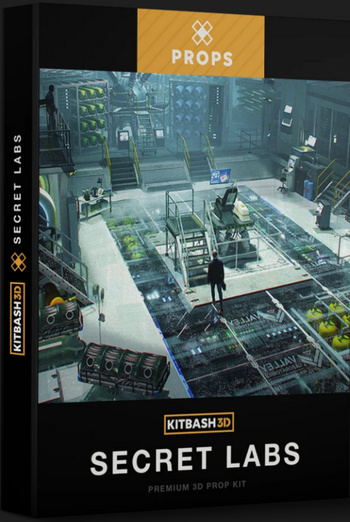
I see that Kitbash 3D have recently produced three appealing new themed packs: Props: Secret Labs; Vehicles: Spaceships; and the big Heavy Metal world-building kit.
There’s a quality new free Aiko 3 character. Dody Character Preset For Aiko 3. This requires the Aiko 3 base figure, which most people will have in their runtime, and also the Aiko 3 Morphs and Maps pack (also found in various Aiko 3 bundles and Anime bundles). Also its dependent, Capsces’s Kioki morphs and faces pack for Aiko 3. If you have all those, you’re set.
Once installed this is what you do in Poser…
1) Figure | CDI Koiki (not Aiko 3!) | load.
2) Poses | CDI Koiki | and inject head and then body into the CDI Koiki figure. (You thought you just loaded Koiki in Step 1? Nope, think again…)
3) Then go find Dody under Poses | Ethin. Inject the Head first, then Body.
4) Select body, apply an Aiko skin MAT of your choice.
5) Head dials | ‘OpenMouth’ slightly, so you get an inked line in Poser’s Comic Book mode under flat lighting.
Looking good already in Poser’s real-time comic book inks…

Nursoda’s Kali hair fits well, with just a little scaling. But it does not toon well. Nursoda’s Fehn Hat proved to be better, but is difficult to position. Nursoda’s Anceata hat/hair combo was the best and needed only minimal fitting for a ‘Brian Froud look’.

A storybook combo, combining a saturated Sketch render from Poser using my custom Incredulize! preset, and an inks-only Comic Book render from Poser that was faded out to look like pencil…

Total render time for both renders at 1800px, about 20 seconds.
Yes, I know, “this is 3d, so where are the shadows?” They can be put in too (and there’s an ugly spodgy one on her neck already, ouch), but they weren’t for this quick demo. She probably also needs a more mud-rolled and rain-dropped skin MAT to be a convincing forest spirit.
A new article on PoserPython at Renderosity reveals Poser 12 will go to Python 3…
“When we move to the newer version of Python it will almost certainly break the DSON [early Genesis versions import] plug-in and other scripts. We simply can’t hold back the needed updates any longer. Poser needs to move forward, and we can’t wait for DAZ to update a 10-year-old plug-in,” he said. If user want to use Genesis figures in Poser, DAZ Studio has a PZ2 (Poser format) exporter that allows the export of figures that can load from Poser’s library system.
The latter is news to me. Does he mean the store, rather than .CR2 export from DAZ Studio? They do have a $7 ‘Poser Format Exporter (PFE)’ .PZ2 exporter for getting poses and animations and the like to Poser, but I’ve never heard it could be used for complete clothed pose-able early-Genesis figures. If that was possible I’m sure I would have heard about it. Perhaps .CR2 and .PZ2 are being confused here? You can do .CR2 to get a Genesis 1 or 2 figure, but not G3 or G8.
But if one really must have an early Genesis figure one can always i) export as a posed plain old .OBJ (pray the textures load back on); or ii) render the posed figure with similar lighting, save to a masked image format, and use inside the Poser scene as an alpha-masked billboard (only good for background crowds, admittedly); iii) render the figure to a masked PNG and composite into the Poser scene in Photoshop, PhotoLine, Krita etc. So far as I’m aware it’s not possible to export a posed .FBX from Poser, and that’s probably also the case for DAZ though I’m not sure.
As for other scripts and Poser 12, I guess we just have to see what breaks. It happened for Poser 11 and 11.2, and stuff got fixed in due course. Perhaps Renderosity could dedicate a tiny fraction of the Poser 12 profits to recompensing the script fixers. How about offering small bounties for fixed scripts? I mean, there’s only going to be a dozen or so. $100 per = $1,200.
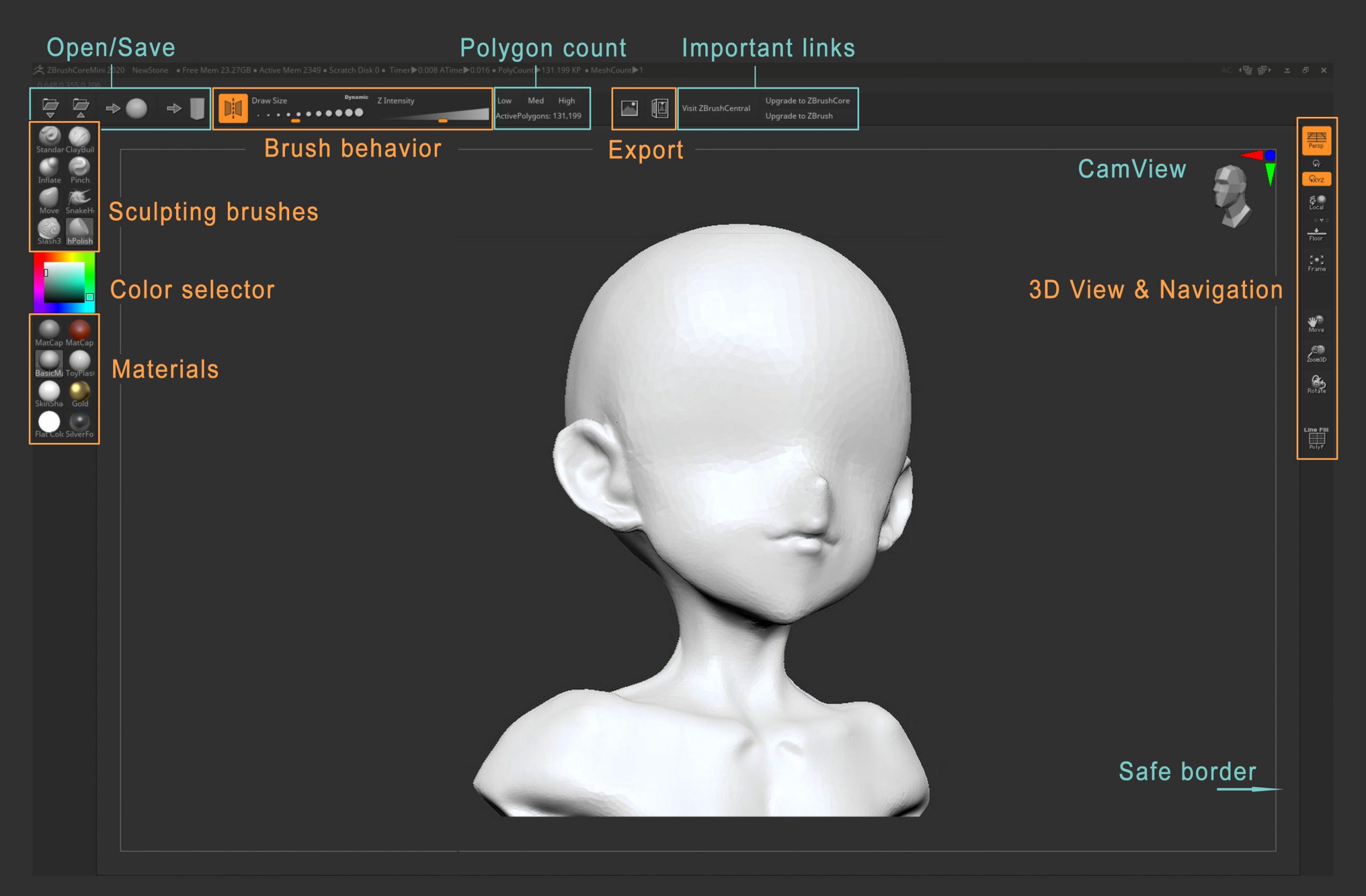
ZBrushCoreMini is a new entry-level free version of Zbrush, sitting below its budget ZBrushCore in the Zbrush range. It’s relatively confusion-free, with just eight sculpting brushes and a few basic materials. There’s also .OBJ export, with no watermarks. Downloading ZBrushCoreMini requires a sign-up, and it appears to be perpetual free desktop software.
It would be interesting to see if this could be hooked into GoZ or an equivalent, for round-trip calling from DAZ Studio, Poser etc like the big ZBrush.
The Poser Addicts store is closing down, with a 60% sale until 15th June 2020. Their flagship FemaSu 2011 alien is one science-fiction artists will definitely want in a runtime, and there are a couple of nice freebies including a Steampunkbike with Poses for M4 and a useful Cigar. There are also curiosities such as a skeleton lion and horse.
Here’s a test $50 checkout, though I will probably trim it back quite a bit. As always with such things, check carefully in your runtimes (using PzDb etc) before purchasing — since you may already have it.

Sad news from Trimble, who took over SketchUp and Google 3D Warehouse from Google. They’re now making the SketchUp software subscription-only. It will reportedly…
stop sales of new perpetual licences after 4 November 2020, along with renewals of maintenance contracts for existing perpetual licences, moving to a subscription-only model.
I suppose we should be grateful that there will still (for now) be a ‘free’ lite version, introduced at the end of 2017, even though that is online-only. I’m not sure if that can back-convert older models though, as .SKPs are version-sensitive. For instance your older software (which ‘knows’ about .SKPs, such as Keyshot) may need its Warehouse 3D model .SKPs to be from SketchUp 8, or some other older version. That means the current Warehouse 3D downloads need to be tediously back-converted by running them through the current version of SketchUp.
They’re also keeping 3D Warehouse online for now, albeit slowly making it ever more difficult to get in, curate, download from, or to get 3D models from that work with older versions of SketchUp or conversion software. Again, I suppose we should be thankful for that.
If you still want free on a desktop, then SketchUp Make in early 2017 was the last good free desktop version. Archive.org has the required installer… sketchupmake-2017-2-2555-90782-en-x64.exe.
But it’s no great loss as regards Poser and DAZ .OBJ geometry. As SketchUp is a total nightmare to import to and then to move something around in (that horrible ‘placer’ and then the bizarre ‘stick to the object’ mover… ugh). It is just not worth the hassle — if all you want is to get one of the Sketch Styles filtering a 3D view of an object or figure. Stick with Poser 11 and the real-time Comic Book lineart + Sketch.
However it is still useful for rendering items found in the Warehouse, with a Sketch Style, such as generic city buildings for the background of a comic or illustration.
For those who are staying at DeviantArt and suffering, you’ll be needing a blocking-filter that’s better than the clunky native one. In which case you should know that the deviantART-Filter browser add-on has a new v6 ‘Alpha 1’ (14th April 2020) for testers. The add-on elegantly blocks users from your search results, and provides a discreet and hassle-free ‘block’ button. It can run alongside the UserScript dA_ignore which it seems doesn’t do blocking in search results, but blocks in other ways.
Why is this deviantART-Filter release important? Because version 6.0 ‘alpha 1’ works with the horrible new Eclipse UI, which regrettably we’re all being forced to use from 20th May 2020. The old version doesn’t work with Eclipse, and the new one is anyway a lot faster when scrolling through search-results.
Here’s the best way to go about getting the new deviantART-Filter…
1. First, don’t uninstall your old deviantART-Filter addon. First, export your old blocklist from it, as a .JSON file…

Then de-activate it, but don’t un-install your old copy just yet.
2. Now download, unzip and install the new version from GitHub. I manually installed the Opera version from the unzipped folders. That means I just went to: Extensions | Load Unpacked | and pointed Opera to the folder. I assume it’ll be much the same on other browsers.
3. Go to the new add-on’s dashboard, accessed via its red address-bar icon. Find the import panel and drag-and-drop your old .JSON blocklist into the import panel…
A ‘hive of scum and villainy’, installed and blocked. As you can see, I’ve been ban-happy over the years…

Now you can uninstall the old version, after backing up that .JSON file somewhere safe.
4. Now check it’s working. On searching you should see correctly-sized placeholders for blocked pictures…
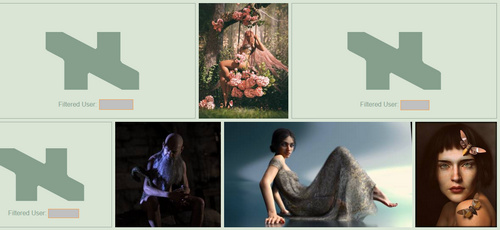
Each remaining picture has a blocking ‘X’ icon placed in the top-left corner, which appears when you mouseover the picture with your cursor…

Click it, and the user is perma-blocked.
Update: 6.1 has a new way to filter a user – right click on a search result, “Create Filters…”.
A big advantage of the new v6.0 alpha in Eclipse is that it’s no longer ‘sticky’ to scroll down multiple pages of results, even with 1,600 permablocks at work in the background. If you only have a few hundred you may not even notice the occasional slowdown.
Incidentally, if you want to convert your exported .JSON file to a one-name-per-line list suited to dA_ignore, then Notepad++ and this Regex is your friend…

The place to then paste your list is your own personal Settings page at DeviantArt, into which dA_ignore will have plugged a new link and a listing page.
Ah, well… that’s DeviantArt ruined. They’re now forcing the appallingly un-usable new ‘Eclipse’ interface on everyone, from 20th May 2020. The new look is somewhat prettier, but is absolutely vile to try to use. Its poor usability and layout is just so bad, and in so many places, that it’s amazing how it all got past the beta testers. I can only assume they were all using tablets, not widescreen desktops. It’s so bad that I’m considering moving. Are there any real alternatives to DeviantArt, that are not the dour and fun-free ArtStation?
Lightwave 2020 has been released. The “what’s new” highlights for artists appear to be:
* Two new hair shaders in FiberFX, with “a simple artist-friendly shading option” which makes controlling and styling the strands easier.
* Tone mapping and better SSS.
* Improved workflow in the Scene Editor.
* “More features” are now supported in the FBX format.
* Updated OpenGL, for a “closer to final render” look in preview.
 Posted in Poser, Special Offers and Discounts, Spotted in the News, The Animation Industry
Leave a comment
Posted in Poser, Special Offers and Discounts, Spotted in the News, The Animation Industry
Leave a comment
The Poser library manager/finder alternative P3DO Explorer Pro 2.8 is 50% off until 30th April 2020, including the upgrade. That makes it just $12.50 for first-time users.
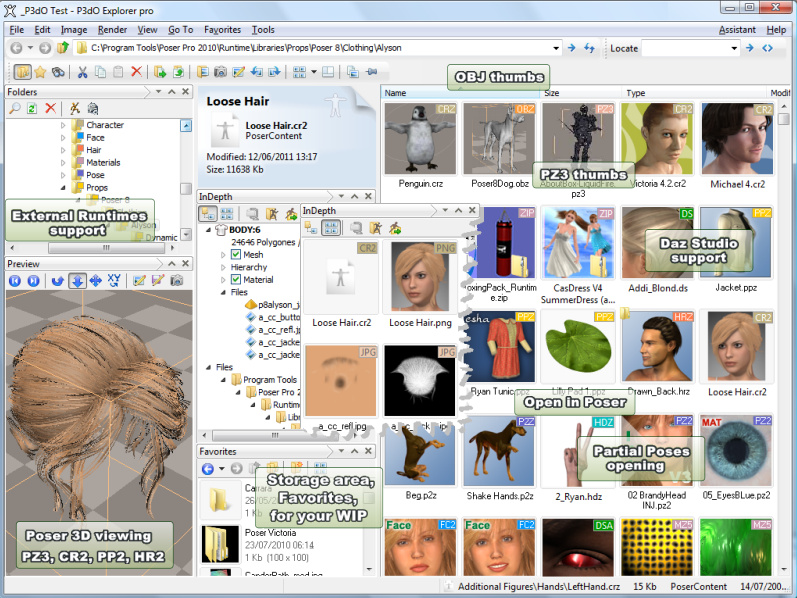
The last P3DO Pro update was December, with many new features added, and this new 2.8 is March/April 2020. Again, lots of new items added and other tweaks, on which the changelog is linked here. Much as I like PzDB as a Poser library manager, this new P3DO 2.8 has to be worth a mere $12.50 just to have as a backup. I believe it also works offline, whereas PzDB needs to ‘phone home’ occasionally, which may make P3DO useful for offline Poser creatives. P3DO’s main problem is that searches are so incredibly SLOOOOOOWWWWWWWWWW. Really, really SSSSSSSSSSSSSSSSSSLLLLOOOOWWWWWWWWWW. Like eight minutes for one search.
Curiously, the DuckDuckGo search-engine seems to heavily censor searches for the software (six results for “P3DO Explorer”, none relevant). Whereas Google Search is happy to provide 14,000 results. I assume that the word “p3do” is now on the Bing bad-words blacklist (DuckDuckGo is mostly Bing, with a bit of Yandex). Yes, it’s 2020 and advanced search-engines are still using clunky old keyword-based censorship. This is yet another reason why DuckDuckGo isn’t something you should use for serious searching, only for quick navigational searches and image searching (on which it’s actually quite good, mostly because it has less spam and fluff than Google Images).
Also, in other discount news, the main Reallusion Store has a coupon code for 50% off everything, also until 30th April 2020. Theoretically that brings the standalone conversion utility 3DXChange 7 Pro down to $99, which will be of interest even if you don’t want to get into the iClone ecosystem.
The iRay devs reported a few weeks ago that iRay “2020.0 final has just been released”. Strand fibers do “especially well” with the new iRay 2020 + an RTX graphics card, even fibres with dense intersections.

iRay 2020… “introduces native fiber intersection support! This delivers perfectly smooth hair, fur, carpet, and similar curve-based primitives out-of-the-box, without paying for extra memory and/or additional pre-computation time for tessellation to triangle-data!”
Good news for fur render speed and for Look At My Hair users. Though not quite yet, as the latest iRay in DAZ Studio is currently 2019.1.4. But it can’t be long until 2020.1 gets plugged in.
Several other major bits of software are also doing short hair, KeyShot 9 has its new “fuzz”, and Lightwave 2020 also adds new shaders and easier controls to its existing FiberFX.
The Poser Pro 11.3 update has just been released. Congratulations on the team for getting it on time in the current difficult circumstances. 11.3 adds…
* support for RTX graphics cards on Windows, and apparently this has to be “20 series”. The added support is said to “significantly reduce render times”;
* improved content library search, with new Boolean “AND” and “OR” search-operators for the Library search-box;
* a new stand-alone male figure, L’Homme, who was previously only a morph of La Femme. But “they can still share morphs, textures and poses”;
* the La Femme figure has been updated to remove the L’Homme morph dial;
* users can now log in to “Renderosity accounts through the Poser Software interface” and download/install store purchases that way. Note that “Users will not have to “Install from Zip” unless they want to.”;
* Poser’s Python scripting is updated to Python 2.7.17;
* 11.3 adds the latest .FBX handling, and there’s a forum post that suggests this means FBX 2019;
* new “faster loading of default scene load time by using PMD”. (Never heard of it, but sounds good. Does it also speed up Poser scenes that are not the ‘default’?);
* and “hundreds of bug fixes”.
On the ‘store content installs’, I presume one can tell Poser which Runtime you want it installed in. Since Poser 11 has several, and users often have more and in strange places.
11.3 looks good, but I won’t be installing it just yet, and I might even prefer to wait until the summer and Poser 12. Poser 11.2 runs fine for me, and I’ll wait and see what scripts the Python update breaks before installing. I’ll probably update this blog’s ‘Poser 11 Python scripts page’ in due course for 11.3, in a few weeks, as and when stable fixes are noted and linked on the forums.