
So, with the Poser 12 Early Access release out the way… when exactly is Black Friday this year? It’s set for Friday 27th to Monday 30th of November 2020. Monday being “Cyber Monday” which some brief digital/software sales wait for. Not long to go!
Category Archives: Spotted in the News
Release: Poser 12 Early Access is available
Poser 12 Early Access is now available on Windows, here, as a Trial and a purchase for Poser 11 owners. The Trial can apparently run happily alongside your existing Poser 11.x.

New items of information on the new pages are:
* SuperFly rendering (the Poser equivalent of iRay) is now based on Blender’s Cycles 1.12 (it’s possible they mean 1.2?) Forum chat suggests this upgrade breaks some of the materials in old Superfly materials/shaders sets and skins.
* Inclusion of “Intel OIDN, an A.I. based image denoising system” for SuperFly. The SuperFly ray tracing support and Adaptive Sampling had already been announced. It appears that the denoising is located in the UI on the… “New post effects palette for denoise and more.” The palette’s other ‘post’ effects are said to be only basic items like Saturation, at present, though there will presumably be more and more artistic ones in due course. Though I suspect we’re not going to get a full in-Poser multipass compositing engine, working in tandem with repeatable automation.
* New Material Management tab, which had previously been announced but for which we now have a screenshot…

* “HiveWire3D’s Dawn, Dusk, Baby Luna, Gorilla, and HiveWire3D’s Horse all feature SuperFly materials.” Which I assume they didn’t have before. They’re found in the freebies bundle. No news of any additions of new figures to this freebies bundle. There is also a new automated content-installer feature, but you can still install the old way via manually unpacking .ZIP files and then a careful cut-paste into your runtime. I assume that the L’Femme and L’Homme base figures are also still in the big freebie bundle, and that their skin renders fine in the new SuperFly version. Presumably these flagship figures will still be the base versions of L’Femme and L’Homme, and not the paid-for Pro versions.
* “21-day full feature, free trial.” Windows 10 is specified, but forum talk suggests Poser 12 can run on Windows back to Windows 7.
* Importantly, note that this release is only Early Access and thus… “You must currently own a copy of Poser 11 to upgrade to Poser 12. Only valid licensed copies of Poser 11 are eligible for upgrade.” I assume this also applies to the Early Access Trial.
* Update: Apparently Poser 12 Early Access broke DAZ Hexagon export for Poser, re: the scale setting being a bit different than it was. TSoren on the forums suggests the following conversion numbers should work with Hexagon for Poser 12: “Poser [12] to Hexagon, export % value 26212.8 Hexagon to Poser [12], import % value 0.381493011048”.
So… version 12 is not getting me to stump up $130, at least as it stands in Early Access. Perhaps it will when “features are finalized” in December 2020, or at the first patch early in the New Year. At present it has some nice tweaks for the SuperFly photoreal and raytracing crowd, but nothing new for anyone who wants to use Poser’s unique non-photoreal features. Indeed the broken SuperFly skin/material shaders and the script-breaking move to Python 3 are active disincentives to upgrade, until things are fixed.
There are some good things though, simply by their absence — there’s been no big UI “makeover” and no move to a subscription payment basis.
More official news on Poser 12
A bit more official news on Poser 12 has been released.
* Poser 12’s SuperFly render-engine has had its Cycles render engine updated from Poser 11, to a more recent (unspecified) version of Blender’s Cycles. It’s still called SuperFly.
* Several new GPU rendering options have been added to SuperFly, and it will now support the NVIDIA OptiX Ray Tracing Engine (for which you’ll need a suitable NVIDIA graphics card and a PC capable of running it — the entry-point graphics-card averages about £350 here in the UK). Some forum trolls will no doubt jump on this and use it to insinuate that users are being ‘forced’ to make expensive upgrades. That’s not the case, as SuperFly users can easily switch it over to use normal graphics-cards (NVIDIA or AMD) or to CPU-only rendering, like you can with DAZ’s equivalent iRay renderer.1.
* Improved image quality via SuperFly integrating Cycles’s new “shadow catching and background transparency” features (with or without OptiX Ray Tracing, it seems). Plus “adaptive sampling” (i.e. it automatically detects ‘noisy’ areas of the picture, such as shadows-in-haze, and does a bit more rendering in those bits — so they’re less noisy on the final render).
* And there’s a firm release date for Poser 12 on Windows (Early Access version): Monday 2nd November 2020. At which point we’ll presumably get the full itemised feature-list and (hopefully) a complete detailed technical changelog.
1. There is a misleading claim made in the linked page, that DAZ iRay “only functions with NVIDIA hardware.” Not true, though NVIDIA do their very best to make you think that. I can run it quite happily on an AMD PC via CPU, or on a CPU-only Xeon workstation. The latter is fast enough, running only on the CPUs, to even give me a real-time main viewport of reasonable size and responsiveness.
Handy hand-puppets
A new Reallusion video “Hand Animation Solution from the Puppet Actor Toolkit pack for Cartoon Animator”. Control animations with your hand. Requires extra kit (rather than working from a HD webcam) and is obviously a bit difficult to control in real-time. Nor can you emulate a traditional “glove-puppet” experience, it seems. But it’s amazing it can be done at all, and as always Reallusion has pre-rigged templates for Cartoon Animator.


$100 Decimator
Wow, the official Decimator for DAZ Studio plugin is now priced at $100 on the store!
I’m glad I got it free from DAZ some years ago, which I think was when they were moving from DAZ 3 to DAZ 4.
After boggling my eyes at the current price, I looked at the re-download of my freebie. Had it updated? Yes, it’s now “DS4 Decimator 1.10.1.118” for 64-bit DAZ Studio. So if you were still running an old install of DAZ Studio alongside the latest version — just for the Decimator you’d plugged into it — then freebie owners might usefully switch to a later DAZ version to run the Decimator.
What does it do? It’s DAZ’s only native polygon-reduction tool, which usefully offers per-item reduction of polygons. e.g. in the hair, the eyelashes, the dress, the body etc. This is done very easily and quickly, by sliders. Decimator is also useful when used simply as a tool to check what item, usually hair, might be causing your scene’s memory-consumption to become critical.
Vue Solutions webinar
Vue Solutions Community Workshop, as a group webinar for users of the E-on Vue software. Sunday 1st November 2020 and booking now.

Still a great bit of software and able to load full textured Poser scenes (not just T-posed figures) with extreme ease, especially if you have the ‘last good’ non-subscription version at 2016 R5. As I wrote here earlier…
A small bug introduced in R4 meant that Poser 11.2 scene saves may not open correctly in Vue 2016 R4, but this bug was fixed in R5
After Effects borrows a vital feature from Cartoon Animator
Posted on
by
 Posted in Companion software, Spotted in the News, The Animation Industry
Leave a comment
Posted in Companion software, Spotted in the News, The Animation Industry
Leave a comment
Posted in Companion software, Spotted in the News, The Animation Industry
Leave a comment
Reallusion’s Cartoon Animator 4.3 Pipeline recent enabled sending of scenes via a script to Adobe After Affects (CC 2020, CC 2019, CC 2018, CS5, CS6). Perhaps as a follow-on, the latest After Effects has introduced a new “3D Design Space in After Effects”…
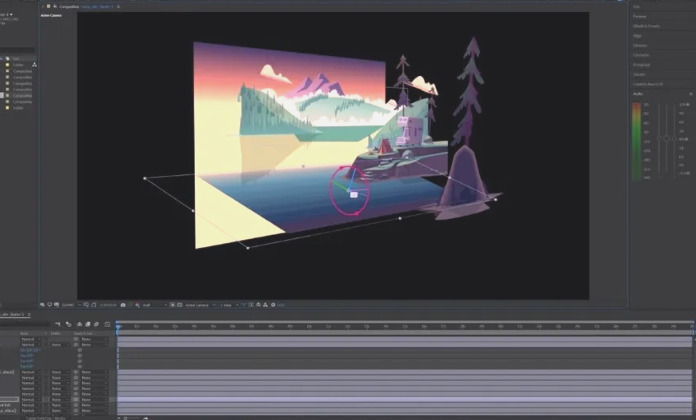
This looks very like the intuitive angled-layers view in Cartoon Animator, which should make the Animator 4.3 -> AE transition easier. Amazingly, it seems that After Effects couldn’t do this before now.
MotionArtist discontinued and unlocked re: activation
Posted on
by
Posted in Comics, Companion software, Special Offers and Discounts, Spotted in the News
1 Comment
Posted in Comics, Companion software, Special Offers and Discounts, Spotted in the News
1 Comment
Smith Micro are obviously continuing to wind down, with their products-blog the most recent casualty. The only really ‘long-term important’ bit of the blog, the Dave Gibbons interview, has been saved.
The page for their unique MotionArtist HTML5 motion-comic making software now states…
As of August 2020, MotionArtist has reached its End of Life. All MotionArtist users should download and install this final available version for MotionArtist here (active license required):
MotionArtist 1.3 for MAC (153 MB) | MotionArtist 1.3 for WINDOWS (149 MB)
The software should continue to function on the supported Operating Systems and Hardware as indicated by the System Requirements.
Right, so that’s very good of them, if they couldn’t find a buyer who wanted to develop it further. Just as well I purchased it when I did, by finding and bagging a cheap £10 DVD on eBay. I just checked inside the downloaded new .ZIP file, and the “NoAct” bit must indicate that no online activation is required for this final version…

So it looks like those with a valid 1.3 install should stash their 1.3 licence serials and this final-final .ZIP version that doesn’t phone-home after install, in case they need to reinstall on a new PC at some point. In which case the software should now last as long as Windows can support it, and as long as the Web can play what it produces. That’s very good.
Presumably a cheap eBay DVD with a serial in it will still be useful, in combination with this .ZIP?
Note also that their Moho Debut 13 and the main Moho (formerly Anime Studio) are both at a 40% discount for the next two days. I believe, though have never tried, that Anime Studio files can be imported to MotionArtist. Maybe even Manga Studio (now Clip Studio)??
“Get a Sammy on the job…”
It’s always good to hear about a new semi-automated AI assistant feature for the free Unity engine, to remove some of the drudge-work. The ArtEngine apparently automates seamlessly tiling of materials, and also…
“up-resing, de-blur, un-warping, color matching”

Drawbacks: appears to need an NVIDIA graphics card, and costs a ridiculous $1,140. Still, it’s likely to be a herald of things to come in Semi-automated Assistant AIs.
We probably need a short name for those in creative production, actually. How about SAMAI or SAMAAI, to be pronounced in conversation using the friendly non-scary name “Sammy”. A Fully Automated Routine AI would be a FARAI, pronounced “Fairy”. Or just said as “Sam-eye” and “Far-eye”.
Photoshop Elements 2021: Face Tilt
A new version of the budget Photoshop Elements 2021 is out today. The most interesting new semi-automation is “Adjust Face Tilt”. It seems this may have uses for final-adjustment of pictures inside comics frames, where the picture is still hi-res and the face-tilt or look-angle is ‘not quite right’. So far as I can tell there’s no third-party plugin that will easily do the same in the main Photoshop.


Given the demos I’ve seen, though, it probably only really works well where the subject is facing the camera, which may rarely be the case in comics.
No progress on the iffy auto-colorize feature, it seems.
Out of the shadows
Portrait Shadow Manipulation is an interesting new technology, hot from the Google labs.
It automatically lifts hard shadows in a head-and-shoulders portrait, these being the shadows of the sort commonly seen in pictures and videos casually made by amateurs in sunny places. Here’s the research video and a useful screenshot from it.
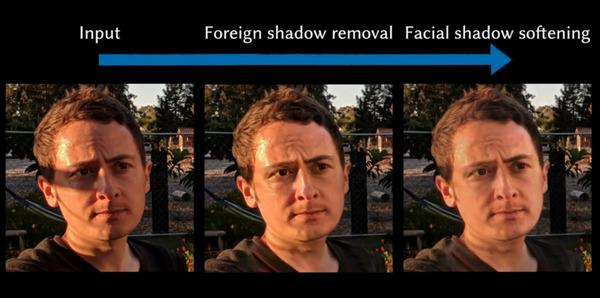
It also removes ‘sweat-shine’ highlights.
As you can see, if plugged into a graphics package, this technology might produce better base-portraits from which to then build comic-like art and line-art. Since what you want for your comics ‘colour flats’ layer, under the lineart, is a fairly ‘flat’ lit face or body. To which you add the shadow-render as a separate and adjustable third layer. Otherwise you’re never going to control the shadows so they display in a believable and uniform way, across the 120 panels of a 28-page comic.
What would be even more interesting would be to go the other way with the new technique, and to ‘auto-cast’ shadows onto fairly flat-lit faces, just by knowing where the eyes / mouth / shoulders are.
Rig this!
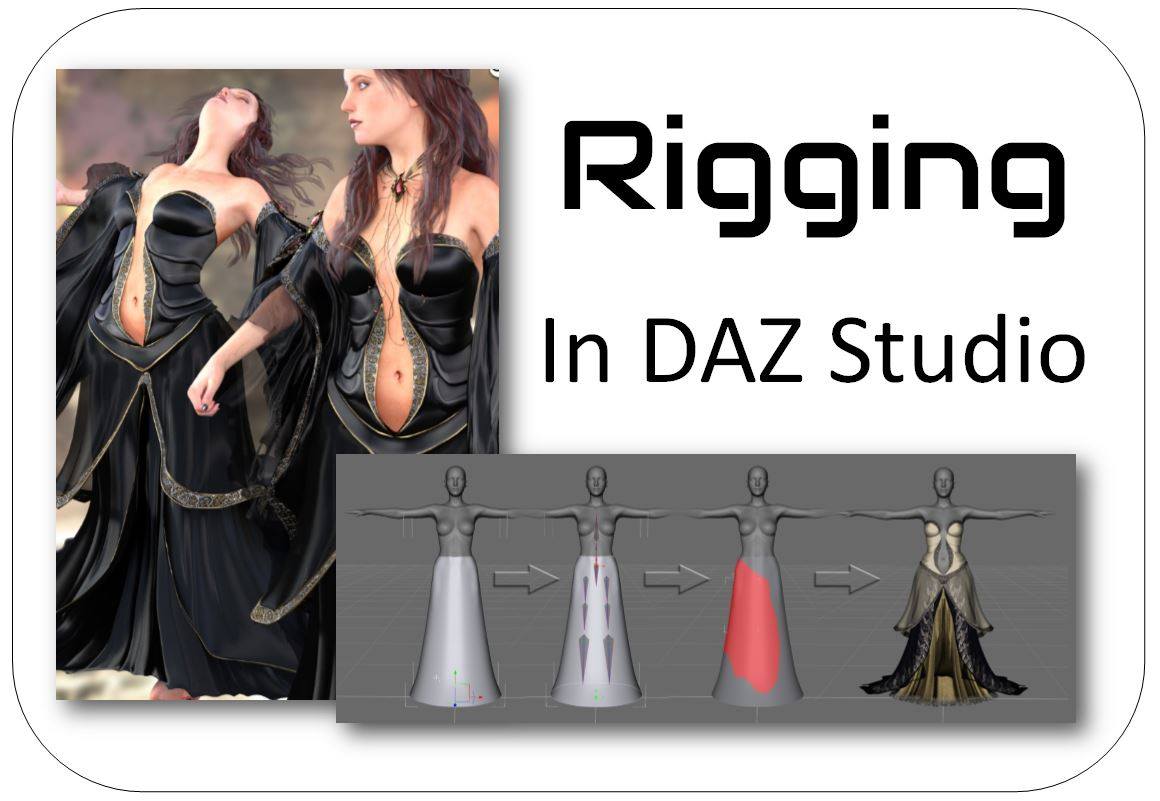
A great opportunity to learn the efficient workflow and advanced techniques of DAZ Store content-creation, one-to-one with one of the best, and in a small selective group. An opportunity like this doesn’t come up every day. Recruiting now.
Effective…
Posted on
by
Posted in Companion software, Spotted in the News, The Animation Industry
Leave a comment
Posted in Companion software, Spotted in the News, The Animation Industry
Leave a comment
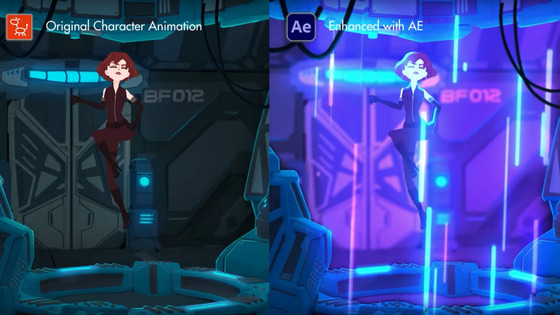
Cartoon Animator 4.3 Pipeline can now export your Project to Adobe After Effects. There’s a handy video on installing the script and sending the scene over. Nice. Now you can say to the animation snobs, “Oh yeah, it was made in After Effects!”
Poser 12, priced and approximately dated
We have more news on Poser, giving a price and an approximate release date.
The date given is still a bit vague, at “Late Fall”. Which would put the release-window between Renderosity’s store discount cut-off of 24th September and the 31st October (which would be the last point that one could reasonably call “late Fall” or Autumn). You can understand that they don’t want to be more specific, since competitors could launch a big ‘must have’ 80% sale a week before and thus drain everyone’s PayPal at just the wrong moment. But it seems possible Poser 12 may be here quite soon now, perhaps even as early as the end of September. I assume there will be a generous free trial, like there is for Poser 11, which should allow for testing and thus allow for some facts to calm the forum hysterics.
So, on price there will be a $129 upgrade price from versions of Poser 11, which is quite reasonable seeing as this is for Pro with its additional features, not the old Standard. In the old days you’d have been happy to pay $129 just for Poser Standard. Also, you can currently get Poser 11 Pro for just $80 at Neowin Deals. ‘Five days to go’ on that, as of today. Given the possible release dates for Poser 12, it could be your last chance to get that deal.
But there won’t be any upgrade path from the old Smith Micro versions prior to Poser 11. That’s fair enough, as it’s something that greatly lessens the programming and help-desk load for Renderosity. People can hang on to antiques like Poser 6 and Poser 2014 forever, for some backwards compatibility, because these versions don’t “phone home” and thus should last as long as Windows. But there comes a point when users can’t expect their antiques, made by another company, to also be perpetual golden-tickets to a shiny new Poser 12.
Slightly worrying is the lack of a crossover period, and an apparent abrupt change…
“Poser 11 will no longer be available for purchase after the release of Poser 12”.
Worrying because that opens the door for some forum trolls to slyly suggest to newbies that their Poser 11 will stop running in a few weeks’ time. A forum clarification would have been useful in that respect, to the effect that Poser 11 will keep running and that 11 will continue to be supported at the help-desk.
In the meantime…
“The full version of Poser 11 is also discounted at 40% off” at the Renderosity Store.
Though note that the $80 Poser 11 Pro version still available via Neowin Deals for the next five days.
There’s also some misleading forum-mongering about a “replacement” render engine. This claim is not at all justified by the official announcement. The announcement says Blender’s Cycles (aka SuperFly) will have its version updated, not be junked and replaced. A Cycles upgrade for Poser 12 should be great news, as Cycles has come a long way since 2012 and it will likely mean rendering speed improvements for SuperFly.
Fake shadows
An interesting idea from “Aversion of Reality” in the Blender crowd…
“What if we just faked all our face shading?”
What he means is not that you have 12 MATs for the same figure, each with a shadow position directly imprinted onto the skin MAT or some overlay for it. But rather that the scene has flat lighting, and that a module in the skin-shader controls how the skin appears to take a shadow from a light…
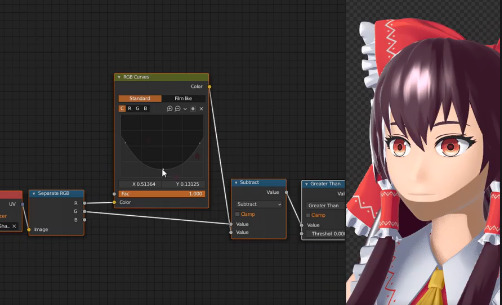
… but really the light has nothing to do with casting the shadow. It’s a sort of dynamic pseudo-shadow ramping in the shader.
Nice idea, but could become a bit tangly to co-ordinate across a whole head and shoulders render… unless you then had a master controller for shadows on all hair / neck / jacket surfaces, not just the face skin. But I guess that’s possible, and he already has it working here on both face and neck, as you can see.
You can already do something like this with duo-tone and colour-ramped materials and suchlike, and there are a number of such packs for Poser and DAZ. But what he’s suggesting for Blender shaders is different than that.