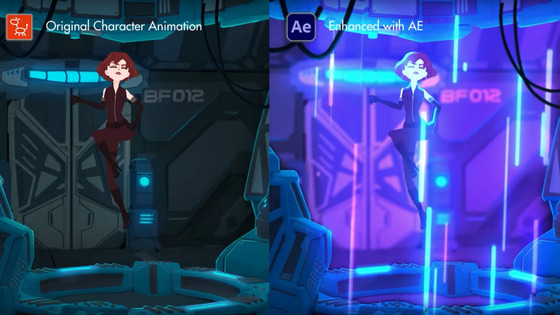
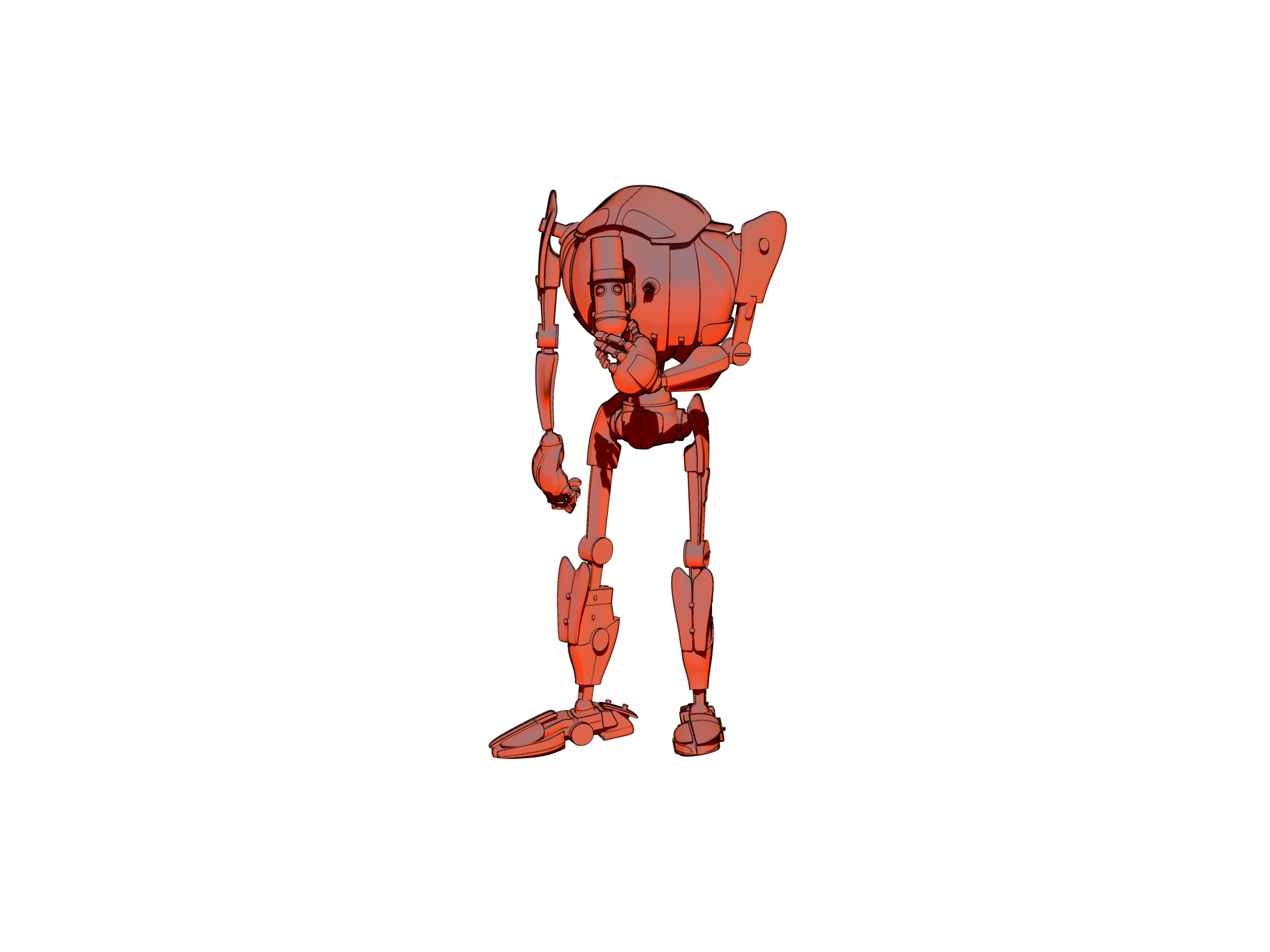
Cartoon Animator 4.3 Pipeline can now export your Project to Adobe After Effects. There’s a handy video on installing the script and sending the scene over. Nice. Now you can say to the animation snobs, “Oh yeah, it was made in After Effects!”
Category Archives: Spotted in the News
Poser 12, priced and approximately dated
We have more news on Poser, giving a price and an approximate release date.
The date given is still a bit vague, at “Late Fall”. Which would put the release-window between Renderosity’s store discount cut-off of 24th September and the 31st October (which would be the last point that one could reasonably call “late Fall” or Autumn). You can understand that they don’t want to be more specific, since competitors could launch a big ‘must have’ 80% sale a week before and thus drain everyone’s PayPal at just the wrong moment. But it seems possible Poser 12 may be here quite soon now, perhaps even as early as the end of September. I assume there will be a generous free trial, like there is for Poser 11, which should allow for testing and thus allow for some facts to calm the forum hysterics.
So, on price there will be a $129 upgrade price from versions of Poser 11, which is quite reasonable seeing as this is for Pro with its additional features, not the old Standard. In the old days you’d have been happy to pay $129 just for Poser Standard. Also, you can currently get Poser 11 Pro for just $80 at Neowin Deals. ‘Five days to go’ on that, as of today. Given the possible release dates for Poser 12, it could be your last chance to get that deal.
But there won’t be any upgrade path from the old Smith Micro versions prior to Poser 11. That’s fair enough, as it’s something that greatly lessens the programming and help-desk load for Renderosity. People can hang on to antiques like Poser 6 and Poser 2014 forever, for some backwards compatibility, because these versions don’t “phone home” and thus should last as long as Windows. But there comes a point when users can’t expect their antiques, made by another company, to also be perpetual golden-tickets to a shiny new Poser 12.
Slightly worrying is the lack of a crossover period, and an apparent abrupt change…
“Poser 11 will no longer be available for purchase after the release of Poser 12”.
Worrying because that opens the door for some forum trolls to slyly suggest to newbies that their Poser 11 will stop running in a few weeks’ time. A forum clarification would have been useful in that respect, to the effect that Poser 11 will keep running and that 11 will continue to be supported at the help-desk.
In the meantime…
“The full version of Poser 11 is also discounted at 40% off” at the Renderosity Store.
Though note that the $80 Poser 11 Pro version still available via Neowin Deals for the next five days.
There’s also some misleading forum-mongering about a “replacement” render engine. This claim is not at all justified by the official announcement. The announcement says Blender’s Cycles (aka SuperFly) will have its version updated, not be junked and replaced. A Cycles upgrade for Poser 12 should be great news, as Cycles has come a long way since 2012 and it will likely mean rendering speed improvements for SuperFly.
Fake shadows
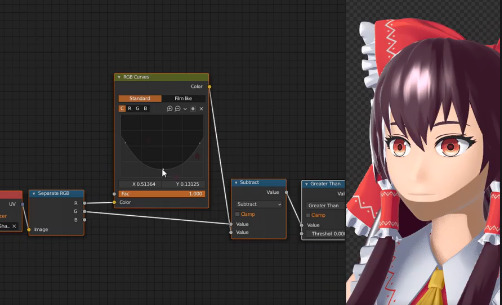
An interesting idea from “Aversion of Reality” in the Blender crowd…
“What if we just faked all our face shading?”
What he means is not that you have 12 MATs for the same figure, each with a shadow position directly imprinted onto the skin MAT or some overlay for it. But rather that the scene has flat lighting, and that a module in the skin-shader controls how the skin appears to take a shadow from a light…
… but really the light has nothing to do with casting the shadow. It’s a sort of dynamic pseudo-shadow ramping in the shader.
Nice idea, but could become a bit tangly to co-ordinate across a whole head and shoulders render… unless you then had a master controller for shadows on all hair / neck / jacket surfaces, not just the face skin. But I guess that’s possible, and he already has it working here on both face and neck, as you can see.
You can already do something like this with duo-tone and colour-ramped materials and suchlike, and there are a number of such packs for Poser and DAZ. But what he’s suggesting for Blender shaders is different than that.
Additional Poser 12 information released
Some additional Poser 12 information has been released by Renderosity, include a hint at the release-window.
* “The Blender Cycles (Superfly) render engine updated”.
I suspected they would do that. If they go to the latest version then that should mean faster rendering times.
* Python updated
As previously announced. I assume they will go to the latest stable version, and then keep it stable rather than trying to keep pace with the latest .point versions. A number of PoserPython scripts may have to be updated for Poser 12, but that’s quite usual for a new Poser version and forum people are already working on that. A few forum freak-outs are happily proclaiming it’s the end of the world and that Poser is about to burn to the ground, as usual. But as usual… the useful scripts will get fixed by hard-working people who roll up their sleeves and do the required work, rather than crying doom! on the forums. The only real uncertainty is DAZ’s DSON Importer plugin, which brings in DAZ-format props and also G1 and G2 figures.
* “Post Render Effects, to speed or embellish renders for single frame or animation renders”.
Interesting, if they’re useful and not just a half-dozen cheesy filters. I wonder if Poser 12 will plug in something really powerful, like G’MIC, somehow? Just my guess.
* FBX import/export improvements. … Unimesh support features sprinkled throughout the code base.
Yes that would be needed for export to the Unity game engine, which is not in the list but which was effectively a feature announced in the recent call for beta-testers. Will this prevent the usual “exploding FBXs” which so hamper use of the FBX format for clothed characters? Will we be able to get clothed and posed FBX’s out of Poser, rather than T or A-pose? We’ll have to wait and see.
* “Material Room overhaul, with material-assignment power tools”.
Excellent. Anything that makes materials stripping / swapping / tweaking easier will be welcome. It would be nice if this was integrated with the Comic Book Mode, by enabling what the animation industry calls “MAT capture”… which means that Poser looks at the colours of the underlying diffuse and its texture, computes and averages them, then strips them out and replaces them with a newly generated flat toon material… of the same colour shade. Ideally you’d then get a quick pop-up colour wheel appearing next to the character and carrying all the new colours on it, thus enabling the user to make quick micro-refinements.
* Poser Reference Manual in HTML as well as PDF.
Nice, and it would enable search engines to get into it. Which might lessen the helpdesk and help forums burden by perhaps 20%, at a guess.
* Deprecated features will include: Face Room (better third-party tools exist); Path Palette (ill-conceived); Kinect support (unsupported); Flash support (obsolete).
Path palette was for animators, and probably only about a half-dozen people have even heard of it. The required Microsoft Kinect hardware can still be had from eBay, but you’ll need to be targeting an earlier version of Poser to use it. Fair enough that it’s going, and I think it was fairly bad at face capture anyway and only good for bodies. It will be interesting to see if there’s real-time face expression/animation capture via a webcam in Poser 12, which would give Poser 12 some parity with other software, but that’s just my guess. As for the Face Room, it is at least free and I’m always loathe to see still-usable free stuff vanish. Will it be pulled entirely, or just left as is and no longer supported at the helpdesk or poked at by the techies?
* “There is a strong likelihood of a 12.1 release in Q1 of 2021 with more unimesh support and new content options.”
Super, so that sounds like we can presumably expect the Poser 12 release between now and Christmas. Which was the expected release window. That would make sense, targeting the “back to school / university” university crowd while they still have some budget or grant money left, and also prepping Poser 12 to be picked up in the Black Friday spend and the Christmas gift market. Start saving double-hard in your PayPal balance for Black Friday, and with the Poser 12 upgrade price factored in, seems like good advice. One way for users of older Poser versions to prepare would be to pick up Poser 11 Pro now for $80, and thus unlock the Poser 12 upgrade price.
Follow the threads….
Two vintage Poser forums are now on the Internet Archive, in newly searchable form: one (threaded, complete with images, 2016-2020) and two (a substantial archive of posts, but not complete and no images). Get ’em while they’re hot.
Once downloaded and extracted these can be searched with desktop-search software such as: DocFetcher (free and the best, but was broken by the very latest Java update); Multifind (free but has limitations); Copernic Desktop (nice but subscription-ware); or dtSearch (for pros, very expensive but you may find an old copy somewhere). Or, possibly there’s something in Windows 10 that bypasses the need for such extra software. I’m running on Window 8.1.x (thank goodness), so Windows 10 is a mystery to me.
Smush Micro
Durn it, the old Smith Micro forums have been erased. Taking with them not only the old Poser forums, but also Manga Studio (Clip Studio) and MotionArtist forums. The my.smithmicro.com/docs/poser/ PDFs have also gone.
Update: Now un-shmushed…. You’re welcome.
RenderMan 24 Stylized Looks – the first look
In Spring 2021 Blender is to get the official new Pixar renderer, RenderMan 24. The cutting-edge RenderMan 24 will include “Stylized Looks”, on which all will be revealed in a webinar this evening. Although you can get a sneak-peek here, from which the screenshot below is taken…
That looks horrible, frankly. Though the painterly simplification brushes look a bit better…
But apparently the “Stylized Looks” will offer…
“a tool for any type of look creation, from photorealistic images to any other artistic genre, from comics to anime, from illustration to watercolor … toon shading to brush stroke effects … or anything you can imagine. … from conventional cartoon shading to hatching or brush strokes, with the hatching reacting to emulated light effects, and supports custom AOVs and display filters. … work usually done in comp to stylise an image can now be performed directly during rendering.”
And before you get too excited by that blurb… note that it will only be available to users of the commercial edition of the software. Not in the “free non-commercial edition”. Aww. Thus it’s going to be “production studios only” rather than for hobbyists, due to the fairly hefty $600 price tag for RenderMan 24.
Ah well… so there’ll still be a place for Blender’s forthcoming BEER NPR plugin. And, most likely, for Poser 12.
NVIDIA announce next-gen RTX graphics cards – shipping October
It’s now official that NVIDIA’s RTX graphics cards will move to a next-generation ‘RTX 30 series’ in October, with the most affordable model there being the $499 | £469 GeForce RTX 3070.
Their older ‘RTX 20 series’ GeForce RTX 2080 Super is said to be the current best for iRay, a card which in the UK will set you back at least £625 for the cheapest such brand on Amazon UK, which will make it unaffordable for many. So I guess the question is… will this new RTX 3070 match the RTX 2080 Super, while shaving £150+ off the price and bringing “the iRay card” below £500? Maybe not, but it’ll be interesting to see the first not-just-videogaming reviews and bench-tests, and learn how well they do with iRay renders. Including, ideally, a relatively complex scene tested with a real-time viewport iRay view.
NVIDIA will also ship the beta of its own Omniverse Machinima movie-making software, originally designed for architects but now also being touted for entertainment…
“Users will be able to import assets from games or from online marketplaces for stock content, or from content creation applications”
Set for October. Update: it’s now December and it thus appears to have been heavily delayed.
Incidentally, for future reference for those wanting to turn on the faster Interactive mode of iRay in the very latest version, it’s here…
I seem to recall it used to be up top, under the Engine: drop-down, so people upgrading from older version may be wondering where it went.
Render settings can be saved to a preset via the top menu | File… then the saved presets can be loaded back to the scene by drag-and-drop from their folder. For some reason, for me the saved presets never show up in the UI.
Release: Blender 2.90
Blender 2.90 has now been released, as a final not a beta.
Here’s six bits of new stuff that caught my eye in the Changelog…
1. Rendering speed improvements…
“Intel Embree is now used for ray tracing on the CPU. This significantly improves Cycles performance in scenes with motion blur. Scenes with high geometric complexity also benefit on average.”
So that potentially benefits Poser’s SuperFly, eventually, as SuperFly is a slightly tweaked Cycles under another name. I assume that Poser 12 will plug in the latest Cycles. Though this change may only offer a bit of benefit, as the benchmark improvements are not that great over the previous Blender.
2. Blender users “can use the denoiser interactively in the 3D viewport”, which you couldn’t before.
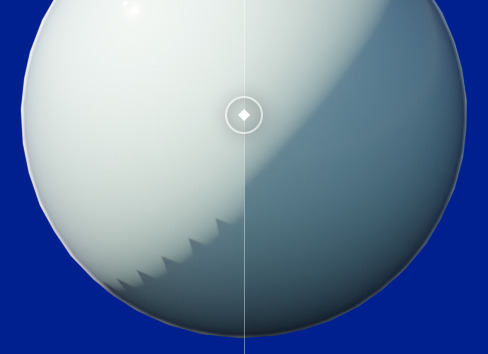
3. A new filter to auto-smooth jaggies in shadows…
4. Lots of improvements to the sculpting tools, including “four types of cloth simulation.” A plug-in called Extended Sculpt Tools v2.0 has also just been released.
5. Better and more logical/readable layout and nesting style for the zillions of sub-menus and tick-boxes. Also a new Search, for finding commands, menus and buttons in what is still a vast and labyrinthine UI…
“Ever wondered in which menu to find a certain operator? Wonder no more! The new search menu shows you that and more: See the menu and its hotkey; Add the operator to Quick Favorites …”
I think I’d rather have UI ‘skinning’ presets that radically simplify and aggregate/iconize the UI just for particular tasks, but it’s welcome all the same.
6. Grease Pencil improvements. Drag-and-drop to re-order a stack of Grease Pencil modifiers. There’s also what appears to be the ability to turn the edges of 3D geometry into Grease Pencil lineart. At the moment it’s looking very basic, and won’t be challenging Sketchup or Poser any time soon. But’s it’s now in there, and fill-layer improvements are due in 2.91. A quite recent update, 2.83.4, also changed how Freestyle lineart works, so it’s possible that will also be new to you in 2.9.
Overall, Blender is finally “getting there”. I can see myself taking a very in-depth look at Blender 3.0 when it arrives. Especially if it has really nice-looking and easy-to-use NPR by that time, either natively or via the BEER plugin.
SIGGRAPH 2020 Open Access
SIGGRAPH 2020 now has a handy Open Access page for public content. Spotted in the 2020 sections: using physics to make 3D fonts dance; deeply emotional talking heads; AI for lineart colorisation; stylization in realtime; and anime-style colorization. They’ve also usefully added collected links to public/open material from conferences back to 2015.
‘Look At My Hair’
The DAZ Studio fur-and-hair plugin Look At My Hair 1.6 is currently on a 50% off deal at the DAZ Store. Its companion LAMH 2 iRay Catalyzer plugin is also 50% off at around $7. Note that the latter iRay addon only works with a few “LAMH models [creatures] compatible with the Catalyzer”, so it you want LAMH for some other use than DAZ LAMH-enabled creatures then the extra iRay addon may not be needed.
Just be warned that it’s well known that LAMH is extremely crash-prone, and it needs to be learned fully and worked in the correct way if you’re to try to avoid some of the crash points. I can confirm that it’s crash-prone, and that it will usually take down DAZ with it. Check the forums for advice and some possible workarounds for such common problems. One of the worst problems is when it crashes DAZ on trying to load a finished scene that was saved with LAMH hair in it — users might save two versions of such a file just in case, one with the preset applied and one with it removed from the scene.
That said, when LAMH can be made to load/render, a preset is simple to operate in terms of fur colour and density and it renders reasonably quickly in 3Delight. Very quickly in default lighting, less quickly in complex lighting. For instance here I have dear old DAZ Millennium Cat with a black cat texture MAT (Classic Cats pack?), a fairly tough ‘Caressed by Light’ light preset #05, and the LAMH short preset for the MilCat ramped up to 260,000 hairs. Even with the tough lighting and many hairs, this render is done in five or six minutes for me. And that’s with me not using the Xeon workstation, just the normal desktop PC.
3Delight. Raw render, no postwork.
Since version 1.5 LAMH has also offered easy export for Poser and Vue and even .OBJ…
New in 1.5: LAMH will now create optimized FiberHair for rendering in Poser and Vue … applies compression to the fibers to control the size of the exported hairs. … LAMH will include the UV’s and custom textures with the FiberHairs, providing a complete asset” for export. Also… “provides the option to write the FiberHairs to .OBJ format.
… and export is relatively straightforward (provided you can actually load the LAMH preset and pose, without DAZ crashing-to-desktop). Such exports alone may thus be worth the $25, when LAMH is on a 50% discount. Indeed, it may even enable iRay (I’ve yet to test that myself) as Kendall in the forums gives some possibly good advice re: taking LAMH FibreHair exports to iRay…
“Do not generate the FiberHair until right before render. [Because FibreHair doesn’t auto-follow the pose]. The FULL version’s FiberHair export will put the generated hairs DIRECTLY on the model in the DAZ Studio viewport.” I also read a little later that “It is no longer necessary to export out FiberHair specifically for iRay … LAMH takes care of determining the rendering engine and adjusting accordingly.
Nice, if that’s the case. And apparently FiberHair exports can also inherit the colouring of the base diffuse texture (.OBJ export of strands don’t).
And I guess that if one then intends to do a lot of iRay rendering with FiberHair, DAZ 4.12.1.83 is current minimum — as that was updated to include “NVIDIA iRay RTX 2020.0.0 (327300.2022)”. That’s important because the iRay devs reported in the early Spring that their new iRay… “2020.0 final has just been released” and strand fibers do “especially well” with the new iRay 2020 + an RTX graphics card. Even fibres with dense intersections do very well, they said. Thus I presume that DAZ running iRay 2020 should help with the speeds on LAMH strand hair, if you have the required graphics card type. Possibly even if you only do CPU rendering, though that’s another guess. According to the forums this ‘Speed’ setting, in particular, might also help…
The current public beta of DAZ Studio is at 4.12.1.117 for the very latest, which is what I’m now running on. As well as the addition of iRay 2020, in recent 4.12.1.x releases the technical Changelog notes several dForce version updates and .OBJ import/export improvements.
For people looking at fur options I should note that Poser 11 Pro has a Hair Room built in, in which basic fur is relatively easy to make and quick to render. I seem to recall that Hair Room fur colouration can automatically take up from the diffuse material’s pattern, if needed. But I hear that LAMH can also do that, though not for .OBJ exports.
There’s also the new DAZ Studio Strand-Based Hair Editor, which is similar but more stable than LAMH. But the problem there is… it has no cat presets! In the meanwhile, LAMH has excellent cat hair, both the old MilCat and the new Hivewire HouseCat. And actually, thinking about it… I have yet to see a single animal preset produced for the native DAZ strand hair. You’d have thought that, a year after release, we’d have fifty or more animals furred by now. Is the absence because such hair can only be saved if there’s a base mesh to ‘grow on’? And that mesh can’t be redistributed, as it’s part of the commercial model?
Paper: “Effects of piracy on the American comic book market”
“Effects of piracy on the American comic book market and the role of digital formats”, Institute for Structural Research, Poland, March 2020.
This is the first really in-depth paper I’ve seen on digital piracy of comics in the Anglosphere. Specifically the reading of per-issue comics in the USA, as they are freshly released. It’s not about the collected series/graphic novels, so the research is only talking about the type of readers who are not averse to reading episodes that are dribbled out over as much as a year or more. I can’t imagine wanting to read a comic in that painfully strung-out way, but I guess there are people who do.
The paper’s headline conclusion is that, for the per-issue readers…
“11-14% more print comics issues could have been bought if not for illegal availability [of digital per-issue scans]”.
My suspicion then would be that some of the “11-14%” is readers who read the initial issues of a run and got bored, decided to sell the paper issues quick to newbs on eBay. Because the series had obviously become mediocre in their eyes. But they still kind of wanted to know how the story ended — so they read the pirated digital versions of issues #5-7, just to know if they should get the trade paperback or not. Probably not, 90% of the time, as they’re savvy readers who can tell when a comic isn’t going to work out. That would be one possibility.
As the new research paper points out, part of the problem here is that legal digital-issue copies are too high in price, often being nearly as expensive as the print version when first released…
“most of the readers who acquired a comic book without payment had a positive willingness to pay for the digital copy of the title … a reduction in [per-issue] digital prices could have incentivised some of the readers to purchase digital formats instead”
The author of the paper points out also a mis-match between audiences…
“the official app-powered digital comics [buffet-style services] target an audience whose specific intent is not to own a print version”
These U.S. digital ‘walled gardens’ give every appearance to an outsider of being mostly for manga-loving youngsters and their manga-nervous parents, and as such I assume they don’t lure away too many ‘$100+ a month guys’ from the comic-book stores. It’s likely been a profitable balance for the big publishers. Until now… as comic stores struggle to re-open and many a ‘$100+ a month on comics’ guy is now finding himself unemployed.
Another factor, as some Japanese research has recently suggested, is that the 11-14% per-issue piracy loss may effectively act as a string of ‘free samples’ that boost profits in the long term. Because they spur a significant boost in the eventual purchase of the collected trade edition in paper. Thus, per-issue piracy could actually benefit publishers, over a typical 18 month release cycle. Though that will likely only apply if the comic is a quality one. If your ‘free sample’ is boring after four issues, you’re not going to be buying the trade to cherish and keep on your shelves.
A further conclusion of the new paper is that, with a couple of key pirate sites seeing at least 10x more traffic than Amazon’s ComiXology walled-garden…
the high volume of pirate consumption suggests a large audience with no intention to pay for any of the formats available at the official market.
Interesting, but you’d want to break that down. How much of that traffic is from the USA, and how much from nations like China where piracy is just casually taken for granted? And how much is scraping bots?
The difference is going to come in curation, I think, in terms of getting highly subscription-averse people like me to get a monthly subscription. Which will potentially open up new adult markets. Give me guaranteed “download in digital and keep” access, from a store that only has truly completed story comics for grown-ups (i.e. no manga other than a handful of Hayao Miyazaki-level quality titles, very very few superheroes, clear out all the ‘young adult’ teen-angst stuff, and the gloomy art-school depressives, and make no sales that leave the buyer with ‘cliffhanger’ volumes). Stories that can entertain like a movie for between an hour and four hours, and which are complete. Then give me a digital comics ereader that can do frame-by-frame guided view, with no hassle every time and the ability to switch to b&w or mute garish colouring. Then curate your store catalogue by hand, and do it properly and with fine-grained facets. Oh and this is about entertainment, not political lectures — so let me hide all comics that have huge political axes to grind, with just one click on my Settings panel. “But there won’t be anything left!” you cry… Yes there will, you’ve just got to go out and search and curate the heck out of the online store. And if a suitable comic is not available in digital via your store, still give me a link/profile page for it and tell be exactly how to get it from elsewhere. Thus, your store should be the completist catalogue for this particular type of completed comic story. I’d pay $15 a month for that, and happily. Maybe even $20, if you throw in two free comics per month.
BEER fizzes
And… it’s a wrap. Or rather, it’s a BEER. As reported here in early August, there’s been a long period of fund-raising to get some serious NPR tooning capabilities into Blender. This goes under the name of BEER, and the fundraiser recently went kerr-ching! and raised enough for 10 weeks of hard development work this summer. Week 10 has just reported. After intensive line-weight research and refinements they have produced the first really ‘worth-having’ Poser-comparable automatic lineart I’ve seen from Blender…
The eye is mean to to be missing, as the model wears an eye-patch.
Good work, chaps, those lines look very usable. The eventual BEER plugin will also aim to be seriously artist-friendly too. If you’d like to contribute to their fund and help raise the cash for the final 10 weeks (of 20 weeks) needed to actually make the finished plugin, you can donate $5 on Gumroad and get fab toon .blend files featuring bunny-girls and kitties under CC-BY. Those with ninja coding skillz can also offer their services to the project.
Free ecosystem spawner for Unity
Take a big square landscape terrain into the free Unity game engine, automatically cover the ground with vegetation based on slope height etc. It’s not Vue’s ecosystems. But it is as free as Unity is, and on the Unity Store now.
If Poser 12 does indeed support ‘export to Unity’ with decimation, this could be a quick “background generator” for an imported Poser scene with posed characters.
Release: EBSynth moves to beta
EBSynth has moved into beta. 10x faster, and batch auto re-naming of files when you drag-and-drop. Still free.
It’s style transfer for video frames. You first extract a still keyframe from a video, and give it a nice manual artistic paintover. Then you use the resulting painting as a style-source in EBSynth for processing all the other frames. Once done, the whole video clip should have taken on the same painterly style.
Obviously you have to work ‘per sequence’ of the video. For instance, you can’t just take a frame out of an exploding tropical volcano scene, overpaint it, and then also expect the same painted frame to work on the next scene… which may show James Bond in a speedboat racing over the sea.
Thus the way EBSynth works is a bit different than just running an entire video through an automated paint-emulation filter. One of the advantages may be, judging from the test footage, that the resulting ‘art emulated’ video is less flickery, depending on how wild your paintover was.
With a bit of careful work it seems it can also be used to remove or add wrinkles, and thus change age. It’s still at the “interesting tech-demos” and “light-show hippies getting freaky with footage of Terence McKenna” stage, but it’s one of several free and relatively easy style-transfer options worth keeping an eye on. Though it looks like we’re still a long way from “grab a Jack Kirby comics frame, apply the style to my basic lineart”.
There’s an official tutorial here (starts at 4:54, once the introductory guff is out the way).