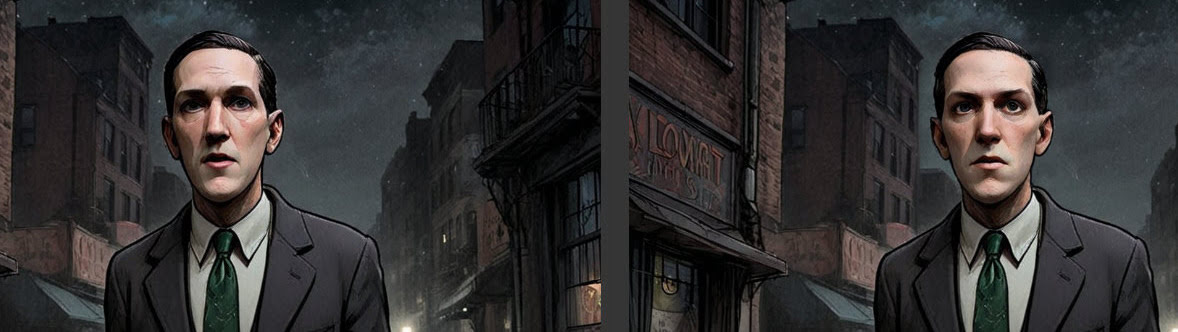
I’ve had time to get back to experimenting with my Poser renders to Stable Diffusion workflow. As you can see, I can now use SDXL and prompting for expressions is possible (even if not present in the Poser render). A Firefly lines-only render is used in the Controlnet, and a very basic Comic Book real-time render is used for the Img2Img. The next big problem to solve is the “stare at the camera” problem. The last thing you want in a comic is the characters looking at the reader.
Category Archives: Poser
Automatic Facefix
More progress in my learning ComfyUI for use with Poser renders. It’s not just about plugging in a character LoRA and hoping for the best, I’ve found. Automatic face masking and facefix + a character LoRA can be added to the SDXL workflow.
Here we see the ‘before’ and ‘after’ effect on a scene with H.P. Lovecraft in the middle-distance. Before it’s sort of vaguely like H.P. Lovecraft but also more like William Burroughs, and then after it’s much more recognizable as Lovecraft. The face in the picture is automatically identified and masked, then that area is regenerated at a higher size — so that the face can become more refined. And the LoRA tags along with that process, also making the character more recognizable.
Of course the problem is that it only works if the figure is alone. Otherwise every face in the scene gets a makeover. Another reason, I think, to make character cutouts and backgrounds separately and composite them in Photoshop. That said, I haven’t yet learned how to set up a way to manually paint-in a face mask (update, seems to be impossible while the workflow is running – easier just to output before/after images and Photoshop them together later).
New Poser comic from Brian Haberlin
Brian Haberlin has a produced a Faster That Light 3D Treasury Edition. 3D here means ‘red-blue glasses’ 3D. It’s actually two new stories from his Faster Then Light sci-fi world, not a collection of the old Faster That Light series converted to stereoscopic 3D.
Presumably Brian’s sophisticated ‘Poser to comic-book’ method is used here as before, but now the Poser 3D models + scenes + a PoserPython script all give the ability to produce a stereoscopic (red and blue glasses) ‘3D view’. Aka ‘stereo anaglyph’.
Basically to get this effect you lower the camera dolly X value to something quite low (0.020) and then make a ‘right eye’ and ‘left eye’ render, then combine in software for making stereo anaglyphs. World of Paul has the details and the free PoserPython scripts.
AVFix fixed – now at Archive.org
AVFix is now at the Internet Archive, following the demise of the PoserLounge domain in the Netherlands. The little fix was a vital one for Poser 11 users, and loading it then allowed a number of older Python scripts to also load. I’ve also gone through the MyClone blog and fixed all the URLs that were pointing to the now domain-expired poserlounge.nl site.
Not needed for Poser 12 or 13.
New for Poser and DAZ – July 2025
Hurrah! Yes, another round-up of the new items for Bondware’s Poser or DAZ Studio. This time covering releases in July 2025.
As always these are ‘just my picks’ and I also try to warn of any pitfalls re: people not knowing something is fanart and thus not for commercial-use. Also, at the end, I note the the usual extras in terms of software, scripts, tutorials, and also some Stable Diffusion image-generation items.
Science-fiction:
Cybotaur for G8 and G9. Would also suit steampunk, suitably re-textured.
Antwan for Genesis 9, a fairly convincing ‘insect alien’. I assume it’s not close to being some Star Wars fan-art.
SE Animal Korch, a strange alien swamp creature, and there’s also SE Animal Lityn for the skies of your alien planet.
Steampunk:
Steampunk Owl for DAZ Studio. I assume it’s not fan-art.
Time Traveller Props for DAZ Studio. Be aware that the Time Machine is effectively fan-art, closely derived from the George Pal movie of the famous novel The Time Machine, and should not be used commercially.
The Cerebral Orb, plus a simple but nicely-done control-cap.
For a more ornate control-cap for the Orb, how about the new Halo Headdress?
A free Aeolipile for DAZ and also in .OBJ format. Five parts.
Fantasy:
Medieval Forest Village for DAZ. There’s also a home interior and forest shine, separately.
Free for Poser, ColorHUe Layers for LF2/LH2/LF/LH, and also for ColorHue Layers for Poser 11. Basically, give your faery La Femme a suitable skin shade.
Storybook:
Not much this month, just Ice Cream Bars for DAZ.
Toon:
Little creepy Bot for DAZ Studio.
Halloween:
DoubleD for DAZ Studio, a two-headed hell-dog with pose controls.
Dungeon Hound for DAZ. Probably looks better in deep shadow with rim-lighting.
Figures, accessories, and everday scenes:
FG Poker Night, a complete modern-day room with table and all accessories. Possibly useful for making tutorial animations for learning the game?
Animals:
Goat by AM Bundle for DAZ. Doesn’t require a dependency, and you can age it, add curly horns etc.
Nature’s Wonders Snakes of the World, Vol. 2, for Poser and DAZ. Includes a Boa Constrictor.
Need to have your character fend off the giant snakes? There’s now a Fully Poseable Bull Whip.
Raw Capybara for DAZ Dog 8, with fur.
Landscapes:
Undergrowth for DAZ Studio, a sort of ‘Florida swamp’ miniature.
Butterfly Garden, plants for your Ken G. butterflies. For Poser and DAZ.
Historical:
Vanishing Point’s Renaissance Courtyard for Poser. Probably a bit basic by modern standards, but good geometry and AI can now do wonders with even a basic render.
dforce Short Morphing Hair for Genesis 9. Early 1960s hair styles.
Soviet-era Helicopter for DAZ.
Japanese Backstreets for DAZ, 1990s otaku style.
Tutorials:
In Poser, a trick to get the brow material settings to render a black brow on figures. Potentially useful for filtering the render for comics, where you’d want a clear black brow.
For Poser on YouTube, useful tips on saving poses to the Library, with morphs.
For Poser on YouTube, why the group tool is better than parenting.
Also on YouTube, using DAZ Studio and DaVinci Resolve (the free powerful video-editor).
Scripts and Plugins:
For Poser, an update to one of the nodes in EZSkin, used to give older Poser figures the ability to be rendered in SuperFly. (Scroll down the forum thread to “Here is an update to the EZ_CycleSkin (PrincipledBSDF) plugin.”)
BJ Layers Plugin for DAZ. Can’t quite work out what it would do, but I guess seeing it working in a video might help.
Software:
Winxvideo AI 4.1, effectively a poor man’s $50 Topaz Video AI for the desktop PC. Now greatly improved as an AI-powered video upscaler, in the new 4.1 version.
Ultimate TTS Studio for Windows / NVIDIA. A sort of ComfyUI, but for generating text-to-speech (TTS) rather than images. Though note that Comfy has audio capabilities too, if you install Torch Audio.
Blender 4.5 final LTS is now available, with updates that potentially offer a more robust and faster Poser/DAZ -> .FBX -> Blender -> ComfyUI rendering pipeline.
iClone now officially has robust ComfyUI integration, for rendering with AI. I see that Keyshot has also officially added AI editing, probably Kontext based.
The ComfyUI rival Invoke 6.0 is now available. They appears to be getting Blender-itis, in that the UI is constantly being changed and thus it becomes a horrible ‘shifting target’ in terms of learning the software or making tutorials. Anyway, I’ve moved to ComfyUI now and have deleted Invoke, so it no longer affects me.
I see MediaChance’s Dynamic Auto Painter (DAP) image filter system, and its excellent NovelForge AI for writers both have a $10 discount. Incidentally I can report that NovelForge can easily connect to Msty-hosted local AIs (‘LLMs’). In NovelForge just select “LLM Studio” as your LLM host option but input the Msty local URL of http://localhost:10000 – then press ‘get models’ and choose a model to use. “Save” the settings.
Stable Diffusion learning:
My new tutorial on setting up Working OpenPose with face and hands, in ComfyUI. Should work with any Poser/DAZ render of a figure. I believe there’s also a four-legged Openpose model, and I assume my workflow will also work with that. So theoretically you could get horses etc into Openpose.
Ultimate Openpose editor, for when you need extreme fine-tuning.
Removing colour from comic-book lineart with Flux Kontext. Kontext can also remove hatch and dash shading (see naked Moebius!).
Endless-Nodes for ComfyUI had a major update in June 2025. It includes the useful Fontifier — change the fonts in your Comfy workflows. Useful for those who, as the author says, have a “4K monitor and old eyes”.
The important WAS Node Suite for ComfyUI is now ‘WAS Node Suite – Revised’ at a new GitHub location, and the old one should be replaced. The Suite is important partly because it’s so widely used in shared workflows. But also because it has a “Save Image” node which can force 300dpi final output — important for those generating images destined for print.
Several useful Stable Diffusion models are on torrents at the Internet Archive, which are possibly useful for those starting out and on slow connections or who are blocked from CivitAI by censorship. The ‘Photon v1’ model is an excellent starter for Stable Diffusion 1.5 photography emulation, and also very useful as a base test for LoRAs since it’s not going to interfere with them in terms of style. While ‘RealVisXL v50 Lightning Baked VAE’ is your starter turbo/lightning fast SDXL model, and the vanilla ‘Realism Engine SDXL v3.0 VAE’ is for when your SDXL workflow needs wiggle-room that the fast version can’t offer.
Services:
Here in the increasingly-censored UK, I’m now using the always-running Mullvad VPN for all online work. A reasonable £48 for a year and a flat no-nonsense fee, paid for anonymously via a simple scratch-card sold and delivered by Amazon. It works lovely, and seems to be giving me faster Internet in some cases (YouTube, Archive.org and a few others)! I guess that’s because I’m now bypassing some ISP congestion in London, by hopping up to Manchester and then over to the east coast of the USA and thence to… free-speech and freedom! Something which seems increasingly rare here in the UK, and is likely to get scarcer. I recommend the service, but be warned that it doesn’t support huge streaming services (Netflix etc) and that Hostinger rented websites (such as this MyClone blog, regrettably) are unreachable until you turn off the VPN. It appears that Hostinger blocks all VPNs, which regrettably I wasn’t aware of when I purchased the web space from them. Here’s the workaround…
1) In Mullvad’s settings click on “split tunnelling”, where you can easily allow non-VPN Internet access for a secondary Web browser of your choice.
2) Install and set the freeware Browser Tamer to route / auto-switch any Hostinger-hosted URLs to your secondary browser, instead of the usual browser.
3) From the Firefox or Chrome Store install the free Browser Tamer extension / add-on in your main browser. Re-start.
4) Now you simply change your main Web browser’s ‘VPN un-reachable’ bookmark URL to read as follows: x-bt://https://ur_lovely_site.com/ (or whatever you want to reach). The x-bt:// is the prefix that tells the Browser Tamer extension to send the clicked bookmark URL to Browser Tamer, which now knows that it must launch your secondary browser to that URL. The Edge browser, with almost no extensions installed, is superfast to launch and thus may be a good secondary browser to use.
That’s it for now. More in August/September!
Back to Lovecraft gazing at the stars
More fun with ‘Poser to Stable Diffusion’, now that I’ve moved to Windows 11 Superlite and have the AI stuff mostly set up.
This time I can use SDXL rather than SD 1.5. I think regular readers of this blog will recall the previous attempts with the same Poser source, and see quite a difference in the result. I’m using the same test render.
To get this I made a ComfyUI workflow featuring an SDXL turbo model powering Img2Img, plus three LoRAs, and a lineart Controlnet. Not sure the latter is really needed (a relic of the old workflow), provided the colour stays steady from image to image and thus from panel-to-panel and page-to-page in a comic. Or I guess I could go all-in and try four different Controlnets working at once, and see how stable the results are compared to the Poser render.
But this is just a first experiment, and it’s encouraging to get this far immediately.
On the other hand, it’s inventing things like the suit pockets and a waistcoat. Which is annoying since consistency is needed. The reason to use Poser is to have the results be consistent, not full of little differences that either take a lot of postwork to fix, or which are lazily left in and annoy the heck out of the reader. (Update: prompt to “dark 2-piece suit” to get rid of waistocoats)
The result comes in at a healthy 1432px (in about 12 seconds), from a 768px starter Poser render. Meaning that cutout and de-fringing is easier in Photoshop. Here the result is cutout, defringed, and given a Stroke to firm the holding-line. The shadows have also been lifted a little, to give it a more graphic look.
Next step will be to get some more SDXL Controlnets, and output a variety of different Poser renders and then see what combination works the best with this workflow.
Completed the move to a new OS, these are the goodies that now become possible…
Having made the leap to Windows 11 Superlite, I now have it nailed down and the AI image generators I wanted. I’m working on ComfyUI Portable, which was updated to the latest version for Flux Kontext Dev. I suspect I won’t be going back to InvokeAI much, now that I have Comfy made… comfy. It’s not so daunting once you get the hang of it. Here’s what I now have…
* SDXL:
Can be made blisteringly fast with realvisxlV50_v50LightningBakedvae.safetensors or the amazingly fast/good-quality splashedMixDMD_v5.safetensors. From the latter, four seconds on a 3060 12Gb for this image at this 1280px size. No postwork…
Four seconds! Works with mistoline_rank256.safetensors as the single universal lineart controlnet (not used in the above image). There are two slight disadvantages to the otherwise awesome splashedMixDMD_v5 model. 1) you get no negative prompt — since you have to work at CFG 1.0 and thus the Negative prompt is ignored; and 2) not all SDXL LoRAs appear to work with splashedMixDMD. Still, some nice ones do, such as the comics one you see in action above. I think I have a new favourite go-to for experimenting with style-changing Poser renders with Controlnet. Maybe also OpenPose Controlnet, since there’s at last a good one for SDXL.
Theoretically, since I also have the original vanilla SDXL base model, I could also now train up some LoRAs myself.
Also of note is the SDXLFaetastic_v24.safetensors which is dedicated to western fantasy artwork (painting, lineart, charcoal etc). Perhaps useful as a backup when a LoRA fails to work in a turbo model.
* Illustrious (SDXL):
Illustrious models are supposed to be ‘SDXL for illustration’ but appear to be overwhelmingly anime (ugh), but at least that makes the good ones excellent at poses and action. I’m not hugely impressed by using the more interesting LoRAs with Nova Flat XL v3, the model that I was recommended to try for making ‘flat’ comics images. The model is indeed great for what it’s meant to do, but I didn’t get much from using it with LoRAs such as Ligne Claire (clear line Eurocomics style) or the Moebius style LoRA. But maybe that’s because I haven’t played around with them long enough or got them in a good Illustrious workflow with suitable prompts that shift it away from anime. Or maybe I need another Illustrious base model.
* Flux Kontext Dev:
Somewhat slow, but with the AurelleV2 LoRA it can take a Poser render and generate a very convincing watercolour + lineart which exactly aligns when laid over the top of the starting Poser render. And which keeps the base colours. Good for illustrating children’s storybooks then. It can also do its other ‘I am a Photoshop Wizard’ magic, albeit slowly — such as merging two images and re-posing, removing items including watermarks, removing or changing colour, re-lighting, placing a face into a new environment and position, etc. Useless for auto-colourising greyscale, compared to online services such as Palette and Kolorize.
* WAN 2.1 Text to Video / Single Image:
Yes, I even tried WAN on a humble 3060 12gb card. Working, with two turbo LoRAs running in tandem. 80 seconds for a nice 832 x 480px single frame, with a workflow optimised for single images. Slow, but it can be done and the results are very cohesive and convincing as photography. This success suggests that a 16fps text-to-video at that size would take maybe 2 hours for five seconds, and making a single-image preview first would reassure one about the eventual results.
* WAN 2.1 Image to Video:
Working, with a turbo LoRA. 36 minutes for 5 seconds at 480 x 368px (81 frames at 16fps). Initial tests show it works well and looks good (spaceship entering planetfall from orbit), and it’s feasible in terms of time. So 820 x 480px, with more quality, might at a guess be three hours for six seconds at 16fps? That would be perfectly feasible to run overnight. After a week one would have some 40 seconds of video. And a hefty electric bill in due course, no doubt. Though, Wan 2.2 is due soon and will add a lightweight 5b model with better camera shot-name and camera movement understanding, and may it well also be quicker.
There’s a lot more to explore, such as tiled upscaling, facerestore, character adapters, normal map Controlnets etc. But for now I’m pleased I’ve made the leap to an OS where I can use more than SD 1.5 and SD 2.1 768. I’ll still go back to them in due course, especially now I can use them with turbo workflows. They can also be used in tandem with other types of model, such as Illustrious for coherent action scenes and then try to get the result into photoreal + nice faces with SD 1.5. It’ll also be interesting to see what ‘SD 2.1 768 to Illustrious’ can do with a Syd Mead landscape.
And I got all the above just in time, since CivitAI is to be effectively banned here in the UK, from tomorrow!
In Kontext…
Not a bad haul for today, with learning the AI called Flux Kontext. I learned how to…
* Speed up the slow Flux Kontext x 2 (turbo LoRA for 12 steps rather than 24, no noticeable difference in output).
* Combine two images into a new prompted composition. That was a feature I hadn’t yet investigated. Got a cat and dog running along a beach (a stress-test it just about managed, from two random stock photos), but the more mundane use would be two talking heads for comic-book yak-yak dialogue. Poser can do this anyway, but the widescreen Poser render you might ideally need for that might not be suitable for input/output in Kontext.
* Zoom the camera in and out in Kontext via a LoRA + prompt, while keeping the central character fixed and any background more or less similar. Again, you’re duplicating what Poser can do anyway in a render, but it’s good to know how to do it in Kontext.
* Generate convincing ‘rough pencils’ line-art from a Poser render, which can then be combined in Photoshop to firm up outlines on a Kontext watercolour render of a Poser figure. Registration is exact when the layers are blended in Photoshop.
Here the source is a Poser render of Nursoda’s ‘Ronk’ Poser figure and his snail, which I’ve shown here before. The above is the ‘rough pencils’ output at 1024px.
* Earlier in the week I also got a universal Controlnet (mistoLine_rank256.safetensors) working for Kontext.
And I now have saved ComfyUI workflows for the above.
Also, it looks like I moved up to Windows 11 just in time, which over the last few weeks has caused me to go get the best of SDXL, Illustrious and Flux style LoRAs and accessories. CivitAI is to be effectively banned here in the UK, from next week.
Microsoft’s New Ray Tracing AI – now in ComfyUI
Life moves fast in AI-land. Last month I blogged here about Microsoft’s New Ray Tracing AI. This month — courtesy of Paul Hansen of Germany — Microsoft’s new tech is now free in ComfyUI. Along with an outstanding install guide and documentation. All free. Currently, 2 seconds of finished raytraced animation takes 22 seconds on a 4060 card. Import of .FBX is coming soon.
New for Poser and DAZ – June 2025
Time for another survey of what’s new for Poser and DAZ, plus items of interest in AI-land. I’m now running on Windows 11 Superlite, so I now have access to more advanced AI software. Indeed, to the very latest goodies such as Flux Kontext, so my OS change was nicely timed!
As usual, my picks of the new releases.
Science fiction:
Owl Bot, a futuristic robot owl for Poser. Likely an enemy of the Space Coop.
The Owl possibly assists with piloting the new ExoNaut ship.
Moonbase Alpha Uniform for G8.1M. Fan-art, so no commercial use.
The Cube for DAZ. A generic sci-fi mysterious space cube. Possibly similar to the Borg in Star Trek, at a guess, but I haven’t seen that series of Trek.
Retro Future for Genesis 2 Male, currently free at DAZ.
Morphing Cyber-Googles for G8.
Easy Environments: ExoPlanet IX.
Fantasy:
Fantasy Helmet Collection for G3F through G9
Gift Guardian stone sculpture.
Ruined Mage Towers 1 for DAZ.
Halloween:
Moreau’s Freaks for DAZ.
Storybook:
1971’s Quiet pier for Poser, also available separately for DAZ.
A handy Old Cobblestone Path as free .OBJ and Vue .VOB file. 8k textures plus displacement.
Toon:
Free Poses for Cat Noodle, the toon cat.
Figures and poses, props:
RA Rory M4 for Poser.
Camper Accessories. See also the Rigged fantasy backpack for G8 and G9.
In Good Hands – Hands poses G9F-G8F-G3F.
Animals:
Nature’s Wonders Butterflies of the World Volume 4, with eight endangered species.
Nature’s Wonders Snakes for Poser and DAZ, plus Nature’s Wonders Snakes of the World Vol. 1 (common snakes). Also Nature’s Wonders Slithering Expressions (paired sperpent / human poses).
If you have the above there’s also Nature’s Wonders Snakes Extras as a freebie pack.
Scenes and places:
Car Scrapyard for Daz Studio, an unsual scene. The car models look as though they were made with a hand-held scanner from real wrecks.
Quick Rocky Vignette 4, a good looking beach scene.
Historical:
Temple of the Nile for Poser, also available separately for DAZ. The free Feathers Conditioner looks like it would match well with this.
Frontier Grace Outfit and Props for Genesis 9. American pioneer outfits with bonnets.
British Rail MK1 TSO Coach by DryJack. His British railway starter freebies are in the SHARECG-backup torrent.
The Workbench for DAZ Studio. (No longer active at DAZ, but now at Rendersosity).
Second World War British Army headgear as the free WWII UK Mk II Airborne Helmet Pack for M4.
Scripts and software:
Remove All Modifiers – DAZ Studio DUF Cleaner.
Pose-Save-Utility for DAZ Studio.
Nomad Sculpt 2.3 for Windows. Formerly popular for digital sculpting on Android, now for Windows.
Stable Audio Open 1.0 WebUI Portable for Windows. A powerful free audio FX generator, distilled from the zillions of public-domain field-recording clips at Freesound. Like Stable Diffusion, but for sound effects, you tell it what you want (e.g. “a distant rolling thunderstorm is heard across a vast plain”) and it generates a .WAV file. Free, tested and working.
Poser matcap script. Blurs the textures so each becomes more of a uniform single colour aligned to the underlying colour. Handy if you want to de-grunge mucky textures, ready for filtering the render into a watercolour look.
Tutorials:
How to make low poly billboards to populate backgrounds in Poser.
Use Collapse to simplify your material templates in Poser.
A vital autosave feature in Poser.
POW! Biff! KAPOW! Comic-book FX upscale and extraction using Gigapixel, Vector Magic and Stable Diffusion 1.5.
Cruising Canals in 3D – Modelling Narrowboats and Water Scenes. A paid in-depth tutorial on 3D modelling for the English canals and narrowboats. Related is UltraScenery 2 – Marinas and Moorings.
Local AI, Poser and Python:
The new Flux Kontext Dev has been released, a new free local AI for image editing and filtering, rather than for image-generation. Perfecting 1:1 watercolour with Poser to Flux Kontext shows how to use it with a Poser render. With a Flux Kontext Dev workflow. Run in ComfyUI Windows Portable, after updating the portable to the very latest version.
My tests show Kontext Dev is no good as a local free auto-coloriser, more’s the pity. But it is excellent at watermark removals from public domain artwork (e.g. old postards on eBay, museum images which have no right being watermarked). It can also do image editing (“remove the rabbit ears, change the dress to green”), style makeovers, place a face in a completely new context, join two characters together in a scene, and probably more that users have yet to discover.
How to speed up CivitAI page loading when browsing and searching the site for free AI models and LoRA add-ons.
SD-Categorizer 2000, a free… “Python script to organize a folder containing all your images into folders and export any Stable Diffusion generation metadata.”
Set up Microsoft Visual Studio Code for Poser python coding. Speaking of which, I’m disappointed to learn from several tests that local sub-14B AI’s won’t cut it as Python script-coding assistants on a 3060 12Gb card. It seems one really needs one of the big beasts (30b and above), that runs in the cloud. However, note the Translate ComfyUI workflows into executable Python code free node for ComfyUI. This is local and could be used, I think, to have Poser call and run Comfy from a script. Watch this space.
Oh, and I reckon that Msty is the best ‘local AI library and model-runner’ for the desktop. I tried several. [Update: here I meant Msty 1.9.x, not the flaky new Studio version].
That’s it for now. More later in the summer.
Perfecting 1:1 watercolour in Flux Kontext – getting better watercolour with a LoRA
Further to my Flux Kontext Dev experiments of the last few days, for filtering Poser renders… here I show how to get better watercolour by using a LoRA. Add the Aurelle v2 LoRA at 0.8. Specifically, this is designed to give an imperfect ‘human-made watercolour’ look for Flux. No garish day-glo colour (as with the default Flux Kontext), and no colour instructions or later Photoshop adjustments needed. And it’s much more subtle. It does want to swish down the hat-brim, and the 1:1 registration is lost there. But that’s easy to fix and otherwise it’s great. We also get rid of the dark 3D shadow under the hat.
The 1024px is slightly fuzzy, fuzzier than the default watercolour output. Possibly that’s because I’m using a regular Flux LoRA, not a Flux Kontext LoRA. But even so, a Firefly line-art render could be layered and blended in Photoshop, to bring back a little harder definition of the shapes and on the edges. That’s not been done here, on this quick demo.
I was however using the real-time character render from Poser that was .PNG and masked with transparency, which seems better than one with a white background. Another test showed 2048px gives clearer and larger results with more detail (e.g. fingernails), but takes far longer and is not so watercoloury. Try working in 1024px to test ideas, with 2x upscale. Then move to pure 2048px for a second pass, which is later blended back into the first in Photoshop?
The ComfyUI workflow shown is the official GGUF demo, adapted for a LoRA and with elements moved around. Note that FluxGuidance (CFG in Stable Diffusion -speak) is at 1.0 rather than 2.5, and apparently this favours a traditional artwork style.
PzDB R.I.P.
Moving to Windows 11 means losing the venerable PzDB Poser Library database / manager, which regrettably no longer works on Windows 10/11. Which for me means moving back to using Poser 11 as my main Poser, so that I can run Shaderworks Library Manager 2. Library Manager builds a runtime database like PzDB did, so its search is reasonably fast on a vast runtime. It also docks into the Poser UI. As a bonus, I get my XS-Toolbar and Scene Toy back. The Library Manager UI is a bit painful (subtle colour-coding might have helped), but not impossible once you get the hang of it and better than the native Library.
To build the database you first need to undock the native Library and close it. Then build the Library Manager 2 database of your runtime. Otherwise you’ll get crashes on a vast 20-year runtime. Also, Library Manager 2 needs the AVfix to run.
In Poser 11 there’s no Superfly for 30-series graphics cards, unless one renders on CPUs. But actually I find a CPU render with 2 x Xeons (24 threads) at 1024px is quite bearable. Currently, I’d only want SuperFly for a colour blending layer in Photoshop. I can always go over to DAZ or Poser 13, if I want to build a super-photoreal picture at a large size.
The only thing Library Manager 2 lacks is a “what’s new” view, showing the stuff you just spent time installing into the runtime. Although Everything can approximate that (Large Thumbnails / View By Path / Search for Picture / Date Created), after a re-indexing of the runtime. ‘Everything’ is also especially useful for quick “do I already have it?” lookup when shopping. The filetypes list to exclude from its search are: *.lnk;~$*;$*;*.xmp;*.jpg;*.obj;*.tif;*.bmp;*.txt;*.bat;*.py;*.pyc Sadly the one thing you can’t do with it is add keyword tags to individual or selected search-results — for that one would need DigiKam.
Those with Poser 2014 also have the option of launching that alongside Poser, then reducing it to the taskbar while just keeping its fast floating Adobe AIR library to lay over the Poser 11 interface. Both AIR and Library Manager have drag-and-drop onto the Poser stage. But AIR has the disadvantage of tiny, almost inscrutable, thumbnails until you click on an item. Also, it won’t dock into the Poser 11 interface, and you have to have two versions of Poser running at once.
Perfecting 1:1 watercolour in Flux Kontext
Could Flux Kontext Dev handle a backdrop as well as a character, thus bypassing the need to composite later? To find out I threw together a basic garden around Nursoda’s Ronk figure and his snail. Obviously, one would spend a lot more time constructing a garden that was destined to appear in many scenes in a storybook or comic. But this is just for a workflow demo.
Pretty ugly from Poser (Comic Book mode lineart and a bright light preset helps it along, but like all 3D it’s desperate to go ‘dark and grungy’). Yet Kontext handles it nicely. Note the new word at the start of the prompt, ‘Filter …’
The problem is then the garish day-glo nature of the colouring on the new image. But because we have 1:1 registration with the Poser source-image, we can easily lay the colours back in by using it as a colour blending layer in Photoshop. Here that’s been done. Then just a little of the Kontext colour has been brought back in. The layer was then flattened and auto-contrast applied, then desaturated slightly to take account of the colour-boost caused by the auto-contrast. The final result…
And since it’s come from Poser, we can have easy-select masks galore via a clown pass / toonID render, should any further postwork be needed. And if a holding-line around the character, or a blurring or fading of the background, is needed… then Poser can also supply the masks needed.
1:1 watercolour in Flux
A quick Poser experiment with the new Flux Kontext Dev. Nursoda’s Ronk and his snail, in Poser. Render to real-time Preview at 2048px, with high texture quality and a little Comic-Book applied. Lay this Poser render on white in Photoshop, reduce to 1024px and use this as the seed image.
The prompt gives a pencil and watercolour effect, but does not cause the layer-registration to shift. It remains an exact 1:1 match, despite the style change. In other words, Kontext can act exactly like a Photoshop filter would. Takes about 70 seconds on a 3060 12Gb graphics-card, at 1024px. This speed is comparable with intensive Photoshop filter plugins such as Reactor or G’Mic. There is a ‘turbo’ version from a third party, said to give a 2x speed up, but it appears to require intense Python wrangling and lots of tracking down dependencies to get it to work.
A 1:1 match means we can restore the Poser colour, by using the original render as a colour-blending layer in Photoshop. Which means we can have consistent colour from panel to panel and page to page, when storytelling in a comic or storybook.
We get a little drop-out of definition. For instance, the spiral of the snail’s shell is lost. If we had a lineart only Firefly render from Poser, we could bring it back by layering in Photoshop.
Update: It appears that if you go back to it then next day, and experiment with style descriptions, then try to go back to the original prompt, the earlier styled generations somewhow adversely affect the later output (more hard and cartoony than it should be). Possibly old latents are being partly re-used? Anyway… start from a fresh launch of Comfy, then go to the workflow and don’t tinker or change anything before starting your output.
Update: It seems a Poser .PNG render with transparency is the best to drop in as the seed image. Rather than needing to first place it onto a white background. Also, “filter” rather than “convert” seems a better choice of words for the prompt.