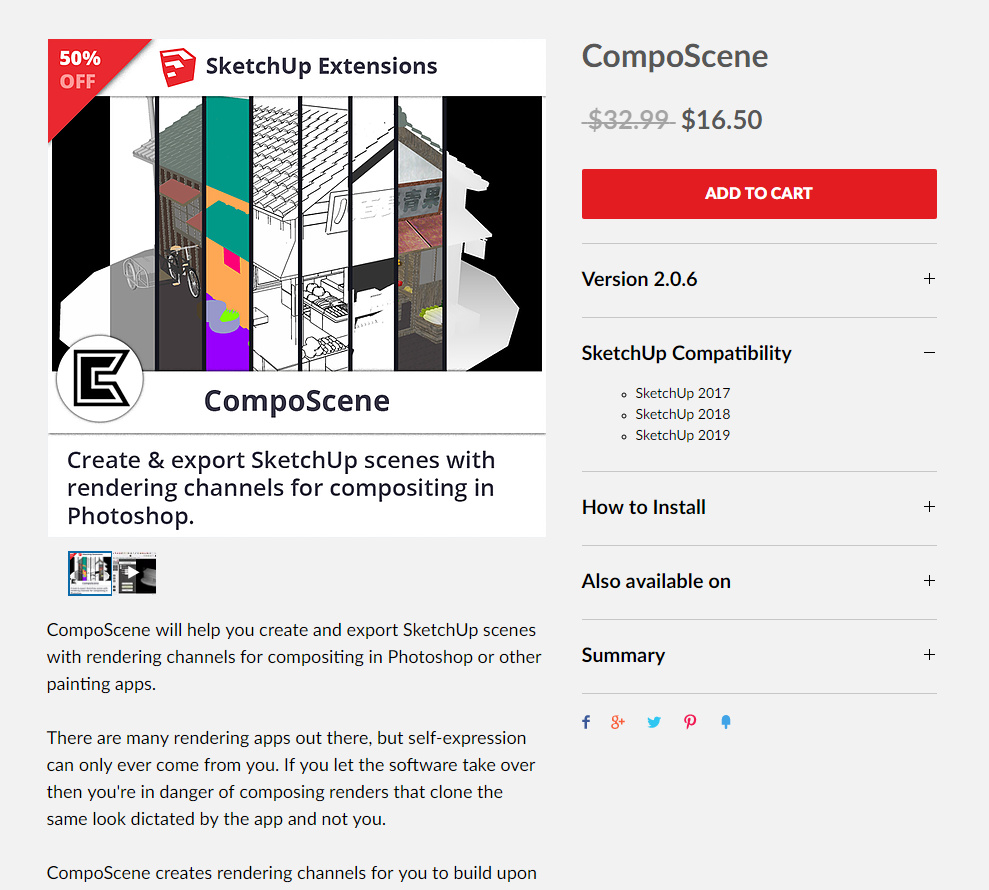
CompoScene is a render plugin, to efficiently export a bundle of multipass renders from SketchUp to Photoshop. Meant for comics makers. Originally $64, now just $16.50. Last updated December 2018.
Category Archives: Companion software
Release: HitFilm 13.0
Shipping now is HitFilm 13.0, the budget $299 video editing, compositing and effects software. It’s basically a cut-down After Effects for VFX-heavy film makers on a tight budget. Lots of camera matching upgrades, plus new colour-grading tools, and an interesting “Remove Stock Background – for compositing stock video footage without manual keying”.
Neobarok
Neobarok. The alpha for 2.0 was previewed a year ago. 2.0 is now being trailed on the site.
Totally free open source software, from one developer. Intuitive modelling and sculpting, with easy boolean and also paint.
It has good video reviews, and it looks quite promising for 2.0. There’s .OBJ export, but so far as I can tell there’s no in-software rendering of what you see to a big 3000px .PNG file. The best you can get there is switch to hi-res, go fullscreen, and take a PrintScreen screenshot.
There are some introductory tutorials and the maker has a DeviantArt gallery.
The most vital first-step in using it is quite tricky, until you get the hang of it. To rotate:
1. First press down and HOLD the RIGHT mouse button.
2. Then do the same with LEFT mouse button, so that both buttons are held down.
3. Then move the mouse to rotate the view.
Do not just press both buttons simultaneously, as that won’t work.
It’s not insanely complicated like some software, although the basic camera and move controls are not initially very intuitive or standard. Let’s hope 2.0 has a camera widget like Poser.
Release round-up
Some release notes of interest, re: recent releases in budget/free software and/or comics and non-photoreal rendering.
* The latest version of PD Howler is available, as Howler 2020 (Windows only) at $77 before discounts. The big changes seem to be a revamp of the legacy brush engine, new paper textures, and rationalised de-cluttered media presets.
* The free Krita 4.2.3 (17th July) is only a minor update, but makes the 4.2 (May 2019) brushes even slicker.
* Just released, a new version of Cinema 4D R21, although I can see nothing on the feature list to interest Poser users or users of C4D’s Sketch & Toon module. However, it’s important to note that there’s now no more confusion between Prime / Visualize / Broadcast / Studio / BodyPaint editions of C4D — they’re all gone. Everything is now in the one edition. Apparently Internet access and online log-in is now required with each launch, with this edition. It doesn’t work with the PoserFusion plugin, and for that you want R17 (which also, rather usefully, doesn’t need the Internet).
* The Release Candidate for Blender 2.8 is now available, as Blender continues to grind its interminable way to the final final really-final-we-mean-it-now honest-it’s-here-at-last 2.8 release.
Free: New 43-minute intro video to the latest Flowscape
All the buttons in Flowscape 1.3, covered, for the first time in a detailed 43-minute walkthrough of the software, aimed at beginners. Free on YouTube.
Release: MagicTints 1.0
Just released, an interesting new “tint transfer” engine for Photoshop called MagicTints 1.0. I especially like the apparently semi-generative ability to…
“iterate through moods, matte color spaces and ideas”
It needs a later CC 2014+ versions of Photoshop and it works as a Panel. There’s a 15-day demo.
I’d just suggest that someone wanting to save $39 could probably wait six months on this. To find that something very similar has been added to G’MIC, and thus to Krita, for free. G’MIC already has 2D style-transfer, auto-colour of line-art, and automatic greyscale-to-colour (see below)… and thus instant-and-acceptable tint-transfer between 2D pictures can’t be far behind.
Cartoon Animator 4: new 360 head tutorials
Whatever you may think about ‘the ultimate price-tag’ on Reallusion’s software, or the radical UI makeover and new render-engines in iClone, as a company they do provide excellent support and tutorials. And the new Cartoon Animator 4 is fine software which is also useful for comics makers of a certain type. Today Reallusion uploaded an hour of detailed new tutorials on the vital skill of how to set up a “360 head” in their new Cartoon Animator 4 software…
Basics of Head Composition in CTA 4, and Full 360 Degree Head Creation Part 1 and Part 2.
There’s also a new 20 minutes video that dives into the details of all the Face Key Editor Enhancements in CTA4, which offers the user detailed creative control over the resulting frame-by-frame animation.
Release: Flowscape 1.3
FlowScape 1.3 is out, and the most stable way for purchasers to get this $10 landscape tool is via the Itch downloader/loader.
New are…
* a basic ‘first draft’ implementation of a terrain-sculpting tool. The maker says “ideally you want to sculpt the terrain before you place anything” on it. “Also if you save and reload, it does weird things if you try and sculpt some more.”
* paint paths, which seems to mean that you can easily lay down footpaths and trackways with a paintbrush.
* 12 new skies.
* a collection of ships.
* six “snowy mountain pieces”, for backdrops.
* “lava and ice options”, as well as water.
* more save slots.
* the overlay grid opacity can be changed, which is useful for RPG map makers.
* water can be made more reflective in top-down-RPG views, so it shows up better.
* “pressing SHIFT will let you rotate”, and this seems to mean rotate a prop with the mouse wheel when placing it on the terrain.
PoseNet 2.0
Google has just open sourced its PoseNet 2.0 pose-detection magic. Which suggests we might get a simple affordable “video to Poser/DAZ pose preset” software, in due course. Without having to stick day-glo markers over clothing and faces. I don’t know of any such thing currently, that’s markerless and sub $50 and works without an enormously expensive iPhone or similar kit.
Apparently Disney also has markerless motion-capture for faces that focuses on the jaw. It detects skin deformations around the jaw, as a proxy of jaw bone position.
Release: Moho 13
Just when you thought Smith Micro was getting out of creative software, with the sale of Poser… “Introducing Moho 13 Animation Software” (YouTube Playlist link). Yes, Smith Micro have just issued a new release of what was formerly Anime Studio, their 2D animation creation software. It’s been three years since the last update. Note that it is not to be confused with the similarly-named 3D modelling software Modo.
I was most interested in the new “Enhanced 3D object support”, though I discovered it to be a “Moho 13 Pro only” feature. Judging by the video for this feature, the user can import and light/shade a simple 3D object in .OBJ, such a soccer ball. But I saw no demo of any exciting real-time automatic application of believable ink lines along the edge line of the ball, akin to Poser’s Comic-book mode or SketchUp. I know there is a Poser import option, but I’ve never seen anyone demo it by giving an imported character more than a very basic line style.
As such, Moho is mildly interesting. But a 2D animator should carefully evaluate the $400 Moho Pro 13 against Reallusion’s latest $199 Cartoon Animator 4 Pipeline (i.e.: Pro) version. The latter is much better supported by add-on content packs, including packs of pre-made motions and characters, albeit mostly costly ones. But Moho seems to have a more ‘pro’ feature set for animation, which may appeal more to trained animators who can make their own content and then make it all flow smoothly. And the Poser import may be useful for you, in that respect.
Blunder
So, with the final-final-really-final honest-it’s-true-at-last Blender 2.8 to launch over the release-horizon in July 2019, I decided to test the 2.8 near-final beta on Windows 8.1 64-bit.
I was looking forward to at least getting a glimpse of the new “complete 2D animation toolset” Grease Pencil module, with 3D interfacing and complete with a dedicated UI workspace template. I don’t care about the animation, but I was interested in comics stills production and how fiddly it might be compared with the ease-of-use with Poser. I was also curious about the Eevee matcap feature, though apparently the Eevee toon shaders are not yet implemented. The simple Sculpting UI workspace template also looked worth a brief try.
But, sadly, the current Blender 2.8 beta crashes my Windows display driver every time it starts to load. Then it refuses to load anything, and just sits there as a blank bare window and loads no UI elements.
Oh well, I guess my system is no longer powerful enough to run Blender. Probably because the… “minimum graphics card requirements for Blender have increased to OpenGL core 3.3.” And the new plugins, such as Toonkit for Cycles 1.3, will only run with Blender 2.8. As I can’t afford a shiny new £500 graphics card + a new PSU to power the new Blender, it looks like Blender is not for me. Despite being free, Blender has now made itself very expensive, both in terms of time-to-learn and its hardware baseline.
Release: Krita 4.2 final
The free Krita 4.2 final has just been released for the desktop. It’s an important release, and of course is free as it’s the flagship digital painting software for ‘open source’ creativity, Krita 4.x rivals Autodesk’s Sketchbook Pro and has clearly outpaced a clutch of similar software.
4.2 Release Notes and New Features in Krita 4.2: Release Video (start at 0.52 seconds if you want to skip the intro).
The highlights:
– over 1,500 stability buxfixes.
– better drawing tablet support.
– better multi-monitor set-up support.
– “a host of bugs with tablets have been resolved”.
– faster brush-speed.
– improved Flow and Opacity in the brush engine, for delicate strokes.
– better colour-picking and colour-palette storage.
– easier ‘move and transform’ of selections.
– rotate your canvas from the Overview mini-window.
– resize the Layer thumbnails.
– updates GMIC filters plugin to version 2.4.5.
– some new Blend modes such as Freeze, Glow, Heat and Reflect.
– and there’s a new Noise generator.
I’ve previously looked in depth here at the potential of its GMIC filters for doing interesting toon-ification things with Poser renders, and I like what I see.
Be warned that it’s not like Blender, in that you can’t have multiple versions of it on the same PC. It’ll remove your old version. But I found that my Brush preset tagging and custom UI remained as it had been in the old version.
Cartoon Animator 4: the official demo video
The official 4-minute demo video for Reallusion’s new Cartoon Animator 4 (formerly CrazyTalk Animator 3) has just been released…
It’s 2D animation software, now 2.5D on the heads. Just be aware that, once you’re hooked into the Reallusion ecosystem, it can become a very expensive option to get all the features and content packs you want.
iClone Plug-in Marketplace
There’s a new iClone Plug-in Marketplace, for small plugins. Only nine there at present. I’m no longer a regular iClone user, but I like the presentation. Wouldn’t it be great to see something similar for your favourite creative software? Presented in a uniformly slick and at-a-glance way, with comprehensive coverage and everything tested and known to be working. Some software occasionally has such a thing, and there are the stores, but more often the details and links are scattered all over the Web.
Hair Strand Designer
In among the stampede of ‘big wallet’ releases from the makers of 3D software this spring, there’s still space for the small and niche. How does a tool to design individual hair strands grab you? Yes, you can of course ‘grow hair strands’ fairly easily in Poser Pro and DAZ Studio has its LAMH plugin and its presets. But the new $3 Hair Strand Designer beta… “creates hair strands ready for placing onto your hair cards” on 3D hair models. It’s for people who make hair this way…
… so may be useful for DAZ / Poser / iClone content makers.