A new video from Lightning Boy Studio, Dynamic Outline Inking with Blender. Definitely not as simple to set up or control as Poser 11’s real-time inking, but the video’s result on the test ‘dinosaur mask’ looks production-ready to me.
Author Archives: jonahjameson
Unsplash
Are you irritated by the Photoshop splash screen that you see 20 times a day? Those with ‘l33t hacker skillz’ can apparently replace the image, but normal mortals are not allowed to. You can, however, simply prevent the Photoshop splash screen from showing. This is done by adding the command…
-NoSplash
… to your start Photoshop launch-icon’s Properties.
Get real
How to load your saved render presets in DAZ Studio
One of the big problems I’ve always had with DAZ Studio is the inability to load my saved Render presets. It’s easy enough to save them: File | Save as… | Render Settings. They are placed in the ..\content\Presets\Render folder as .DUF files.
But then they never ever show up in the Presets tab. This problem has always been there, across multiple different versions of DAZ Studio and even across different PCs. To try to solve the problem, one can copy the render preset files into every possible runtime and content folder that DAZ has access to, but still… nothing will ever show up in the panel. I assume it’s a bug.
The workaround solution is to manually find your presets in Windows Explorer and then drag-and-drop the required .DUF preset file directly onto/into the scene in DAZ Studio. With the Editor open in the Render Panel, you can see the settings change ‘live’ as you drop the .DUF onto the scene. But it would be so much easier just to have them show up in a list where they’re supposed to be.
Double it and double it again…
Using the latest DAZ Studio gives you a substantial iRay speed boost, thanks to the integration of the latest iRay version. 2x faster on CPUs, for instance. Though, as NVIDIA want to sell $500 graphics cards, you’ll only read about that in a quiet blog post from the iRay dev team.
But now I read on the forums about another way to add a further 2x boost to DAZ Studio. So long as you don’t have transparency in the scene, choosing the “Interactive” rather than “Photoreal” version of iRay in DAZ Studio should apparently give you another 2x speed-boost with minimal loss of quality. Some shadows are skipped and transparency is handled differently. But otherwise it’s a good WYSIWYG representation of what your render will look like. The advice is from someone on a fast dual-Xeon PC, but it’s something to consider re: working toward a real-time iRay viewport rather than just a Preview window. It’s easily tested on your system.
DAZ / Poser content survey: January 2020
It’s the end of January 2020 and time for another survey of new content and scripts for DAZ Studio and Poser. What goodies have slipped out in this quiet time of the year? Read on and find out…
Science fiction:
Entertainment Studio in .OBJ format. The same maker has more in a $99 pack, including a somewhat futuristic one.
10 Drones Orchid Pack, organic alien spaceships in .OBJ format.
Luminous Monster in .FBX with animations. From Invasion Studio who is producing a series of such things. They appear to be unique and not fan-art.
Fantasy:
Where do the inn’s deep cellars lead to? Why, to the PW Underworld of course…
Mrs Evil HD for Victoria 8 and Genesis 8 Female.
Historical:
Modular 3D Kits: Fantasy Library from ShaaraMuse3D. HD books, bookcases, tables and scrolls.
Ancient Greco-Roman Crowd Generator, as billboards.
RP Salty Scarlett for Genesis 8 Female.
Poser Hair ‘Em2 – Just Four Men. Dynamic Hair Room hair for M4 and Poser.
dForce Viking Maiden Outfit for G8F
Wild West Horse And Rider Poses for G8M and Horse 2, including wielding six-guns while riding.
Characters and poses:
Matilde for La Femme for Poser.
A usefully generic free ‘surfing’ pose for Genesis 8.
Toon and storybook:
Fairy hut for Poser by 1971s.
Swing Poses For Genesis 8 Female.
Noor Toolbox for Nursoda’s Noor baby (part of the Fehn bundle).
Free Fehn Eyes, for Fehn, ten of them, the default ones being very dark.
Klia for G8F, a free semi-toon character suited to storybooks.
Some nice Retro brushes for Photoshop.
Vehicles:
A classic French Citroen for Poser, likely to interest those with French style toons such as Muggie and Nos by Nursoda.
Animals:
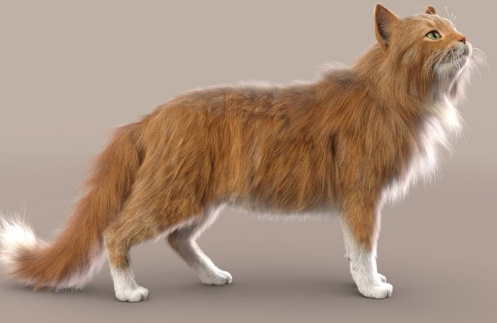
Hivewire Kitten LAMH Preset. Requires the DAZ Studio Look At My Hair plugin.
A free Hivewire Kitten Pose, and another.
Multi-species WolfPack for Poser, with animations. They appear to be suitable for large pack scenes, once you reduce the textures a bit.
Scenery:
DGV Miniature Gardens Vol.1 TeaCups and TinCans.
Old Town Alley for DAZ Studio.
A wind-scoured canyon system for Vue, for $2.
18Gb of vegetation and waterfall and related assets for Vue, including localised mists.
Photo Props: Electric Poles from ShaaraMuse3D, with HD textures so presumably suitable for closeups of a linesman working on the wires. Also likely to interest Vue artists.
New tutorials:
Painting Over 3D Renders with Wootha.
Artbreeder: Generating new Characters with Artificial Intelligence.
Utilities and scripts:
Last month I said I wouldn’t cover any more of the burgeoning range of Genesis converter packs, but Cross Figure 0002 Character Morph and Cross Figure 0001 Character Morph look very useful and long-term. What the difference is between the two packs I just can’t figure out, though. Which is a huge barrier to a potential purchase.
HeadShop 12 for Poser La Femme and HeadShop 12 for Genesis 8.
Perspective Control for DAZ Studio. I’m fairly sure Poser already does this as standard, if this add-on is the same as Poser’s Perspective dial.
Reveal Node Type for Poser.
Finally, be aware that your CG Trader ‘Wish List’ appears to be public. I can access mine while logged out, and its not coming from the browser’s cache.
That’s it for this month. More picks next month!
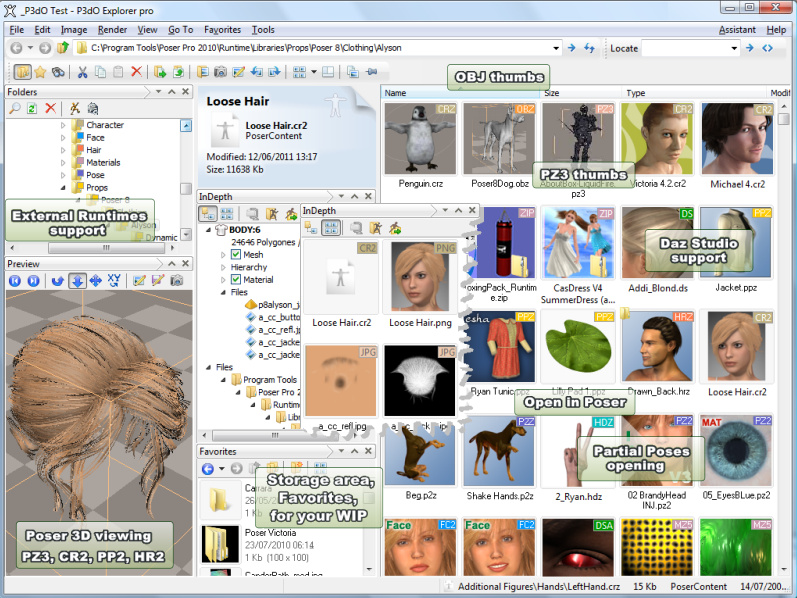
P3DO Explorer Pro 2.7 R3 – now supporting Poser light and camera presets
P3DO Explorer Pro has updated to a 17th January 2020 release, and…
“As promised this version contains Poser additions: lights and cameras have been added to the Poser formats supported.”
This again brings P3DO into parity with its competitor PzDB, following the recent addition of DAZ .DUF content indexing. Lights appear to have been done in quite a robust way, and search hits…
“shows the lights list with the light type (infinite, spot, point, diffuse IBL, area light) and image references for IBL.”
And for an unspecified future release in 2020 the maker plans to…
“add the ability to load only one light/spot from a given set into Poser.”
There will be a P3DO 2.8 ’20th anniversary edition’ in April 2020, so the Easter store-wide sales may be the time you’ll want to bag a copy on Renderosity.
TurboVNC – free, 3D friendly ‘remote desktop’ software
TurboVNC, “high-speed, 3D-friendly, TightVNC-compatible remote desktop software”, including mouse and keyboard control of the remote PC. Free, open-source, mature but also in active development. “3D friendly” here means things like Poser, Cinema 4D, Vue etc, not videogames.
Those who’ve used the business-friendly Team Viewer will be familiar with the basic principle of the ‘Remote Desktop’, aka ‘Virtual Desktop’. You install some software on both PCs, then with the aid of a ‘crossover’ Ethernet cable and a Local Network set up in Windows, you can seamlessly view and operate a remote PC from the comfort of your main PC. A use-case might be that you want to run Vue 2016 directly on your 12-core dual-Xeon render-farm ‘beast’ PC, rather than just sending its rendering work to that PC. But you don’t want to have to swop seats, cables etc to do so. Windows also has a similar feature built-in, which may be enough for those not doing advanced modelling with real-time rendering.
I also looked at the similarly free TigerVNC, also 3D-friendly, but TurboVNC seems the best choice for such things as it has high throughput and also ‘visual glitch’ error correction designed for 3D software work. Though it has a User’s Guide that only a techie could love, and badly needs a focused and user-friendly 6-minute YouTube video offering a quickstart on its setup and use.
Still, making a .BAT file should relive you of the need to type in a half dozen tedious commands, which are needed before you start up the Viewer component…
Note that, to download TurboVNC you may also want to know how to get direct downloads from SourceForge, if the EU’s cookies-crap stops your download from starting.
PoserEd
One of the items of software mentioned by Nerd3D (see previous post), was called PoserEd. I’d never heard of it before. Turns out it’s for hand-editing Poser saved files. I knew there were several free .CR2 editors, and sometimes you can also just use Notepad++ to take a peek.
However, Nerd3D was re-purposing PoserEd into something closer to my heart — a where-the-heck-is-it content finder, as you can have it show the linked file paths and suchlike.
Where to get it? Seems to me that PoserEd must actually be short for Poser File Editor 3… which unfortunately is no longer sold. A comment elsewhere appears to indicate that 3.3 was the last update.
However, a demo version and manual are still online for the present. [Archive.org backup].
I also found a comment that said that Netherworks’ Creator’s ToyBox does something very similar, re: how Nerd3D was using PoserEd.
Poser 11 Webinar Series: Meeting 1
Poser 11 Webinar Series: Meeting 1 January 2020 is a welcome new webinar from Poser expert Nerd3D. Here’s the handy contents-list from the front of the video recording which is archived on YouTube…
I’ve added three red dots on those items likely to interest those who are not store content-developers.
Perhaps, in future, the show might get an even bigger audience if the producers were to front-end it with such general items, and then follow those with the more content-developer-ish items?
Enlightening the dense
A promising new 2020 paper, “Generating Digital Painting Lighting Effects via RGB-space Geometry”. Along with the paper are Python scripts that inspect your digital painting, detect where “the density of strokes” are, and then intelligently re-light the painting accordingly.
It’s ‘early days’ for this and similar experimental re-lighting techniques. But one wonders if it could be used on 3D renders, perhaps if they were output along with a quickly-calculated data-file that served as a proxy for “density of strokes”. That would perhaps be the equivalent of Poser’s Sketch rendering, but without the rendering — only the stroke density data would be saved, as a text file. Poser can already save its stroke data for export to Corel Painter.
Renderosity officially mentions Poser 12, dates Poser 11.3
New at Renderosity, a brief post on What’s planned for their Poser 11.3 ahead of Poser 12 (“We’re saving the big things for Poser 12”, they say).
Due at the end of March 2020…
* “improved local library search experience by using “AND” versus “OR” logic.”
Nice, but I’d ideally also want “NOT”, to be able to knock out unwanted items.
* Software helper “wizards and alerts of potential setting problems”.
Sounds useful, especially for new users. Perhaps even for advanced users, if the wizards can double-up as time-savers (e.g. one click to turn off all background sketching sliders, after loading a default Sketch preset), and if the alerts can be told to tone down the nagging (as an alternative to turning them off).
* Easier content installation for store purchases.
Sounds good, but you would need to be able to specify the runtime location, as many users have their main mega-runtime located outside the official runtime folders.
* Small bug-fixes.
So it all looks good, and we’ll also benefit from the small tweaks that appear to have been ongoing, re: the dating of the installers, since 11.2 was released. For instance I have 11.2.x, but I think I’m a few small increments behind on having the very latest build.
Steambetty
A custom Sketch demo in Poser 11. V4 wears “Steambot” from the SteamBetty pack. A two-second Poser 11 Sketch Render at 1800px, into the real-time Comic Book inks…
… and the same with Smooth Shaded, for those desperate to see some 3D shape and shadow…
The above driven by real-time OpenGL inking in Comic Book mode…
Top 5 Python scripts for new Poser users
There are quite a few new Poser 11 users since Black Friday 2019, and by now they may be wanting to get their first small handful of helper Python scripts. I’d suggest the following are the “top five” for new users…
1. “Scene Toy Pro” (2016 version), available paid at Renderosity and Hivewire. An absolutely vital scene helper, in a slick user interface.
2. “Eye-target” in the Poser Python tools with source code pack, also paid at Renderosity. A non-rendering cube that the character looks at. The cube can be moved, and the eyes follow it. An advanced user can manually set up such a ‘eye-target’ for a character, but this script hooks it all up automatically in a micro-second and saves some tedium. Does not work with all characters, but works with many. (*)
3. Ockham’s “SnapTo” mover. Free at Ockham’s site. Move the just-loaded item from Wheretheheckizit to somewhere in the scene where it’s visible/useful. He also has a variant that moves the current camera to the clicked location, useful for large scenes. Note that this uses Tkinter as part of the script, which means Mac users cannot run it (take it up with Apple and their fickle support-policies dept., not Poser).
4. The DAZ “DSON Importer” for Poser. Free. I assume this is Python, though I’ve never looked — it just works. Auto-loads older DAZ Studio content into Poser, which means Genesis 1 and 2 and props of the same era, if you also downloaded and installed that content’s PoserCF files.
5. “ChangeGamma”. Free, and it ships with Poser 11. Find it under: Top Menu | Scripts | Material Mods. For quickly making grungy dark textures lighter in tone, without actually replacing them. “1” is a good initial setting to use it with, when it asks for user input, though the photoreal rendering crowd may prefer a more subtle ‘lift’ than that.
* Are you a Python coder with a large runtime stuffed with characters, and are you looking for a nice project? Note that Posers users would benefit greatly from a more sophisticated version of this script, with the addition of a per-character drop-down menu. Each drop-down line in the menu would call some character-specific code and math to adjust the eye-tracking for eye-size and other per-character foibles, thus giving perfect eye-target tracking.
See also my larger page on Python Scripts for Poser 11, including installation location advice.
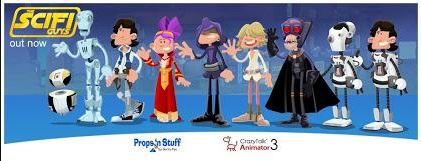
50 more freebies for CTA
Here are 50 commercial-use vector cartoon props for Reallusion’s excellent CrazyTalk Animator / Cartoon Animator. Unlike the Odd Job Jack assets (see previous post) these are commercial-use.
Originally converted and released by me in 2011, and now re-released here in 2020. Enjoy! It’s on SendSpace as a download, so “when it’s gone, it’s gone!”
Download (2Mb)