
Fantasy Attic’s Christmas Gift Page for 2021 is seeking nice donated Poser/DAZ freebies to give away, in the ‘Advent Calendar’ style page (one reveal per day, through to Christmas). Also 2D backgrounds etc.
Author Archives: jonahjameson
Black Friday 2021: birds, Vue and XP-Pen
* 3D bird specialist Ken Gilliland has 50% off until 23rd November.

* E-on Vue has up to 43% off licences for their 3D landscape and plant-creation software.
* XP-Pen US Official Store: Black Friday Sale on now, for their ‘draw on the screen’ pen-monitors.
Can you help me out please?
Ahead of the ‘Black Friday’ sales, a small but vital appeal to my regular readers. Please consider making one of your Black Friday ‘buys’ a regular monthly Patreon donation to myself. Becoming my regular patron will help this blog and my other unpaid services to continue. I know that times are hard, but if you are able to spare $2 or even $5 per month it will really help me out. Thanks.
Vue Solutions
A free Vue Solutions community webinar, 28th November 2021. Booking now.

Monkeying with Moho
Posted on
by
 Posted in Companion software, Poser, Spotted in the News, The Animation Industry
Leave a comment
Posted in Companion software, Poser, Spotted in the News, The Animation Industry
Leave a comment
Posted in Companion software, Poser, Spotted in the News, The Animation Industry
Leave a comment
The venerable indie animation software Moho, now back with its original developers, has released a YouTube preview of a new CrazyTalk-like ‘Live Mesh’ feature. Apparently this is…
coming with the free Moho 13.5.2 update for Moho 13.5 owners
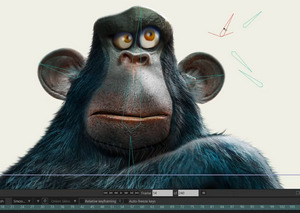
Looks like you can relatively easily add face-rigging to a 2D image, for a 2.5D animatable look, something other software can also do. Though here it looks nicely professional, is integrated into the all-in $400 software (i.e. no $1,000+ of extra plugins to buy), and it obviously gives good results.
Sadly it’s probably not an alternative way to rig a Poser face, and thus perhaps have an older Poser figure fake the look of having ‘real stretchy muscles’ under the skin. Other than as a 2D rendered from Poser. That’s because Moho (formerly Anime Studio) had licencing problems with the Smith Micro / Renderosity switchover, and that caused the drop of the Poser import feature with Moho 13. My guess would be that there was a big script doing the work and that was by Smith Micro and had not been labelled as public domain (as DAZ tends to do with key scripts, presumably to prevent such future problems). So far as I know 12.5.x was the last Moho to officially support Poser import, and there have as yet been no experiments to see if the following is possible:
Poser 11 -> Moho 12.5 -> save file -> open in Moho 13.5.
Sacked!
Sacked! was made with DAZ’s Cookie and Chip figures. It’s a “Christmas movie” in the form of a 3D graphic novel. Recently released free on the ArtStation Marketplace.

The maker is interviewed in VisNews #23.
Poly Haven
From South Africa, the new Poly Haven. A library website of free CC-Zero Blender assets with, at present, what appears to be some quality-control. A test of a small oil-can gave me an open public download (no sign-up needed). The polished and roomy new site seems to be from a small group of young Blender enthusiasts, who plan to run on a mix of crowdfunding and ads. It’s crowdfunding now.
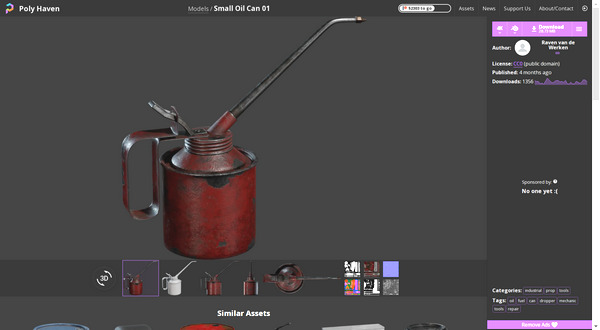
Opening my test file failed in Blender 2.76, but succeeded in 2.83. Automatic Blender to Poser conversion then succeeded nicely, and the can was inside Poser in seconds and looking good.
Technical Search expands again
My Technical Search is now covering 95 sites or pages. It’s now exponentially more useful than when first launched.
Also, added to the sidebar on this blog, PD Howler and Vue Galleries (Facebook). I recently got around to trying the free Howler 2020 (given away in the summer) and it’s excellent for landscape painting. Also for creating simple 3D from greyscale heightmaps, which then auto-magically extrude into lit landscapes — and which you can use as a base for paintovers. The UI takes an hour of getting used to, but it soon makes sense. It’s now one of the four I’d recommend trying on a Windows 7 PC (Photoshop 2018, SAI2, PaintStorm Studio, PD Howler 2021 build 86). For Windows 10 users there’s a 2022 version. If you last tried it decades ago, take another look.
Learn from top DAZ Store maker and vendor Esha
A new tutoring group, with top DAZ Store maker and vendor Esha, offering ‘in person’ a full up-to-date…
guide for texturing props and clothing, without the usual headaches and hurdles. … we’ve had repeated requests for Esha to teach this topic, so we are starting on Sunday the 28th of November 2021.
Small numbers in the group, for the personal coaching touch. Booking now.

If you can’t afford Substance Painter for this, I imagine that the translation of that part of the tutoring to the similar tool $20 ArmorPaint would not be too difficult.
Black Friday 2021: first moves
The software side of Black Friday is starting to move slightly forward. Here’s a round-up of the current discounts I could find:
* The innovative and now greatly refined PD Howler 2021 and 2022 (aka Project Dogwaffle), both strongly improved and speeded up since any version you may have tried years or even decades ago. It’s a digital painting tool that’s especially good for landscape artists, but can also do Bryce-like 3D landscape creation/rendering, some superb particles (inc. particle brushes), animation, spline-based fast inking for comics (‘Penny Paint’ module), and much more. Bear in mind you may already have a copy of 2020 stashed away but not yet installed, as it was temporarily given away free in August 2021. However, that was build 37, a relatively early build, and later builds of 2020 have many further improvements including brushes working faster on larger canvases (build 50).
Windows 7 users should target the most recent version of 2020 (discounted to $29) or buy 2021 (at $30) and then ask for PD Howler 2021.3 (build 85) — which the changelog suggests was the ‘last good’ version before it went all ‘Windows 10’. Other purchasers should just go for the latest 2022 version, and they will also get a free Howler 2021 licence along with 2022 “and you are allowed and encouraged to give 2021 as a gift”. Nice, though bear in mind the recipient ideally needs to have lots of RAM and CPU threads available. If all they have is a dusty old laptop then they probably need the lightweight SAI2.
Actually it gets better. This sales page currently has 2022 for just $20, and presumably you also get the 2021 freebie with that(?).
* Humble Bundle: the Campaign Cartographer software, plus a lot of fantasy and some sci-fi map making packs that work with it. Two weeks left. Bear in mind there’s now a wide range of fantasy map-making software available, and the venerable Campaign Cartographer is by no means the only choice.
* 15% off Silo & Milo. Basically, you get a discount that covers your local sales tax.
* 10% off U-Render, which is kind of ‘Blender’s real-time Eevee, but for Cinema 4D’. Again, doing little more than covering some of your local sales tax, but any discount is welcome in these difficult times. Depending on how you can juggle the versions to align with each other, there may be a ‘Poser 11 – Poserfusion – Cinema 4D – U-render’ route in there somewhere.
* DxO ViewPoint for $50, down from $80. Automatically straightens the ‘fish eye’ camera-curvature lines in your architectural photos or renders, and does a fine job of it. Highly recommended if you want ‘architect magazine perfect’ verticals on pictures, and want it done in seconds.
iClone 8 – new features reveal
Just in today, iClone 8 New Features Introduction. Some of the highlights…
* extended animated .FBX support (“Drag and drop! Any FBX motion data format is compatible, which largely removes platform barriers for motion data and makes it all compatible”);
* many improvements to animation editing and figure controls;
* a new look for the figure Control Rig;
* Hotkey Manager and Collection Manager (“freely categorize objects in the Scene Manager”);
* simulated volumetric lighting in real-time (by adding “visible volume to directional, spot and point lights”);
* mirrors (“simulate realistic mirror reflection, with various control settings like opacity and blur”);
* NVIDIA Omniverse connection (requires RTX graphics card);
* performance optimization (such as “hidden objects will not be processed in the background” for large scenes).
iClone 8 is not out yet. The official take from the Forum is… ”
“iClone 8 … not scheduled for release until at least Spring 2022”
Since the downloads of purchased versions are limited to the last three versions, now might be a good time to go get and archive the installers for iClone 5 — just in case you ever need it for backwards compatability.
VRoid Studio 1.0
Japanese avatar creation software VRoid Studio is out of beta (launched August 2018), and has released its stable 1.0 version. They write… “we rebuilt it from scratch”. Commercial use of the results, summed up as “Your models are yours to use freely”.
Easy to use, and while limited to a generic manga/anime look it does have pointy-ears and suchlike.

Designed characters are low-poly (designed for VR, chat) and export to .VRM format. There are ways to get .VRM to .FBX files and into other 3D software. There is also software such as VSeeFace for facial motion-capture for .VRM figures.
For DAZ and Poser users it would probably be better to get the right shapes/eyes/morphs and build the character natively. You would then have a high-poly model that could also take accessories, motions, face mo-cap and lip-sync etc. Though admittedly the toon texturing and getting the lines looking right would present problems for many. But Poser users have the Comic Book mode and now my discovery of blur + overlay.
Winging it…
I stumbled on a couple of interesting alternative possibilities re: curing the DAZ-to-Poser ‘butterfly wing’ eyelash problem, at least for Genesis 1 and 3. Get rid of the lashes altogether in DAZ, first.
1) A free set of G3F Morphs. One of which is…
‘No Lashes’ – embeds the lashes deep inside the head and scales them to a near microscopic size
Once loaded, found under: Parameters: Actor : Head : Face : “Eyelashes Hide”.
2) A free ‘No Eyelashes’ morph for Genesis 1. G1 is still useful for comic makers due to its great many creature and other morphs, and the ability to easily go to Poser 11 via DSON.
Once loaded, found under: Parameters: Actor : Head : Face : Eyes : “No Lashes”.
Works on a test Poser 11 import via DSON, and no “Sub-division OFF” is then needed there to fix the eyelashes.
Going Live…
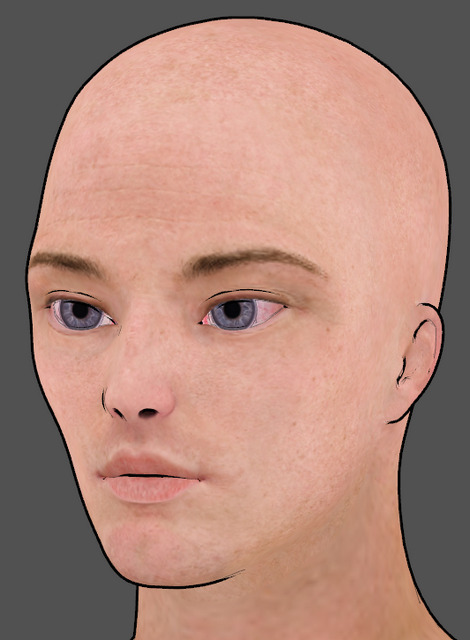
Well, my eBay bargain Asus Xtion Pro depth-sensing 3D camera has turned out to be better than expected. After trudging through an Autumn/Fall storm to pick it up, on opening the box it turns out to be… an Asus Xtion Pro Live. And thus, a later improved model and even more of an absolute bargain. Super.

The first Asus Xtion Pro was out for about a year before it was replaced by the later Live. This added a RGB camera and two microphones either side. It’s the model widely named by 2012-2018 software makers as their supported camera, alongside various early incarnations of the Kinect. It appears to support OpenNI 2.0 without needing to be flashed with new firmware.
Sadly though, this happy discovery means I shall never be able to tell readers if the first generation Xtion works with software X, Y or Z. As I now have no way of testing that.
Pitterbill, re-mapping blendshapes to morphs, in Faceshift…
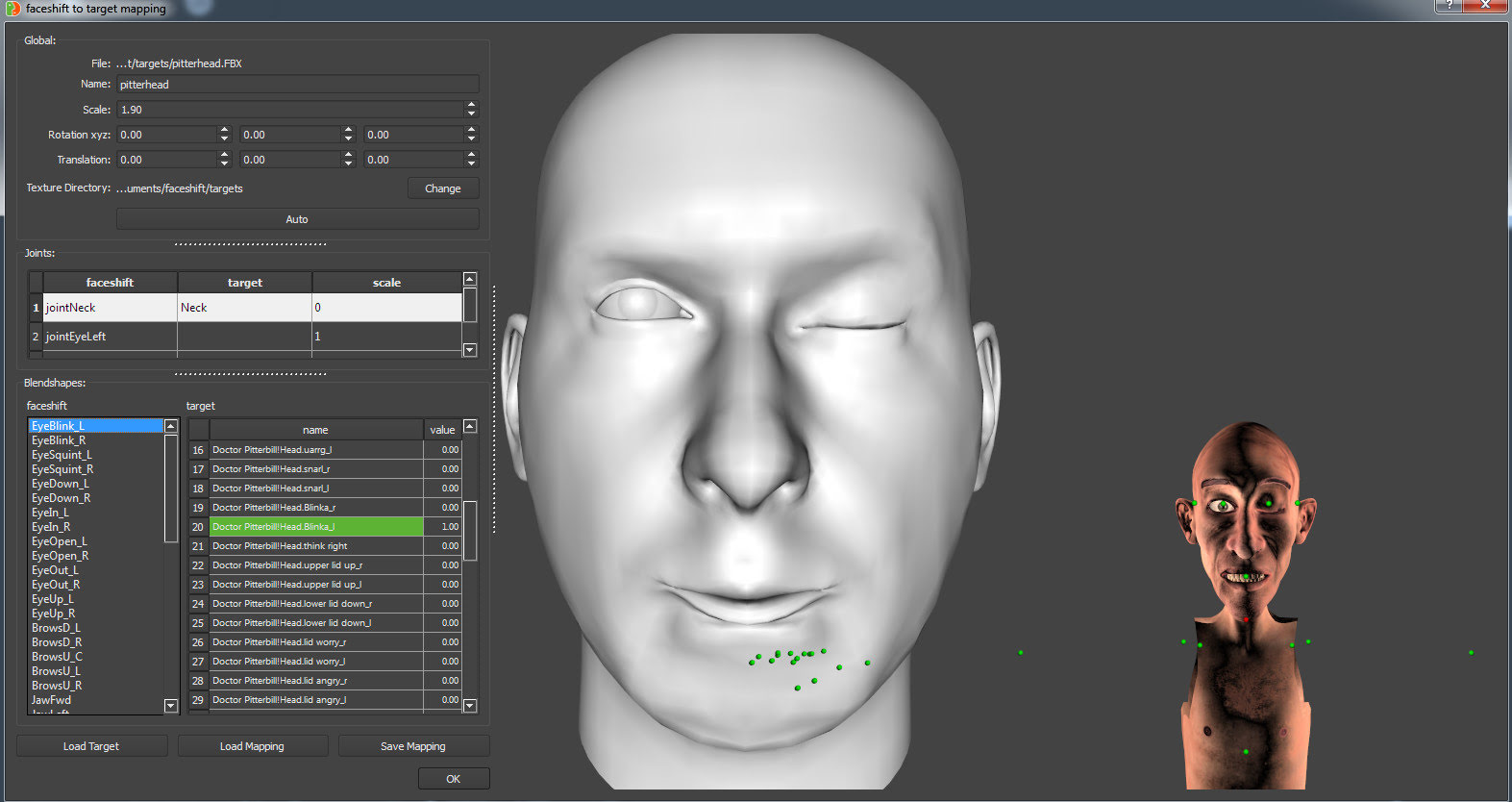
Export .FBX from Poser, Binary, 2012 spec. Place in the \faceshift\targets working folder, along with any texture .fbm folder.
Open Faceshift. Tracking | Display | Target | Import. Import the .FBX. Pair jointNeck with Neck, and then the other morphs will appear. Align the head (better than seen here). Then match the targets, with the Pitterbill targets on sliders similar to Poser dials. Turn to 1.0 to activate the Pitterbill target.
Above we see the left blink being matched.
Release: MeshLab 2021.10
MeshLab 2021.10 has been released. If you’ve missed the last few releases of this free open-source 3D mesh ‘Swiss Army Knife’, here some of what’s recently new…
* support for *.gltf, *.glb, *.nxs, *.nxz, *.e57.
* a brand-new plugin for exact mesh booleans.
* a new Python library for mesh batch processing (replaces old meshlabserver).
* a new “Texture Map Defragmentation” filter.
* a new Extra plugins for MeshLab GitHub repository.