Need snow in your Poser scene for Christmas? Snarlygribbly’s free Snow Machine 2.3 works in Firefly and Preview. Also in Sketch, though it tends to get rather ‘lost in the shuffle’. The snow is really easy to apply, just choose your settings (depth, colour, reflectivity etc) and watch the snow appear on your prop or even all across your scene…
How to strip your Poser characters
How to strip your Poser characters… to clay.
1. Download SnarlyGribbly’s free EZmat, unzip. Inside there is another EZMat.zip. Unzip that too, and copy the ..\runtime folder there to your usual main ..\content\runtime folder by copy-merging.
2. Then copy the rest of the EZMat folder content to ..\content\ezmat and use Windows Explorer to clipboard-copy the filepath for the \plugins\ folder. e.g.: C:\Users\YOUR_USER_NAME\YOUR_PATH\content\ezmat\Plugins
3. Load Poser. Under the top “Window” menu, and then right down at the bottom, you now find the main way to launch the core EZMat panel…
4. In this core panel you paste in your path to the many EZMat plugin scripts. These are a wide variety of helper scripts, doing things such as adding rust overlays and even special ‘furry moss’ textures for standing stones, all explained in the PDF documentation.
In the screenshot below I have the truncated path ..\content\ezmat\Plugins\Official shown for security, but your own full path will be required in your install. You may then need to reload Poser to get the plugins-list loading into EZmat. Choose the EZClay plugin from the selection in the EZmat panel.
5. The workflow on the EZmat panel is then fairly straightforward, if a little roundabout…
Be warned that ‘apply to “whole scene”‘ is ticked by default.
6. If your translucent or glass materials are then looking jaggy in Preview, such as on Robo-kitty’s visor, then set the shadow quality on your scene lights to 1024 instead of 512.
Enjoy your test Robo-kitty in grey clay. This particular kitty ships for free with Poser 11.2, and once installed is found under Figures | Toys | SA Kitty.
Update: Further testing seems to show a small problem with EZmat in Poser 11.2.x: to load it for a saved Poser scene, its panel first needs to be opened briefly on an unsaved Poser scene. After that it will load fine on saved scenes, but will otherwise refuse to fully do so.
The power of the _ID
I found an interesting PoserPython script by ParrotDolphin for Poser’s Material Room. When run it auto-changes the Diffuse colour of a material to a new semi-random colour.
My interest in the script comes from…
i) … its semi-“MatCap” nature. It intelligently looks at the current Diffuse colour, and tries to make an auto-replacement that somewhat matches the original colour’s black-to-white brightness range. One can thus imagine a tweaked version of this script which is even more clever about its colour matching, while also disconnecting existing materials. The result might then be a good quick starting-point for tooning up a character, for rendering with Poser’s Comic Book mode. The new Diffuse colour would be somewhat close to the original material colour.
and
ii) … I’m thinking that the script might be further adapted. So as to work en-masse on the Toon_ID (aka ToonID) rather than the Diffuse. Thus automatically randomising Toon_ID colours across the whole scene in Poser. For example here we see the ToonID for a material set to the colour-code for ‘bright green’…
This change does not affect how the scene looks, but it does get the user a proper “Clown Pass” when using Firefly’s Toon_ID render option…
Here’s my quick partial emulation of a Clown Pass with unique ToonIDs, done manually to show readers a visual example of what you might expect to get…
One can see how such a pass might be useful in Photoshop. While there are scripts that can speedily render a mask for every character and prop, what we have here is a way to mask areas within the character or prop.
But at present Poser’s ToonID pass gives it in very muted blues for some reason, and the user thus needs to drastically tweak levels in Photoshop to get something useful for making selections of parts of your picture in Photoshop. Even then, the render’s ID’s appear to be somewhat “grouped” and not perfect. A full-strength Clown Pass, by contrast would make for easier selection of even small material zones. This may also be useful for comics makers who use Photoshop’s “Change Colour…” and “Paintbucket” tools to quickly colour under their Ink-lines layer, and who automate this process via Actions. (At present they might use the paid-for XS – Extended Shader Manager to mass-change Toon_ID colours in Poser, but this is done in the plugin via manual selection from a tree that shows the scene’s contents).
and
iii) … the script is interesting because it shows how to set up, call and apply the poorly documented and little-used “random number” feature in PoserPython. Though I can’t figure out how one might plug this “random” into a script such as Pick colour & assign to ToonID, which offers a simple Windows colour-picker for changing this colour value. One would hope to change the script to work across the scene, semi auto-randomising all the Toon_IDs and thus to make a full Clown Pass that is still ‘readable’ to the eye. But making such changes is way beyond me. Perhaps someone else might care to have a go?
Update: SnarlyGribbly’s free EZmat has a “Randomizer” script which randomises the Diffuse value of a figure or prop, with a certain level of body-symmetry retained (see below). Obviously this needs to be applied to each figure and prop in a scene separately, and also to a saved “dummy copy” of the scene for safety. But one could then output a Preview render, and thus get what is effectively a Clown Pass without needing to go to a more time-consuming Firefly render…
The script has no “apply to whole scene”, though a “Strip Scene Materials to Clay” script does. One wonders if the two scripts could be combined into what would effectively be a ToonID randomiser for Preview renders?
Testing “Randomizer” seems to show a small problem with EZmat in Poser 11.2.x: to load it for a saved Poser scene, its panel first needs to be opened briefly on an unsaved Poser scene. After that it will load fine on saved scenes, but will otherwise refuse to fully do so.
Update: I’ve now successfully coded a scene-wide ToonID randomising script for Poser 11.
Another watercolour demo with Koit
Nursoda’s Koit character, straight from Poser 11 with unaltered grungy textures and Poser’s Comic Book mode active…
The same Koit was then passed through my custom Sketch preset in Poser 11. 10 seconds at 1800px. The resulting Sketch render then had basic blur and treatment in Photoshop, an alt. inks layer blended in, and some manual fixes to clean up eyes and a few broken or missing lines. Two different watercolour looks…
Yes, I know… “but where are the shadows?” wail some readers. Very easily blended in from another render, with Photoshop, on both body and ground, comes the answer. But this is just a quick demo.
Also, it can be observed that the above pictures are a graphic novel ‘lite’ idea of what watercolour is, which would likely be quite a bit messier if done for real…
“Mul-ti-pass…”
I’ve continued working on refining and adding to my automated multipass script for comics production in Poser.
* I’ve now added a starting line which turns off unwanted directional guide-arrows on lights, just in case they somehow show up in the Preview renders.
* I added a Firefly ‘toon lines-only’ render to the render outputs, and made that fast by automatically turning off some un-needed Firefly stuff such as SSS and huge textures that may be lurking in the scene as bump-maps etc. Quite a hassle to get all that working, without simply loading a custom rendering preset. But it now works nicely and speedily.
* And finally I return the user to the scene’s exact starting state, including switching back from the Render display pane to the live Preview pane, once all the multipass rendering has completed.
Time for eight renders at 1800px, inc. two Sketch renders = 42 seconds. My resulting render-set, I should note, produces nothing like what’s needed for the traditional movie-school multipass method. Comics and storybook-art production, destined to be a set of Photoshop layers, needs a very different set of renders.
A mine of PoserPython source code in the public domain
Source code for the GlowWorm, a PoserPython multipass rendering plugin. Highly advanced, but changes in Poser Pro both overtook many of its functions and also fried its code, though I find it can still work on an install of Poser 6 with the SR3 patch applied. Possibly also Poser 7 as “GlowWorm has been updated for Poser 7 and Poser 6 SR3” and presumably the public domain code was the last version.
I find it was kindly placed under a full open source licence and released to the world by its maker, after it became defunct. It might be fixed up and made to work again in a modern version of Poser, but the main value today seems to be as a PoserPython code-mine of highly advanced code in its many scripts and sub-scripts. Sadly it’s not commented, so anyone tackling it will need to be an advanced Python author.
Equally sadly it lacks the manual or a Help button. But here are some basics and a guide to how to install…
To install and get running on Poser 6 SR3, first install the Poser 6 SR3 patch or ensure you have it already. Unzip the source code zip. Find the \runtime folder under \trunk and copy it. Paste-merge this into C:\Program Files (x86)\Curious Labs\Poser 6 such that it merges with the main runtime. Your GlowWorm can now be run from: C:\Program Files (x86)\Curious Labs\Poser 6\Runtime\Python\Poseworks\GlowWorm and the GlowWorm.py script launcher.
Poser 6 may not work with a modern installation of OpenGL, and you will have to set Preview to the fallback SreedD and then set this as the “Preferred State”. Good luck!
Even for those who can’t run it, the code is interesting. For instance, in its gwrRender.py we appear to have Python getting a list of Poser’s Sketch render presets by name, and selecting one to load to Glowworm’s default settings as presented to the user…
As you can see, it seems far more advanced that the crude “LoadPreset” function in the current PoserPython methods PDF, a function which anyway appears only to work with Firefly rendering, not with Sketch…
Release: P3DO Pro 2.7 – adds DAZ indexing
The new P3DO Pro 2.7 was released a few days ago. One of several third-party indexers and content-managers for for Poser, P3DO Pro now has a DUF parser, for a partial indexing of the newer type of DAZ Studio files. P3DO Pro costs $25 for a two-year licence.
Update: The licence is a little confusing, but the maker clarifies it in a comment to this blog…
“P3DO keys don’t expire. Once you have acquired a key you will be able to use that version without duration limit. It is the ability to upgrade to a newer version which is not possible after a given time. Those two years you are referring to is the minimal time with free upgrades [to the user].”
P3DO Pro’s main rival PzDB 1.3 had partial DAZ indexing some years ago, along with iClone and Vue items. The PzDB licence never expires and 1.3 is currently on a discount at $56. However, if you only need a vast Poser runtime indexing then I’d suggest 1.2 is the better and perfectly good option, and it’s also significantly cheaper at $32.
If you can’t afford either, take a look at the free Everything.
Poser Script – Duplicate and Scatter
Bagginsbill’s Load and scatter script for Poser. Specifically, it loads a school of 150 fish and places them in semi-random positions within a natural tight distribution.
Currently it’s set, via a line in the LoadFishes.py script, for the freebie fish loaded from :Runtime:Libraries:props:TrekkieGrrrl:Fish.pp2 — which is a free Poser prop.
Once the script has spent about 15 seconds making the shoal and returned UI control to you, select Fish_1 and move it, and the shoal will spin and tilt as if it were a single prop.
Tested by me, and it works fine in Poser 11.2. It should presumably also work for fireflies, pollen floaters, asteroids, moment-of-explosion debris clouds (“Hulk… SMASH!”), perhaps even a “distant low-poly star-fighter mega-battle”, etc… provided you load up Notepad++ and change the path to the base prop. For a flock of birds, though, one of Ken G’s paid-for scripts is probably going to be better, re: the required variety of wing-flaps within a flock.
If you need to do something similar but constrained within a container and fully random (e.g. fireflies in a jar), then see my recent test of the free ‘Props in a container’ script.
Renderosity Christmas Give-away
It’s the Renderosity Christmas Give-away! Lots of wholly free items, with direct-downloads. Here’s a sampling of just a few of them…
“Two Doctors! Blimey, time paradoxes will start to form…”
A new free David Tennant for G8M, slightly stylised but in a nice semi-toon way and with The Hair reasonably well done. Released a week ago, but the maker has just today fixed something possibly a bit vital and the .zip file… “now has the character .duf file.”
In this regeneration the Doctor does however have a large amount of dependencies. The underlying base is a… “morph with a Character Preset that uses a Skin Material found in Edward 8”. Then there’s The Hair. So the full list of dependencies are…
Edward 8 for G8M, and you may also want the Edward 8 HD Add-On though the latter is not required.
Super Natural Brows Merchant Resource for Genesis 8 and 3 Male, “with the Shape Preset of Super Natural Brows | Style 33”.
CC Beard Boss for Genesis 8 Male, “with the Brown Material and ‘Shaping -> Sides’ preset of CC Beard Boss ‘Short Burns’ with Materials 02 Brunettes -> CC Beard Boss – 02 Brunettes – 02”.
Tousled Hair for Genesis 3 and 8, “with the Brown Materials set.”
Phew. Quite a haul, but worth it for the Hair of Awesomeness, and the Sideburns of Sublimity. Or the best you can get for those in DAZ, without actually having David Tennant land inside the software with the TARDIS. Now there’s a plot idea, for one of the continuing Tennant audiobooks (10th Doctor Adventures from Big Finish)…
You’ll be wanting suitable Daleks and other Doctor Who items too, for which see my Doctor Who: DAZ and Poser content survey.
Current DAZ Freebies – updated
The Current DAZ Freebies page has updated with new items.
DM’s scene/lights combos are always worth having, especially the lights. And free here is his garden-nook DM Retreat (inc. Poser version), plus a matching storybook Genesis 2 outfit with matching hair — the hair includes both a Poser .CR2 and Poser CFs.
Also, the Anime Starter Bundle gives you the Aiko 4 Base and Hiro 4 Base figures for free, these being for V4.2 and M4 respectively. Plus some interesting-looking stylised anime Xell hair that I hadn’t noticed before.
Also the Freak 5 Action Poses. Which, being Genesis 1, will presumably also be taken more-or-less by other G1-G3 ‘big lad’ characters and robots. Includes Poser CF .zip.
New character from Nursoda: Fehn
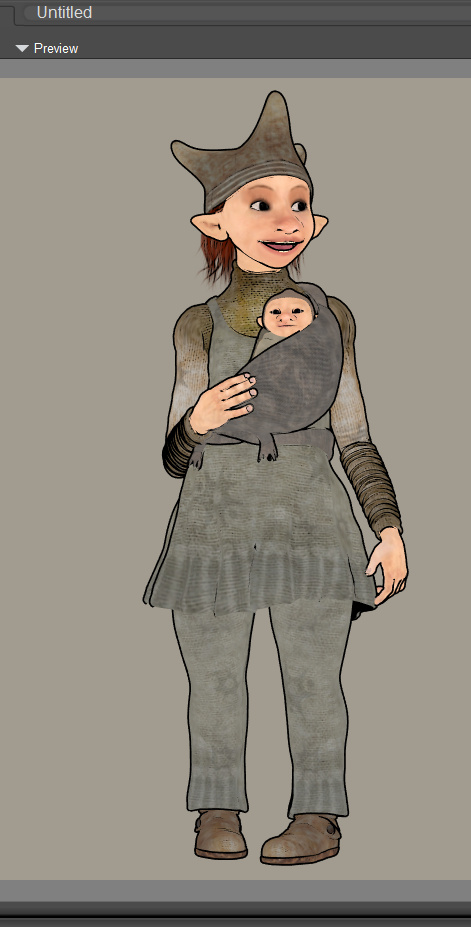
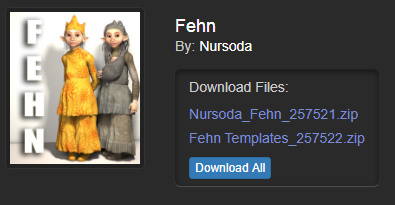
It’s always good to see the release of a new Nursoda character. With his new Fehn he produces not one but two characters, while deftly anticipating the incipient baby-boom among Millennials.
I’m not madly keen on the starry fabric texture, but the alt. version could probably be made a less drab forest-green quite easily, and the character comes with texture templates to DIY with. The distinctive ‘crown’ hat and possibly also the shoes might also be fitted to his other characters.
Fehn is currently discounted at $10.50, and like all of Nursoda’s paid characters is commercial-use (some of his freebie characters are non-commercial, sadly, so you can’t make indie comics or storybooks with them).
I see that I have a mere $11 left in my PayPal as residue from a recent payment for some work. So, yup… Renderosity dinged my PayPal again. They’re getting good at that.
Automated multipass in Poser
Yes! I’ve now coded a working automated multipass render script in PoserPython, and it’s debugged and working. It can switch between Preview and Sketch render modes, and can also control the real-time Comic Book Preview toggles (though it can’t adjust the dials). I never thought I’d have such a thing, but it’s amazing what can be done with enough Bournville dark chocolate and a sufficient supply of mugs of Yorkshire tea on a rainy Saturday night.
Three new desktops for free
Crowded desktop? Jealous of Windows 10’s extra desktops? You want the free Windows Desktops 2.0 utility for Windows 8, from official Microsoft developer subsidiary Sysinternals.
The extras desktops can be set up purely for creative work, such as one for 2D, one for 3D, one for creative writing or music production. You can’t drag icons between them, so each has to be set up purely as a standalone desktop.
It’s a tiny utility that gives Windows three new desktops for free, with simple keyboard command to switch between them. Alt + 1, 2, 3, 4 seems the keyboard command(s) least likely to overlap with other software. Alt + 1 is always the main desktop you have already. If you have mouse-gesture software like StrokesPlus you can tie these keyboard commands to mouse-gestures, and so forget about doing hand-yoga on the keyboard to switch between desktops.
You can also right-click the icon on the taskbar, and select the required desktop from there.
Tested by me, and works fine on Windows 8.1.x. Doesn’t appear ‘at first test’ to interfere with a two monitor setup (e.g. a draw-on-the-screen pen-monitor such as the Ugee).
M4 Horror Investigator
A quick test of VanishingPoint’s M4 Horror Investigator outfit I picked up in the Black Friday sales. This is just a raw Preview screenshot in Comic Book mode. I was going for a sort of “a 1920s Columbo, as a troll-elf”, with the help of the M4++ head and monster morphs.
The shoes in the set are very poor, and were replaced by P3DA’s M4 business shoes with their brown MAT. The gun is the ElectroCalcinator from a ray-gun set, which paired to M4’s hand automatically and perfectly. The dark textures on the suit were lightened with a gamma lift, plus a suitable light.
It’s not too bad for mild non-‘action movie’ poses suited to a Lovecraftian investigator. But the clothes don’t take ink lines all that well (even in toon outline) and you’d have to be prepared to over-ink manually in Photoshop or Krita. The hat, however, takes lines crisply and is authentic for the 1920s — H.P. Lovecraft’s friend Morton often wore one like it.