The new free “All Purpose Strand” is a SuperFly ‘universal shader’ for Poser 11’s Hair Room strand hair and fur.
My saved PDF copy of the instructions. New textures can be easily plugged into the shader.
The new free “All Purpose Strand” is a SuperFly ‘universal shader’ for Poser 11’s Hair Room strand hair and fur.
My saved PDF copy of the instructions. New textures can be easily plugged into the shader.
It’s always good to hear about a new semi-automated AI assistant feature for the free Unity engine, to remove some of the drudge-work. The ArtEngine apparently automates seamlessly tiling of materials, and also…
“up-resing, de-blur, un-warping, color matching”
Drawbacks: appears to need an NVIDIA graphics card, and costs a ridiculous $1,140. Still, it’s likely to be a herald of things to come in Semi-automated Assistant AIs.
We probably need a short name for those in creative production, actually. How about SAMAI or SAMAAI, to be pronounced in conversation using the friendly non-scary name “Sammy”. A Fully Automated Routine AI would be a FARAI, pronounced “Fairy”. Or just said as “Sam-eye” and “Far-eye”.
A new version of the budget Photoshop Elements 2021 is out today. The most interesting new semi-automation is “Adjust Face Tilt”. It seems this may have uses for final-adjustment of pictures inside comics frames, where the picture is still hi-res and the face-tilt or look-angle is ‘not quite right’. So far as I can tell there’s no third-party plugin that will easily do the same in the main Photoshop.
Given the demos I’ve seen, though, it probably only really works well where the subject is facing the camera, which may rarely be the case in comics.
No progress on the iffy auto-colorize feature, it seems.
Official, free, booking now…
“Clip Studio Paint Demo: Drawing Digital Comics” will be hosted on 11th October 2020 from 7-8 p.m. EDT. …. will show tons of tips and tricks for translating traditional techniques into the digital environment. … including turning thumbnails and roughs into pencilled artwork, digital inking … [then] “Clip Studio Paint II” will take place on Sunday, 18th October 2020 from 7-8 p.m.”
Part of the “Month of Mice”.
Portrait Shadow Manipulation is an interesting new technology, hot from the Google labs.
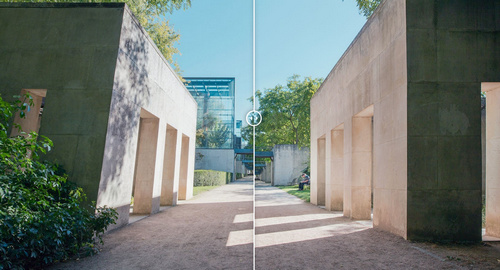
It automatically lifts hard shadows in a head-and-shoulders portrait, these being the shadows of the sort commonly seen in pictures and videos casually made by amateurs in sunny places. Here’s the research video and a useful screenshot from it.
It also removes ‘sweat-shine’ highlights.
As you can see, if plugged into a graphics package, this technology might produce better base-portraits from which to then build comic-like art and line-art. Since what you want for your comics ‘colour flats’ layer, under the lineart, is a fairly ‘flat’ lit face or body. To which you add the shadow-render as a separate and adjustable third layer. Otherwise you’re never going to control the shadows so they display in a believable and uniform way, across the 120 panels of a 28-page comic.
What would be even more interesting would be to go the other way with the new technique, and to ‘auto-cast’ shadows onto fairly flat-lit faces, just by knowing where the eyes / mouth / shoulders are.
It’s the start of the month, and here’s my pick of what was new in September for DAZ Studio and Poser…
Science fiction:
Overkill HD for Genesis 8 Male.
Ceremony HD for Genesis 8 Male, an alien creature who might benefit from a space-suit exo-skeleton. A less photoreal and more stylised alien is the new Amphen, an alien standalone for DAZ Studio.
FA FireBlade MEEV, exploration vehicle for Poser. Also has free Agency textures (NASA etc).
An Easy Snap Space Habitat for near-future space stations.
A Sci-fi Hospital for DAZ Studio.
The free Retro Sci-Fi Hover Car.
Steampunk:
The Streets of Steampunk by Stonemason.
Bastien Curly Hair and Beard for Genesis 8 Male.
dForce Lighthouse Keeper for Genesis 8 Male.
Some of the Weird West items on DAZ this month could work for steampunk.
Figures:
Dhani for L’Homme, a character makeover for the L’Homme male figure that ships with Poser 11 and 12.
Toon:
The free 4 Little Robots set.
Eyeballs for Sakura and Genesis 8.
The free Better Fur Bump Maps For Melody & Micah.
The free Headphones 2, semi-toon headphones.
Storybook:
Straw-hat-with Hair for DAZ Studio.
Just PreSchoolers Pose 04 for G3 and G8.
dforce Blanket 3, free for DAZ Studio, and an Airbed for DAZ Studio and Poser.
A free Toy sit-on plane in .3DS format.
Historical:
MS20 Country Store for Vue and OBJ. And the new Seb HD for Genesis 8 Male and Old Jeb HD for Genesis 8 Male to manage the store.
A free classic American River Steamer paddleboat. There has been a host of very fine looking Wild West items on the DAZ Store this month.
A Celtic Crannog on Lough Ea, a fortified lake-town.
Egyptian Chariot Warfare for Daz Horse 2. There’s also been a host of Ancient Egypt items on the DAZ Store, including some mummies.
Vintage Film Props and Shutterbug Pose Collection for Genesis 8 Female.
A grim communist city set for Blender, from LightArchitect.
Landscape:
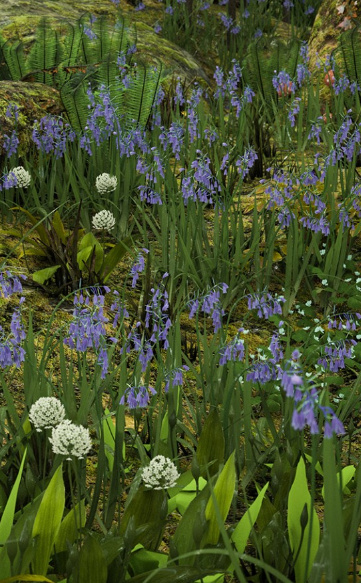
Olive Grove – Ancient Olive Trees and Mediterranean Shrubs Vol. 1.
The free Skull Cave & Expansion
Mountain Pathways kit by ShaaraMuse3D.
Photo Plants: Bamboo World by ShaaraMuse3D.
Corals 2 for Unity. The maker also has a nice line in other semi-toon asset packs.
Raffy Raffy has gone from CGTrader, which is a pity, as he was really the only reason to buy from them. A limited range of his Vue work is still available on the ArtStation Store and CubeBrush.
Animals:
Tetracovine Original Creature with Fur and Accessories for DAZ Studio, from Sixus1. Very nice.
Mouse by AM with LAMH presets, a Hollywood-quality photoreal mouse.
African Elephant Updated, “a reworked version of the African Elephant for Poser, in HD for DAZ Studio.” Appears to require the original African Elephant.
Scripts and utilities:
Face Mojo – Facial MoCap Retargeting for Genesis 3 and 8. Supports facial motion-capture from the iPhone X, iPhone 11, or iPad Pro series 3.
Automatic OBJ Exporter. A free streamlined way to get a posed and dressed figure in the Genesis range over to Poser for use with the Comic Book mode, with speedy poly-reduction along the way. Requires the $50 Atangeo Balancer.
Genesis 8 Clones for Genesis. Fit G8 stuff to the original Genesis figure.
A free Avatar GF8 With Bones for Marvelous Designer.
Tutorials and learning:
Vital Tips in Getting Started with DAZ Studio and Managing DAZ Studio Content.
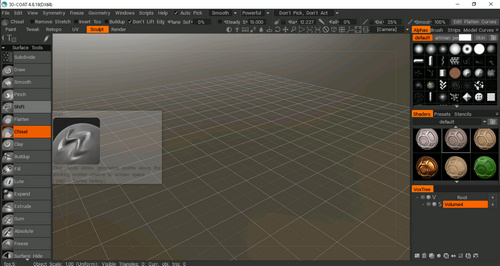
ZBrush Sculpting Project for ZBrush, ZBrush Core and ZBrush Mini.
And finally, the Smith Micro Forums complete in keyword-searchable form, and a partial Runtime DNA forums archive too. Vast stores of community knowledge, especially for Poser.
That’s it for the picks, more next month!
Fantasy Attic’s Halloween Freebies 2020. 31 days of freebies, one per day to Halloween, starting on the 1st of October.
Cartoon Animator 4.3 Pipeline can now export your Project to Adobe After Effects. There’s a handy video on installing the script and sending the scene over. Nice. Now you can say to the animation snobs, “Oh yeah, it was made in After Effects!”
What’s that you say? You want semi-automatic speedy export of any Genesis figure from DAZ Studio, to use with Poser’s real-time Comic Book mode? What? And you also want it posed and clothed?
And you’d like to add fast and stable poly-reduction to about 200,000 polys, to make the figure wieldy inside Poser in real-time? And you want all but the unwanted specular textures loading back onto the OBJ, when you load it in Poser?
Oh, and you’d also like the poly-reduction to be done by an efficient stable super-fast third-party decimator that doesn’t crash or stall (i.e. MeshLab), or take forever to produce a crumpled mess (i.e. DAZ Decimator), or which needs three hours of wrangling and head-scratching to even start to make work (i.e. Blender)?
You’d also like this done in less than four minutes?
So… you want a miracle, right? Well, it’s here. All this is available in the new free Automatic OBJ Exporter suite of scripts, which provides a step-by-step and highly-automated way of getting posed/clothed Genesis figures to Poser for tooning. Works in Windows only, and to be so fast it requires the $52 Atangeo Balancer — which a script will launch from an icon inside the DAZ Studio Library.
G8M, with lineart and toon in Poser 11. Yes, with extreme poses / tight clothes you may have to fix some poke-through via Photoshop’s heal/clone brushes. And yes, you’ll also likely want to blend in a shadows render too, which hasn’t been done for this demo.
There’s a clear read-me, but here are a few extra tips on use:
1) On importing to Poser, there will be a message that the Specular materials cannot be found. They’re not needed for toon and are not available because they were deleted earlier by a script. Just carry on loading and the rest of the textures will load on fine.
2) Once you’re happy with your reduced OBJ in Poser, obviously you then re-name its export sub-folder to something meaningful like Export_0001_Kid_Bounty_Hunter_01 and also delete the larger original OBJ in that folder (it’s the one that now has a -bak file-name). The next time you run Automatic OBJ Exporter, you rename the final created export sub-folder as Export_0001_Kid_Bounty_Hunter_02. And so on. Otherwise Automatic OBJ Exporter will over-write your older exports.
We have more news on Poser, giving a price and an approximate release date.
The date given is still a bit vague, at “Late Fall”. Which would put the release-window between Renderosity’s store discount cut-off of 24th September and the 31st October (which would be the last point that one could reasonably call “late Fall” or Autumn). You can understand that they don’t want to be more specific, since competitors could launch a big ‘must have’ 80% sale a week before and thus drain everyone’s PayPal at just the wrong moment. But it seems possible Poser 12 may be here quite soon now, perhaps even as early as the end of September. I assume there will be a generous free trial, like there is for Poser 11, which should allow for testing and thus allow for some facts to calm the forum hysterics.
So, on price there will be a $129 upgrade price from versions of Poser 11, which is quite reasonable seeing as this is for Pro with its additional features, not the old Standard. In the old days you’d have been happy to pay $129 just for Poser Standard. Also, you can currently get Poser 11 Pro for just $80 at Neowin Deals. ‘Five days to go’ on that, as of today. Given the possible release dates for Poser 12, it could be your last chance to get that deal.
But there won’t be any upgrade path from the old Smith Micro versions prior to Poser 11. That’s fair enough, as it’s something that greatly lessens the programming and help-desk load for Renderosity. People can hang on to antiques like Poser 6 and Poser 2014 forever, for some backwards compatibility, because these versions don’t “phone home” and thus should last as long as Windows. But there comes a point when users can’t expect their antiques, made by another company, to also be perpetual golden-tickets to a shiny new Poser 12.
Slightly worrying is the lack of a crossover period, and an apparent abrupt change…
“Poser 11 will no longer be available for purchase after the release of Poser 12”.
Worrying because that opens the door for some forum trolls to slyly suggest to newbies that their Poser 11 will stop running in a few weeks’ time. A forum clarification would have been useful in that respect, to the effect that Poser 11 will keep running and that 11 will continue to be supported at the help-desk.
In the meantime…
“The full version of Poser 11 is also discounted at 40% off” at the Renderosity Store.
Though note that the $80 Poser 11 Pro version still available via Neowin Deals for the next five days.
There’s also some misleading forum-mongering about a “replacement” render engine. This claim is not at all justified by the official announcement. The announcement says Blender’s Cycles (aka SuperFly) will have its version updated, not be junked and replaced. A Cycles upgrade for Poser 12 should be great news, as Cycles has come a long way since 2012 and it will likely mean rendering speed improvements for SuperFly.
An interesting idea from “Aversion of Reality” in the Blender crowd…
“What if we just faked all our face shading?”
What he means is not that you have 12 MATs for the same figure, each with a shadow position directly imprinted onto the skin MAT or some overlay for it. But rather that the scene has flat lighting, and that a module in the skin-shader controls how the skin appears to take a shadow from a light…
… but really the light has nothing to do with casting the shadow. It’s a sort of dynamic pseudo-shadow ramping in the shader.
Nice idea, but could become a bit tangly to co-ordinate across a whole head and shoulders render… unless you then had a master controller for shadows on all hair / neck / jacket surfaces, not just the face skin. But I guess that’s possible, and he already has it working here on both face and neck, as you can see.
You can already do something like this with duo-tone and colour-ramped materials and suchlike, and there are a number of such packs for Poser and DAZ. But what he’s suggesting for Blender shaders is different than that.
Some additional Poser 12 information has been released by Renderosity, include a hint at the release-window.
* “The Blender Cycles (Superfly) render engine updated”.
I suspected they would do that. If they go to the latest version then that should mean faster rendering times.
* Python updated
As previously announced. I assume they will go to the latest stable version, and then keep it stable rather than trying to keep pace with the latest .point versions. A number of PoserPython scripts may have to be updated for Poser 12, but that’s quite usual for a new Poser version and forum people are already working on that. A few forum freak-outs are happily proclaiming it’s the end of the world and that Poser is about to burn to the ground, as usual. But as usual… the useful scripts will get fixed by hard-working people who roll up their sleeves and do the required work, rather than crying doom! on the forums. The only real uncertainty is DAZ’s DSON Importer plugin, which brings in DAZ-format props and also G1 and G2 figures.
* “Post Render Effects, to speed or embellish renders for single frame or animation renders”.
Interesting, if they’re useful and not just a half-dozen cheesy filters. I wonder if Poser 12 will plug in something really powerful, like G’MIC, somehow? Just my guess.
* FBX import/export improvements. … Unimesh support features sprinkled throughout the code base.
Yes that would be needed for export to the Unity game engine, which is not in the list but which was effectively a feature announced in the recent call for beta-testers. Will this prevent the usual “exploding FBXs” which so hamper use of the FBX format for clothed characters? Will we be able to get clothed and posed FBX’s out of Poser, rather than T or A-pose? We’ll have to wait and see.
* “Material Room overhaul, with material-assignment power tools”.
Excellent. Anything that makes materials stripping / swapping / tweaking easier will be welcome. It would be nice if this was integrated with the Comic Book Mode, by enabling what the animation industry calls “MAT capture”… which means that Poser looks at the colours of the underlying diffuse and its texture, computes and averages them, then strips them out and replaces them with a newly generated flat toon material… of the same colour shade. Ideally you’d then get a quick pop-up colour wheel appearing next to the character and carrying all the new colours on it, thus enabling the user to make quick micro-refinements.
* Poser Reference Manual in HTML as well as PDF.
Nice, and it would enable search engines to get into it. Which might lessen the helpdesk and help forums burden by perhaps 20%, at a guess.
* Deprecated features will include: Face Room (better third-party tools exist); Path Palette (ill-conceived); Kinect support (unsupported); Flash support (obsolete).
Path palette was for animators, and probably only about a half-dozen people have even heard of it. The required Microsoft Kinect hardware can still be had from eBay, but you’ll need to be targeting an earlier version of Poser to use it. Fair enough that it’s going, and I think it was fairly bad at face capture anyway and only good for bodies. It will be interesting to see if there’s real-time face expression/animation capture via a webcam in Poser 12, which would give Poser 12 some parity with other software, but that’s just my guess. As for the Face Room, it is at least free and I’m always loathe to see still-usable free stuff vanish. Will it be pulled entirely, or just left as is and no longer supported at the helpdesk or poked at by the techies?
* “There is a strong likelihood of a 12.1 release in Q1 of 2021 with more unimesh support and new content options.”
Super, so that sounds like we can presumably expect the Poser 12 release between now and Christmas. Which was the expected release window. That would make sense, targeting the “back to school / university” university crowd while they still have some budget or grant money left, and also prepping Poser 12 to be picked up in the Black Friday spend and the Christmas gift market. Start saving double-hard in your PayPal balance for Black Friday, and with the Poser 12 upgrade price factored in, seems like good advice. One way for users of older Poser versions to prepare would be to pick up Poser 11 Pro now for $80, and thus unlock the Poser 12 upgrade price.
DAZ currently have a wide sale on for the U.S. Labor Day holiday, and it’s still on. For $7 for both I picked up Sickleyield’s Genesis 2 Female Clone for Genesis and Genesis 2 Male Clone for Genesis. I already had Sickleyield’s earlier Genesis 3 Clones for Genesis. I note there’s also a new male/female duo of Genesis 8 Clones for Genesis for $7 at Renderosity, though I didn’t get that.
Put them all together and the very flexible Genesis 1 would have compete Genesis autofit compatibility. Why Genesis 1? Because it has loads and loads of half-human creatures, aliens, toony etc, all very easily applied. So, although lacking the bends and subtler facial expressions of G8, it’s still useful. Especially if you can get it to Poser to toon it.
Of course Genesis 1 also came fitted with clones for backwards compatibility to V4, M4, A4 etc. With a few more paid autoclone packs it would also be possible to go the other way and add V3, M3, A3 etc clones, which are needed as 3 series autoclones did not ship with the original Genesis. It looks like now is the time to pick up such things, cheap and before they (possibly) start to vanish from stores.
I just wanted to make a quick test of the Blender Decimate ‘decimator’ feature. A free decimate, aka poly-reduction, aka mesh reduction. What could be nicer? Especially as the free Meshlab 2020 is still flaky and very crash-prone.
First of all, where is the Decimate panel in Blender? Everyone, including the official manual, shows you a nice picture of the Decimate panel itself. “Just click the Spanner icon…” reveal a couple of rather more helpful YouTube videos. But that was no use to me, because there was no Spanner icon…..
Bizarrely, the spanner icon then does appear and it persists, but only when the items in the scene are deselected and re-selected. No other change had been made. Go figure…
Anyway, with this “missing icon” hassle fixed, the user can finally select “Add modifier” and choose to load the Decimator panel…
Once the Decimate panel’s UI is visible there’s some weird stuff going on in it. You expect to see a normal poly-count and a nice smooth dial to dial this down. But you get “faces” instead of polys. I know this is a 2.3m poly .OBJ, so Blender telling me that it has a 73,000 “Face count” is not at all helpful.
Then there’s the reduction dial… which is not labelled as such and is not a dial, as it’s just horrible to try to operate with a mouse. There’s also no indication that its “1.0” setting is actually 100%. The best way to operate this awkward cryptic pseudo-dial appears to be double-clicking on it and just manually typing in a desired setting. Turns out that “0.18” = 18% of the original.
You can see the mesh modifying in real-time, which is something.
Then, buried deep in a forum, is the advice that you have to save the .BLEND file before you export, or you won’t get the reduction. Another bit of fairly vital advice missing from other sources, including the Manual.
So then I export to a new .OBJ file, with “Apply modifiers” ticked in the OBJ export panel. This takes five minutes, during with the PC becomes deeply unresponsive. And what do I get from that? A 174Mb OBJ, 50Mb bigger than the original!
Ok, so it’s back to search and the forums. Turns out you have to not only save the file but also, in the Modifier panel…
“Apply the modifier using the apply button on the modifier.”
“Modifiers can be permanently applied by clicking ‘Apply Modifier’ while in Object mode.”
OK. Where’s that button then, because it is definitely not on the panel I see…
Apparently it should be under the “Add modifier” label.
Does it show up if I move from Object to Edit mode? Nope. if I switch away to a new tab and then back again? Nope. If I close Blender and re-open. Nope.
Turns out this button has been recently removed(!) to be hidden under a fiddly little drop-down arrow…
This drop-down at least usefully informs me that I had switched to the wrong mode. Switching back to Object mode caused the “Apply” to become active…
On clicking the live “Apply” the Decimate Modifier panel vanishes, the items in the scene are deselected, and in the top item there’s a new little circular icon near the name. I assume it’s applied.
OK, so I save the .BLEND file a third time. Then save out as an OBJ, “Apply modifier” once again ticked in the export panel. Things go a little more smoothly now, though the export was still about three minutes. The only problem was… the resulting OBJ was was just as large as before at 174mb!
So, three hours later, I still had no decimated circa-20Mb .OBJ out of Blender. I gave up. Blender appears to have some very nice developing NPR and real-time features… but is still an utter pain in the arse to actually try to use.
Now I know why people who want to decimate OBJs a lot pay $50 for the speed and ease of Atangeo Balancer.