Arki has another Live training webinar with Digital Art Live, coming soon. It’s in three parts, on the making of Complex Accessories. Booking now for an end-July starter event, and then the in-depth series should be underway in August.
Category Archives: Spotted in the News
Released: Genesis 8 Female and Victoria 8
DAZ’s new flagship female, Victoria 8 for Genesis 8 Female, is available now for DAZ Studio. She’s making her appearance two years after the release of Victoria 7 for Genesis Female 3.
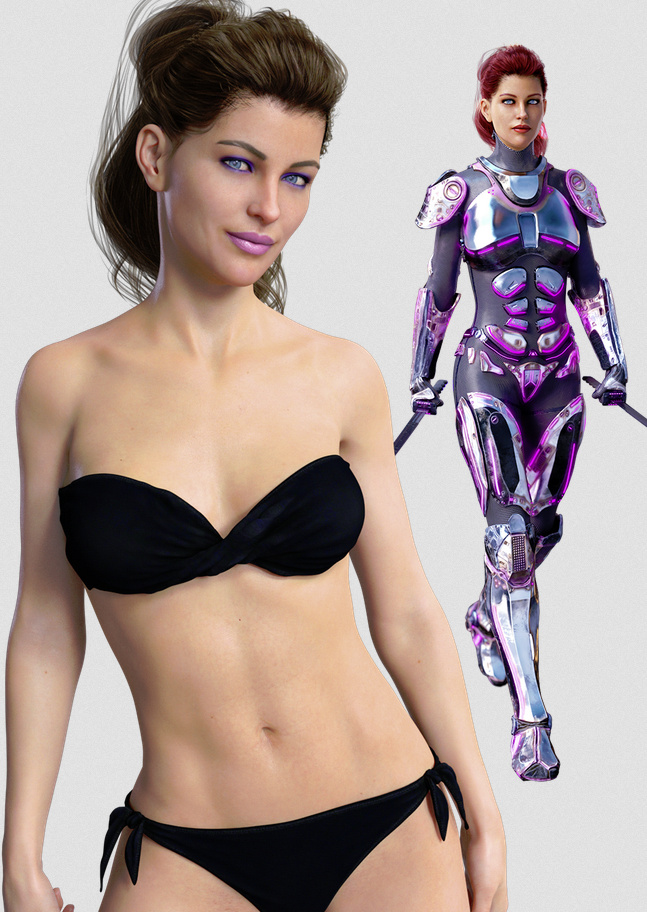
How to get V8? You first need “Genesis 8 Starter Essentials”, which is “included free with Daz Studio”. In 2015 the easiest way of installing V7 was to 1) get the very latest beta of DAZ Studio, then 2) find the relevant icons in the Content Library, then 3) click the ‘Download & Install’ button there. Looks like it’s the same process for the new V8, which…
“…requires installation of either Genesis 8 Starter Essentials through Daz Connect, or both Genesis 8 Female Starter Essentials and Genesis 8 Female PowerPose Templates through Daz Install Manager, Product Library, DIM or Daz Connect.”
After you have the free Genesis 8 up and running in DAZ Studio, you can then load up your newly-purchased Victoria 8 base figure. Here are the new store content pages for Victoria 8:
* The Victoria 8 base and Victoria 8 Starter Bundle.
V8 has: slightly improved joint bending; the fingers and toes are more realistic; she has better shoe fitting and foot posing; and the skin shader has skin improvements (which are apparently being fully enabled for all Genesis characters via the next full version of DAZ Studio). There’s basic backwards compatibility for content, via a set of clones, which includes male -to- female clones. Nice to have, but it seems V8 may still need some workarounds to take older content. For instance, I see that someone has already felt the need to release a ‘V8 pose fix’ script for fixing old poses which don’t work properly on V8. I expect we’ll see more such ‘fix’ and ‘convert’ scripts for older Genesis content, in the coming weeks. Apparently there are also some types of older Genesis clothes which may break, specifically the sort that expect to ‘hook onto’ certain bones which are no longer present in the new V8. For instance, a bone has been removed from the foot, to enable better-looking bending of the foot when wearing high heels.
* There are sets of Victoria 8 Body Morphs and Head Morphs.
Apparently V8’s muscle groups automatically flex a little, according to the pose you apply to the body. Sounds good. Presumably the Body Morphs also work with this new default body behavior?
* There are Victoria 8 Expressions.
They look rather realistic, I must say, and are apparently “sculpted”. I haven’t had time to look into what that means, but they do look good. Apparently there are a whole lot of new bones in the V8 face, and I’m wondering if the V8 face also has the new feature where ‘muscle groups automatically flex a little’ according to the pose?
There’s also a Pro Bundle which is V8 plus a big starter range of dedicated poses and clothes.
The G8 Female Base is reported to transfer fine into Poser 11, using the existing and well-documented (if rather fiddly) workflow for importing G3 characters to Poser.
The new Victoria 8 is also being named in shorthand as “G8F/V8”. But that’s a bit of a handful on the keyboard, and so I’ll probably be typing either “G8F” or “V8” in future.
I expect we’ll also be getting a new Micheal 8 flagship male character soon. Back in 2015, Mike was set for a November release after the June release of Victoria.
The skipping of the Genesis generation numbers also suggests that the long-awaited ‘DAZ Studio 5’ may turn out to be named ‘DAZ Studio 8’, probably complete with a swishy new Moebius-strip ‘8’ logo. Just my guess.
Released: ZBrush 4R8
The new version of the digital sculpting tool ZBrush, ZBrush 4R8 is out…
“ZBrush 4R8 is the final iteration within the ZBrush 4 series before we move to ZBrush 5.0.”
It adds major new features such as Vector Displacement Meshes and Real-time Booleans, as seen in this demo/promo video…
The full list of new features is here.
In the past I’ve spent some days with the ZBrush demo and tutorials, but was rather held back by the lack of a pen monitor which would allow me to draw and sculpt directly onto the screen. Also by that fiendishly horrible interface, which is Definitely Not In Any Way Like Photoshop, and deeply offputting. My recently re-learning of Vue (in its latest 2016 R2 incarnation) has made me weary/wary of learning yet another huge complex chunk of software, and navigating through all of its inevitable and frustrating roadblocks. But these new feature additions, plus my new pen monitor, have definitely moved ZBrush up my “might learn” list.
My current alternatives are the much easier-looking Groboto and Hexagon, even though they’re older now. The more modern, but more expensive, option there would be Modo 10.2 with the MeshFusion plugin. But that latter option appears to be waaay too sluggish on my PC when intersecting booleans, whereas a Groboto 3 test runs as a smooth as silk. Groboto is what MeshFusion grew out of, and they basically do the same thing.
Ralf Sessler, Dimension3D
It’s sad to hear confirmed that Poser scripter and store vendor Ralf Sessler (Dimension3D aka D3D) has recently passed away. His fine and robust Python scripts, such as ‘XS – eXtended Shader Manager’, came up many times during my recent intensive perusal of the Python scripts which work with Poser 11. On the Renderosity forums, I see that ‘renapd’ reports that materials and information have been requested from Ralf’s family, in order for the community to — in due course — make a fitting memorial for him and his work.
Vue competition announced, $30,000 of prizes
There’s a new Vue Environment Competition 2017. Over $30,000 of prizes, top judges, deadline 30th September 2017.
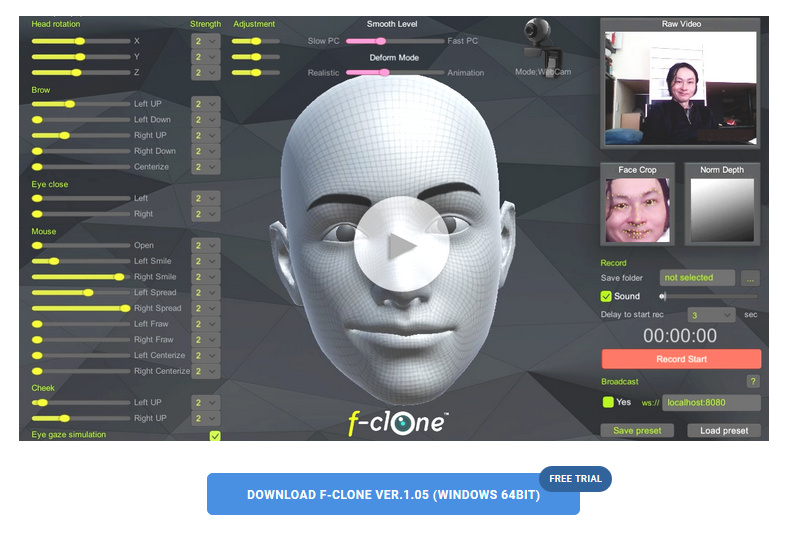
fClone – easy facial motion capture for a .pz2 output
fClone is a new facial motion-capture software that works via a webcam, and can output to Poser’s .pz2 format for use in Poser and DAZ Studio. It’s a little fresh in terms of its versioning, but it’s now in a 1.05 bugfix version.
There’s a free trial available, then it’s $199 for the Standard version, or $50 if you just want to ‘rent’ it for a month of gurning and grinning production work. I’m guessing that $199 price is probably about on a par with iClone’s more mature desktop mo-cap offerings, though I haven’t looked at those or their pricing for a while.
As far as I can tell, the software has nothing to do with iClone or Reallusion, despite the similar name.
The Duck soars
Google Images is such a pile of manure for picture research these days, even when you know how to search and can knock out all the search-pollution coming from Pinterest and Wikipedia and YouTube. For many types of searches, DuckDuckGo’s Images Search is now far superior in terms of relevancy. The range of search modifiers is not yet perfect, but they’ve just added a new “Extra Large” to their search.
Drone -2- Mesh
Want to create a high-precision 3D map of your own specific bit of the earth, for beautification in Vue or Terragen? There’s no need to hijack a passing NASA satellite — just launch your GPS-enabled drone, snap some HD photos and use PrecisionHawk‘s free software for drone mapping…
“Using GPS information embedded within the drone images, the software automatically stitches together a complete map, viewable in both 2D and 3D. Free users of PrecisionMapper can create up to 60 surveys a year without resolution or export limits.”
The precise types of 3D models that can be exported is left a little hazy by the publicity, but I presume they’re fairly standard types.
Possibly it’s easier just to sculpt the terrain with reference to a good large-scale map with contour-lines, of course. Or wrestle with some public geo-data sets. But if you happen to own a HD/GPS drone then it could be a nice project to use it to make an accurate and crisply Vue-beautified “bird’s eye view” version of your valley, local nature reserve, cycle-way, etc. Possibly even for VR fly-throughs.
Feeling the fabric of the past
Need fashion design inspiration from the past, for designing new digital outfits? Pinterest boards are great, of course, if you can find a great searcher/curator combo. But Europeana Fashion is open access and…
“brings together an incredible wealth of content including historical clothing and accessories, contemporary designs, catwalk photographs, drawings, sketches, catalogues and videos contributed by nearly 40 museums and fashion brand archives from 13 European countries.”
CrazyTalk Animator 3.1
The excellent 2D animation software CrazyTalk Animator is now shipping the promised .PSD Photoshop templates with the $299 CrazyTalk Animator Pipeline version 3.1 (not to be confused with 3.01). This is from Reallusion, and so the new templates are very clearly documented.
This relatively-simple software also looks increasingly useful for re-posing 2D characters of the sort used in webcomics production, to save a whole lot of hand-drawing. So it might be considered by artists, even if you don’t want to plunge into all the pain and fiddly slogging that comes with making a full-blown animation with its backgrounds / video-editing / voice-acting / music / titles etc.
Also, I see Reallusion has iClone 7 on a pre-order with special discounts, for delivery in “June 2017”. Upgrading from iClone 5 Pro would cost $199, and that would include the vital companion software 3DXchange 6 Pro (required for working with the current incarnation of 3D Warehouse, older 3DXchange versions being no use now in that regard, because 3D Warehouse have junked all their old file versions).
I’ve looked at the new features but am not really tempted to get back into iClone, unless perhaps… if iClone 7 reveals a Comic Book inking mode that can do better than Poser 11 can. iClone 7 development looks to be pitched heavily toward meeting a slate of industry pre-vis feature requests, and competing with videogame engines such as Unreal and Unity (both free, but for now they’re stuck with nightmare interfaces intended for game developers).
Technavioforecast
There’s a new predictive industry report on 3D software, from Indian analysts Technavioforecast. They suggest that the “global animation design software market” to grow by 16%, to be at $4.288 billion by 2021. Keep in mind that this market report is focused on animation production and thus includes and will be skewed by the huge videogames industry. As such it presumably doesn’t consider the uses in comics and artwork production, event and theatre pre-production, and industrial uses such as architectural and store design rendering.
The report suggests some main drivers:
* increased use of animation design in movies and video games.
* use of animation design software for TV commercials [and presumably also for Web].
* a rise in demand from the Asia-Pacific region inc. Russia. With… “China, India, and Japan leading this growth”.
Fairly obvious stuff. Off the top of my head, I’d suggest that a few other factors will be:
* increasing automation and optimised workflows within the software.
* a large and growing number of able older people, retired and still adept with their hands and their PCs, with the time and money to learn the software as a hobby.
* faster rendering via the move to 8-core PCs and faster video cards. Also on the horizon are “render farms in a box” (44 cores in a cool quiet desktop BOXX, currently £3,800 but that sort of thing will fall in price in five years if the market sees competition).
* excellent tutorials, webinars and support, making the ‘on-ramp’ for the software vastly easier than the way things were 10 to 15 years ago.
* this ‘on-ramp’ is aided by the increasing use-ability of mature software (think Poser 11, Vue 2016 R2, CrazyTalk Animator 3 etc). The same can be said for the wider 2D ecosystem of support software (Photoshop, Clip Studio, SketchBook Pro etc) and their digitising methods. Judging by 3D World magazine, the same thing is happening over in the university-students-and-professionals market (3DS Max, Maya, Zbrush etc).
* there are new commercial content niches for paid content made with this type of software, in markets often uncontrolled by establishment media gatekeepers. Production and sales distribution are both aided by the ease of getting affordable no-hassle assistance from the likes of Fivver.
Gaze warping
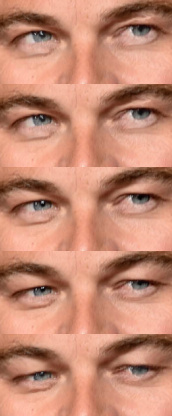
High-quality realistic Gaze Warping. Seamlessly change where the eyes in a hi-res photo are looking. Currently it’s an academic paper and an WebGL demo. I’m guessing: next stop, Photoshop integration? That might mean there would be no need to do a fiddly pose of your 3D character’s eyes, as you could fix the gaze afterwards in Photoshop.
Intel’s new Optane memory
“Ah… what I could do with a faster PC”. How many times have you heard that one? Well, if that’s you then you might interested that there’s a new form of slot-in cache memory from Intel, “Optane memory”. It promises to give Moore’s Law another push and potentially to make media content production work on PCs faster. If you have a Core i3 CPU or higher…
“powering up your PC will be twice as fast; overall system performance will be faster by up to 28%; storage performance will be up to 14 times better; launching of apps will be up to 5 times faster for Google Chrome, up to 6 times faster for MS Outlook, and up to 67% faster for some games.”
“… officially available from 24th April onwards in 16GB and 32GB sizes at $44.00 and $77.00 respectively.”
Intel-based PCs with Optane memory ready-fitted should be shipping-and-affordable around Christmas 2017. But bear in mind that Intel’s cheapest 8-core consumer CPU costs $1,000 just for the chip. So a complete 8-core + Optane system is not likely to be cheap.
Note, however, that Intel are mostly touting start-up times for software, and I’m guessing that the “overall system performance will be faster by up to 28%” may be degraded by other components. But if you already have the correct motherboard slots and the correct CPU, then a mere $44 for 16GB of Optane memory looks like it may offer a very affordable speed boost for artists, even if it’s only an overall system performance boost of perhaps 15% in the end.
The Optane price also compares well with the current price of around £69 (UK) to get, say, an extra 8Gb of branded DDR3-SDRAM 1600 for my AMD-based PC. But that may may not show a great deal of difference in performance either…
“… for most regular work, there is no tangible performance difference between 8GB and 16GB of system memory.”
For the beast-like 3D software Blender, the Standard Performance Evaluation Corporation’s…
“test only pushed the entire system usage to 6.1GB”
D&D Creations new store
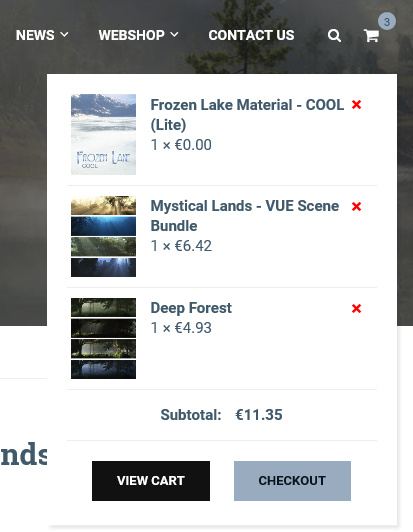
Vue content makers D&D Creations have a shiny new Web store, and if you sign up to the email newsletter first (and confirm) then you should get a 10% discount coupon code. They also have some nicely-priced sale items at present. I picked up five full scenes with atmospheres, and a cool multi-layer freebie, for a low price…
Note that your purchase download links are delivered by email, and I didn’t see them show up immediately on my account dashboard.
Vue 2016 – R2 official patch is available
Got Vue 2016? There’s now an R2 update patch for Vue 2016. This weighs in at a 350Mb download, and in the changelog I see that they’ve added 360° VR panoramas and additional viewports, plus a host of fixes for EcoPainter and fixes for various stability and loading niggles. There’s also an R2 patch for Plant Factory.
If you don’t have Vue but want to try it, E-on has just announced the PLE (Personal Learning Edition) and trial versions of Vue 2016 and Plant Factory are now available.