The UK’s Marcus Johnson has a new 2D RPG Random City Map Generator for just $1 on ArtStation, and the licence allows… “up to one commercial project (up to 2,000 sales or 20,000 views).” It hooks into the free Substance Player, and needs it to work. Not sure what the output resolution and anti-aliasing is like, but presumably one could wrangle these into an isometric view and then pop 3D rendered PNGs on top.
Category Archives: Spotted in the News
The old Poser World content
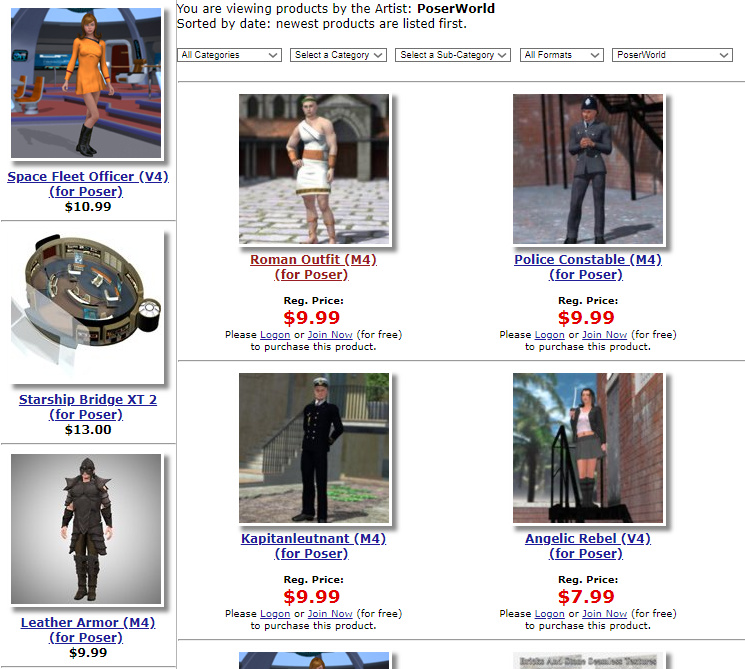
What appears to be some of the old Poser World stuff is appearing for sale on the Vanishing Point store.
I picked up all of their unusual and worthwhile content when they had a generous “all you can download” offer, in 2012 which was late in the life of their site.
But they had a lot of nice V4/M4 uniforms and M3 historical outfits that some people have missed since they departed.
So it’s good to see that some of these are starting to become available again. They’re still useful for overpainters and comic-book makers, or people who need lots of extra costumed characters in a historic scene.
Some of these are also on ShareCG, where there’s a rider… “Original model by, and acquired, from Poserworld, and now owned by VanishingPoint.” So it looks like the old Poser World content has been sold as a job lot.
MediBang! Contest 2019
Tokyo’s MediBang! and Manga CPO have joined forces for a new contest with two sections, Manga and Illustration. They want a max. 32-page manga style comic, and / or an unpublished comic-style illustration on the theme of “Journey”. Free entry, and it appears to be open worldwide though they obviously expect to see a Japanese style in the entries. Deadline: 7th May 2019.
MediBang appears to be a sort of store platform for indie manga creators to sell their comics and illustrations in the Japanese market. They also offer the free MediBang Paint software, now fairly mature at version 23.x, and Jump Paint which is more of a guided experience with embedded tutorials for new manga creators. The contest doesn’t appear to restrict you to just this software.
ClipStudio – innovative new features demo
The paid ClipStudio (aka Manga Studio) has a new short video demo of its new ‘autocolour line art’ and ‘pose extraction’ tools. The autocolour gives ClipStudio parity with the free Krita 4.x, and the semi-automated pose extractor is only in quite experimental stage at present. Notice how there’s an abrupt jump-cut in the video as we jump from the basic and rather clunky pose extraction…
… to something that’s obviously had a quite a bit of hand-tweaking…
Still, that it can be done at all is very promising for the future. And it’ll surely be coming to other software, as the research for it is in the public domain.
D-NOISE for Poser and DAZ renders
There’s a free D-Noise add-on from Remington Graphics, for the free Blender. While I’m loath to recommend Blender to anyone, this is a top-class state-of-the art GPU de-noiser judging by the tests.
And the Web page blurb for this plugin also states that…
“D-NOISE can run on any image loaded into the [Blender] Image Editor including texture bakes and even photos!”
Thus it seems that, once you work out where the the Image Editor is in the infernal Blender interface, you could then use Blender to denoise iRay and Superfly renders made with Poser and DAZ. It may be worth a try if you’re not satisfied with what you’re getting by removing the fireflies and speckles via other methods. It’s all free, bar your time. I figure that it might cost someone new to Blender about three hours of work to get it all installed, set up and the focussed de-noising workflow pinned down for use with iRay and Superfly renders. If you have a go, please comment on this post and let me know how it went for you. I don’t have the required NVIDIA GPU, so I can’t run it.
If experience with A.I. GigaPixel has made you think that anything “A.I.” takes days to run, fear not. It runs quick, like ‘five seconds quick’ according to Remington, but only with an NVIDIA GPU. It thus requires a… “NVIDIA GTX 600 Series or newer”, which means a card from 2012 or later.
It’s also interesting because it’s geared to 3D render noise, whereas most de-noiser software appears to be more focussed on the mass-market camera market and camera sensor-noise.
There’s a handy new 20 minute tutorial on how to use it.
ZBrush 2019 – ‘NPR for comics’ heads the new features list
The ZBrush 2019 new features are out…
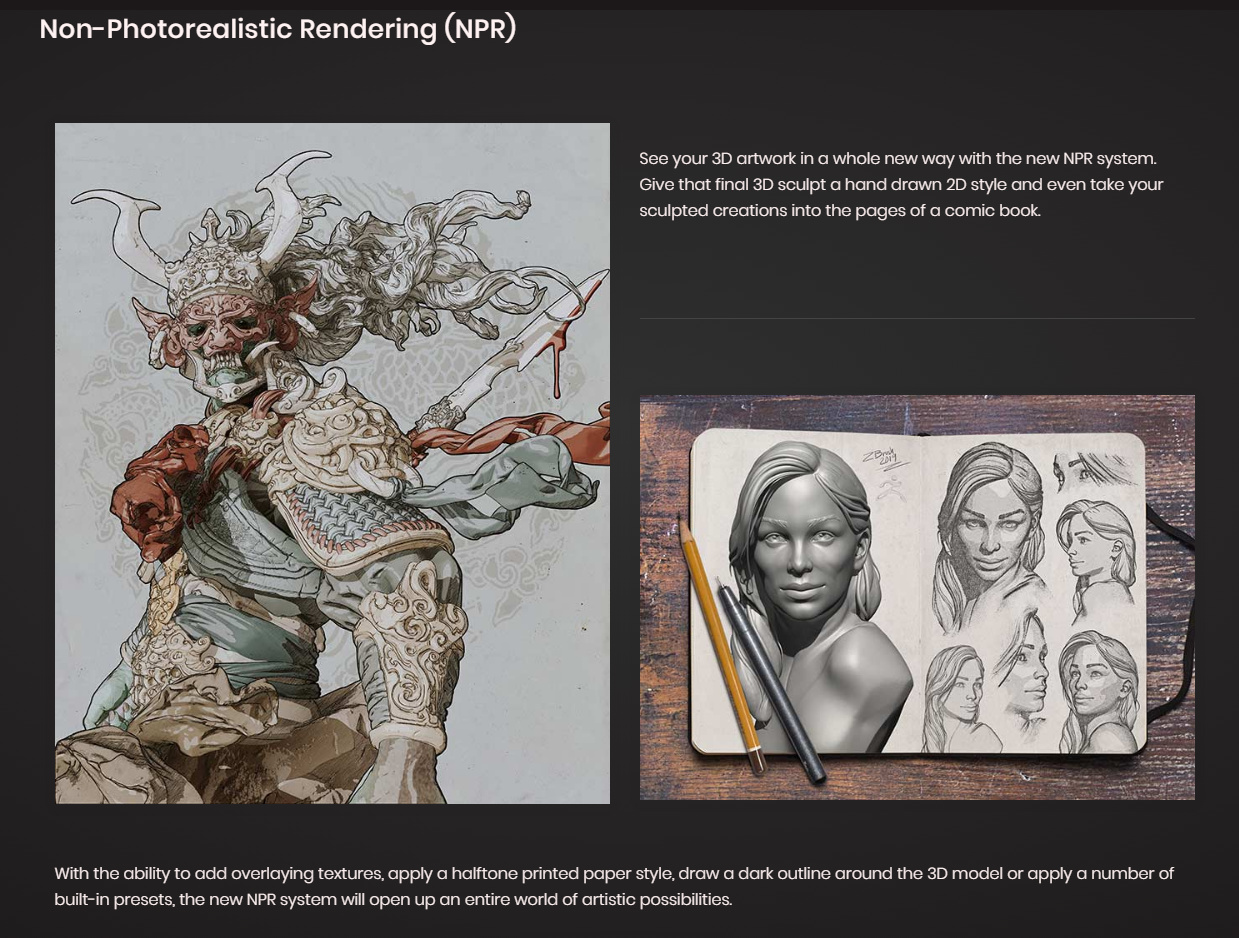
The big one is NPR, which offers… “a hand drawn 2D style and even take your sculpted creations into the pages of a comic book.” Very interesting, though from the look of the samples I doubt it beats Poser 11 for either i) hand-drawn-ness of the ink lines, ii) ease-of-use, or iii) speed of real-time rendering.
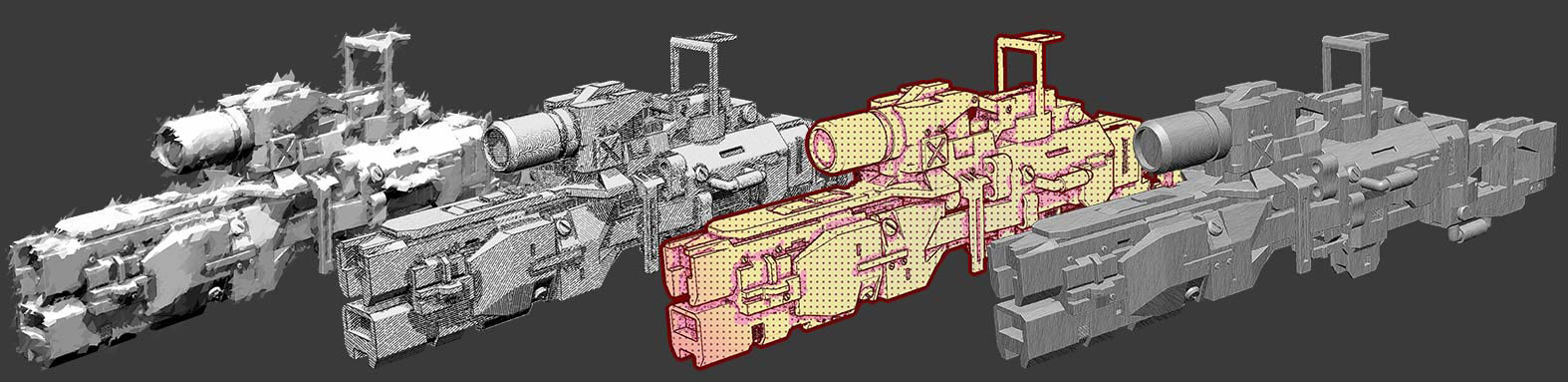
While the pencil effect looks adequate, and the hatching on the second example (below) seems to follow the contours of a very boxy 3D model, I can also see the shading zip-tones slicing through geometry as if it wasn’t there…
The question is then… can that ‘follow the angles’ hatching (on the second example) also work on more rounded organic shapes, such as characters? The texture-bunching weirdness seen happening on the gun’s round scope suggests not.
ZBrush 2019 does have MATCap — meaning that (apparently) the toon outlines can pick up their colour from the 3D material applied below them. Which is cool if it works well and automatically.
Still, the ‘demo comic’ graphic makes it look like the new ZBrush is at least worth a test once it’s available, to see how easily all this can actually be done. There’s a lot being added in post here — look at the (hand drawn?) floor, added texturing on the pillar, and (painted?) sky background…
Poser 11 would give you the colour flats as well as the ink lines, possibly saving work in colouring.
But I guess this is ZBrush’s move to an approximate parity with the free Blender and its increasingly powerful (if incredibly fiddly) toon capabilities, rather than Poser 11/12. If that’s the case, then I guess we’d expect to see the $180 ZBrush Core 2019 have all the NPR features of the main ZBrush. Yet Core currently lacks “2D and 2.5D painting and drawing tools” and a whole lot of other features that a sculptor/toon-illustrator might want.
Ok, well… these are just my first few minutes of reactions. I’ll obviously have to give this feature an in-depth review when the time comes. A lot will depend on if the toon lines are just standard uniform toon-outlines (as they seem to be), or are variously weighted inking lines which can look like they were made by a human inker. But if they had ‘tapering/variable line weights’ and ‘hatching that follows curved contours’, then surely they’d be showing it in the demo pictures?
There’s also lots of other new stuff in the announcement. Though that seems only of interest only to ZBrushers, such as the expected Folders, Retopology stuff, a better camera system.
GeoCities Japan is closing at the end of March
GeoCities Japan: It’s the GeoCities closure all over again… The Japanese version will shut down at the end of March 2019. There will undoubtedly be older Japanese Poser and DAZ sites in there, and other useful digital graphics stuff, so you may want to do some personal archiving of such sites with the likes of Teleport Pro or WinHTTrack.
However, the digital superheroes of the Archive Team are on the case, and have so far saved 96 million URLs from GeoCities Japan. Presumably they’ve also grabbed the .ZIP files.
Manga Studio: automated pose-extraction from photos
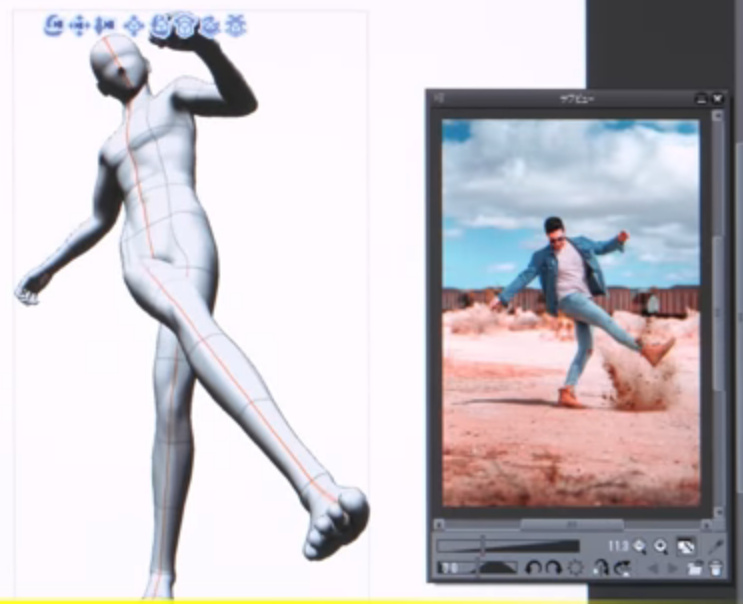
A nifty bit of automation, added to the latest Clip Studio Pro (aka Manga Studio), 1.8.6 which was released 28th February 2019. Feed the “Pose Scanner” a picture of a pose, and it will attempt to automatically pose the 3D dummy that resides inside Manga Studio and which is meant as a drawing-guide.
Note how, in the example given, it’s only getting a rather approximate fit. You’d probably do better, in terms of getting pose both believable and lively, by just inking over the photo itself. Still, if you wanted to save a repeatable preset and were willing to further tweak the auto-pose, then it could provide a starting point for crafting the preset. You might also get better results from photos made in your own green-screen setup in your home-studio.
This feature is only a beta “technology preview” at present, but I’d assume it’s based on public research and thus may be coming to other software in time. I assume that the approximate pose extraction is automatic, and doesn’t require the user to draw lines on the photo.
Possibly this sort of thing is already common as a visual toy in smartphone apps. But, not being a connoisseur of such things, I don’t know about them.
Call: Google Summer of Code 2019
Google Summer of Code 2019: Call for Coders! You’ll be at university but also already be involved with development of an open source software (such as the free Krita, hint hint…). You’ll focus on one hands-on project, and will have mentors to help you. Google will bung you a nice stipend, and most likely a fat bundle of t-shirts too (that last bit is just my guess). Individual student application begin: 25th March 2019.
Release: Electra for Photoshop
I’m always pleased to see a new Photoshop plugin from Richard Rosenman. He’s just released Electra, for all your sparking needs. From a tiny spark in a cyborg’s eye to a massive superhero-tastic ‘Amazing Arc from Above’ that gives the hero his superpowers.
Sadly it’s not one of his many excellent freebies, and your headphones may throw off more than a few sparks when you read the price… “$49.99”. Ouch. But it’s for Photoshop CS5 and above, and it will even run in Corel Painter 12 and above.
The plugin is one to try as an overlay for the new free Poser prop, Updated Morphing Beam prop for Demoleculizer, perhaps…
Your alternative plugins here would be: ‘Electrify’ in Alien Skin Eye Candy; ‘Electrify’ in Xenofex 2. I suspect that when Xenofex was retired, that was when ‘Electrify’ was added to Alien Skin Eye Candy, so they’re probably the same thing. I’m fairly sure that Corel ParticleShop also does something in that line (though perhaps a bit more ‘faery fireflies’), although that’s a hefty price.
Semi-automatica from Japan
Some recent semi-automatica from Japan. For animation, of a sort, but also with obvious use for comics makers who only need slightly different variants between comic frames.
1. Live2D Euclid 1.0. Illustrated 2D characters in 3D space, seemingly auto animated (once you have the character set up)…
Their less turn-tastical but more polished version of this is their Live2D Cubism 3.0 software. 3.0 appeared in 2017, and it’s now at 3.3. As with Euclid you also feed it a multi-layer 2D .PSD file from Photoshop, but with Cubism you can only set up relatively subtle camera-facing animations. Looks interesting, and there are templates to base your new characters off…
Sadly the software is a monthly subscription, but reasonable at around $10 per month. There’s a free trial for Windows and Mac, with translated UI, and an English manual. It’s interesting to know that this software is out there. But without looking at it too deeply I’d suspect that the latest CrazyTalk Animator (soon to be Cartoon Animator 4.0) would be feature-comparable and possibly easier to use. Though possibly more expensive if Cubism has a thriving hinterland of low-cost third-party animation and template packs over in Japan.
2. PaintsTransfer. AI-assisted auto-painting of line art. The user first places and adjusts ‘wheels’ over the line art, then indicates general colours at the centres of these. A first approximation of the colouring is tested, and then if the auto-colour is broadly acceptable the user refines it by placing further colour dots onto the wheels. The code has been released, but it’s not for Windows.
Again it’s interesting, but Krita 4.0 seems to be the most vigorously-developed choice for auto-colouring of line-art at present. Note that the free Krita also has the ability to auto-colour by greyscale value (e.g. lighter tones become skin-pink)…
3. Anime generation with AI, in a recent conference presentation. Give it three keyframes, have the AI intelligently interpolate the animations in between, to generate 16 flowing frames.
A glimpse at the future of semi-automated AI-assisted workflows! Next stop, 3D strand ‘autohair’ from a photo…
Release: digiKam 6.0
Still missing your old Picasa software? The new digiKam 6.0 has just been released. It’s polished and free ‘open source’ software for handling, searching and previewing your entire picture library. 6.0 now supports video files, and major cloud services including Pinterest (though 500px is sadly missing). It also has the usual features that one expects these days, such as face detection, ‘visual similarity’ sorting, tags, etc. It’s new to me, but it looks and work fine. I see thumbnails and quick-preview for Photoshop .PSD files. The nice dark user interface is found under Settings | Themes.
While it’s obviously aimed at the “show me a ton of metadata” guys, working in fields such as wedding and magazine photography, there seems no reason why it can’t be a useful way to view and sort your 3D renders and animations. Be warned however, that this isn’t Picasa and and the initial set up of ‘albums’ is way harder than it needs to be. But it’s genuinely free.
Regrettably there’s no real perfect mid-ground in this sort of free software. There’s ‘ugly but freeware’ like Faststone and XnView, or pro-feature overkill slickness in software like digiKam (similar to Photo Supreme, incidentally, if you need a paid option). The free IrfanView would be an absolutely perfect mid-ground software for this, but it lacks just one vital feature — folder bookmarking. Of course, there’s always Picasa itself, and though it may have been abandoned by Google it’s still free and still works fine in Windows. It has movie and Photoshop .PSD support, and can launch a picture in IrfanView with a right-click on its thumbnail.
G’MIC 2.5 preview
The G’MIC filters are is now available in a preview of the next 2.5 version. This adds the filter Artistic | ‘Stylisation’, as well as some colour-grading filters.
‘Stylisation’ attempts to style-transfer the style of one picture onto the content of another. The main demo picture that’s been shown of this filter makes it look a bit of a gimmicky tech-demo. However, on looking at the full range of samples, and especially the hatching transfer, it seems to be more powerful than it’s made out to be. It seemed worth a look.
It will come to Krita eventually, but I felt that the safest way to try the new filter was via installing it to a download of GIMP, which also hosts it. The 2.5 preview installer for GIMP is in Index of files/prerelease_windows/ as the gmic_gimp2.10_qt_win64.exe file. Using the .exe means that there’s no messing around with unzipping and copy/pasting and hoping for the best.
1. The first thing I discovered was that G’MIC for GIMP had my Krita-made presets in it. It seems all G’MICs use the same Appdata folder. Nice. No, not so nice. A new install can destroy your carefully crafted custom Favourite presets, if the filter they call has been removed!!
2. The second thing I noticed was that G’MIC for GIMP has presets under ‘Testing’ and there’s a whole set there by PhotoComix. His ‘Pheonix Steam-Pencil’ at first seemed to be the one that had a lot going for it. But while this was quick to run (20 seconds), regrettably it failed to reproduce the look of the preview (seen below) onto the actual image. The problem here seems to be that it’s merging with the original and it seems there’s no way around that merge.
Testing also has Samj | ‘Contour Drawings’. This a curious filter that appears to extract contour lines from their background? Useful for map makers, perhaps.
Also under Testing | Telperion | ‘Mc Pendraw’ was very promising in its Preview, seeming to combine a comic-book filter with stipple. But it also failed to deliver in what it sent to the original.
3. And finally, I got to test the new Artistic | ‘Stylisation’. I got it to run and played with the settings, but just couldn’t get anything satisfactory out of it. Possibly there’s a knack with it, and we’ll eventually get a YouTube video of how to do a clean crisp transfer.
Release: QuadSpinner’s Gaea 1.0
QuadSpinner’s new landscape sculpting software has been released. You may remember their name if you’ve been a Vue user in recent years. QuadSpinner’s Gaea is not for Vue, though. It’s a standalone Windows software. It’s also rather affordable, with a very sensible scaling price.
Of course there are already a variety of well-polished terrain makers out there, from trusty old Bryce 7 at $20 on the DAZ Store, up to the latest Terragen at $$$s. There are also newer game-engine based tools such as World Creator 2, which I reviewed in depth a while back, and the new FlowScape which I recently reviewed here on this blog.
How is Gaea different? Well, I have to say I haven’t tried it yet, only researched it a bit to work out what it is and isn’t. It’s made by very experienced landscape folks who know what the industry needs in a workflow. Simplicity, for instance. Gaea appears to be focussed on presenting an obvious-even-to-interns workflow and super-quick creation of quality terrain meshes. So it sounds like it can be likened to ‘a KeyShot for terrain makers’. Which would be very welcome, if that’s a correct characterisation of the software.
That said, I see that Gaea does have power under the hood, and also has… nodes. The mere mention of which is enough to have some 3D artists running for the exit. You’re also likely to need a very hefty PC if you’re going to be working at 8K with complex erosion and a filter stack on top. That said, it seems you can ignore the nodes and just work with manageable mesh sizes.
So it’s another welcome entry in the landscape sculpting field, and the $99 Indie price is right. It’s driven by your CPU, so doesn’t require a £500 graphics card (GPU). Even better, if you can tolerate a 1k limit then the price is free! And even generously allows commercial use…
Currently the site’s download slots appear to be saturated, though. It just gives timeout after timeout, for me. But I guess I just keep trying for the download. I can’t find any download mirrors they might have set up to take up the slack.