The Poser Pro 2014 training videos are coming thick and fast — but sadly none are in English. This blog has told readers about Spanish and Italian training resources for 2012. And now comes a new French one…

Can a decent English one be far behind?

The Poser Pro 2014 training videos are coming thick and fast — but sadly none are in English. This blog has told readers about Spanish and Italian training resources for 2012. And now comes a new French one…
Can a decent English one be far behind?
Snow Machine v2 for Poser Pro 2014 has been released by Snarly!
“The Snow Machine is a Python Wacro for Poser, enabling a snow effect to be selectively applied to scene elements. It works by modifying the shader tree of the selected element(s)’ materials. No additional geometry is created.”
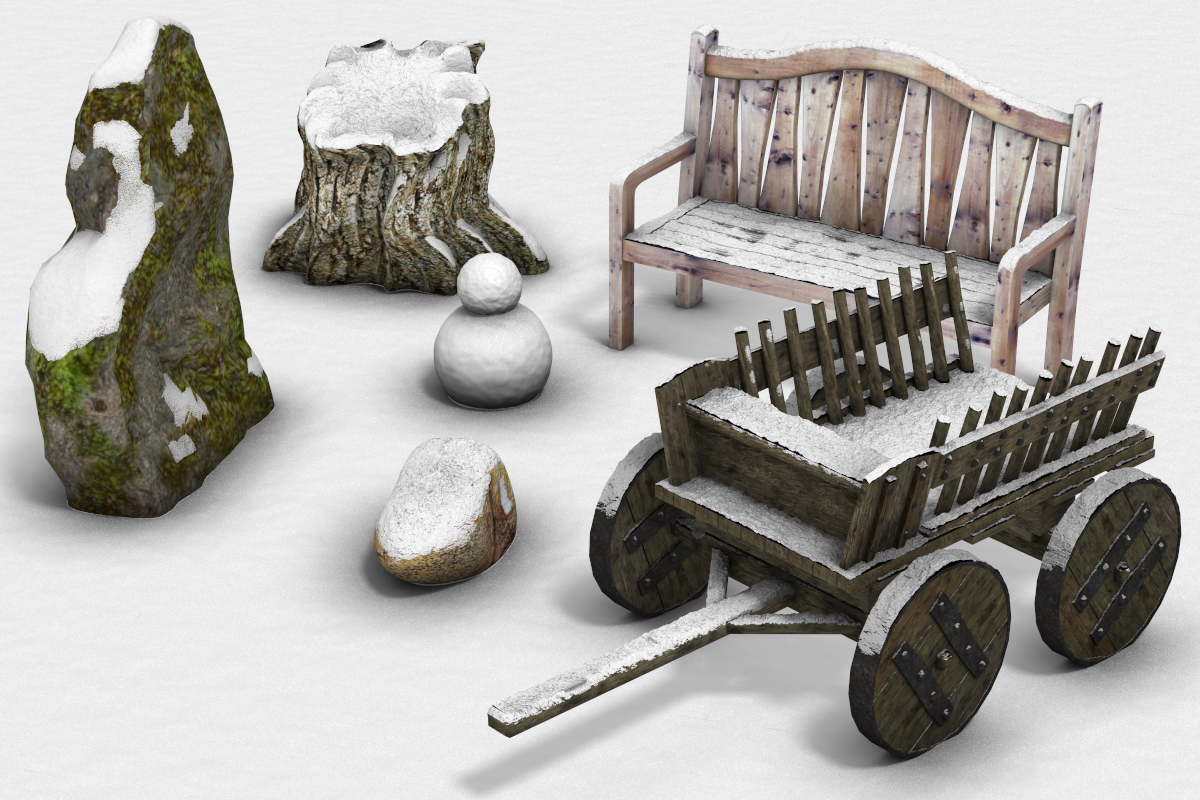
SSM2.zip (Free, Windows and Mac)
In re-learning Poser Pro 2014 after some years away from Poser, these are the two most important things I’ve yet learned — in terms of how to make “speed previews” to check lighting and positioning:
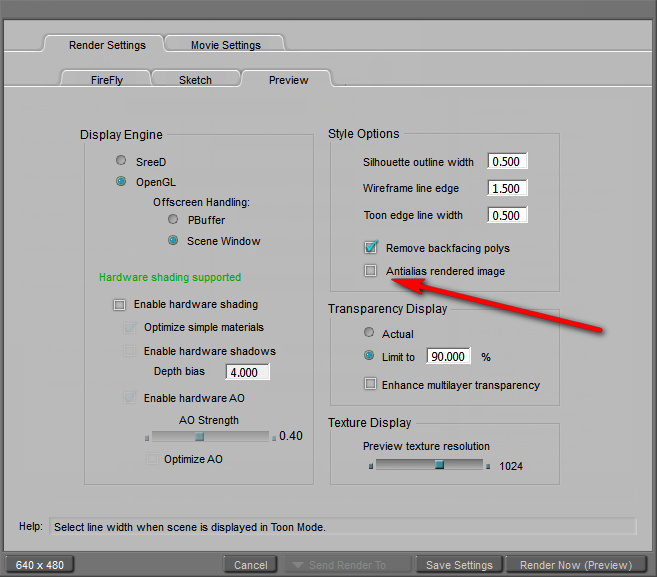
1. You should turn off Anti-alias in the OpenGL Preview, which has the effect of removing the 20-second delay on moving from wireframe to OpenGL preview and generally speeding up the real-time viewport. Update: no longer needed on Poser 11.
2. On the default FireFly settings, simply turn Pixel Samples down to “2” and Min Shading Rate to “12.50”. Save it as a manual preset. Using this preset means you can render a small 640px preview in about five seconds. The textures will be soupy, but you’ll see how the lighting will actually look in a final render.
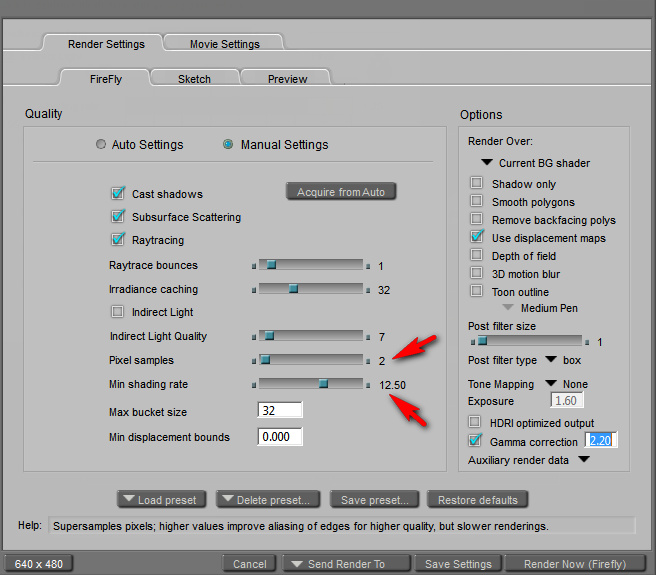
These simple tweaks (save them as Render Presets) vastly improve the experience of working with Poser.
If you can speak and read Italian, there’s a Poser Pro 2014 online course for you. Massimiliano Marras of the Italian Film School called FaiStrada is offering 2 hours and 26 minutes of video lessons in 20 videos. And 180 days of access to his online lessons. All for a very modest price. The accent is on pre-vis film industry use, rather than photorealism or glamour pin-ups…
“in a couple of hours gives everything you need to integrate Poser Pro into your business strategy. A substantial part of the course is devoted to storyboards and non-photorealistic rendering, increasingly indispensable tools for those who make digital cinema.”

The winners of the 2012 Songbird Remix Contest have been announced and posted. The contestants used the fabulous SongBird Remix packs for Poser. The winning entry was “Tancho” (Red-crowned Cranes), and can be seen in the entrants gallery…

This review is eight years old now, but still useful.
I went looking for another third-party DAZ/Poser content management system. I remembered the old PzDB (it stands for ‘Poser Database’), and I wondered if it was still around. It turns out that PzDB is now PzDB 1.2.2. It looked good, with lots of interesting features, but… I wasn’t sure if it would work with DAZ Studio and Poser Pro 2012. I’ve now tried it, and it turns out that PzDB still works fine.
After installing PzDB you get a simple Wizard that walks you through finding your main runtime, the one with all your content in it. Indexing the first run may take some hours, but subsequent updating of the index (i.e. after adding new content) is quicker.
Indexing is supposed to automatically fix missing thumbnail-previews, populated the database with keywords taken from file and folder names, and automatically grouped and cross-referenced all the content.
The time taken was reasonable, considering how much 3D content I have been able to build up over the years of cherry-picking bargains, freebies, sale-offers, and group discounts…

I was a little worried that PzDB might be messing with my runtime. But I needn’t have worried. It does not touch the runtimes at all. All PzDB does is build an incredibly useful virtual catalogue of them.
Once it’s finished indexing, I simply closed the Indexing window (scary moment, since there was no indication that the 35 minute trawl had been saved), and then clicked on the “Launch PzDB” button.
You’ll find content for all your main characters already sorted for you. Although I found that PzDB doesn’t seem to know yet about Nursoda’s characters like Dr. Pitterbill. But Vicky 4 and all the other standard characters can be quickly displayed via handy drop-down preset filters.
In my first use of the keyword search-box I was obviously doing something wrong. I searched for “dog”, and had no results. It took about ten minutes of mild puzzling before I managed to figure out how to get out of the Victoria 4 index I was started off in, and to be able to do a proper global search of the runtime (like you can, in a primitive manner, in Poser Pro 2014). Sadly the manual wasn’t any help on this fundamental sticking point. Basically, to do an “all content” search, you do this: make sure all the little tabs over in the search panel are showing colour and not grey (click on any grey ones, to turn them to colour), AND have the top category selection set to All Content, thus…
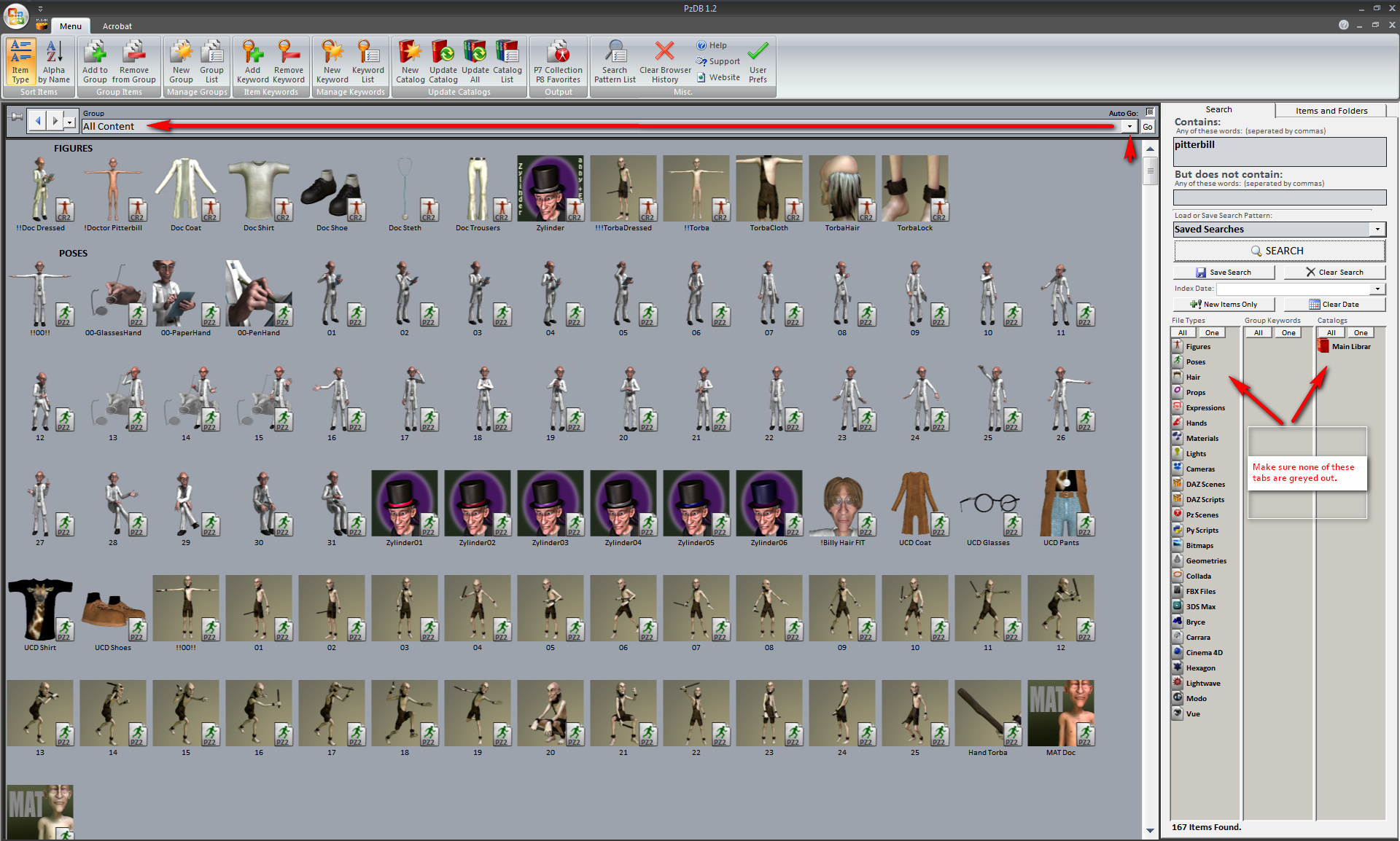
Once that was sorted out, the software searched perfectly. I quickly had a Catalogue display of search results showing all my Doctor Pitterbill items and characters. This was very comprehensive, and contained pleasingly presented smooth thumbnails without graphical jaggies. My trial of DAZ Studio 4 Pro’s search facility using the same keyword search gave a much poorer result. So PzDB is generally a much better experience for content browsing than the native Poser or DAZ content interfaces. You can also tag, and generally manipulate searches a whole lot more. However, I found that some thumbnails were still missing. That can be fixed by running the free RSR to PNG Converter before indexing.
The moment of truth came when I launched Poser Pro 2014 with PzDB still open. I was easily able to drag-and-drop characters and props straight out of the PzDB database. Clothing works too. Here’s Doctor Pitterbill swiftly dragged and clothed directly from the PzDB interface…
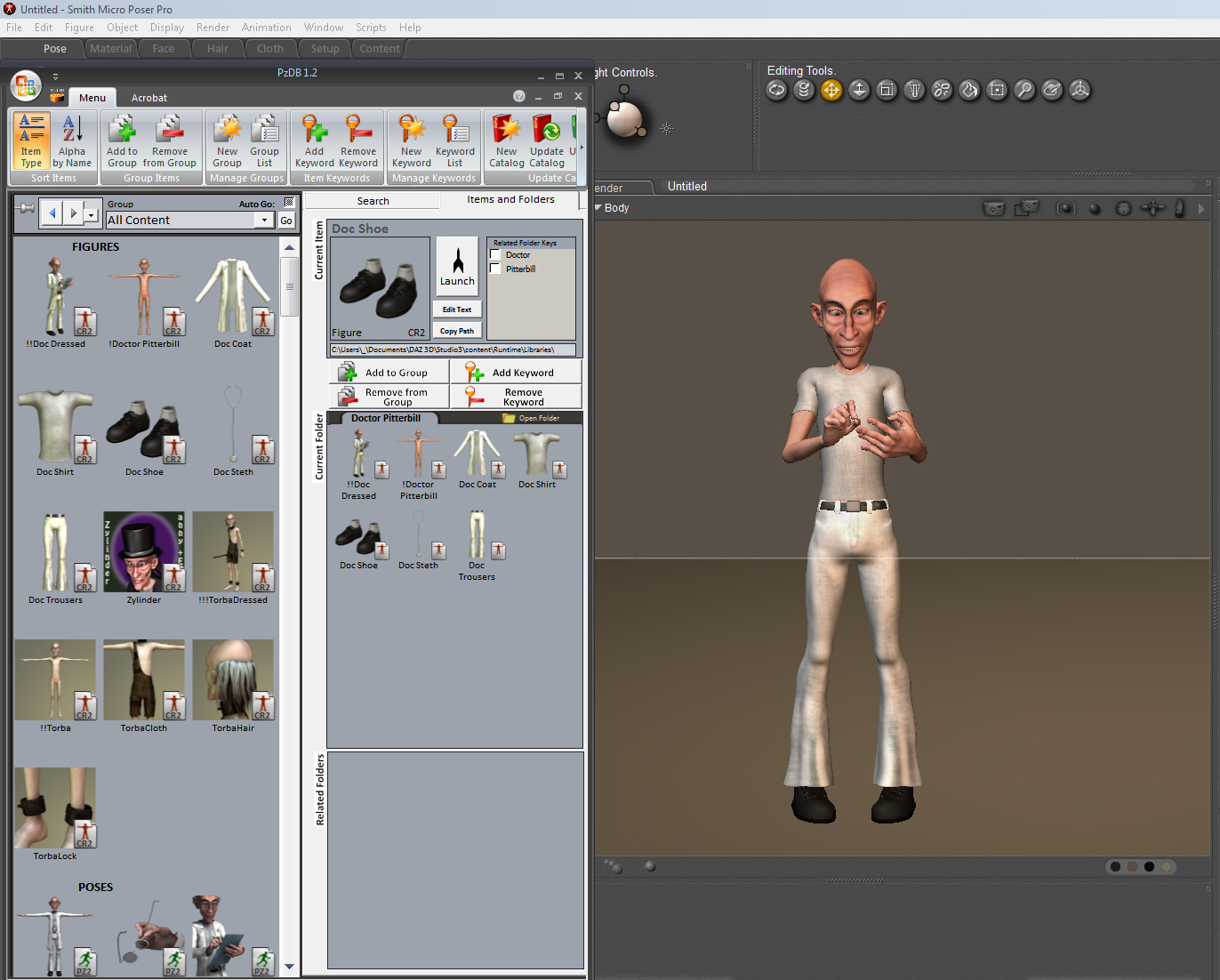
Drag-and-drop works for DAZ Studio 3 too, and DAZ Carrara. Lights won’t work in Carrara, though, since DAZ/Poser light presets are not supported by Carrara. (Note that PzDB is pretty useless at indexing your special runtime for Carrara-only content, as it can’t add thumbnail previews for Carrara content)
Further testing with searches showed that PzDB is very fast even with wide-area searches such as “cat” (I have a lot of cat content) — just four seconds. Everything had beautiful thumbnails. I smiled and said “Hi!” to Poser and DAZ content that I had long since forgotten.
The one problem was that the per- content-item “Launch” button didn’t seem to work. Apparently it used to launch the Poser Remote (pRPC) script to place the prop or character in the scene. But this script failed to launch for me. It seems it’s meant for users of older versions of Poser, ones that don’t support drag-and-drop. So users of Poser Pro 2012 and Daz Studio needn’t bother about this button.
I could have kept on wrestling with Poser’s own 32-bit Content Library, or forced myself to wrestle with the DAZ 4 interface, but working with 3D content will now be so much more pleasant with PzDB. Not to mention a time-saver. An eternal licence for PzDB cost me $39.95 U.S. (about £27 UK). You can buy through Renderosity, which accepts PayPal, and I saw no additional sales tax being added. You get a serial number, and then there’s a one-time Internet activation process.
Update: the new summer 2014 1.3 version of PzDB fixes the “it doesn’t remember the serial number” problem.
Update: At summer 2017, to index Vue 2016 content you may need to have two Vue indexes – one for the shipping content at C:\Program Files\e-on software\Vue xStream 2016 and another for your installed third-party content at C:\ProgramData\e-onsoftware\Vue xStream 2016. You probably want to remove all the .~~ ‘sample’ files before you index, although you can knock such files out of your search by using the “does not contain” search modifier.
Update: Be sure to re-index an index only when Poser is closed, not while it’s running, or PzDB may throw up ‘database error’ messages.
Update: Works fine with Poser 11 and the new Poser 11.2.x
Added to my recent survey of steampunk

Made by SkyCaptain, a name to watch if you like affordable steampunk models.
Would you like to change Smith Micro’s choice of splash screen image for Poser Pro 2014? I’m certainly quickly getting tired of that dreadful creepy stare, every time I load Poser.
Here’s how to change it:
1. In Windows Explorer, navigate to where you installed Poser. For me this is… C:\Program Files\Smith Micro\Poser Pro 2014\Runtime\ui
2. Here locate the file: 30000_credits_splash.psd This is a Photoshop file. Make a copy, and save it somewhere safe in case you make a mistake.
3. Open the original 30000_credits_splash.psd with Photoshop. In Photoshop, make sure you have the layers palette open (Press F7, or go View | Layers). Now select the layer named “30510”.

4. The “30510” layer is the one you now need to edit. Simply paste another image on top (791px by 445px is the crop size you want, to fit the area not including the bottom red banner). Personally I rather like this alternative version from Irdya in Japan…

5. Open this replacement with Photoshop. Now select the layer “30510” and make sure it is the only layer with the little Eye icon visible. Now paste in the new Splash. Align it exactly over the old one. Now Shift-select so that both layers are selected thus…

Now right-click and select “Merge Layers”. Rename the merged layer as “30510” (without the quote marks). Don’t mess with any of the other layers.
6. Save the file, and exit Photoshop.
You now have a new splash screen when launching Poser Pro 2014! Enjoy!
This is my survey of the best of the 3D house cats for Poser 9, Poser Pro 2014, and DAZ Studio, available in early 2012:
Millennium Cat:
The DAZ Millennium Cat is of course the master moggie that you must have, and she has long since chased the earlier and lesser Poser cats out of the neighbourhood. The base cat is available on the DAZ Store…

She works fine in Poser. There is also an “LE” edition that looks identical, but which has less morphs and thus has a less taxing effect on your PC. The LE is currently free.
Seven beautiful extra textures for the Millenium Cat can be had for free at PlanIt.
You can also buy the “Classic Cats Combo” textures pack on the DAZ Store.
Need a wildcat or bobcat texture? Yup, there is one. Cloud and Castle has a free wildcat texture for the Millenium Cat…

For depicting more civilized kittees, your classical Egyptian cat renders can take advantage of “Bast for Millennium Cat” pack, available on the DAZ store…

Animations and poses for Millenium Cat:
Paid poses packs for the MilCat are available; and the “LB Millennium Cat Poses” and the “Purrfect Poses for the Millennium Cat” on the DAZ Store.
Kittee toys and baskets:
The DAZ Store has the “Millennium Cat Props” containing such items as sleeping baskets, indoor cat trees, and a litter box, etc.
Fur:
Poser users can get fur as standard, without any addons. Although a careful application of parts of something like the Instant Hair Collection PSD Photoshop files, in Photoshop, might reduce render times considerably. Advanced Photoshop users should also take a look at the amazing filter plugin Alien Skin Eye Candy: Textures (Animal Fur), which can do a lot more than the Alien Skin website’s lacklustre samples suggest.
For fur DAZ users will need to upgrade to DAZ Carrara, and then install the “Real Fur for the Millennium Cat” addon pack from the DAZ Store. Another alternative is the “Furify: Fur Shaders” pack, which also works on Poser.
There was also a “Furred Cat Short” pack, which appears to have worked, but is no longer sold. Update: It’s now called Fluffy Cat for the Millennium Cat and is sold at Hivewire.
Toon cats:
The cutest kittee is Yanelis’s free Mesky & Blackie for Poser. Was at RuntimeDNA, now appears to be lost. The Blackie kitten comes with Dynamic Hair for Poser…

There are some pretty ugly toon cats out there, but I think the most pleasing balance between realistic and toon is the new Noodle from 3D Universe…


Noodle comes with good texures, and posing dials (not preset poses). Noodle once had a free Mimic file for all your talking cat needs, but sadly it vanished in the 3D Universe website makeover of Nov 2012. However, I tracked down a copy at the South African version of 3DU.
There’s also a classy toon cat in the form of Cupcake. And Tom Pawyer is an excellent male toon morph set for Cupcake.
Spooky cats:
Need a cat skeleton that you can make glow-in-the-dark? Try the Skele Cat for Poser. It’s actually a lion skeleton, but if you scale it down I expect that not many viewers will actually spot the difference…

Cheshire Cat is Alice in Wonderland via Tim Burton…

A little too garish? There’s an eight texture pack FuzzBallz for Cheshire Cat that gives this fearsomely pink grimalkin a much more natural look, but which can’t do much about the lamp-like eyes. The Cheshire cat accepts poses from the old Poser cat and the new Millennium cat.
There was once a morph set for the Cheshire Cat that turned it into more of a thinner demon-style cat, but it appears to have vanished without trace.
A leaner Halloween-style cat is Black Cat. Although it’s old now and doesn’t stand close-ups like the Millennium Cat does, it might be especially good for silhouettes with a little rim lighting and some Poser fur…

Robot cats:
The Cat Robot is the only one I know of…

There’s definitely a gap in the market for a steam-punk cat robot, I’d say.
Update: see also the “D-Claws and D-Squeek” cat robot on the DAZ Store.
Sci-fi:
There was once an “alien cats” pack of morphs and textures, but it appears to be no longer available…

Home environments:
There are plenty of normal home environments for DAZ and Poser, but the Crazy Cat Lady Mobile Home perhaps deserves a special mention.
That’s it! Enjoy your kittee renders and animations!
A new addition to Jack Tomalin’s sci-fi GIS series of high-quality interiors have just landed for DAZ Studio and Poser — “GIS Sigma” and its additional Future Quiet texture pack are available now. GIS Sigma 3D science fiction architectures are pretty much how I’d imagine the movies of Asimov’s Foundation books might look when the first is released in 2013.

This blog now has a single port of call, a new fixed page that collects links to all my themed surveys of Poser and DAZ 3D content.
Update: now overtaken by the Everything freeware.
Poser’s search-by-keyword feature is incredibly useful. But sometimes it shows you a prop that doesn’t have a clickable route back to its folder. That can be frustrating. For instance, you can only remember the name of a prop (cupping glass, from a Wild West doctor’s pack), but want to remember the name of the pack it comes with (Bad Medicine). The prop is sitting there in your search-results, but with no way to get back to its parent folder.
So, is there a better way to search your multi-Gb of runtime? Yes, and it’s free and simple to use. It’s also faster than Poser at search. Agent Ransack to the rescue. This software is a free lite version of a larger professional file search tool called FileLocator Pro. But the Lite version works reliably for simple tasks and is quite fast. It’s completely free, and free of ads or time-bombing. It’s a much lighter and nippier solution than launching the lumbering Google Desktop service, or having Windows File Indexing constantly grinding away in the background.
Once Agent Ransack is installed, simply paste your runtime path into its “Look in:” box (this is remembered each time you launch Agent Ransack), and ensure ‘Subfolders’ is ticked. Then pop a single search word in the “File name:” box and off it goes. Agent Ransack is quick compared to un-indexed Windows Search.
Unfortunately there’s no nice visual thumbnail previews like you see in Windows Explorer, otherwise it would be a perfect content library search-tool. I guess it’s so fast because it ignores all of that.
But once you have your list of results you can highlight the file you think you want, right-click on it and choose ‘Explore Here’…

Steampunk weapons and guns:
This is the concluding part of my survey of the best in steampunk
Rifles, big guns, and machine-guns:
Your first stop might be the excellent Steam Rifle Ultimate Construction Kit for Poser and DAZ…

Also very cool is this fab Steampunk Solar Lazer Rifle which could also double-up as a “camera gun” for a steampunk spy…

Need a big gun, but not too big? SteamPunk BFG fits the niche between hand-gun and eccentrically oversized…

Rapid fire devices are covered by this Steam Dragon steampunk machine-gun…

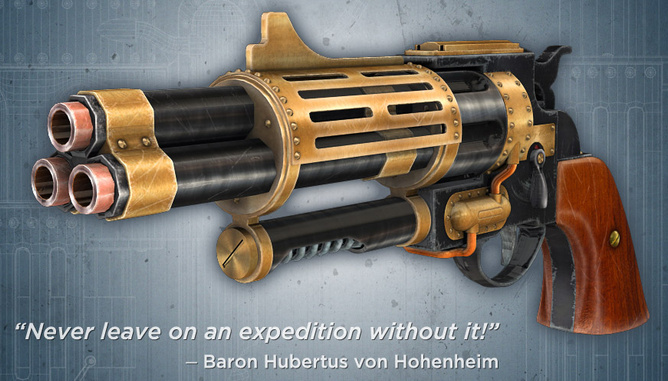
Something much more pocketable is this excellent Steampunk revolver…
Grenades:
This SteamPunk Lantern, shown here with Doctor Pitterbill, might also be used as an airship gas grenade or finale monster-destroyer device…

There are more traditional grenades and mines in SteamPunk Grenades…

Rayguns:
There are a variety of rayguns around. Here are some of those that are more 1800s aether-powered than 1920s Flash Gordon…

The Weta Industries Raygun is also nice, though you’ll need to convert it from SketchUp. If you have iClone, my free conversion of this gun here.
Duelling and medical care:
For the purist, there’s a free 19th Century Dueling Pistol Set…

And after the duel, to patch up any wounds, there’s this lovely…

Warning of air attack:
Electranaut’s Steampunk PC for Poser might be adapted to be a sort of proto-radar…

You could also have a enhanced-human “enemy airship spotter” with these Steampunk Implants for Poser, currently a steal at only $5…

Wands:
Blending magical fantasy with your steampunk world? Try this wand…

There’s also a matching Staff.
TNT:
The Explosives Pack is very modern, but one prop is this dynamite, which would have its modern timer removed…

There’s also a free but untextured set of dynamite sticks for Blender.
Unusual Battle Transport:
Look at this SteamPunk Flying Broom; the Steam Razor Monocycle; and the Steampunk Stilts.
Cannons:
Wheeled cannons can be found in plenty on the Google 3D Warehouse, for free.
 Posted in 3D Utilities, Carrara, Companion software, DAZ Studio, Poser, SketchUp
Leave a comment
Posted in 3D Utilities, Carrara, Companion software, DAZ Studio, Poser, SketchUp
Leave a comment
I’m pleased to say that I’m now offering a 3D models conversion service. DAZ or Poser to iClone, or visa versa. Or tricky conversions from Maya, 3DS Max, or other formats. Very reasonable rates, payment accepted via PayPal. Visit the page for more information.
Any new scene pack from Stonemason is guaranteed success. The latest such is the just-released “stand-alone 360 degree environment” called Return To The Enchanted Forest, which is now on the DAZ Store for DAZ Studio and Poser. It looks like a darker and moodier version of his existing Enchanted Forest pack. Perfect for dark fairy-tales…
