
Sadie Mermaid set and textures set.


Renderosity’s Holiday Giveaway, Week 3. Some nice steampunk freebies here, including: more orreries; a steampunk saw; a rickety wooden stairway with curve morphs; a Bad Santa robo-toy prop; and a complete ‘Steampunk Captain’ outfit for V4.
White Label Taxi for DAZ Studio or Poser, to run you to that all-important Xmas party!

A fine pipe and some good Shire cider in a jug, to celebrate the release of The Hobbit movie.

Star guitar for DAZ Studio or Poser. Rock around your living room playing the classic Slade Xmas songs, and get in the Christmas party mood!

Renderosity Holiday Giveaway: Week 2. Lots of nice freebies, including three steampunk orrery models, a waterbike, a toon igloo (also given away in previous years), and a microscope.
Added to my sidebar Directory’s “Freebies” listing: Freelancecomic’s sci-fi armour selection. Note that there are file passwords along with the download links.
A nice new bit of steampunk for Poser, the Oculus Mechanicus…

Just arrived on Renderosity, and rather cool and unusual, the famous Trojan Horse for Poser & DAZ, from new vendor London224…

Given the obvious quality of this, I’ll be looking out for more new London224 models in future. A full range of stylish Syd Mead -like futuristic ground vehicles, like London224’s MS12 Service Transporter but even more Syd Mead -like, would certainly appeal. But that’s just me — they might not sell too well.
A neat new feature has been added to the Octane third-party render system for Poser (and soon for Daz), alpha masks that include shadows…

Currently free on the DAZ Store, U.S. mailboxes…

I’ve been having a look at the free CrossDresser software for DAZ Studio and Poser. CrossDresser is a speedy and simple utility which quickly converts DAZ/Poser clothing from one character, to fit and conform to another character.
I downloaded CrossDresser and the install went swiftly. If you have a hard firewall such as TinyWall then you need to whitelist both exes, and also the processes that they launch, so they can go online. It can be a bit tricky in such circumstances, getting it all running and downloading and installing the main XD 4.exe and figure files.
It then popped up an updater, and offered to download an unavoidable update — and a bunch of character-conversion data files. I selected most of the Nursoda figures and Sam + Sadie. That part went smoothly too, but the character files are rather chunky — even my limited selection took about three hours to download. If you forget to download any desired character conversion files, and want to install them later, just start XD_Updater.exe.
During the download I did wonder if, for instance, an M4 -> Pitterbill conversion would require CrossDresser licences for both characters. But I found that you can convert any clothing (and from a very wide range of characters), and that you only need one licence — per target character.
On loading up CrossDresser, the software sat there loading morphs for a minute, then finally launched. I then went to the website and purchased licences for 3DU Sam and for Nursoda’s Pitterbill, which at the current 50% sale price meant less than $10 for both licenses. PayPal is accepted. Sadly, on completing the order via PayPal, the download links were not active inside the invoice. What you need to do is to look over on the Store sidebar for the link to “My Downloadable Products”. It’s rather in-intuitive that the downloads are nowhere near the account/invoices sections. The .zip files I downloaded extracted to .exe files, and the installs went smoothly and the licenses were installed in seconds.
I run PzDB as a Poser/DAZ content library manager, so locating the .cr2 clothing to convert went very smoothly. Once you’ve found the clothing you want, you just “copy path” in PzDB, and paste it into Crossdresser. My first conversion was the main suit of the V4 SpaceGirl retro outfit (breasts and all!), and Crossdresser was intelligent enough to automatically know that the spacesuit was a V4 and not a V3 outfit. Conversion took about 15 seconds. I then converted collars, gloves, boots etc for the same outfit. I had no success in converting .pp2 props, such as a belt, for the same outfit.
On re-indexing in PzDB, I found the new Pitterbill versions of the Spacegirl suit among the “new” items. These were correctly labelled with the prefix “Pitterbill-“. Loading the main suit to Pitterbill showed a little poke-through, but otherwise the conversion was good. The V4 breasts had even been suitably flattened for Pitterbill.
Crossdresser conversions are placed in the Windows folder ..\content\Runtime\Libraries\Character\!Converted\ In the Poser Library this shows as ..|Figures|Content|!Converted. Due to the poke-through, I found this folder, deleted, and started over using the simple Fix Poke-through solution and a better and less silly choice of clothing.
This time I chose a more suitable male costume — a classic M4 tweed jacket and trousers. With the 0.25 conversion tweak applied to these, I had much more success with Pitterbill, combined with some converted Eepo boots (not ideal, but this was just a test).
The clothes loaded fine. I turned off visibility on Pitterbill’s toes to cure a tiny poke-through. Applying a mild pose was fine, but a more active pose led to poke-through and slight tearing at the clothing joints. There’s a Poser specific fix tutorial for that, but for most people and for DAZ users it’s probably more easily cured by turning off limb visibility and/or fixing it in Photoshop. Here’s the before-and-after result on the Pitterbill as “tweedy English country gentleman”, with the larger version showing the picture after ten minutes of Photoshopping …
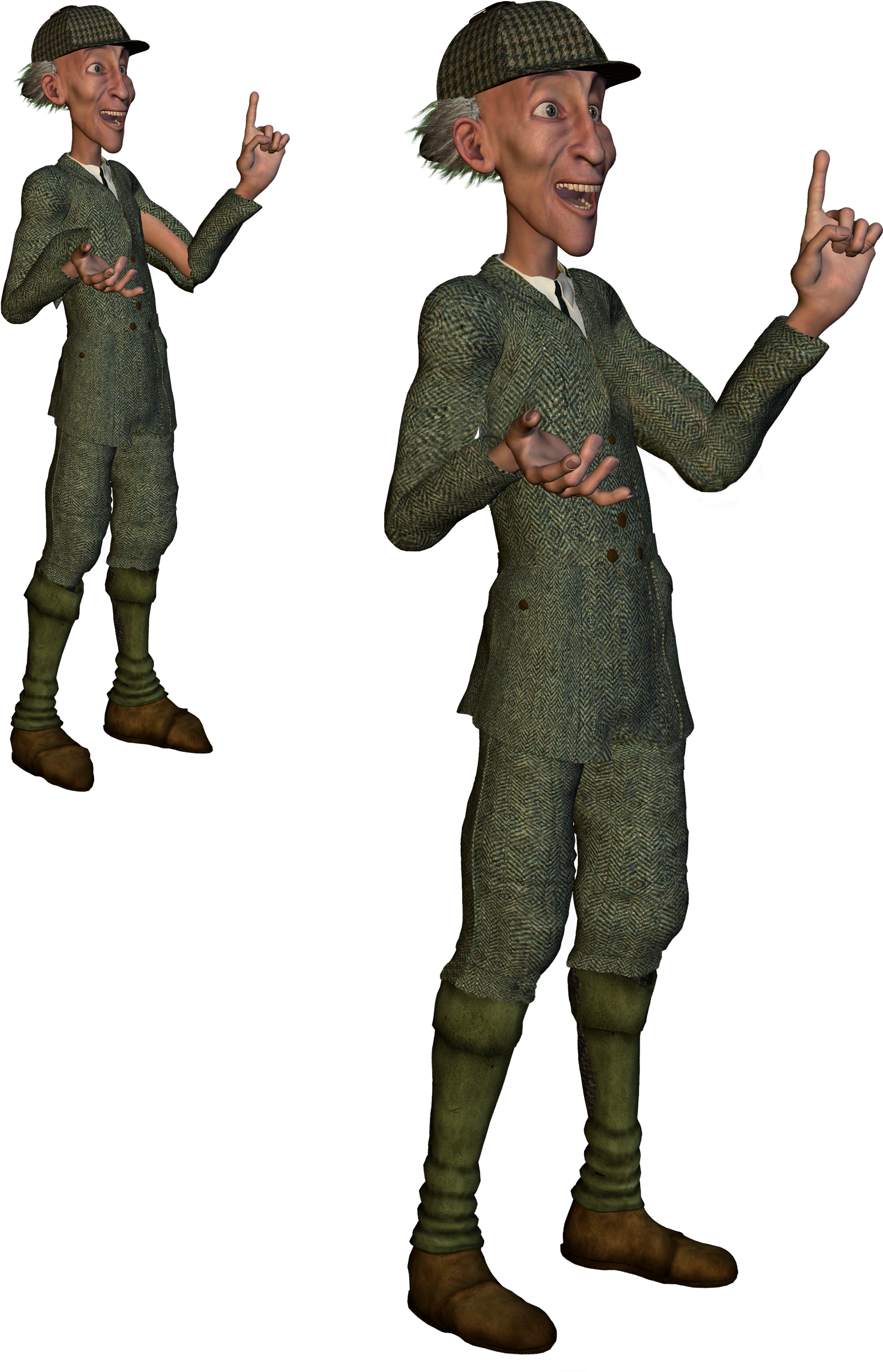
Click on the picture for the large version. (Suit is Victorian Country Gentleman at Poser World)
Overall, CrossDresser 4 is useful for still renders (but probably not animation, due to the likely poke-through) and it’s only currently going to cost about $15 to $20 for three or four key licences. Considering the value you’d get out of that over the years, getting clothing onto characters you would never otherwise have outfits for, it’s a bargain.
The Crossdresser store is for some reason rather difficult to navigate and find the key licenses. Here’s a linked list of the pages for key licenses on the store:
Victoria 4 and Michael 4.
Doctor Pitterbill, Kali and Kelm, and Mavka, all Nursoda characters.
The manga characters Deco and Decoco and NearMe, all designed for tooning and popular in Japan for making manga comics. I believe that NearMe is still available on a AIO (all in one) installer.
Also at the Crossdresser store are free plugins to load Universal Clothing (another possible output of the Crossdresser software) into Poser and DAZ. These automatically handle the conversion via CrossDresser when the clothing is loaded to the figure from your regular Library, and the plugin will even auto-conform the newly applied clothing. This extended feature of Crossdresser wasn’t tested for this review.
Holiday Giveaway: Week 1 over at Renderosity. These are the new set of freebies I got in my runtime…

Need snow and frost on your scene? Snarly’s Snow Machine 2.2 for Poser is free. A script to cover any scene in frost and snow. Comes with an excellent manual.

