

This review is eight years old now, but still useful.
I went looking for another third-party DAZ/Poser content management system. I remembered the old PzDB (it stands for ‘Poser Database’), and I wondered if it was still around. It turns out that PzDB is now PzDB 1.2.2. It looked good, with lots of interesting features, but… I wasn’t sure if it would work with DAZ Studio and Poser Pro 2012. I’ve now tried it, and it turns out that PzDB still works fine.
After installing PzDB you get a simple Wizard that walks you through finding your main runtime, the one with all your content in it. Indexing the first run may take some hours, but subsequent updating of the index (i.e. after adding new content) is quicker.
Indexing is supposed to automatically fix missing thumbnail-previews, populated the database with keywords taken from file and folder names, and automatically grouped and cross-referenced all the content.
The time taken was reasonable, considering how much 3D content I have been able to build up over the years of cherry-picking bargains, freebies, sale-offers, and group discounts…

I was a little worried that PzDB might be messing with my runtime. But I needn’t have worried. It does not touch the runtimes at all. All PzDB does is build an incredibly useful virtual catalogue of them.
Once it’s finished indexing, I simply closed the Indexing window (scary moment, since there was no indication that the 35 minute trawl had been saved), and then clicked on the “Launch PzDB” button.
You’ll find content for all your main characters already sorted for you. Although I found that PzDB doesn’t seem to know yet about Nursoda’s characters like Dr. Pitterbill. But Vicky 4 and all the other standard characters can be quickly displayed via handy drop-down preset filters.
In my first use of the keyword search-box I was obviously doing something wrong. I searched for “dog”, and had no results. It took about ten minutes of mild puzzling before I managed to figure out how to get out of the Victoria 4 index I was started off in, and to be able to do a proper global search of the runtime (like you can, in a primitive manner, in Poser Pro 2014). Sadly the manual wasn’t any help on this fundamental sticking point. Basically, to do an “all content” search, you do this: make sure all the little tabs over in the search panel are showing colour and not grey (click on any grey ones, to turn them to colour), AND have the top category selection set to All Content, thus…
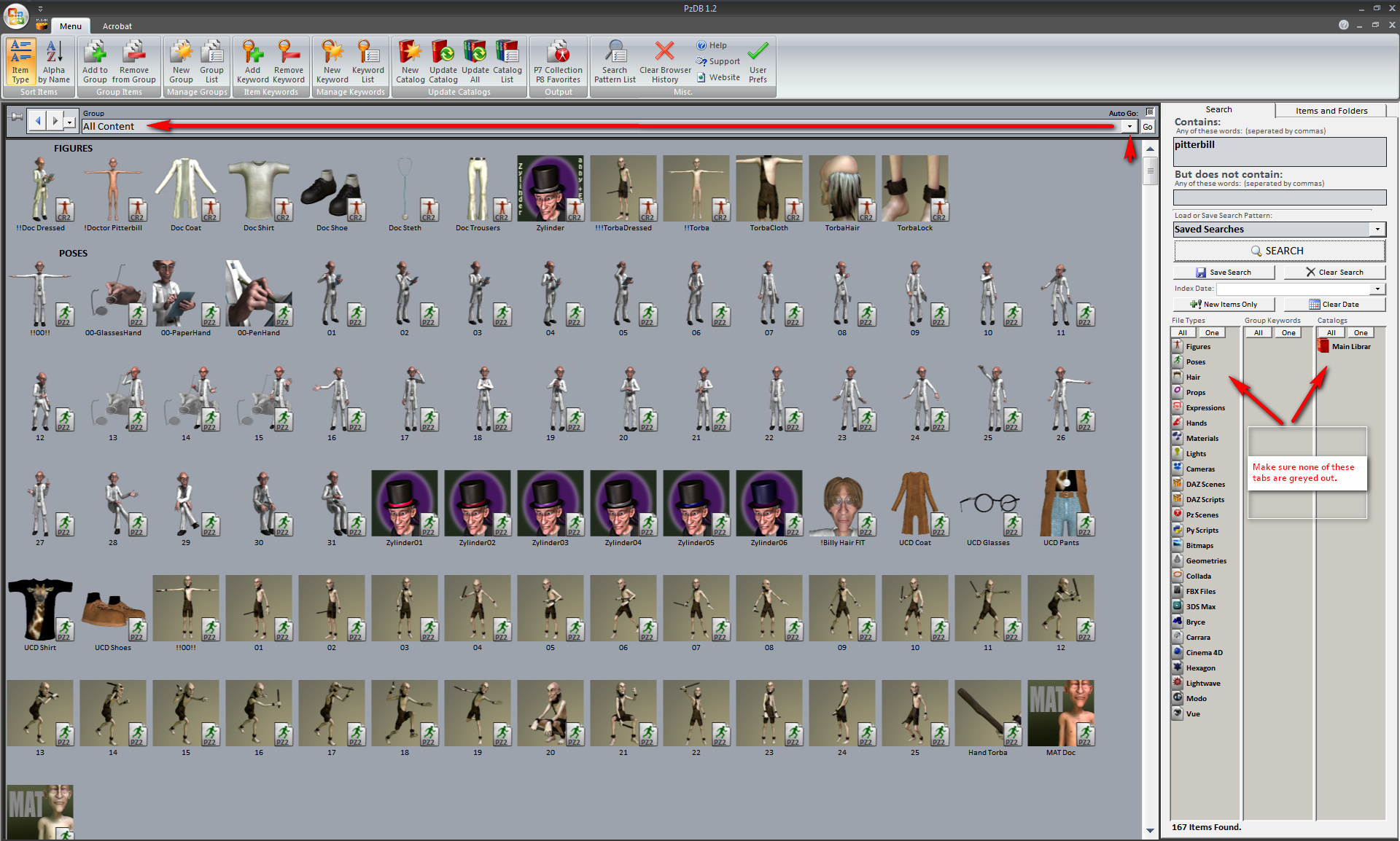
Once that was sorted out, the software searched perfectly. I quickly had a Catalogue display of search results showing all my Doctor Pitterbill items and characters. This was very comprehensive, and contained pleasingly presented smooth thumbnails without graphical jaggies. My trial of DAZ Studio 4 Pro’s search facility using the same keyword search gave a much poorer result. So PzDB is generally a much better experience for content browsing than the native Poser or DAZ content interfaces. You can also tag, and generally manipulate searches a whole lot more. However, I found that some thumbnails were still missing. That can be fixed by running the free RSR to PNG Converter before indexing.
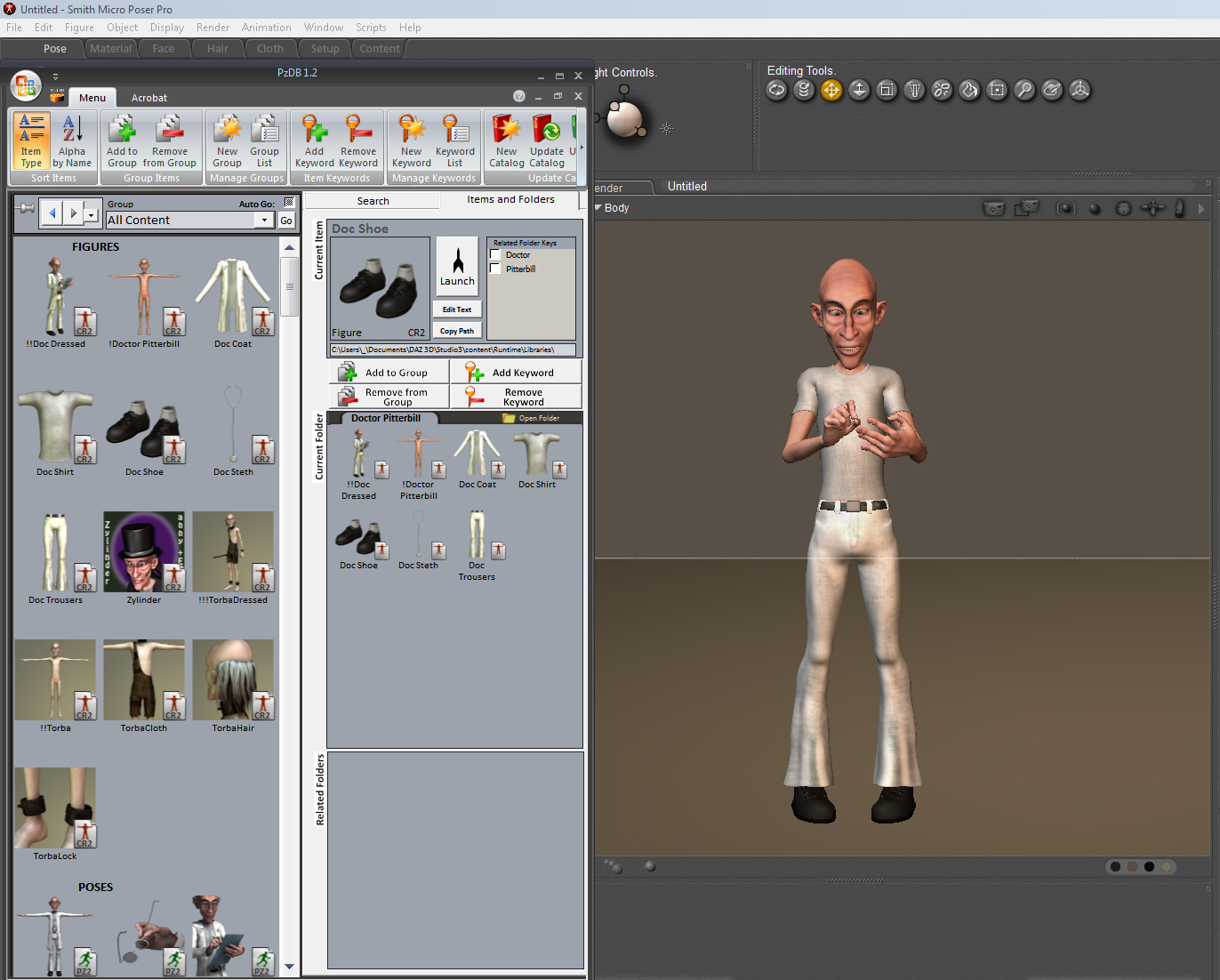
The moment of truth came when I launched Poser Pro 2014 with PzDB still open. I was easily able to drag-and-drop characters and props straight out of the PzDB database. Clothing works too. Here’s Doctor Pitterbill swiftly dragged and clothed directly from the PzDB interface…
Drag-and-drop works for DAZ Studio 3 too, and DAZ Carrara. Lights won’t work in Carrara, though, since DAZ/Poser light presets are not supported by Carrara. (Note that PzDB is pretty useless at indexing your special runtime for Carrara-only content, as it can’t add thumbnail previews for Carrara content)
Further testing with searches showed that PzDB is very fast even with wide-area searches such as “cat” (I have a lot of cat content) — just four seconds. Everything had beautiful thumbnails. I smiled and said “Hi!” to Poser and DAZ content that I had long since forgotten.
The one problem was that the per- content-item “Launch” button didn’t seem to work. Apparently it used to launch the Poser Remote (pRPC) script to place the prop or character in the scene. But this script failed to launch for me. It seems it’s meant for users of older versions of Poser, ones that don’t support drag-and-drop. So users of Poser Pro 2012 and Daz Studio needn’t bother about this button.
I could have kept on wrestling with Poser’s own 32-bit Content Library, or forced myself to wrestle with the DAZ 4 interface, but working with 3D content will now be so much more pleasant with PzDB. Not to mention a time-saver. An eternal licence for PzDB cost me $39.95 U.S. (about £27 UK). You can buy through Renderosity, which accepts PayPal, and I saw no additional sales tax being added. You get a serial number, and then there’s a one-time Internet activation process.
Update: the new summer 2014 1.3 version of PzDB fixes the “it doesn’t remember the serial number” problem.
Update: At summer 2017, to index Vue 2016 content you may need to have two Vue indexes – one for the shipping content at C:\Program Files\e-on software\Vue xStream 2016 and another for your installed third-party content at C:\ProgramData\e-onsoftware\Vue xStream 2016. You probably want to remove all the .~~ ‘sample’ files before you index, although you can knock such files out of your search by using the “does not contain” search modifier.
Update: Be sure to re-index an index only when Poser is closed, not while it’s running, or PzDB may throw up ‘database error’ messages.
Update: Works fine with Poser 11 and the new Poser 11.2.x


 . Focal Press, 355 pages. Indexed. First edition, July 2010. (You can currently get it used on Amazon UK for little more than the price of a glossy monthly magazine, £7.78).

 and
and  . I would not recommend trying to view it on a standard Kindle eReader intended for novels and histories.


 Submarine Poser model is free