A Renderosity staffer reviews Vue Xtream 11, the top version of the natural landscape rendering software. The blurb for the lesser Vue 11 Studio version ($399) claims… “extended DAZ Studio and Poser integration” and that it will “Load and render Poser characters”. Hopefully that latter feature isn’t limited to the 64-bit version, as it was in Vue 10.
Category Archives: Companion software
Carrara 9 dated by DAZ
Hot from the Carrara Cafe! News that DAZ Carrara 8.5 is to be released at the end of summer 2013, with Carrara 9 set to follow perhaps Christmas 2013 or in the first quarter of 2014.
Carrara 8.5 will include…
– Support for up to Windows 8 and Mac OSX 10.8
– DSON support
– Metadata support
– New animation tools (keyframe tool improvements, smoothing, keying every frame, etc.)
– Graph editor improvements
– Improvements to viewport avatars (Lights – spotlight, sun, moon, etc. Cameras – conical, isometric, etc.)
– Improved bullet simulation for soft bodies
Update: ok, they were perhaps a little ambitious on the timeline for the version 9 date, which has now been and gone. 🙂
Vue 11 in German and French
All editions of the Vue 11 landscape software (Pioneer, Theme Packs, Frontier, Esprit, Studio, Complete, Kitchen Sink With Pink Spots…) are now available in German and French.
Reality 3 for Poser – due for March 2013 release
Reality 3 for Poser 9 / Poser Pro 2012 SR3 is scheduled to be released in April 2013, at $59.95. It’s a plugin that connects Poser to the power of the free LuxRender high end render engine. Here’s the preview video…
Apparently it’ll be fully integrated with the Poser interface, and will include auto materials-conversion (so we shouldn’t have to spend hours fiddling with texture adjustments). GPU acceleration too, so those with fast modern PC gaming graphics-cards should benefit.
It’ll be interesting to read a Vue vs. Reality head-to-head bench test when Poser Reality 3 arrives.
MotionArtist for motion comics
I’m always been a fan of comics, and the chance to combine comics with animation seems like a dream come true — to someone who was a kid in an age when the coin-operated photocopier was the best advanced comics-production technology we had access to. So it’s exciting that Smith Micro, of Poser fame, have announced that they are to very shortly release MotionArtist, for making interactive digital motion-comics…
“MotionArtist is going to be released very soon with amazing improvements over the public beta version. These span from HTML5 output to animated panels, text and word balloons, 3d Parallax effect, and Anime Studio input. Start counting your pennies and watch for additional news about the official launch coming very soon!”
Reallusion also reportedly have something similar in the works, and it’ll be interesting to see what CrazyTalk Animator 2.0 looks like when it arrives. I’d expect Reallusion may learn a lot from letting MotionArtist launch first.
It’ll also be interesting to see how MotionArtist interfaces with Smith Micro’s comics production software Manga Studio, if at all. It sounds like it might interface more with their animation software Anime Studio and with Poser 2014.
Free webinar: What’s new in Manga Studio 5?
Digital comics makers who draw or paint over their DAZ Studio or Poser renders for might be interested in a free webinar from Smith Micro on “What’s New in Manga Studio 5?”. Despite its somewhat misleading name, the specialist graphics software Manga Studio 5 is not just for manga artists. It’s just about the best dedicated comic-book production software available. MS5 also has the industry’s best range of pressure-sensitive digital “black ink” brushes.
The free one hour webinar is on 5th February 2013, at 3pm in the afternoon (US Pacific time). It’ll be presented by Doug Hills, comic book artist and author of the training book Manga Studio For Dummies.
“Doug will explore the new, fully-customizable interface and show you how it can help to improve your workflow. He will also review the stunning new coloring and painting tools, demonstrate how it is even easier to import and use 3D character and background images, create word balloons, and much more. We will conclude the hour with a brief Q&A session where you will be able to ask questions and have them answered.”
The pro “Ex” version of Manga Studio is set for a summer 2013 release.
Look at My Hair! 1.0 – released
Look at My Hair! 1.0 has been released and is live now on the DAZ Store. 12 months in development, the plugin aims to provide DAZ Studio 4.5 users with the tools…
“to create hair and fur for all the figures and objects he/she desires.”
…and also to easily style and cut that hair. Looks fabulous, but I’d first like to see a step-by-step tutorial which would let me determine how fiddly it is to apply, plus a comparison table of render times in a standard lighting setup.

Painter Lite
An interesting new graphics software release. Corel’s features-heavy natural-media software Painter has a new Painter Lite version now available. Price is just $69 (about £47 in the UK).
There’s already the Painter Essentials version, but even that was too confusing for some. So Corel has stripped Painter down even more. The Macworld magazine review of Painter Lite says that…
“Corel really has stripped Painter right down to the bare wood for this Lite version … [ Lite has ] everything anyone starting out with Painter would actually need, but it’s a huge reduction on the facilities offered by the parent program … makes painting much quicker and simpler.”
Lite lacks Painter Essentials’s Photo Painting Palette — but given the naff results which auto Photo Painting gives, that lack may be no great loss. Lite seems like one for digital painting beginners to consider, if they want to learn how to manually overpaint DAZ/Poser renders using layers and ‘proper’ natural-media brushes/papers.
CrossDresser 4 test and review
I’ve been having a look at the free CrossDresser software for DAZ Studio and Poser. CrossDresser is a speedy and simple utility which quickly converts DAZ/Poser clothing from one character, to fit and conform to another character.
I downloaded CrossDresser and the install went swiftly. If you have a hard firewall such as TinyWall then you need to whitelist both exes, and also the processes that they launch, so they can go online. It can be a bit tricky in such circumstances, getting it all running and downloading and installing the main XD 4.exe and figure files.
It then popped up an updater, and offered to download an unavoidable update — and a bunch of character-conversion data files. I selected most of the Nursoda figures and Sam + Sadie. That part went smoothly too, but the character files are rather chunky — even my limited selection took about three hours to download. If you forget to download any desired character conversion files, and want to install them later, just start XD_Updater.exe.
During the download I did wonder if, for instance, an M4 -> Pitterbill conversion would require CrossDresser licences for both characters. But I found that you can convert any clothing (and from a very wide range of characters), and that you only need one licence — per target character.
On loading up CrossDresser, the software sat there loading morphs for a minute, then finally launched. I then went to the website and purchased licences for 3DU Sam and for Nursoda’s Pitterbill, which at the current 50% sale price meant less than $10 for both licenses. PayPal is accepted. Sadly, on completing the order via PayPal, the download links were not active inside the invoice. What you need to do is to look over on the Store sidebar for the link to “My Downloadable Products”. It’s rather in-intuitive that the downloads are nowhere near the account/invoices sections. The .zip files I downloaded extracted to .exe files, and the installs went smoothly and the licenses were installed in seconds.
I run PzDB as a Poser/DAZ content library manager, so locating the .cr2 clothing to convert went very smoothly. Once you’ve found the clothing you want, you just “copy path” in PzDB, and paste it into Crossdresser. My first conversion was the main suit of the V4 SpaceGirl retro outfit (breasts and all!), and Crossdresser was intelligent enough to automatically know that the spacesuit was a V4 and not a V3 outfit. Conversion took about 15 seconds. I then converted collars, gloves, boots etc for the same outfit. I had no success in converting .pp2 props, such as a belt, for the same outfit.
On re-indexing in PzDB, I found the new Pitterbill versions of the Spacegirl suit among the “new” items. These were correctly labelled with the prefix “Pitterbill-“. Loading the main suit to Pitterbill showed a little poke-through, but otherwise the conversion was good. The V4 breasts had even been suitably flattened for Pitterbill.
Crossdresser conversions are placed in the Windows folder ..\content\Runtime\Libraries\Character\!Converted\ In the Poser Library this shows as ..|Figures|Content|!Converted. Due to the poke-through, I found this folder, deleted, and started over using the simple Fix Poke-through solution and a better and less silly choice of clothing.
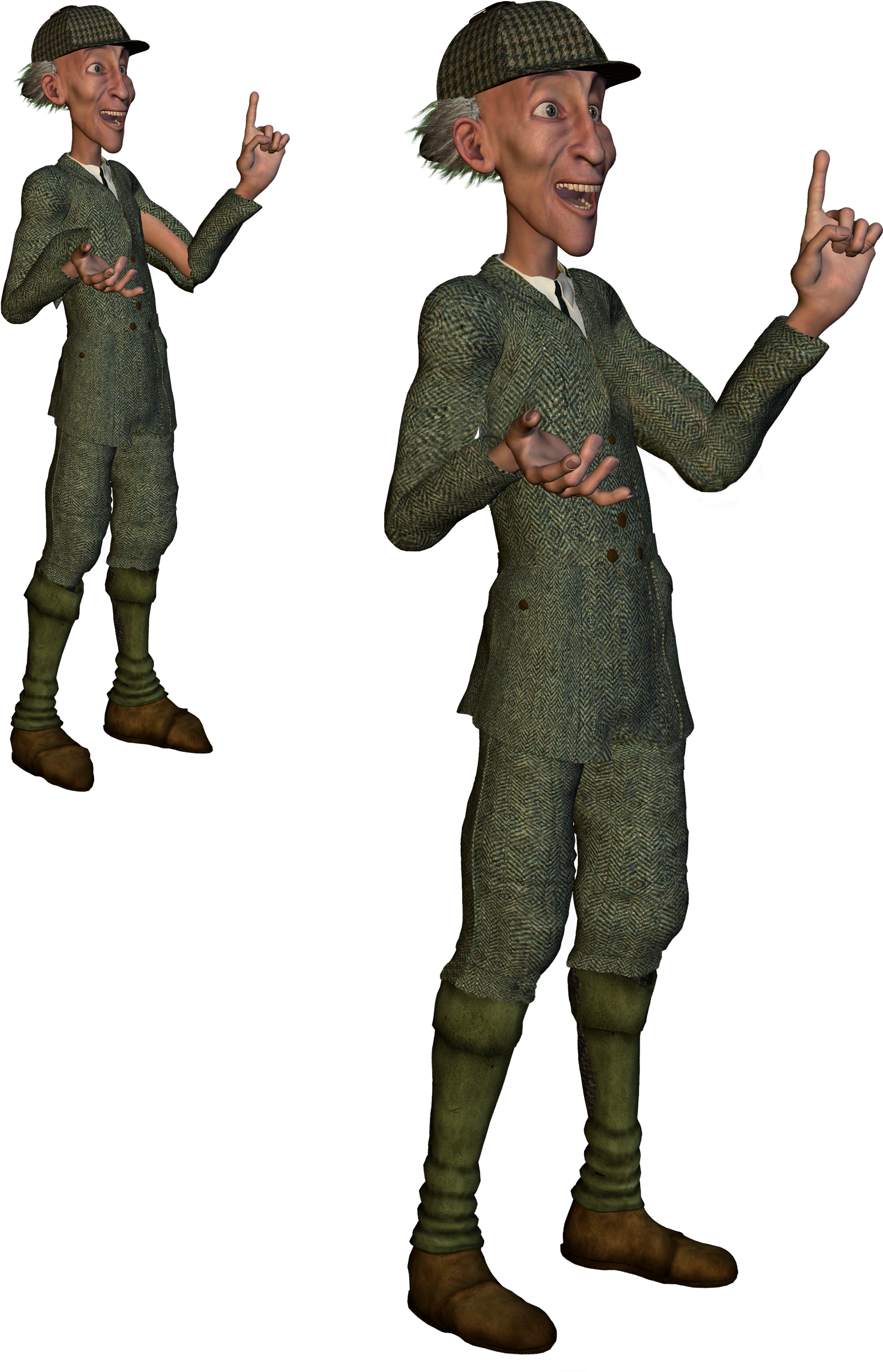
This time I chose a more suitable male costume — a classic M4 tweed jacket and trousers. With the 0.25 conversion tweak applied to these, I had much more success with Pitterbill, combined with some converted Eepo boots (not ideal, but this was just a test).
The clothes loaded fine. I turned off visibility on Pitterbill’s toes to cure a tiny poke-through. Applying a mild pose was fine, but a more active pose led to poke-through and slight tearing at the clothing joints. There’s a Poser specific fix tutorial for that, but for most people and for DAZ users it’s probably more easily cured by turning off limb visibility and/or fixing it in Photoshop. Here’s the before-and-after result on the Pitterbill as “tweedy English country gentleman”, with the larger version showing the picture after ten minutes of Photoshopping …

Click on the picture for the large version. (Suit is Victorian Country Gentleman at Poser World)
Overall, CrossDresser 4 is useful for still renders (but probably not animation, due to the likely poke-through) and it’s only currently going to cost about $15 to $20 for three or four key licences. Considering the value you’d get out of that over the years, getting clothing onto characters you would never otherwise have outfits for, it’s a bargain.
The Crossdresser store is for some reason rather difficult to navigate and find the key licenses. Here’s a linked list of the pages for key licenses on the store:
Victoria 4 and Michael 4.
Doctor Pitterbill, Kali and Kelm, and Mavka, all Nursoda characters.
The manga characters Deco and Decoco and NearMe, all designed for tooning and popular in Japan for making manga comics. I believe that NearMe is still available on a AIO (all in one) installer.
Also at the Crossdresser store are free plugins to load Universal Clothing (another possible output of the Crossdresser software) into Poser and DAZ. These automatically handle the conversion via CrossDresser when the clothing is loaded to the figure from your regular Library, and the plugin will even auto-conform the newly applied clothing. This extended feature of Crossdresser wasn’t tested for this review.
Octane final released
Octane render 1.0 final is now available, with the Poser plugin. A DAZ 3d Studio plugin is coming “soon”. A Standalone + Poser plugin bundle costs 279 euros (about $360), although the purchase page for that bundle hasn’t yet been updated — it still talks about the beta version of Octane.
iClone 4.2 Pro for free
iClone 4.2 Pro for free, currently on a free cover-disk with the leading British PC magazine PC Pro (Jan 2013 edition). I’ve looked at the blurb in the magazine itself, on a news-stand, and it appears to be the full uncrippled version. iClone, for those who don’t know, is the excellent real-time 3D software (no rendering time, as it runs on a videogame engine). It takes a little learning, but no more than DAZ Studio does, and the learning resources are vastly better than for DS.
It’s perfectly possible to create excellent results once you know what you’re doing with it. Here’s a couple of my iClone real-time renders…
Octane for Poser/DAZ – videos
A first look at the upcoming OctaneRenderer render plugin for Poser, showing the workflow…
It’s also coming for DAZ Studio 4.5 too…
Carrara video training – 60% off
Another good deal has cropped up, in the current DAZ sale. A healthy 60% off the cost of video training DVD Learning Carrara 8 (10.5 hours), and also 60% off the more advanced video tutorials set

New plugin release: Talk Designer Assistant 2 for Poser
Just released, the Poser plugin “Talk Designer Assistant 2” for Poser 9 / Poser Pro 2012, from Andre O’Brien at Anakele Vision and Design…
“make virtually any figure compatible with Poser’s Talk Designer” [Version 2] “now includes automated speech animation processing, for rock solid results without the need to download any further assistance scripts.” [and it] “allows characters with large amounts of facial morph dependencies (such as Michael 5, Tyler GND, and Miki 4) to work directly with Poser’s Talk Designer”
Update: said to work with Poser 11.
Vue 11 announced, dated
Vue 11 announced, for release in November 2012. Lots of improvements to various EcoSystems components, and the promise of…
“Faster Rendering Speed: Significant internal optimizations made to Vue 11’s rendering engine will result in dramatically accelerated rendering, especially on very dense EcoSystem scenes.”