All the buttons in Flowscape 1.3, covered, for the first time in a detailed 43-minute walkthrough of the software, aimed at beginners. Free on YouTube.
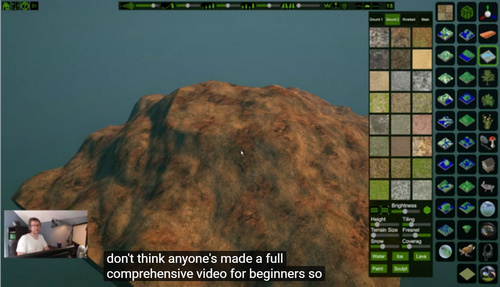

All the buttons in Flowscape 1.3, covered, for the first time in a detailed 43-minute walkthrough of the software, aimed at beginners. Free on YouTube.
Just released, an interesting new “tint transfer” engine for Photoshop called MagicTints 1.0. I especially like the apparently semi-generative ability to…
“iterate through moods, matte color spaces and ideas”
It needs a later CC 2014+ versions of Photoshop and it works as a Panel. There’s a 15-day demo.

I’d just suggest that someone wanting to save $39 could probably wait six months on this. To find that something very similar has been added to G’MIC, and thus to Krita, for free. G’MIC already has 2D style-transfer, auto-colour of line-art, and automatic greyscale-to-colour (see below)… and thus instant-and-acceptable tint-transfer between 2D pictures can’t be far behind.

Whatever you may think about ‘the ultimate price-tag’ on Reallusion’s software, or the radical UI makeover and new render-engines in iClone, as a company they do provide excellent support and tutorials. And the new Cartoon Animator 4 is fine software which is also useful for comics makers of a certain type. Today Reallusion uploaded an hour of detailed new tutorials on the vital skill of how to set up a “360 head” in their new Cartoon Animator 4 software…

Basics of Head Composition in CTA 4, and Full 360 Degree Head Creation Part 1 and Part 2.
There’s also a new 20 minutes video that dives into the details of all the Face Key Editor Enhancements in CTA4, which offers the user detailed creative control over the resulting frame-by-frame animation.
FlowScape 1.3 is out, and the most stable way for purchasers to get this $10 landscape tool is via the Itch downloader/loader.
New are…
* a basic ‘first draft’ implementation of a terrain-sculpting tool. The maker says “ideally you want to sculpt the terrain before you place anything” on it. “Also if you save and reload, it does weird things if you try and sculpt some more.”
* paint paths, which seems to mean that you can easily lay down footpaths and trackways with a paintbrush.
* 12 new skies.
* a collection of ships.
* six “snowy mountain pieces”, for backdrops.
* “lava and ice options”, as well as water.
* more save slots.
* the overlay grid opacity can be changed, which is useful for RPG map makers.
* water can be made more reflective in top-down-RPG views, so it shows up better.
* “pressing SHIFT will let you rotate”, and this seems to mean rotate a prop with the mouse wheel when placing it on the terrain.
 Posted in Automation, Companion software, Spotted in the News, The Animation Industry
Leave a comment
Posted in Automation, Companion software, Spotted in the News, The Animation Industry
Leave a comment
Google has just open sourced its PoseNet 2.0 pose-detection magic. Which suggests we might get a simple affordable “video to Poser/DAZ pose preset” software, in due course. Without having to stick day-glo markers over clothing and faces. I don’t know of any such thing currently, that’s markerless and sub $50 and works without an enormously expensive iPhone or similar kit.

Apparently Disney also has markerless motion-capture for faces that focuses on the jaw. It detects skin deformations around the jaw, as a proxy of jaw bone position.
Posted in Comics, Companion software, Real-time animation, Spotted in the News
Leave a comment
Just when you thought Smith Micro was getting out of creative software, with the sale of Poser… “Introducing Moho 13 Animation Software” (YouTube Playlist link). Yes, Smith Micro have just issued a new release of what was formerly Anime Studio, their 2D animation creation software. It’s been three years since the last update. Note that it is not to be confused with the similarly-named 3D modelling software Modo.
I was most interested in the new “Enhanced 3D object support”, though I discovered it to be a “Moho 13 Pro only” feature. Judging by the video for this feature, the user can import and light/shade a simple 3D object in .OBJ, such a soccer ball. But I saw no demo of any exciting real-time automatic application of believable ink lines along the edge line of the ball, akin to Poser’s Comic-book mode or SketchUp. I know there is a Poser import option, but I’ve never seen anyone demo it by giving an imported character more than a very basic line style.
As such, Moho is mildly interesting. But a 2D animator should carefully evaluate the $400 Moho Pro 13 against Reallusion’s latest $199 Cartoon Animator 4 Pipeline (i.e.: Pro) version. The latter is much better supported by add-on content packs, including packs of pre-made motions and characters, albeit mostly costly ones. But Moho seems to have a more ‘pro’ feature set for animation, which may appeal more to trained animators who can make their own content and then make it all flow smoothly. And the Poser import may be useful for you, in that respect.
So, with the final-final-really-final honest-it’s-true-at-last Blender 2.8 to launch over the release-horizon in July 2019, I decided to test the 2.8 near-final beta on Windows 8.1 64-bit.
I was looking forward to at least getting a glimpse of the new “complete 2D animation toolset” Grease Pencil module, with 3D interfacing and complete with a dedicated UI workspace template. I don’t care about the animation, but I was interested in comics stills production and how fiddly it might be compared with the ease-of-use with Poser. I was also curious about the Eevee matcap feature, though apparently the Eevee toon shaders are not yet implemented. The simple Sculpting UI workspace template also looked worth a brief try.
But, sadly, the current Blender 2.8 beta crashes my Windows display driver every time it starts to load. Then it refuses to load anything, and just sits there as a blank bare window and loads no UI elements.
Oh well, I guess my system is no longer powerful enough to run Blender. Probably because the… “minimum graphics card requirements for Blender have increased to OpenGL core 3.3.” And the new plugins, such as Toonkit for Cycles 1.3, will only run with Blender 2.8. As I can’t afford a shiny new £500 graphics card + a new PSU to power the new Blender, it looks like Blender is not for me. Despite being free, Blender has now made itself very expensive, both in terms of time-to-learn and its hardware baseline.
The free Krita 4.2 final has just been released for the desktop. It’s an important release, and of course is free as it’s the flagship digital painting software for ‘open source’ creativity, Krita 4.x rivals Autodesk’s Sketchbook Pro and has clearly outpaced a clutch of similar software.
4.2 Release Notes and New Features in Krita 4.2: Release Video (start at 0.52 seconds if you want to skip the intro).
The highlights:
– over 1,500 stability buxfixes.
– better drawing tablet support.
– better multi-monitor set-up support.
– “a host of bugs with tablets have been resolved”.
– faster brush-speed.
– improved Flow and Opacity in the brush engine, for delicate strokes.
– better colour-picking and colour-palette storage.
– easier ‘move and transform’ of selections.
– rotate your canvas from the Overview mini-window.
– resize the Layer thumbnails.
– updates GMIC filters plugin to version 2.4.5.
– some new Blend modes such as Freeze, Glow, Heat and Reflect.
– and there’s a new Noise generator.
I’ve previously looked in depth here at the potential of its GMIC filters for doing interesting toon-ification things with Poser renders, and I like what I see.
Be warned that it’s not like Blender, in that you can’t have multiple versions of it on the same PC. It’ll remove your old version. But I found that my Brush preset tagging and custom UI remained as it had been in the old version.
The official 4-minute demo video for Reallusion’s new Cartoon Animator 4 (formerly CrazyTalk Animator 3) has just been released…
It’s 2D animation software, now 2.5D on the heads. Just be aware that, once you’re hooked into the Reallusion ecosystem, it can become a very expensive option to get all the features and content packs you want.
There’s a new iClone Plug-in Marketplace, for small plugins. Only nine there at present. I’m no longer a regular iClone user, but I like the presentation. Wouldn’t it be great to see something similar for your favourite creative software? Presented in a uniformly slick and at-a-glance way, with comprehensive coverage and everything tested and known to be working. Some software occasionally has such a thing, and there are the stores, but more often the details and links are scattered all over the Web.

In among the stampede of ‘big wallet’ releases from the makers of 3D software this spring, there’s still space for the small and niche. How does a tool to design individual hair strands grab you? Yes, you can of course ‘grow hair strands’ fairly easily in Poser Pro and DAZ Studio has its LAMH plugin and its presets. But the new $3 Hair Strand Designer beta… “creates hair strands ready for placing onto your hair cards” on 3D hair models. It’s for people who make hair this way…

… so may be useful for DAZ / Poser / iClone content makers.
One of the problems with the old MojoWorld software is that, even when you full-screen the software, the “instant preview” window is very small. Here is that preview window, seen actual size on a modern 1920px desktop monitor…

So tweeny-weeny, so cute, but… a pain on the eyes and the neck, on a big widescreen monitor! The user can do certain things to improve it. In its Settings controls you can set render size to: ‘Large’ and ‘Auto-update’. While its ‘Render Quality’ is best left at Default (it makes little difference, but is slightly the fastest of the three options).
So the user can do some things to improve it, but can’t actually enlarge its size. Wouldn’t it be great to get a bigger view? Like this…

Is there some freeware that can do that? What about a Windows magnifier software? Nope… I looked for hours and there’s absolutely nothing that can grab a section of the screen and show it in an enlarged fixed window like this. They all want to play “follow the cursor, and show what’s under it”.
There is a solution, and it comes from a surprising direction. It’s the popular free video player VLC Player. Here are the instructions…
1. Launch the latest VLC Player. From the top menu, go: Media | Open Capture Device | Capture Mode | Desktop | 12 FPS | Play. You have now set up a live video-stream of your desktop. Don’t worry, it’s not being sent to some dodgy blokes in Ecuador, and is staying within your PC!
2. From the top menu, go: Tools | Effects | Video Effects | Crop | then you will need to play around with the pixel offsets to suit your screen. You may need to ‘jiggle it a bit’ until the section of the screen you want to isolate pops out into an ‘enlarged’ mode, but you’ll soon get the hang of how its ‘indenting the screen’ and thus enlarging it. Here are my settings on a big widescreen desktop monitor…
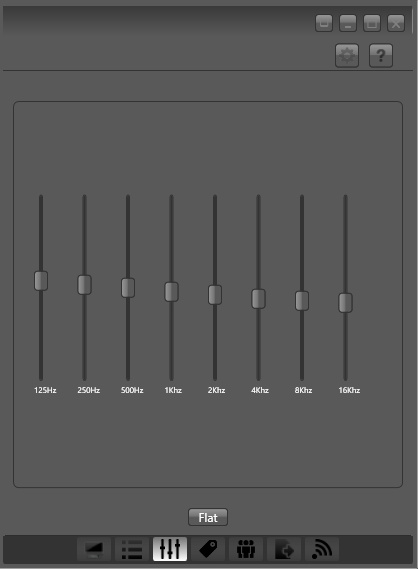
Optionally, you can also have VLC do a very slight real-time sharpen, which is controlled from the same Video Effects tab — the Sharpen slider is found under ‘Essential’. You can even send the image into black and white and slight change the contrast, to get a sense of how the greyscale values of the picture will visually “read”.
3. When happy with the view, effect and magnification level, grab the VLC Player window and place it in the bottom right of the screen (as seen above). Then go to the top menu and set: View | “Always on top”. This forces VLC to be visible, even when MojoWorld is the active window.
You then work with MojoWorld as usual.
Optionally, in MojoWorld if you mouseover on the native instant-preview window, then you can click once on it to “Enhance”. That’s pretty quick on a modern PC, little more than a second. After doing that Enhance, here’s a comparison at actual-size of the two views, the native instant preview and the VLC stream of that section of the desktop…
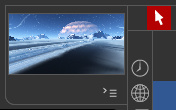

Not ideal, but better that the native preview. You’re getting an entire planet rendered in WYSiWYG in near-real-time, and as such some pixellated blockiness seems a small price to pay.
There are a few drawbacks:
1. You lose instant access to your “random cam” dice buttons, because the corner of the VLC Player windows is covering them up. If you want access to them you have manually grab the VLC Player window by its top bar, and slide it down for a few moments, then manually side it back up. But that’s easily done, and then you can re-select the MojoWorld window and go back to the JogNav buttons.
2. You get a slight ‘mouse cursor flicker’, due to VLC capturing the stream.
3. It’s overkill for fast-rendering planets. On a fast modern PC you’d get a preview that’s nicer and almost as fast by just doing a quick 600px render on the lowest settings.
The above technique should work on any older software where the instant preview is of a fixed size.
The new $10 real-time landscape software goes to 1.2, just released…
Among many other features…
* Fantasy creatures — including a dragon, skeletons, and what appear to be Ents.
* Fantasy houses.
* Place-able lights.
* Snow.
* Ctrl Z undo / Ctrl Y redo.
Regrettably the Windows download appears to be corrupt. Should be 1.2Gb, but downloads as 2Gb then stops part way through. Others have the same problem. So it’s probably best to wait until this is fixed, to get it.
The itch.io app also shows 2Gb, but appears to have no problem downloading. Their app’s main problem is that it has no bandwidth throttle, and will saturate your available download bandwidth.
Posted in 3D Utilities, Companion software, Spotted in the News, The Animation Industry
Leave a comment
Amid the wave of new releases in recent weeks, good advice from Ricky (content editor at Renderosity) on “Focusing on the Tools at Hand”…
“I’m seeing a lot of animators jump from tool to tool as new ones are released. It’s no longer uncommon for there to be several tools that basically do the same thing installed on one’s system. … [creatives suffer from] informational overload when it comes to tools. Our inboxes are stuffed with announcements and there are getting to be so many vendors at the various conferences and expos that its difficult to see all them.”
Very true. I see a lot of CG news, though not being in the USA I don’t get to the trade expos to pound the floors and see the launches. But the wash of CG news gets filtered before it reaches this blog. The bits you read here are only those that make it through the filter of being somehow relevant to Poser / DAZ / digital landscapists, or to digital comics creation, or to fantasy/sci-fi artists. Thus when Lightwave gets sold, that’s of mild interest here because it interfaces nicely with Poser. Plus, the CG news often gets questioned, tested or investigated before it’s posted — it’s not just ‘link the press release’.
Luckily I’m also somewhat constrained, in that I now… i) avoid nearly all ‘animation’ (fun to watch, not fun to make) and am trying to build up to a set of skills in comics making instead (less work, quicker rendering, a bit more fun); and ii) not being able to afford the uber-PC and ninja £600 graphics-card to run everything new and shiny. Several recent bits of demo or review software have even refused to install (Substance and AI Gigipixel) because my PC was deemed under-par. Not even an install!
Ricky suggests in his article that we should stop and think if software we already have duplicates the features of the shiny new software. Again, good advice, but sometimes you also want to support software that’s more open. For instance I was enamoured of Sketchbook Pro for about 18 months, in my slow move toward finding time for 2D painting/overpainting. But now I want to support the similar but open-source Krita 4.x. That Sketchbook Pro has now slipped back from being supposedly ‘free’ to having a paid version, and within a year of Autodesk’s ‘free’ announcement, seems to partly vindicate my choice.
Anyway, for what it’s worth, prompted by Ricky here’s my list of currently frequently-used software on Windows:
Poser 11.x Pro. REVIEW COPY (no expiry).
DAZ Studio 4.x (with Scene Optimizer for iRay). FREE.
Carrara 8.5. PAID.
PzDB (for Poser/DAZ content management and selection). GIFT FROM THE MAKER (for helping with v.1.3).
3DXChange (3D file converter). WON IN A CONTEST, with iClone 7.
Meshlab 2016 (3D file wrangler). FREE.
Vue xStream 2016 R4. REVIEW COPY (no expiry).
Flowscape 1.2. PAID.
PTGui 8 (panorama stitcher). PAID.
Krita 4.x (2D digital paint). FREE.
Dynamic Auto-Painter 6.x (aka DAP 6). PAID.
Photoshop, mostly CS6 – plus a half dozen plugins, mostly tried and tested old-school ones. PAID/FREE.
IrfanView for quick image previewing and basic processing in Windows. FREE.
FastStone Capture for screenshots. FREE.
+ Ugee 1910b ‘draw on the screen’ pen monitor + main 24″ monitor. PAID, but both cheap Amazon ‘warehouse deals’.
You’ll notice iClone is missing. Many long-standing readers will know I used to be a big fan and user of it, but then they changed the UI wholesale and more. I did win a copy of iClone 7 recently in a contest, installed it and was glad because I gained the latest 3DXChange utility, but… I just don’t tend to use iClone itself any-more, these days. I’m far more fond of their fine CrazyTalk Animator and its potential for rapid comics production, these days.
Back to Ricky’s article. Perhaps we need a big ‘decision tree’ flow-chart, to help in choosing the right software for the task?
I’ve added a sidebar link to Flaming Pear, maker of Photoshop plugins, on this blog.
Many science-fiction artists will remember using their LunarCell (moons and planets renderer) and Glitterato (star-field and nebula generator) plugins in Photoshop, and some may still do so. These plugins still work fine for making backdrops elements in landscapes, and I see that Flaming Pear have updated their Flood plugin to Flood 2 in 64-bit. The interface is still a bit old-school, especially the clunky preset loading/saving, but the scene-reflective water it makes is very good and highly adjustable. It could save days of render time on 3D reflective water for large landscapes. “Now with improved 3D realism”, in Flood 2 — which seems to have been released late 2017?

Regrettably, when the picture has objects in the water at different distances from the camera, one has to make about for or five Flood 2 renders at different horizon heights. Then one layers these in and blends them together with the aid of a mask. It takes a bit of work and finessing, compared to just dropping in water onto a picture with a straight horizon.