Tschai‘s new tutorial for using Depth of Field for face portraits in DAZ Studio 3. It aims to…

“prevent the awful “fuzzy” effect in the ‘Out Of Focus’ zones of the image”

Tschai‘s new tutorial for using Depth of Field for face portraits in DAZ Studio 3. It aims to…
“prevent the awful “fuzzy” effect in the ‘Out Of Focus’ zones of the image”
 Posted in Carrara, Competitions, DAZ Studio, Poser, Spotted in the News, The Animation Industry
Leave a comment
Posted in Carrara, Competitions, DAZ Studio, Poser, Spotted in the News, The Animation Industry
Leave a comment
The 2012 CG Student Awards are now open. Entrants worldwide are invited to compete for $100,000 in prizes. You have to be on, or a recent graduate from, an accredited course at a college or university.

Here’s my survey of some of the various quality steampunk
Personal street transport:
The classic early Victorian mode of personal transportation, the Penny Farthing by Traveler…

Something that could look home-brew steam powered (add a steam boiler and a retexture), is Oskarsson’s Steampunk Transport1…

And at the top of the range in road transport is the Steampunk Coach…

There’s also a nice SteamPunk Mechanica II Monocycle.
Those in need of an early car should look at the Steampunk Carriage.
Airships:
A pretty good work-horse of the air is 1971s’s Vacuum Zeppelin for Poser…

Also look at this excellent free airship from Adm on Archive 3D. Like most Archive 3D models, the textures are missing and you will have to retexture by hand…

If you want a leviathan-class airship, Meshbox’s Clockwork Steampunk Zeppelin 1888 should fit the bill. It also has its own Docking Towers…


The Steampunk Cathederal for Poser also has an airship docking tower. This one looks best in Poser, and even then may need some texturing.
Hot-air balloons:
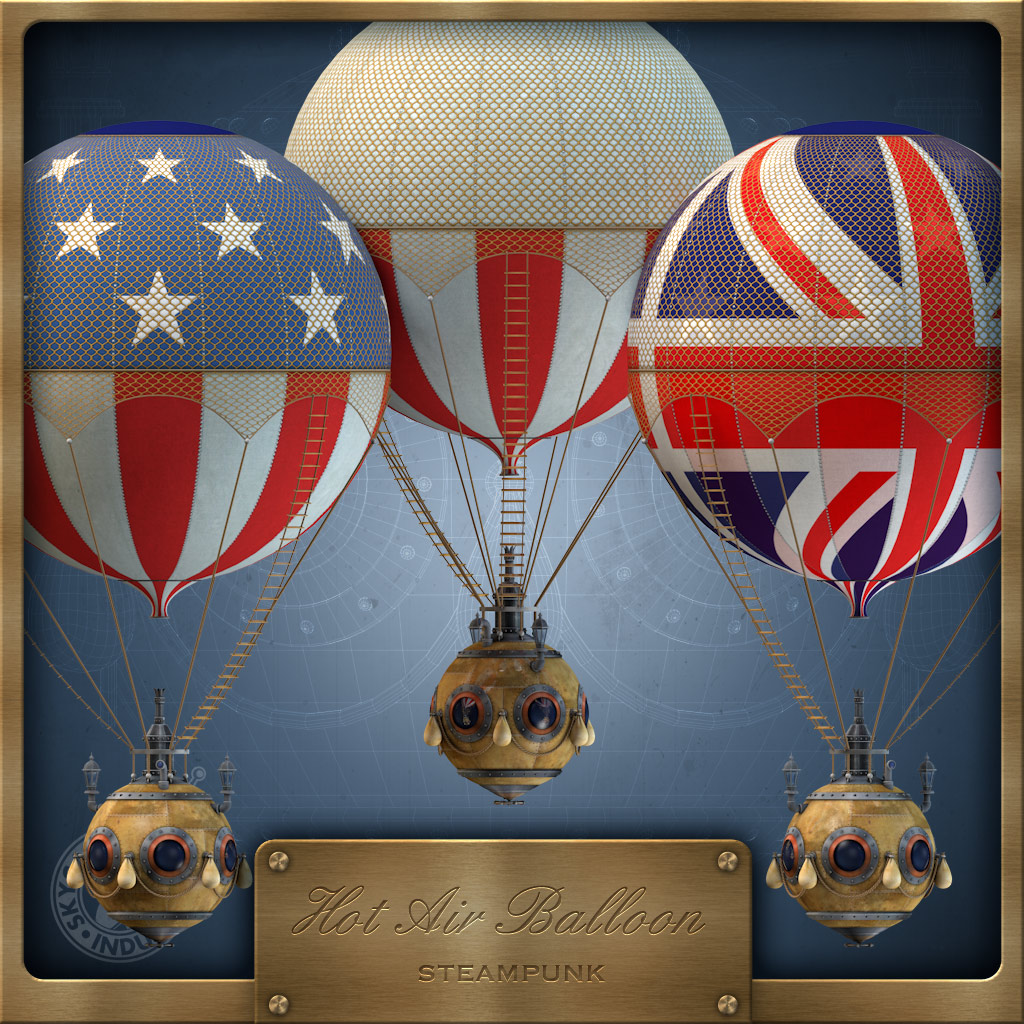
There are many conventional balloon models. But this delightful steampunk hot-air balloon is something special, with a flag texture and brass bathysphere-type basket…
Going underground, not into the air? Try this Meshbox Clockwork Steampunk Digger…

Going underwater? Try this free one-person submarine, Senya’s Submarine for Poser…

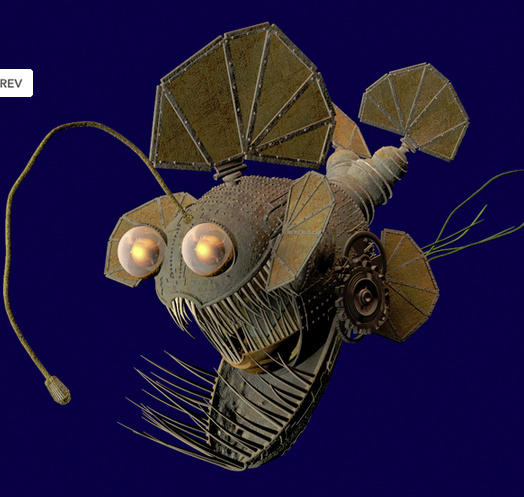
Or try 1971s’s Steam Fish for Poser…
Also look at the excellent and authentic free Turtle, although you will need to convert it from Sketchup…

For something more Nemo-esque there’s also a very nice Meshbox Submarine, although it’s only available as a freebie if you buy the whole of the Meshbox Clockwork Vol.1 series…

The best of the free 3D Warehouse steampunk models are all collected in this comprehensive collection.
Another installment of the Steampunk Survey, soon!
Here are a few of what I think are the best scene assets for Victorian steampunk

Steampunk Timelab (makes sure you get the Poser, and not the Vue, version), and a cool boiler which would suit the lab nicely…


The DAZ Store’s The Enigma could also fit in a Lab nicely…

The following three Meshbox scenes, and the trolley bus, are part of the larger Steampunk City Volume 1:
Meshbox Fantasy Crystal Palace…


Meshbox Charles Babbage’s Thinking Mansion…

Meshbox Baker Street Construction Set…

For a more interesting roofline, combine Baker Street with the NeverHome pack, available on the DAZ Content Store. Suitable street accessories for Baker Street, from smaller developers, would be the SteamPunk WheelChair, and a free MIDI-powered Victorian street organ…


Also suitable for the street is the Steampunk Clockwork Trolley-Bus (yes, there were steam-powered trams, in the early days) which is almost a complete environment in itself…

The DAZ Store’s Rybolt Mechanical would nicely complement the Bot Shop…


And the DAZ Store has set of Steampunk Tools and Machinery for the lab (I found the textures on these are best in Poser)…

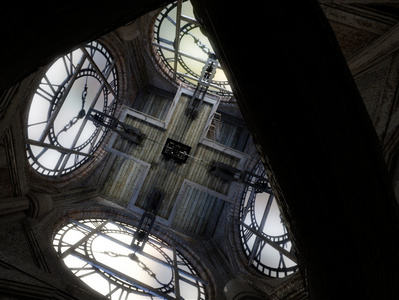
Good for simple posing of characters against are: DM’s Clock for Poser and DM’s Inertia for Poser and the DAZ Store’s Steampunk Empire…


That’s it for now. Clothing, goggles, headwear, and rifles/guns will be covered in a future post on this blog. I’ve also noticed that there’s a number of elements now that could called “valvepunk” or “Teslapunk” — I’ll also survey those in a future post.
Now there’s a Poser fan…

It seems that DAZ has officially extended the free software offer to 31st March 2012…
“Due to an absolutely astonishing response from 3D ART enthusiasts everywhere, DAZ is extending this offer through March 31, 2012!”
And it looks like 3D Photoshop Bridge is now back in the mix, now included in the DAZ Studio Pro download rather than an optional extra as before…
“3D Photoshop Bridge: Retail $199.00 (Included with DAZ Studio 4 Pro) Retail $199.00”
Durn it… I missed an extra external Poser render (see yesterday’s blog post on these).
Poser works with Refractive Software’s Octane (Nvidia graphics cards only). What makes Octane interesting is that it uses the GPU for render acceleration. The common advice on Poser forums to the… “I wanna new graphics card, which is best for Poser?” query, seems to be that Poser relies mostly on the main processor. But Octane would seem to change that, passing over the heavy-lifting of rendering to the much faster graphics card.
Octane is still in beta, and is reportedly not wholly stable. But then the same could be said of the similarly crash-prone LuxRender. Octane costs E99 Euros (about $130). There’s a Deviant Art group of Poser2Octane users who can give advice, and there are tutorials from the group on how to use it with Poser Pro 2014.
It appears Poser users need to export an OBJ of the target Poser scene — either directly from Poser, or (for more complex scenes?) via loading the Poser scene in DAZ Studio, then saving out as an OBJ, in order to get an OBJ that Octane won’t reject. Sounds a little clunky.
One alternative route that occurred to me might be to get a Collada export from Poser Pro 2014, then use Meshlab to get the OBJ and textures. Another pipeline might be: Collada – Autodesk’s free FBX convertor – OBJ. In fact, I read on the Octane forums that .dae import is supported, so it may now be a straight Poser – Collada – Octane pipeline.
My guess would be that it would probably also be a good idea to use Photoshop’s batch processing to downsample any really huge 4000px or larger materials/texures, down to 2048px, before you load the scene in Octane. Game cards, especially ones that are no longer cutting-edge (like mine), are geared for handling smaller textures.
The Poser2Octane tutorial doesn’t cover re-lighting the scene in Octane, but there’s a very clearly-presented video tutorial on that here…
I do like what I see, I must say. But it doesn’t look as seamless as Vue.
I’ve been looking into external renderers for Poser 9 / Poser Pro 2014, other than the “PoserFusion” plugins that ship with 2012 (and which let you use 3DS Max, Maya, Cinema 4D, and LightWave). Vue 10 seems the best option. But I think I still need to research more, to find out if one of those PoserFusion plugins for Maya or 3DS Max or Lightwave can offer something more seamless and “three-clicks” than Vue. But from my research it seems Vue is the currently preferred choice of many Poser users. Anyway, here’s the survey…
1. Cinema 4D: Interposer ($75) is an alternative to the PoserFusion C4D module that ships with 2012. Fine, if you own Cinema 4D ($1,000+). Personally C4D is not a 3D software I’ve ever touched. I have old versions of 3DS Max and Maya in their educational versions, so one of those — probably 3DS Max — would be my choice over C4D.
Verdict: No.
2. Blender: a Poser importer titled Poser Tools 2 for Blender is actively underway at 2012 — but it seems far from finished. While Blender is free, it has a nightmare of an interface, and I really doubt I’d want to use it unless Poser Tools comes with a “really simple five-click Wizard” or similar.
Verdict: Very unlikely.
3. Pose2Lux ($ free) gives access to the free LuxRender. The disadvantages are…
* still in beta at version 0.8.7.
* download pages and even the quick-start page are presented in “techie developer”-speak that’s likely to have that average hobbyist creative running screaming to the hills.
* getting it to actually work looks to be an incredibly fiddly process.
* LuxRender doesn’t exactly seem stable. The same stability problems appears to affect the Reality 1 LuxRender plugin for DAZ, which negate a Poser-DAZ-Reality-LuxRender pipeline.
Verdict: Unstable. No, but look again at Reality 2 when it arrives.
4. Vue: Vue 10 Frontier ($99) is commercial hobbyist software dedicated to working with DAZ and Poser imports. It’s a cut down version of the more expensive and more complicated Vue software versions. Vue is definitely more affordable than the big beasts such as 3DS Max, Maya, Cinema 4D, and Lightwave. Worth trying. Some drawbacks, though…
* forums say Poser 9 / 2012 character import currently only works with the 64-bit version? And then possibly only with the more expensive Vue 10 Complete or Infinite versions?
Update on the above point: this official page for Vue 10 Studio states…
“Poser SDK from August 2011: This SDK adds support of Poser 9 and Poser Pro 2014. This SDK used on Mac will only work in 64 bit. It will work in both 32 and 64 bit on Windows.”
But it seems this is incorrect. Several different forums users are adamant that a Poser Pro 2014 .pz3 file will only import under the 64-bit version of Vue 10. I’ve tried some 32-bit experiments myself, and it seems the forums users are correct. A 32-bit Vue 10 install will not import a Poser Pro 2014 .pz3 file. Vue’s spec sheets on their Web site are misleading. I also learned from the forum that E-on, the makers of Vue, are notorious for giving out such misleading information on their products.
* import of .pz3 files can be a bit of a nightmare, in terms of getting Vue to accept them.
* model import other than from Poser or DAZ requires the $129 3DImport plugin.
* bump map import can be glitchy, and many other materials may need fiddly tweaking to reduce a likely performance-hit from a scene with characters using massive 4000px textures, and from any texture mess-up that may happen on import to Vue.
* static characters / props only. No animation gets imported.
* Vue really bogs down when importing more than a simple character.
* the ability to render higher than 1920px needs an extra $70 plugin called RenderUp.
* Vue’s rendering is really s…l…o….w……
Despite its many apparent drawbacks Vue looks initially like the best value and simplest option, and comes with a skin shader plugin called SkinVue that’s designed to do a mostly-automatic conversion of the skin materials on the Poser character imports. However, SkinVue requires the purchase of extra per-character modules.
But at a total purchase of $300 for Vue 10 Frontier + RenderUp + 3DImport this version of Vue is not as cheap as it first looks. You might was as well buy Vue 10 Studio. Even then, I’d have to be prepared to shell out for Windows 8 in 64-bit, and for SkinVue character modules.
Verdict:Perhaps. But very expensive. And slow. And heavy on system resources.
5. The other alternative to consider might be DAZ Carrara, which supports Poser .pz3 files. But I’ve not been able to find out much about the quality of the renderer when compared like-for-like with Vue. I see lots of reports of crashes, although from some years ago. Most people seem to currently use Vue instead, and I guess there’s a reason for that. Possibly it’s render quality? But I guess the new “coming soon” Carrara 9 might change that, if it can offer a simple “three clicks” import and render of complete Poser scenes with the original placement of lights.
Verdict: Wait, see if Carrara 9 works well with whole Poser scenes, and gives great render quality
6. Octane. I found out about Octane after this post was released. I made a separate post on it. It seems to have the same problems as LuxRender.
Verdict: Interesting. But doubtful.
Overall, Vue 10 seems the way to go. But only if you’re running on 64-bit Windows with lots of RAM and generally have a big wallet. So until then, for me, it’s back to looking at the PoserFusion plugins, and the possibility of using them with 3DS Max.
New fixed page added to the blog: DAZ Studio 4 : the missing training DVD. This collects the various key official and unofficial training videos, and some key text/screenshot tutorials — and presents them in a logical order on one handy page.
A cool free King Kong morph for the DAZ Studio Genesis Gorilla. For it to work, you need to have both the Gorilla for Genesis and Freak 4 installed.

Beyond Photoshop: Advanced techniques integrating Photoshop with Illustrator, Poser, Painter, Cinema 4D and ZBrush
Reputable British training book publisher Focal Press is one of the few with a good range of books of interest to Poser 9 / Poser Pro 2014 users, although at March 2012 there’s nothing specific yet from them for those programmes.
Chunky project-based books such as this are always welcome, and this is no exception. Although I have to warn readers that I found the actual Poser content to be very limited. Basically the power of Poser is set aside, in favour of a little simple figure posing in Poser 8, and then rendering out. In all, we get about twenty pages of Poser, which would be useful for beginners…

This is the final image you create from this chapter…

This book is from mid 2010 and so assumes you’re using Poser 8. It also assumes you have a pressure-sensitive graphics tablet. Project files are provided at the book’s website. Be warned that you also need to own all or at least a lot the software, or at least have the trial versions, to get the most out of it.
Overall the book is broken into seven chapters that run for about 50 pages each. Not being a fan of the fiendish and unintuitive Adobe Illustrator, the first three chapters were of little interest to me. However, the presentation was clear, and I’d no doubt be able to produce the intended results from these Illustrator chapters — if I had a couple of days spare and the cost of an old copy of Illustrator. Chapter 2, in particular, shows you how to produce a pleasing retro/children’s look that stradles 2D and 3D…
Chapter 4 is about compositing photos using Photoshop CS4 and Painter X.
Chapter 5 will be the most interest to Poser users although, as stated above, Poser is only used as a generator for figure cut-outs that can be composited with Photoshop.
Chapter 6 uses Cinema 4D and Photoshop to make the picture that adorns the book’s cover…
Chapter 7 uses ZBrush and Photoshop to make a picture of a demon’s head. This is fairly introductory and the absolute beginner would be much better served by the excellent “Z-Brush 4: Essential Training” video DVD at Lynda.com
Overall, it’s high quality content presented as a bit of a jumble of chapters. But if you’re a digital illustrator looking to sample a bit of each programme, within clearly presented and structured real-world projects, this could be for you. Especially at the current low price that it sells for used on Amazon, and if you can only afford used copies of the older software versions the book describes.
Note that the book is also available for the Kindle Fire tablet in the USA

Need to convert Poser Pro 2014’s Collada export format to FBX? Autodesk have a free FBX Convertor for Windows and Mac. The 2012 version is now available.

I had excellent results taking a Poser Pro 2014 Collada export to iClone this way…

One of the things that I’ve never looked into, though I’ve modded for iClone extensively, is how Poser / DAZ characters actually get made. Here are some of the books and tutorials I found, on how to create new figures for Poser…
1. Secrets of Figure Creation with Poser 5
2. How’d You Do That?: Poser Character Creation For Beginners
3. Poser: Developer Trade Secrets, from Dark Edge, can be had on Content Paradise. It’s a set of video tutorials that cover 2 hours, rather than a book.
4. PhilC also has a series of three YouTube tutorials for Poser 7:
Rigging Figures for Poser, Part 1, Part 2 and Part 3.
Update:
Digital Art Live has the webinar “Poser Rigging – Master the rigging process with Teyon Alexander”.
Darkseal has the video set “Poser Figure Creation”.
Smith Micro are currently sending out a very special-offer email to those subscribed to its Poser site:
“Poser Madness: 50% Off Software, Exclusive Content Offers, Free Webinar”
Here’s a screen capture of the e-flyer…

Yes, half price on Poser Pro 2014 and Poser 9! Although there’s no sign of the offer on their public website, yet. It seems this is just for those who shop at Smith Micro and who get the Poser emails.
Here’s Kevin Richter taking you through the whole process of using DAZ Studio, a bit of Maya, and Photoshop Extended to make a finished digital comic. Kevin creates this as a regular comic-strip for the biggest newspaper in the UK, The Sun. It’s a fine (if a little dizzying) 8-minute speed-run…
If you need good comic book fonts (vital in getting the right look), try Blambot which has a strong range of free fonts as well as paid-for. Also Comiccraft, and Fonts.com. Free speech-balloon fonts are Komika Bubble (komikabb.ttf), and TalkTalk (talk.ttf).
As for comics layout software, the best and simplest for most people is Comic Life Deluxe