New free DAZ / Poser character, S. Cargo at the 3D Universe Store.
Author Archives: jonahjameson
Stonemason’s new Hutt
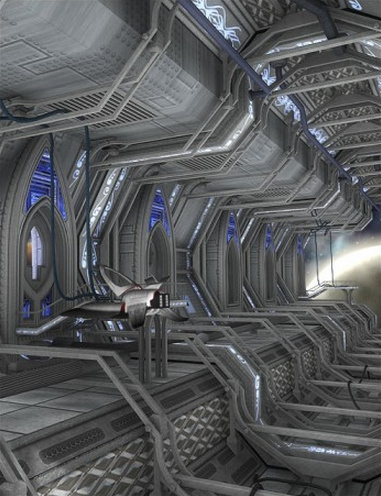
Stonemason is back from holiday with a new ultra-quality scene for DAZ and Poser, Desert Outpost. Nice science-fiction styling, and it reminds me a bit of Jabba the Hutt’s palace on the planet Tatooine in Star Wars.
Could be combined with the new Balloon Technomages, suitably recoloured in desert and grungy textures. The balloons could be the water-vapor capture technology for the arid desert fortress.
Cave Octopus
H.P. Lovecraft was afraid of caves and octopus, so what could be more Lovecraftian than the new free Cave Octopus for DAZ Studio (warning: DS 4.6 .duf file).
Poser 2014 – Service Release 2.1 released
Service Release 2.1 update patches are now officially available for Poser Pro 2014 and Poser 10.
Daz Carrara v8.5 – released 26th August
DAZ Carrara, DAZ Studio’s big sister software, is getting an upgrade. Daz Carrara 8.5 will be released 26th August 2013. Featuring…
* Support for the new DAZ 4 stuff: Genesis characters with autofit; Content Management System integration; and DSON importers.
* Better animation tools.
* Better identification of lights in the viewport.
* Memorize and restore shapes and poses.
* Mesh SubDivision and smoothing tools.
And don’t forget that Carrara now also has a third-party plugin for LuxRender.
SR2 now available for Poser
Light Dome Pro -R for Daz Studio 4
It’s great to see that Dreamlight has released his new outdoors lighting and compositing system Light Dome Pro -R for DAZ Studio 4. This updates his old Light Dome Pro 2 and appears to combine it with parts of his old Mood Master 2 (both of which only worked in DAZ Studio 3.x until now). There’s also a welcome speed boost.
The new Light Dome Pro -R looks like a “must-have” for those who use DAZ Studio to create large outdoor scenes and then tweak them with Photoshop. I know from past experience that Light Dome is fairly simple to use once you learn a few easy steps, and that it gives great results. Light Dome Pro -R comes with a handy Photoshop Action which automatically loads all your seven render passes into Photoshop layers, where they can be automatically blended and adjusted with filters in real-time — thus cutting DAZ’s render-time dramatically. Since it’s only an Action, I’m guessing it’ll work with any version of Photoshop above about CS3?
Here’s the new video showing how it’s done (the intro sequence ends at 1:00 minute in, when the step-by-step tutorial begins)…
There’s also a longer 23-minute version of the video.
Of course, there’s nothing to stop you adding a render from the same camera with more dramatic lighting applied, to throw another flavour into the Photoshop mix of layers.
Also worth mentioning is the “glow effects” in the features list for Light Dome Pro -R. Be aware that this is just a whole-scene videogame-like high-contrast ‘bloom’ (yuk), rather than the ability to add per-object glow spillover of light into the air.
Included in Light Dome Pro -R is the old Mood Master 2’s simple Depth Fog / Haze, for easily adding a nice Vue-like z-depth fog to your landscape or cityscape. The fog effect alone is a good reason for getting Light Dome Pro -R, even if you’re not impressed by the other features. But we do appear to have lost Mood Master 2’s weather effects layers, such as rain etc. Possibly a new weather-tastic Mood Master 3 for DS 4.x will be coming along next from Dreamlight, along with time-of-day and night presets? Just my guess.
This works with 3D Delight as a renderer. There was also a later iRay version, but it was nowhere near as automatic or seamless.
Update:
Note that “- R” version 1.0.5 changes where you find it in your runtime. Instead of having to burrow around to find it down in My Library, it’s now up on Dreamlight | LDP-R, and is thus more easily found…
The basic workflow for “- R” is now…
1. Dreamlight | LDP-R | right-click on Load icon, “Open as New”.
2. Select the Skydome in the Scene tab. Then in the Content Library, drop down a level to find Background images, and apply a suitable sky to the Skydome.
3. Save the basic scene file. Load in your objects and arrange the scene artistically using the special LDP-R camera to view and frame it.
4. Ensure the scene’s render settings are as in PDF. This version of Light Dome Pro only works with 3Delight, not iRay.
5. Approximately set sun position by looking through Sun camera.
6. In the Scene tab, look through the Parameters LDP-R, set fog-depth – default is likely to be too far away. Try 2000 instead of 20000.
7. In Parameters, ensure set Ray-tracing is set. This is independent of the main Render setting.
8. Render, pick folder to save the output. ( C:\Users\YOUR_USER_NAME\Documents\DAZ 3D\Studio\Render Library\.. ) Close render windows when FOG finishes rendering, as it’ll be the last of the set. Save scene file and close DAZ. Load Photoshop, load renders into a single file by using the LDP-R Action.
PASS watercolour art shaders for Poser
There’s some nice-looking new watercolour art shaders, as .mt5 runtime materials for the latest Poser.
Now, I’m always reluctant to feature new whizz-bang shaders that promise much with their promo images. They almost always have inadequate documentation, in which the maker notes the basic technical features and then warbles “just experiment!”, rather than carefully presenting a step-by-step example of use from starting up Poser to finishing the completed picture. If a vendor is using the finished pictures to sell shaders to the masses, then at least show step-by-step exactly how one or two of the pictures were made.
But anyway, Nightsong’s watercolour shaders bundle — or her even larger PASS Bundle from Nightsong — look as good a starting-point as any, for a serious Poser user seeking that ever-elusive convincing natural-media solution. Nightsong’s individual shader sets are currently just $2.50 on RuntimeDNA, so there’s not much lost if you can’t get them working as advertised.
Update: Now free on ArtStation.
New Nursoda freebies
Nursoda has kindly added new freebies to his newly-returned website:
“Man Morph” turns Nursoda’s Frankie the Pig into a stylised man…
And “Black Doctor” turns Nursoda’s Doctor Pitterbill into a sort of dodgy back-street chemist / drug-dealer…
Super computer
A nice free 1970s style retro super-computer for Poser, from Sparky. Could be useful as a background for a old pulp magazine cover render with semi-toon characters, such as Dr. Pitterbill.
Universal Clothing plugin for CrossDresser
I just spotted a goodie from the maker of the excellent CrossDresser clothing conversion utility for DAZ 3D and Poser. Universal Clothing Plugin will…
“convert the clothing automatically and then load it into your scene already conformed to your character. You no longer need to think about which CrossDresser settings to use to get the best conversion, because the plugin takes care of that for you.”
You do, of course, already need to have CrossDresser and the relevant character licences.
There are now 65 freebies for DAZ/Poser clothing that allow you to use the Universal Clothing plugin with them. Such as Universal Strawberry Dress for V4…
Although you will also need to track down the original content and install it in your runtime for the Universal version of it to work. The original is not always linked from its Universal version’s page — in this case the required base content is EvilInnocence’s Strawberry for V4.
Cthulhu Rising lowered
The excellent Cthulhu Rising currently 70% off, down to $10.49.
Steam snail
Sometimes it feels like all the outstanding DAZ Studio and Poser content developers just go to the beach during July-Aug. And who could blame them? But London224 is still on the job, and has just released an awesome new SteamPunk Snail & Baby…
Nursoda’s website returns!
Nursoda’s website, back online! Grab those freebies while you can!
Da Vinci’s glider
Wow, a lovely new Da Vinci glider from London224, based on the famous medieval-era design. Plus a pose for M4. Poser-only, so I’m not sure how it looks in DAZ. Want!
I can imagine this with a Mad Max-style post-apocalyptic steampunk pilot, flying over the ruined cities scenes I posted on yesterday.