

Qwen3 TSS has been released, and it allows local ‘prompt to custom character’ voices. This adds a whole new dimension to local text-to-speech (TTS). It’s also a pleasingly small model at around 5Gb total (if you already have many TTS Python requirements), so is very feasible for those with older graphics cards and slower Internet connections. It has an Apache 2.0 license, so is fully open-source and available for commercial use. All the below requirements are free, as is the way with local AI.
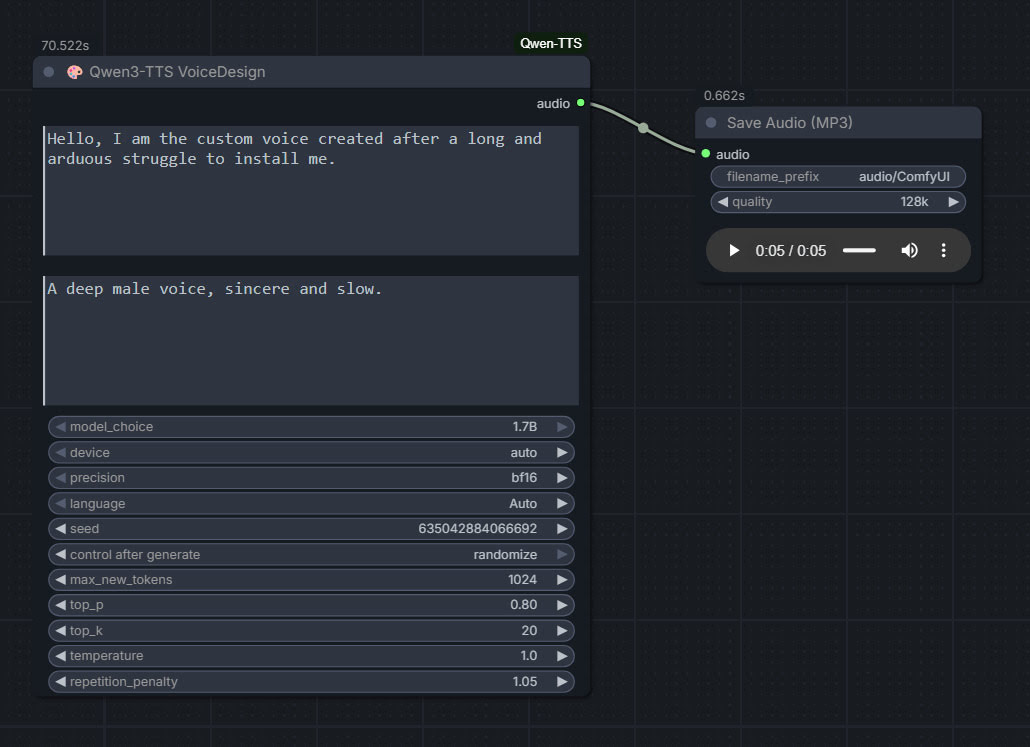
As you can see, you can describe your exact voice and the audio generated conforms to the description. Voices can be described with great detail, far more than shown above, and their modulation over time also (e.g. “rising excitement”). There are obvious uses here for unusual character voices for animation, games, audio drama, vocal additions to audio soundscapes, etc.
Tested and working, after a lot of work. Here’s how to manually install for ComfyUI portable:
1. In ..\ComfyUI\models\ create the new local folders ..\ComfyUI\models\qwen-tts\Qwen3-TTS-12Hz-1.7B-VoiceDesign\ and its subfolder ..\speech_tokenizer\
2. Download the required models Hugging Space at Qwen3-TTS-12Hz-1.7B-VoiceDesign and speech_tokenizer.
Put the downloaded files into their locally pre-prepared folder and sub-folder.
3. Now get FlybirdXX’s ComfyUI-Qwen-TTS custom nodes to run these models. Windows Start button, CMD, cd into the ComfyUI custom nodes directory, then…
git clone https://github.com/flybirdxx/ComfyUI-Qwen-TTS
4. Install the requirements for the new custom nodes. Start, CMD, cd to the ComfyUI embedded Python directory, then…
C:\ComfyUI_portable\python_standalone\python.exe -s -m pip install -r C:\ComfyUI_portable\ComfyUI\custom_nodes\ComfyUI-Qwen-TTS\requirements.txt
(Replace ComfyUI_portable with whatever your local path is).
There should be no conflicts, as yesterday’s patch for these custom nodes fixed the official Qwen TTS demanding transformers==4.57.3 which could have killed Nunchaku (which requires a lower version).
5. These Custom Nodes require a download of SoX which is an .EXE installer. Sox is a venerable freeware sound-exchange code library, kind of like ImageMagik… but for sound. After install you must add it to your Windows PATH. Thanks to Promethean Dante for the fix here…
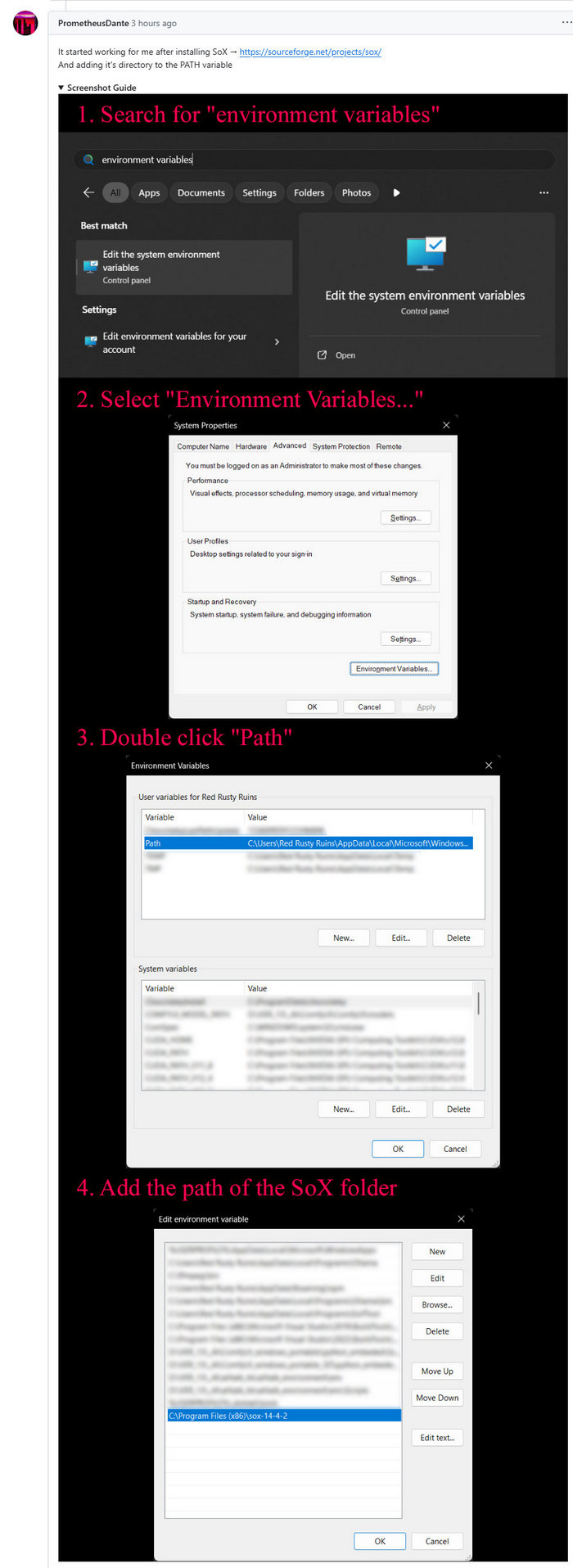
Looking at the node code it seems SOX is only needed if you try to generate on CPU rather than GPU, but the lack of it prevents the nodes from loading in ComfyUI. It seems you need both the Python sox module installed (it installed along with the requirements.txt – see above), and its Windows framework via the .EXE installer.
6. Start ComfyUI, and set up a simple workflow thus with the new nodes…
Time: 70 seconds for a five second clip, on a 3060 12Gb card. Reasonable, not super-turbo but workable.
The basic requirements of Qwen3 TTS are compatible with a ComfyUI portable install — Python 3.8 or higher, PyTorch 2.0 or higher, so the above custom node set won’t bjork your PyTorch by trying to upgrade it. Beware others similar custom nodes for Qwen3 TTS in ComfyUI that will try to upgrade Pytorch to 2.9 (not good, for a portable Comfy).
Wow, I tried to use ComfyUI desktop, and problems kept popping up, even after installing the modules needed, then I got the portable version and it immediately worked after installing the missing modules
Yes, the Portable is the way to go with ComfyUI. It also gets the daily updates that enable you to use the very latest models. ComfyUI Desktop users can wait weeks for such updates to happen.