

I made an initial basic test with the new Flux 2 Klein 4B, using it on a simple Firefly lineart-only render from Poser. Flux 2 Klein 4B is different from the recent and comparable Z-Image Turbo, in that it’s also a lightweight local Edit model as well as a prompt-to-image model. That means you can feed it an image and tell it to e.g. “Reskin this image in a charcoal sketch style”. And in ten seconds (on a 3060 12Gb card), out it pops. Far faster than the old Flux Kontext.
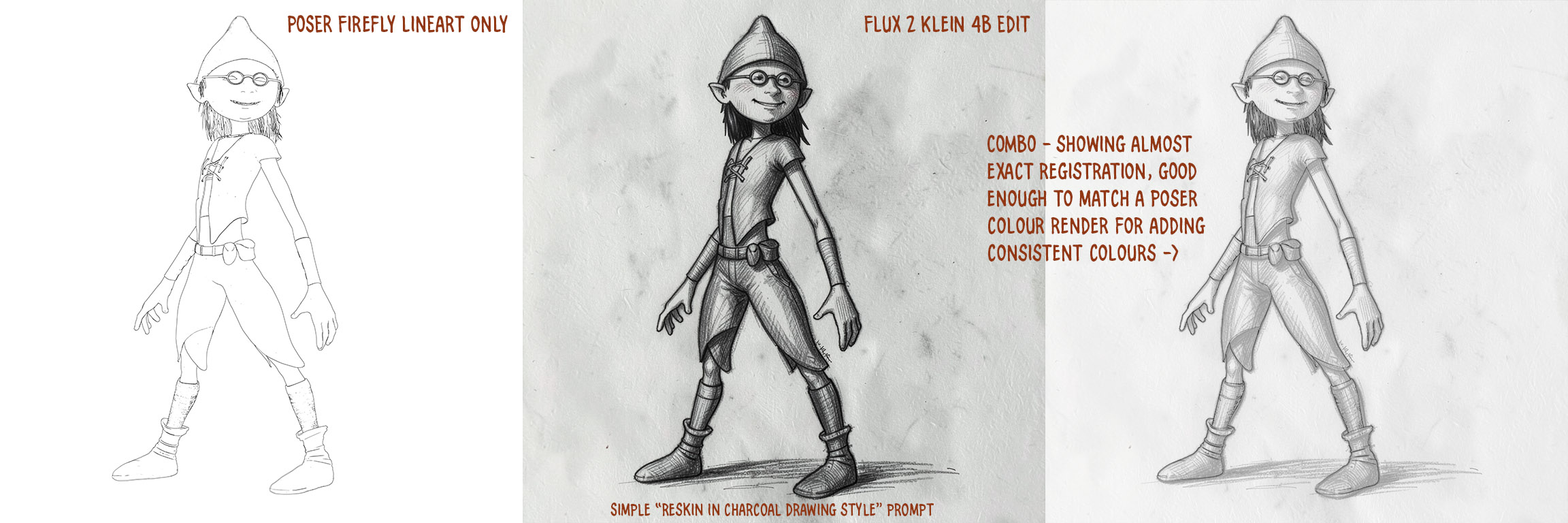
In this case it doesn’t quite work like a 1:1 Photoshop filter, but very nearly. As you can see in the blended third section, it has slightly expanded the toe of one shoe, the back of the leg, and moved the waistcoat back a bit. But other than that it’s close enough to be able to lay a Poser colour render on top in Photoshop, and then use the Photoshop blending modes to colorise the grey. Thus getting the all-important consistent colours from panel-to-panel and page-to-page in a comic.
Not bad for a first result. One can input two images in the Flux 2 Klein 4B workflow, so it may also be possible to add… “and apply just the colours from image 2” to the prompt? Thus saving work in Photoshop. (Update: no, it appears that can’t be done).