

Stable Audio 1.0 is a free “prompt to sound-fx” generator, based on an ingestion of the well-tagged sound FX files at the huge public-domain Freesound website. As such it produces royalty-free sound FX clips, of up to 47 seconds in length. Here it is, working in ComfyUI portable.
Workflow:
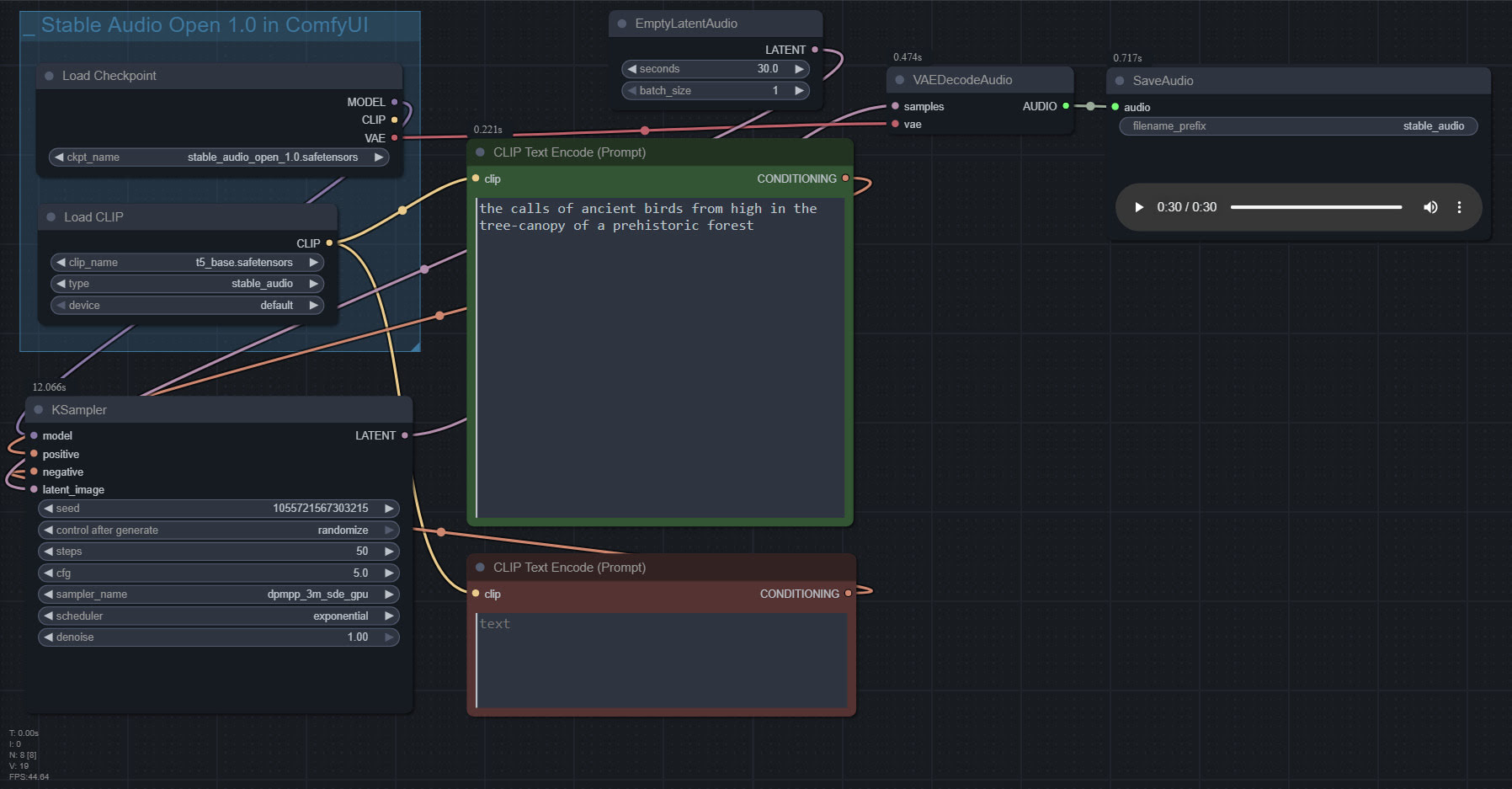
1. Copy the 4.7Gb model.safetensors from the Archive.org standalone’s ..\Stable-audio-open-1.0-webui-portable-win\stable-audio-tools\models folder. The standalone’s .torrent file is the easiest and most hassle-free / re-startable way to get this huge file. Then you put it in ../ComfyUI/models/checkpoints and after that you rename it as stable_audio_open_1.0.safetensors
2. Download the 800Mb Google T5 encoder model.safetensors file from HuggingFace, rename it t5_base.safetensors and copy that into ../ComfyUI/models/text_encoders/
That’s all you need. Just set up the workflow as seen above, and you’re ready to generate. All the other guff in the Archive.org Stable Audio portable is now taken care of by ComfyUI. ComfyUI audio generation also feels faster than the standalone.
In the above workflow, setting “batch” higher than “1” seems not to work.
I found it is possible to multitrack/mix more than one FX, via the prompt rather than nodes…
A balanced mix between a good field recording of a man walking through dry leaves in winter, and a recording of small birds calling plaintively in the surrounding Canadian boreal forest.
Update: This simple batch workflow works for batching different prompts and/or getting multiples ‘takes’ of the same prompt…

Pingback: New for Poser and DAZ, November 2025 – MyClone Poser and Daz Studio blog
Pingback: Creating multiple sound FX with ComfyUI and Stable Audio Open – MyClone Poser and Daz Studio blog