How to ignore certificate errors in your browser

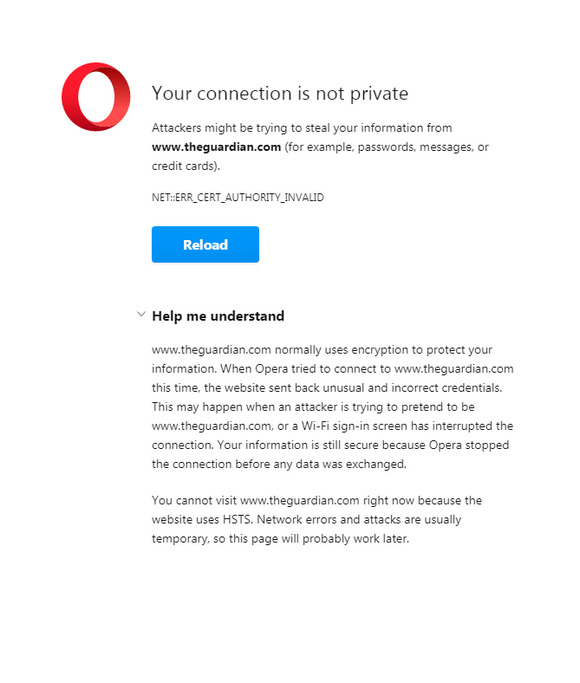
Total refusal to visit a normal website.

This common Web browser problem is usually related to only a handful of sites and is incredibly difficult to troubleshoot, and for most people will be impossible to fix. I tried everything, and I know Windows and browsers inside-out. Nothing worked.

The ‘nuclear’ cure, which works with Opera and apparently other Chrome-based browsers, is then to simply add the following to your browser icon’s launch path. This path is found by right-clicking on the launch-icon and then looking in its Properties path. No more problems, if you add there…

-ignore-certificate-errors
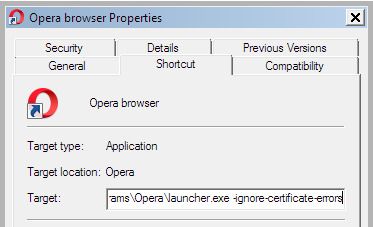
This needs to applied after the shortcut has been pinned to the TaskBar, not before.

The site will now load fine. Tested and working with the Opera browser and theguardian .com

Obviously this will not be the same browser you use for Internet banking, PayPal etc. Or in such cases you will at least launch the same browser from another un-fixed launch icon.

The alternative is to switch from Chrome to the Pale Moon browser. Pale Moon, being based on Firefox, uses its own certificate store rather than relying on that of Windows. I don’t know of any way to have Chrome do the same.


Update, December 2023: this old post takes on a wider significance…

“Proposed EU legislation gives European governments the ability to conduct man-in-the-middle attacks against secured web communications (i.e. https). It would be illegal for browser makers to reject certificates compromised by governments.”

How to block by keyword with uBlock Origin

Google Search is now adding “People also searched for” pop-down panels, placed under individual search results. These often appear on using the back button to go back to a page of former results.

I don’t want any kind of ‘pops’ in my search-results. Block them all in your uBlock Origin filter list, by adding this filter…

The above is also a working demo of how to use an xpath command to block any keyword inside a DIV’s ID. In this case the filter blocks all HTML DIVs with an internal ID containing the letters “eob”. This blocking is not constrained to just these letters, meaning that the command will also block “eob77” or “eob_34”, without the need for a wildcard * symbol. This is required for Google Search, as all the “eob” instances have a number after them.

Archive.org webinar – Controlled Digital Lending

“Frequently Asked Questions About Controlled Digital Lending”, a free Archive.org webinar on 19th June 2021, at 12:00 PM Eastern time USA. Via Zoom.

Even though CDL is used at hundreds of libraries around the world, questions remain about this important innovation in digital library lending. In this session, we’ll be tackling the most commonly asked questions surrounding CDL and answering some of yours.

How to enable hyphens to mdash in Word 2007

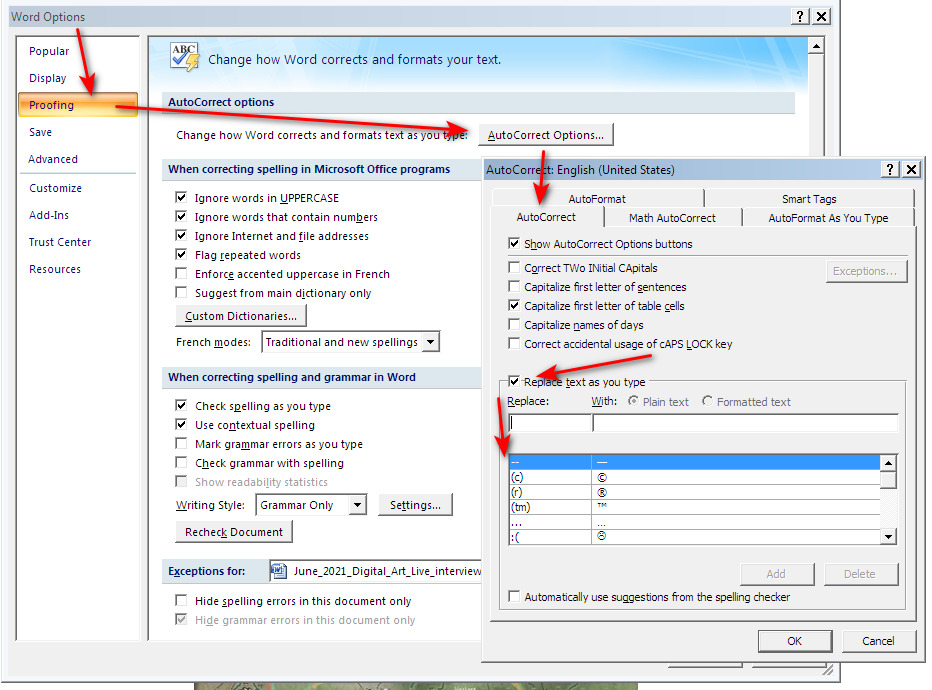
For some reason my fresh install of trusty old Microsoft Word 2007 does not do the autocorrect for converting two typed hyphens – – into a long and the mdash autocorrect thus setting had to be applied manually. For future reference, and perhaps useful for others, here’s how to do that…

As you can see here I’ve already added it, and it’s been saved to the options below. Word is supposed to do thus autocorrect automatically but if that fails, the above will set the behaviour manually.

Added to JURN

Indian Journal of History of Science (Indian National Science Academy)

VIS : Nordic Journal for Artistic Research

Arts, Buildings & Collections Bulletin (National Trust)

Mapping the Impossible : Journal for Fantasy Research

Journal of Gandharan Buddhist Texts

Symphonya : Emerging Issues in Management

Journal of Effective Teaching in Higher Education

IWA Publishing journals (group of journals on water technologies, now all OA)

Yippy-die-day…

Sad to see that the search-engine Yippy, based on Bing, has yipped its last yip. The domain now bounces to DuckDuckGo. When its sources were last heard of, Yippy was a version of Bing but with a strong boost given to sites for complex coders, regex wranglers, javascript jugglers and HTML hammerers. Also technical hobbyist sites in other fields, it was said. As such it was rather useful on occasion. It was also nice that it didn’t freak out if you ran the same search seven or eight times or more. It tolerated drilling at depth, which Google now has problems with.

DuckDuckGo is partly based on Bing (a blend of Bing and Yandex, when its sources were last heard of). It appears to be unknown if there has been a back-end ingestion that makes it a replacement for Yippy. But a few initial tests suggest it might be a reasonable replacement, and may have had some of Yippy’s weightings plugged in. For instance try a search for…

“href.replace” regex script

But if you want a technical search for your field or hobby in 2021, with full indexing reach and relevance-ranking, it’s probably best to create a Google Custom Search Engine (CSE) and populate it with about 100 or so of the top relevant URLs.

Added to JURN

Music For and By Children

IMPAR: Online Journal for Artistic Research

Journal of Controversial Ideas

Border and Regional Studies

Ethnologia Polona

Dostoevsky Studies

IBERIA : An International Journal of Theoretical Linguistics

Interdisciplinary Egyptology (forthcoming later in 2021)

MINIKOMI: Austrian Journal of Japanese Studies

Journal of the European Association for Chinese Studies, The


Water Cycle

CC Search goes to WordPress.org

CC Search, aka Creative Commons Search Engine, is moving to WordPress.org, which has also “hired key members of the CC Search team”. WordPress CEO Matt Mullenweg also states on his blog of CC Search… “audio and video [are] soon to come” with the support of WordPress.org.

CC Search should not be assumed to be a one-stop solution. It appears, for instance, to be completely useless for DeviantArt. Presumably DeviantArt is traffic-shy in that respect, and its bots are being blocked there. If WordPress could find a way to have DA open up, that would also be a major boost to the service.

Your Ulthar battle-cat army has arrived…

Scan The World is a new site for free Creative Commons scans of real-world objects, aimed at people who want to waste time and money on making worthless plastic tat 3D-print delightful plastic objects. We’ve seen such sites before, but this one looks like it’s well-organised and commercial enough to succeed.

Sadly the 3D printing angle means that “objects” is often where it ends, as nearly all my test downloads under full Creative Commons were simple .OBJs and thus lacked the vital photogrammetric textures seen in the previews. Those that did have textures tended to be under non-commercial Creative Commons. Such as this fab 3D printable Cat Armour.

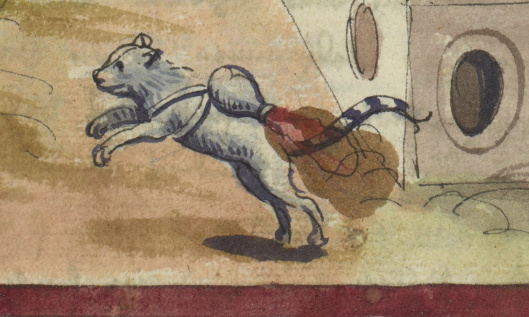
I somehow doubt has a medieval original, but there were medieval rocket-cats, so you never know…

Overall, despite the limitations and ads Scan The World is an ‘open downloads’ site and no sign-up is required to download.