Back on the menu…

Another useful Google UserScript that works in 2020, Fixed Order Google Categories.

This cryptically-named December 2019 script puts the Google top menu-bar into the following order, and prevents Google from pushing items around or pushing sales-oriented items forwards…

Before:

After:

You can then also very easily edit the script to remove “Shopping”, “Flights”, “Finance”, while having “Books” on the main menu. These items are still available if needed, but are hidden under “More” along with a “Books” duplicate.

Custom:

The new addition of “Books” happily passes through the search query as usual. Note that “Jurn” is being added here via my own additional script, and that “Videos” is also gone as I never use it.

So, now Google is fully “fixed up” again for me, following the demise of GoogleMonkeyR. With a slight toning down of the background colour, this is what it looks like for me in January 2020. The gaps being Google Hit Hider in action…
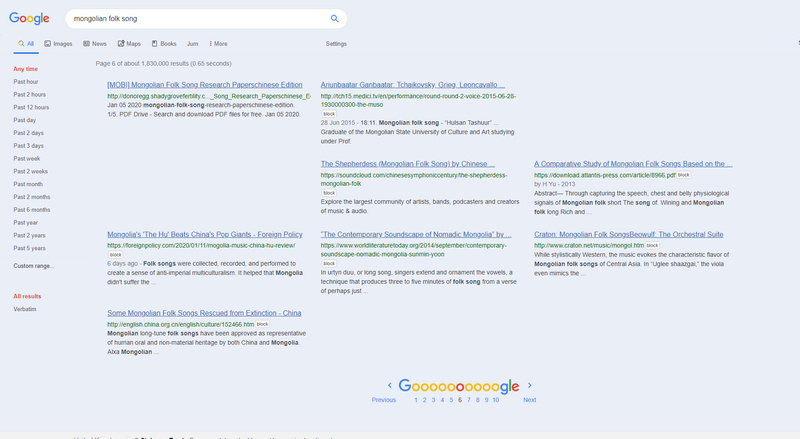
All ‘auto-suggestions’ and ‘quick answers’ panels and similar junk removed, and just the search results left. No images anywhere, except in the search results from “Images”. Robust blocking via Google Hit Hider. Full URL paths, in green below blue links.

Update: I now have a tutorial on how to do this: Google Search in three columns: how to do it in 2020.

Update: Reorder Google Categories

Save the URLs

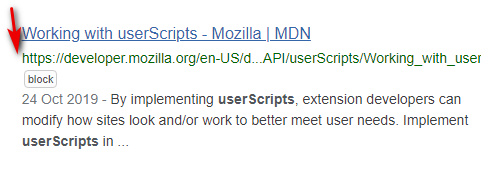
Lovely. Another useful new UserScript for Google Search and Google Books. Old Google Search simply brings the URL back down to below the link title, where it’s been for decades. Works fine on combination with the Google Search restore URLs (undo breadcrumbs) script.

The ugliness Google would like you to endure, with ‘screaming’ page titles…

What you get while using Old Google Search / Restore URLs / and the Classic Links UserStyle…

Also works on Google Books, and plays nicely with the Google search in several columns script I blogged about and tested earlier today.

Incidentally, those with sharp eyes may note above that the URL fails to wrap nicely and is slightly truncated and masked at the end, in a multi-column view. This has just this minute been fixed in the Google Search restore URLs (undo breadcrumbs) by a new update to the script.

New script: Google search in several columns

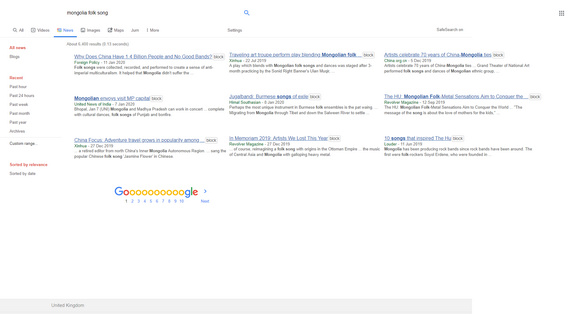
There’s a new Google Search ‘in columns’ script: Google search in several columns (Dec 2019). It’s the only one I know works on Google News results in 2020 (I mean the proper Google News search results, not the ersatz variety also available), for those using a desktop PC and widescreen monitor.

I found that 3 columns on a 1920px widescreen was possible, though I had to tweak the script a little for fitting and beautification. For instance I had to blank the silver dividing line between columns to accommodate the “block” buttons generated by my HitHider addon.

I also removed the “Cache” link on search results, which otherwise lays on top of and partly blocks the view of the URL title. “Cache” can be blocked from appearing, via adding a line in uBlock Origin thus…


! 16/01/2020 google com
! remove cache link button
xxx.google.com##div.yWc32e

Update: this cache link-removal/fix not needed if you have the latest version of Google Search restore URLs.

If you have image thumbnails blocked on News search results, via uBlock Origin thus…


google.*##[id^="news-thumbnail"]
google.*##[alt^="Story image"]

… then to aid this script’s columns you may also want to make sure you remove the space-padding left behind by such images, so as to straighten up the looks of the three column layout…


! 16/01/2020 google com
! remove empty image-block padding from results
! and also block tiny favicons from results
xxx.google.com##a.top.NQHJEb.dfhHve
xxx.google.com##.xA33Gc

Other items at work on the above screenshot are Google Search Restore URLs, and Google Search Sidebar. I haven’t yet figured out how to get the Goooooogle footer to centre on the page.

If you want to tell the script not to load on Google Books, then add…


// @exclude http*://xxx.google.*tbm=bks*
// @exclude http*://xxx.google.*.*tbm=bks*

The script also plays nicely with the Stylish UserStyle Google Search in columns, which takes care of showing Google Books in three columns and does a far nicer job of it. For the main Google Search also appears to prevent result-breaking, where half a result is in one column, and half in another column.


In the above code, replace xxx with www — despite wrapping the code in code tags, WordPress refuses to respect the actual code and shows www. as a linked http://www.

How to hide all animated GIFs in Facebook comments

This seems rather suitable for those musing on New Year and resolutions. No more GIFs, many of which still seem to get past GIF-blockers in the form of other formats.

How to hide all animated GIFs in Facebook comments:

This blocking option has been in the FBP Web browser addon since v.29.0 (May 2019), though it’s well-hidden. It’s found in the “Font, Colour & Design” section of the FBP options screen, where almost no-one would think to look for it.

1. Install FBP and re-start the Web browser. Visit Facebook, locate the icon at the top of the Facebook page that launches the FBP control panel.

2. Find and open the “Font, Colour & Design” section on the left-hand side.

3. Tick “Hide Animated Gifs”. Save settings, and exit the control panel.

4. Reload your Web browser and test on an especially annoying Facebook Group. A blank space should replace the animated GIF.


Related: How to stop YouTube’s new animated ‘thumbnail previews’.

Update: October 2020: no longer working fully. I still see some animated GIFs in comments, despite having FBP working correctly.