• Directory
  • FAQ: about JURN
  • Group tests
  • Guide to academic search
  • JURN’s donationware
  • Links
  • openEco: titles indexed

News from JURN

~ search tool for open access content

News from JURN

Category Archives: JURN tips and tricks

How to resize pages in a squished PDF

25 Wednesday Nov 2020

Posted by futurilla in JURN tips and tricks

≈ Leave a comment

Sometimes you get a PDF where the page is “squished”, as seen here…
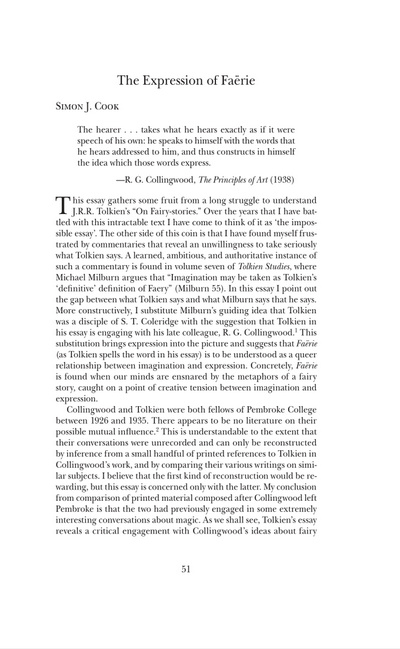
Bad, some dunderhead saved the pages with slightly wrong proportions and didn’t notice.
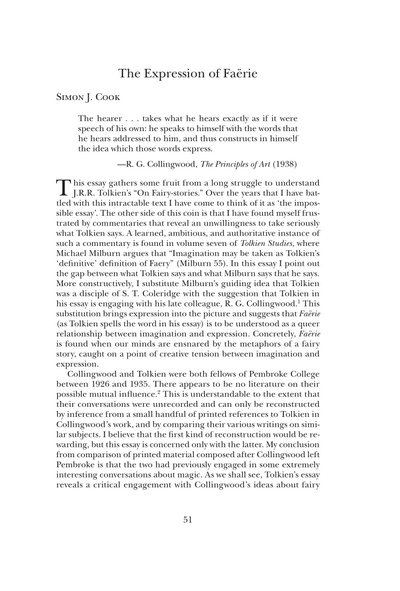
Good, as it should be.

It can also happen when ebooks files are being bulk converted to .PDF files. It’s often especially noticeable where there is artwork with faces. The slightly “squished” or “stretched” result is locked in a PDF file and is difficult to change. It’s no use trying PDF tools that only scale a page proportionally, or simply crop the page, or will re-print from U.S. Letter size to UK A4 size etc. Because you only need to change each page along one dimension, not along both.

There are three or four online tools for fixing this in a PDF, though that’s not much help if you have a 200Mb PDF and a very slow upload speed, or are offline. Or have 50 such files to process. Or if your business has a mission-sensitive document you’d rather not sent to Whereizitagin. The full paid Adobe Acrobat can also do the repair though in a clunky way, from Adobe Acrobat DC (2015, not to be confused with Adobe Reader) onward, via fiddling around with Preflight and following a convoluted recipe.

Are there any fast Windows desktop options? I found and tested three working possibilities, one free.

1. The free and trusty Irfanview can open PDFs (with the free Ghostscript and free plugins pack installed). This combo can together open and page through PDFs. Irfanview can even resize the first page in an unconstrained way, so you can work out what your re-size dimensions need to be. Sadly it can’t then flow this resizing over to all subsequent pages. Instead it can at least automatically save out all the pages as .PNGs or .JPGs, then you’d open their output folder and batch resize them with Irfanview. Then you’d re-compile them back to a .PDF file, or zip them into into a Comic Book .CBZ file.

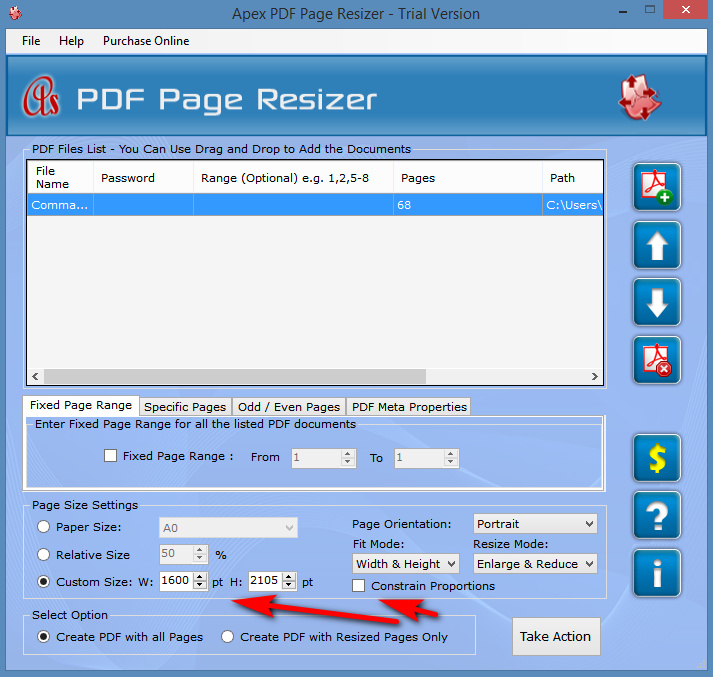
2. Apex PDF Page Resizer did the job easily and perfectly, although it’s expensive at $20 via FastSpring. Over-priced, for a one-trick-pony that won’t be used too often. There’s a 30-day trial with only a light watermark.
3. Advanced PDF Tools at $38. Twice the price it should be, but it does the job after a quick bit of fiddling with the settings. As you can see here, you scale the Page Content by a % and then pad in pt’s to accommodate the added width or height. It’s a bit more hit-and-miss than Apex.
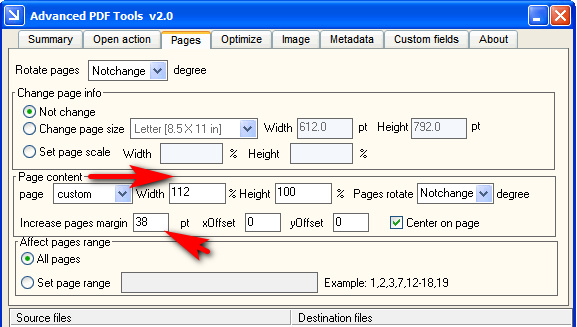
As you can see, you’re getting many more features than Apex PDF Page Resizer. But the very fast output speed and exactly the same file-size in output suggests it is working in much the same way as Apex, probably via a .NET Windows GUI that gives a pipe into several key Ghostscript switches.

In both, the settings are then run across all pages, and a new repaired .PDF is swiftly saved out. It strikes me that such a relatively slight change could be one way of detecting a leaker in an organisation. Give each person a .PDF copy with very slightly widened or lengthened pages, such that each imperceptibly changed .PDF is unique to one person.

I looked hard but could not find anything with a GUI for Windows that hooked into Ghostscript’s resizing and scaling switches in the same way as the above two, but for free. pdfScale: Bash Script to Scale and Resize PDFs using Ghostscript came closest (see the scripts at the end) and may interest some.

If you just want to crop pages to a user-defined rectangle, including instances where you have several columns on the same page, the free Briss is well recommended.


(If you have a related problem, a PDF that shows the curved pages of a book as photographed from above with a hand-held camera, see my recent How to auto-correct curved book pages post)

How to delete search-box auto-suggests in the Opera browser

13 Friday Nov 2020

Posted by futurilla in JURN tips and tricks

≈ Leave a comment

Well, here’s a handy trick for users of the Opera Web browser, and possibly of any other Chrome-based browser. Do you have a lingering and slightly annoying search-box autosuggest, which occurs on non-search websites? Such as on one of your WordPress blogs…

If so, then it’s no use searching in Opera’s Settings | Advanced | Privacy | Autofill. Only things like home mailing addresses and passwords live back there.

What you do is move your mouse cursor down to highlight (but not click) the offending suggestion, when it occurs in normal use. Then it’s hands-off your mouse, to press SHIFT and then DEL (delete) simultaneously on your keyboard. This removes the offending suggestion.

Get an RSS feed for any YouTube channel

31 Saturday Oct 2020

Posted by futurilla in JURN tips and tricks

≈ Leave a comment

YouTube has removed the ‘Export RSS feeds list’ option from your Subscribed Channels List. It used to be that it was at the foot of the page. The link to this feature is now nowhere to be found.

For the time being the RSS feeds are still there and working, however. A standard subscription URL is in the form of…

https://www.youtube.com/channel/UCralF3lNmSNYFaFtul5apuw

.. and a handy bit of UserScript reveals the current YouTube RSS feed URL is in the form of…

http://www.youtube.com/feeds/videos.xml?channel_id=UCralF3lNmSNYFaFtul5apuw

Therefore, you go to your Subscribed Channels List page, and there use LinkClump (or similar) to copy out just the channel URLs and then in Notepad…

Search: /channel/

Replace: /feeds/videos.xml?channel_id=

You then have a list of RSS feeds for your subscriptions.

Working Excel spreadsheet: Take a list of home-page URLs, harvest the HTML, extract a snippet of data from each

11 Sunday Oct 2020

Posted by futurilla in JURN tips and tricks

≈ 1 Comment

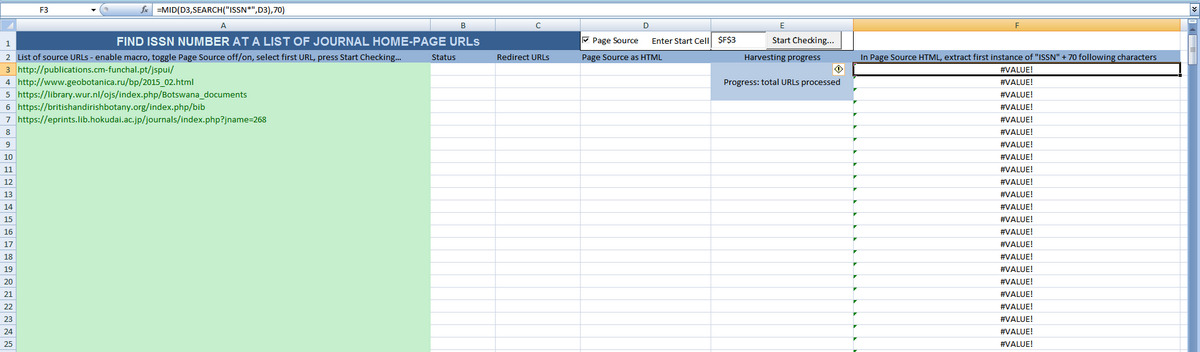
I’m pleased to present a free ‘ISSN harvester’ for Excel 2007 or higher.

What you need: You have a long list of home-page URLs, one per line. You want a small snippet of data captured from each HTML page. The target data is not in any kind of repeating HTML table or tag, and could be anywhere on each page.

Usage: A long list of home-page URLs is pasted into the first column. The sheet then checks each URL in turn, and also extracts their HTML source into an adjacent cell. A formula in the end column then looks at the captured HTML and extracts the first instance of “ISSN” and any 70 following characters. Where no result is found, the formula leaves a general label as a placeholder.

Download: ISSN-and-data-checker-working.xlsm

Works in Windows and Excel 2007. May require the user to have Internet Explorer installed. Tested and working fine on an 800+ URL list. Each URL just captures the loaded page, not the entire website.

It should be adaptable to capture any snippet of data, just vary and replace the formula. Theoretically, you could also add extra columns to capture other data from the same HTML, such as “i s s n” or “eISSN”.


Credit: This is derived and expanded from the free “Bulk URL status checker in Excel sheet”, which checked a list of home-page URLs for 404s, and also rather usefully extracted each page of HTML to a cell while it was about it. I would have had no idea how to set up that ‘HTML per cell’ bit, without his working example. That spreadsheet was kindly shared on the TechTweaks blog by ‘Conscience’ in April 2017. Here it has been adapted by myself to also extract data.

Working Excel spreadsheet: Align two lists without fuzzy lookup

09 Friday Oct 2020

Posted by futurilla in JURN tips and tricks

≈ Leave a comment

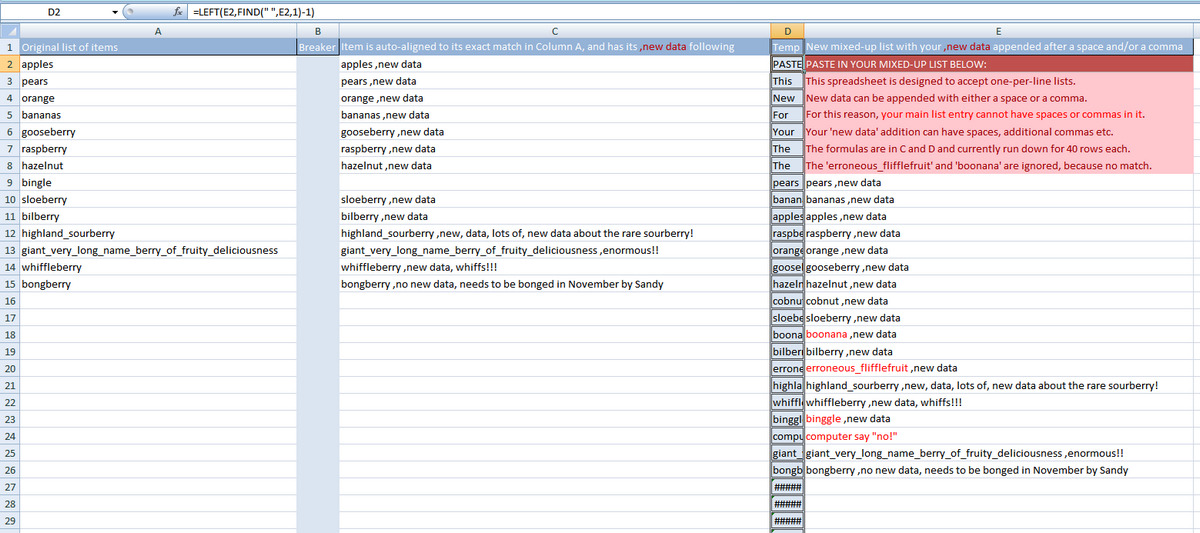
Here’s my possibly-useful working Excel list-sorter, made for Excel 2007 and higher.

Situation: You have a long list of items in column A. You’ve copied out this list to run it through a process elsewhere, perhaps in some arcane Windows freeware that is the only thing that can do a particular job for free. This process has added a snippet of wanted new data at the end of each item. Hurrah!

But… possibly the process also discarded some lines, when no new data was found. Or perhaps a ‘helpful’ intern has later added a few lines here and there to the new list. Your new processed list is thus rather awkwardly jumbled up. You can no longer easily align your valuable new data snippets against the old list.

Use: Paste your jumbled and expanded list in Column E, and Column C will automatically sort and auto-align it alongside the original list. No ‘fuzzy lookup’ engine is required.

Download: match_and_sort_without_fuzzy_lookup

How to force Excel to import a .CSV properly

09 Friday Oct 2020

Posted by futurilla in JURN tips and tricks

≈ Leave a comment

A useful tip to know, for those times when Excel is refusing to properly load a .CSV file. Open the file in Notepad++ and just add…


sep=;

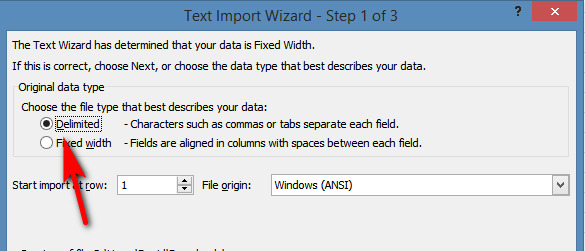
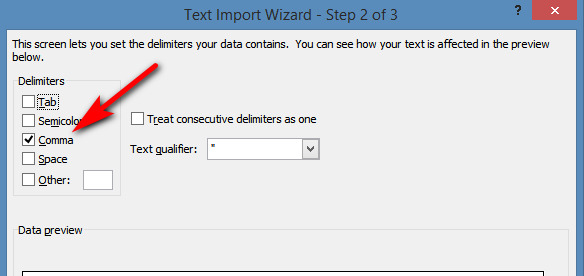
…right at the start of the file. Save and exit. This command then forces Excel to open its separated data-import wizard, on import. In the three-step Wizard, set to Delimited and Commas…

Two vital Google Search UserScripts, fixed

07 Wednesday Oct 2020

Posted by futurilla in JURN tips and tricks, JURN's Google watch, Spotted in the news

≈ Leave a comment

Newly fixed vital UserScripts for use with Google Search:

Google Search Sidebar

Google Search restore URLs (undo breadcrumbs). This restores readable URL-paths in search results, a vital aid to avoiding the growing amount of spam in Google Search.

Add the following to the top of the Breadcrumbs script, to stop it working on Google Books.


// @exclude http*://www.google.*tbm=bks*
// @exclude http*://www.google.*.*tbm=bks*

Some free tools to extract data from fetched HTML

07 Wednesday Oct 2020

Posted by futurilla in JURN tips and tricks

≈ Leave a comment

Here are some relatively simple free Windows desktop tools to ‘extract an item of data from fetched HTML’. They were found while considering if it might be possible to append ISSNs to the JURN directories in a semi-automatic manner.

My target task was: you have a big list of URLs, and the HTML pages for these are to be automatically fetched. Their text is then regex-ed (or the Excel equivalent) to extract a tiny snippet of text data from each page. In this case, any line following the first instance of the word “ISSN” on each home-page. Ideally, each extracted text snippet is then automatically appended to its source URL.

1. Excel Scrape HTML Add-In, free from Analyst Cave. I can’t do anything with it in Excel 2007, so I assume it needs Excel 2016 or higher (2016 introduced the new features Power Query and Get & Transform).

2. Download WebExtractor360 1.0. Simple Windows abandonware from 2009, and lacking any Help in terms of… how do you format your big list of URLs so they can be automatically processed? It also looks like it cannot be limited to just the first-encountered home-page. Still, someone might figure out that bit of the WebExtractor360 puzzle, or pick up the open source code at SourceForge and develop it for easier batch processing and expanded output options.

3. DEiXTo. Genuine Windows freeware from Greece, for “Web data extraction made easy!” The baffling interface and example-free techie manual strongly suggest otherwise though, and you’ll likely need to read the manual very carefully to get it working. There’s also a 2013 academic paper on DEiXTo from the authors.

4. Update: the open source freeware Web-Harvest 2.x from 2010, Java with a clean Windows GUI and a good manual. Seems like a good alternative to DEiXTo. Still works and has many examples and templates, but no template to run through a list of URLs and grab a fragment of data from each home-page. Despite the name it’s a data extractor, not a site harvester.

5. Update: I made one for Excel 2007, and it’s free. Take a list of home-page URLs, harvest the HTML, extract a snippet of data from each.

For paid Windows desktop software, that doesn’t require a PhD in Spreadsheet Wrangling and which indeed assumes you’re not working in Excel, look at Sobolsoft’s $20 Extract Data & Text From Multiple Web Sites Software and BotSol’s Web Extractor. The first from Sobolsoft requires Internet Explorer and that you delve into two of Explorer’s settings to make it not be verbose, in terms of IE not freaking out with process-stopping alerts every time it meets a Twitter button etc. Search is not ideal, as it cannot be limited to just the first-encountered ‘home’ page. Output it not ideal either, as it cannot offer Source URL = no result as a line in the results. The latter software from BotSol has the great advantage that it can limited itself to the home-page and will also try another 2 nearby pages (“About” etc), if it can’t find the target data on the home-page. It’s designed to extract phone numbers, but can be configured to get anything. It’s free for a version that processes a list of 10 URLs at a time, and is $50 for an ‘unlimited URLs’ version (that is regrettably time-bombed).

There are browser-based tools like the long-standing OutWitHub and new free Cloud services such as Octoparse, but they appear focused on ripping competitor ecommerce listings and plugging them into your boss’s database. Also, apparently Octoparse’s “List of URLs” feature requires all the pages to have exactly the same HTML elements.

A robust fix for reaching the Classic Editor, for free WordPress.com blogs

03 Saturday Oct 2020

Posted by futurilla in JURN tips and tricks, Spotted in the news

≈ 1 Comment

I’m pleased to see that the vital WordPress.com edit post redirects UserScript has updated, and it handles the current changed arrangements at the WordPress.com free blogs. It’s working fine for all functions (start new post, edit post from side-link on existing post, edit post from wp-admin list, etc). It briskly takes you and your post to the Classic Editor, rather than to the awful Block editor.

I had coded a Lua script for the StrokesPlus mouse-gestures freeware to provide a workaround for the current problem, which was working. But it’s now no longer needed. Here it is anyway, for what it’s worth…


-- A LUA SCRIPT for a STROKESPLUS mouse-gesture.
-- TITLE: Auto-load the Classic Editor at WordPress.com
-- DATE: October 2020.
--
-- Your Web browser is at ../wp-admin/edit.php and you do the mouse gesture.
-- First the script pauses, to ensure wp-admin has time to fully load itself
acDelay(1500)
-- select and copy the current browser URL
acActivateWindow(nil, gex, gey)
acSendKeys("^l{DELAY 100}^c")
url=acGetClipboardText()
-- process the browser URL, trimming it back
new_url=string.gsub(url,"(.+)/.+/?","%1")
acSetClipboardText(new_url)
-- load the new trimmed URL in the browser
acSendKeys("^v{DELAY 100}{ENTER}")
-- copy the current browser URL again
url2=acGetClipboardText()
-- append the posting URL and thus effectively go to New Post
new_url2=string.gsub(url2,".+/?","%1/post-new.php")
acSetClipboardText(new_url2)
acSendKeys("^v{DELAY 100}{ENTER}")
-- delay 7 seconds to allow the sluggish Block editor to load
acDelay(7500)
-- type the word draft in the post title, and Ctrl + S to save as a Draft post
acSendKeys("draft")
acSendKeys("^s")
-- pause 3 seconds for WordPress to switch to the new numbered URL
acDelay(3000)
acActivateWindow(nil, gex, gey)
-- copy this new URL to the clipboard
acSendKeys("^l{DELAY 100}^c")
url3=acGetClipboardText()
-- append the vital &classic-editor slug to the end of the URL
new_url3=string.gsub(url3,".+/?","%1&classic-editor")
acSetClipboardText(new_url3)
-- take the Draft post into the Classic Editor and finish.
acSendKeys("^v{DELAY 500}{ENTER}")


And to handle the additional “Edit” side-link on posts, you’d use a second Lua script with its core being…

-- look at the current URL, keep only the post number
new_url=string.gsub(url,"[^0-9]","")

… then prepend and append the required URL structure around the post number, to get a working URL back again, then load that URL.


Will either of these solutions last beyond 2021? Perhaps not, as I suspect the Classic Editor will then be killed off totally as previously announced for that date, rather that effectively hidden from the mass of users. As such it’s probably best to just start learning the free Open Live Writer and try to use free blogs in WordPress.com that way. That assumes, however, that in 2021 WordPress.com doesn’t also block offline-editing using such blogging software.

Free: My Little Regex Cookbook, for Notepad++

27 Sunday Sep 2020

Posted by futurilla in JURN tips and tricks

≈ 3 Comments

New, My Little Regex Cookbook as a printable eight-page PDF. It has numerous working examples of useful regex for Notepad++ users working with data extraction and text lists. All tested and working in Notepad++.

This is my expanded and now prettified 1.3 PDF version of what first appeared here as the post “Some useful regex commands for Notepad++” in May 2019.

Download: little_regex_cookbook_2020.pdf

← Older posts
Newer posts →
RSS Feed: Subscribe


Please become my patron at www.patreon.com/davehaden to help JURN survive and thrive.

JURN

  • JURN : directory of ejournals
  • JURN : main search-engine
  • JURN : openEco directory
  • JURN : repository search
  • Categories

    • Academic search
    • Ecology additions
    • Economics of Open Access
    • How to improve academic search
    • JURN blogged
    • JURN metrics
    • JURN tips and tricks
    • JURN's Google watch
    • My general observations
    • New media journal articles
    • New titles added to JURN
    • Official and think-tank reports
    • Ooops!
    • Open Access publishing
    • Spotted in the news
    • Uncategorized

    Archives

    • February 2026
    • January 2026
    • October 2025
    • May 2025
    • April 2025
    • September 2024
    • June 2024
    • May 2024
    • April 2024
    • March 2024
    • February 2024
    • January 2024
    • December 2023
    • November 2023
    • October 2023
    • September 2023
    • June 2023
    • May 2023
    • January 2023
    • December 2022
    • November 2022
    • October 2021
    • September 2021
    • August 2021
    • July 2021
    • June 2021
    • May 2021
    • April 2021
    • March 2021
    • February 2021
    • January 2021
    • December 2020
    • November 2020
    • October 2020
    • September 2020
    • August 2020
    • July 2020
    • June 2020
    • May 2020
    • April 2020
    • March 2020
    • February 2020
    • January 2020
    • December 2019
    • November 2019
    • October 2019
    • September 2019
    • August 2019
    • July 2019
    • June 2019
    • May 2019
    • April 2019
    • March 2019
    • February 2019
    • January 2019
    • December 2018
    • November 2018
    • October 2018
    • September 2018
    • August 2018
    • July 2018
    • June 2018
    • May 2018
    • April 2018
    • March 2018
    • February 2018
    • January 2018
    • December 2017
    • November 2017
    • October 2017
    • September 2017
    • August 2017
    • July 2017
    • June 2017
    • May 2017
    • April 2017
    • March 2017
    • February 2017
    • January 2017
    • December 2016
    • November 2016
    • October 2016
    • September 2016
    • August 2016
    • July 2016
    • June 2016
    • May 2016
    • April 2016
    • March 2016
    • February 2016
    • January 2016
    • December 2015
    • November 2015
    • October 2015
    • September 2015
    • August 2015
    • July 2015
    • June 2015
    • May 2015
    • April 2015
    • March 2015
    • February 2015
    • January 2015
    • December 2014
    • November 2014
    • October 2014
    • September 2014
    • August 2014
    • July 2014
    • June 2014
    • May 2014
    • April 2014
    • March 2014
    • February 2014
    • January 2014
    • December 2013
    • November 2013
    • October 2013
    • September 2013
    • August 2013
    • July 2013
    • June 2013
    • May 2013
    • April 2013
    • March 2013
    • February 2013
    • January 2013
    • December 2012
    • November 2012
    • October 2012
    • September 2012
    • August 2012
    • June 2012
    • May 2012
    • April 2012
    • March 2012
    • February 2012
    • January 2012
    • December 2011
    • November 2011
    • October 2011
    • September 2011
    • August 2011
    • July 2011
    • June 2011
    • May 2011
    • April 2011
    • March 2011
    • February 2011
    • January 2011
    • December 2010
    • November 2010
    • October 2010
    • September 2010
    • August 2010
    • July 2010
    • June 2010
    • May 2010
    • April 2010
    • March 2010
    • February 2010
    • January 2010
    • December 2009
    • November 2009
    • October 2009
    • September 2009
    • August 2009
    • July 2009
    • June 2009
    • May 2009
    • April 2009
    • March 2009
    • February 2009

    Proudly powered by WordPress Theme: Chateau by Ignacio Ricci.