• Directory
  • FAQ: about JURN
  • Group tests
  • Guide to academic search
  • JURN’s donationware
  • Links
  • openEco: titles indexed

News from JURN

~ search tool for open access content

News from JURN

Category Archives: JURN tips and tricks

“I’m sorry Dave, I can’t do that…”

16 Wednesday May 2018

Posted by futurilla in JURN tips and tricks

≈ Leave a comment

“I’m sorry Dave, I can’t do that…” That’s the default position from the makers of the Firefox Web browser.

It doesn’t matter that you’ve turned off all the browser’s Update settings (Options | Advanced | Update | “Never check for updates”) and so on. You’ll still be nagged. Regularly. With a slide-down into your screen, while you’re browsing, telling you the browser is ‘out of date’.

There is a simple way to fix it, and though it took a long time to find it, and applying it worked for me:

1) type about:config to get into Firefox’s deep settings.

2) Search for the config entry extensions.shield-recipe-client.enabled and ensure it is set to False. A double-click should toggle the True/False settings.

3) Exit about:config and restart Firefox.

In the end, though, this nag prompted me to make the switch to the Opera browser. Which I’ll detail in another post. Well done, Firefox guys.

Free OCR for German blackletter text

10 Thursday May 2018

Posted by futurilla in JURN tips and tricks, Spotted in the news

≈ 1 Comment

The free open-source Tesseract OCR 4.0 for Windows (beta, 64-bit), released 14th April 2018.

“The Mannheim University Library uses Tesseract to perform OCR of historical German newspapers. Normally we run Tesseract on Debian GNU Linux, but there was also the need for a Windows version. That’s why we have built a Tesseract installer for Windows.”

The Tesseract engine was apparently originally from Google, in use there at Google Books, but Google made it open source.

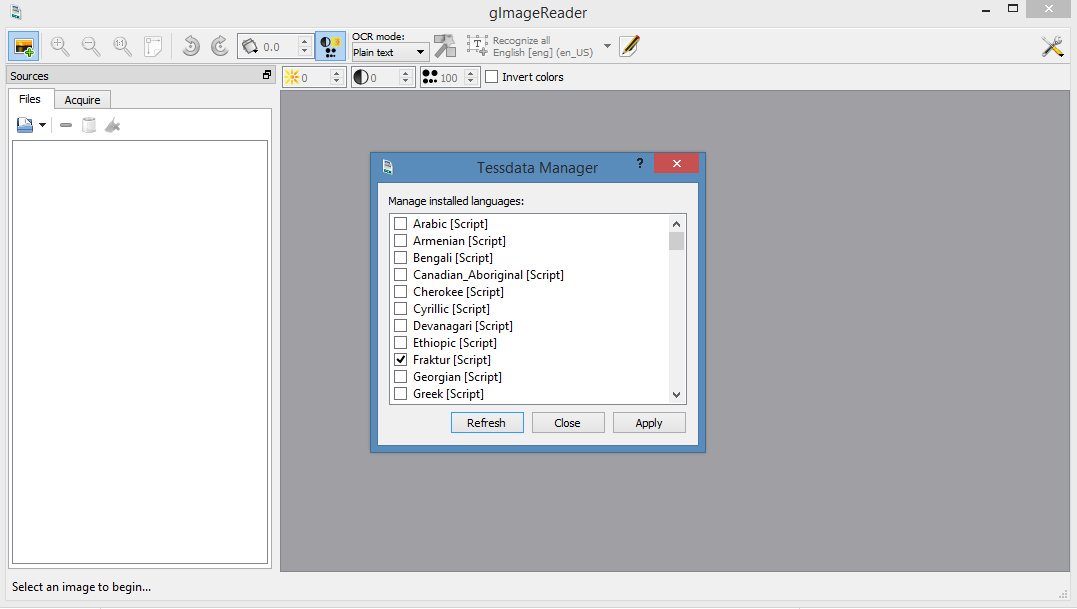
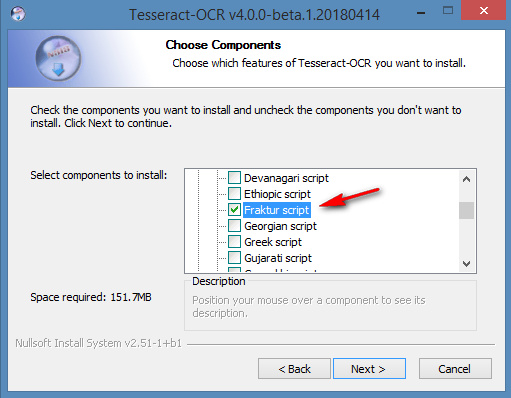
Tesseract 4.0 supports OCR in a range of old and ancient letterforms including German blackletter (aka Fraktur, in popular parlance ‘Gothic’), but these need to selectively enabled at install…

Once installed there are a few Windows GUI front-ends to choose from, with which to operate Tesseract. gImageReader is 64-bit Windows and current. On their forums I found a gImageReader beta version that is newly-compiled for Tesseract 4.0 beta. That needs to be launched in Windows Administrator mode, and then it also seems to require a Fraktur download, in order to handle OCR of German blackletter letterforms…

I’m assuming that gImageReader ‘knows’ where Tesseract 4.0 is, and hooks into it automatically. Because I didn’t need to set any file-paths to it, in gImageReader.

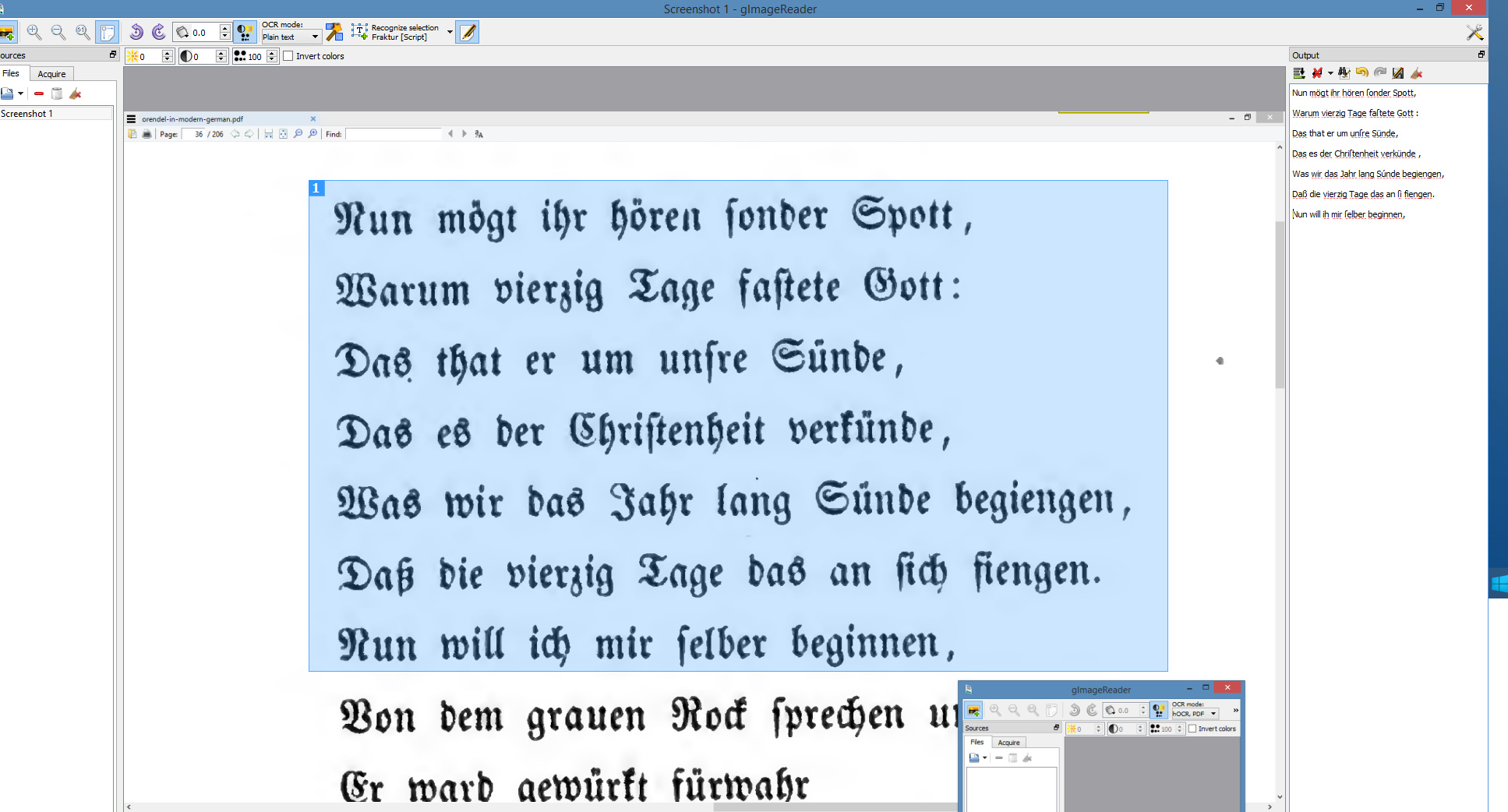
Once gImageReader is set up and the Frankur toggle/icon is switched, even when taking a screenshot the OCR results were pretty good…

It can also handle complete PDFs, and seems to go at about 15 pages per minute on a modern desktop PC. Nice to have, and (in combination with Google Translate) useful if your research takes you back to the German literature of pre-1938 — but you can’t read German and certainly not in blackletter.

There are probably online sign-up services that can do the same, these days, where you do a sluggish upload and have to deal with time-outs and usage-quotas etc. But I prefer the ease of having one’s own Windows desktop software.

Google Translate does PDFs

10 Thursday May 2018

Posted by futurilla in JURN tips and tricks, My general observations

≈ Leave a comment

New to me: Google Translate now works on foreign-language PDFs. Perhaps it’s been available for a while, but I’ve seen no-one blogging about it.

It doesn’t work if you just right-click on the Web link to the PDF in, say, Google Scholar or JURN search results, and then select “Translate this page…”.

Instead you have to:

1) Right-click, and copy to the clipboard the direct PDF link.
2) Visit Google Translate, manually paste in the URL you just copied.
3) Click on the URL that appears over in the facing box.
4) The PDF text appears extracted, in the form of a Web page, and translated.

Very useful, and I had excellent results with a Polish article I tested. I had the whole article translated, too, not just the first few paragraphs. Longer items such as a PhD thesis will be refused as “too long”.

Note that a ‘redirect URL’, which gives the PDF but hides the direct URL link to the PDF, is of no use in the above workflow.

Sadly I guess it’s also a route to plagiarism for students. I’d suggest that the anti-plagiarism detector-bot services might usefully build a bank of Google-translated theses and dissertations, to add to their phrase-detection sources. Teachers who mark suspiciously-excellent final dissertations, and who are then inclined ‘to go on the hunt’, should also be aware of the possibility that the lacklustre student may have run a foreign dissertation through Google Translate and then lightly re-written it for clarity in English.

“Open Link in…”

03 Tuesday Apr 2018

Posted by futurilla in JURN tips and tricks

≈ Leave a comment

Are you a veteran Google News searcher-and-clicker? Are you utterly fed up of having your view of the news article blanked after five seconds, by a “Sign up for our…!” screen-blocker?

Yes, there are things like “Enter Reader Mode” built in to Firefox, but you need to be at the page first, then you switch to Reader Mode. Instapaper, ditto. Wouldn’t it be quicker to:

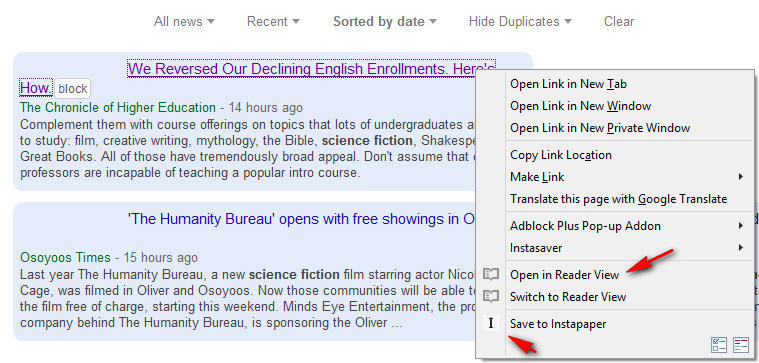
Right-click on link > Open with Reader View mode.

Thereby bypassing completely any visit to the bloated version of the news page.

Thankfully there’s an add-on for that: Open in Reader View does the trick.

The only problem here is that, after you’ve quickly verified that you’ll want to read the article properly and at leisure, saving the page to Instapaper from within Reader View will throw up an error message from Instapaper…

To partly get around that you’ll want the Official Instapaper Add-on for Firefox (rather than the third-party Instasaver). Like Instasaver this can’t save from within Reader View, but unlike Instasaver it does allow you to click back to the Google News search results, then right-click on the link and “Save to Instapaper”.

With those two add-ons set up, you’ll never have to see the original bloated and block-happy page back at the newspaper or magazine. The add-ons still won’t get you past paywalls, but your News browsing and saving will be drastically speeded up.

If your browser can’t run the latest 0.2 of Open in Reader View, there’s an older version from Jan 2017 that works fine with Firefox 38 – 56. If your right-click menu needs pruning, Menu Wizard can do that with a simple list of check-box toggles.

I’d suggest that we also need a way to share that link-state in blogs etc. Via a browser plugin that understands a hyperlink link formed as:

bloody-annoying-newspaper.com/news-story.html?open-with-Reader-View

Facebook Group posts to RSS

09 Friday Mar 2018

Posted by futurilla in JURN tips and tricks

≈ Leave a comment

Facebook to RSS – FetchRSS. I tested it, it works, and with Groups as well. Though your Facebook Group needs to be Public, not Private. $5 a month for a 25-item RSS feed, though it seems the feed has no ‘re-sort by date posted’ functionality.

How to extract audio from a multi-Gb video file

05 Monday Mar 2018

Posted by futurilla in JURN tips and tricks

≈ Leave a comment

I found the excellent 123Apps Online Audio Converter, which extracts the audio from any online video. No sign-up needed. I fed it a Web link to a 6Gb MIT conference video. (Sadly that was the only option MIT offered, but not all users have i) superfast Internet, ii) the spare disk space, or iii) a video editor that can handle such a beast of a file without crashing).

The 123Apps service downloaded the video onto its servers speedily (about 5 mins). It then offered me a .MP3 of the audio from the 6Gb video, with conversion to .MP3 taking another minute or so. The .MP3 then downloaded with no hassle, at a comfortable 495Mb containing a day’s conference audio at a good quality.

Similar services appear to place limits on the online video size they can digest, such as 500Mb or 150Mb. Which means it’s useful to know that 123Apps can handle very large video files, and that it works very smoothly.

Getty kills Google Image’s ‘View image’ button: how to fix it

16 Friday Feb 2018

Posted by futurilla in JURN tips and tricks, JURN's Google watch, Spotted in the news

≈ 1 Comment

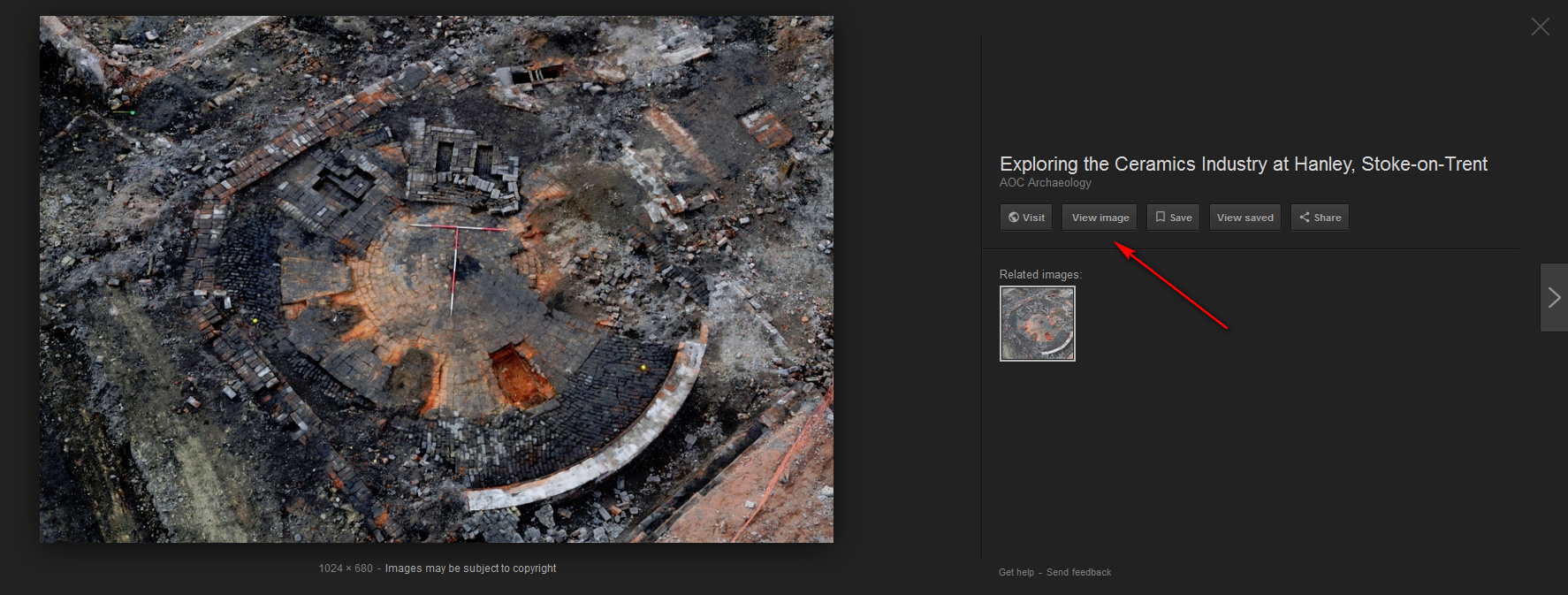
Under pressure from commercial image library Getty, Google Images has removed a key button from its search results. It’s the “View Image” button, which allowed people to view an image in isolation, against whatever colour they have set as a background for the Web browser.

The removal is easily fixed with a simple new script:

Firefox: Google Images Fix for Greasemonkey.

Chrome and Chrome-compatible: Google Search "View Image" Button

If you also want to change the default background colour (white can be better for screen-shots of logos for Facebook posts, to get an edge), in Firefox you can change the Web browser’s default background from black thus: Tools | Options | Content | Colours | Background | OK.

There are also press reports that the “search by image” icon in the Google Images search box is to be removed, also due to Getty pressure. But I see it’s still there on the UK version of Google Images.

How to export a backup of your WordPress.com blog – when the email never arrives

31 Wednesday Jan 2018

Posted by futurilla in JURN tips and tricks

≈ 2 Comments

Problem: For some of your WordPress.com hosted blogs, you are effectively unable to export a local backup copy of the blog.

You Export, and apparently you have success. The WordPress dashboard informs you that “Your export is being processed!” and that a link to the download will be emailed to you. But… nothing ever arrives in your email in-box.

This seems more likely to happen on larger blogs, with smaller ones tending to give you a direct .XML download of your blog.


Solution: You are likely still using the older WordPress interface for posting. This is a very sensible option, as the new posting page is hideous and clunky. But it appears that the whole-blog Export option only works as intended with the ungainly newer Blue interface. To get there from the old WordPress interface:

i) Visit the daily stats page, which uses the new Blue interface.
ii) Then scroll down to the listing for the blog you want to export, and click on “Views”.
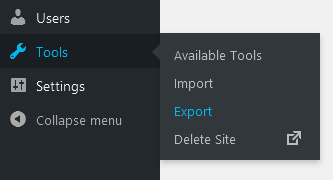
iii) Once there, click the Settings on the sidebar, and then scroll down the Settings page to find the Export option near the bottom.
iv) Start the Export. At the end of the Export process, you should get the message that “Your export was successful! A download link has also been sent to your email.” But this time you will also get a direct download link to a .ZIP file…

This .ZIP contains the compressed WordPress eXtended RSS file generated by WordPress. It contains your posts, pages, comments, categories, and links to the graphics (but not the blog’s graphics). In some cases the .ZIP may contain multiple .XML backups. In many cases the media export .ZIP will fail repeatedly. Despite WordPress claims of being ‘portable’ it really isn’t when it comes to the images.

On doing nation-specific Web search

31 Wednesday Jan 2018

Posted by futurilla in JURN tips and tricks, JURN's Google watch

≈ Leave a comment

In Autumn 2017 Google announced that Google Search would ignore the country domain of its service, and instead serve you national results based on what Google thinks your geographic location is…

“the choice of country service will no longer be indicated by domain. Instead, by default, you’ll be served the country service that corresponds to your location.”

Here’s my quickstart on some of the nation-specific research options which can route around this. You either need to:

i) use the likes of DuckDuckGo and add national URL Parameters to the end of your bookmarked URL: e.g. Hungary. Top results are not great in that instance, with BBC, Wikipedia and Guardian cruft, but they quickly become relevant as you scroll down. Adding site:hu helps a lot, at the cost of knocking out local grassroots blogs on WordPress and Hungarian .org and .com sites etc.
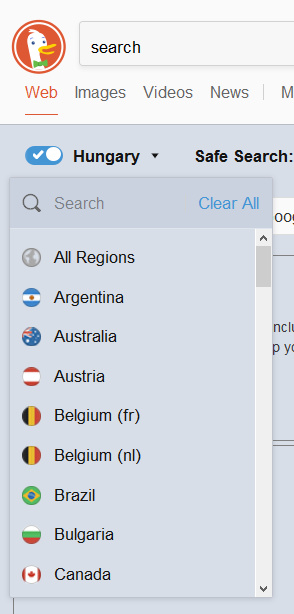
DuckDuckGo is now actually better than Google, in my opinion, for picture research. Though you will have to home-brew a Creative Commons filter within your search terms.

ii) Go to Google’s Advanced Search settings and (for now) you can request that Google Search “narrow your results” by nation. Clunky, but it may prove useful. I imagine there must be a browser plugin that allows this setting to be swiftly switched across various nations.

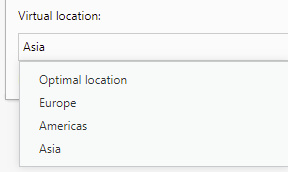
iii) use a VPN proxy in your Web browser. The Opera web browser has a free and sturdy VPN built in, but all you can do with it these days is to select broad regions rather than nations (as used to be the case). Adequate for things like quickly getting past region-blocking on public domain resources at Hathi, etc, but not that useful if you just want to research ceramics in Morocco.
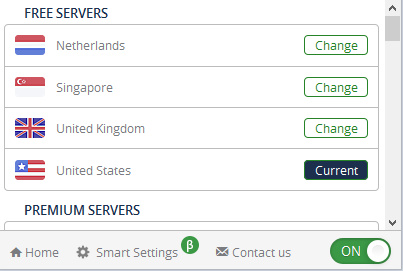
iv) use a few free VPN such as Browsec. This offers three or four free national VPN nodes, of a limited access duration (10 minutes or so before it becomes unresponsive). Again, useful for researchers wanting to access region-locked Hathi books or YouTube videos etc. Such freebie VPNs also offer an enticingly big list of other national nodes for paid users…
v) The TOR browser. Google’s new move potentially leaves sensitive ‘business researcher traffic’ open to being snooped on and tracked by hostile/piratic nations, who may either clandestinely run and/or can tap into VPN traffic. As such, smaller business — especially those in a larger supply-chain but without security-savvy IT departments — might also look into the anonymous TOR browser’s capabilities before doing intensive country research. It’s my understanding that some TOR exit nodes can be geolocated to nations, while others appear to be free of geolocation, and apparently one can switch between these types and choose which nation the exit node is in.

So far as I’m aware, JURN has for some time now auto-detected your home nation and served results accordingly. Some types of user can route around this somewhat, by searching in a local alphabet and encasing words or phrases in quote marks (“مقارنة”) which in this case should mean the majority of search results are in Arabic.

BBC Weather: a chance of probabilities

30 Tuesday Jan 2018

Posted by futurilla in JURN tips and tricks, Spotted in the news

≈ Leave a comment

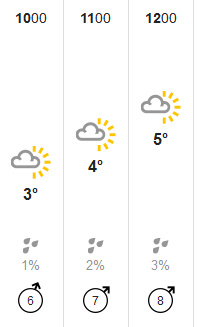
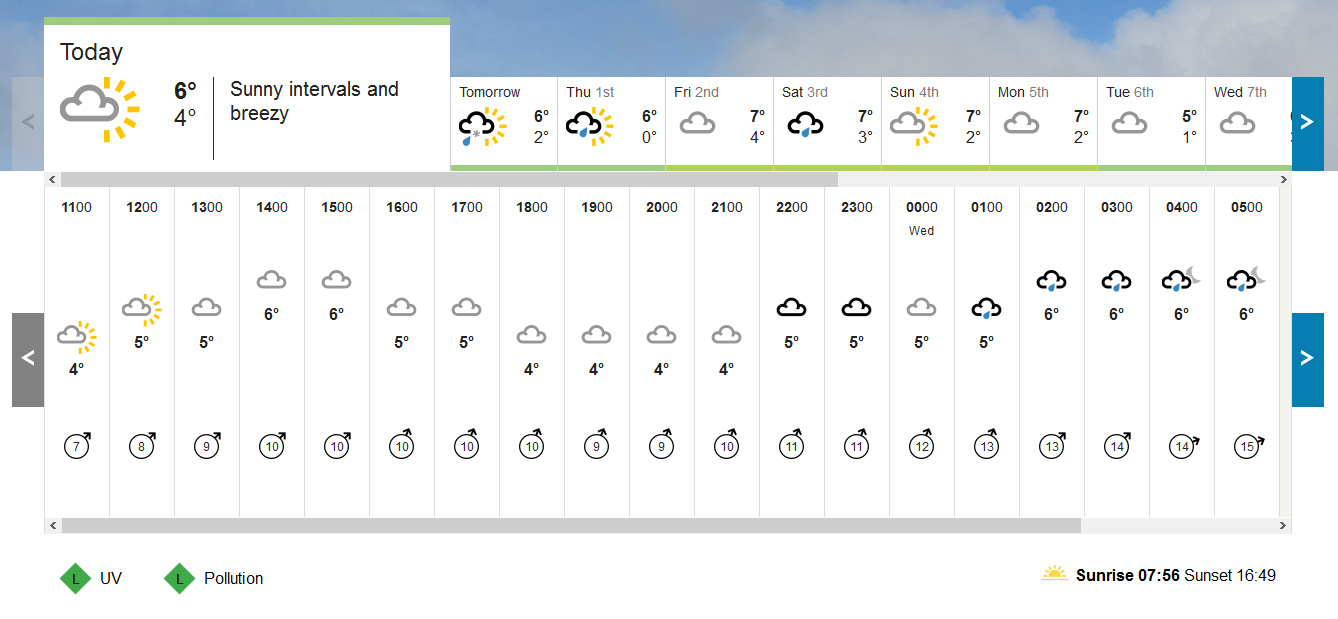
The BBC Weather forecast page has changed. It’s slightly clunkier now, in terms of graphic elegance. Certainly a move away from the near-perfect design they had before. But there are new features, as trade-offs. Presumably the change is because the promised new supercomputers are now online, as so we get a nine-day default view rather than the previous five-day default view. They’ve also added a new unlabelled “Chance of precipitation” (meaning, rain) icon down the bottom just above the wind speed and direction…

To the 95% of the population who don’t understand probabilities, and are anyway not able to meaningfully apply them within the highly variable system that is the British weather, that new additional icon is probably unwanted. Also, why show a visual icon of rain when it’s not at all likely to happen? It’s a form of pessimistic “fake news”, done in the language of graphic design.

If you want to remove these “Chance of precipitation” icons, here’s how to do it in Firefox. I’m assuming you have AdblockPlus installed and its Element Hiding Helper add-on, which only work properly in FF55 or lower. In Adblock go to: Filter Preferences | Element Hiding Rules | Add filter. Add the following new rule…

bbc.co.uk##[class*="wr-time-slot-primary__precipitation wr-time-slot-primary__precipitation--grey gel-brevier"]

This removes the grey “low” probability icons…

If you also want the blue “low-medium” probability icons gone, then add the following rule…

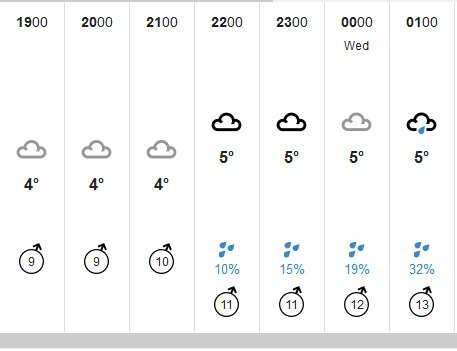
bbc.co.uk##[class*="wr-time-slot-primary__precipitation wr-time-slot-primary__precipitation--blue gel-brevier"]

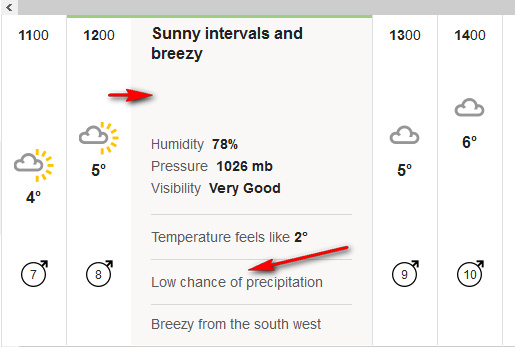
Even after this blocking, you can always click on an hour-slice and you get a slide-out which gives a more sensible type of “Chance of precipitation”…

The gradations here are far more simple: Low chance | Chance | High chance. That’s good enough for me, as I don’t need to be constantly juggling with fine percentage gradations of an hourly probability of rain. We’re a damp nation and the ever-changing weather in a specific locality is complicated enough as it is.

Here’s what the BBC Weather’s new nine-day hourly forecast looks like, after fixing…

Regular users will probably also want to block the new animated tickers, the huge and ugly new satellite map that loads under the bottom of the page, and other page-junk, in order to speed up loading.

← Older posts
Newer posts →
RSS Feed: Subscribe


Please become my patron at www.patreon.com/davehaden to help JURN survive and thrive.

JURN

  • JURN : directory of ejournals
  • JURN : main search-engine
  • JURN : openEco directory
  • JURN : repository search
  • Categories

    • Academic search
    • Ecology additions
    • Economics of Open Access
    • How to improve academic search
    • JURN blogged
    • JURN metrics
    • JURN tips and tricks
    • JURN's Google watch
    • My general observations
    • New media journal articles
    • New titles added to JURN
    • Official and think-tank reports
    • Ooops!
    • Open Access publishing
    • Spotted in the news
    • Uncategorized

    Archives

    • February 2026
    • January 2026
    • October 2025
    • May 2025
    • April 2025
    • September 2024
    • June 2024
    • May 2024
    • April 2024
    • March 2024
    • February 2024
    • January 2024
    • December 2023
    • November 2023
    • October 2023
    • September 2023
    • June 2023
    • May 2023
    • January 2023
    • December 2022
    • November 2022
    • October 2021
    • September 2021
    • August 2021
    • July 2021
    • June 2021
    • May 2021
    • April 2021
    • March 2021
    • February 2021
    • January 2021
    • December 2020
    • November 2020
    • October 2020
    • September 2020
    • August 2020
    • July 2020
    • June 2020
    • May 2020
    • April 2020
    • March 2020
    • February 2020
    • January 2020
    • December 2019
    • November 2019
    • October 2019
    • September 2019
    • August 2019
    • July 2019
    • June 2019
    • May 2019
    • April 2019
    • March 2019
    • February 2019
    • January 2019
    • December 2018
    • November 2018
    • October 2018
    • September 2018
    • August 2018
    • July 2018
    • June 2018
    • May 2018
    • April 2018
    • March 2018
    • February 2018
    • January 2018
    • December 2017
    • November 2017
    • October 2017
    • September 2017
    • August 2017
    • July 2017
    • June 2017
    • May 2017
    • April 2017
    • March 2017
    • February 2017
    • January 2017
    • December 2016
    • November 2016
    • October 2016
    • September 2016
    • August 2016
    • July 2016
    • June 2016
    • May 2016
    • April 2016
    • March 2016
    • February 2016
    • January 2016
    • December 2015
    • November 2015
    • October 2015
    • September 2015
    • August 2015
    • July 2015
    • June 2015
    • May 2015
    • April 2015
    • March 2015
    • February 2015
    • January 2015
    • December 2014
    • November 2014
    • October 2014
    • September 2014
    • August 2014
    • July 2014
    • June 2014
    • May 2014
    • April 2014
    • March 2014
    • February 2014
    • January 2014
    • December 2013
    • November 2013
    • October 2013
    • September 2013
    • August 2013
    • July 2013
    • June 2013
    • May 2013
    • April 2013
    • March 2013
    • February 2013
    • January 2013
    • December 2012
    • November 2012
    • October 2012
    • September 2012
    • August 2012
    • June 2012
    • May 2012
    • April 2012
    • March 2012
    • February 2012
    • January 2012
    • December 2011
    • November 2011
    • October 2011
    • September 2011
    • August 2011
    • July 2011
    • June 2011
    • May 2011
    • April 2011
    • March 2011
    • February 2011
    • January 2011
    • December 2010
    • November 2010
    • October 2010
    • September 2010
    • August 2010
    • July 2010
    • June 2010
    • May 2010
    • April 2010
    • March 2010
    • February 2010
    • January 2010
    • December 2009
    • November 2009
    • October 2009
    • September 2009
    • August 2009
    • July 2009
    • June 2009
    • May 2009
    • April 2009
    • March 2009
    • February 2009

    Proudly powered by WordPress Theme: Chateau by Ignacio Ricci.