• Directory
  • FAQ: about JURN
  • Group tests
  • Guide to academic search
  • JURN’s donationware
  • Links
  • openEco: titles indexed

News from JURN

~ search tool for open access content

News from JURN

Category Archives: JURN tips and tricks

Browser addons: Scriptsafe to NoScript / uMatrix

12 Saturday Jan 2019

Posted by futurilla in JURN tips and tricks

≈ Leave a comment

I’ve un-installed the Scriptsafe browser addon, which had been my Opera browser’s main script-blocker since I switched to Opera. A service, seemingly hardwired into this addon, has overstepped the line and caused the addon to become a nannying URL blocker rather than a simple script blocker. Specifically, it appears to have an agenda about which bona fide affiliate links it will and will not accept. One cannot even whitelist some of these perfectly genuine and useful URLs, as they are actively refused in the addon’s interface.

I suspect the problem is upstream, rather than with the maker of the addon. Since Scriptsafe includes by default…

block unwanted content (MVPS HOSTS, hpHOSTS (ad/tracking servers only), Peter Lowe’s HOSTS Project, MalwareDomainList.com, and DNS-BH – Malware Domain Blocklist are integrated!)

These lists are ‘hardwired’ into the addon… and are thus impossible to inspect or turn off, it appears.

Thus I went looking for an alternative. Naturally I took a look at the respected TOR browser — they use NoScript 10.2 by default. Well, if it’s good enough for the world’s best hardened browser then it’s good enough for me. I installed it, in the form of the Opera browser fork NoScript Suite Lite. That addon was simple to use and gave me no nonsense when I clicked on the links in question at my friend’s site. I was sent straight through to my intended destination, as used to be the case.

It’s obviously not Lowe’s list or MalwareDomainList which is causing Scriptsafe to be so nannying, in this instance. Because my uBlock Origin also uses that same blocklist. Therefore it must be one of the other lists that actively blacklists entire domains. I also considered uMatrix 1.3 extension from the makers of the leading adblocker uBlock Origin. Installing uMatrix and then comparing the blocklists suggests to me the hardwired inclusion of the DNS-BH list in Scriptsafe was causing my initial problem.

This sort of ‘The Browser Says NO’ attitude is why I moved from Firefox… which increasingly gave the user no choice about exactly what one let through from the Web. I, ‘the user’, should be the one who always ultimately gets to decide that.

Anyway, for those following my occasional browser tutorials and similar at JURN, I’d now recommend the easy NoScript Suite Lite and uBlock Origin as the core blocker duo for ordinary users of the Opera browser. But, in the end, I personally opted for the more sophisticated uMatrix as a fine-grained personal blocker (which is what I had mostly used Scriptsafe as).


So… advanced users may prefer the far more complex uMatrix 1.3 addon / extension rather than the simpler NoScript Suite Lite.

Basic initial configuration of uMatrix is to:

i) click on the tiny grey cog-wheel in the top-left corner | Host Files tab | there un-check any lists also used by uBlock Origin, so they’re not both trying to do the same thing at once. You may also want to ensure that you are only following the ‘Malware domains’ lists and uncheck the nannying lists that are over-reaching themselves in terms of ad-blocking.
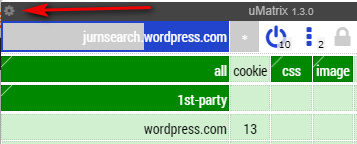
ii) get used to the simple routine of switching it to ‘permissive mode’ and fiddle with per-item blocking later. Giving permission to a site is a one-time four click operation per newly visited URL: Whitelist the ‘all’ cell by clicking on it so it turns from red to green | Un-blacklist the ‘frame’ cell, ditto | then ‘save’ by clicking on the padlock). Then reload the page. You soon pick up the routine.
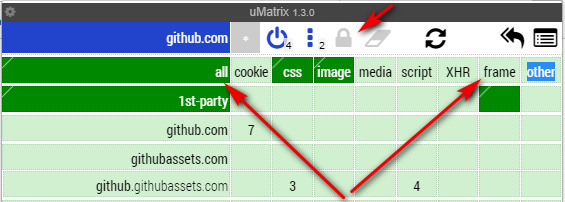
Then, when you have time, you can take another look at what’s loading up when you visit a site, and start blocking useless fluff from regularly visited sites.

The uMatrix whitelisting of a URL takes the form of two lines in an editable list, for instance:

github.com * * allow
github.com * frame inherit

These first go into the My rules | ‘Temporary rules’ list, and then after testing you can “Commit” these to the list of ‘Permanent rules’. To manually edit either list, click on the Edit button under the ‘Temporary rules’ header.

uMatrix looks fiendishly complex at first, due to scary screenshots of its big blocking tables. But spend 30 minutes with it and you’re soon used to it, and can see how easy it is to block stuff in a fine-grained way.

At the Opera

03 Thursday Jan 2019

Posted by futurilla in JURN tips and tricks, Spotted in the news

≈ 1 Comment

Ah, finally! The latest version of my Opera Web browser (57.03.x) now supports pretty page-like display of raw .XML news feeds, when you encounter them via search or bookmarks. They don’t also offer an .MP3 button, but you just right-click on the tile and “Save linked content as…” to get the .MP3 or similar media downloading.

Humanists’ digital workflows

05 Wednesday Dec 2018

Posted by futurilla in Academic search, JURN tips and tricks, Spotted in the news

≈ Leave a comment

New in DHQ: Digital Humanities Quarterly, “Researcher as Bricoleur: Contextualizing humanists’ digital workflows”. A small-scale observational study from 2016, building on a larger ‘Digital Scholarly Workflow’ study. The body is made up of case studies and commentary. Here’s the tale of a search by a historian for “1916” “November” “War Council”:

Audrey, a professor of history, searched for literature on an event that took place in 1916, and for which she had only partial information. Audrey’s search starts with her personal collection of notes written in Word and stored on the internal hard drive. She uses a Word search function that queries the folder for a supposed event name, but this search yields no result. Audrey then switches to her browser and the online search. She logs on to the Penn State library and enters a search phrase composed of three descriptors into the discovery search interface, LionSearch. This attempt does not yield any results either.

“Okay, no problem, I’m going to go to some of my favorite databases,” Audrey says optimistically, and, using the same search phrase, she continues her search in the Historical Abstracts database. “All right, I need another field. It happened in Rome,” she comments still optimistically, and expands her search with one more field, which reads “Rome.” Still nothing. “Seriously?!,” Audrey exclaims with annoyance. “All right, let me just do ‘war council,’ something more specific,” she says with reasserted optimism, and changes her search phrase accordingly. Failure again. “Really?!,” Audrey laments in shock. “I would have thought it was more important.” Audrey then reaches to her bookshelf and grabs a book. She reads through a few pages, trying to find any additional information that could help her search. Nothing. But Audrey is not ready to give up yet.

She returns to her library search and adds “November” as one more search field, trying to make her query as precise as possible. No results. Still, Audrey does not give up, and, instead of adding one more search term, she decides to change her search phrase. She creates a new search phrase, again composed of three descriptors as the possible event name. “Nope. All right, strange,” Audrey says quietly, confident that any further search would be pointless. “You would think someone must have written an article about this. It was the time that the different allies got together and hammered out a strategy…,” she continues murmuring, but discontinues her library search.

Instead, Audrey decides to try her luck with Google Search. She enters the search phrase and the Wikipedia entry pops up right away. “See, that’s the thing,” Audrey comments. “One would love to use more scholarly resources, but I just typed [the search phrase] and it’s up there [on Wikipedia]! Sadly, Historical Abstracts was not of too much use; the most useful one was still Wikipedia,” this historian concludes.

The problem here appears to be that the Supreme War Council of the three allies was created in November of 1917, not 1916. Only by switching the search terms from 1916 to 1917 does the Wikipedia page mentioned appear, so one has to suspect that there was some finessing of the search before hitting Google Search.

Run Opera? How to unpluck your search-engine results

28 Wednesday Nov 2018

Posted by futurilla in JURN tips and tricks, Ooops!, Spotted in the news

≈ Leave a comment

Has your ad-blocker (and other scripts) stopped working in the Opera Web browser today? It’s nothing to do with changes made by Google, Bing, Yandex etc.

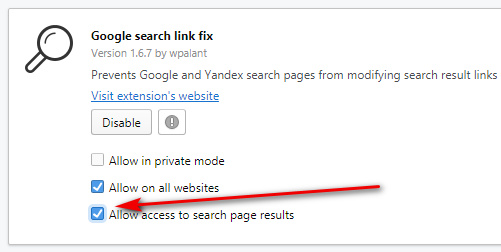
What’s happened is that Opera has high-handedly decided to disable all adblocker and script-blocker addons from running on search-engine results pages. Thankfully, for now, the browser still has an option to turn off this unwanted and highly dangerous stupidity (disabling script-blockers etc) from the owners of Opera. Here’s the fix…

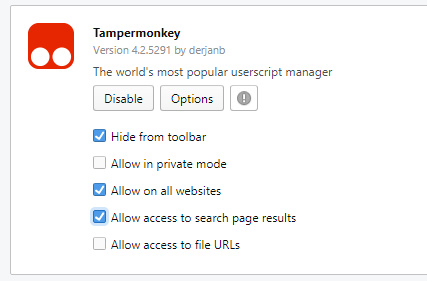
“For some reason Opera with the latest update have decided to add a new option for extensions that will disable them by default for “search page results”. You’ll have to go to top bar > Menu > Extensions > and then scroll down and tick the box “Allow access to search page results” for your addons. After that it will work normally again.”

You need to do this for each addon that affects search engines and their results, for example…

If you have a JURN link on your Google Search menu bar, via my UserScript, to get it back make sure to also enable TamperMonkey for Opera…

Block autosuggestions from the Google Scholar search box

05 Monday Nov 2018

Posted by futurilla in How to improve academic search, JURN tips and tricks

≈ Leave a comment

For those who know what they’re looking for, and how to type… here’s how to block the dumb auto-suggestions from appearing on the Google Scholar search-box:

1. In the UBlock Origin Web browser addon, open the My Filters list (Go: Icon | Slider Controls Icon | My filters tab).

2. Paste in the line…

google.*##[class^="gs_md_"]

3. Save the List and exit it. Reload Google Scholar, and the flickery and distracting (and almost always very wrong) drop-down suggestions are gone.

A variant of the above ‘block line’ with probably also work in similarly advanced ad-blocker addons.

Practical blog search at the end of 2018

26 Friday Oct 2018

Posted by futurilla in JURN tips and tricks

≈ 1 Comment

It’s the back end of 2018 and there’s still no really useful and comprehensive search tool for recent blog posts, other than the main Google Search. And even that is iffy. Given that we’re approaching Halloween, I decided to do a quick group test with the simple keyword Lovecraft. He’s a good choice because so much utter trash floods onto the Web in his name. If a search can deal with Lovecraft, it should be able to handle much else.

* Google News: Can filter by ‘blogs’ and by ‘date’, but the results are laughable — are there really only eight blog posts on Lovecraft in October 2018, from worthy long-form and timely-news bloggers? I think not. (Another test for ‘Staffordshire’ suggests News | Blogs is almost all just press-release outlets and similarly worthless pseudo-blogs).

* Google Search: The inblogtitle:keyword modifier is no longer useful in search, as it now returns only 10 irrelevant results when used with Lovecraft. One used to be able to find sites that Google ‘knew’ were blogs, and had a keyword in their main blog title. Google Search has also removed ?tbm=blg from their URL options.

* WordPress.com internal cross-blog search: Simple to use, the results looks pretty, but it obviously has very mediocre coverage of its own blogs. Many expected and well-respected blogs do not appear at all. Users need to be aware that they are not seeing results from the entire range of non-spam WordPress.com hosted blogs.

I would suspect that DuckDuckGo may be using this WordPress.com results set as a de facto anti-spam whitelist, since that would explain its curious big gaps in the coverage for WordPress.com blogs. The same may be true of the dismal Bing — the only saving grace for which is the excellence of the Bing News | Most Recent results, which you can RSS-ise by adding &format=rss to the URL. By comparison, NewsNow is nowhere.

* You Got Blogs, a Google CSE: Fairly good at pulling the top three currently-active blogs to the top of the results, but thereafter turns to mush. If the user then sorts by Date on a single keyword, the results are far less useful, mainly because You Got Blogs is indexing all *.wordpress.com/* pages rather than just the blog posts via *.wordpress.com/20*/* You Got Blogs is reliant on Google Search, since it’s a CSE, and thus for many blogs Google will only show the most recently-indexed post or else just the front page (e.g. you make seven posts a week, but Google will only show searchers the post it has most recently indexed, and the others will be un-findable). It’s thus an impossible balancing act for You Got Blogs (or any other blog-focussed CSE): if they don’t do a global index of *.wordpress.com/* then they miss a whole lot of results.

* Regrettably setting up a Google CSE (for *.wordpress.com and *.blogspot.com etc) is not an option. I’ve tried it and practice it doesn’t work well, when one sorts by Date. It’s sort-of-ok on a straight search, if making a first search looking for blogs on one’s topic, though the main Google Search would do better. A CSE picks up and lifts to the top of the results some very out-of-date and moribund blogs, and obviously can’t deliver usable sort-by-date results.

* Social Mention. Search restricted just to ‘Blogs’. Pathetic results from ‘Blogs’. No results at all, for ‘Microblogs’. Top three results were very similar to the WordPress.com internal, then a huge gap in time. My guess is they’re blending together the WordPress.com and Bing APIs, and to no great effect.

* DuckDuckGo: Should, theoretically, be good. But is mediocre. It all-but ignores key Lovecraft blogs, blogs which rank very highly in Google Search. I should note that the Duck is excellent in many other respects, especially the relevance of its Image Search. But is still lacks breadth and depth.

* Instant RSS Search Engine. No longer appears to work, even when tested in multiple browsers.


For niche news gatherers wishing to supplement their RSS feedreader and break out of the tiny-minded Twitterbubble, the best option at the end of 2018 is thus to set up a bookmarks folder in your Web browser with the following:

site:wordpress.com/2018/10/ “Lovecraft” -zombie -game -movie
site:blogspot.com/2018/10/ “Lovecraft” -zombie -game -movie

Vary according to your desired keyword and knockout words, obviously. These URLs will work because all blog posts on Blogger and WordPress have the date embedded in their URL.

These bookmarks should be set to run on Google Search and DuckDuckGo and Yandex (the latter with a &lang=en English only filter in the URL). Right-click on the finished Bookmarks folder, select “Open All” and they all load.

Of course, this doesn’t pick up self-hosted blogs, only the free ones. And, obviously you’ll have to manually go in and incrementally change the date numbering in the target URLs, at the end of each month. Thus it’s not a perfect solution. (Nor can this solution be amalgamated into a Google CSE, for the reasons stated above).

Once the searches have loaded, switching through to a “week” or “24 hour” view will require the copious use of Google Hit Hider by Domain, to weed the spam and unwanted results. Google Hit Hider knocks out unwanted domains from search results, and does it very well. (Google Hit Hider can run on Yandex, it just needs the results reloaded, in order for its blocking buttons to appear).

Even having set up such a one-click Bookmarks folder, we also still have the problem of Google Search sometimes only offering the front page of a timely and frequently updated blog, rather than its most recent post URLs. In practice though, for a ‘last 24 hours’ search, you don’t actually need a site: modifier…

site:wordpress.com “Lovecraft” -zombie -game -movie

All you need is ‘last 24 hours’ filter alone, and Google Search will lift some of the best content into the first two pages of results. Kind of useful, as it can thus catch self-hosted blogs, albeit jumbled among legacy news sources and updating catalog sites etc. Even so, you’ll want Google Hit Hider when working at the 24 hour level.

Also useful, inside your new folder, will be a similarly hard-coded Google Images search URL for the last 24 hours or week…

“keyword” -pinterest -youtube -twitter -wikipedia -tumblr -instagram

… and so on. It only takes a few seconds to visual check the results, and such timely visual results are often useful re: new books, conference posters etc. Keep eBay listings in the mix as they can suggest interesting blog post topics, about old vintage stuff. Again, we’re not keying the search to blogs only, and thus Google Hit Hider is your friend here (it also works on Google Images results – block on Google Search, and it’s also blocked on Images).

There are of course also a whole bunch of “request a demo” agency services which claim to offer social media sentiment tracking. They seem to be of the ‘if you have to ask the price, you can’t afford it’ sort. There’s one free and public service worth a look, Social Searcher. Very slow to load a search, but it’s pretty and it works. It’s no use for blogs, though, but seems useful if you want to quickly glance across recent Facebook and Twitter posts. It covers some other ephemeral sharing sites, but their signal gets swamped by Facebook and Twitter. Not that that matters much as it’s almost all blather and parroting, of no news value. To prevent results turning into a wall of hashtags, the tags panels can be blocked in uBlock Origin with social-searcher.*##[class^="rezults-item-tags"]

Text Cleanup 2.0 – now free

24 Wednesday Oct 2018

Posted by futurilla in JURN tips and tricks, Spotted in the news

≈ 1 Comment

I’m pleased to see that Text Cleanup 2.0 is now freeware. It’s Windows desktop software from 2003 that “fixes” text automatically when you copy-paste it. For instance, by unwrapping a chunk of text that has hard line-breaks. Text Cleanup has a nice balance of power and ease-of-use, can save user presets, and still runs fine on a Windows 8.x desktop.

How to block image thumbnails in Google News search results

22 Monday Oct 2018

Posted by futurilla in JURN tips and tricks

≈ Leave a comment

The problem:

Hmmm, not really adding a lot, are they? Nearly all news reports these days use shovelware stock/library photography or logos of some kind, or are occasionally grabby click-bait. These irrelevant distractions can be blocked with no loss, allowing you to focus on the headline, source and snippet.

The solution:

Block image thumbnails of news media pictures from appearing in your Google News search results. To do this efficiently and precisely, in the uBlock Origin browser addon, go: Dashboard | My Filters | then paste in these two lines…

google.*##[id^="news-thumbnail"]

google.*##[alt^="Story image"]

At July 2020, also add:

google.*##*.sYpfDb
google.*##*.QyR1Ze

Then “Apply changes” and exit. Reload the Google News results, and the thumbnail images are gone. And gone in an elegant manner, without leaving behind an ugly block of ‘alt’ text.

Why two filters? Because while most Google News thumbnails have “news-thumbnail” in their id class, the top one per page does not. To also block this thumbnail you need the second cosmetic filter, which blocks any images with an alt tag which has the phrase “Story image” in it.

The empty padding can be removed with…

...com##a.top.NQHJEb.dfhHve
...com##.xA33Gc

… where you add google.dot in place of the three dots.

These filters have the advantage of not interfering with thumbnail loading over on Google Images, Google Books etc. Though if you do want to block book cover thumbnails on Google Books, for some reason, then add this line…

...com##*.th

(I also have a post on how to block YouTube’s new animated ‘thumbnail previews’ of videos in its search results)

GoogleMonkeyR fix – stop it running on Google Images

21 Sunday Oct 2018

Posted by futurilla in JURN tips and tricks, JURN's Google watch

≈ Leave a comment

Here are some updated fix instruction for the latest GoogleMonkeyR UserScript, which many desktop power-searchers use to give their Google Search results a three-column multicolumn layout.

* Problem: the script breaks Google Image search results, by running on such searches. Specifically, the script appears to be preventing the central ‘slider’ div from opening up, when an image is selected from the Google Image search results.

* Solution: In your Web browser, access the raw GoogleMonkeyR script. For instance, in Opera this is done via: Extensions | Tampermonkey | Installed UserScripts | GoogleMonkeyR | Edit.

You then need to paste in a line of code that explicitly turns off GoogleMonkeyR, but only whenever the browser is running a Google Images search. To do this, add the following line to the header of your GoogleMonkeyR script, below all the // @include lines…

// @exclude http*://www.google.*/search?*isch*

Google Image searches have “isch” in their URL, so we can grab onto that and exclude such URLs. Save (click the disk icon) and exit. You should now be able to operate the Google Images results as usual, which still retaining your usual three-column layout for the main Google Search.

How to extract multiple zip files to a single folder

18 Thursday Oct 2018

Posted by futurilla in JURN tips and tricks

≈ Leave a comment

It’s surprisingly difficult to discover the right settings in .ZIP-file handling software to extract multiple .ZIP files into a single subfolder. Without making multiple subfolders within that new folder, one for each .ZIP file. That latter arrangement is not so good… if you have scans of 10 journals in 10 .ZIP files and want to visually pick out just five images from their combined 800 pages.

The popular 7-zip for Windows has what appear to be the right settings (“No pathnames”), but fails to respect this. I tried multiple configurations, but 7-zip always extracted each .ZIP into its own subfolder regardless.

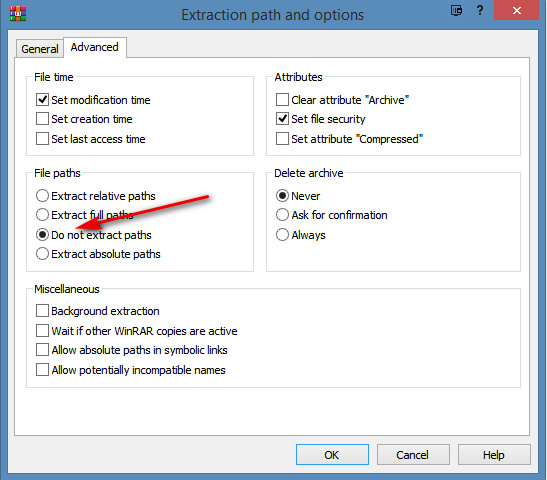
The solution is WinRAR. Use its “Do not extract paths” setting when extracting…

← Older posts
Newer posts →
RSS Feed: Subscribe


Please become my patron at www.patreon.com/davehaden to help JURN survive and thrive.

JURN

  • JURN : directory of ejournals
  • JURN : main search-engine
  • JURN : openEco directory
  • JURN : repository search
  • Categories

    • Academic search
    • Ecology additions
    • Economics of Open Access
    • How to improve academic search
    • JURN blogged
    • JURN metrics
    • JURN tips and tricks
    • JURN's Google watch
    • My general observations
    • New media journal articles
    • New titles added to JURN
    • Official and think-tank reports
    • Ooops!
    • Open Access publishing
    • Spotted in the news
    • Uncategorized

    Archives

    • February 2026
    • January 2026
    • October 2025
    • May 2025
    • April 2025
    • September 2024
    • June 2024
    • May 2024
    • April 2024
    • March 2024
    • February 2024
    • January 2024
    • December 2023
    • November 2023
    • October 2023
    • September 2023
    • June 2023
    • May 2023
    • January 2023
    • December 2022
    • November 2022
    • October 2021
    • September 2021
    • August 2021
    • July 2021
    • June 2021
    • May 2021
    • April 2021
    • March 2021
    • February 2021
    • January 2021
    • December 2020
    • November 2020
    • October 2020
    • September 2020
    • August 2020
    • July 2020
    • June 2020
    • May 2020
    • April 2020
    • March 2020
    • February 2020
    • January 2020
    • December 2019
    • November 2019
    • October 2019
    • September 2019
    • August 2019
    • July 2019
    • June 2019
    • May 2019
    • April 2019
    • March 2019
    • February 2019
    • January 2019
    • December 2018
    • November 2018
    • October 2018
    • September 2018
    • August 2018
    • July 2018
    • June 2018
    • May 2018
    • April 2018
    • March 2018
    • February 2018
    • January 2018
    • December 2017
    • November 2017
    • October 2017
    • September 2017
    • August 2017
    • July 2017
    • June 2017
    • May 2017
    • April 2017
    • March 2017
    • February 2017
    • January 2017
    • December 2016
    • November 2016
    • October 2016
    • September 2016
    • August 2016
    • July 2016
    • June 2016
    • May 2016
    • April 2016
    • March 2016
    • February 2016
    • January 2016
    • December 2015
    • November 2015
    • October 2015
    • September 2015
    • August 2015
    • July 2015
    • June 2015
    • May 2015
    • April 2015
    • March 2015
    • February 2015
    • January 2015
    • December 2014
    • November 2014
    • October 2014
    • September 2014
    • August 2014
    • July 2014
    • June 2014
    • May 2014
    • April 2014
    • March 2014
    • February 2014
    • January 2014
    • December 2013
    • November 2013
    • October 2013
    • September 2013
    • August 2013
    • July 2013
    • June 2013
    • May 2013
    • April 2013
    • March 2013
    • February 2013
    • January 2013
    • December 2012
    • November 2012
    • October 2012
    • September 2012
    • August 2012
    • June 2012
    • May 2012
    • April 2012
    • March 2012
    • February 2012
    • January 2012
    • December 2011
    • November 2011
    • October 2011
    • September 2011
    • August 2011
    • July 2011
    • June 2011
    • May 2011
    • April 2011
    • March 2011
    • February 2011
    • January 2011
    • December 2010
    • November 2010
    • October 2010
    • September 2010
    • August 2010
    • July 2010
    • June 2010
    • May 2010
    • April 2010
    • March 2010
    • February 2010
    • January 2010
    • December 2009
    • November 2009
    • October 2009
    • September 2009
    • August 2009
    • July 2009
    • June 2009
    • May 2009
    • April 2009
    • March 2009
    • February 2009

    Proudly powered by WordPress Theme: Chateau by Ignacio Ricci.