• Directory
  • FAQ: about JURN
  • Group tests
  • Guide to academic search
  • JURN’s donationware
  • Links
  • openEco: titles indexed

News from JURN

~ search tool for open access content

News from JURN

Author Archives: futurilla

Image Composite Editor 2.0

20 Thursday Feb 2020

Posted by futurilla in JURN tips and tricks

≈ 2 Comments

Microsoft’s Image Composite Editor 2.0 is free photo stitching software for desktop PCs. (Also backed up at Archive.org). Although it bills itself as yet another panorama-stitching software, if can also stitch hand-held ’tiled’ sequences of images, provided there is overlap. Such as multiple images of a large old poster. The software is the product of Microsoft’s Photosynth years, and both very fast and accurate.

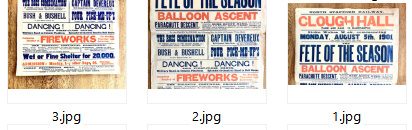
As a test I started with three images from eBay, non-scanned and made with a hand-held camera…

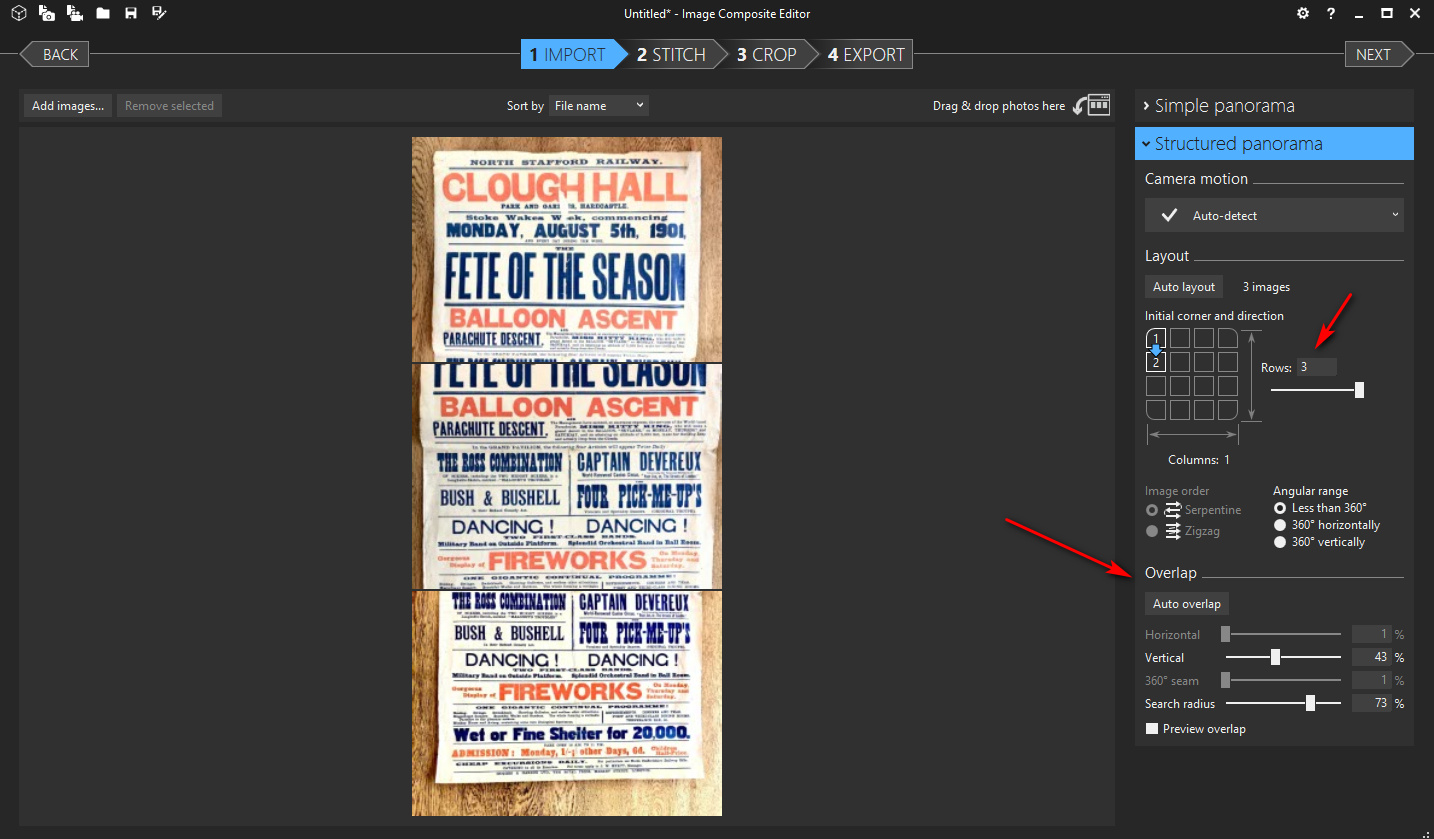
After import the files were automatically arranged by file-name numbering: 1, 2, 3. Then by using the Structured | Layout section it was easy enough to get the three images into a column…

Automatic can be used, but the best results come from jiggling the Structured | Overlap sliders until you have an approximately good fit. It seems the fit doesn’t have to be perfect.

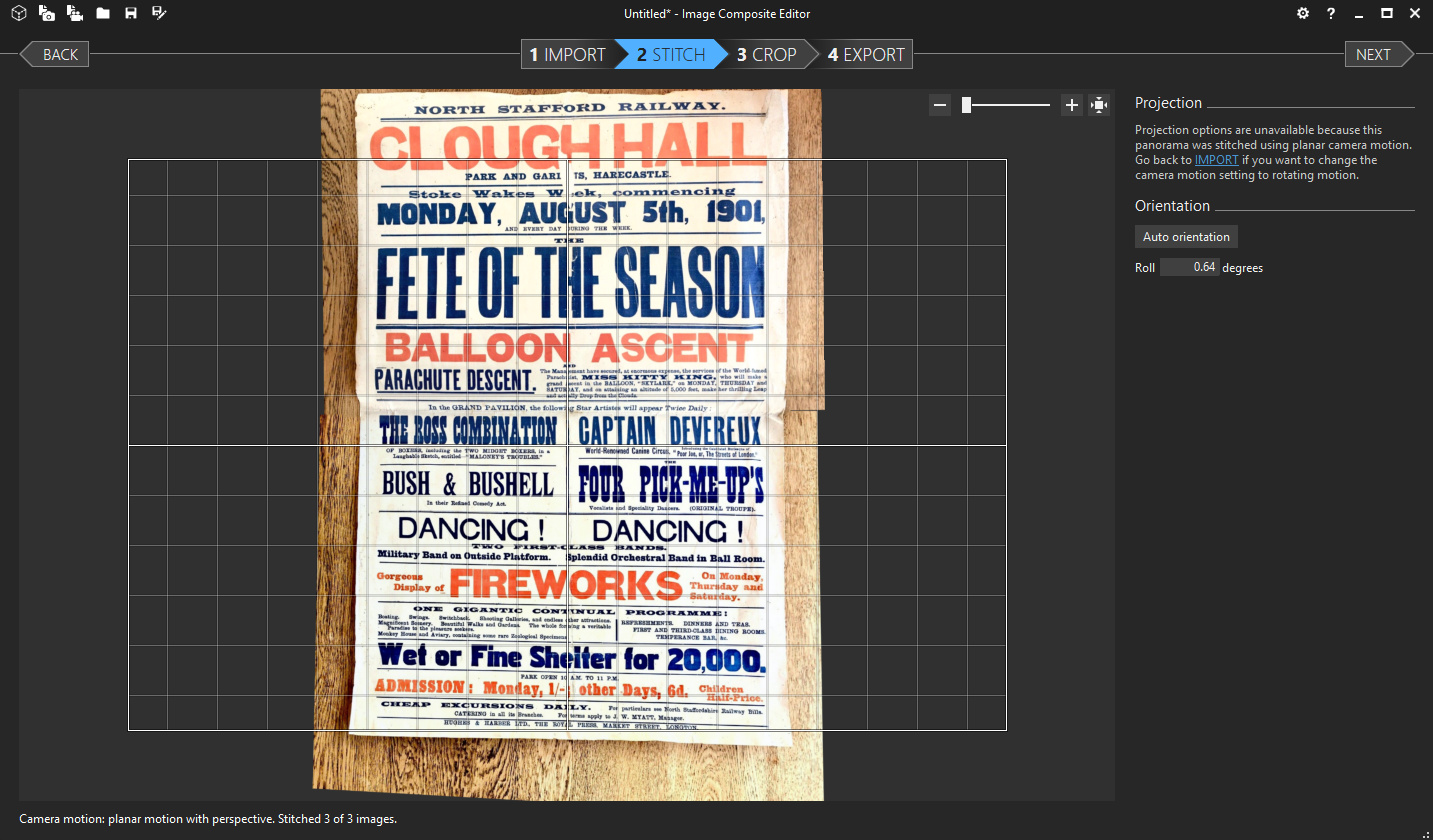
From there you go to the next step, Stitch, and if it’s not done right you go back and adjust the Overlap sliders again. It only took me two tries to get a perfect stitch.

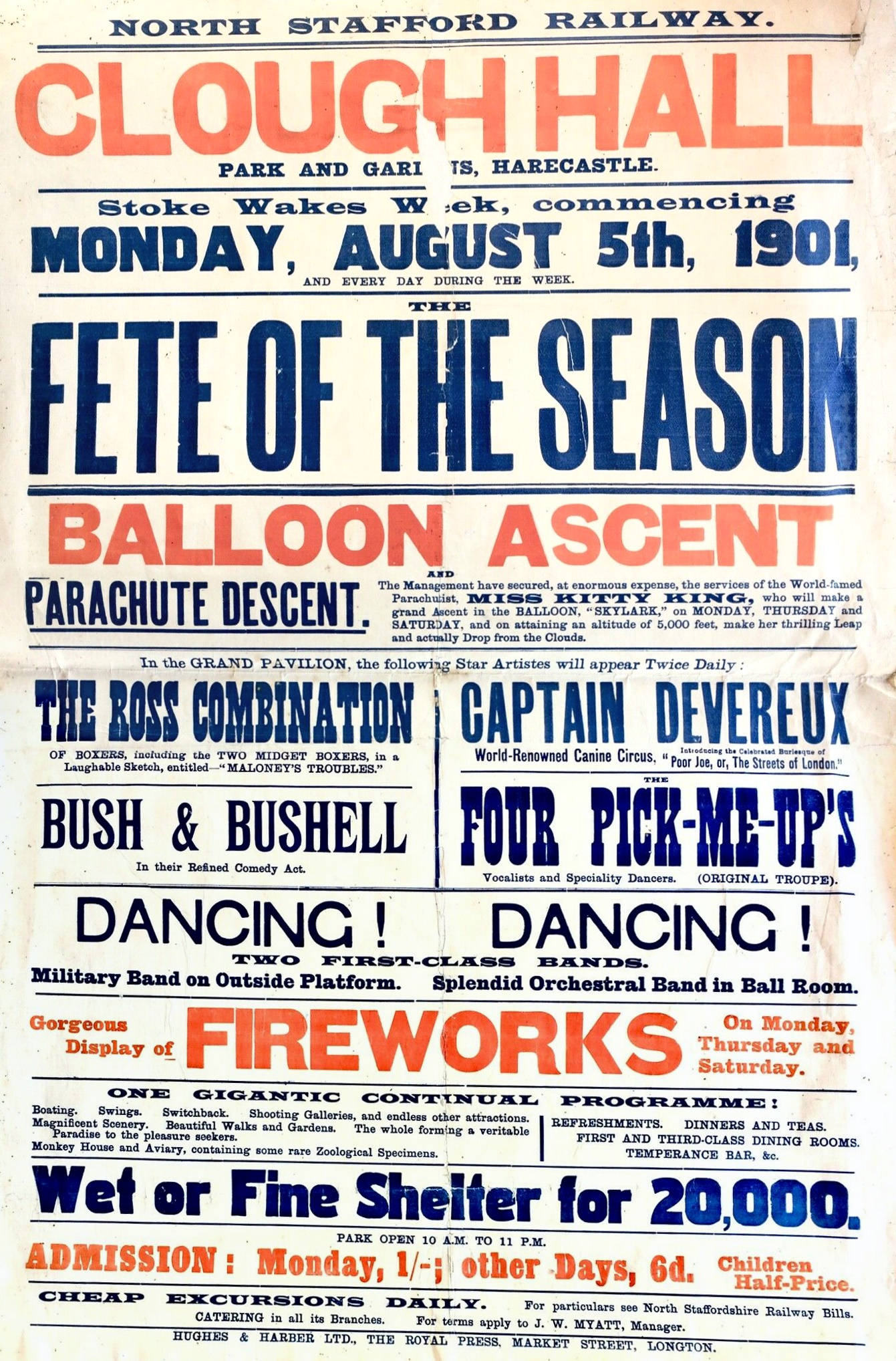
Cropping and export is then very straightforward. As you can see there’s a slight skew at the top and bottom, but further finessing of the Overlap sliders might fix that.

A very nice bit of free software, and so much easier and faster than other possible options. One could, theoretically, use this with screenshots of a public-domain picture trapped inside a tiled viewer, quickly re-combining these into a large whole image.

The Stadtische Gallery

19 Wednesday Feb 2020

Posted by futurilla in Spotted in the news

≈ Leave a comment

Stadtische Gallery in Munich, Germany, has kindly placed scans of all their public domain works online. A test search for kat (cat) also picked up katalog and katherine. A search for katze (cats) was no better, but did pick up two tigers. A search for katen (tom-cat) found nothing. This suggests either that the Germans were not historically cat-lovers, or that the range of pictures is limited compared to other open online galleries. A search for hund (dog) suggests the latter.

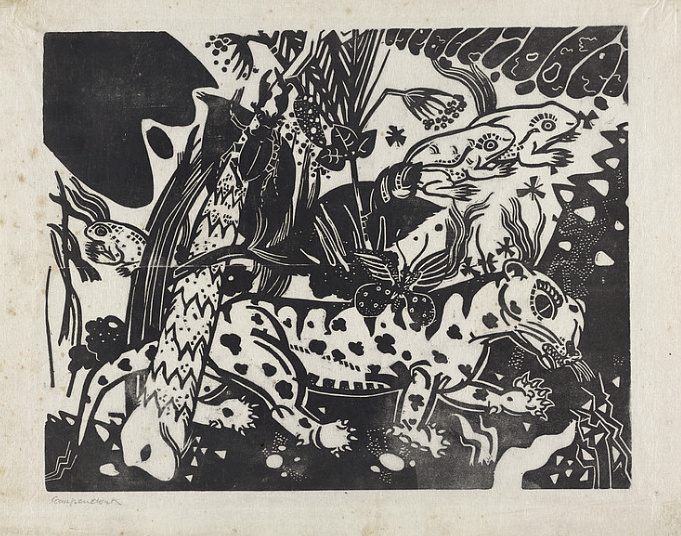
A Google site search of site:https://www.lenbachhaus.de/en/discover/collection-online/ fared little better with kat, but did discover the fine 1916 woodcut “Der Leopard” (Der Tiger).

A specific search on the site for tiger then found another three not discovered by kat. Possibly the Germans don’t always consider a tiger/leopard to be a ‘big cat’, as the British do? Thus, a mix of Google and a number of on-site searches seems best for a deep-dive.

There is a Creative Commons filter, tucked away under: Refine results | How to use | CC. The standard here seems to be CC-BY-SA. A Kandinsky scan was found to be 2000 x 1602px at 300dpi.

Not all material that one would expect to be available under CC actually is, for instance the 1916 tiger woodcut and the 1918 woodcut “Plakat fur die Gabriele Munter”.

New Zealand museums – 45,000 low-res CC images

11 Tuesday Feb 2020

Posted by futurilla in Spotted in the news

≈ Leave a comment

New Zealand now has 45,000 low-res images from the nation’s museums under Creative Commons. They’re on Artstor as a public collection.

A search “within collection” for keyword cat had 48 good results. One can then right-click on a result and load it in a new tab. From there it’s easy to get a download, and there’s only the lightest of barriers.

My test downloads, however, were all low-res (1024px, 96dpi), while the viewer images appear to be much higher res but are locked inside a tile-viewer. The downloads are just about of a size to be amenable to A.I.-driven resolution scaling, though.

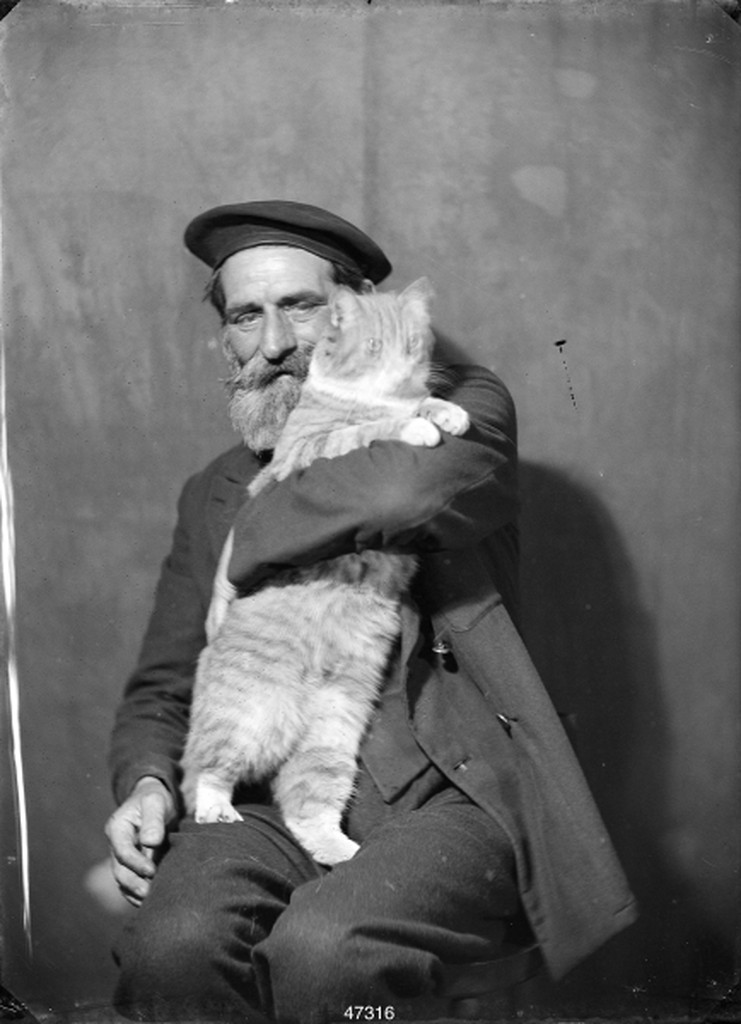
Original of Marion Queenie Kirker’s 1930s portrait of an old sailor, 1024px:

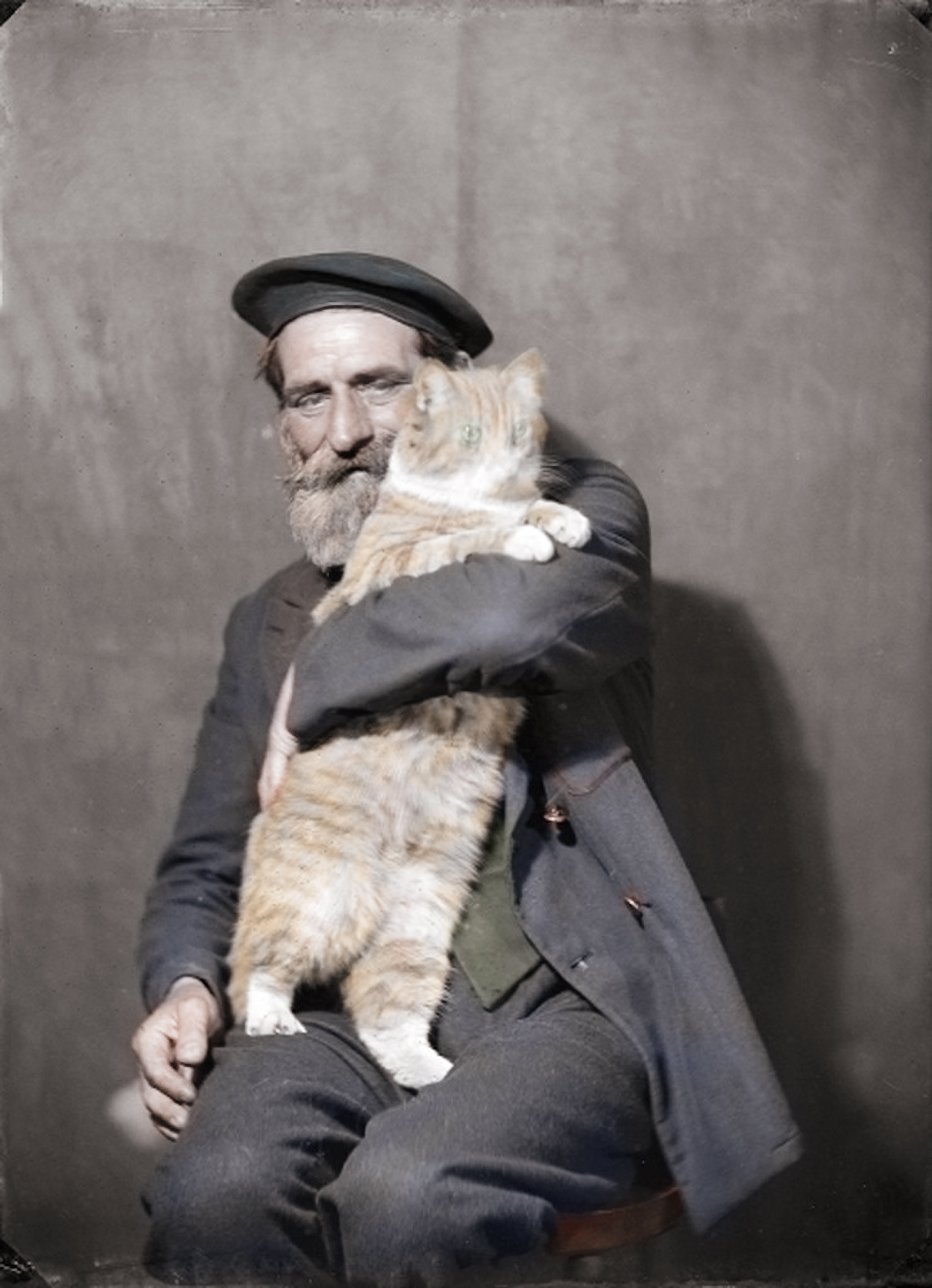
A.I. up-rez to 2400px and a quick colourise:

Not ideal, but there are no jaggies and it’s acceptable for a wide-bordered page in a PDF magazine. One would have to retrieve the larger tiled image and re-assemble, if one wanted better.

Results relevance is keyword-based, rather than having kittee-trained A.I. identify that there’s a cat in the picture. But the relevance ranking is fairly good, at least on this test.

UK Library and Information History Group – newsletter editor required

07 Friday Feb 2020

Posted by futurilla in Spotted in the news

≈ Leave a comment

A volunteer Newsletter Editor is required by the UK’s CILIP, for their Library and Information History Group. The Group’s Newsletter appears three times a year. Deadline: 29th February 2020.

Newsletter archives 2004-2019.

Paris Musees – 150,000 CC0 images

03 Monday Feb 2020

Posted by futurilla in Spotted in the news

≈ 1 Comment

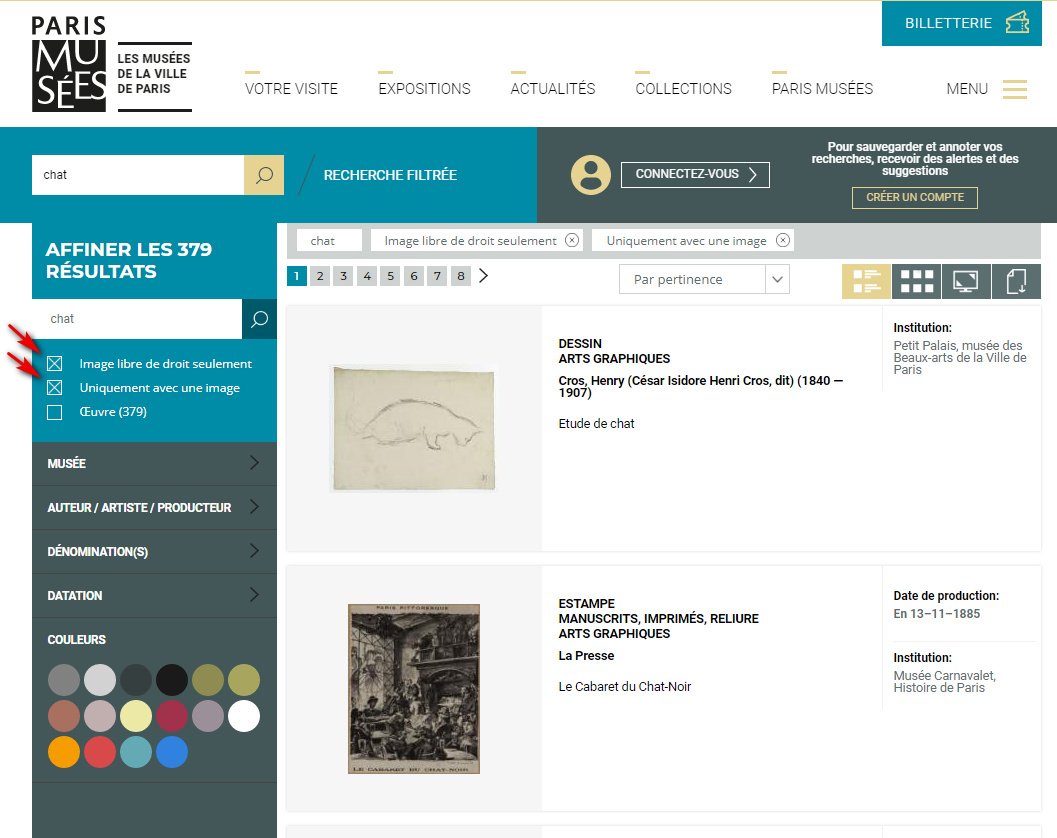
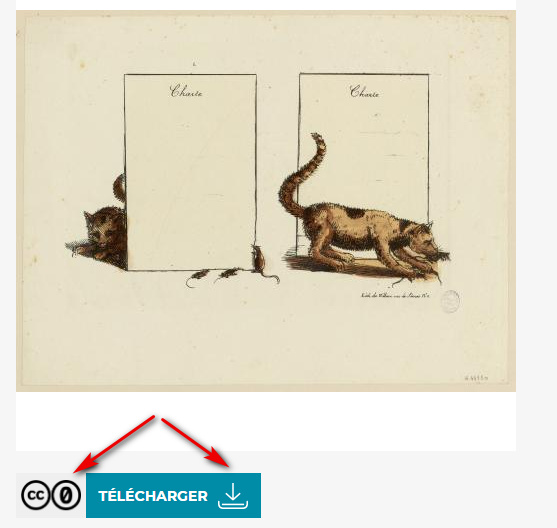
The museums of Paris now kindly offer a royalty-free image filter on their online collection. My test search for chat (cats, felines) gave 376 results, from what are said to be 150,000 newly uploaded CC0 images. These are the filters you want to find CC0 + ‘has an image online’…

I find it’s possible to set the site to use English, but that version is not fully translated. “Image libre de droit seulement” is still present in the supposedly English interface. “Datation” is obvious and allows you to set a date-range.

A right-click / “open in new tab” on the “Voir/See” button then takes you to the item’s record page with a download link. Download links are public (i.e. without a sign-up or other obfuscation), start quickly, and my test image came inside the .ZIP format.

In my first test I had a 4k 300dpi .JPG, at 6.5Mb. Nice. A few more tests shows the same thing, and the scans are clean and crisp. I downloaded about ten .ZIPs, some simultaneously, and did not encounter wait times or a ‘daily limit’ pop-up.

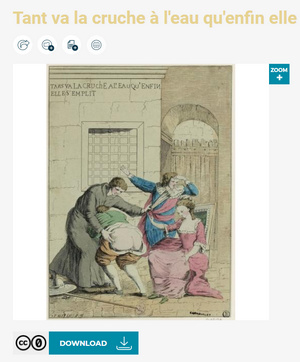
The keyword relevance is a bit off, though, being overly broad. For instance, chat also finds chatiments (punishments), which may cause chuckles among schoolkids encountering spankings and canings while doing innocuous homework on ‘kittees from history’…

Thankfully the results produced nothing more shocking than that, which was a surprise give the goriness of the French revolutions and the pungency of their satirical arts.

openresearchlibrary.org

29 Wednesday Jan 2020

Posted by futurilla in New titles added to JURN, Spotted in the news

≈ 1 Comment

A quick test of the new openresearchlibrary.org with keywords Mongolian folk song.

Of the top ten results, only three were very broadly on-topic:


1. Joro’s Youth: The first part of the Mongolian epic of Geser Khan. [Translation of an epic].

4. Long Narrative Songs from the Mongghul of Northeast Tibet. [Neighbouring tradition]

9. Virtual Reality in Village Folk Custom Tourism. [Somewhat connected].


Item 4 was Tibet, not Mongolian, but could be useful for those doing comparative work on regional intertwingling of traditions.

No further relevant hits were seen on the first page, at 20 results per page. There were no relevant results at all on the second page.

Full marks for slick and clean presentation. But, based on this quick test, at present the new service seems to have poor relevance-ranking for a general query. Using the more refined search Mongolian “folk song” gave dire results, surprisingly, and knocked out two of the three relevant results while adding no new ones.

Still, the record pages are useful, all lead without fuss to OA full-text, and are Google-visible. As such, the URL has been added to JURN. At present Google has only tepidly indexed 140 such pages from the new site, but a full indexing can’t be far off. JURN probably already indexes all the sources used by openresearchlibrary.org, but it’s good to have a second option and some researchers — on seeing two links to what are obviously the same book or chapter — may prefer to use the slicker in-browser viewer at openresearchlibrary.org.

How to get direct downloads from SourceForge

25 Saturday Jan 2020

Posted by futurilla in JURN tips and tricks

≈ Leave a comment

Problem: Downloading from SourceForge may be impossible from the UK and EU, due to cookie madness. This occurs if your cookie-alert blocker and/or overlay-blocker automatically removes SourceForge’s huge “ACCEPT COOKIES!” blocking screen, which means that the SourceForge download-timer will never start. You never get your file.

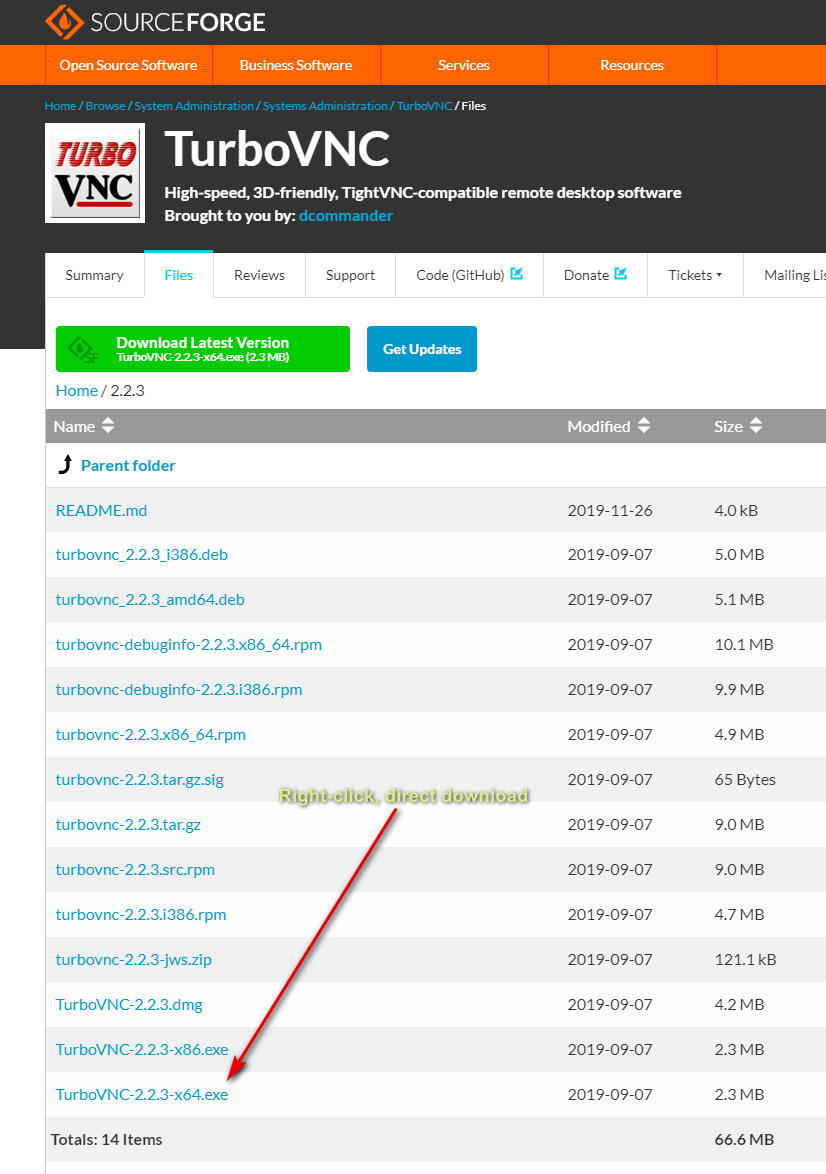
Solution: Bypass all that junk, and go straight to the direct download. Do this by simply installing the SourceForge: Direct download links UserScript.

Result: You get a direct download from the Files tab. Right-click on your desired file and then “Save linked content as…” (or whatever your Web browser’s equivalent is of that right-click menu item).


Incidentally, the UK is to opt out of the EU’s questionable new copyright laws, once our glorious Brexit is done, and hopefully we’ll also stomp on the EU’s hated cookie alerts too. Which means that UK users may not need this solution, at some point in the near future.

How to block auto-suggest on Archive.org

20 Monday Jan 2020

Posted by futurilla in Uncategorized

≈ Leave a comment

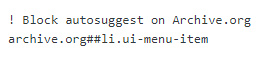
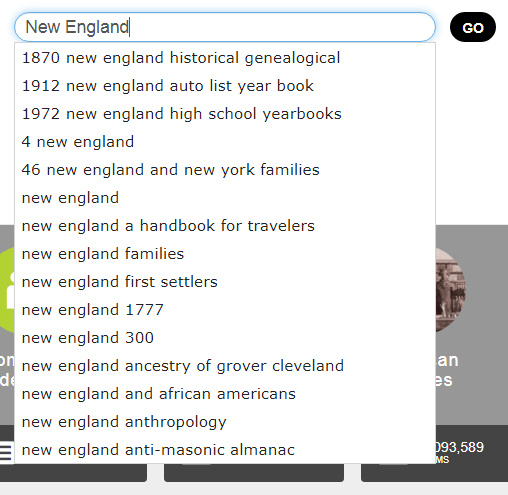
To block the auto-suggestions on Archive.org search, add the following to uBlock Origin’s “My Filters” list, save and reload the page…

Before…

After…

Google Search in three columns: how to do it in 2020

17 Friday Jan 2020

Posted by futurilla in JURN tips and tricks

≈ 5 Comments

Following on from my testing of new scripts in recent days, here’s a basic summary list and quick-start on what you’ll need for three column search in Google in 2020. This follows the effective demise of the much-loved GoogleMonkeyR.
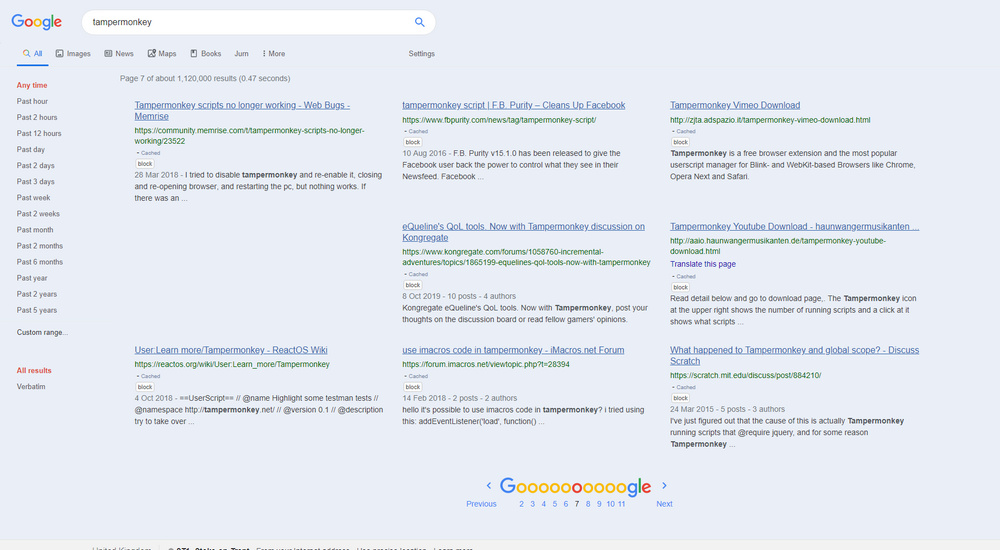
First you want a good Chrome-based browser. Opera for Desktop is in use here, at 1920px. Turn off addons and scripts likely to conflict with the new ones listed below.

I assume you already have auto-suggest etc turned off, when formulating search-queries at Google, and are using a widescreen desktop PC.


Core script-management and element-blocking addons:

1. Tampermonkey for installing and running UserScripts.

2. Stylus for installing and using UserStyles.

3. uBlock Origin for blocking, and knowledge of how to use its element picker and how to edit its “My Filters” list. (I suggest that you unsubscribe from the “Peter Lowe’s Ad and tracking server list” after install, due to over-reach. It’s found under Filter Lists | Multipurpose).


UserScripts and UserStyles:

1. Google search in several columns for Tampermonkey.

And then tell it to exclude Google Books, by adding the following lines to the top of the script…

// @exclude http*://xxx.google.*tbm=bks*
// @exclude http*://xxx.google.*.*tbm=bks*

… where xxx = www

You may want to tinker a little with the script’s column-width settings, in certain parts of the script, to better fit your widescreen monitor. If you plan to use Google Search Sidebar (see below) then install that before you start tinkering with these widths.

Update at end of March 2020: script broken by changes at Google Search. Temporary fix.

2. Then let the Stylish script Google Search in columns handle the three columns for Google Books results, having first set the script to three columns when you downloaded it. This script also appears to have the very useful effect of preventing the other UserScript columnising script from splitting an individual search-result across two columns, with a bit awkwardly placed in each column. The two scripts seems to be able to co-exist on Google Search, News etc.


Cosmetic:

1. Re-order the top menu in Google, and remove links to “Shopping”, “Flights” etc, if unwanted.

2. Google Search restore URLs (undo breadcrumbs) + Old Google Search. Together these two place a full URL path, under the link title in your results, like it’s always been. Another script noted below will make the URL path green, like it should be.

3. Google Search Sidebar and its expansion Google Search Various Ranges. This also works with News, and “two weeks” seems a good recent time-point at which the Googlebot has cleared a lot of the robo-spam from Search but results are still fresh.

4. Google Hit Hider by Domain (Search Filter / Block Sites). Dynamically and automatically remove results according to a user’s own URL blocking list. But it leaves a space in the results page, so that the layout is not ruined and the user knows something was removed. Blocking is done by a little “Block” button placed next to each result.

5. Fix Google Images a bit with Google Search – Always Show Image Size.

6. Google Search – Visible Cached + Similar links. Add back the “Cached” link (which still works). Then hack the script to make the Cache links small and also colour-matched to your theme — simply add “font-size: 10px;” and a basic color fix in the /* Actual Link */ section of the script; and then add this wholly new section and tweak its colour chip…

/* li background */
.ab_dropdown {
background: #eaeff7!important;
}

7. Google Search – Classic Links. I’ve adapted mine for use in combination with the above and a preferred coloured background, and it looks like this…

/*** Basic fix of the main links to appear less shouty ***/
#search a h3, #search a.l {
text-decoration: underline !important;
font-size: 16px !important;
color: #3666aa;
/*** Since URLs paths are visible in results, make them green ***/
}
cite.iUh30.bc.iUh30 {
color: darkgreen;
}


Blocking tweaks:

You’ll then need to use the Picker tool in UBlock Origin as you search…
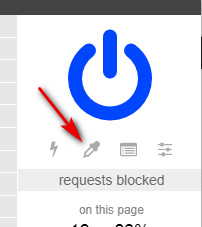
…to block all the spammy ‘suggestions’ panels, massive ‘helper’ panels, nags and suchlike that will appear from time-to-time on your page to clutter up your Google Search.

The following will also be useful for en-masse blocking of images in search results in News and Books, using UBlock. Paste them into your UBlock Origin “My Filters” list, save it, then reload Google.

! Block any page-panel containing the keyword X - here the word is 'videos'
google.com##g-section-with-header:has-text(/Videos/)

! Block all Google News Thumbnails
google.*##[id^="news-thumbnail"]
google.*##[alt^="Story image"]
google.*##[class^="gs_md_"]

www.google.*##*.sYpfDb
www.google.*##*.QyR1Ze

! Remove remaining image-block padding spaces on the News results
! and block the image favicons on results while we're at it
google.com##a.top.NQHJEb.dfhHve
google.com##.xA33Gc

! Block all Google Books cover thumbnails en-masse
google.com##*.th

The Google Books cover-thumbnail space cannot be removed, only the thumbnail images that sit on top of that space. The empty space left behind seems to be ineradicable.


That’s it. Enjoy your newly columnar, cleaned and tweaked Google search experience.

A new group test of search

17 Friday Jan 2020

Posted by futurilla in Academic search, Spotted in the news

≈ Leave a comment

Which Academic Search Systems are Suitable for Systematic Reviews or Meta-Analyses? Evaluating Retrieval Qualities of Google Scholar, PubMed and 26 other Resources, October 2019.

“Our tests revealed that the help files of numerous search systems promise a Boolean search functionality that our tests could not verify. These findings were especially alarming because users of such systems rely on functionalities that they assume work properly, but that may not be the case.” … “our results contradict systematic review guidance that assumes that “all the search engines in some way [would] permit the use of Boolean syntax operators to expand or restrict the search””.

Regarding… “full Boolean search strategies” the authors also noted that “Google Scholar [does] not offer such functionality”. The word “full” here is the critical word, and indicates that NOT is still a missing operator for Google Scholar.

For open access, this new test concludes that those outside of biomedical research… “are limited to the multidisciplinary system BASE” for discovering open access material, but that unspecified… “other open, or partially open search systems that fail to meet the criteria for query-based search might still be useful for supplementary search methods.”

← Older posts
Newer posts →
RSS Feed: Subscribe


Please become my patron at www.patreon.com/davehaden to help JURN survive and thrive.

JURN

  • JURN : directory of ejournals
  • JURN : main search-engine
  • JURN : openEco directory
  • JURN : repository search
  • Categories

    • Academic search
    • Ecology additions
    • Economics of Open Access
    • How to improve academic search
    • JURN blogged
    • JURN metrics
    • JURN tips and tricks
    • JURN's Google watch
    • My general observations
    • New media journal articles
    • New titles added to JURN
    • Official and think-tank reports
    • Ooops!
    • Open Access publishing
    • Spotted in the news
    • Uncategorized

    Archives

    • February 2026
    • January 2026
    • October 2025
    • May 2025
    • April 2025
    • September 2024
    • June 2024
    • May 2024
    • April 2024
    • March 2024
    • February 2024
    • January 2024
    • December 2023
    • November 2023
    • October 2023
    • September 2023
    • June 2023
    • May 2023
    • January 2023
    • December 2022
    • November 2022
    • October 2021
    • September 2021
    • August 2021
    • July 2021
    • June 2021
    • May 2021
    • April 2021
    • March 2021
    • February 2021
    • January 2021
    • December 2020
    • November 2020
    • October 2020
    • September 2020
    • August 2020
    • July 2020
    • June 2020
    • May 2020
    • April 2020
    • March 2020
    • February 2020
    • January 2020
    • December 2019
    • November 2019
    • October 2019
    • September 2019
    • August 2019
    • July 2019
    • June 2019
    • May 2019
    • April 2019
    • March 2019
    • February 2019
    • January 2019
    • December 2018
    • November 2018
    • October 2018
    • September 2018
    • August 2018
    • July 2018
    • June 2018
    • May 2018
    • April 2018
    • March 2018
    • February 2018
    • January 2018
    • December 2017
    • November 2017
    • October 2017
    • September 2017
    • August 2017
    • July 2017
    • June 2017
    • May 2017
    • April 2017
    • March 2017
    • February 2017
    • January 2017
    • December 2016
    • November 2016
    • October 2016
    • September 2016
    • August 2016
    • July 2016
    • June 2016
    • May 2016
    • April 2016
    • March 2016
    • February 2016
    • January 2016
    • December 2015
    • November 2015
    • October 2015
    • September 2015
    • August 2015
    • July 2015
    • June 2015
    • May 2015
    • April 2015
    • March 2015
    • February 2015
    • January 2015
    • December 2014
    • November 2014
    • October 2014
    • September 2014
    • August 2014
    • July 2014
    • June 2014
    • May 2014
    • April 2014
    • March 2014
    • February 2014
    • January 2014
    • December 2013
    • November 2013
    • October 2013
    • September 2013
    • August 2013
    • July 2013
    • June 2013
    • May 2013
    • April 2013
    • March 2013
    • February 2013
    • January 2013
    • December 2012
    • November 2012
    • October 2012
    • September 2012
    • August 2012
    • June 2012
    • May 2012
    • April 2012
    • March 2012
    • February 2012
    • January 2012
    • December 2011
    • November 2011
    • October 2011
    • September 2011
    • August 2011
    • July 2011
    • June 2011
    • May 2011
    • April 2011
    • March 2011
    • February 2011
    • January 2011
    • December 2010
    • November 2010
    • October 2010
    • September 2010
    • August 2010
    • July 2010
    • June 2010
    • May 2010
    • April 2010
    • March 2010
    • February 2010
    • January 2010
    • December 2009
    • November 2009
    • October 2009
    • September 2009
    • August 2009
    • July 2009
    • June 2009
    • May 2009
    • April 2009
    • March 2009
    • February 2009

    Proudly powered by WordPress Theme: Chateau by Ignacio Ricci.