GreasyFork is now accepting “Stylus format user CSS” as well as UserScripts.


09 Wednesday Sep 2020
Posted in Spotted in the news
GreasyFork is now accepting “Stylus format user CSS” as well as UserScripts.
09 Wednesday Sep 2020
Posted in JURN tips and tricks
A new free UserScript for your browser, Super-phrase – automatic “phrase search” on DuckDuckGo. It cost me £10 in the end, as I had to hire on Fiverr to get the Regex fixed up as well as the initial script made, but it was worth it. You’re welcome.

While you’re at it you may also want this for your uBlock Origin blocklist…
! Block DuckDuckGo mainpage autocomplete
duckduckgo.com##.search__autocomplete
… this turns off the flickery and nearly-always-wrong auto-complete drop-down.
04 Friday Sep 2020
Posted in Academic search, JURN tips and tricks, Spotted in the news
Update: DocFetcher Pro now available and stable at 31st May 2021, with embedded Java, for $40 via Gumroad.
The freeware desktop file-indexer and keyword searcher DocFetcher has been sporked by the Java runtime update, specifically failing to launch due to an error with the JIntellitype64.dll file. The code archive for this file suggests similar problems for others in the past. And the comments at SourceForge suggest other are finding the latest Java (mid July 2020) repeatedly crashes DocFetcher. Apparently it’s also causing problems for several other bits of software.
The fallback is not the official portable version of DocFetcher, sadly, which has the same problem. Nor is falling back to an earlier version of DocFetcher. Nor is the solution to download and install the latest 64-bit Java for Windows again. It appears that the old 32-bit software just doesn’t play nicely with the latest mid-July Java. This is confirmed by a comment buried on SourceForge from the developer…
“A proper bugfix for DocFetcher won’t be available until 2021, so for now downgrading to Java 8u251 is the only workaround”.
But by that time the software will be “DocFetcher Pro” and $50 paid for a perpetual licence. Ah well. Still, that’s good value compared to dtSearch, and is not a subscription like Copernic Desktop. But… $50. So, an alternative freeware option will soon be needed. I took a look…
1) There is Recoll on Windows, which looks like it’s halfway there, but it costs 5 Euros. That’s not viable if you were wanting to distribute a bit of full-text search freeware with the archive of a large defunct technical forum. Still, by 2021 it might have developed further. (Update: the maker has commented, noting it’s GPL and copies may be freely redistributed).
2) The developer of the freeware AnyTXT Searcher has been knocking the rough edges off it and expanding file types, over the last year. But, while it bills itself a “Google Desktop Search Alternative” is still appears not to have any sort of acceptable in-file preview on its search results. The other problem is that its start-up time is extremely slow. Several minutes, rather than seconds. You expect that of behemoths like Photoshop, but not of a little Windows utility. Plus it appears to be “all or nothing”, and there’s no ability to index just a few folders. Uninstalled.
3) Another possible choice is Exselo, said to be very powerful and yet also free desktop search. But… like DocFetcher it’s Java based. Plus, it’s Registerware and “Invites are sent to friends” (register via Facebook?). It’s a system-hog, and it stops working after 14 days if you don’t accept automatic updates. The developers were obviously hoping to sell it on, and lacking a buyer are now pitching it as a trendy “secure chat environment”? Blugh.
4) The old standby Copernic Desktop has become slightly better. The ‘last good’ wholly free version was 2.30 build 30 (no Deskbar feature on Windows 64-bit, PDF manual here). The current 2020 free version still has no .PDF or Word support, but the 10,000 file limit has now been raised to 25,000. It also has a new $15 “knowledge worker” edition, but that just turns out to be a “per-year subscription”. It’s now Registerware, even to just download the Trial. Also requires big .NET Framework downloads, which the 2.3 doesn’t. Thus it’s not feasible as freeware to distribute along with a large forum archive.
5) The old 2010 Multifind would be a good choice, if only it built an initial index and was thus fast. For some, the lack of a requirement to build an index may be a feature not a drawback. Despite its slowness due to a lack of an index, it can find and display text inside files. And it’s genuine old-school Windows freeware and has a tiny footprint. If you wanted to make something to fill the freeware gap that’s looming with the loss of DocFetcher, you might do worse than buy the rights to this and start developing it again.
So it’s back to DocFetcher. One can’t go back beyond DocFetcher 1.1.20, as that was when it started indexing HTML with no body element (e.g. RSS-feed forum-threads archived in XML and re-named .HTML), and anyway that doesn’t fix the problem. So it looks like the only real solution to get DocFetcher working is the downgrade to Java SE Runtime Environment 8u251 (jre-8u251-windows-x64.exe), which is a security risk unlikely to be welcomed by those who just want a free search tool for use with their forum archives. Perhaps what’s needed is to make a truly portable DocFetcher, which never has to call on the Windows system’s Java runtime?
02 Wednesday Sep 2020
Posted in JURN tips and tricks
The vital Facebook-cleaning browser-addon FBPurity is still not fully working in the Opera Web browser, but upgrading to the latest version 30.6.6 does much to help. Sadly this upgrade appears to be blocked via the browser’s internal “Update” function on the Extensions page, and when attempting to update via the official Opera addons website. It’s possible that other Chrome-based Web browsers may have the same problem updating.
Here’s the working work-around, to get the latest version installed:
1. Turn off the uBlock Origin browser addon, if you were using it to selectively block elements of the new Facebook design. Visit any Facebook Group, and wait a few seconds for the link to the FBPurity control-panel icon to appear. Open the control panel and export your FBPurity Settings to a text file.

2. Uninstall FBPurity from Opera. Close and reload Opera.
3. Then re-install FBPurity from here to get the latest version (the FBPurity site-link for Opera browser may send you to a different, non-working add-on directory page, and that was the case for me).
4. Then once again visit any Facebook Group, and wait a few seconds for the link to the FBPurity control-panel icon to appear. From the opened control panel, you now import your settings from that export file you saved…

5. Go down the tick-boxes and block the new items, which version 30.6.6 now lets you block.
6. Once again, save out your FBPurity settings and stash the resulting file somewhere safe. Re-enable uBlock Origin. Close and reload the browser and double-check you are on the latest FBPurity…

Sadly there’s still no fix in FBPurity to auto-open the “See More” button on Facebook posts. “See More” is so annoying and time-wasting that I’m currently discussing paying to have a UserScript made, to open all such buttons automatically.
31 Monday Aug 2020
Posted in Spotted in the news
SIGGRAPH 2020 now has an Open Access page. SIGGRAPH is the place were practical cutting-edge developments in 3D and other computer graphics techniques are presented, along with related items on computer vision and similar. They’ve also usefully collected and organised links to open material from past conferences, back to 2015.
29 Saturday Aug 2020
Posted in My general observations
This is interesting. For once, DuckDuckGo’s “last week” search is now better than Google Search’s “last week” search. I have the same URL blocklist running on both, so there’s no difference there. But having run a regular search on Google, I found myself going through the exact same with the Duck and saying… “why did Google Search not get that, and that, and that…” And most of that was currently-dated blog or magazine posts, so there was no sense of items being dredged from the past and presented as if new. Of course, it could be a simple mis-match in terms of timeliness, and I just caught Google in a late-August “techies have gone to the beach” slacker mode. But I suspect not.
28 Friday Aug 2020
Posted in Spotted in the news
Podcatr.com bills itself as “the podcast directory powered by machine learning”.

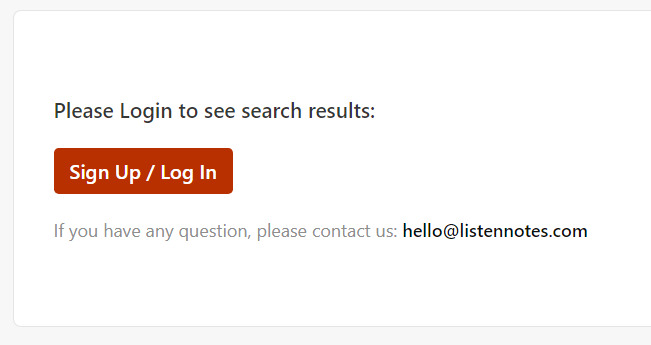
It’s new to me. A few tests shows it’s pretty good as a categorisation and discovery tool for podcast shows. Better, in terms of relevance, than the increasingly screwy Listen Notes. The latter has now gone from only allowing four pages of search results before accusing the hapless user of trying to pirate ‘their’ listings, to now allowing no public results at all for either ‘Episodes’ or ‘Podcasts’ — unless you’re logged in…
Podcatr on the other hand is public and it makes a useful choice in how it presents results within the topic categories for shows. The shows are “sorted exclusively by freshness”. Thus rewarding timeliness rather than popularity. This feature seems to work best if you feed Podcatr’s search-box something more specific than a single keyword, e.g. “H.P. Lovecraft” rather than just Lovecraft. In effect it’s a sort of subtle “what’s new” that you might drop in on every few weeks, just to keep in touch with who’s covering a topic. Thus potentially enabling you to back off from the ‘firehose effect’ of taking a daily look at everything new for a keyword at the episode level, in date order, just in case something is missed.
23 Sunday Aug 2020
Posted in Uncategorized
I’m happy to report success with testing a gig on Fiverr that offers to Download an entire website from the Internet Archive Wayback Machine. I put in a test order for a site archived in late 2015, a technical forum for some graphics production software. The forum had abruptly vanished on being sold to a larger business.
While it is possible to do what Joseph is offering for free, the only options appear to be Linux, command-line, or a couple of subscription/paid Cloud services. For a mere $6 it thus seemed worth finding out what Joseph could do.
He delivered a 310mb .zip containing 1.1Gb of archive from a given date. It was a script-driven .PHP forum site, but that caused no fuss. I didn’t expect him to re-work links to make a working site again, for that reason. Though apparently he can do that, on simpler HTML sites.
On my desktop PC dtSearch then indexed all text in the extracted files, regardless of file-type, and thus enabled keyword-search across the archive. If you need freeware on that point, then DocFetcher is a good free equivalent to the paid dtSearch.
21 Friday Aug 2020
Two new reports this week…
The Association of Research Libraries has Future Themes and Forecasts for Research Libraries and Emerging Technologies (PDF).
The Institute for the Future has The Hyperconnected World of 2030–2040 (PDF).
20 Thursday Aug 2020
Posted in JURN tips and tricks, Spotted in the news
So, the new Facebook design arrives. Until FBPurity and others fix their scripts, the browser add-on Ublock Origin’s selector pipette is your friend…
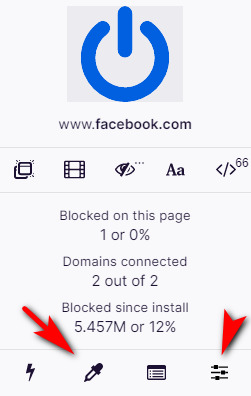
The other icon indicated is how you access the blocklist. After 40 minutes blocking bits with this pipette, all I now need is a UserScript to auto-open the stupid “See more…” content-blocking buttons.
But Facebook has recently also changed the URL for the ‘news feed’ from Pages. This handy feed came to a Page curator from all the other Pages they have “Liked” as their business, minus the verbose or spammy ones that you threw out after a week.
The feed is still there, but now on a new URL and there’s no re-direct. Here’s the fixed URL for your Page news feed…
WAS: https://www.facebook.com/YOUR_PAGE_NAME/pages_feed/
NOW WORKING: https://www.facebook.com/YOUR_PAGE_NAME/news_feed
Regrettably it won’t be actually usable until we have FBPurity back again, to remove all the irrelevant posts from “Suggested pages”. In FBpurity, “Suggested for you” in Pages feeds should be hidden by ticking this box…

… but this is not currently stopping the spam. (Update: one of the problems here was the that Opera was blocking an auto-update to the latest FBPurity).