Updated: 13th July 2020.
Want to home-brew a classic “back of the book” index from a Word file, ideally using freeware? Here are all the current software options I could find:
* TExtract can handle a wide variety of input files and seems to be favoured by pro book indexers. From $79 (use for a single title) to $595 (buy outright). Seems likely to take a while to learn.
* WordEmbed. £80. A MS Word Macro that helps to automate the process where your pre-made book index gets slotted in as an intrinsic ‘living/linked’ part of the MS Word document. It seems to be well regarded as a helping hand, but is not an automated maker of the index in the first place. Not likely to be used by amateurs but it might be something you could tell your hired low-cost ebook freelancer about — they might be interested in learning how to use it and thus adding to their skills-base.
* PDF Index Generator. $69.95, with a free demo limited to the first ten pages of the book. Create a basic automatic index, and then trim back and supplement it as needed.
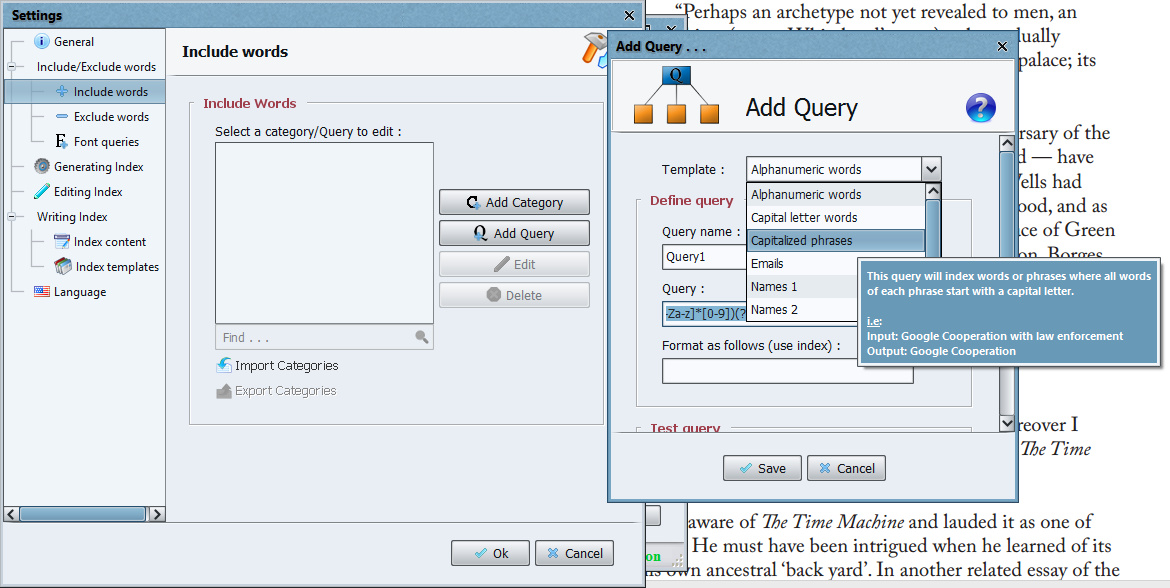
Version 2.4 added a new feature, a… “new query template has been added to allow indexing capitalized phrases” which works this way: get to “Step 2” in the initial PDF import | “Include words” | Click on pencil icon | “Add Query” | Choose “Capitalised Phrases” from the dropdown | this then forms Query 1 | Make sure Query 1 is ticked, and “Index these words only” | OK.
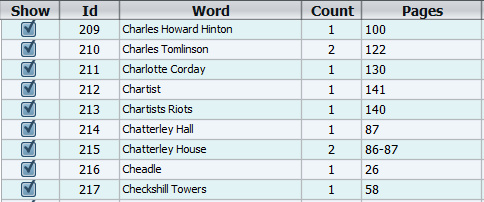
You now have a vastly more useful starting point for a first-pass at an index than otherwise, with all your place-names and personal names done…
There’s also a filter to get the “surnames, forenames” switched over. You can stack filters and/or run multiple indexes and then merge them (video tutorial link: see video at the 3 minute mark) and thus work in stages.
You’d then un-tick the irrelevancies and cut out the mis-steps, and then go through your book manually and add to the index various concepts and ideas which readers might want to look up. That wouldn’t be the end of making a polished index, but it’d be a big chunk of the grunt-work done.
A note on Java:
However, useful as such automation is, note that PDF Index Generator requires that you install Java to run it, and having Java installed on your PC these days is a very very major and ongoing security risk…
Network World reported that in 2014 U.S. Homeland Security… “recommended users uninstall Java completely” throughout the USA. In 2014 PC Magazine advised “Users should either uninstall Java, disable it entirely in the browser, or take other steps to protect themselves from attacks against Java.” In 2015 InfoWorld magazine wrote… in 2015, it’s really, really tempting [for a network admin] to simply uninstall Java from user machines.” In 2017 even Java World wrote, of yet more new and critical vulnerabilities, that… “Users should uninstall Java from their systems”.
Still… one might safety install Java on an old laptop and run from there, if the laptop has sufficient memory, where it would be quarantined from your main PC. Or, for a one-time use on your main PC, you might: i) download the standalone Java installers, ii) disconnect from the Internet; iii) install Java and then PDF Index Generator; iv) do your indexing output and refining work; v) completely uninstall Java and then re-connect to the Internet. Only with the standalone (full, about 58Mb) Java installer and the Internet disconnected does the installer NOT collect and send your system fingerprint to a remote location at Oracle, makers of Java. After install you should also look down the Java Security settings and disable things like Web browser integration (most Web browser makers block all Java plugins by default, but it’s best to check).
Update, July 2020: As of PDF Index Generator 2.9…
The Windows edition of the program now comes with Java embedded inside it, so you don’t have to worry about installing the right Java edition to run the program.
* Index Generator is un-crippled freeware for PDFs. It’s more basic than PDF Index Generator (above), lacking things like Phrase Query filters, but is quite capable and easy to use. I found that it doesn’t require an install of Java to launch or work. It’s available for Windows, Mac and Linux (the latter two do seem to require Java?). The very major drawback is that it currently appears to lack any Query ability to select only capitalised items such as Names and Place Names, and seems to actually case-shift every word in its pick-list to lower-case! Still, it’s in active development, and we may well see it catching up with PDF Index Generator over time.
* For a simple table of: word | language | times used the free Calibre ebook management and conversion software can also give you a quick output from an ebook of all words in the book. Calibre’s simple word table can then be exported to .csv and thus sorted in MS Excel. To access it from inside Calibre: load your ebook and convert to ePub (it only works with the ePub format) | click the tiny top-right “more” arrows | drop down the extra hidden toolbar | Edit Book | Tools | Reports | Words | Save…
The Word file’s word capitalisation is retained in the resulting Calibre list. On loading into Excel and sorting for capitalised words, one may thus quickly create a rough checklist of important name items, for reference use when selecting words with the likes of Index Generator (which regrettably appears to have no such ‘show capitalised name words only’ function).
* Indiscripts’ IndexMatic 2 plugin for Adobe InDesign (which is Adobe’s flagship DTP software).
Possibly someone will eventually whip up a script to automatically check if a word or phrase in an index has a corresponding Wikipedia or Infogalactic page, thus offering another way to filter a word-list down to the more important items.