Free OCR for German blackletter text

The free open-source Tesseract OCR 4.0 for Windows (beta, 64-bit), released 14th April 2018.

“The Mannheim University Library uses Tesseract to perform OCR of historical German newspapers. Normally we run Tesseract on Debian GNU Linux, but there was also the need for a Windows version. That’s why we have built a Tesseract installer for Windows.”

The Tesseract engine was apparently originally from Google, in use there at Google Books, but Google made it open source.

Tesseract 4.0 supports OCR in a range of old and ancient letterforms including German blackletter (aka Fraktur, in popular parlance ‘Gothic’), but these need to selectively enabled at install…
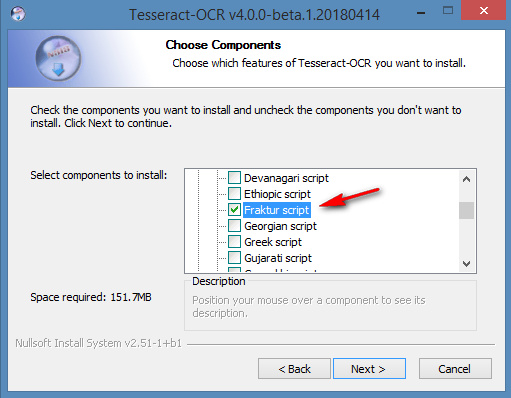
Once installed there are a few Windows GUI front-ends to choose from, with which to operate Tesseract. gImageReader is 64-bit Windows and current. On their forums I found a gImageReader beta version that is newly-compiled for Tesseract 4.0 beta. That needs to be launched in Windows Administrator mode, and then it also seems to require a Fraktur download, in order to handle OCR of German blackletter letterforms…
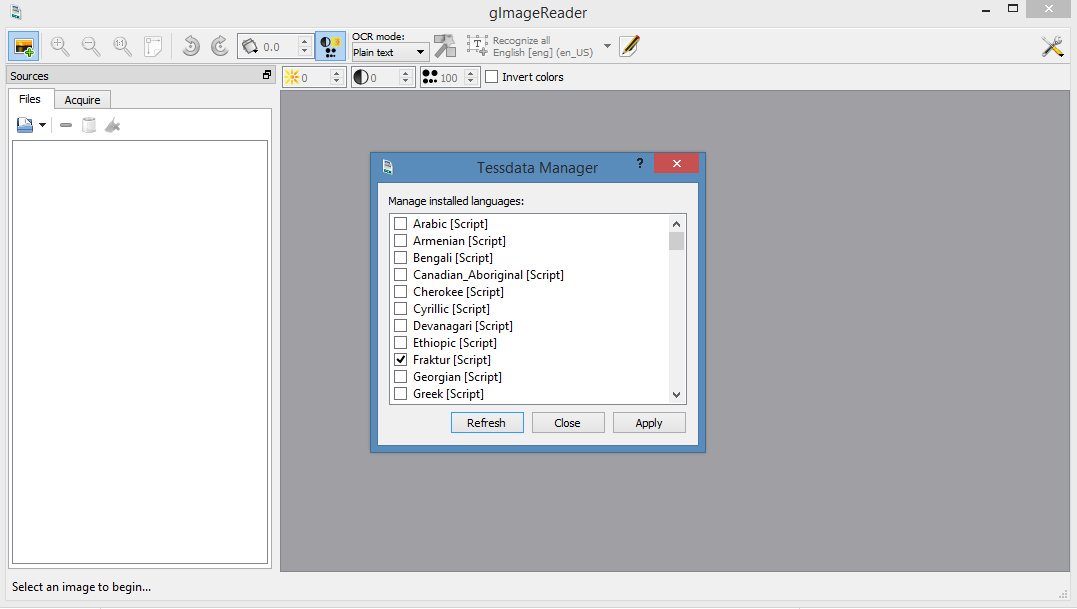
I’m assuming that gImageReader ‘knows’ where Tesseract 4.0 is, and hooks into it automatically. Because I didn’t need to set any file-paths to it, in gImageReader.

Once gImageReader is set up and the Frankur toggle/icon is switched, even when taking a screenshot the OCR results were pretty good…
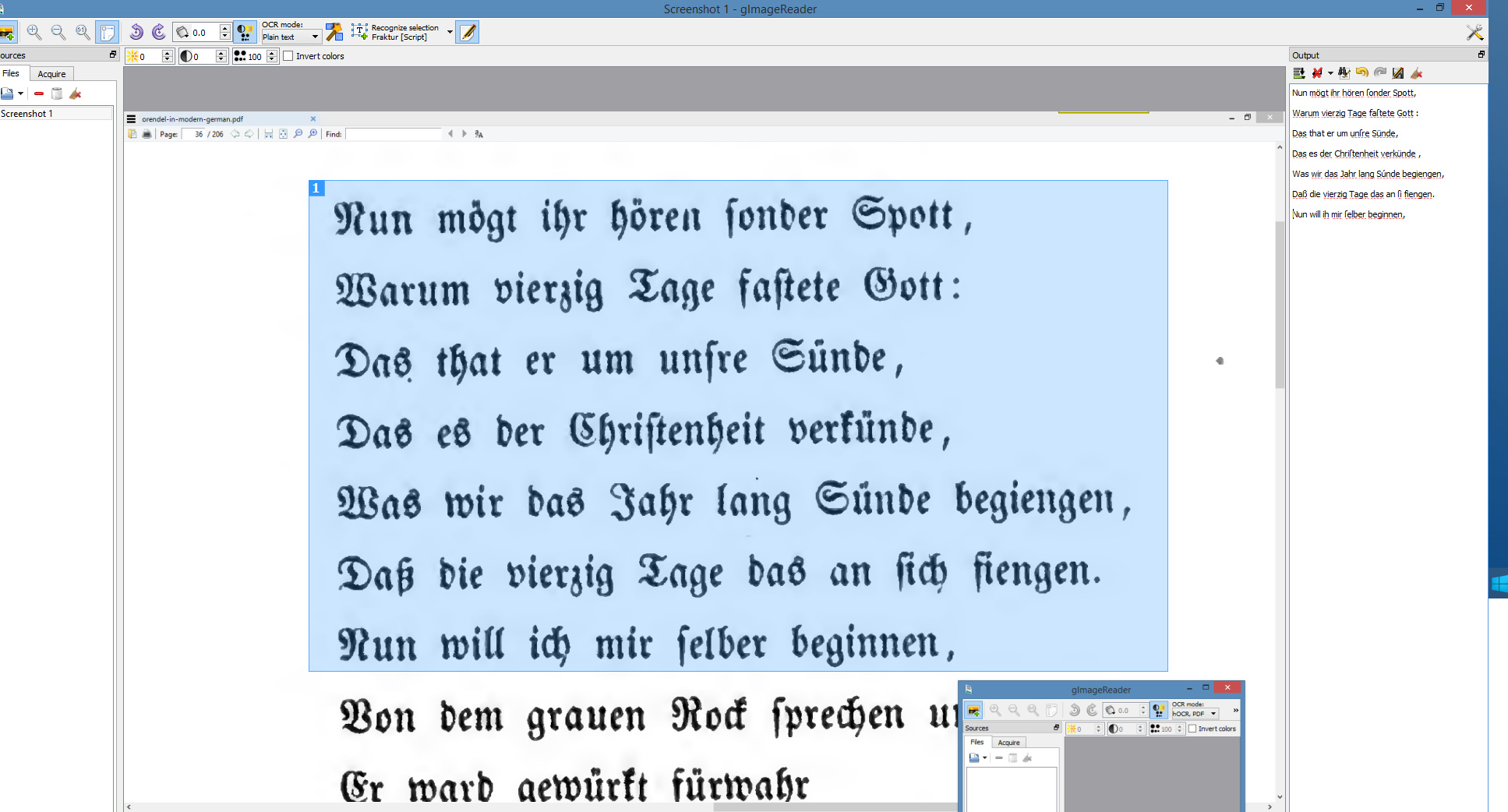
It can also handle complete PDFs, and seems to go at about 15 pages per minute on a modern desktop PC. Nice to have, and (in combination with Google Translate) useful if your research takes you back to the German literature of pre-1938 — but you can’t read German and certainly not in blackletter.

There are probably online sign-up services that can do the same, these days, where you do a sluggish upload and have to deal with time-outs and usage-quotas etc. But I prefer the ease of having one’s own Windows desktop software.


Google Translate does PDFs

New to me: Google Translate now works on foreign-language PDFs. Perhaps it’s been available for a while, but I’ve seen no-one blogging about it.

It doesn’t work if you just right-click on the Web link to the PDF in, say, Google Scholar or JURN search results, and then select “Translate this page…”.

Instead you have to:

1) Right-click, and copy to the clipboard the direct PDF link.
2) Visit Google Translate, manually paste in the URL you just copied.
3) Click on the URL that appears over in the facing box.
4) The PDF text appears extracted, in the form of a Web page, and translated.

Very useful, and I had excellent results with a Polish article I tested. I had the whole article translated, too, not just the first few paragraphs. Longer items such as a PhD thesis will be refused as “too long”.

Note that a ‘redirect URL’, which gives the PDF but hides the direct URL link to the PDF, is of no use in the above workflow.

Sadly I guess it’s also a route to plagiarism for students. I’d suggest that the anti-plagiarism detector-bot services might usefully build a bank of Google-translated theses and dissertations, to add to their phrase-detection sources. Teachers who mark suspiciously-excellent final dissertations, and who are then inclined ‘to go on the hunt’, should also be aware of the possibility that the lacklustre student may have run a foreign dissertation through Google Translate and then lightly re-written it for clarity in English.

Dialling it back

A preprint, just arrived on SocArxiv: “Digital blackout of Spanish scientific production in Google Scholar”

“An abrupt drop in the number of Spanish scientific journals covered in [since] the last edition of Google Scholar Metrics (2012-2016) has been detected. […] After considering several hypothesis to explain this phenomenon, we conclude that the main cause was the sudden disappearance of the Spanish bibliographic database Dialnet from Google Scholar.”

I’d add that parts of Ex Libris also summarily removed Dialnet in July 2017

“all titles will be removed from Dialnet database in the Knowledgebase on July 20, 2017. The database will become a zero-titles database.”

This might suggest that the Google Scholar cut-out — apparently of some 2m Dialnet items — was just ‘an up-stream -> down-steam thing’ that flowed into Google Scholar. Due to the way they have their automated inputs set up from their partners? Just my guess.

Newberry Library makes 1.7m images free to use

The Newberry Library has made its 1.7m images free to re-use, including commercial…

“users can share and re-use images derived from the library’s collection for any purpose without having to pay licensing or permissions fees to the Newberry. There are currently over 1.7 million Newberry digital images freely accessible online.”

Picture: Norman Rockwell, “Rosie the Riveter”, 1943. Not sure that Norman Rockwell is really public domain, but it’s nice to have in high-res.

‘Discoverability of award-winning undergraduate research in history’

New paper: “The discoverability of award-winning undergraduate research in history: Implications for academic libraries”, College & Undergraduate Libraries, April 2018…

“eight of the fifteen papers could be found in full text. If full text was available somewhere, Google always found it. Google Scholar only found four of the eight full-text papers […] Microsoft Academic found two of the full-text papers”

Lens.org

Lens Scholarly Search, a new tool to search across patents and citations at the cutting-edge of innovative science and engineering. Looks great, with nice clean design and fast response. It’s one of the new wave of citation search tools.

It’s public, and can be used without an account sign-in, unlike Sparrho (which claims 60m across both citations and patents).

I can’t see any way to filter the search results for “… and has link to free public full-text”. But I guess if you need a focussed tool like this, then your innovative project has the funding to access everything that you need to read.

Searches can be embedded in URLs, as can the ‘search by date’ setting. Which means that saving a set of bookmarks would give you a usefully quick way of regularly horizon-scanning across the developed applications and commercialisation of a specific research topic. I don’t see that Lens.org has the capability to offer a RSS alerts-type feed, based on keywords, though it looks like it may do if you sign up for an account. Of course, on highly sensitive projects, such an account has dangers — in that you don’t know if competitor nations might be sniffing at or profiling your search-trail in some way.