Open and Closed Articles in Norway

“Grades of Openness. Open and Closed Articles in Norway” (August 2018)…

Based on the total scholarly article output of Norway, we investigated the coverage and degree of openness according to three bibliographic services: 1) Google Scholar, 2) oaDOI by Impact Story [now called Impactstory], and 3) 1findr [formerly oaFindr]. According to Google Scholar, we find that more than 70% of all Norwegian articles are openly available. However, degrees are profoundly lower according to oaDOI and 1findr, respectively 31% and 52%.

open shares vary considerably by discipline, with … the Humanities at the lower end

Steaming Amazon

Amazon’s search is becoming more and more useless. Search for “middle-earth” in Books: Reference, and half way through the second page of results, it starts slipping in multiple “middle-east” results. Presumably on the assumption that the searcher is a drooling idiot who’s mis-typed the search query.

Google’s new Dataset Search tool

Google has a new Dataset Search tool. It looks good.

An initial test search for Krita (the open source paint software) didn’t pick up anything, so it is just limited to datasets and is not also bringing in general file-names from FTP servers.

A wide search for Antarctica Cephalopods then gave a good set of 25 results, all of which were record pages that appeared to place their dataset under CC or to be public domain (NASA etc). There doesn’t appear to be any way to then load a further set of results, or to do a further keyword search within the record-pages of the results.

Tutorial: assemble non-overlapping tiles in Photoshop

How to capture zoomified image tiles and semi-automatically re-assemble them into a single image, with Photoshop. Even when there is no overlap between the tiles (which means you can’t use Photoshop’s Photomerge feature).

First, make sure your target picture is of an age and a state to be in the public domain and can legally be liberated. Also, note that the WikiMedia Commons has a de-zoomify advice page which offers various dezoomifying services and tips. These options may be quicker and more accurate than my method. But if the WikiMedia options don’t work, try this…

1. Install the Save All Images extension for Opera (or an addon with similar fuctionality that works in your Web browser).

2. Visit your target page. Zoomify the image and pan around until all tiles have loaded. Then capture all the loaded images on the page with ‘Save All Images’. As you can see, it’s quite sophisticated in its filters, though unfortunately you can’t save your settings as a repeatable preset for a particular website…
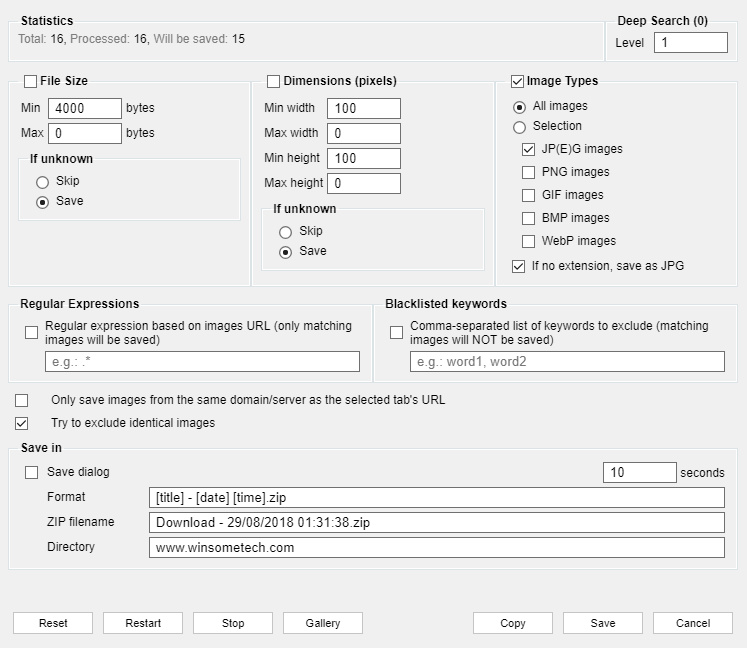
Ok, ‘Save All Images’ will pack all the loaded tiles up in a zip file.

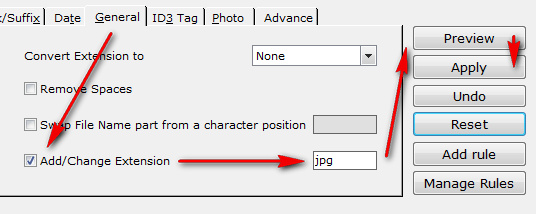
3. Extract your saved .zip of images. View the resulting folder as thumbnail images. Delete all images that are not part of the tile set. Rename .jpeg files to .jpg if needed, with Winsome File Renamer or similar. Also rename to alphanumeric order if needed — tiles are downloaded in their tiling sequence, so a sort-by-date should mean that a 1… 2… 3… re-naming should be possible even if the filenames are obfuscated. You want to end up with a folder of image tiles in .jpg and with a logical alphanumeric loading order. Make a note of how many rows and columns make up the complete image (e.g. three tiles across, and four tiles down).

4. Get Paul Rigott’s Photoshop stitcher script File Stitcher.zip (mirror) and unzip it. This script can handle non-overlapped tiles by using an ‘alphanumeric load-order’ option.

5. Load Photoshop. Do not open a new image. Just go: File | Scripts | Browse and then find and load Paul’s script.
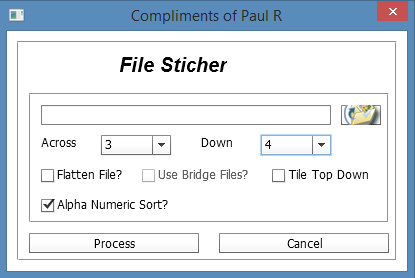
Set your numbers for the tiles across / down, and then point the script at your target folder. The images load and are automatically distributed across a newly opened image, with the script doing canvas expansion as needed. As you can see here, the result is not perfect, but 85% of the work has been done automatically. Most tiles have been accurately snapped together into the main image, but a few tiles have been assembled into strips and these remain as outliers.
Just multi-select a few relevant layers (Shift, select with right mouse-click, repeat to add the next layer to the group). Then snap the image together. More recent editions of Photoshop should help with that, if Snap is turned on.


Additional note: to assemble a set of six QTVR tiles (the old Quicktime way of present a 360-degree panorama online), use Pano2VR 6.0 or higher to save the tiles out to a single-image 360 VR panorama format that Facebook and WordPress understand.

Update: March 2020. Also try the free Microsoft Image Composite Editor 2.0. It may be able to do much the same thing, and may also work with only a quick set of screenshots.


WorldBrain for Chrome

WorldBrain for Chrome : “Full-text search of your Web browsing history and bookmarks. Find previously visited websites & PDFs in seconds.” Works in Opera too, and presumably any browser which supports Chrome extensions and addons.

On install it offered to import my last 90 days of visited URLs from my History, thought it fatally ‘hung’ at 2% and couldn’t get past that even in a few hours. However, that 2% was all I needed, since it was going through the URLs in reverse date order and thus had grabbed the last few days. I cancelled and was left with what I actually wanted: not 90 days’ worth of browsing, but just the last few days to start me off.

You can also Blacklist sites that don’t need to be cached locally, and Google Maps is blacklisted by default. One very important filter you need to add before you do anything is Google and DuckDuckGo searches, or hitting them all again in an automated fashion may cause you to be blocked by those services. Once the initial import is done, you can then unblock the main search-engines and they will cache naturally as you browse.

You’ll also want to visit the Privacy settings and ensure that some things are off/on.

It’s only getting the text, stripped of HTML. Therefore partial searches for filenames of pictures and .zips presumably won’t work, since they’re in the HTML code. Even so, one potential problem appears to be that there’s no rolling “delete page files after 90-days” setting. Presumably your local cache just goes on growing and growing, which may not be so good for those with over-stuffed hard-drives.

You also get a personal annotation and tagging tool as a discreet sidebar button. This also gives you a way to get to the Search interface, if you don’t want the creepy ‘staring eyes’ WorldBrain icon on your Bookmarks bar.