New FAQ section

I’ve added a new section on the JURN FAQ page: “I’m a linguist or country specialist. JURN wants to return mostly English results when I search using words in another language. How do I fix this?”


JURN does ‘auto-translate + add synonyms’ when a user searches using non-English keywords, while also auto-detecting your home nation. For instance, if you search from the UK for the single word…

مقارنة (Arabic, meaning: comparison, comparative)

… then the UK user sees search results containing مقارنة OR comparison OR comparative, with English language results predominating. Search instead for “مقارنة” (in inverted commas) and the majority of the search results are in Arabic.

This automatic nation-detection feature makes results more useful, for most people. But it may present a problem for linguists or country specialists who regularly search JURN, or for those who are part of a diaspora living outside their home nation. One solution might be to spoof your IP address via a free Web browser add-on, such as the easy-to-use Hola. Hola allows you to bypass the petty national restrictions that can be placed on access to Web content, by making you appear to be in another nation.


New JISC report on scholarly discovery

JISC has commissioned a new September 2015 Spotlight Literature Review on scholarly discovery, which is available now in PDF. Short, but to-the-point…

in most cases staff over-estimate the extent to which users use different library services, in some cases very greatly. […] overall they think, it seems mistakenly, that the library discovery layer attracts very similar usage to Google Scholar”

one recent ethnographic study of student research behaviour (Dalal et al, 2015) highlights the low levels of information literacy skills displayed by many undergraduates even after library training in research skills [… they still had] very basic search techniques and poor search strategies [and a] Failure to locate the full text of articles.”

I’m interested in serendipity’s role in online search, and so I was pleased that the report pointed me to the December 2014 Library Journal article “Serendipitous Discovery: Is it Getting Harder?”. I was also rather tickled to discover that the word ‘serendipity’ was invented by Horace Walpole.

Times Higher on Russian plagiarism

Times Higher on allegedly rampant thesis plagiarism / ghost-writing in Russia…

PhD forgery is now an “integral part of Russia’s statehood”, rather than a “fringe phenomenon”, according to the analysis published in Higher Education in Russia and Beyond, a quarterly newsletter published by the country’s National Research University Higher School of Economics.”

Mass-production of PhDs is generally centred in Moscow and St. Petersburg, where “conveyor [belt] units” were found for “PhDifying” politicians, public officials and teachers”

Placing text

A fascinating and very clearly written April 2015 article about automatically mining geolocation points out of plain text: “Mapping Words: Lessons Learned From a Decade of Exploring the Geography of Text”

In Fall 2014 I collaborated with the US Army to create the first large-scale map of the geography of academic literature and the open web, geocoding more than 21 billion words of academic literature spanning the entire contents of JSTOR, DTIC, CORE, CiteSeerX, and the Internet Archive’s 1.6 billion PDFs relating to Africa and the Middle East, as well as a second project creating the first large-scale map of human rights reports. A key focus of this project was the ability to infuse geographic search into academic literature…”

We probably need a name for such activities, and also for mining eco/geo data out of old paintings and photographs of landscapes. Geo-mining is too 20th century and eco-unfriendly. Geo-gleaning and Geo-gleaner are terms that have a certain poetry about them, while also suggesting both the curatorial and the imprecise nature of the techniques.

Google Scholar and grey literature

Interesting new paper at PLOS One, “The Role of Google Scholar in Evidence Reviews and Its Applicability to Grey Literature Searching”.

Test searches were drawn from review papers…

“…chosen as they covered a diverse range of topics in environmental management and conservation, and included interdisciplinary elements relevant to public health, social sciences and molecular biology.”

… and compared alongside Web of Science results…

Surprisingly, we found relatively little overlap between Google Scholar and Web of Science (10–67% of WoS results were returned using searches in Google Scholar using title searches).

Unsurprisingly, Google Scholar wasn’t found to be the one-stop shop many assume it to be…

… some important evidence was not identified at all by Google Scholar … [so it] should not be used as a standalone resource in evidence-gathering exercises such as systematic [literature] reviews.”

Interesting finding also that…

“Peak” grey literature content (i.e. the point at which the volume of grey literature per page of search results was at its highest and where the bulk of grey literature is found) occurred [in Google Scholar] on average at page 80 (±15 (SD)) for full text results … page 35 (± 25 (SD)) for title [search] results.”

So this suggests that one might usefully flick through to result 700 (of 1000) and work a few hundred results starting from there, if seeking grey literature with a very well-formed topic search? By well-formed I mean the sort of sophisticated literature-review style of search term chaining being used in this study, for example…

“oil palm” AND tropic* AND (diversity OR richness OR abundance OR similarity OR composition OR community OR deforestation OR “land use change” OR fragmentation OR “habitat loss” OR connectivity OR “functional diversity” OR ecosystem OR displacement)

It appears that the researchers only auto-extracted “citation records” from the search results, and then classified into broad categories based on those alone. There appears to have been no checking as to the validity of the link, and/or downloading and scrutiny of PDFs. So there are no measurements of how many of Google Scholar’s links work or lead to free no-paywall fulltext articles.

Lastly, I noted…

Google Scholar has a low threshold for repetitive activity that triggers an automated block to a user’s IP address (in our experience the export of approximately 180 citations or 180 individual searches). Thankfully this can be readily circumvented with the use of IP-mirroring software such as Hola (https://hola.org/)”

Has it leaked?

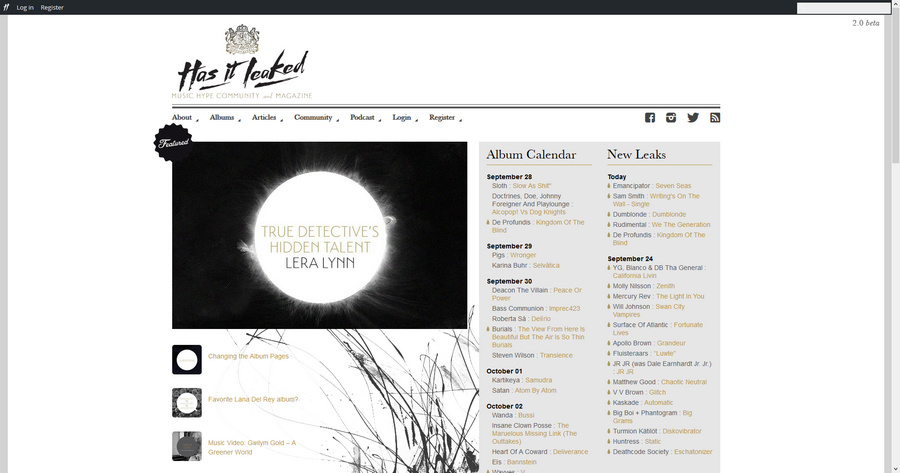
Has it leaked? is a rather nice specialist search tool for free content, from Sweden. Focussed on forthcoming arty music albums, it basically saves fans the task of tracking down the tracks / snippets / “making of…” etc that the official marketeers ‘leak’ for free in advance of the album, or during the release window. It’s not a pirate site, though, and firmly states: “No download links are allowed!”.

hasitleaked

I’d say there’s room in the market for something similar for all quality non-fiction books, perhaps in partnership with a book-summary service like Blinklist, and with user-configurable topic filters.

Why would such a site be needed? Here’s an instance of the limited way in which current mega-services offer to group versions or offer preview options. If one looks at Amazon UK for the new Matt Ridley book The Evolution of Everything: How New Ideas Emerge one only sees two options there for the audiobook: free with an Audible direct-debit subscription, or a £30 pre-order and wait until November for delivery. Even then the audiobook pages are not linked from the print book page, so someone landing on the print page via Web search would have no clue there even was an audiobook version. No mention at all on Amazon UK that it’s actually available now for £13 on the Audible UK site, or that there’s a free 13 minute extract of the introduction of the audiobook available via publisher on SoundCloud. Only my deep searching surfaced the free audiobook extract.

The above suggests that two mega-services (Amazon and Audible) and a mega-publisher (Harper) can’t even co-ordinate promo material and version offers for a major book in the globally important UK market. So I’d say there’s a lot of scope for savvy curators to do it for them, also adding author podcast links, newspaper book review links etc.

DuckDuckGo testing #2

I did a quick experiment in making a Custom Search Engine via DuckDuckGo‘s link-chaining feature. In this experiment I enable a search across a small group of reputable crowdfunding services, via this search in DuckDuckGo. The search format is…

"open access" site:patreon.com,gofundme.com,peerbackers.com,mysherpas.com,wedidthis.org.uk,crowdcube.com,cofundos.org,indiegogo.com,rockethub.com,kickstarter.com

Works fine. WordPress.com refuses to embed an active link that contains “a phrase” (it’s the inverted commas, presumably), but this test link should work.

Unfortunately chaining a list of URLs appears to turn off DuckDuckGo’s intitle: search modifier, at least when searching for a phrase. But intitle: does work when using a single keyword, in a search such as…

intitle:journal "open access" site:patreon.com,gofundme.com,peerbackers.com,mysherpas.com,wedidthis.org.uk,crowdcube.com,cofundos.org,indiegogo.com,rockethub.com,kickstarter.com

A keyword / phrase that veers more into popular culture (such as Lovecraft) seems to cause Kickstarter results to swamp the search results.

I also noted that the search results from the above example fail to distinguish between “open access” and “open-access”. Adding +, as in +”open access”, fails to force a verbatim search. There is obviously some slight wiggle-room in DuckDuckGo’s claim that they don’t try to second-guess your search terms. Google has the same problem with a verbatim that is-not-really-verbatim.

There’s no sort-by-date filter on the search results, and adding the search modifier sort:date to the search causes a chained-URLs search to totally fail.

Sadly a list of chained URLs just doesn’t work with DuckDuckGo’s Image Search. For instance, a searcher can’t constrain Image Search thus…

"cute cat" site:flickr.com,deviantart.com,commons.wikimedia.org

When looking for Creative Commons images using DuckDuckGo Image Search a better strategy is probably simply to dispense with the URL chain and use this…

"cute cat" "some rights reserved" OR "cute cat" commons attribution -noncommercial

This will still pick up “noncommercial” CC pictures on Flickr (since Flickr obfuscates the picture’s license behind a “some rights reserved” generality), but at least you’d be headed in the right direction. Note that it seems that DuckDuckGo only lets you use a single minus sign to knock out one keyword from the search, and it has to be at the end of the search to work.

A “Region” filter doesn’t appear to work on Image Search. You can’t just see the “cute cats” of Japan, for instance.
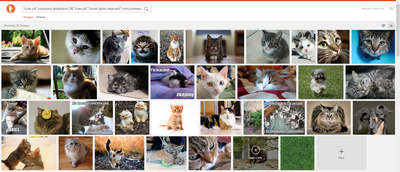
cats

DuckDuckGo testing #1

First finding from my DuckDuckGo search testing. That site: is not at all a reliable indicator of what is indexed, when using an extended URL. For instance, the PDFs of the Joint Nature Conservation Committee, UK…

site:http://jncc.defra.gov.uk/pdf/

One lone result in DuckDuckGo. However, search for…

“The Vascular Plant Red Data List for Great Britain”

And up it pops at…

http://jncc.defra.gov.uk/pdf/pub05_speciesstatusvpredlist3_web.pdf

So the PDFs at http://jncc.defra.gov.uk/pdf/ are in there then, but it seems they can only be surfaced in DuckDuckGo by using…

site:jncc.defra.gov.uk filetype:pdf