• Directory
  • FAQ: about JURN
  • Group tests
  • Guide to academic search
  • JURN’s donationware
  • Links
  • openEco: titles indexed

News from JURN

~ search tool for open access content

News from JURN

Category Archives: JURN's Google watch

GoogleMonkeyR temporary fix

12 Wednesday Mar 2014

Posted by futurilla in JURN's Google watch

≈ 7 Comments

It seems that Google Search have committed to their new code for displaying Google Search results, after trialling the changes last week and then withdrawing them. The changes break the vital browser addon GoogleMonkeyR. A temporary fix is to edit the GoogleMonkeyR userscript thus…

Find…

var list = document.getElementsByXPath(".//div[@id='ires']/ol/li[starts-with(@class,'g')]/div/parent::li");

Replace with…

var list = document.getElementsByXPath(".//div[@id='ires']/ol/div[starts-with(@class,'srg')]/li");

Confirmed as working with Google.com search. Fails when you switch the keyword through to Google News.

UPDATE, NOV 2014.

Still working fine for me, with a few tweaks…

1. Updated Greasemonkey to 2.3 (29th Oct 2014) and GoogleMonkeyR to 1.7.2.

2. I access Google Search via this URL, which has a parameter that limits search results to 15 per page…

https://www.google.com/webhp?hl=en&complete=0&tbo=1&num=15&tbs=li:1

15 fits nicely in three columns, which I also have set up in GoogleMonkeyR Prefs — which is the cog-wheel that appears top-right once you make a Google search.

googlemonkeyr

3. Hide the “Searches related to test” element on the Google Search results page, by using the AdBlock Plus addon (right-click on “”Searches related to test””, ‘Inspect Element’, highlight whole ‘extrares’ element, click on red AdblockPlus icon, block). This bit gets hidden because otherwise it sits awkwardly between you and the numbered links that lead to the subsequent results pages.

Towards a Google Scholar API

27 Thursday Feb 2014

Posted by futurilla in How to improve academic search, JURN's Google watch

≈ Leave a comment

Wouter has hacked out a Google Scholar API workflow today, sort of. I suspect the reason Scholar has never offered an API is the agreements Google has with the large commercial journal publishers and citation database providers.

Google Scholar citations pages appear in Google Search

24 Monday Feb 2014

Posted by futurilla in JURN's Google watch

≈ Leave a comment

I note that Google Scholar’s single author citations pages are now to be found in the main Google Search results…

   site:scholar.google.com/citations

Although it seems that if a prolific or influential author has two or more pages of citations, only the first will show up in Google Search. For example…

   site:scholar.google.com/citations “graham harman”

Google makes its own CSE

20 Thursday Feb 2014

Posted by futurilla in JURN's Google watch

≈ Leave a comment

In an unusual move Google appears to have created its own Custom Search Engine, Custom Search for K-12 Computer Science Education. For the benefit of those outside the USA, “K-12” isn’t the name of some obscure Linux module. It seems to be U.S. educational jargon indicating: “state schooling for kids aged 5 to 16”.

Google Scholar and DSpace

24 Friday Jan 2014

Posted by futurilla in How to improve academic search, JURN's Google watch

≈ Leave a comment

A new study, “Google Scholar and DSpace”…

“The average indexing ratio [in Google Scholar] for our sample of 10 recent DSpace repositories is 64.8%”

I wonder if the interface presentation has an influence? http://circle.ubc.ca/ is totally hardcore in presentation and keywording, and is indexed at 99%. Whereas http://dash.harvard.edu/ has a more student-friendly blog-like look and feel to it, and is indexed at just 26% despite the harvard.edu domain. But perhaps not, as I guess its more likely due to the presence or otherwise of good machine-readable metadata.

Blogs begone

22 Wednesday Jan 2014

Posted by futurilla in JURN's Google watch

≈ Leave a comment

Just when blogs were making a comeback, after the inane collective Twitter-gasm of the last few years… today Google has removed “Blogs” from the switch-through options at the top of the Google Search results …

blogs-removed

They’ve also recently made some pointed comments to bloggers about allowing spammy “guest bloggers” to use their blogs.

10 steps to move from Chrome to Firefox

23 Monday Dec 2013

Posted by futurilla in JURN tips and tricks, JURN's Google watch

≈ 4 Comments

Google has announced that Google Chrome browser users will not be allowed to install their own choice of plugins, addons, and userscripts, from January 2014. Today I moved over to using Firefox, as a result. Here are my notes on the “how to” of the move from Chrome to Firefox, in the hope the notes may help a few others:


1. Backup any old bookmarks from any existing install of Firefox. It seemed best to start fresh, so I removed the old version of Firefox via a full uninstall.


2. Download and install the very latest Firefox. As this was a fresh install, the first time Firefox loads it should offer to automatically port over all your bookmarks, toolbar bookmarks, passwords, etc. from Chrome. (The tiny favicons will only reappear, next to bookmarks on your toolbar, when you revisit those bookmarked pages).


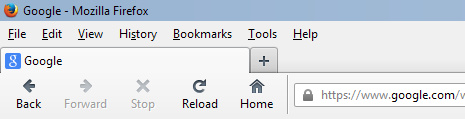
3. Tweak the Firefox interface. I prefer to get back to a retro look with Classic Reload-Stop-Go Buttons.

Then go View | Toolbars | Customize. While this Customize library window is open, you are able to drag around the navigation icons in the navigation bar. Get the icons positioned how you want them, then before you close the Customize library window choose “Icons + Text”. Then click “done”. This is how I like the top left on my browser…
navmenu


4. Get the RSS newsfeed icon back in the address / location bar by installing this addon. The RSS button it adds had success in passing over the feed to my free desktop RSS news reader Feeddemon.


5. Add some basic advert and click-jacking blocker add-ons:

Adblock Plus

Flashblock

NoScript (annoying initially)

And then in Firefox go to: Tools | Addons | Plugins and disable all the craptastic media-player plugins that ship with Firefox (RealPlayer and the like, ugh). I only left Flash on “Always Activate” — since the Flashblock add-on (above) keeps it under control.


6. Then block the web’s other annoyances with these add-ons:

Facebook Purity (and import any blocklist / settings from your Chrome version of F.B. Purity)

Comment Snob


7. Add userscript capability to Firefox:

Greasemonkey (required for running all userscripts). Followed by…

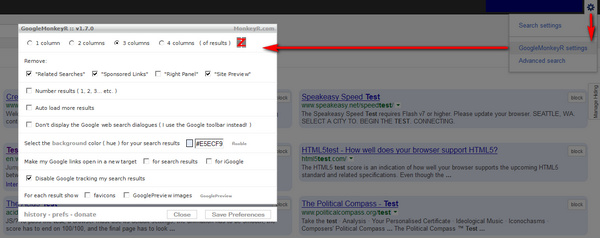
GoogleMonkeyR. Vital for working with Google Search, in my opinion. I set it up to display results in three columns, and also to block several bits of Google Search cruft.
googlemonkeyr

monkeyr

(To find GoogleMonkeyR settings: make any search in Google, then right-click on the grey cog. Bear in mind that ticking “Don’t display the Google Web Search dialogues” may prevent the search box appearing above the top of search results in Google Images, and Google Books).

Direct Links in Google Search. This forces direct URLs to be used in the search result links.

Google Hit Hider by Domain (blocks Google Search results by unwanted domain). Import your old Google Search blocklist from “Personal Blocklist (by Google)”, then use the de-duplicate tool in Google Hit Hider…
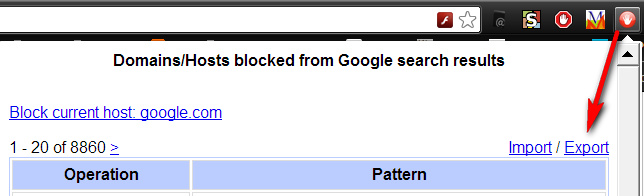
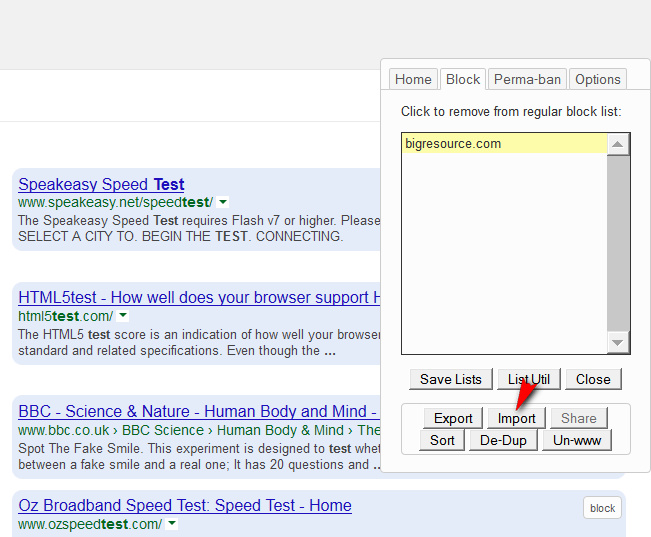
export

import


8. Finally, go to Tools | Options | General | Home Page. There paste in this handy home page URL, which will send you to the main Google Search when you click on the Home button in Firefox:

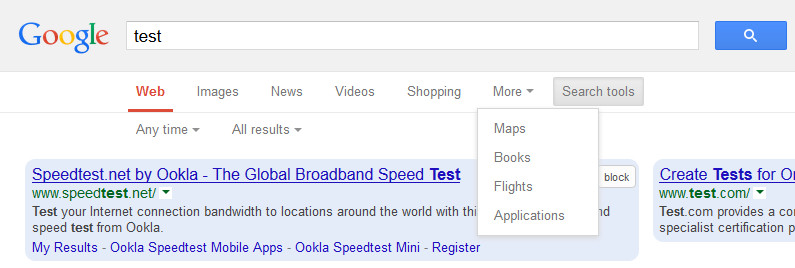
https://www.google.com/webhp?hl=en&complete=0&tbo=1&num=18&tbs=li:1

This special URL has certain parameters embedded in it, which:

* forces Google Search to use Verbatim (it searches on just what you type, not what it guesses you might want)
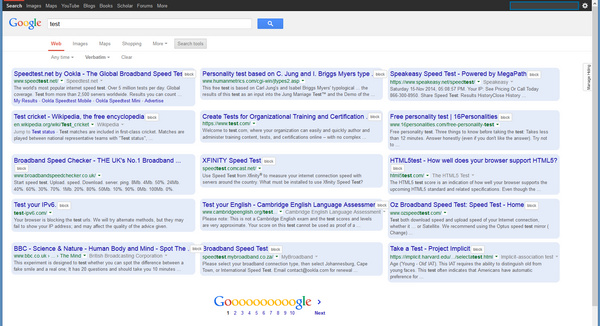
* sets the number of results to 18 (perfect with a widescreen monitor and GoogleMonkeyR using three columns)
* forces the top Search Tools open, displaying drop-down items
* forces Google Search to use its complete main USA index, without making an automatic switch to a local version
* and turns Google Search’s Autocomplete off.

It also seems to have the advantage of turning off nagging on the Google Search front page, re: “we use cookies!” and “download Chrome now!”.

The resulting ad-free nag-free search results layout, with GoogleMonkeyR and the above fixes:
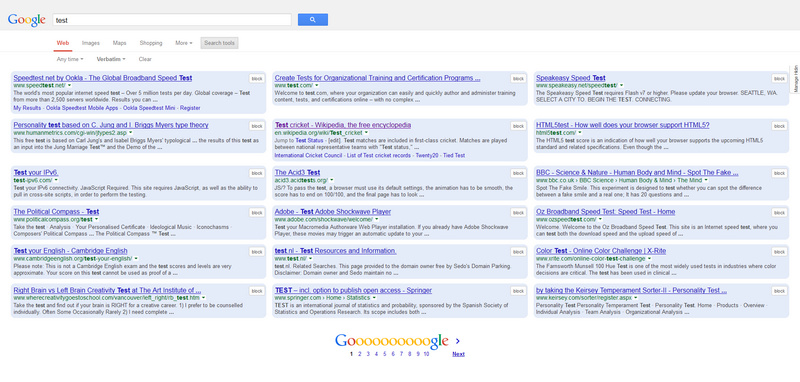
searchfinal


9. You can use the same URL trick with a Google News search, dragged onto your bookmarks bar, thus:

https://www.google.com/search?hl=en&gl=uk&tbm=nws&authuser=0&q=keyword&num=18&tbs=sbd:1

Replace the keyword in the above URL with your own. Switch out “uk” for “us”, etc.

Also handy is this Google Books link, with parameters included:

https://www.google.com/search?lr=lang_en&tbo=p&tbm=bks&q=%22beautiful+roses%22&tbs=,bkv:p,bkt:b&num=12


10. Other Firefox add-ons that are also very useful:

* the free grammar and spelling checker After the Deadline + Menu Editor to reverse AfterTD’s impudent hijacking of the top of the right-click context menu in Firefox. Sadly there’s no way to have AfterTD use British English spelling.

* Google Translator for Firefox.

* Paste Email Address

* Make Link

* FEBE Backup

* Bookmark Favicon Changer 2.0 (is the only one that works with the latest Firefox)

* Instasaver (Instapaper saver button for Firefox) (works with the latest Firefox including Nightly developer version, requires an Instapaper account)

* NoSquint (a nice flexible and easily resettable zoom tool)

Google Scholar new feature: Library

22 Friday Nov 2013

Posted by futurilla in JURN's Google watch

≈ Leave a comment

A useful new Google Scholar feature: Library. Save a personal selection from your search results, then share that collection with others. Now to write a bot that auto-bookmarks just the open access articles 🙂

Firefox again

07 Thursday Nov 2013

Posted by futurilla in JURN's Google watch, Spotted in the news

≈ Leave a comment

It looks like I’ll be switching back to Firefox as a Web browser, over Christmas, as Google Chrome is set to block install of all extensions that don’t come from its own extension store. There is no way I could tolerate Google Search without GoogleMonkeyR, or Facebook without F.B. Purity. After The Deadline is also not on the Chrome extensions store.

Hummingbird flies

27 Friday Sep 2013

Posted by futurilla in JURN's Google watch

≈ Leave a comment

Google has rolled out a major upgrade to Search…

“The new algorithm, codenamed Hummingbird, … the first major upgrade for three years … is especially useful for longer and more complex queries. … more capable of understanding concepts and the relationships between them rather than simply words”

← Older posts
Newer posts →
RSS Feed: Subscribe


Please become my patron at www.patreon.com/davehaden to help JURN survive and thrive.

JURN

  • JURN : directory of ejournals
  • JURN : main search-engine
  • JURN : openEco directory
  • JURN : repository search
  • Categories

    • Academic search
    • Ecology additions
    • Economics of Open Access
    • How to improve academic search
    • JURN blogged
    • JURN metrics
    • JURN tips and tricks
    • JURN's Google watch
    • My general observations
    • New media journal articles
    • New titles added to JURN
    • Official and think-tank reports
    • Ooops!
    • Open Access publishing
    • Spotted in the news
    • Uncategorized

    Archives

    • February 2026
    • January 2026
    • October 2025
    • May 2025
    • April 2025
    • September 2024
    • June 2024
    • May 2024
    • April 2024
    • March 2024
    • February 2024
    • January 2024
    • December 2023
    • November 2023
    • October 2023
    • September 2023
    • June 2023
    • May 2023
    • January 2023
    • December 2022
    • November 2022
    • October 2021
    • September 2021
    • August 2021
    • July 2021
    • June 2021
    • May 2021
    • April 2021
    • March 2021
    • February 2021
    • January 2021
    • December 2020
    • November 2020
    • October 2020
    • September 2020
    • August 2020
    • July 2020
    • June 2020
    • May 2020
    • April 2020
    • March 2020
    • February 2020
    • January 2020
    • December 2019
    • November 2019
    • October 2019
    • September 2019
    • August 2019
    • July 2019
    • June 2019
    • May 2019
    • April 2019
    • March 2019
    • February 2019
    • January 2019
    • December 2018
    • November 2018
    • October 2018
    • September 2018
    • August 2018
    • July 2018
    • June 2018
    • May 2018
    • April 2018
    • March 2018
    • February 2018
    • January 2018
    • December 2017
    • November 2017
    • October 2017
    • September 2017
    • August 2017
    • July 2017
    • June 2017
    • May 2017
    • April 2017
    • March 2017
    • February 2017
    • January 2017
    • December 2016
    • November 2016
    • October 2016
    • September 2016
    • August 2016
    • July 2016
    • June 2016
    • May 2016
    • April 2016
    • March 2016
    • February 2016
    • January 2016
    • December 2015
    • November 2015
    • October 2015
    • September 2015
    • August 2015
    • July 2015
    • June 2015
    • May 2015
    • April 2015
    • March 2015
    • February 2015
    • January 2015
    • December 2014
    • November 2014
    • October 2014
    • September 2014
    • August 2014
    • July 2014
    • June 2014
    • May 2014
    • April 2014
    • March 2014
    • February 2014
    • January 2014
    • December 2013
    • November 2013
    • October 2013
    • September 2013
    • August 2013
    • July 2013
    • June 2013
    • May 2013
    • April 2013
    • March 2013
    • February 2013
    • January 2013
    • December 2012
    • November 2012
    • October 2012
    • September 2012
    • August 2012
    • June 2012
    • May 2012
    • April 2012
    • March 2012
    • February 2012
    • January 2012
    • December 2011
    • November 2011
    • October 2011
    • September 2011
    • August 2011
    • July 2011
    • June 2011
    • May 2011
    • April 2011
    • March 2011
    • February 2011
    • January 2011
    • December 2010
    • November 2010
    • October 2010
    • September 2010
    • August 2010
    • July 2010
    • June 2010
    • May 2010
    • April 2010
    • March 2010
    • February 2010
    • January 2010
    • December 2009
    • November 2009
    • October 2009
    • September 2009
    • August 2009
    • July 2009
    • June 2009
    • May 2009
    • April 2009
    • March 2009
    • February 2009

    Proudly powered by WordPress Theme: Chateau by Ignacio Ricci.