• Directory
  • FAQ: about JURN
  • Group tests
  • Guide to academic search
  • JURN’s donationware
  • Links
  • openEco: titles indexed

News from JURN

~ search tool for open access content

News from JURN

Category Archives: JURN's Google watch

Google’s new Dataset Search tool

07 Friday Sep 2018

Posted by futurilla in JURN's Google watch, Spotted in the news

≈ Leave a comment

Google has a new Dataset Search tool. It looks good.

An initial test search for Krita (the open source paint software) didn’t pick up anything, so it is just limited to datasets and is not also bringing in general file-names from FTP servers.

A wide search for Antarctica Cephalopods then gave a good set of 25 results, all of which were record pages that appeared to place their dataset under CC or to be public domain (NASA etc). There doesn’t appear to be any way to then load a further set of results, or to do a further keyword search within the record-pages of the results.

New type of Custom Search Engine

17 Tuesday Jul 2018

Posted by futurilla in JURN's Google watch, Spotted in the news

≈ Leave a comment

Google Custom Search has slightly expanded the range of services.

The Standard and Non-profit CSE services are unchanged.

They also offer an CSE via a JSON API: there’s no Google branding on that, but you pay $5 per thousand queries, and are limited to 10,000 search queries per day.

The new and fourth offering is a “Site Restricted JSON API”: it also requires the same “$5 per thousand search queries” payment. But if you search across no more than 10 URLs, then there’s no daily traffic limit.

I guess a use-case for this would be a huge and very heavily-used corporation like Boeing, where you want to offer your clients the quickest and most accurate way to search across all your technical reports, papers and manuals — which are spread across 10 different URLs? That use-case would likely need some guarantees from Google, though, on the spread and depth of the indexing.

Getty kills Google Image’s ‘View image’ button: how to fix it

16 Friday Feb 2018

Posted by futurilla in JURN tips and tricks, JURN's Google watch, Spotted in the news

≈ 1 Comment

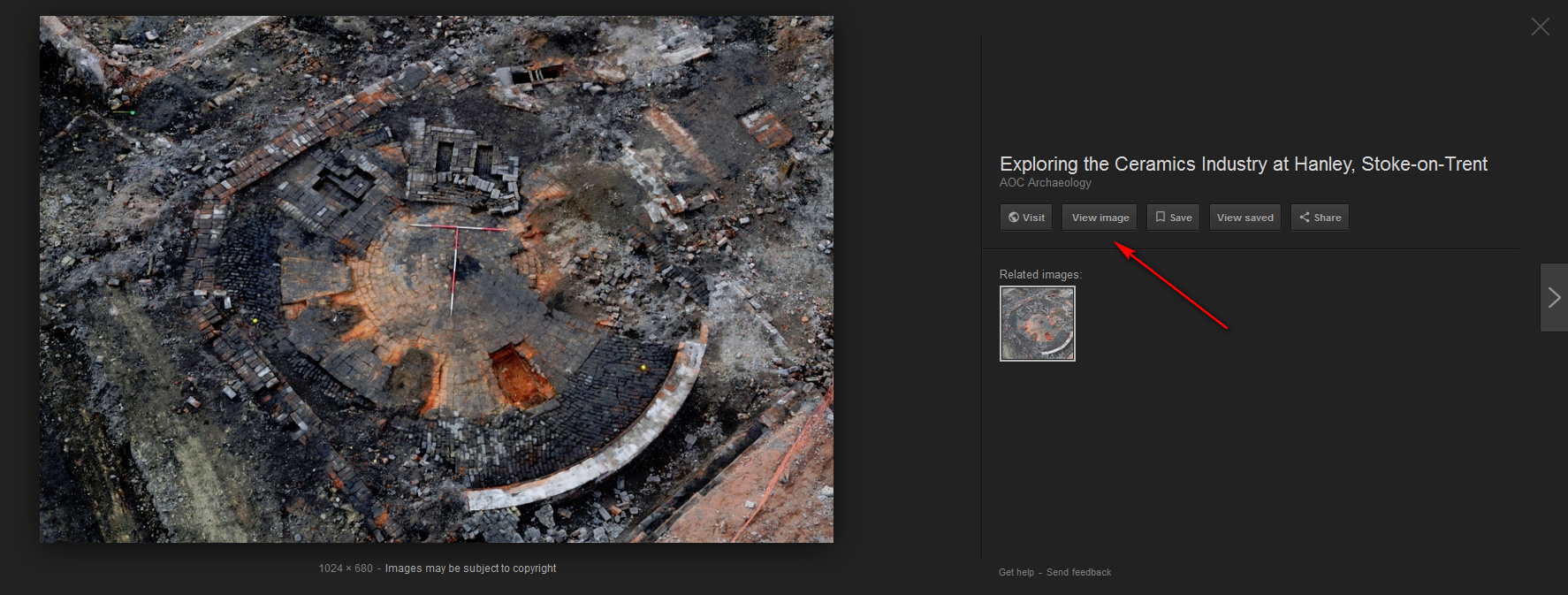
Under pressure from commercial image library Getty, Google Images has removed a key button from its search results. It’s the “View Image” button, which allowed people to view an image in isolation, against whatever colour they have set as a background for the Web browser.

The removal is easily fixed with a simple new script:

Firefox: Google Images Fix for Greasemonkey.

Chrome and Chrome-compatible: Google Search "View Image" Button

If you also want to change the default background colour (white can be better for screen-shots of logos for Facebook posts, to get an edge), in Firefox you can change the Web browser’s default background from black thus: Tools | Options | Content | Colours | Background | OK.

There are also press reports that the “search by image” icon in the Google Images search box is to be removed, also due to Getty pressure. But I see it’s still there on the UK version of Google Images.

On doing nation-specific Web search

31 Wednesday Jan 2018

Posted by futurilla in JURN tips and tricks, JURN's Google watch

≈ Leave a comment

In Autumn 2017 Google announced that Google Search would ignore the country domain of its service, and instead serve you national results based on what Google thinks your geographic location is…

“the choice of country service will no longer be indicated by domain. Instead, by default, you’ll be served the country service that corresponds to your location.”

Here’s my quickstart on some of the nation-specific research options which can route around this. You either need to:

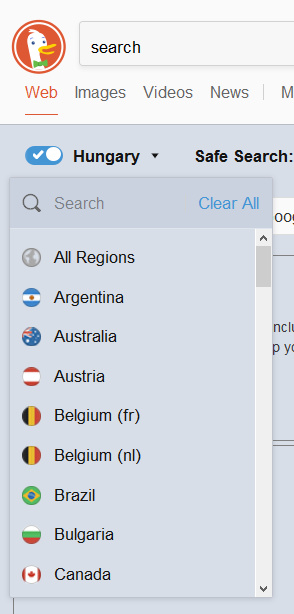
i) use the likes of DuckDuckGo and add national URL Parameters to the end of your bookmarked URL: e.g. Hungary. Top results are not great in that instance, with BBC, Wikipedia and Guardian cruft, but they quickly become relevant as you scroll down. Adding site:hu helps a lot, at the cost of knocking out local grassroots blogs on WordPress and Hungarian .org and .com sites etc.

DuckDuckGo is now actually better than Google, in my opinion, for picture research. Though you will have to home-brew a Creative Commons filter within your search terms.

ii) Go to Google’s Advanced Search settings and (for now) you can request that Google Search “narrow your results” by nation. Clunky, but it may prove useful. I imagine there must be a browser plugin that allows this setting to be swiftly switched across various nations.

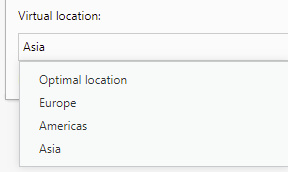
iii) use a VPN proxy in your Web browser. The Opera web browser has a free and sturdy VPN built in, but all you can do with it these days is to select broad regions rather than nations (as used to be the case). Adequate for things like quickly getting past region-blocking on public domain resources at Hathi, etc, but not that useful if you just want to research ceramics in Morocco.

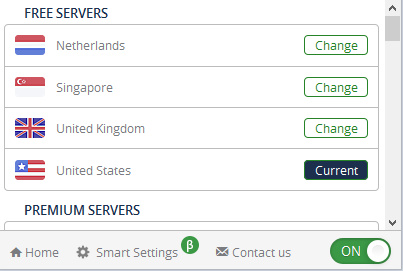
iv) use a few free VPN such as Browsec. This offers three or four free national VPN nodes, of a limited access duration (10 minutes or so before it becomes unresponsive). Again, useful for researchers wanting to access region-locked Hathi books or YouTube videos etc. Such freebie VPNs also offer an enticingly big list of other national nodes for paid users…

v) The TOR browser. Google’s new move potentially leaves sensitive ‘business researcher traffic’ open to being snooped on and tracked by hostile/piratic nations, who may either clandestinely run and/or can tap into VPN traffic. As such, smaller business — especially those in a larger supply-chain but without security-savvy IT departments — might also look into the anonymous TOR browser’s capabilities before doing intensive country research. It’s my understanding that some TOR exit nodes can be geolocated to nations, while others appear to be free of geolocation, and apparently one can switch between these types and choose which nation the exit node is in.

So far as I’m aware, JURN has for some time now auto-detected your home nation and served results accordingly. Some types of user can route around this somewhat, by searching in a local alphabet and encasing words or phrases in quote marks (“مقارنة”) which in this case should mean the majority of search results are in Arabic.

Google Shorter?

07 Thursday Dec 2017

Posted by futurilla in JURN's Google watch

≈ Leave a comment

I just ran a search on Google Scholar, and Scholar decided to present me with only two results (from Elsevier and Springer). The other 231 results (perfectly valid, often also from Elsevier and Springer) were hidden behind a small link to “See all results”. A curious new behaviour…

It seems we may need a browser add-on that forces “show all results” as the default page of results.

One way to fix your broken Google News RSS feeds, at November 2017

04 Saturday Nov 2017

Posted by futurilla in JURN tips and tricks, JURN's Google watch

≈ Leave a comment

The new RSS change at Google News makes their existing keyword-based RSS feeds defunct. It affects the RSS feeds that collect all Google News items with a headline/snippet containing the words ‘bunny’ + ‘fluffy’, for instance. I don’t know if the generic catch-all ‘Science’, ‘Health’ etc RSS feeds are affected, as I don’t use those.

Those keyword-based feeds will now need to be changed. Changed slowly and manually and individually by slogging down the list in one’s RSS feedreader. It’s a big task to do, for some, and journalists and editors and bloggers will have hundreds (if not thousands) of these feeds set up.

So far as I can see there’s no way to export the OPML from one’s desktop RSS feedreader and then simply do a global search-replace of the Google News URL paths in Notepad++, then bring the OPML back in. The URLs are too complex and varied in their structures to allow that.


One way of tackling the change is as follows:

Aim: Open our list of feeds in Excel and extract only the Google News ones, thus making it relatively easy for a worker to run through them all and discover the new ones.
Software required: the free Notepad++ and MS Office Excel with Sobolsoft’s Excel Remove Text addin.

1. Export your OPML master file from your RSS feedreader / newsreader.

2. Right-click on this and open the OPML in Notepad++. Search/replace "/> with "/>; and then manually go through and add a ; to the end of the remaining few lines which now lack them.

3. Search/replace all , (i.e.: all the commas) and change these to &&&&.

4. Save a backup of the changed OPML, then save another copy from Notepad++ — this time as “feeds.csv” which makes it a comma-separated Excel file. “But there are no commas left” you cry. That doesn’t matter, as Excel will treat the ; instances as if they were commas. And it won’t be terminally confused by commas sitting within the URLs, as we just changed them all to &&&&.

5. You can now load feeds.csv in MS Office’s Excel spreadsheet package. If you successfully put a ; at the end of each line of the OPML, Excel will happily load the file and it will display correctly, meaning in a similar way to the clear structured view you saw in Notepad++.

6. You’re now able to extract all the lines containing the phrase “Google News” and then do the same for “news.google”. There are a number of complex ways to do this, involving fiendish formulas, but a very easy way is with Sobolsoft’s Excel Remove Text, Spaces & Characters From Cells add-in. This gives Excel a number of very useful functions, including “Clear all cells not containing X”. Select all lines. Then clear everything not containing Google News. You can then ‘sort A-Z’, to get a neat list of all your defunct Google News feeds, one per line.

7. Select all lines with content in them. Then use the same add-in to “Remove all text before…” xmlUrl=" (which is the query command in the URL). Then “Remove all text after…” &output=

You can continue doing this sort of search/replace, and thus end up with a fairly clean set of the keywords and phrases and knockout -keywords which you were using for each Google News URL. For instance, you can search/replace %22 with ” to get recognisable search phrases again, inside the URL.

If you have hundreds or thousands of these, they can now be passed to a gig worker at Fivver.com etc, tasked with working down your nicely cleaned one-per-line list to discover the new working RSS URLs from Google News. While they’re at it, you may as well pay them to discover the Bing News equivalents.

You may also want them to use a VPN in order to also snag the Google News USA equivalent URLs, if you’re in the UK etc. Although it appears possible that simply changing the end of the new URLs from ?hl=en-GB&gl=GB&ned=uk to ?hl=en&gl=US&ned=us does the trick and gets the USA version. Google News USA obviously has better coverage, and is perhaps updated more quickly. For instance, a UK-centric search for: newcastle-under-lyme -police in Google News UK has no search results. The same from the USA site has one valid result in a local freesheet two hours ago. Such timeliness may matter for journalists with deadlines to meet.

8. You don’t then need to create a new OPML without any Google News URLs, and try to import it back to your newsreader etc. That’s a hassle and the OPML will probably break. So it’s easier to just let the defunct Google News URLs sit there and do nothing, since they’re not doing any harm. Some newsreader software may eventually flag them as defunct, and may even offer the ability to mass-delete your defunct feeds after 1st December 2017. Apparently that’s the date Google has set for the current feeds to die altogether.

9. Once your Fiverr gig worker etc comes back with the new URLs, either add in your new working Google News URLs by hand, or (if you have lots of them set up) have your Fivver gig worker format them up as a valid OPML file for bulk import to your newsreader. That’s very simple to do, once you have a newly-working Google News sample line to show them, although I think there are website converters that will turn a one-per-line RSS URL list into a valid OPML with ease.

That’s the most efficient way I can think of for handling the changeover.

How to get your new RSS feed from Google News

03 Friday Nov 2017

Posted by futurilla in JURN's Google watch

≈ 1 Comment

Annoyingly, Google appears to have just removed all its keyword-based RSS feeds for Google News. One gets the message…

This RSS feed URL is deprecated, please update. New URLs can be found in the footers at https://news.google.com/news.

But all it’s possible to get there is the generic national Spotlight headlines, as linked in the footer of the main Google News page…

https://news.google.com/news/rss/headlines?gl=GB&ned=uk&hl=en-GB

And even that feed “has no articles” when loaded into a feedreader.

What you actually need to do is to first run a new Google News search, then the new RSS feed link will appear in the footer of the page of search results.


If, at the same time as you’re fiddling with this annoying change-over, you want to swop out your Google News RSS for a working Bing News RSS feed, here’s how:

1. Do a keyword or phrase-based News search as usual, at Bing News.
2. Add -keyword to knock out unwanted stories (e.g. -police -NHS)
3. Then re-sort the search results by date.
4. Add &format=rss to the end of the URL. This turns it into a RSS feed from Bing News.
5. Now plug your new RSS feed into your newsreader.

Face it

31 Tuesday Oct 2017

Posted by futurilla in JURN's Google watch

≈ Leave a comment

Google Images needs an additional filter. Something like: “Face with lots of complex background, people doing stuff”, as well as “Face”. Otherwise, no matter what your search terms are, with “Face” you just get head-and-shoulders mug-shots and boring zoomed-in snaps of conference presenters (why do people even make the latter?).

Pop off, Google…

07 Saturday Oct 2017

Posted by futurilla in JURN's Google watch

≈ Leave a comment

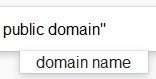
More junk in the Google Search box? It seems so, in the form of another layer of distractingly dumb autosuggest. Which is now on individual words, even those at the end of a long-chain search query, as a ‘pop-down’.

No, Google — when I am searching for “public domain”, I have no interest in “domain names”. An apparently hyper-intelligent search company jammed with semantics experts and AI should know that by now.

Thankfully it can be hidden with AdBlock Plus’s Element Hiding Helper.

Another Google CSE dashboard glitch?

26 Friday May 2017

Posted by futurilla in JURN tips and tricks, JURN's Google watch

≈ Leave a comment

The recent changes to the Google CSE services appear to have introduced another glitch. The problem happens when adding new URL entries into your Google CSE. For instance, you can no longer add…

http://www.nnns.org.uk/sites/nnns.org.uk/files/

… and reliably select “Include all pages whose address contains this URL”. Oh yes, the Dashboard will let you save it that way… but then go back and open the URL up again. You’ll see that the CSE dashboard has refused to accept the setting you gave the URL, and has instead defaulted the URL to: “Include just this specific page or URL pattern I have entered”.

The problem with this is that you didn’t explicitly enter http://www.nnns.org.uk/sites/nnns.org.uk/files/* With the * wildcard making the “Include just this specific page or URL pattern I have entered” functional. Without the wildcard, the http://www.nnns.org.uk/sites/nnns.org.uk/files/ URL is null and void on that setting, and may as well have not been added to your CSE.

This has only just started happening, and the “Include all pages whose address contains this URL” setting is sticky on entries made prior to about 24 hours ago. Which makes me think it’s probably a temporary glitch, inadvertently introduced during yesterday’s switch from three-options to two-options for settings on individual URLs.

If you’re working on a CSE over the weekend / Bank Holiday (UK), you should be aware of this problem, as it probably won’t be fixed by Google until early next week. You’ll probably want to keep a .txt file of all the URLs you add which you have to use a /* for, because you may need to manually change them back once the problem gets fixed.

← Older posts
Newer posts →
RSS Feed: Subscribe


Please become my patron at www.patreon.com/davehaden to help JURN survive and thrive.

JURN

  • JURN : directory of ejournals
  • JURN : main search-engine
  • JURN : openEco directory
  • JURN : repository search
  • Categories

    • Academic search
    • Ecology additions
    • Economics of Open Access
    • How to improve academic search
    • JURN blogged
    • JURN metrics
    • JURN tips and tricks
    • JURN's Google watch
    • My general observations
    • New media journal articles
    • New titles added to JURN
    • Official and think-tank reports
    • Ooops!
    • Open Access publishing
    • Spotted in the news
    • Uncategorized

    Archives

    • February 2026
    • January 2026
    • October 2025
    • May 2025
    • April 2025
    • September 2024
    • June 2024
    • May 2024
    • April 2024
    • March 2024
    • February 2024
    • January 2024
    • December 2023
    • November 2023
    • October 2023
    • September 2023
    • June 2023
    • May 2023
    • January 2023
    • December 2022
    • November 2022
    • October 2021
    • September 2021
    • August 2021
    • July 2021
    • June 2021
    • May 2021
    • April 2021
    • March 2021
    • February 2021
    • January 2021
    • December 2020
    • November 2020
    • October 2020
    • September 2020
    • August 2020
    • July 2020
    • June 2020
    • May 2020
    • April 2020
    • March 2020
    • February 2020
    • January 2020
    • December 2019
    • November 2019
    • October 2019
    • September 2019
    • August 2019
    • July 2019
    • June 2019
    • May 2019
    • April 2019
    • March 2019
    • February 2019
    • January 2019
    • December 2018
    • November 2018
    • October 2018
    • September 2018
    • August 2018
    • July 2018
    • June 2018
    • May 2018
    • April 2018
    • March 2018
    • February 2018
    • January 2018
    • December 2017
    • November 2017
    • October 2017
    • September 2017
    • August 2017
    • July 2017
    • June 2017
    • May 2017
    • April 2017
    • March 2017
    • February 2017
    • January 2017
    • December 2016
    • November 2016
    • October 2016
    • September 2016
    • August 2016
    • July 2016
    • June 2016
    • May 2016
    • April 2016
    • March 2016
    • February 2016
    • January 2016
    • December 2015
    • November 2015
    • October 2015
    • September 2015
    • August 2015
    • July 2015
    • June 2015
    • May 2015
    • April 2015
    • March 2015
    • February 2015
    • January 2015
    • December 2014
    • November 2014
    • October 2014
    • September 2014
    • August 2014
    • July 2014
    • June 2014
    • May 2014
    • April 2014
    • March 2014
    • February 2014
    • January 2014
    • December 2013
    • November 2013
    • October 2013
    • September 2013
    • August 2013
    • July 2013
    • June 2013
    • May 2013
    • April 2013
    • March 2013
    • February 2013
    • January 2013
    • December 2012
    • November 2012
    • October 2012
    • September 2012
    • August 2012
    • June 2012
    • May 2012
    • April 2012
    • March 2012
    • February 2012
    • January 2012
    • December 2011
    • November 2011
    • October 2011
    • September 2011
    • August 2011
    • July 2011
    • June 2011
    • May 2011
    • April 2011
    • March 2011
    • February 2011
    • January 2011
    • December 2010
    • November 2010
    • October 2010
    • September 2010
    • August 2010
    • July 2010
    • June 2010
    • May 2010
    • April 2010
    • March 2010
    • February 2010
    • January 2010
    • December 2009
    • November 2009
    • October 2009
    • September 2009
    • August 2009
    • July 2009
    • June 2009
    • May 2009
    • April 2009
    • March 2009
    • February 2009

    Proudly powered by WordPress Theme: Chateau by Ignacio Ricci.