• Directory
  • FAQ: about JURN
  • Group tests
  • Guide to academic search
  • JURN’s donationware
  • Links
  • openEco: titles indexed

News from JURN

~ search tool for open access content

News from JURN

Category Archives: JURN tips and tricks

Freeware: TextWorx

25 Friday Sep 2020

Posted by futurilla in JURN tips and tricks

≈ Leave a comment

There’s a relatively new entry in genuine Windows freeware for complex text-manipulation, and this hadn’t been found when I made my summer 2019 survey of Freeware for cleaning and manipulation of text lists.

It’s TextWorx by bgmCoder, a “Universal Text Manipulator”. It lives up to the name, in terms of being able to use it with any text-editor. Highlight the text block you want to work with. Press a keyboard shortcut. Up pops a well-organised tool offering a huge range of “advanced text-manipulation routines”.

The default keyboard shortcut required to trigger the menu is a bit of a contortionist show-stopper, or else it requires you to remove your hand from the mouse:

Win key + K or Win key + shift + K.

But the shortcut is not hardwired and can be changed in the .INI file. And it’s easy enough to trigger a keyboard shortcut with a mouse-gesture. Choose a gesture that ends up somewhere suitable on the screen, since your mouse-cursor position is where the TextWorx interface will appear.

What it doesn’t seem to have is regex functions. It can’t thus function as a handy regex ‘key-ring’. For instance it can’t do things like “Extract all text found between KEYWORD1 and KEYWORD2 to a new List”. For that you’d want regex or Sobolsoft’s £20 “Extract Data Between Two Strings” utility software, which saves the extracted substrings as a list. Or you could save £20 by doing the same with this tested-and-working regex and a copy of the free Notepad++…

FIND:         .*?KEYWORD1(.*?)KEYWORD2|.+
REPLACE:    \1\r\n

Weather magic

19 Saturday Sep 2020

Posted by futurilla in JURN tips and tricks

≈ Leave a comment

Here’s how to remove the invasive official Weather widget (and possibly other such widgets, as they roll out) from your Opera Web browser’s start-screen. This method may also work in other Chrome-based browsers.

1. Type or paste chrome://flags in the browser taskbar. Press Return on your keyboard.

2. Scroll down the list, find it, disable it…

3. Then click the “Relaunch” button at the bottom of the page. This will relaunch the Web browser and apply the new settings. This special Flags page, as you can see, does not work like the main Settings page does, where changes take effect immediately. A restart of the browser is needed from the Flags page.


Update: this has now been moved from Experimental, and made public for all Opera users. As of December 2020 you now turn it off in the main Settings…

CSV easy

12 Saturday Sep 2020

Posted by futurilla in JURN tips and tricks

≈ Leave a comment

A handy new UserScript, Download Table as CSV. Any table on a webpage, saved to a .CSV file.

Duck wrapped

09 Wednesday Sep 2020

Posted by futurilla in JURN tips and tricks

≈ Leave a comment

A new free UserScript for your browser, Super-phrase – automatic “phrase search” on DuckDuckGo. It cost me £10 in the end, as I had to hire on Fiverr to get the Regex fixed up as well as the initial script made, but it was worth it. You’re welcome.

While you’re at it you may also want this for your uBlock Origin blocklist…

! Block DuckDuckGo mainpage autocomplete
duckduckgo.com##.search__autocomplete

… this turns off the flickery and nearly-always-wrong auto-complete drop-down.

What to do about DocFetcher?

04 Friday Sep 2020

Posted by futurilla in Academic search, JURN tips and tricks, Spotted in the news

≈ 2 Comments

Update: DocFetcher Pro now available and stable at 31st May 2021, with embedded Java, for $40 via Gumroad.

The freeware desktop file-indexer and keyword searcher DocFetcher has been sporked by the Java runtime update, specifically failing to launch due to an error with the JIntellitype64.dll file. The code archive for this file suggests similar problems for others in the past. And the comments at SourceForge suggest other are finding the latest Java (mid July 2020) repeatedly crashes DocFetcher. Apparently it’s also causing problems for several other bits of software.

The fallback is not the official portable version of DocFetcher, sadly, which has the same problem. Nor is falling back to an earlier version of DocFetcher. Nor is the solution to download and install the latest 64-bit Java for Windows again. It appears that the old 32-bit software just doesn’t play nicely with the latest mid-July Java. This is confirmed by a comment buried on SourceForge from the developer…

“A proper bugfix for DocFetcher won’t be available until 2021, so for now downgrading to Java 8u251 is the only workaround”.

But by that time the software will be “DocFetcher Pro” and $50 paid for a perpetual licence. Ah well. Still, that’s good value compared to dtSearch, and is not a subscription like Copernic Desktop. But… $50. So, an alternative freeware option will soon be needed. I took a look…

1) There is Recoll on Windows, which looks like it’s halfway there, but it costs 5 Euros. That’s not viable if you were wanting to distribute a bit of full-text search freeware with the archive of a large defunct technical forum. Still, by 2021 it might have developed further. (Update: the maker has commented, noting it’s GPL and copies may be freely redistributed).

2) The developer of the freeware AnyTXT Searcher has been knocking the rough edges off it and expanding file types, over the last year. But, while it bills itself a “Google Desktop Search Alternative” is still appears not to have any sort of acceptable in-file preview on its search results. The other problem is that its start-up time is extremely slow. Several minutes, rather than seconds. You expect that of behemoths like Photoshop, but not of a little Windows utility. Plus it appears to be “all or nothing”, and there’s no ability to index just a few folders. Uninstalled.

3) Another possible choice is Exselo, said to be very powerful and yet also free desktop search. But… like DocFetcher it’s Java based. Plus, it’s Registerware and “Invites are sent to friends” (register via Facebook?). It’s a system-hog, and it stops working after 14 days if you don’t accept automatic updates. The developers were obviously hoping to sell it on, and lacking a buyer are now pitching it as a trendy “secure chat environment”? Blugh.

4) The old standby Copernic Desktop has become slightly better. The ‘last good’ wholly free version was 2.30 build 30 (no Deskbar feature on Windows 64-bit, PDF manual here). The current 2020 free version still has no .PDF or Word support, but the 10,000 file limit has now been raised to 25,000. It also has a new $15 “knowledge worker” edition, but that just turns out to be a “per-year subscription”. It’s now Registerware, even to just download the Trial. Also requires big .NET Framework downloads, which the 2.3 doesn’t. Thus it’s not feasible as freeware to distribute along with a large forum archive.

5) The old 2010 Multifind would be a good choice, if only it built an initial index and was thus fast. For some, the lack of a requirement to build an index may be a feature not a drawback. Despite its slowness due to a lack of an index, it can find and display text inside files. And it’s genuine old-school Windows freeware and has a tiny footprint. If you wanted to make something to fill the freeware gap that’s looming with the loss of DocFetcher, you might do worse than buy the rights to this and start developing it again.

So it’s back to DocFetcher. One can’t go back beyond DocFetcher 1.1.20, as that was when it started indexing HTML with no body element (e.g. RSS-feed forum-threads archived in XML and re-named .HTML), and anyway that doesn’t fix the problem. So it looks like the only real solution to get DocFetcher working is the downgrade to Java SE Runtime Environment 8u251 (jre-8u251-windows-x64.exe), which is a security risk unlikely to be welcomed by those who just want a free search tool for use with their forum archives. Perhaps what’s needed is to make a truly portable DocFetcher, which never has to call on the Windows system’s Java runtime?

How to get the latest FBPurity in the Opera browser

02 Wednesday Sep 2020

Posted by futurilla in JURN tips and tricks

≈ Leave a comment

The vital Facebook-cleaning browser-addon FBPurity is still not fully working in the Opera Web browser, but upgrading to the latest version 30.6.6 does much to help. Sadly this upgrade appears to be blocked via the browser’s internal “Update” function on the Extensions page, and when attempting to update via the official Opera addons website. It’s possible that other Chrome-based Web browsers may have the same problem updating.

Here’s the working work-around, to get the latest version installed:

1. Turn off the uBlock Origin browser addon, if you were using it to selectively block elements of the new Facebook design. Visit any Facebook Group, and wait a few seconds for the link to the FBPurity control-panel icon to appear. Open the control panel and export your FBPurity Settings to a text file.

2. Uninstall FBPurity from Opera. Close and reload Opera.

3. Then re-install FBPurity from here to get the latest version (the FBPurity site-link for Opera browser may send you to a different, non-working add-on directory page, and that was the case for me).

4. Then once again visit any Facebook Group, and wait a few seconds for the link to the FBPurity control-panel icon to appear. From the opened control panel, you now import your settings from that export file you saved…

5. Go down the tick-boxes and block the new items, which version 30.6.6 now lets you block.

6. Once again, save out your FBPurity settings and stash the resulting file somewhere safe. Re-enable uBlock Origin. Close and reload the browser and double-check you are on the latest FBPurity…


Sadly there’s still no fix in FBPurity to auto-open the “See More” button on Facebook posts. “See More” is so annoying and time-wasting that I’m currently discussing paying to have a UserScript made, to open all such buttons automatically.

The new Facebook

20 Thursday Aug 2020

Posted by futurilla in JURN tips and tricks, Spotted in the news

≈ Leave a comment

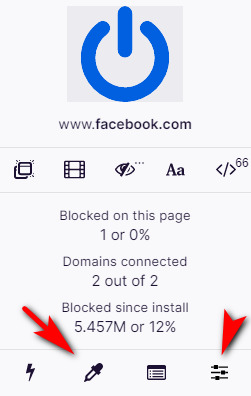
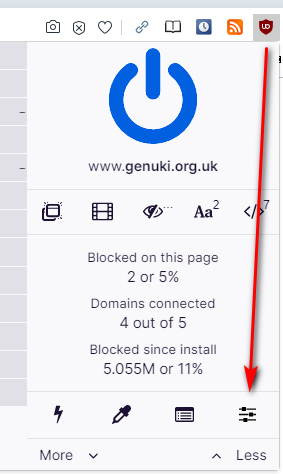
So, the new Facebook design arrives. Until FBPurity and others fix their scripts, the browser add-on Ublock Origin’s selector pipette is your friend…

The other icon indicated is how you access the blocklist. After 40 minutes blocking bits with this pipette, all I now need is a UserScript to auto-open the stupid “See more…” content-blocking buttons.

But Facebook has recently also changed the URL for the ‘news feed’ from Pages. This handy feed came to a Page curator from all the other Pages they have “Liked” as their business, minus the verbose or spammy ones that you threw out after a week.

The feed is still there, but now on a new URL and there’s no re-direct. Here’s the fixed URL for your Page news feed…

WAS: https://www.facebook.com/YOUR_PAGE_NAME/pages_feed/

NOW WORKING: https://www.facebook.com/YOUR_PAGE_NAME/news_feed

Regrettably it won’t be actually usable until we have FBPurity back again, to remove all the irrelevant posts from “Suggested pages”. In FBpurity, “Suggested for you” in Pages feeds should be hidden by ticking this box…

… but this is not currently stopping the spam. (Update: one of the problems here was the that Opera was blocking an auto-update to the latest FBPurity).

Some musings arising from a search for PDF translation services

28 Tuesday Jul 2020

Posted by futurilla in JURN tips and tricks

≈ Leave a comment

A new $25 Translator integrates Google Translate into Adobe InDesign, Adobe’s PDF editing DTP software. An API key with Google Translate is needed, though.
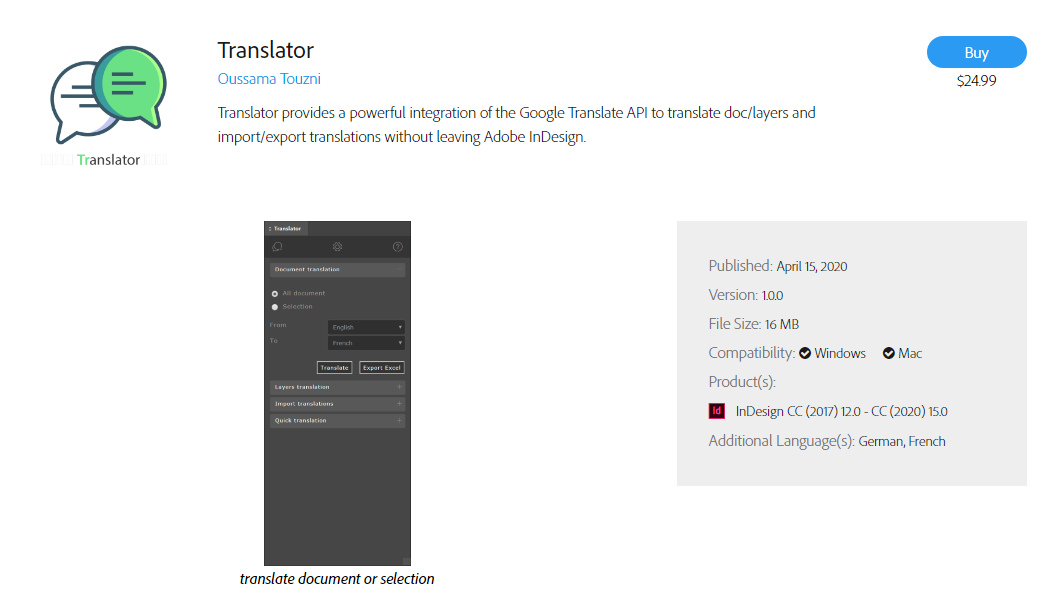
Another recent third-party option for InDesign editing of PDFs is Translate from Id-Extras, which appears to be promisingly low-cost. It appears from my related searches that, rather surprisingly, that there’s no such thing as an Official Adobe PDF Translator plugin. You might have thought Adobe would have been onto that years ago, and made a small fortune for their shareholders off it. Nor has Microsoft slotted Bing Translator into Microsoft Publisher.

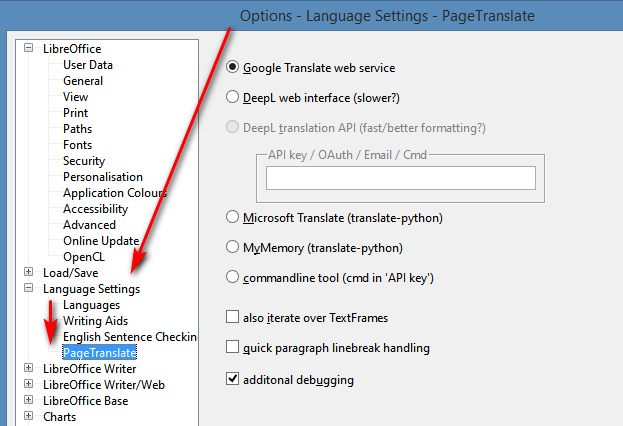
Spotting these made me wonder what was similar and available free for LibreOffice, the free Office suite. I find that “working in 2020” is the free PageTranslate. Install of plugin/extensions in LibreOffice is not manual, but done via Tools | Extension Manager. Once installed, this shows up under Tools | Page Translate…
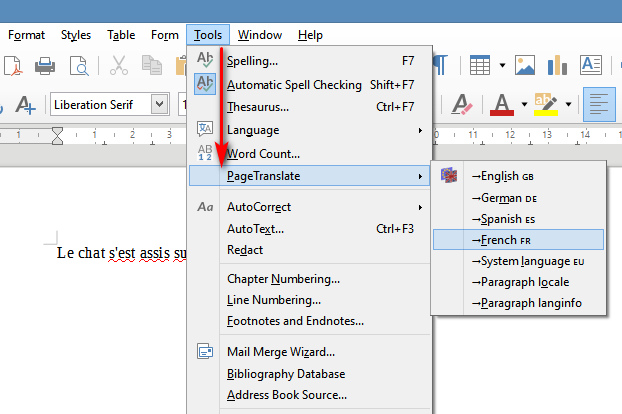
Supported is inline ‘translate and replace’ of English to German, Spanish, French. It works fine in doing this, hooking into Google Translate and allowing both full document translation and translation of “selected and highlighted” text. No API key or other log-on is needed for Google Translate, though you can switch it over to other services that do require keys or logins or suchlike. Its provider settings are found under Options | Language…
Obviously then, if one could rig up a reliable way to convert a PDF to Word, and then translate in place (‘inline’), that would be a useful thing to have on a desktop PC. Especially for those that have slow Internet uplinks, and for whom sending a 80Mb PDF up to the Cloud for translation might take an hour. But I’ve yet to find a reliable freeware for the Windows desktop that offers “PDF to Word, and retain layout 100%”. LibreOffice’s Draw component claims to import PDF, but while it may be adequate for the layout of a plain academic journal it makes an utter hash of the layouts of magazines. This is the sort of layout I’m talking about…
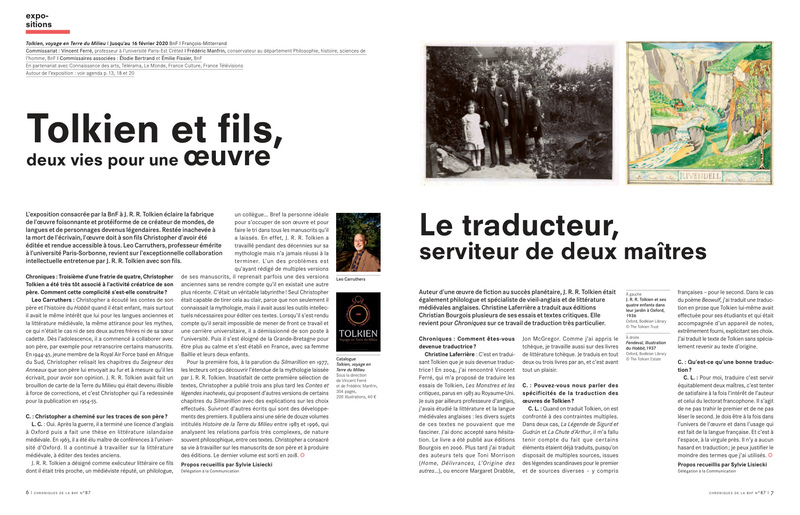
You can see how fiddly it might be to individually copy-paste each block of text to Google Translate, and how easy it would then be to lose track of what bit came from which part of the page. The ideal here would be that some as-yet-unmade software would identify each block of text and its co-ordinates on the page, the text in each would be copied (by OCR if needed) and auto-translated, each text block would be erased then filled with its translated text.

So, until that happy moment it’s back to PDF to Word… and the best genuine conversion freeware I’ve found and tested so far is Nemo PDF to Word 4.0, which is a good try — but does not capture the layouts and font styling 100% on my test PDFs. Maybe 80%, and the remaining messiness may be largely due to font substitution. Which is a problem on my side, not on Nemo’s — my PCs simply lacks the snazzy fonts that the magazine designers were using for their PDF.

There are of course Cloud services and three or four bits of paid software that claim to auto-translate a PDF while retaining 100% layout fidelity, but they all appear to be Cloudy and limited unless you pay. Curiously, none of the ones I’ve looked at offer a few before-and-after “sample conversion” PDFs, by which to judge their wares. Various names include SYSTRAN PDF Translator ($279), Babylon Pro (subscription), Multilizer ($40?) and couple of others. Multilizer does have what is effectively a demo, though. These are at the consumer and small-business level, and I find they are not to be likened to the fiendishly complex pro-translator software suites such as MemoQ and Trados Studio, the latter being designed for translation professionals who have accounts with high-end machine-translation services to assist in their laborious daily work.

One interesting bit of desktop Windows freeware found was Lingoes, but judging by my tests it no longer works in terms of calling in Google Translate. Google tightened up on access a few years back, and it appears to have left several such software makers high and dry. I’d be interested to know if there are still ways to get Lingoes working in 2020, as it otherwise seems be a free alternative to the paid Babylon Pro. Possibly API keys are needed, even for Google Translate?

Finally, I also see that Foxit PDF has just introduced a “Translate PDFs into other languages” free service for those signed up to its Foxit Cloud (also free). No screenshots are included on the blog post, though, so I assume the translation probably “appears” in a sidebar rather than replacing the original text inline in the way that Project Naptha does it.

The free and still-working Project Naptha is exemplary in showing how inline “OCR, translate, erase to white space, paste in translation” should be done. But it can only do English to other languages. Give it a block of text in French, German or Italian and it’s kaput. If someone out there wants to be a major philanthropist to the world, getting Project Naptha able to work with text other than English would be a fine project to fund. The secret to that appears to be getting the free Tesseract OCR engine to work with text other than English.


Update, September 2021: the solution is probably an exact HTML5 conversion…

1) QuarkXpress 2021 and its perfect ‘what you see is what you get’ HTML5 output from PDFs. Save the PDF to HTML5 with QuarkXPress, upload it to the live Web, point Google Translate at it. The layout should retained while the text is translated in-place. Quark can be had for £180 on a perpetual licence and (unlike its rival InDesign) needs no expensive subscription plugin to the WYSIWYG HTML5 output. There may possibly be translation plugins for Quark.

2) An online PDF-HTML5 service such as IDR Solutions.

Both would leave you with the problem of getting the HTML5 uploaded to a live rented webspace, which not everyone has access to.

Partial fixes for Google News changes

14 Tuesday Jul 2020

Posted by futurilla in JURN tips and tricks, JURN's Google watch

≈ Leave a comment

The Google News page layout has updated, here in the UK. Here’s the latest on how to tame it…


1. Hide thumbnails and icons:

Add these lines to the foot of your uBlock Origin block list, save, reload…

These lines should hide your thumbnails and ID icon on Google News…

! Always autohide Google News thumbnails and ID icons - but retain source name
google.*##*.sYpfDb
google.*##*.QyR1Ze


2. Fix the colours and font size.

Headline text colour and font size is controlled via CSS thus…

/*** Fixes Google news headline colour and font size ***/
.nDgy9d.JheGif
{
color: #3d69ac!important;
font-size: 15px !important;
}

/*** Fixes Google news source-name colour and font size ***/
.WF4CUc.XTjFC
{
color: #4c7d48!important;
font-size: 13px !important;
}

/*** Highlights date on Google news result ***/
.WG9SHc
{
color: #e3732a!important;
font-size: 11px !important;
}

This can be added to the bottom of anything you have controlling the CSS for Google, e.g. the Stylus browser addon and a UserStyle.


3.

Block search suggestions as you type your search query.

! Block Search Suggestions on Google News
google.*##li.gsfs.sbsb_c


PDF Index Generator 2.9

13 Monday Jul 2020

Posted by futurilla in JURN tips and tricks, Spotted in the news

≈ Leave a comment

PDF Index Generator 2.9 is a new February 2020 release of the best sub-$100 back-of-the-book automatic indexing software. It very usefully adds automatic footnote indexing, and…

The Windows edition of the program now comes with Java embedded inside it, so you don’t have to worry about installing the right Java edition to run the program.

← Older posts
Newer posts →
RSS Feed: Subscribe


Please become my patron at www.patreon.com/davehaden to help JURN survive and thrive.

JURN

  • JURN : directory of ejournals
  • JURN : main search-engine
  • JURN : openEco directory
  • JURN : repository search
  • Categories

    • Academic search
    • Ecology additions
    • Economics of Open Access
    • How to improve academic search
    • JURN blogged
    • JURN metrics
    • JURN tips and tricks
    • JURN's Google watch
    • My general observations
    • New media journal articles
    • New titles added to JURN
    • Official and think-tank reports
    • Ooops!
    • Open Access publishing
    • Spotted in the news
    • Uncategorized

    Archives

    • February 2026
    • January 2026
    • October 2025
    • May 2025
    • April 2025
    • September 2024
    • June 2024
    • May 2024
    • April 2024
    • March 2024
    • February 2024
    • January 2024
    • December 2023
    • November 2023
    • October 2023
    • September 2023
    • June 2023
    • May 2023
    • January 2023
    • December 2022
    • November 2022
    • October 2021
    • September 2021
    • August 2021
    • July 2021
    • June 2021
    • May 2021
    • April 2021
    • March 2021
    • February 2021
    • January 2021
    • December 2020
    • November 2020
    • October 2020
    • September 2020
    • August 2020
    • July 2020
    • June 2020
    • May 2020
    • April 2020
    • March 2020
    • February 2020
    • January 2020
    • December 2019
    • November 2019
    • October 2019
    • September 2019
    • August 2019
    • July 2019
    • June 2019
    • May 2019
    • April 2019
    • March 2019
    • February 2019
    • January 2019
    • December 2018
    • November 2018
    • October 2018
    • September 2018
    • August 2018
    • July 2018
    • June 2018
    • May 2018
    • April 2018
    • March 2018
    • February 2018
    • January 2018
    • December 2017
    • November 2017
    • October 2017
    • September 2017
    • August 2017
    • July 2017
    • June 2017
    • May 2017
    • April 2017
    • March 2017
    • February 2017
    • January 2017
    • December 2016
    • November 2016
    • October 2016
    • September 2016
    • August 2016
    • July 2016
    • June 2016
    • May 2016
    • April 2016
    • March 2016
    • February 2016
    • January 2016
    • December 2015
    • November 2015
    • October 2015
    • September 2015
    • August 2015
    • July 2015
    • June 2015
    • May 2015
    • April 2015
    • March 2015
    • February 2015
    • January 2015
    • December 2014
    • November 2014
    • October 2014
    • September 2014
    • August 2014
    • July 2014
    • June 2014
    • May 2014
    • April 2014
    • March 2014
    • February 2014
    • January 2014
    • December 2013
    • November 2013
    • October 2013
    • September 2013
    • August 2013
    • July 2013
    • June 2013
    • May 2013
    • April 2013
    • March 2013
    • February 2013
    • January 2013
    • December 2012
    • November 2012
    • October 2012
    • September 2012
    • August 2012
    • June 2012
    • May 2012
    • April 2012
    • March 2012
    • February 2012
    • January 2012
    • December 2011
    • November 2011
    • October 2011
    • September 2011
    • August 2011
    • July 2011
    • June 2011
    • May 2011
    • April 2011
    • March 2011
    • February 2011
    • January 2011
    • December 2010
    • November 2010
    • October 2010
    • September 2010
    • August 2010
    • July 2010
    • June 2010
    • May 2010
    • April 2010
    • March 2010
    • February 2010
    • January 2010
    • December 2009
    • November 2009
    • October 2009
    • September 2009
    • August 2009
    • July 2009
    • June 2009
    • May 2009
    • April 2009
    • March 2009
    • February 2009

    Proudly powered by WordPress Theme: Chateau by Ignacio Ricci.