• Directory
  • FAQ: about JURN
  • Group tests
  • Guide to academic search
  • JURN’s donationware
  • Links
  • openEco: titles indexed

News from JURN

~ search tool for open access content

News from JURN

Category Archives: JURN tips and tricks

Freeware to automatically screenshot every time you click.

21 Monday Jun 2021

Posted by futurilla in JURN tips and tricks

≈ Leave a comment

Free software that automatically takes a screenshot every time you click somewhere with your mouse? You’re in luck, there’s one built into Windows 7 and later. Or there was until the Windows 10 Creators Update, when it was bjorked.

In Windows 7 it was called Problem Steps Recorder (PSR), later just Steps Recorder, and can be found by via typing psr or steps into the Start menu search-box. It automatically makes one whole-screen screenshot per user click, but is limited in the number of screenshots it can make. It’s meant to be a quick tool that helps IT technicians see what a user is getting hung up on, without having to record and send video or launch a Remote Desktop connection.

Slightly more advanced is the Windows freeware Imago Recorder 1.2, which has no cap on the number of screenshots. You do need to manually hack its config file to get full-size screenshots (open imago.conf.xml and change resize to 0). Automatically captures the whole screen only. Although I’m guessing it may be able to capture a region if you delve into hacking the .XML config further?

The freeware Snappy can capture the whole screen on a click, and is a bit more friendly and fully-featured than Imago. I had no success with getting it to repeatedly capture a pre-defined region on a click, only the whole screen. Though it can grab a region in the usual way.

StepsToReproduce 1.0 was freeware meant as a taster for the more fully featured and paid StepShot, later StepShot Guides. StepShot was bought out for the underlying technology in 2019 and since 2020 is no longer available for purchase. However this cut-down freeware still works, and is a rarity in freeware in that it can do more than full-screen… but it appears to be limited to 800 x 600px in its region capture. The cursor being captured was a feature that could not be turned off, as StepShot was meant to be for rapidly producing software how-to documentation. But if you need the cursor gone, then try a temporary ‘one dot’ or thin ‘bar’ cursor that won’t be noticed. The full StepShot could automatically capture a custom region of unlimited size, simultaneously with user mouse clicks (or a looping macro emulating the same).

Beyond that you start to quickly get into expensive/subscription corporate territory.

Those have lots of full-screen screenshots would then need to crop their repeating target-region from each one, by using a friendly freeware batch image-cropper such as Image Tools.
How to extract Windows Explorer thumbnail previews

14 Monday Jun 2021

Posted by futurilla in JURN tips and tricks

≈ Leave a comment

How to extract Windows Explorer thumbnail previews from a specific Windows folder, using old-school desktop freeware:

1. Install the freeware Q-Dir, a quad-view Windows Explorer replacement. This has a useful “print the folder as you see it” feature, something lacking in Windows Explorer.

2. Use Q-Dir to navigate to your chosen folder. Show the folder with medium or large thumbnails, as you prefer. Then print the folder view to a Microsoft .XPS file, using Q-Dir. The .XPS format was Microsoft’s attempt at a .PDF rival, and all Windows installations should be able to print to it.

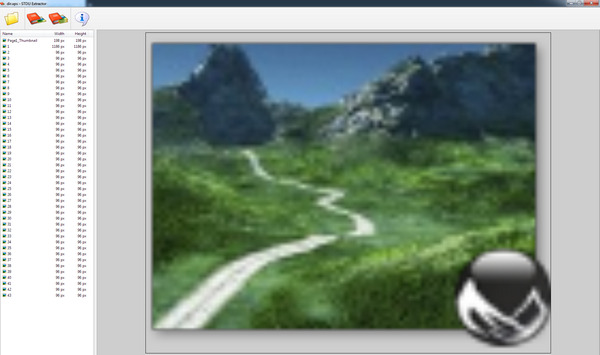
3. Now install the little freeware utility STDU Extractor and load the .XPS file you just printed. This utility can extract images inside several formats, including from .XPS files. STDU will show you a preview of the available thumbnails and let you extract as .PNG files or in other image formats. For some reason its batch extract is very slow, but the individual select-and-extract is fast.

For batch processing of a folder with thousands of Windows thumbnail previews, you’re probably looking at an overnight job — due the slowness of batch in STDU Extractor. The workflow is more useful if you just want a few dozen at a uniform size, and without faffing around trying to manually take exactly-sized screenshots. As you can see from the above final-output example, the drop-shadow is also extracted. But neatly so.

What you don’t get is the extracted thumbnail being given the name of the file it represents. So far as I can tell, no such software exists for that sort of extraction.

So long as you have software that gives you Windows Explorer previews for its file-types, the above workflow can work even on files that are not images. For instance, the above test is with an E-on Vue 2016 3D scene file.


Saving the .XPS to .PDF and extracting images from that will not work. The preview thumbnails become fragmented into strips by the PDF printing process.

There are also freeware extractors that will attempt to load the Windows thumbnails .db database in the Windows ../System folder and extract from that. But that’s ‘pot luck’, even if you can get them to open. The above can target a specific folder and a few specific icons.

How to extract Windows Explorer thumbnail previews

14 Monday Jun 2021

Posted by futurilla in JURN tips and tricks

≈ Leave a comment

How to extract Windows Explorer thumbnail previews from a specific Windows folder, using old-school desktop freeware:

1. Install the freeware Q-Dir, a quad-view Windows Explorer replacement. This has a useful “print the folder as you see it” feature, something lacking in Windows Explorer.

2. Use Q-Dir to navigate to your chosen folder. Show the folder with medium or large thumbnails, as you prefer. Then print the folder view to a Microsoft .XPS file, using Q-Dir. The .XPS format was Microsoft’s attempt at a .PDF rival, and all Windows installations should be able to print to it.

3. Now install the little freeware utility STDU Extractor and load the .XPS file you just printed. This utility can extract images inside several formats, including from .XPS files. STDU will show you a preview of the available thumbnails and let you extract as .PNG files or in other image formats. For some reason its batch extract is very slow, but the individual select-and-extract is fast.

For batch processing of a folder with thousands of Windows thumbnail previews, you’re probably looking at an overnight job — due the slowness of batch in STDU Extractor. The workflow is more useful if you just want a few dozen at a uniform size, and without faffing around trying to manually take exactly-sized screenshots. As you can see from the above final-output example, the drop-shadow is also extracted. But neatly so.

What you don’t get is the extracted thumbnail being given the name of the file it represents. So far as I can tell, no such software exists for that sort of extraction.

So long as you have software that gives you Windows Explorer previews for its file-types, the above workflow can work even on files that are not images. For instance, the above test is with an E-on Vue 2016 3D scene file.

Saving the .XPS to .PDF and extracting images from that will not work. The preview thumbnails become fragmented into strips by the PDF printing process.

There are also freeware extractors that will attempt to load the Windows thumbnails .db database in the Windows ../System folder and extract from that. But that’s ‘pot luck’, even if you can get them to open. The above can target a specific folder and a few specific icons.

How to ignore certificate errors in your browser

28 Friday May 2021

Posted by futurilla in JURN tips and tricks

≈ Leave a comment

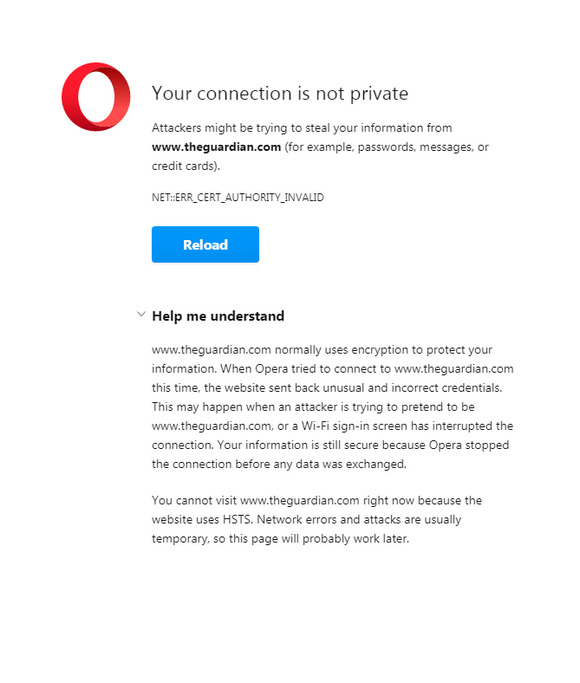
Total refusal to visit a normal website.

This common Web browser problem is usually related to only a handful of sites and is incredibly difficult to troubleshoot, and for most people will be impossible to fix. I tried everything, and I know Windows and browsers inside-out. Nothing worked.

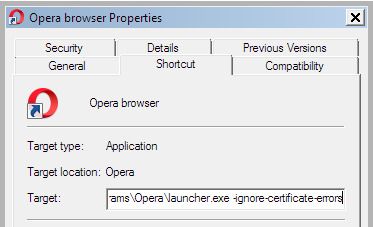
The ‘nuclear’ cure, which works with Opera and apparently other Chrome-based browsers, is then to simply add the following to your browser icon’s launch path. This path is found by right-clicking on the launch-icon and then looking in its Properties path. No more problems, if you add there…

-ignore-certificate-errors

This needs to applied after the shortcut has been pinned to the TaskBar, not before.

The site will now load fine. Tested and working with the Opera browser and theguardian .com

Obviously this will not be the same browser you use for Internet banking, PayPal etc. Or in such cases you will at least launch the same browser from another un-fixed launch icon.

The alternative is to switch from Chrome to the Pale Moon browser. Pale Moon, being based on Firefox, uses its own certificate store rather than relying on that of Windows. I don’t know of any way to have Chrome do the same.


Update, December 2023: this old post takes on a wider significance…

“Proposed EU legislation gives European governments the ability to conduct man-in-the-middle attacks against secured web communications (i.e. https). It would be illegal for browser makers to reject certificates compromised by governments.”

How to block by keyword with uBlock Origin

27 Thursday May 2021

Posted by futurilla in JURN tips and tricks

≈ Leave a comment

Google Search is now adding “People also searched for” pop-down panels, placed under individual search results. These often appear on using the back button to go back to a page of former results.

I don’t want any kind of ‘pops’ in my search-results. Block them all in your uBlock Origin filter list, by adding this filter…

The above is also a working demo of how to use an xpath command to block any keyword inside a DIV’s ID. In this case the filter blocks all HTML DIVs with an internal ID containing the letters “eob”. This blocking is not constrained to just these letters, meaning that the command will also block “eob77” or “eob_34”, without the need for a wildcard * symbol. This is required for Google Search, as all the “eob” instances have a number after them.

How to enable hyphens to mdash in Word 2007

25 Tuesday May 2021

Posted by futurilla in JURN tips and tricks

≈ Leave a comment

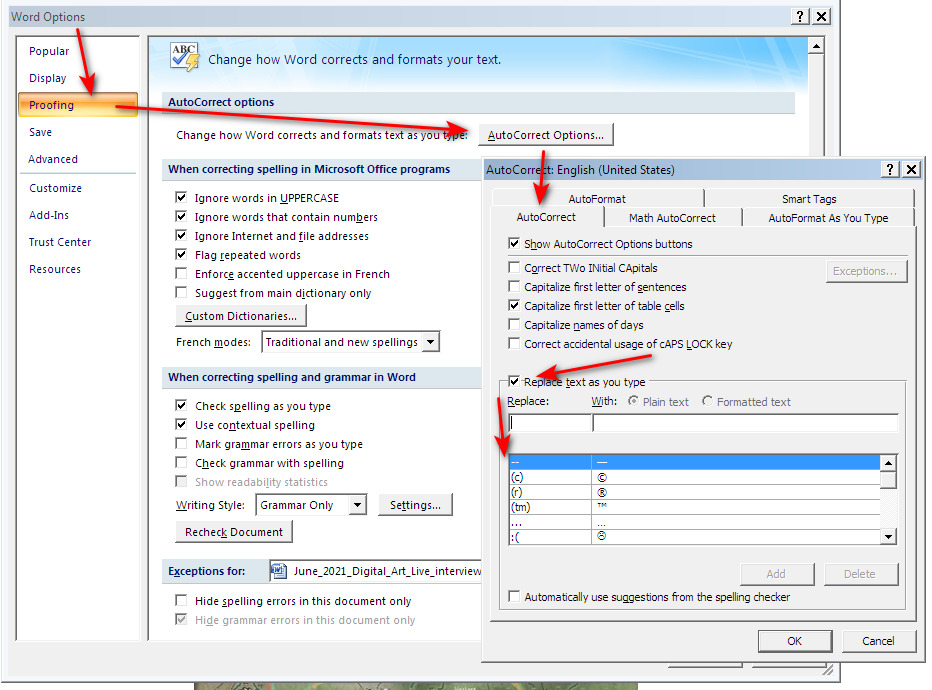
For some reason my fresh install of trusty old Microsoft Word 2007 does not do the autocorrect for converting two typed hyphens – – into a long — and the mdash autocorrect thus setting had to be applied manually. For future reference, and perhaps useful for others, here’s how to do that…

As you can see here I’ve already added it, and it’s been saved to the options below. Word is supposed to do thus autocorrect automatically but if that fails, the above will set the behaviour manually.

One-click to remove a verbose site from Google

11 Thursday Mar 2021

Posted by futurilla in How to improve academic search, JURN tips and tricks

≈ Leave a comment

One-click to remove a verbose site from Google Search results, a new UserScript. Preset for Wikipedia, but the URL can be easily changed to be any verbose website. It should ideally be a website that you usually regularly want to remove from search results, but sometimes want to keep. The script is thus more flexible than a regular list-based site blocker.

It works by re-running the current search, but only an instant after some regex has cunningly inserted the command    into the URL.


Also, yes, I’m aware that my ‘add JURN as a link to Google Search’ UserScript has stopped working. Google has re-labelled the divs on the text links just below the search box. A similar script that allows the current search to be passed to Scholar has also stopped working, as have several similar menu scripts. I’m waiting for one of these scripts to update, and thus to show me how it needs to be fixed.

Sweep away the breadcrumbs

23 Saturday Jan 2021

Posted by futurilla in JURN tips and tricks, Spotted in the news

≈ Leave a comment

Got nasty breadbrumbs in your Google Search, again? An update to the free UserScript Google Search restore URLs (undo breadcrumbs) fixes that, restoring full human-readable URL paths in your search results. Having URL paths visible is vital for instantly detecting and blocking spam, something which Google’s mega-mind AI seems unable to learn to do. After a while, the experienced searcher learns to spot the half-dozen common types of spam URLs. An obvious example…

A garbled hash forms part of the URL + an .it domain + a movie ‘download’ offer = definitely robo-spam and likely dangerous too. Why is it even in Google Search, and for search terms that have nothing to do with Thundercats?

Seamless height-maps for the whole world

31 Thursday Dec 2020

Posted by futurilla in JURN tips and tricks, Spotted in the news

≈ Leave a comment

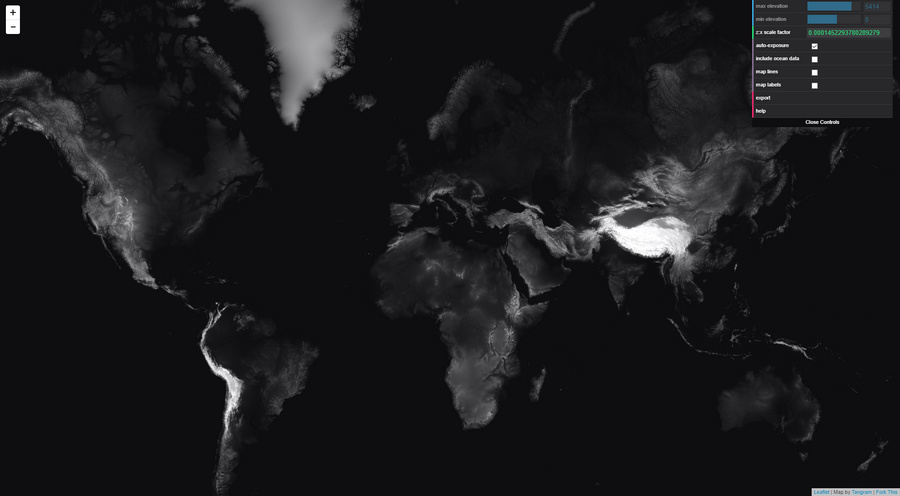
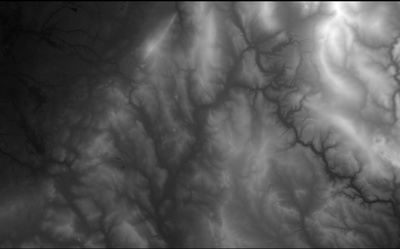
Seamless and free height-maps for the whole world, now at Tangram Heightmapper. It’s very easy to use. Once you’ve dived down to your location, and exported such a map, these height maps can be imported into 3D software. There they can then be used as the basis for making new elevated terrain maps, and as pretty as you care to make them.

How to use…

1. Go to Google Maps. Find your chosen location, and position it. Copy the current Google Maps URL to Notepad.

2. Now use this Google Maps URL co-ordinate data to craft a new URL for the Height Mapper. An example Google Maps URL would look like…

../maps/place/Your_place/@53.0220219,-2.2297826,12z/

Therefore the needed Tangrams Height Mapper URL would be…

https://tangrams.github.io/heightmapper/#12/53.0220/-2.2297

The #12 appears to be the zoom-level, with #13 zooming the satellite down another mile or so nearer to the ground. It appears to correspond with the ,12z bit of the Google Maps URL. It thus seems someone could easily cook up an URL-converter UserScript for Google Maps, but for now it needs to be done manually.

3. Paste your newly-crafted URL into Tangrams Height Mapper. Allow time to load. Once you’re happy, press “Export” to get the heightmap in PNG.

If needed, zoom-in further and grab multiple adjacent sections for export, then stitch these with the free Microsoft ICE. Although this does not appear to add detail. It just makes the final image larger. Nor can the upres-er AI Gigapixel add much new detail.

4. View in your chosen 3D landscape software by loading up your new height map. For a quick look, the Aerialod freeware is simple and will do the trick.

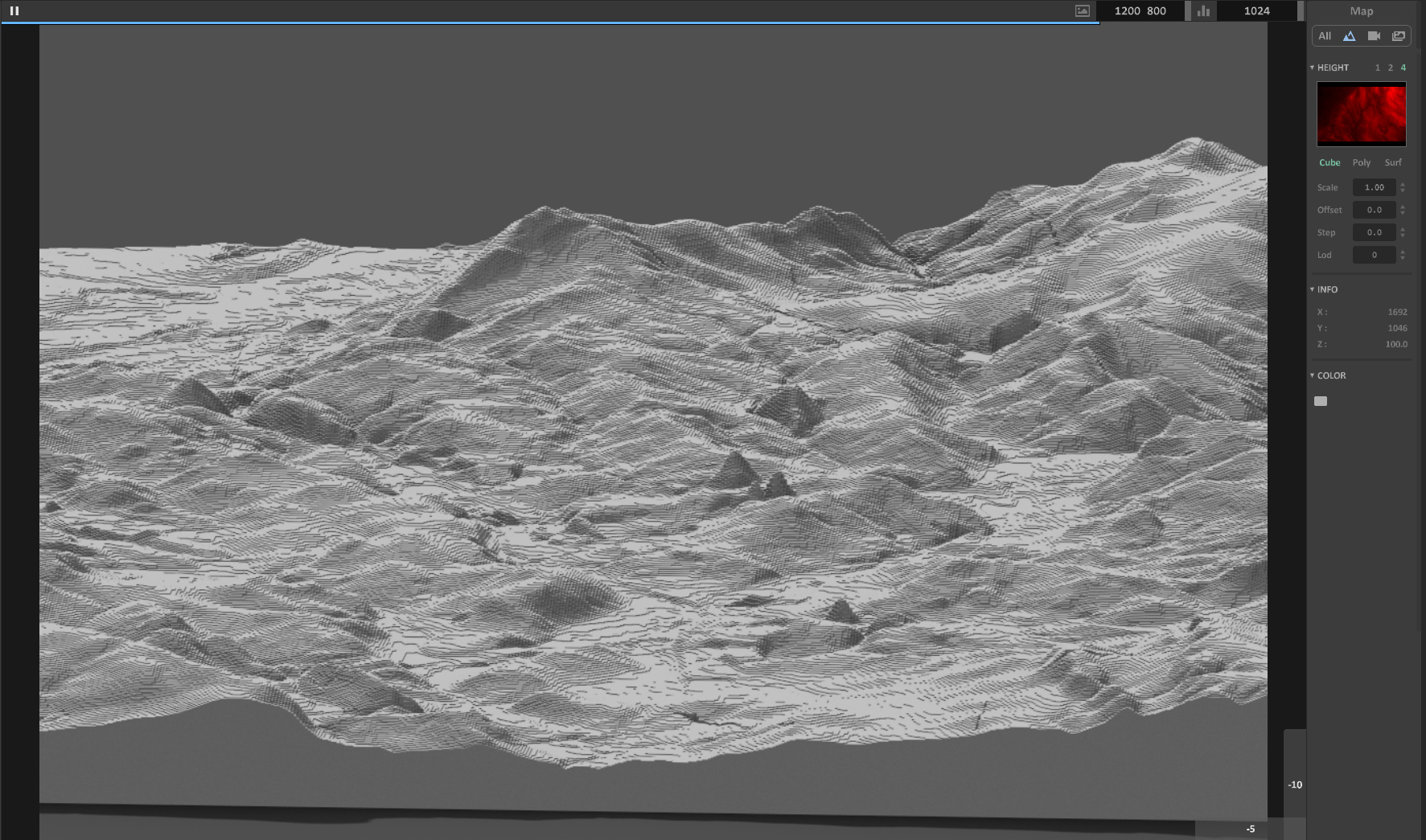
You will then likely find the height map has “terraces” (aka “stairsteps” or “steps” or “zippers” or stepped “waterlines” or “tidelines”). These look like the tiny lines following the contours of a drawn map. These are not actually drawn-on contour-lines, but rather the unwanted artefacts of the relatively low-resolution heightmap. If you want high-resolution heightmaps you’re assumed to prospecting for oil or gold and you generally have to take out a mortgage to afford them.

Seen here in Aerialod, this “stepping” effect is actually not unappealing when rendered crisply. Though here with a bit too much of the Minecraft game about it. You can hide this effect somewhat by switching Aerialod to display in ‘Poly’ or ‘Surf’ mode, but these modes make the terrain look like a plaster-cast and seem far from ideal.

5. Most will then want to find a method of smoothing these tiny terraces, but without removing too much detail from the real bits of the terrain. Sadly it appears there’s there’s not really any way to do that, without smushing the other details, other than to cover the terrain with a satellite map or apply textures.

One simple free option that I find works for mesh export is Height Map to OBJ. This gives a smoother 3D mesh as it exports, though also regrettably smushing fine details, rather than trying to smooth the height-map pixels first. It’s old but, like most good Windows freeware, still works and it will get rid of the ‘terraces’. Just note that the height maps you feed it must have exactly square dimensions. On import of the resulting OBJ into 3D software you may find you have to re-set the scaling, to something like 700% on the Y axis.

With a vastly steeper learning-curve, TerreSculptor is now free and will also import a height map and export an OBJ.

Time for YouTube

13 Sunday Dec 2020

Posted by futurilla in JURN tips and tricks

≈ Leave a comment

There are two useful YouTube addons for wrangling YouTube, without needing the services of some third-party online outfit in Whereizitagin.

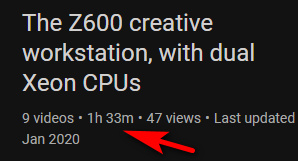
Youtube Playlist Total Duration is a UserScript that shows the total duration of the playlist. Useful for those who need to know how long a software-training or hardware-setup playlist will take to view. Tested and working, but note that you must re-load the page to see the correct time for the playlist.

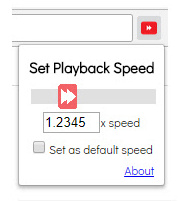
Got a slow presenter, and need your learning playlist running a little faster? The Chrome browser addon Any Youtube Playback Speed does the job nicely, and with fine increments on a simple slider. Again, tested and working.

Small changes re: time and speed, but both are very useful.

← Older posts
Newer posts →
RSS Feed: Subscribe


Please become my patron at www.patreon.com/davehaden to help JURN survive and thrive.

JURN

  • JURN : directory of ejournals
  • JURN : main search-engine
  • JURN : openEco directory
  • JURN : repository search
  • Categories

    • Academic search
    • Ecology additions
    • Economics of Open Access
    • How to improve academic search
    • JURN blogged
    • JURN metrics
    • JURN tips and tricks
    • JURN's Google watch
    • My general observations
    • New media journal articles
    • New titles added to JURN
    • Official and think-tank reports
    • Ooops!
    • Open Access publishing
    • Spotted in the news
    • Uncategorized

    Archives

    • February 2026
    • January 2026
    • October 2025
    • May 2025
    • April 2025
    • September 2024
    • June 2024
    • May 2024
    • April 2024
    • March 2024
    • February 2024
    • January 2024
    • December 2023
    • November 2023
    • October 2023
    • September 2023
    • June 2023
    • May 2023
    • January 2023
    • December 2022
    • November 2022
    • October 2021
    • September 2021
    • August 2021
    • July 2021
    • June 2021
    • May 2021
    • April 2021
    • March 2021
    • February 2021
    • January 2021
    • December 2020
    • November 2020
    • October 2020
    • September 2020
    • August 2020
    • July 2020
    • June 2020
    • May 2020
    • April 2020
    • March 2020
    • February 2020
    • January 2020
    • December 2019
    • November 2019
    • October 2019
    • September 2019
    • August 2019
    • July 2019
    • June 2019
    • May 2019
    • April 2019
    • March 2019
    • February 2019
    • January 2019
    • December 2018
    • November 2018
    • October 2018
    • September 2018
    • August 2018
    • July 2018
    • June 2018
    • May 2018
    • April 2018
    • March 2018
    • February 2018
    • January 2018
    • December 2017
    • November 2017
    • October 2017
    • September 2017
    • August 2017
    • July 2017
    • June 2017
    • May 2017
    • April 2017
    • March 2017
    • February 2017
    • January 2017
    • December 2016
    • November 2016
    • October 2016
    • September 2016
    • August 2016
    • July 2016
    • June 2016
    • May 2016
    • April 2016
    • March 2016
    • February 2016
    • January 2016
    • December 2015
    • November 2015
    • October 2015
    • September 2015
    • August 2015
    • July 2015
    • June 2015
    • May 2015
    • April 2015
    • March 2015
    • February 2015
    • January 2015
    • December 2014
    • November 2014
    • October 2014
    • September 2014
    • August 2014
    • July 2014
    • June 2014
    • May 2014
    • April 2014
    • March 2014
    • February 2014
    • January 2014
    • December 2013
    • November 2013
    • October 2013
    • September 2013
    • August 2013
    • July 2013
    • June 2013
    • May 2013
    • April 2013
    • March 2013
    • February 2013
    • January 2013
    • December 2012
    • November 2012
    • October 2012
    • September 2012
    • August 2012
    • June 2012
    • May 2012
    • April 2012
    • March 2012
    • February 2012
    • January 2012
    • December 2011
    • November 2011
    • October 2011
    • September 2011
    • August 2011
    • July 2011
    • June 2011
    • May 2011
    • April 2011
    • March 2011
    • February 2011
    • January 2011
    • December 2010
    • November 2010
    • October 2010
    • September 2010
    • August 2010
    • July 2010
    • June 2010
    • May 2010
    • April 2010
    • March 2010
    • February 2010
    • January 2010
    • December 2009
    • November 2009
    • October 2009
    • September 2009
    • August 2009
    • July 2009
    • June 2009
    • May 2009
    • April 2009
    • March 2009
    • February 2009

    Proudly powered by WordPress Theme: Chateau by Ignacio Ricci.