• Directory
  • FAQ: about JURN
  • Group tests
  • Guide to academic search
  • JURN’s donationware
  • Links
  • openEco: titles indexed

News from JURN

~ search tool for open access content

News from JURN

Category Archives: JURN tips and tricks

Footnotes plugin for WordPress

25 Wednesday Jan 2012

Posted by futurilla in JURN tips and tricks

≈ 2 Comments

A nice new footnotes plugin for WordPress. It uses simple square brackets, which must have a number at the start of them. It accepts HTML links inside the brackets. I’d love to see this plugin come as standard with the free WordPress.com -hosted blogs…

To get the smaller font size on the footnotes, paste this CSS into your theme’s styles CSS, probably at the foot of the font section (that worked for me). The plugin doesn’t add this CSS automatically.

DIY Book Scanner

07 Saturday Jan 2012

Posted by futurilla in JURN tips and tricks, Spotted in the news

≈ Leave a comment

With the seeming demise of the too-long awaited Ion Book Scanner device (now vanished from both Amazon and the Ion website), those seeking to efficiently scan their private libraries might like to look at the DIY Book Scanner website…

It has plans, shopping lists, photos of items needed, and well… just about everything. If you can’t build it yourself, anyone on a decent salary should be able to find the funds to pay a couple of their neighborhood hobbyists to build one for them. It looks transportable, so perhaps a group of academics could pool their cash to get one built, then share the scanner.

Firefox users: how to remove the Google +1 button from search results

29 Wednesday Jun 2011

Posted by futurilla in JURN tips and tricks, JURN's Google watch

≈ 13 Comments

For Firefox 5 users, this is a simple way to remove the annoying new Google +1 button from your search results:

UPDATE, 20th July 2011:
the previous AdBlock Plus solution stopped working at 13th July. Google changed something. I have now amended the instructions to work with their new code. What follows works at 20th July…

1. Open Firefox. Go to the top menu bar | Tools | Addons | Adblock Plus | Options

2. In your Filter option add…

www.google.com##BUTTON[class=”esw eswd”]

Don’t be tempted to add a “http://” in front. Save and exit the Adblock Plus options.

3. Restart Firefox. The distracting animated buttons are gone. If you run on some other national version of Google, try replacing “.com” with your national domain (like .uk or .ca).

JURN, Firefox 5 and HTTPS-Everywhere

28 Tuesday Jun 2011

Posted by futurilla in JURN tips and tricks

≈ Leave a comment

New addition to the FAQ:

Q: I have installed Firefox 5, and now I can’t get more than one page of results using a JURN search from the main www.jurn.org Web page. What went wrong?

A: Disable the Firefox addon HTTPS-Everywhere, restart Firefox, and JURN will work again. Dedicated users of HTTPS-Everywhere, for instance those living in repressive nations, can also write a ruleset to exclude Google and JURN from the addon’s encryption process.

Moving from Google Noise Reduction to Google Hit Hider

22 Tuesday Mar 2011

Posted by futurilla in JURN tips and tricks, JURN's Google watch

≈ 1 Comment

Firefox 4 final is out now. Sadly it breaks the Greasemonkey script Google Noise Reduction, which was an excellent per-domain results blocker for Google Search.

However, the new and powerful Google Hit Hider does work very well, and is very similar. It’s obviously learned a lot from earlier software like Blocksite, Surfclarity, and Noise Reduction (all of which no longer work with FF4 / the latest Google) and there are some nice refinements. Not the least of which is very easy import/export as simple plain-text lists of URLs.

It’s a fairly simple process to get your hand-crafted Noise Reduction blocklist out of Firefox and into Google Hit Hider…

1. In Firefox’s address bar, type: about:config

2. Scroll down to greasemonkey.scriptvals.http://exego.net//Google Noise Reduction.blacklist You’ll see…

({‘britannia.com’:true, ‘oxfordjournals.org’:true, ‘tandf.co.uk’:true, ‘ingentaconnect.com’:true, ‘sagepub.com’:true, ‘myspace.com’:true, ‘experts-exchange.com’:true})

3. Double click on the line of banned URLs you’ll find there, and copy them to Notepad.

4. Now just top-and-tail the list, then search and replace until you have a clean list, but leave each URL separated by a single comma. Save the list as a .csv (comma separated value) file, then open that with MS Office’s Excel (or whatever the free Open Office equivalent is). The list should load up with one URL per cell.

5. Now just copy and paste the resulting cleaned list into: Manage Hiding / List Util / ‘Perma-ban list’ in Google Hit Hider.

The advantage of this over the now-native Google blocking is that: i) it lets you break the 500 URL limit; ii) you can block domains en-masse rather than one at a time; and iii) it lets you easily import/export the blocklist, in order to share with colleagues etc.

Hacking Hathi

03 Thursday Feb 2011

Posted by futurilla in JURN tips and tricks

≈ Leave a comment

A handy Hathi Trust website tutorial for UK and European readers. It details how to bypass the EU’s ridiculously elongated copyright terms, and access blocked material that is freely available to Americans.

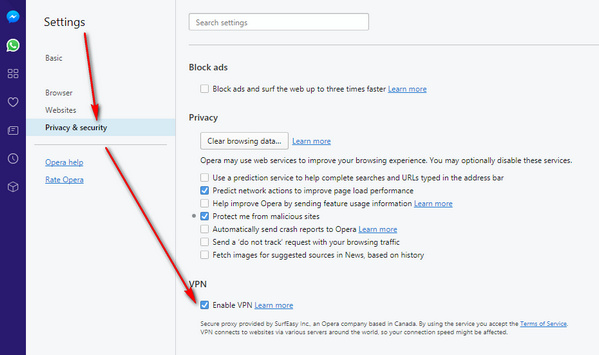
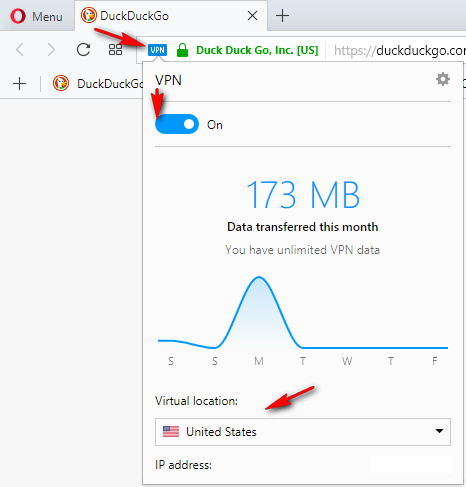
Update: as of 2017 it’s now easier just to install the Opera Web browser (desktop PC version), and use their easy free VPN service.

Update, at spring 2020, a VPN seems to only way to reach Hathi from the UK. Even then, the site is just un-usably slow. This situation has been ongoing for about six weeks, at early May 2020.

Facebook unlike

25 Tuesday Jan 2011

Posted by futurilla in JURN tips and tricks

≈ Leave a comment

Why you should keep the new Facebook paste-ins off your blog — they make the page clunky when loading, jar with your layout/colour-scheme, distend your sidebar, and sometimes even obscure your content…

For those who want an immediate “nuke from orbit” solution, the Remove Facebook script for Firefox/Greasemonkey works a treat at removing this sort of cruft from all the pages you encounter on the web.

ReKindleit – Firefox to Kindle

20 Thursday Jan 2011

Posted by futurilla in JURN tips and tricks

≈ Leave a comment

ReKindleit, a Firefox plugin that sends any web page to your Kindle. Simply add the email address readit@rekindle.it to your approved senders. Then simply drag the ReKindleit Bookmarklet to your Firefox toolbar. Only works on HTML pages, not PDF files. The blurb on the page about “then transfer by USB” is out of date — the new Kindle 3 pulls pages directly to the Kindle.

How to copy URLs with their anchor text alongside them

08 Saturday Jan 2011

Posted by futurilla in JURN tips and tricks

≈ 3 Comments

The excellent free MultiLinks addon for Firefox can be a handy way to open links in many tabs. Just Crtl + right mouse-click and drag a box around the links you want to open. Then when you release the mouse, your selected links spring into life as new tabs all busy loading pages.

But MultiLinks can also work as a very handy links harvester, neatly copying URLs complete with their anchor text to the clipboard. That can certainly beat ferreting around among the code in ‘View Source’. Here’s how to do it.

1. Install MultiLinks. Then go to Tools | Addons…

2. Click the “Options” button on the MultiLinks listing…

3. Change the behaviour of MultiLinks to: Copy to Clipboard | URLs with Titles…

4. You can also tell it to ignore everything except the main links, on pages of Google Search results…

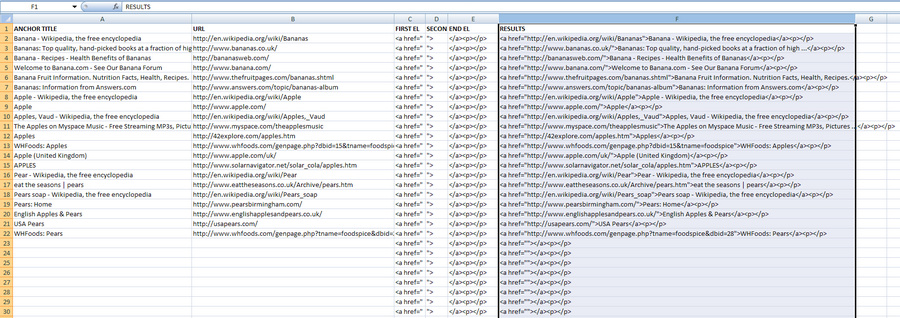
5. Now when you Crtl + right-click and drag a box around some Web links, when you release the mouse button those URLs and their anchor (title) text are placed on your clipboard. Not very useful, unless Excel 2007 automatically places these side-by-side in different columns. Thankfully it does…

6. Now you can use Excel to automatically turn them back into HTML links, as soon as you paste them into your spreadsheet. My ready-made spreadsheet with formula applied is URL-maker.xlsx. It uses the simple concatenation (‘combine columns’) formula: =C2&B2&D2&A2&E2

Found an additional way to auto-check JURN

28 Tuesday Dec 2010

Posted by futurilla in JURN tips and tricks, My general observations, New titles added to JURN

≈ 2 Comments

I’m pleased to say that I’ve found a robust way to auto-check if Google is still “seeing” content at the article-level URLs indexed by JURN. It’s a software based solution, and is basically ‘dark side’ SEO software that I’ve turned to the good side. It auto-prepends the site: modifier to each of the URLs contained in the JURN index, and then checks if those URLs are actually indexed by Google. It then logs any wholly un-indexed URLs. It just chugs away in the background and is very slow — so as not to trigger flood-control blocking measures. But it’s certainly better than doing the checking by hand.

If you have such a list you want to check, it’s probably best to remove or cut back any URLs containing multiple wildcards such as /*/*/. Google has also been known to choke on URLs containing question-marks (it can see them as evidence of someone trying a scripting exploit on Google), although I don’t see this happening during the checking. But if you’re doing the checking in blocks of 200, it’s not difficult to correct those sort of URLs first.

← Older posts
Newer posts →
RSS Feed: Subscribe


Please become my patron at www.patreon.com/davehaden to help JURN survive and thrive.

JURN

  • JURN : directory of ejournals
  • JURN : main search-engine
  • JURN : openEco directory
  • JURN : repository search
  • Categories

    • Academic search
    • Ecology additions
    • Economics of Open Access
    • How to improve academic search
    • JURN blogged
    • JURN metrics
    • JURN tips and tricks
    • JURN's Google watch
    • My general observations
    • New media journal articles
    • New titles added to JURN
    • Official and think-tank reports
    • Ooops!
    • Open Access publishing
    • Spotted in the news
    • Uncategorized

    Archives

    • February 2026
    • January 2026
    • October 2025
    • May 2025
    • April 2025
    • September 2024
    • June 2024
    • May 2024
    • April 2024
    • March 2024
    • February 2024
    • January 2024
    • December 2023
    • November 2023
    • October 2023
    • September 2023
    • June 2023
    • May 2023
    • January 2023
    • December 2022
    • November 2022
    • October 2021
    • September 2021
    • August 2021
    • July 2021
    • June 2021
    • May 2021
    • April 2021
    • March 2021
    • February 2021
    • January 2021
    • December 2020
    • November 2020
    • October 2020
    • September 2020
    • August 2020
    • July 2020
    • June 2020
    • May 2020
    • April 2020
    • March 2020
    • February 2020
    • January 2020
    • December 2019
    • November 2019
    • October 2019
    • September 2019
    • August 2019
    • July 2019
    • June 2019
    • May 2019
    • April 2019
    • March 2019
    • February 2019
    • January 2019
    • December 2018
    • November 2018
    • October 2018
    • September 2018
    • August 2018
    • July 2018
    • June 2018
    • May 2018
    • April 2018
    • March 2018
    • February 2018
    • January 2018
    • December 2017
    • November 2017
    • October 2017
    • September 2017
    • August 2017
    • July 2017
    • June 2017
    • May 2017
    • April 2017
    • March 2017
    • February 2017
    • January 2017
    • December 2016
    • November 2016
    • October 2016
    • September 2016
    • August 2016
    • July 2016
    • June 2016
    • May 2016
    • April 2016
    • March 2016
    • February 2016
    • January 2016
    • December 2015
    • November 2015
    • October 2015
    • September 2015
    • August 2015
    • July 2015
    • June 2015
    • May 2015
    • April 2015
    • March 2015
    • February 2015
    • January 2015
    • December 2014
    • November 2014
    • October 2014
    • September 2014
    • August 2014
    • July 2014
    • June 2014
    • May 2014
    • April 2014
    • March 2014
    • February 2014
    • January 2014
    • December 2013
    • November 2013
    • October 2013
    • September 2013
    • August 2013
    • July 2013
    • June 2013
    • May 2013
    • April 2013
    • March 2013
    • February 2013
    • January 2013
    • December 2012
    • November 2012
    • October 2012
    • September 2012
    • August 2012
    • June 2012
    • May 2012
    • April 2012
    • March 2012
    • February 2012
    • January 2012
    • December 2011
    • November 2011
    • October 2011
    • September 2011
    • August 2011
    • July 2011
    • June 2011
    • May 2011
    • April 2011
    • March 2011
    • February 2011
    • January 2011
    • December 2010
    • November 2010
    • October 2010
    • September 2010
    • August 2010
    • July 2010
    • June 2010
    • May 2010
    • April 2010
    • March 2010
    • February 2010
    • January 2010
    • December 2009
    • November 2009
    • October 2009
    • September 2009
    • August 2009
    • July 2009
    • June 2009
    • May 2009
    • April 2009
    • March 2009
    • February 2009

    Proudly powered by WordPress Theme: Chateau by Ignacio Ricci.