• Directory
  • FAQ: about JURN
  • Group tests
  • Guide to academic search
  • JURN’s donationware
  • Links
  • openEco: titles indexed

News from JURN

~ search tool for open access content

News from JURN

Category Archives: JURN tips and tricks

How to download a large page image from an Issuu magazine

21 Sunday Jun 2015

Posted by futurilla in JURN tips and tricks

≈ 1 Comment

How to download a large page image from an Issuu magazine:

1. Load the Issuu magazine.

2. Right click on the first page. “View Source”.

3. Near the top of the source code, look in the meta for link rel="image_src" href="http://image.issuu.com/[really-really-long-number---]/jpg/page_1.jpg"

4. Copy that image URL, and simply change page_1.jpg to page_18.jpg or whatever page you want to get.

Note that the page numbering between the Issuu magazine’s display and the original PDF may be astray by a few pages, and a little re-calibration may be needed. Note also that you’re getting images of the entire page, not hi-res copies of the images used in the page.

But these days all this is probably not needed. Screen-capture software is perfectly capable of capturing a scrolling screen.
Calibre now searches inside your ebook collection

21 Sunday Jun 2015

Posted by futurilla in JURN tips and tricks, Spotted in the news

≈ Leave a comment

The popular Calibre ebook software now includes a means to search inside all the ebooks on your devices. Find it in: Preferences | Miscellaneous.

How to access your Amazon Listmania lists

04 Thursday Jun 2015

Posted by futurilla in JURN tips and tricks

≈ Leave a comment

Amazon.com is making it almost impossible for user of its Listmania service (create themed lists of selected books, eg: best books on the history of Tomorrowland) to access their old lists from their personal Amazon profile. Here’s how to see a list of your lists…

http://www.amazon.com/gp/richpub/listmania/byauthor/ADD-YOUR-ID-NUMBER-HERE?ref_=cm_aya_bb_lists&pldnSite=1

Replace ADD-YOUR-ID-NUMBER-HERE with the number that shows up in the URL when you view your personal profile.

Probably best copied out to a new WordPress.com blog, if you want to keep them and make them more public.

How to un-dumb WordPress.com blog posting

07 Tuesday Apr 2015

Posted by futurilla in JURN tips and tricks, Spotted in the news

≈ Leave a comment

In a WordPress.com blog, you can now use a Greasemonkey script to get you past the dumb and childish “Beep Beep Boop” method of posting to your blog. Seems to work fine in the Firefox browser, as starting a new blog post takes me to the full-featured Classic editor. Why is this script needed?…

“on March 13, 2015, the preference setting for the choice of [WordPress.com blog] editor, which was implemented by a cookie through a link back to the classic editor, was removed.”

Not loving Notey

18 Wednesday Feb 2015

Posted by futurilla in JURN tips and tricks, Spotted in the news

≈ Leave a comment

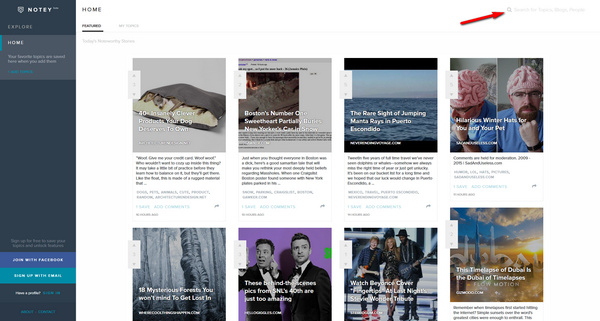
Notey is a new topic-focused blog finding directory. Yeah, I know… but it just reportedly raised $1.6 million in funding.

It has a slick iPad-focussed design, so on a widescreen desktop PC I hit some clunky navigation points a few times. Top of the ‘recent blog posts’ pile on entering was “40+ Insanely Clever Products Your Dog Deserves To Own”, which suggests the marketeers are already in Notey, via marketeering blog-a-zine articles.

notey

The search box is hidden away, as if they’re ashamed of it. The search experience is not great. I searched for “Lovecraft” (H.P. Lovecraft, famous horror and SF author, on whose life I’m an expert) and the results were incredibly poor. A Google search for…

site:http://www.notey.com/blogs/ lovecraft

… reveals more of the semantic messiness, and the ways that the database is being skewed by the vast cloud of fanboy crapware that now surrounds the man and his fiction.

Sadly Notey doesn’t look like the new Technorati to me, and nor is it of much used to academics seeking a specialist single-topic blog. For discovery of single-topic blogs Google is still your friend, and the following Google Search modifier still works despite Google having abandoned a dedicated blog search box…

inblogtitle:keyword


Update: October 2018. It appears that inblogtitle:keyword is no longer useful, as it now returns only 10 irrelevant results when used with Lovecraft.

RSS to email

08 Sunday Feb 2015

Posted by futurilla in JURN tips and tricks

≈ Leave a comment

Some live RSS-to-email services:

Blogtrottr

RSSforward

Feed Mailer

FeedMyInbox

Adblocking in 2015

08 Thursday Jan 2015

Posted by futurilla in JURN tips and tricks

≈ 1 Comment

It’s 2015 and it seems there are still some people moaning about seeing adverts in search and online generally. They obviously still haven’t heard about the free automatic advert blockers available for Web browsers. If you know one of those people, simply get them to install the following the ‘core four’ browser add-ons:

Adblock Plus
Adblock Plus Pop-up Addon
Element Hiding Helper for Adblock Plus
F.B. Purity – Clean up and Customize Facebook

Unfortunately there’s still nothing that can routinely and automatically block the stupid “sign up to our newsletter!” / “take our survey!” screen-dimmers.

It takes an Aeon…

24 Wednesday Dec 2014

Posted by futurilla in JURN tips and tricks, New media journal articles, Spotted in the news

≈ 1 Comment

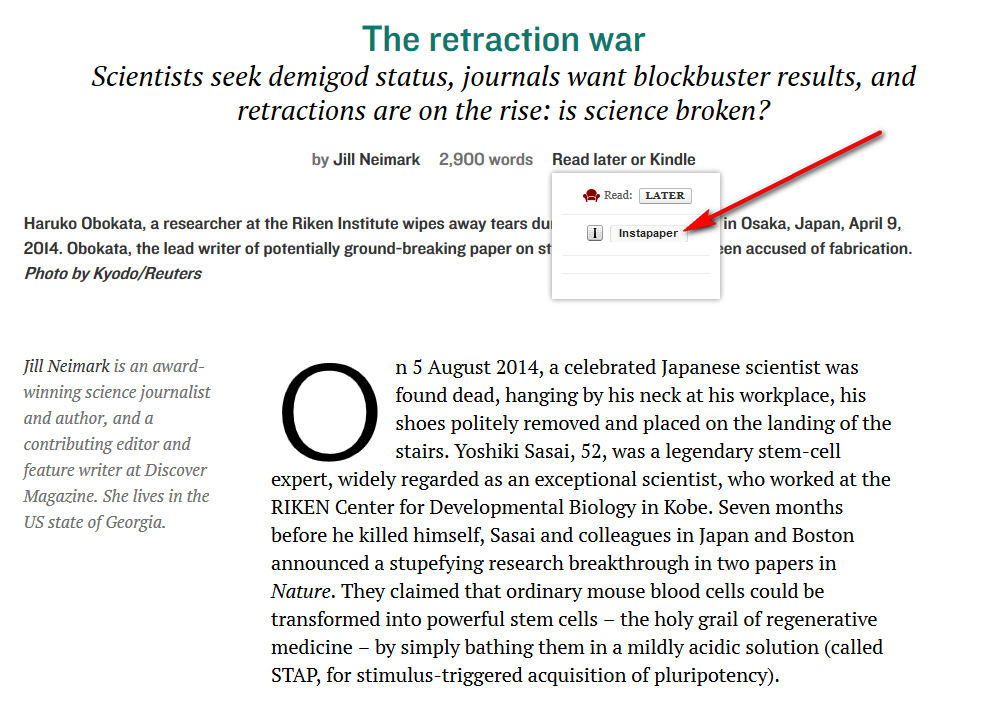
Aeon magazine has a very nice new Save to Instapaper drop-down on its articles, which might usefully be copied by ejournals offering articles in HTML.

saveinsta

Compare the blissful ease of doing this with the impossibility of saving Digital Arts magazine’s new 2015 creative trends survey article to Instapaper. Impossible because of the database-driven URL structure, which loathsomely uses ? in the URL to spawn a new page hanging off of a static URL. I ended up having to copy-paste to a .txt file and then used Amazon’s Send to Kindle desktop software. I guess Digital Arts are assuming their younger clear-eyed readers are going straight to the page on an iPad, rather than needing the ‘old-eyes friendly’ font-scaling on a Kindle.

No mention of this Aeon button on the Instapaper official blog in 2014, so I’m guessing it’s custom to the editors, probably wrapped up in a WordPress widget or similar. But their little button looks like it can be fairly easily implemented in a DIV in your HTML code…

readlatercode

EZB tweaks remove date-range

17 Wednesday Dec 2014

Posted by futurilla in JURN tips and tricks

≈ Leave a comment

The EZB has evidently had a slight re-design. They’ve removed the ability to set a date-limit on the “List of new EZB journals”. However, the date is still being set in plaintext in the URL itself. Users can dial back the date range by typing a new date at the end of the URL, and then reloading. The dialogue to set a date-range on the page itself has been removed, as has the ability to filter by partly OA titles (now the options are just ‘freely available’ or ‘not accessible’).

http://rzblx1.uni-regensburg.de/ezeit/searchres.phtml?bibid=AAAAA&colors=1&lang=en&jq_type1=ID&jq_term1=01.12.2014

Three-column static search results in Firefox

16 Sunday Nov 2014

Posted by futurilla in JURN tips and tricks, JURN's Google watch

≈ 1 Comment

This post is for those who’ve recently lost the capability to have their Google Search results look like this in Firefox and a widescreen PC monitor…

googlemonkeyr

Greasemonkey and GoogleMonkeyR are required to do this. They are still working fine together for me, with a few new versions installed…

1. Update Greasemonkey to 2.3 (29th Oct 2014) and GoogleMonkeyR to 1.7.2.

2. Access Google Search via the following URL, which has a parameter that limits search results to 15 per page…

https://www.google.com/webhp?hl=en&complete=0&tbo=1&num=15&tbs=li:1

15 results fit nicely into three columns, the three columns being set up in GoogleMonkeyR Preferences (which is the cog-wheel that appears top-right, once you make a Google search).

3. Hide Google’s “Searches related to …” element on the Google Search results page. You can do this easily in GoogleMonkeyR Preferences. This div needs to be hidden, because otherwise it sits awkwardly between you and the numbered links that lead to the subsequent results pages.

If that doesn’t work for you, then you can do Step 3 with the popular AdBlock Plus add-on (right-click on “”Searches related to …””, ‘Inspect Element’, highlight whole ‘extrares’ element, click on red AdblockPlus icon, and block it on Google.com). Once you’ve learned how to hide page elements like this with AdBlock Plus you can use it on other sites, for instance hiding the sports section or the tacky video sidebars on newspaper websites.

← Older posts
Newer posts →
RSS Feed: Subscribe


Please become my patron at www.patreon.com/davehaden to help JURN survive and thrive.

JURN

  • JURN : directory of ejournals
  • JURN : main search-engine
  • JURN : openEco directory
  • JURN : repository search
  • Categories

    • Academic search
    • Ecology additions
    • Economics of Open Access
    • How to improve academic search
    • JURN blogged
    • JURN metrics
    • JURN tips and tricks
    • JURN's Google watch
    • My general observations
    • New media journal articles
    • New titles added to JURN
    • Official and think-tank reports
    • Ooops!
    • Open Access publishing
    • Spotted in the news
    • Uncategorized

    Archives

    • February 2026
    • January 2026
    • October 2025
    • May 2025
    • April 2025
    • September 2024
    • June 2024
    • May 2024
    • April 2024
    • March 2024
    • February 2024
    • January 2024
    • December 2023
    • November 2023
    • October 2023
    • September 2023
    • June 2023
    • May 2023
    • January 2023
    • December 2022
    • November 2022
    • October 2021
    • September 2021
    • August 2021
    • July 2021
    • June 2021
    • May 2021
    • April 2021
    • March 2021
    • February 2021
    • January 2021
    • December 2020
    • November 2020
    • October 2020
    • September 2020
    • August 2020
    • July 2020
    • June 2020
    • May 2020
    • April 2020
    • March 2020
    • February 2020
    • January 2020
    • December 2019
    • November 2019
    • October 2019
    • September 2019
    • August 2019
    • July 2019
    • June 2019
    • May 2019
    • April 2019
    • March 2019
    • February 2019
    • January 2019
    • December 2018
    • November 2018
    • October 2018
    • September 2018
    • August 2018
    • July 2018
    • June 2018
    • May 2018
    • April 2018
    • March 2018
    • February 2018
    • January 2018
    • December 2017
    • November 2017
    • October 2017
    • September 2017
    • August 2017
    • July 2017
    • June 2017
    • May 2017
    • April 2017
    • March 2017
    • February 2017
    • January 2017
    • December 2016
    • November 2016
    • October 2016
    • September 2016
    • August 2016
    • July 2016
    • June 2016
    • May 2016
    • April 2016
    • March 2016
    • February 2016
    • January 2016
    • December 2015
    • November 2015
    • October 2015
    • September 2015
    • August 2015
    • July 2015
    • June 2015
    • May 2015
    • April 2015
    • March 2015
    • February 2015
    • January 2015
    • December 2014
    • November 2014
    • October 2014
    • September 2014
    • August 2014
    • July 2014
    • June 2014
    • May 2014
    • April 2014
    • March 2014
    • February 2014
    • January 2014
    • December 2013
    • November 2013
    • October 2013
    • September 2013
    • August 2013
    • July 2013
    • June 2013
    • May 2013
    • April 2013
    • March 2013
    • February 2013
    • January 2013
    • December 2012
    • November 2012
    • October 2012
    • September 2012
    • August 2012
    • June 2012
    • May 2012
    • April 2012
    • March 2012
    • February 2012
    • January 2012
    • December 2011
    • November 2011
    • October 2011
    • September 2011
    • August 2011
    • July 2011
    • June 2011
    • May 2011
    • April 2011
    • March 2011
    • February 2011
    • January 2011
    • December 2010
    • November 2010
    • October 2010
    • September 2010
    • August 2010
    • July 2010
    • June 2010
    • May 2010
    • April 2010
    • March 2010
    • February 2010
    • January 2010
    • December 2009
    • November 2009
    • October 2009
    • September 2009
    • August 2009
    • July 2009
    • June 2009
    • May 2009
    • April 2009
    • March 2009
    • February 2009

    Proudly powered by WordPress Theme: Chateau by Ignacio Ricci.
